


Your search box is live. Editors keep publishing. Product teams keep adding attributes. Regional teams want language-specific relevance. Marketing wants smarter journeys. Then the complaints start: poor results, filters that don't narrow anything useful, slow pages under load, and a search index nobody wants to touch before a release.
That's the point where enterprise teams usually realize site search isn't a front-end widget. It's core infrastructure. In complex DXPs, especially Sitecore implementations with multiple sites, content types, taxonomies, and personalization rules, search becomes the retrieval layer that everything else depends on.
Apache Solr search fits that role well because it was built for indexing, retrieval, faceting, and distributed scale. In Sitecore-heavy estates, that matters far beyond keyword lookup. It affects content discovery, component behavior, merchandising logic, multilingual findability, and the quality of downstream AI experiences.
Table of Contents
- Indexing is where relevance starts
- Analysis drives result quality
- Facets highlighting and retrieval design
- Why Sitecore benefits from an external search engine
- Search quality affects AI and personalization
- SharePoint and cross-platform retrieval
- Performance tuning starts with schema discipline
- Security has to be designed not assumed
- Monitoring should answer operational questions fast
Why Your Enterprise Search Needs an Upgrade
Most enterprise search problems don't start with traffic. They start with mismatch. The content model changes, but the index schema doesn't. Editors add new fields, but nobody updates boosts, tokenization, or filters. A global Sitecore solution launches with good intentions, then regional teams layer on products, documents, news, support content, and campaign pages until search becomes inconsistent.
Users feel that immediately. They type a precise query and get broad results. They apply filters and still see noise. They search on mobile and wait too long for faceted pages to settle. In a DXP, that friction doesn't stay inside search. It spills into conversion, self-service, support deflection, and trust in the platform.
A lot of teams try to patch around this with database-driven queries, custom code, or brittle logic in the application layer. That usually works for small catalogs and simple intranets. It doesn't hold up for enterprise content estates where retrieval needs to be fast, relevance-aware, and flexible.
Poor enterprise search is rarely one bug. It's usually a stack of design shortcuts that finally become visible to users.
That's why Apache Solr search remains such a practical choice. It gives architects a dedicated engine for indexing and retrieving content at enterprise scale, rather than forcing the CMS or application database to do work it wasn't built for. For Sitecore teams evaluating what “good” looks like, these reasons to implement enterprise search with Sitecore align closely with what Solr solves in production.
The upgrade usually needs three things
- Better relevance design: Search has to reflect business intent, not just text matching.
- Operational resilience: The platform needs to tolerate content growth, editorial change, and traffic spikes.
- Composable integration: Search should support the DXP, not trap it in custom coupling.
When teams upgrade search properly, they aren't just improving result pages. They're building a retrieval foundation for personalization, AI-assisted journeys, multilingual content delivery, and federated discovery across systems.
Understanding the Apache Solr Architecture
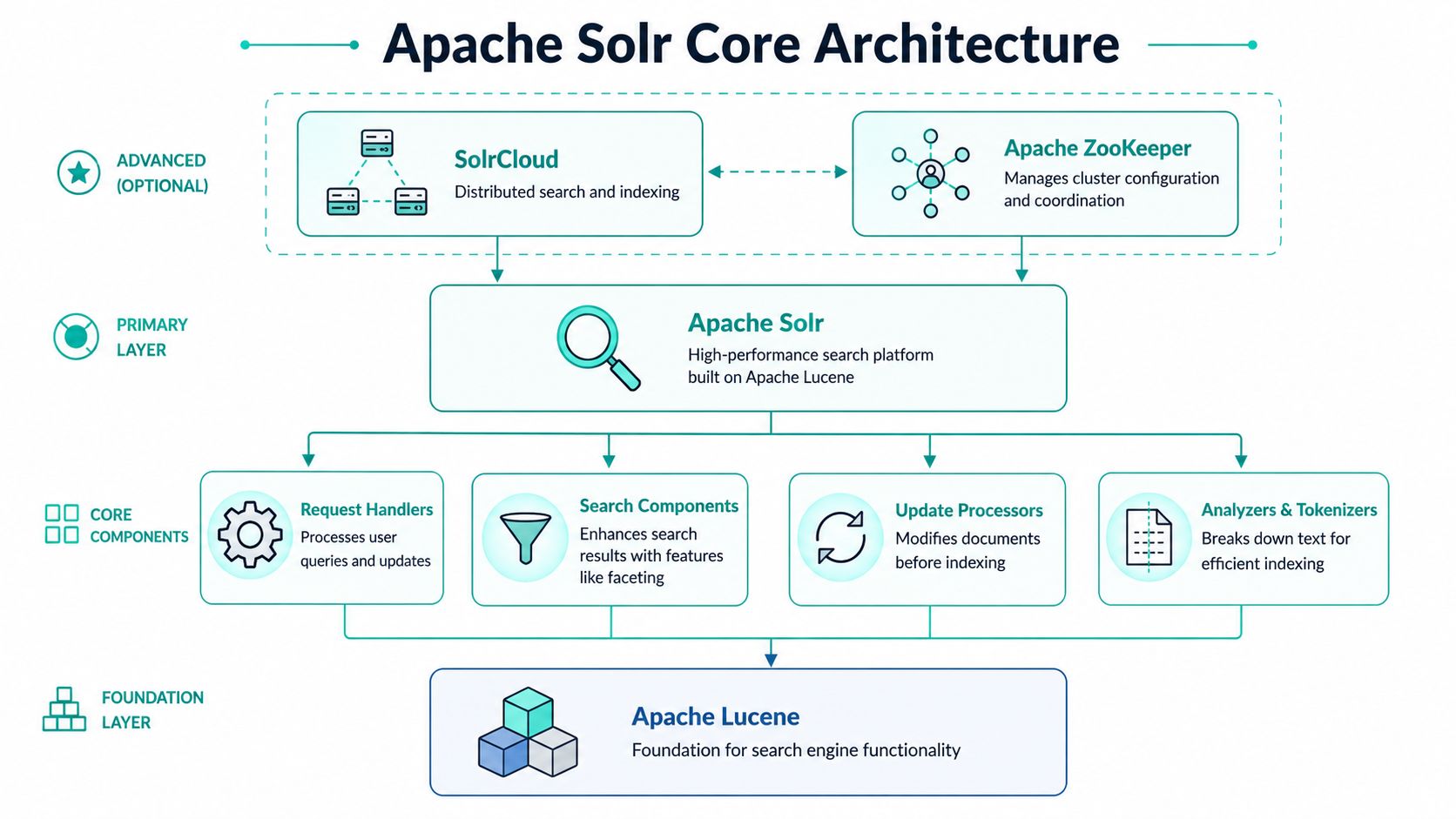
Apache Solr was created as an open-source search platform built on Apache Lucene and is commonly described as a standalone full-text search server that can index documents in formats such as JSON, XML, CSV, or binary via HTTP POST and retrieve results via HTTP GET, as described in this overview of Apache Solr fundamentals. That combination is one reason it became a foundation for websites, intranets, e-commerce catalogs, and large content repositories.
Lucene is the engine
At the bottom of the stack is Apache Lucene. That's the indexing and retrieval library that does the heavy search work. If you're explaining Solr to a delivery team, Lucene is the engine block. It handles inverted indexes, term lookup, scoring mechanics, and the low-level search behavior that makes fast retrieval possible.
Architecturally, this matters because you aren't starting from scratch when you adopt Solr. You're using a search server that sits on top of a mature retrieval engine. That gives you strong query features without forcing your application team to build them in code.
Solr adds the enterprise layer
Solr is the car built around that engine. It adds APIs, schema management, indexing pipelines, query parsers, faceting, caching, administrative endpoints, and the operating model that makes search manageable for real systems.
A practical way to think about a core is as a self-contained index with its own configuration. In smaller implementations, one core may be enough. In larger estates, teams often separate concerns by environment, solution boundary, or workload profile.
Here's the distinction that matters in day-to-day architecture:
| Layer | What it does | Why teams care |
|---|---|---|
| Lucene | Handles low-level indexing and retrieval | Gives Solr speed and retrieval depth |
| Solr | Exposes enterprise search capabilities | Makes search operable through APIs and config |
| Core or collection | Stores and serves a specific indexed dataset | Lets architects isolate search responsibilities |
SolrCloud is where scale becomes operational
Enterprise Sitecore programs usually don't fail because one query is hard. They fail because the solution has to survive growth, failover, publishing churn, and multiple workloads at once. That's where SolrCloud matters.
SolrCloud is the distributed model for running Solr across nodes. Instead of treating search as one server with one index, you run collections distributed across shards and replicas. A shard partitions the data. A replica duplicates shard data for resilience and read capacity. ZooKeeper coordinates the cluster, configuration, and node awareness so the system behaves like one search platform instead of a loose group of servers.
Practical rule: Don't treat SolrCloud as a checkbox feature. Treat it as an operational design choice that affects indexing strategy, failure recovery, and query behavior.
For Sitecore architects, this is the leap from “search works” to “search stays available when the platform is under pressure.” It's also why Solr fits composable DXP architecture. Search becomes an independent service layer, not a fragile extension buried inside the CMS runtime.
Exploring Core Search Capabilities and Features
Apache Solr is built on Apache Lucene and positions itself as a multi-modal search platform with full-text, vector, and geospatial search, while supporting advanced query features such as faceting, joins, and grouping through Lucene's inverted-index architecture, as outlined on the Apache Solr project site. In practice, that means Solr can support both classic enterprise retrieval and newer semantic patterns, but only if the implementation is disciplined.
Indexing is where relevance starts
Teams often talk about query tuning first. That's understandable, but it's usually the wrong starting point. In Solr, relevance begins with what you index, how fields are modeled, and which content makes it into the collection.
For a Sitecore build, that means deciding early which fields are:
- searchable,
- filterable,
- sortable,
- displayed in results,
- used for business signals such as content type, market, taxonomy, or lifecycle state.
If those concerns are mixed together carelessly, query logic becomes bloated. You end up asking one field to serve full-text recall, exact filtering, sorting, and display at once. That's how search solutions get slower and harder to reason about.
Analysis drives result quality
Analyzers, tokenizers, and filters are where Solr becomes useful for real-world content. Enterprise content is messy. Titles use acronyms. Product names include punctuation. Authors use inconsistent terminology. Regional teams mix languages and market-specific phrasing.
Good Solr implementations handle this in analysis pipelines. That can include tokenization for word boundaries, normalization for case and formatting, stop-word handling, stemming, and synonym behavior. The point isn't to turn on every option. The point is to match language processing to the content and user intent.
A few patterns work well in practice:
- Use separate field strategies: Keep one field tuned for exact filtering and another for analyzed search behavior.
- Design synonyms with governance: Synonyms help when business language varies, but unmanaged synonym lists can create noisy recall.
- Respect language boundaries: Multilingual indexes need language-aware analysis. One generic pipeline usually underperforms across markets.
The fastest way to damage relevance is to treat all text fields as interchangeable.
Facets highlighting and retrieval design
Faceting is one of the biggest reasons enterprise teams adopt Solr seriously. It powers the filter experience users expect on product discovery pages, knowledge portals, document libraries, and support centers. If your Sitecore search page supports narrowing by category, audience, topic, date, or region, that's usually a faceting design problem as much as a UI problem.
This guide to what a search facet is is a useful business-level explanation, but the technical lesson is straightforward. Facets only feel good when the index structure, field cardinality, and filter strategy are aligned.
What works well
- Stable taxonomies: Controlled vocabularies produce predictable facet behavior.
- Clear field purpose: Fields used for faceting should be modeled differently from rich text meant for retrieval.
- Focused result payloads: Return only what the UI needs. Overfetching fields hurts response performance.
What tends to fail
- Overloaded schemas: One field doing too many jobs.
- Unbounded filters: Faceting on noisy, high-variation values without strong business need.
- Late relevance fixes: Trying to solve indexing mistakes only with boosts and query tricks.
Highlighting also matters, especially in support, legal, and document-heavy experiences. Users want to see why a result matched. Done well, highlighting increases confidence and shortens the path to the right content. Done badly, it creates visual clutter and exposes weak matching logic.
Solr and Sitecore A Powerful Duo for Enterprise DXP
Sitecore is at its best when content modeling, delivery, personalization, and search all pull in the same direction. That's why Solr makes so much sense in serious Sitecore estates. It gives Sitecore a dedicated retrieval engine while Sitecore focuses on experience orchestration, editorial workflows, presentation, and business rules.

Why Sitecore benefits from an external search engine
The key architectural advantage is separation of concerns. Sitecore's content repositories and APIs aren't meant to replace a search engine. They manage content and delivery logic. Solr handles retrieval patterns that would be expensive, rigid, or slow if implemented directly against content storage.
That matters even more when teams use Sitecore's abstraction layer for content search. Developers can work against a search API while Solr does the indexing, scoring, filtering, and response shaping behind the scenes. The result is cleaner application code and far better search behavior under real production conditions.
For teams investing in composable DXP and modern experience delivery, the broader Sitecore platform approach reinforces this pattern. Search is not an isolated utility. It supports discovery, navigation, and contextual experience delivery across the stack.
Search quality affects AI and personalization
A lot of organizations talk about AI in Sitecore before they've fixed retrieval. That's backward. Whether you're using Sitecore AI capabilities for smarter personalization, recommendations, assisted discovery, or content decisioning, those outputs depend on clean searchable data and predictable relevance signals.
Solr's relevance tuning for multilingual, messy, and domain-specific content is especially important here. Solr documentation and related guidance show support for advanced parsers, proximity search, dense vectors, and hybrid search, while also making clear that design tradeoffs matter as the ecosystem moves from classic lexical search toward hybrid retrieval, as discussed in this write-up on Apache Solr relevance and newer search approaches.
In practical terms, that means:
- Personalization needs trustworthy retrieval: If the candidate result set is weak, downstream ranking logic won't rescue it.
- AI recommendations need field discipline: Embeddings and semantic layers only help when the underlying content is clean, structured, and current.
- Multilingual search needs deliberate architecture: Language-specific analyzers, synonyms, and taxonomy mapping have to be planned, not improvised.
Strong AI experiences usually sit on top of boring search fundamentals done well.
SharePoint and cross-platform retrieval
This is where enterprise architecture gets more interesting. Many organizations don't run Sitecore in isolation. They also have SharePoint for documents, knowledge bases, policies, or internal collaboration content. Solr can serve as a centralized retrieval layer across these content domains when indexing strategy is designed around source-aware fields and access patterns.
That gives digital teams a practical path to:
- surface SharePoint-managed knowledge inside Sitecore experiences,
- unify document and web content discovery,
- keep content source systems separate while presenting one coherent search experience.
The benefit isn't only technical. It reduces the fragmentation users feel when one experience layer sits on top of many repositories. In large organizations, that's often the difference between “search exists” and “search is trusted.”
Deployment Scaling and Cloud Operations
Production search architecture is mostly a trade-off exercise. You're balancing control, resilience, operational burden, and how much search expertise your team has available during incidents, upgrades, and high-change release cycles.
Choosing the right operating model
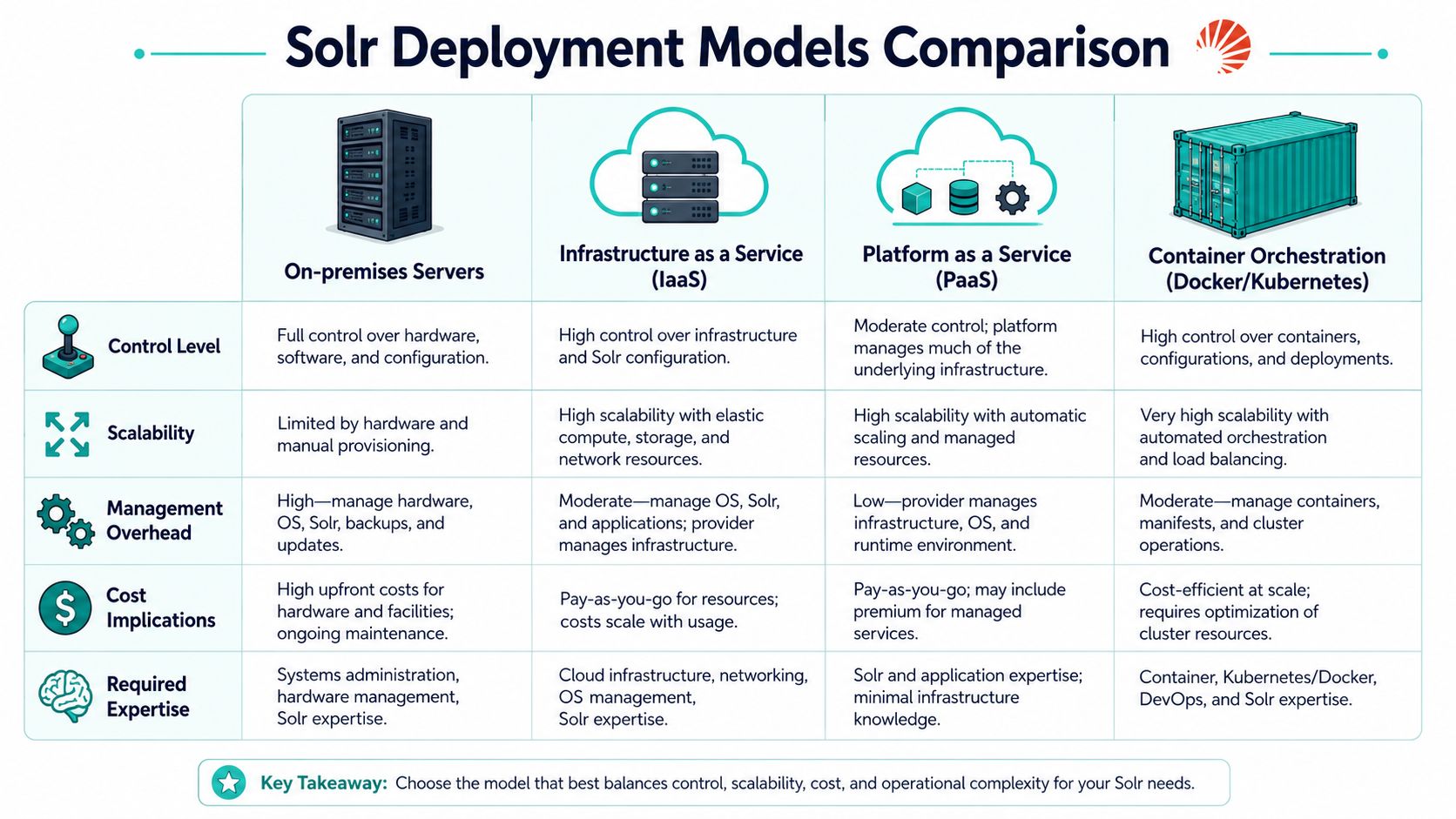
Some organizations still run Solr on dedicated on-premises infrastructure. That gives the highest level of control and is still a valid choice when governance, network boundaries, or legacy integration constraints are strict. The trade-off is obvious. Your team owns capacity planning, patching, failover behavior, and hardware lifecycle.
IaaS is often the middle path. You keep operating flexibility while shifting underlying infrastructure concerns to cloud primitives. For many Sitecore programs, this is the most comfortable route because it maps well to traditional environment management and controlled release processes.
Containers and Kubernetes improve portability and automation, but they only pay off when the platform team is ready for them. Search clusters are stateful systems. They don't magically become simpler because they run in containers. Teams planning containerized Solr should spend time on optimizing Kubernetes deployments and, for a practical delivery comparison, this breakdown of Docker Compose vs Kubernetes is useful when deciding what belongs in local development and what belongs in production orchestration.
Here's the decision lens I use most often:
| Model | Best fit | Main caution |
|---|---|---|
| On-premises | Strict control and internal hosting requirements | Highest operational ownership |
| IaaS | Teams that want flexibility without full platform abstraction | Requires solid infrastructure discipline |
| PaaS-adjacent patterns | Organizations standardizing surrounding services and automation | May still need custom handling for search workloads |
| Containers and Kubernetes | Mature platform engineering teams | Operational complexity can move, not disappear |
How to think about shards replicas and growth
Solr's SolrCloud architecture supports high availability and fault tolerance, and independent vendor guidance reports production examples of up to 12,000 queries per second and indexing throughput of around 220 GB per hour when tuned appropriately, according to this Solr scaling guide from Sematext. Those numbers are useful, but the more important lesson is what drives them: shard layout, document size, and indexing strategy.
For architects, shard planning shouldn't start with guesswork. It should start with workload shape.
Consider these questions:
- Are you read-heavy, write-heavy, or mixed?
- Do you expect heavy faceting and filtering?
- Are documents small and structured, or large and text-rich?
- Will query patterns be broad and exploratory, or narrow and transactional?
Capacity problems in Solr usually come from layout and query design before they come from the core engine.
Replicas improve resilience and read distribution, but they also increase operational footprint. More replicas aren't automatically better. More shards aren't automatically more scalable either. Over-sharding creates its own coordination and performance costs. Good Solr operations come from matching topology to workload, then validating it with realistic indexing and query behavior before launch.
Tuning Security and Monitoring Best Practices
A default Solr installation is a starting point, not a production posture. Enterprise teams need performance tuning, access control, and observability designed into the service from the beginning. That's especially true when Solr is sitting behind customer-facing Sitecore experiences or indexing content from multiple business systems.

Performance tuning starts with schema discipline
The most common tuning mistake is trying to optimize hardware before fixing schema and queries. If field types are poorly chosen, if high-cardinality facets are everywhere, or if result payloads are bloated, no amount of infrastructure polish will make search feel efficient.
A few rules consistently help:
- Keep field intent clear: Separate analyzed text from exact-match values and sort fields.
- Control stored fields: Only return what the application needs for the result view.
- Treat caches as workload-specific: Cache behavior should support actual query repetition, not assumptions from development environments.
Search teams also need to watch how Sitecore templates and computed fields map into Solr. Loose indexing discipline at the CMS layer often becomes expensive query behavior later.
Security has to be designed not assumed
Solr should not be left broadly exposed just because it sits behind other application layers. Admin endpoints, metrics surfaces, and query interfaces still need proper protection. Strong network boundaries, restricted administrative access, and explicit authentication and authorization matter even in internal environments.
For teams building secure operational habits across smaller units or distributed departments, this checklist on cybersecurity best practices for small businesses is a helpful reminder that simple controls still matter. The same principle applies to Solr. Reduce unnecessary exposure. Limit who can change what. Audit operational access.
A practical hardening baseline
- Protect the Admin UI: Operational interfaces shouldn't be openly reachable.
- Separate duties: Publishing, query use, and administrative control shouldn't all share the same level of access.
- Constrain network paths: Only the systems that need to talk to Solr should be able to reach it.
Monitoring should answer operational questions fast
Solr's modern operational model exposes detailed metrics through its Metrics API, including request-time histograms and category-based statistics for QUERY, UPDATE, and CACHE workloads, and those metrics are queryable through endpoints such as /solr/admin/metrics?category=QUERY, as documented in the Solr performance statistics reference.
That's important because good monitoring isn't just dashboard decoration. It should help operators answer a few concrete questions fast:
- Is query latency rising?
- Are updates backing up?
- Is a cache helping or just consuming memory?
- Is one collection behaving differently from the rest?
- Did a deployment change query patterns or index behavior?
If your monitoring can't tell you whether the problem is query load, update pressure, or cache inefficiency, it's not mature enough yet.
The best production setups combine Solr metrics with application telemetry from Sitecore and infrastructure monitoring from the hosting platform. That gives teams correlation. You can see whether a perceived “search issue” is a publishing spike, a bad release, a traffic pattern change, or an index design problem.
Conclusion From Theory to Practice
Apache Solr search earns its place in enterprise DXPs because it solves a hard problem cleanly. It gives platforms like Sitecore a dedicated retrieval engine that can support content-heavy websites, complex faceting, multilingual search, and the structured relevance work that modern AI-driven experiences depend on.
The mistake many teams make is treating Solr as middleware they can install once and forget. It doesn't work that way. Solr performs well when architecture, schema, query design, and operations are aligned. That's why the strongest implementations usually come from teams that treat search as a product capability, not a side feature.
A practical checklist
- Model fields by purpose: Search, filter, sort, and display concerns shouldn't collapse into one field strategy.
- Design for editor reality: Indexes need to handle content churn, taxonomy drift, and multilingual variation.
- Validate with real queries: Test against actual user behavior, not only developer assumptions.
- Plan topology deliberately: Shards and replicas should follow workload patterns, not generic templates.
- Instrument everything important: Query, update, and cache behavior should be visible before production incidents happen.
- Secure the service directly: Don't rely only on surrounding platforms to protect search infrastructure.
Common mistakes that cause avoidable pain
Some teams over-index every field, then wonder why relevance becomes noisy. Others add facets too freely and create heavy filter experiences that look impressive but don't help users complete tasks. A common Sitecore mistake is allowing content model changes to outpace search governance, which eventually creates confusing query logic and uneven result quality across sites.
The practical path is simpler than many teams expect. Start with retrieval goals. Design the schema carefully. Keep query patterns disciplined. Monitor what matters. Then layer in personalization, semantic techniques, and AI features once the fundamentals are stable.
If your organization is reworking Sitecore search, modernizing a SharePoint-connected discovery experience, or planning a composable DXP with AI-ready retrieval, Kogifi can help align architecture, implementation, and operational practice so search performs like a core platform capability, not an ongoing workaround.