You've got the intranet open in one tab, a policy email in another, and a Teams message asking where the latest form lives. That's the everyday failure mode: employees don't need “more pages,” they need one place that helps them get work done.
A modern intranet works like a private digital workspace. It brings together files, documents, internal news, third-party tools, search, and workflow access inside a controlled environment, so employees can find, read, approve, and act without jumping across half a dozen systems. In practice, that means the intranet is no longer just an internal website, it's a composable experience layer over identity, content, HR, and collaboration systems.
Table of Contents
- Why Most Intranets Fail Before They Launch
- What usually sits behind the browser
- Why identity is the real gateway
- Content management and the source of truth
- Identity and access as the control plane
- Search, collaboration, and workflow
- Governance and security have to be designed together
- Performance is usually a backend and delivery problem
Why Most Intranets Fail Before They Launch
A manager needs the travel policy. They search the intranet and get three versions, one from finance, one from HR, and one buried in an old department page that nobody has touched in months. That's not a search problem alone, it's a governance problem dressed up as a user-experience problem.
The strongest intranets avoid that mess by acting as a governed workspace, not a loose collection of departmental pages. Employees don't browse them like a public website. They use them in short bursts, return often, and expect quick access to updates, documents, and task pages, which matches the usage pattern seen in SharePoint intranet benchmarks, where employees spent 5.85 minutes per working day on the intranet and visited about 3.36 times per day (Axero intranet stats). That pattern matters because it rewards speed, relevance, and clear ownership, not long-form storytelling.
Practical rule: If a page can't answer a task in one or two clicks, it probably belongs somewhere else, or it needs to be rewritten.
Many intranets go wrong before launch. Teams treat the platform like a static content site, then allow every department to publish freely without common rules for ownership, freshness, or naming. The result is content sprawl, weak search, and users who stop trusting the portal as the source of truth. In my experience, that's the point where adoption collapses, even if the design looks polished.
A functioning intranet has to solve three things at once. It has to make content discoverable, it has to make ownership obvious, and it has to help employees complete a task without extra context switching. That's why modern implementations are built as experience layers over HR systems, document repositories, service portals, and identity providers, not as isolated websites.
For a practical framing of employee portal design, this internal portal overview is useful: internal portal for employees. The broader lesson is simple. If the intranet doesn't help people finish work faster, it becomes another place to ignore.
The Technical Foundation of How Intranets Work
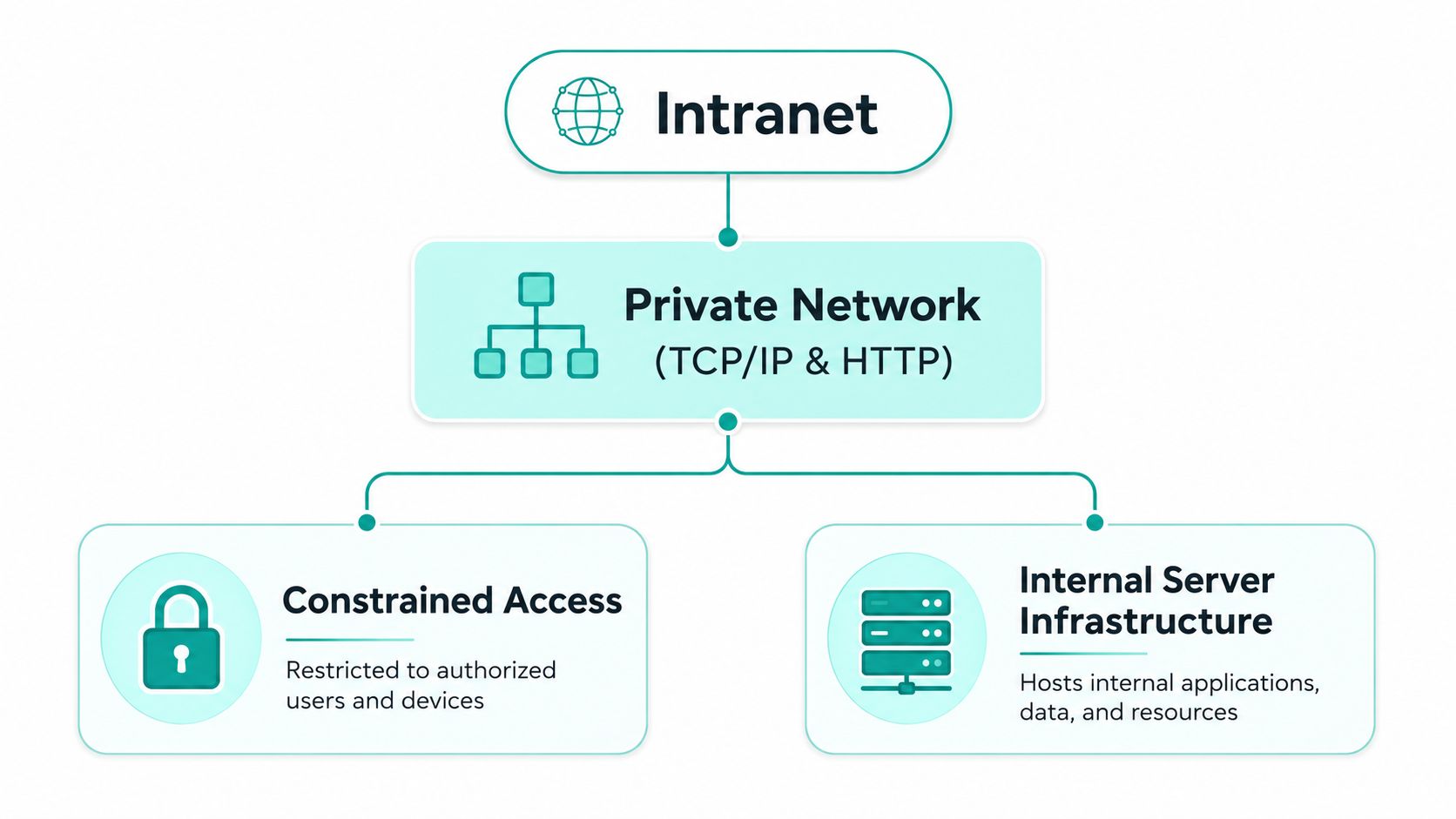
At the protocol level, an intranet uses the same stack as the public web, mainly TCP/IP and HTTP/HTML. The difference is access control. Instead of being open to anyone with a browser, the intranet sits behind private-network controls such as firewalls, network separation, or authenticated access, so only selected users can enter.
Imagine a secured office building. The hallways, elevators, and rooms may look familiar, but you need a keycard and a valid identity before you can move through the building. The browser is the hallway. The authentication layer is the keycard. If either one fails, the user doesn't get in, even if the content server itself is healthy. That's why intranet reliability depends as much on routing, DNS, firewall rules, and identity as it does on the content platform.
What usually sits behind the browser
Most enterprise intranets use a three-tier architecture. The browser client sends a request to a web server, the web server calls application services, and those services retrieve data from databases before rendering the page. That separation helps scale presentation, business logic, and data independently, which is why backend latency often hurts intranet performance more than the frontend does (intranet infrastructure reference).
In practice, the slow parts are usually directory lookups, database waits, or overloaded application services. The page may look simple to the user, but under the hood it's often stitching together profile data, permissions, search results, and document metadata. That's also why cloud-hosted intranets now lean on gateways and authenticated access instead of a traditional LAN alone. Remote teams and frontline workers still need the same workspace, they just reach it through different paths.
Why identity is the real gateway
Identity is where most intranet experiences succeed or fail. Once a user authenticates, the platform can show the right pages, documents, and tools based on role and permissions. In a Sitecore-led environment, that often means the experience layer pulls from multiple systems, then personalizes what the user sees. In a SharePoint-led environment, it usually means Microsoft identity and audience targeting shape what surfaces first.
A useful mental model comes from comparing Bluetooth to precise navigation. The intranet doesn't just “connect,” it guides each person to the right destination inside a constrained space. That guidance gets better when permissions, content structure, and search all point in the same direction.
The Five Pillars of a Modern Intranet
A useful intranet isn't one product feature. It's five systems working together. When one pillar is weak, the whole experience feels fragmented, even if the homepage looks clean.

Content management and the source of truth
The content layer is where policies, announcements, forms, and knowledge pages live. In a Sitecore setup, I'd usually treat XM Cloud as the content orchestration layer and pair it with a Next.js frontend when the business wants composable delivery, reusable components, and a cleaner separation between authoring and presentation. In SharePoint Online, the equivalent pattern is document libraries, communication sites, and page templates shaped for employee communication.
The key rule is not which CMS you choose, it's whether content has ownership and review cadence. If HR owns policy pages, finance owns expenses, and IT owns access guides, users can trust the intranet more quickly.
Identity and access as the control plane
An intranet should adapt to role, location, and device without exposing content that shouldn't be visible. That's where single sign-on, role-based permissions, and audience targeting matter. This is especially important for remote staff and frontline employees who may not use corporate email in the same way office workers do.
The platform choice changes the mechanics. In Microsoft-heavy environments, Entra ID and SharePoint audience rules tend to be the natural fit. In Sitecore programs, identity is often stitched into the experience layer so the frontend can personalize navigation, content blocks, and calls to action based on authenticated context.
Search, collaboration, and workflow
Search is the fastest test of whether the intranet is working. If employees can't find the policy, form, or process they need, they stop relying on it. Collaboration tools then reduce the need to jump into separate apps for comments, co-authoring, or local team updates. Workflow automation closes the loop by handling approvals, document routing, and simple service tasks.
Implementation insight: The best intranet search is usually designed around governed content first, not around a clever search box. If the content model is chaotic, the search layer can't save it.
For teams standardizing on Microsoft tools, SPFx web parts and Power Automate are often the practical route. They let employees move from reading a page to taking an action without leaving the workspace.
Sitecore vs SharePoint for Enterprise Intranets
The right platform depends on what the intranet has to do every day. If the main job is internal communication, document access, and workflow support inside Microsoft 365, SharePoint Online is usually the cleaner operational fit. If the intranet needs to behave like a branded digital workplace with deep personalization, multilingual delivery, and orchestration across several systems, Sitecore becomes the stronger base.
| Capability | Sitecore XM Cloud | SharePoint Online |
|---|---|---|
| Content delivery | Strong fit for composable, headless delivery with custom frontends | Strong fit for communication pages, libraries, and Microsoft-native publishing |
| Personalization | Better suited to advanced, experience-layer personalization | Works well for audience targeting and Microsoft-aligned segmentation |
| Integration depth | Flexible for HR, CRM, and service-system orchestration | Strong for Microsoft 365, Power Platform, and adjacent tools |
| Frontend control | Highly customizable with modern frameworks | More opinionated, faster for standard employee portal patterns |
| Governance model | Works well for hub-and-spoke and shared component libraries | Works well for standardized intranet administration and content ownership |
In practice, Sitecore wins when the intranet needs to feel like a digital experience platform rather than a document hub. That's common in multi-brand organizations, multilingual environments, and workplaces that want AI-assisted discovery and richer personalization at scale. SharePoint wins when the organization wants to move fast inside the Microsoft ecosystem and keep the operating model simpler.
I've seen hub-and-spoke designs work well in Sitecore when a central team owns shared components and regional teams manage local content within guardrails. That model helps when multiple brands or business units need a common design language without losing autonomy. For SharePoint, the more successful projects tend to keep the scope disciplined, then use Microsoft 365, SPFx, and Power Platform to cover the most common employee journeys.
If you're evaluating the Microsoft path, this SharePoint intranet development overview is worth a look: SharePoint intranet development. The important decision is not which platform sounds more powerful, it's which one fits the operating model you can govern.
Governance, Security, and Performance at Scale
An intranet gets messy the same way a city gets messy, by allowing growth without rules. Content ownership slips, duplicate pages multiply, and search starts returning stale results because nobody feels responsible for pruning or consolidating anything. Once that happens, users don't just complain, they leave.
Governance and security have to be designed together
Governance starts with ownership, approval flows, and content lifecycle rules. Security starts with SSO, conditional access, and data loss prevention. Those layers can't live in separate silos, because the same user journey often needs both. A policy page can be governed correctly and still leak risk if permissions are too broad.
In regulated environments, I'd also treat accessibility, multilingual support, and audit trails as baseline requirements, not extras. If users can't rely on a page in their language, or auditors can't trace who changed a process page and when, the intranet becomes a liability. That's why strong teams formalize reusable components and approval rules instead of letting each department improvise its own mini site.
Performance is usually a backend and delivery problem
Most intranet slowdowns come from backend dependencies, not from the browser. Directory lookups, database waits, and overloaded services are the common culprits, which is why caching strategy, CDN placement, and cloud proximity matter. On larger programs, Azure microservices and automated CI/CD workflows help keep releases predictable and reduce the risk of one bad change breaking the whole workspace.
For teams hardening the platform, this real user monitoring guide is a practical reference point. It's the same principle I use on live intranets, watch actual user journeys, not just server health.
A secure intranet is not just locked down. It's governed, observable, and fast enough that employees don't feel punished for using it.
For a broader security lens, this Securitec Security cyber protection resource is relevant when your intranet sits inside a wider enterprise risk program. The key takeaway is simple. Governance keeps the intranet coherent, security keeps it safe, and performance keeps people willing to return.
Measuring Intranet Success Beyond Page Views
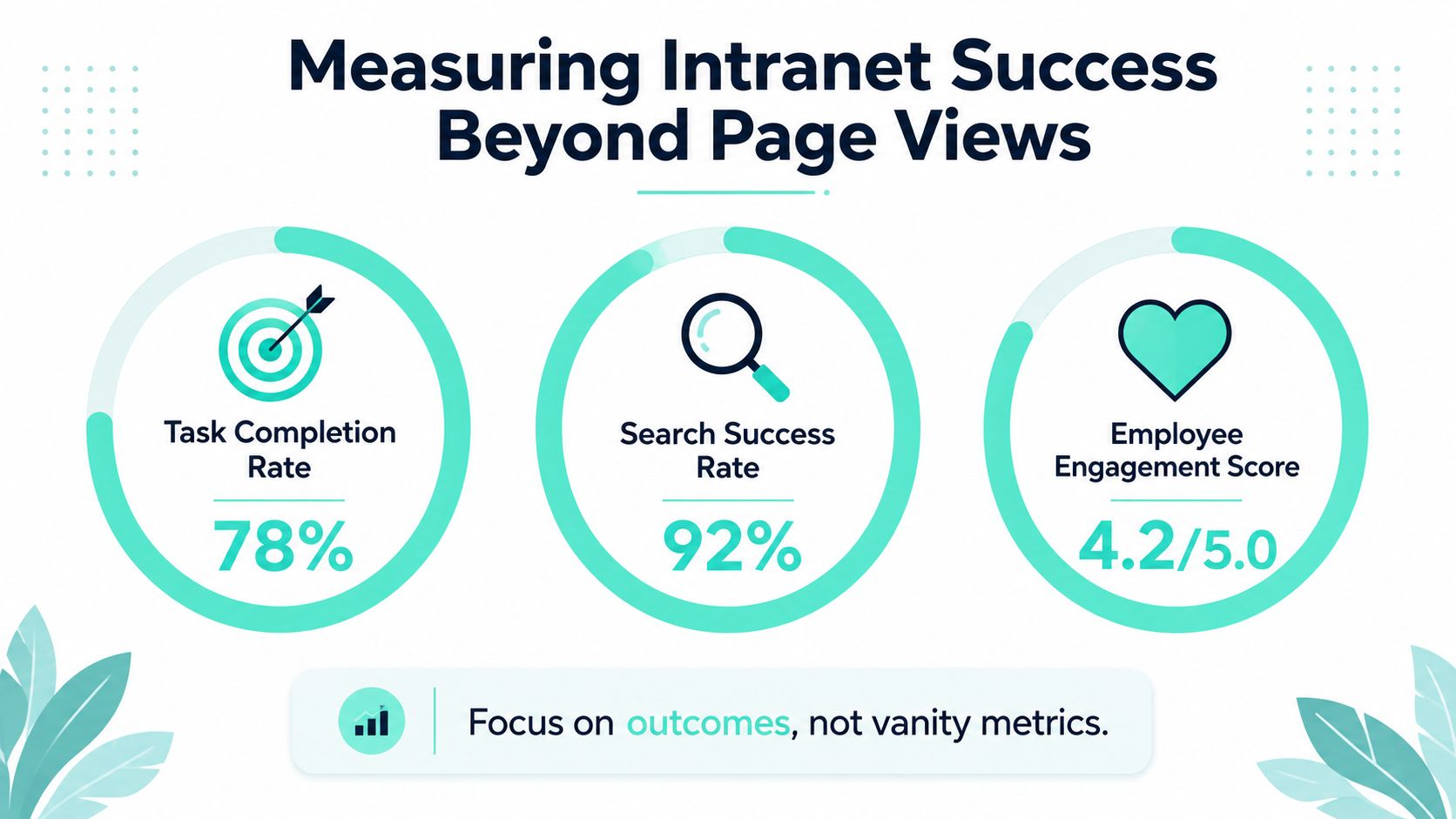
A user can log in, click through several pages, and still leave without finding the policy, form, or answer they needed. That happens often in intranets that measure activity instead of outcomes, and it is why vanity metrics are a weak proxy for business value.
The better measurement model starts with work completion. Track task completion rate, search success rate, time-to-policy, and employee feedback on whether the workspace lowers friction. Those measures show whether the intranet is helping people finish work, not just generating traffic.
The page mix still matters, but the key takeaway is about intent. If a portal is dominated by news-style publishing, employees get updates without necessarily getting answers. A healthy intranet needs enough content pages, task hubs, and service entry points to support the work people do. That is the difference between a broadcast layer and a working layer.
SharePoint and Sitecore teams see this in different ways. In SharePoint, a news-heavy homepage often means the information architecture is drifting away from service content and self-service flows. In Sitecore, the same problem usually shows up as overused content templates and underused component patterns, where editorial output is easy but action-oriented journeys are hard to complete. The fix is not more content, it is better alignment between search, identity, and the systems that hold the answers.
A few patterns show up repeatedly in weak deployments. Teams launch without a content audit, so stale pages keep ranking in search. They ignore mobile and frontline usage patterns, so the experience works for desk workers and fails for the people who need it most. They let duplicate or outdated pages stay indexed, which erodes trust every time someone clicks the wrong result.
The practical test is simple. Can employees find the right answer quickly, can they finish a common task without escalation, and can owners keep content current without heroic effort? If the answer is no, the problem is design, governance, and integration, not awareness. Use a structured CMS migration checklist only when the current platform cannot support those outcomes.
Your Intranet Modernization Roadmap
If the current intranet still works, don't rebuild it out of habit. Start by identifying whether the problem is content debt, platform limits, or a broken operating model. The fix depends on which one is doing the damage.
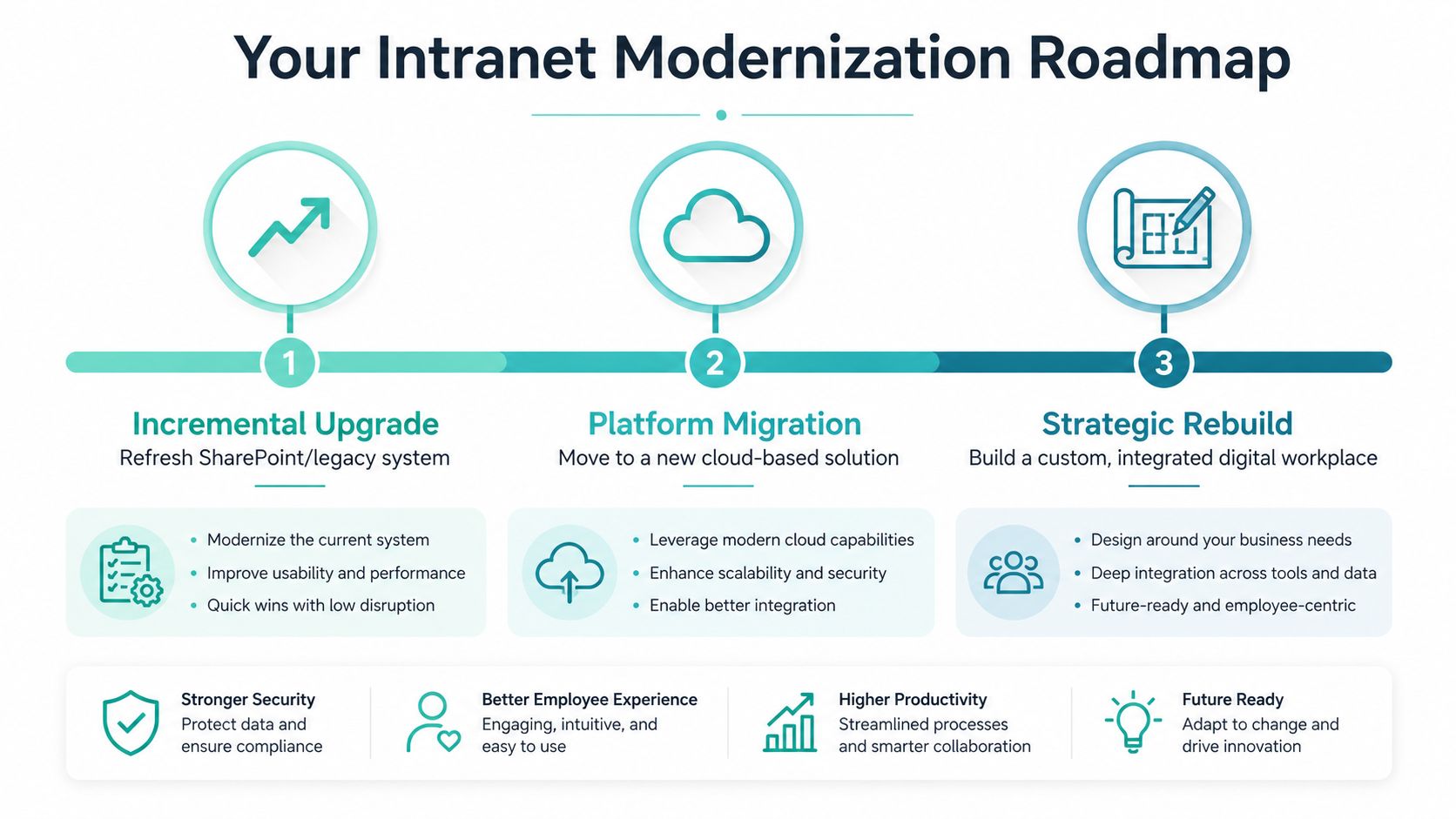
Choose the smallest change that fixes the bottleneck
An incremental upgrade works when the platform is basically sound but needs fresher templates, better navigation, or tighter integrations. In SharePoint, that often means modernizing pages, adding SPFx components, and cleaning up information architecture. In Sitecore, it can mean stabilizing delivery and improving component reuse without changing the whole estate.
A platform migration makes sense when release speed, hosting friction, or maintenance overhead are slowing the business down. That's where a move from a legacy CMS or older intranet stack into a cloud-native setup becomes more than a technical preference. The internal migration checklist here is a useful companion: CMS migration checklist.
A strategic rebuild is the right call when the current intranet can't support identity, search, personalization, and system integration in one coherent model. That's the point where a composable stack, AI-assisted search, and enterprise-wide governance stop being nice-to-have and become the only path that scales.
What to do next
Start with a content audit, then map the top employee journeys, then decide whether the fix belongs in SharePoint, Sitecore, or a hybrid architecture. If releases are slow and knowledge is fragmented, don't keep adding pages to a weak structure. Fix the architecture first, then rebuild the experience on top of it.
Kogifi designs and maintains intranets on Sitecore and SharePoint, from composable employee portals to Microsoft 365 workspaces with search, workflow, and identity integration. If you're planning a modernization program, visit Kogifi to discuss the right architecture, whether that means an incremental upgrade, a migration, or a full rebuild.