


Most intranet projects start the same way. Someone says the old portal is cluttered, Teams has become a dumping ground, file shares are impossible to search, and people keep asking for “just one place” to find policies, updates, and forms. By the time SharePoint enters the conversation, the actual problem usually isn't the homepage, it's that the business has already lost control of content, ownership, and search.
That's why sharepoint intranet development needs more than branding and page layouts. Microsoft's own planning guidance pushes teams toward a pilot scenario, a committed sponsor, enough current content to test with, and a specific audience, which is the right shape for an enterprise intranet because it forces proof before scale Microsoft SharePoint intranet planning. The hard part is that the build has to survive real governance, real permissions, and real adoption pressure, not just a launch-day demo.
Table of Contents
The Decisions That Shape Any SharePoint Intranet Build
A 5,000-employee manufacturer once came to the table with a familiar mess, Teams channels for departments, file shares for forms, and a legacy SharePoint 2013 intranet that people only visited when they had no choice. Every group thought it owned the knowledge, but no one owned the system. Rebuilding the homepage would have changed almost nothing because the actual failure sat underneath it.
What the steering committee has to settle first
Before anyone mocks up a homepage, four decisions need to be settled. Governance ownership decides who approves structure and content standards. Hub-site topology decides how the portal will scale across departments, regions, and projects. Identity and access decides what users can see and what they shouldn't. Measurement decides how the team will prove the new intranet is being used.
Microsoft's guidance makes the right cultural point here. It says intranet projects should start with a pilot that can be prototyped in a few days, has a sponsor, has enough current content, and has a specific audience for testing Microsoft intranet planning guidance. That's not just delivery advice, it's scope control. If the steering committee can't define a pilot audience, the project is too vague.
Practical rule: if the sponsor can't name the first audience, the first top tasks, and the first content owners, the build isn't ready for design.
A strong kickoff pack usually includes a governance charter, a content ownership list, a pilot audience statement, and a measurement model tied to adoption rather than vanity metrics. Microsoft also recommends executive sponsors and grassroots champions to drive adoption Microsoft intranet planning guidance, and in delivery terms that means the launch needs both top-down authority and local advocates who'll correct bad content before users do.
A decision matrix that keeps scope honest
| Decision | Constraint it creates | What happens if it's skipped |
|---|---|---|
| Governance owner | Who can approve site and content changes | Content sprawl and duplicate sites |
| Hub topology | How sites connect and scale | Broken navigation and inconsistent branding |
| Identity and access | Who can see what | Permission chaos or overexposure |
| Measurement model | What success means after launch | A launch with no proof of value |
That matrix is more useful than a long workshop deck because it forces trade-offs. A portal with strict access boundaries and measurable pilot users is very different from a loose, department-led publishing space, and those differences affect every later choice. This is why failed intranets usually become migration nightmares, the build solved the visible page problem while the operating model stayed undefined.
Designing the Hub-Site Information Architecture
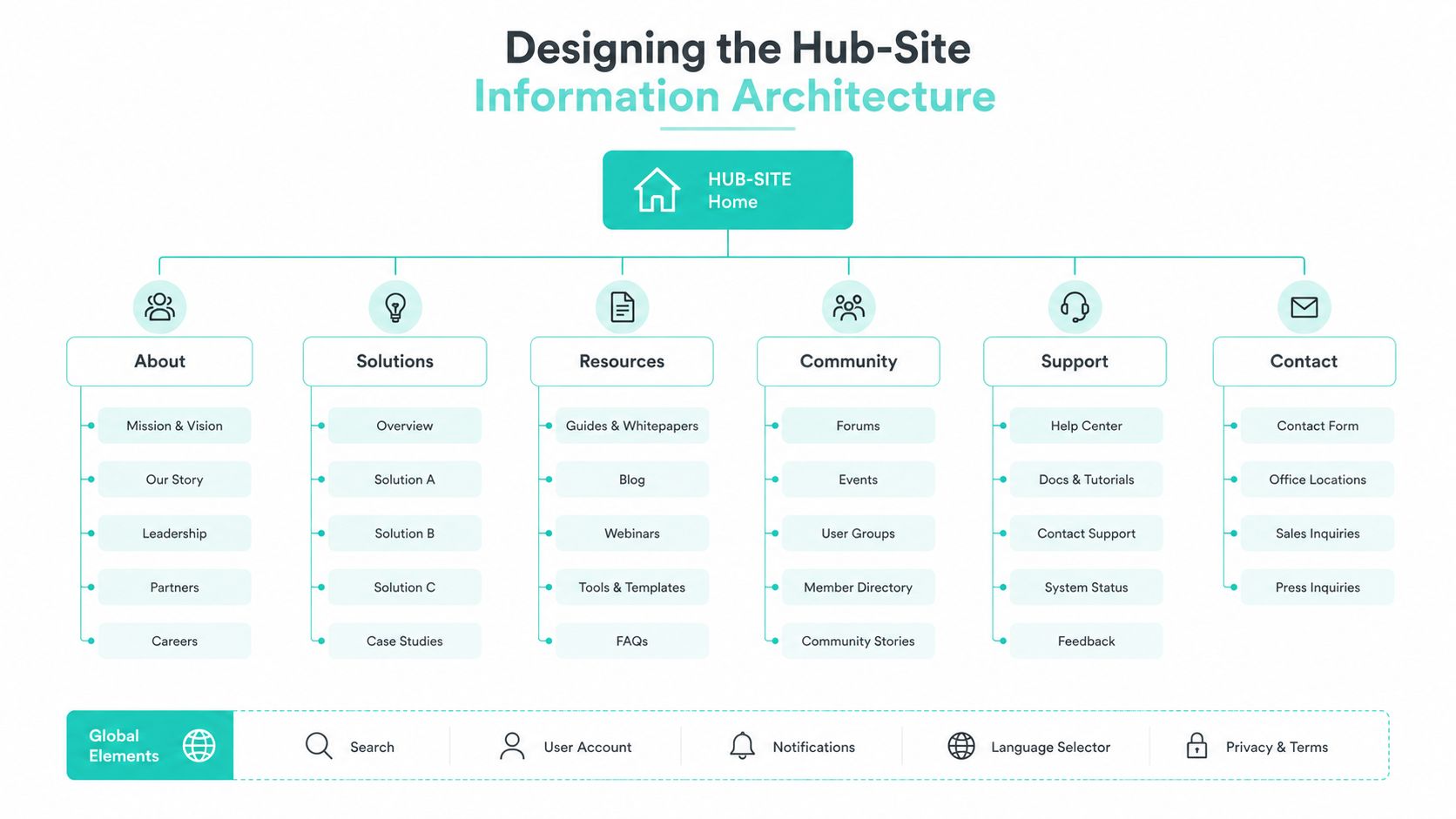
A SharePoint intranet starts to work when the root hub gives people one clear entry point, then branches into departmental hubs, regional hubs, and project hubs where those layers are needed. That structure keeps the portal readable without forcing every audience into the same content model. The test is whether the top layer stays narrow enough for quick orientation while still leaving room for local variation.
How the hub model should be grouped
Put enterprise-wide content in the root hub, keep policy-heavy or function-heavy material in department hubs, and use regional hubs only when geography changes the content in a meaningful way. Temporary or cross-functional work belongs in project hubs, but only if there is a clear retirement rule. Without that rule, the portal collects dead spaces that users still have to wade through.
That approach fits broader IA thinking, including 925 Studios on IA for Fintech, where explicit structure is used to reduce cognitive load. It also matches SharePoint-specific guidance on hub-site structures, tightly scoped navigation, and audience targeting SharePoint intranet design best practices. If the hub map is unclear on paper, users will feel that confusion in the browser.
I have seen the biggest payoff come from removing a “miscellaneous” hub that had become a dumping ground. Once content was redistributed into proper departmental spaces and the root hub was reserved for enterprise tasks, search worked better in practice because users could predict where something belonged before they started typing.
Navigation, audience targeting, and discovery checks
Top-level navigation should stay within the 7 to 9 item range recommended by practical guidance SharePoint intranet design best practices. That limit matters because every extra item adds scanning time and weakens the menu itself. Mega menus can still work, but only when they group content for recognition instead of hiding a weak taxonomy.
Audience-targeted web parts and navigation are worth using, but only after the business has validated personas and menu labels. Discovery should come from interviews, surveys, and card sorting, then the design should be checked against real user groups before launch. The cost of that work is far lower than rebuilding navigation after employees have already learned the wrong mental model.
For teams mapping content to user intent, the internal reference at Kogifi's information architecture article is a useful way to frame the work. The principle stays the same, structure first, decoration second.
Customization, UX, and the Integration Stack You Actually Need
SharePoint customization is easy to overbuy. Teams often want an SPFx component for every gap, a branded widget for every department, and a custom workflow for every approval path. Most of that is noise unless it supports a repeated business task.
What belongs in SPFx and what does not
SPFx is the right place for reusable UI that needs to live inside SharePoint, such as a news card, a people search tile, a rotating policy panel, or a quick-link module with specific business logic. It's also the cleanest way to support brand consistency without falling back to unsupported page hacking. If the same component will be used across multiple hubs, that's a good sign it belongs in the shared codebase.
Viva Connections cards can sit on top of that layer when the goal is mobile-friendly, task-led access to common intranet actions. They work best when the underlying content model is already stable. If the source content is messy, a nice card just surfaces messy content faster.
The same restraint applies to theme handling. A controlled theme set, consistent page templates, and a few well-chosen components usually beat an oversized design system that nobody updates. The maintenance burden stays manageable only when presentation is separated from business logic.
The integration patterns worth paying for
Identity should flow through Entra ID first, because that's the foundation for authentication and audience targeting. Document workflows may need a DMS connector when the intranet has to surface controlled records or route documents through an existing enterprise repository. Sales-facing portals sometimes need CRM links, but the common mistake is writing deep CRM write-back when read-only context would do the job with far less maintenance.
Microsoft 365 usage analytics and SharePoint hub and page analytics should be treated as core, not optional, because they tell owners what people use SharePoint analytics guidance. Page reports commonly cover the past 90 days, which is enough to spot stale pages and engagement trends without pretending the intranet is a real-time campaign channel SharePoint analytics guidance. One industry benchmark for a strong intranet is 60% to 80% monthly active users SharePoint analytics guidance, so teams need a measurable standard, not just a launch celebration.
A practical stack looks like this.
| Integration | Purpose | Maintenance Cost | Worth It When |
|---|---|---|---|
| Entra ID | Identity and access control | Low to moderate | You need consistent sign-in and audience targeting |
| DMS connector | Controlled document workflow | Moderate | Documents already live in a governed records system |
| CRM hook | Surface customer or account context | Moderate to high | Users need read-time context, not constant write-back |
| Microsoft 365 usage analytics and SharePoint analytics | Measure adoption and engagement | Low | You need proof that the intranet is being used |
Kogifi's SharePoint Online work fits naturally here because it uses SPFx components, Power Platform automations, and Microsoft 365 integrations in the kind of layered build most enterprises need, not a one-off custom shell. That's the right shape for a maintainable intranet, especially when a small core team has to support it after launch.
A good integration is the one that lowers user friction without creating a new system to babysit.
Making the Intranet AI-Ready Without the Hype
Copilot does not rescue a messy intranet. It exposes the mess faster. If content is duplicated, permissions are loose, and page titles are vague, AI makes the bad structure more visible.
Why Copilot is not a cleanup strategy
Microsoft's intelligent intranet guidance is blunt about the operating model. It recommends measuring intranet effectiveness with Microsoft 365 usage analytics plus SharePoint hub and page analytics, and it stresses that site owners need training to build and maintain sites Microsoft intelligent intranet overview. The same guidance also pushes structured content, clean permissions, and curated knowledge bases so Copilot can surface the right material and only what users are authorized to see Microsoft intelligent intranet overview.
That means the key question is not whether to turn on AI. It's whether the content model is ready for AI to do something useful. If the answer is no, the first fix is governance, not licensing.
A lot of organizations also misunderstand search. They assume more content means better answers, but the opposite is usually true when metadata is weak. Better results depend on whether the intranet has a predictable content model, clean site boundaries, and search verticals that map to real tasks.
The content and search work that makes AI useful
The operational work is repetitive, and that's the point. Use top-task analysis to identify what employees keep trying to do, review search queries to see what they're asking for, and audit content freshness so stale pages get removed or rewritten Microsoft intelligent intranet overview. Add permission reviews before expanding any AI use case so the answer set stays safe and relevant.
A useful checklist looks like this:
- Clean metadata: make sure core content types share a predictable schema.
- Curated knowledge bases: separate authoritative content from ad hoc pages.
- Permission hygiene: verify that users only see what they're allowed to see.
- Search verticals: group search results by task, not just by site.
- Freshness audits: retire stale pages before they contaminate recommendations.
The internal resource at Kogifi's personalization article is relevant here because the same discipline behind personalization also governs AI readiness, curated content, controlled surfaces, and a clear understanding of user intent. Intranet AI only works when the portal already knows what it is.

Governance as an Automated Delivery Process
Governance fails when it becomes a document that nobody opens. It works when it becomes the default behavior of the platform. Microsoft's governance guidance explicitly recommends using platform capabilities to apply policies and guidelines automatically wherever possible Microsoft intranet governance.
Policy by default, not by request
That starts with naming conventions, templates, and permission boundaries that are hard to bypass. Site templates should carry the standard page structure, navigation layout, and policy settings so each new space starts compliant. Sharing boundaries should be defined by audience and sensitivity, not by which department asked first.
Microsoft also tells teams to evaluate each initiative by whether it solves a real problem, how many people will use it, whether it can be built in a reasonable timeframe, and what the ROI is Microsoft intranet governance. That rubric is useful because it keeps the backlog honest. A site request that doesn't solve a problem or serve enough users may still be a good idea, but it shouldn't jump ahead of higher-value work.
A governance model that survives turnover usually has three things in common. Naming rules that are short enough to remember. Approval paths that are tied to policy, not personalities. And templates that make the safe path the easy path.
How to keep the backlog from drifting
The best way to keep governance alive is to make it measurable and repetitive. Run new site requests through a light intake form, map them to an owner, and connect them to a template that already encodes the right policy settings. Then review exceptions in a regular governance meeting, not in an ad hoc email thread.
Use the internal framework at Kogifi's content governance article as a reference for structuring ownership and lifecycle rules. The value isn't in rigid bureaucracy, it's in making sure the intranet doesn't depend on one person remembering how every rule works.
If a rule can't be enforced through the platform, it will be ignored whenever the project gets busy.
Migration, Testing and Deployment in Practice
A clean launch is rarely a single launch. Microsoft's planning guidance for SharePoint intranets already points toward iterative delivery through a pilot, sponsor support, and staged expansion Microsoft SharePoint intranet planning. That matches how migration works in real enterprises, because content has to be cleaned, tested, and introduced in manageable pieces.
Why a pilot beats a big-bang cutover
The useful starting point is discovery. Inventory the current intranet, identify what's still current, flag duplicate content, and decide what should be retired before migration. Then choose your tooling based on complexity, not habit. Microsoft's own migration tooling often works well for straightforward moves, while more complex estates may justify a third-party platform or a more controlled migration pattern.
The internal migration reference at Kogifi's SharePoint migration services article is relevant when teams need a deeper implementation lens on staged content moves. The practical point is the same either way, migration is easier when the target model is settled first.
Acceptance criteria for the pilot should stay close to the user experience. Findability, page rendering, search relevance, and access correctness matter more than whether the source tree was copied perfectly. If users can't find the right policy or form, the migration failed even if the files all moved.
Test, launch, and learn in stages
UAT should use real content, real roles, and real top tasks. Performance checks should happen against realistic content volumes, because an intranet that looks fine with a toy dataset can still feel slow or confusing once a department's worth of material lands in it. The deployment plan should expand by hub association and audience targeting so the first group proves the model before the rest of the business sees it.
A rollback plan is essential. If search or permissions break after launch, the team needs a way to pause expansion and correct the issue without improvising under pressure. Sponsor briefings and editor training should happen before launch, then a feedback loop should feed issues back into the governance backlog after launch.
Performance, Monitoring and a 12-Month Roadmap
Once the intranet goes live, the work shifts from delivery to operations. Many programs lose momentum here, because the team stops acting like product owners and starts acting like a help desk.
What to watch after go-live
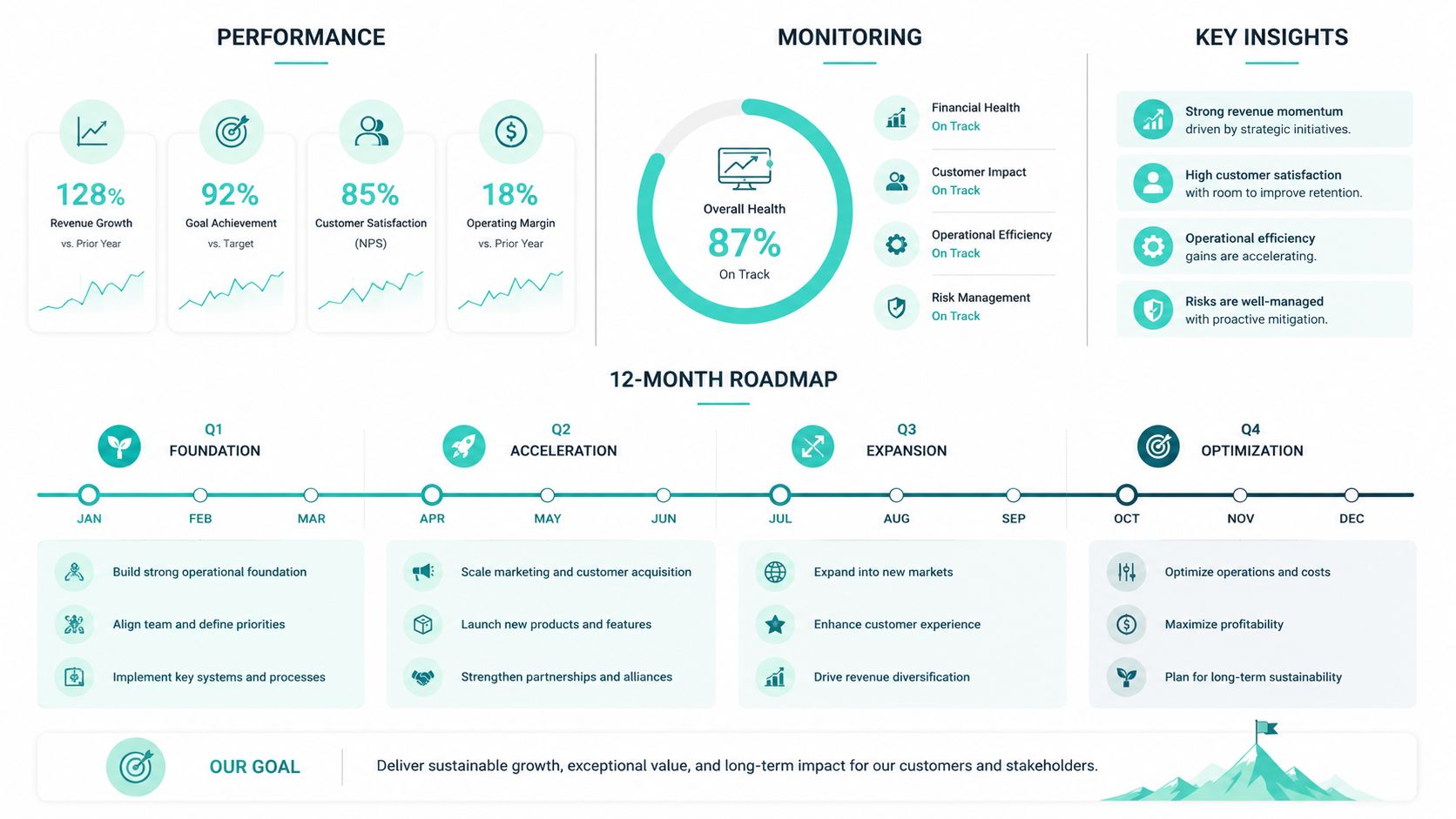
Track page views, unique viewers, time on page, popular pages, and traffic trends through SharePoint analytics and Microsoft 365 usage analytics SharePoint analytics guidance. Those signals show which content people use and where the portal still creates friction. Page-level reports usually cover the past 90 days, so they work for routine review cycles rather than one-off launch reporting.
Performance monitoring should also cover service health, page render behavior, and search quality. If search keeps surfacing stale or irrelevant pages, the problem is usually content quality before it is technical configuration. Keep a monthly freshness audit in place, put a quarterly navigation review on the calendar, and run an annual governance refresh so the operating model does not drift.
Use the analytics review to answer practical questions. Which pages draw repeat visits, which ones get ignored, which content types cause the most exits, and where do users fall back to search instead of finding what they need through navigation? Those answers help content owners decide what to fix next.
Operational rule: measure what helps owners decide what to fix next, not what looks good in a steering committee slide.
How to turn launch into a product roadmap
A useful 12-month roadmap starts with stabilization, then moves into adoption, then improves intelligence. In the first month, focus on defects, content cleanup, and support volume. From months two to four, drive adoption with sponsor messages, editor coaching, and targeted campaigns tied to top tasks. From months five to eight, introduce Copilot use cases only after content and permissions are clean enough to support them. From months nine to twelve, expand into more advanced personalization and cross-region hub patterns where the business has clear demand.
The core shift is mental. SharePoint intranet development does not end at launch, it becomes a governed product with analytics, content stewardship, and a roadmap that keeps earning attention. That is what turns the intranet from a one-time project into a platform employees rely on.