


Leveraging deep Sitecore expertise—honed across the Sitecore Experience Platform (XP), Sitecore Experience Manager (XM), Sitecore Content Hub, and Experience Edge—our SharePoint migration services make shifting your content, custom setups, and permissions into a modern SharePoint environment feel like a smooth handoff. You get data integrity, airtight compliance, and users up and running faster. By integrating Sitecore best practices, our seasoned specialists break the work into five clear phases so your team stays focused on daily tasks, not the migration.
Quick Overview Of SharePoint Migration Services
Before diving deep, here’s a high-level look at the five stages that drive minimal downtime and quick adoption:
- Planning: Nail down scope, timelines, and risk controls to set realistic expectations.
- Data Assessment: Catalogue every file, metadata tag, and permission setting to avoid surprises.
- Pilot Runs: Run trial migrations on small samples, spot snags early, and fine-tune your scripts.
- Cutover Execution: Automate the full migration for consistent, efficient data moves.
- Post-Migration Support: Confirm success, coach users, and tweak performance for maximum satisfaction.
Here’s a snapshot of core service components and their benefits:
Each step builds toward secure compliance and cost efficiency, setting the stage for a seamless migration.
Process Flow Visualized
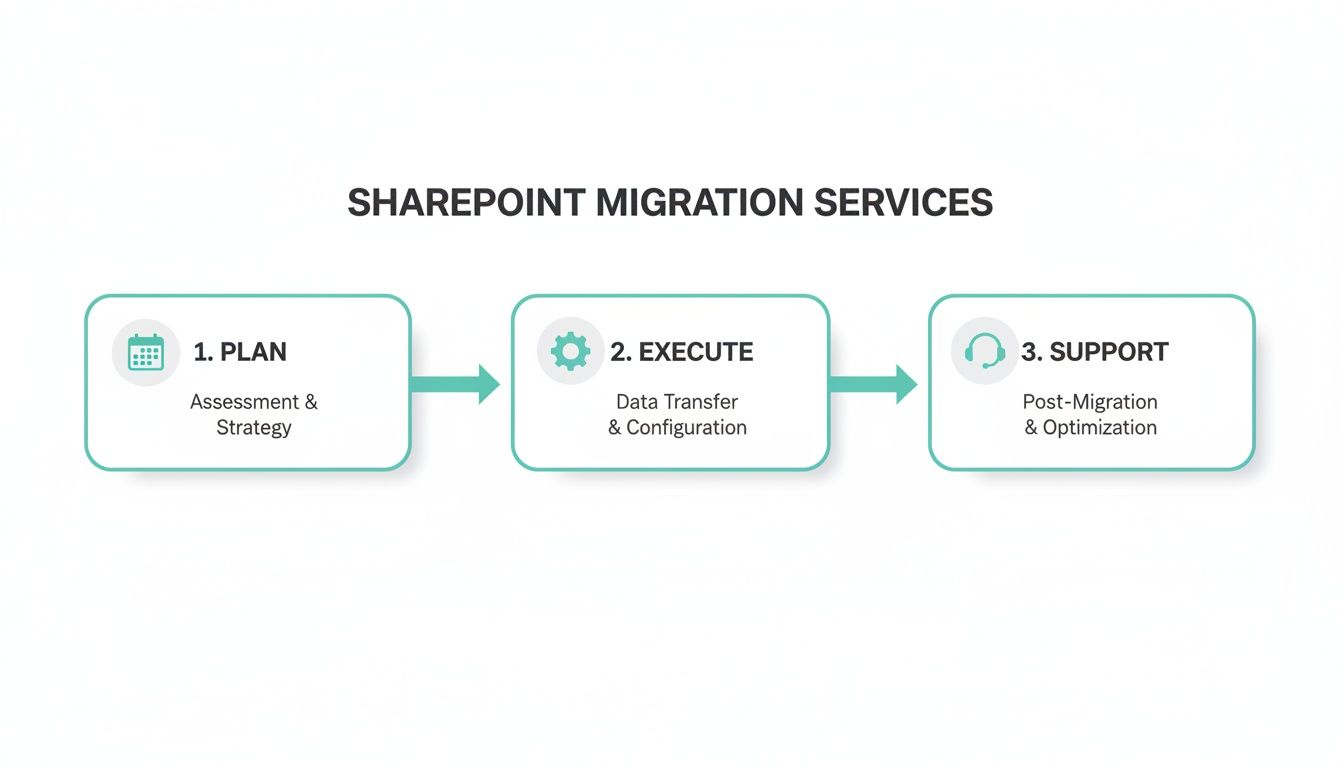
This infographic maps how Planning, Execution, and Support phases overlap to reduce risk and speed user buy-in.
You might be interested in our Digital Platform Migration Checklist with 12 Critical Steps for a detailed walkthrough of each phase.
Pro Tip Planning and support phases account for over 60% of migration effort but deliver the highest ROI.
Next, we’ll unpack the tools, tricks, and pitfalls you’ll face in each migration stage.
- Minimal downtime keeps teams productive throughout the move.
- Compliance checks protect sensitive data at every step.
- Hands-on support accelerates user training and confidence.
Understanding SharePoint Migration Concepts
Moving to a new home is more than just hauling boxes. You start by taking stock of every belonging—sorting, labeling, and protecting each item well before the moving truck shows up.
SharePoint migration takes that same methodical approach. You inventory content repositories, custom code, workflows, and permissions so nothing gets misplaced on the way to your new digital address.
For instance, you might stick room labels on boxes—“Kitchen,” “Home Office,” “Garage”—to know exactly where each box belongs. In a migration, experts map metadata so every document arrives in the right SharePoint Online library, ready to go.
Here’s a quick snapshot of what you’ll move:
- Content Repositories store all documents, images, and media for transfer.
- Custom Code covers web parts, add-ins, or scripts that need rebuilding.
- Workflows keep approvals and notifications running post-migration.
- Permissions ensure security trimming and access controls stay intact.
Key Migration Approaches
Legacy on-premises farms often miss out on cloud-native perks in SharePoint Online. That’s where your migration strategy comes into play:
- Lift-and-Shift moves everything “as-is” to the cloud, perfect when time is tight.
- Phased Cutover migrates workloads in stages, minimizing downtime on business-critical systems.
- Hybrid Coexistence keeps some services on-premises while you transition others, giving you breathing room.
Key Insight Think of lift-and-shift as tossing boxes into the truck at once, phased cutover as loading valuables first, and hybrid as keeping a spare key at your old place.
Industry research projects strong growth; see detailed forecasts on HDINResearch.
For deeper guidance tailored to SharePoint, explore our in-depth SharePoint migration services guide.
Packing Labels and Safety Checks
Metadata mapping in migration is like writing clear labels on your moving boxes. Security trimming acts as the lock on authorized crates, and compliance controls run final safety inspections before you hit the road.
Follow these best practices:
- List every tag, column, and content type you rely on today.
- Configure roles so users only see the folders and documents they’re meant to.
- Enable audit logs, set retention policies, and run eDiscovery searches to stay audit-ready.
- Run sample transfers on representative content sets
- Validate metadata mapping and custom integrations
- Tune performance settings to resemble live conditions
- Compare file counts and sizes
- Check metadata integrity and version histories
- Verify user access levels and security settings
- Accelerators for metadata mapping
- Templates for site structure and navigation
- Scripting modules for permission replication
- Permission Syncing Scripts mirror access roles across environments
- Term Set Update Scripts propagate taxonomy changes consistently
- Archive Cleanup Scripts archive stale content to meet retention rules
- Confirm inventory accuracy
- Validate pilot test results
- Schedule cutover and support teams
- Inconsistent permissions across departments
- Medical records scattered in multiple file shares
- Search queries taking minutes instead of seconds
- Detailed inventory and security mapping
- Lift-and-shift execution alongside parallel environment validation
- Automated checksums and user acceptance testing
- Hybrid coexistence model with staged tenant consolidation
- Multi-region sandbox pilots to spot latency issues
- ROI: 25% cut in storage costs and 20% faster file access
- Start with phased pilots to catch issues early
- Automate migrations to preserve metadata integrity
- Measure collaboration metrics before and after go-live
- Combine Sitecore expertise with SharePoint best practices
- Engage stakeholders at every step for smoother adoption
- Track KPIs like user adoption rate, search relevancy, and load times
- Data Integrity Gaps – Occur when metadata or version histories do not transfer correctly, resulting in lost document context.
- Downtime Spikes – Happen if cutover is scheduled without phased windows or load balancing, impacting business operations.
- Custom Code Failures – Surface when outdated scripts or web parts fail, requiring refactoring or rebuilds.
- Permission Creep – Develops from unmanaged access changes, inflating security risks and audit violation probabilities.
- User Resistance – Stems from insufficient training and communication, delaying full adoption and ROI realization.
- Build detailed checklists covering data types, custom workflows and permissions.
- Use pilot migrations in sandbox environments to catch issues early and refine processes.
- Incorporate staged user feedback loops after each migration phase to improve training materials.
- Document every decision and configuration change in a central knowledge base for future audits.
- Inventory all content repositories and custom code components.
- Conduct sandbox pilot migrations and document test results.
- Verify metadata mapping with automated validation scripts.
- Execute phased cutover windows and communicate status to stakeholders.
- Schedule a post-migration governance review session.
Technical Certifications
Validate that certified experts (like Microsoft Gold Partners) will lead your migration.Migration Accelerators
Proprietary scripts or tools can shrink data-transfer windows by up to 50%.Support SLAs
Look for clearly defined response times, escalation paths, and guaranteed resolutions.Industry Expertise
Vendors with compliance know-how (healthcare, finance, education) sidestep regulatory snags.Pricing Models
Fixed bids bring predictability; capped time-and-materials plans offer flexibility.- Review detailed case studies to understand project scope, hiccups faced, and results delivered.
- Interview client references about communication style, adherence to timelines, and follow-up support.
- Check lead times for pilot migrations, including rollback plans if something goes off track.
- Run sample migrations in a sandbox to gauge accuracy, speed, and metadata fidelity.
- Ask for examples of custom workflows—this reveals how well a vendor adapts to your unique processes.
- Proprietary automation slashes manual metadata mapping efforts.
- Deep background in Sitecore and Microsoft 365 tackles intricate integrations.
- A track record of zero-downtime cutovers keeps your business humming.
- Support model guarantees a 2-hour response window and 24/7 on-call assistance.
- Confirm vendor certifications and customer reviews align with your technical must-haves.
- Match the pricing structure to project milestones to keep costs under control.
- Schedule proof-of-concept runs early, so gaps surface before full cutover.
- Lock in SLAs and support tiers—define emergency response times and escalation protocols.
- Verify governance frameworks and rollback plans meet your compliance requirements.
- Planning and Assessment: Host workshops to nail down scope, timeline and key risks.
- Data Inventory and Mapping: Build a clear catalog of documents, metadata and permissions.
- Pilot Runs and Validation: Test scripts in a sandbox; tweak until you’re confident.
- Cutover Execution: Automate the bulk transfer of files with minimal downtime.
- Post-Migration Training: Equip your users with bite-size sessions and one-on-one coaching.
- Small Teams (up to 500 users): 4–6 weeks
- Mid-Size Organizations (500–5,000 users): 8–12 weeks
- Large Enterprises (5,000+ users): 3–6 months
- Microsoft SharePoint Migration Tool: Free, built by Microsoft for core content lifts.
- ShareGate: Intuitive GUI for metadata mapping, reporting and pre-flight checks.
- AvePoint Fly: Secure transfer with full version retention and delta sync.
- Metalogix Content Matrix: Ideal for complex transformations and bulk restructuring.
- PowerShell Scripts: Custom workflows to sync permissions and trigger post-migration jobs.
- Microlearning Modules: Five-minute videos on everyday tasks.
- Live Workshops: Hands-on labs that mirror real scenarios.
- User Champions: Identify power users in each department to spread best practices.
- Feedback Loops: Use short surveys and office hours to refine guidance.
- Readiness Assessment: Book a comprehensive health check at sitecore.net/assessment.
- Stakeholder Workshops: Gather leadership, IT and business owners to align on success criteria.
These steps turn a chaotic move into a well-choreographed operation. Next up: pilot runs to validate this plan in a sandbox before full-scale execution.
Comparing Approaches
A side-by-side view makes decision-making straightforward. A small team racing a deadline may choose lift-and-shift. Enterprises with complex governance requirements often lean into phased cutover or hybrid coexistence to control risk.
Tip Engage stakeholders early—align those box labels with real user needs and cut down confusion before moving day.
With these core concepts in place, you’re ready to map out detailed phases and select the right tools that match your organization’s complexity.
Core Aspects of SharePoint Migration Services
Starting a migration without a clear view of your assets is like building a house without blueprints. Kogifi taps into its extensive Sitecore background—leveraging modules like the Sitecore Experience Platform (XP), Sitecore Content Hub for centralized asset management, and Experience Edge for seamless delivery—using methods refined over countless digital experience projects to set the stage for a smooth SharePoint transition.
First, we dive into Data Discovery to locate every repository, file type, and piece of metadata. That pairs with an Inventory Assessment that logs custom workflows, scripts, and permission chains.
By mapping these elements up front, you avoid last-minute shocks and give stakeholders a clear picture of the content landscape.
Then, architecture design steps in. Think of this as laying the structural beams for a building: site collections, libraries, and permission layers are sketched out in detail, ensuring a solid foundation for your new SharePoint environment.
Pilot Migration In Sandbox
A pilot migration is your practice run. You load a subset of content into a sandbox environment and test your design, scripts, and workflows before touching production.
This test drive surfaces misconfigurations early, so you can refine scripts and reduce surprises when the full migration kicks off.
Cutover planning is next. By breaking the move into phases and automating repetitive tasks, Kogifi keeps manual errors to a minimum. We look at user activity patterns to pick the ideal cutover window—one that sidesteps peak business hours and minimizes disruption.
Key Insight A carefully planned cutover can reduce downtime by up to 80%, preserving business continuity.
After the main migration, validation testing makes sure nothing slipped through. Automation tools compare your source and target inventories side by side, flagging any mismatches.
Structured user training then eases adoption. By combining microlearning modules, live workshops, and on-demand guides, you turn new SharePoint features into practical skills rather than abstract concepts.
Post Migration Support Models
Long-term success depends on solid support—think of this as ongoing maintenance after the heavy lifting is done. Vendors usually offer 24/7 monitoring, troubleshooting, and periodic optimization sprints.
Kogifi’s framework layers automated governance scripts on top of real-time alerts to keep permissions and policies in check.
Pre-built accelerators—like metadata mapping scripts and site templates—can shave weeks off your timeline.
Automation And Governance Scripts
Automation scripts are the unsung heroes of a migration, repeating tasks reliably and at scale. They handle repetitive tasks reliably and free your team to focus on strategic work.
When these scripts run alongside governance policies, they form a largely self-driving pipeline that needs minimal manual checks. They integrate with governance policies to create a self-maintaining environment.
The market for SharePoint consulting services is growing at a 6.9% CAGR from 2025 to 2032, underscoring the rising demand for collaboration and workflow automation. For more details, see the Global SharePoint Consulting Service Market Size on OpenPR.
To see how Kogifi accelerates your journey, explore our detailed guide on SharePoint migration services at Kogifi.
Governance frameworks seal the deal by enforcing policies that cover document retention, audit trails, and access reviews. This approach ensures compliance and keeps collaboration sustainable over time.
Expert Quote “Governance is the backbone of sustainable collaboration,” says a Kogifi migration lead.
Bring all these elements together and you have a methodical, repeatable process for moving from on-premises hurdles to a cloud-ready SharePoint Online setup with minimal risk. You’ll move confidently from on-premises hurdles to a cloud-ready SharePoint Online setup with minimal risk.
Real World Examples of SharePoint Migrations
Seeing migrations in action helps ground the theory. Below are three case studies that show how deep Sitecore know-how paved the way to a smooth SharePoint rollout.
Healthcare Consolidation Case Study
A sprawling hospital network across five sites relied on isolated intranets. Teams struggled with fragmented patient data and a search tool that felt painfully slow.
We leveraged Sitecore Content Hub taxonomies and a phased cutover—starting with a sandbox pilot—cleaning up metadata to enforce a single tagging scheme consistent across Sitecore and SharePoint. Combining native migration APIs, custom PowerShell scripts, and automated validation checks kept the effort aligned with both platforms.
The result? 40% faster record retrieval and an audit trail that satisfied compliance teams. It felt like merging dozens of patient charts into one electronic health record—governance maturity jumped and care coordination sped up.
Finance Regulatory Cutover Case Study
A global finance firm faced a hard deadline to deliver regulatory reports with zero data loss. Downtime had to be minimal, and every document needed a clear security map.
In parallel, we used Sitecore Experience Manager to handle regulatory document lifecycles, ensuring content governance across both Sitecore and SharePoint. This phased approach slashed downtime by 60% and kept compliance data online throughout. It was like synchronizing clocks in New York, London, and Tokyo—every report lined up perfectly across time zones.
Global Corporate Tenant Migration
An enterprise operating in 50 countries juggled 120 separate SharePoint tenants. Their mission: unify document management and brand templates in one hub.
Think of it as merging dozens of local roads into a single expressway—collaboration traffic suddenly flowed without bottlenecks. We drew on Sitecore template migration techniques to map key site features into SharePoint site collections and rolled out region by region.
Across industries, professional SharePoint migrations deliver a 25% increase in employee satisfaction and engagement, a 30% reduction in meeting times, and a 35% improvement in project completion rates. No wonder 80% of businesses are actively moving to SharePoint. Discover more insights on Alphabold’s analysis.
Key Insight: A well-structured pilot and cutover plan turns a patchwork of systems into a unified digital workplace.
Lessons For Your Migration
Document each phase like a recipe—so you can replicate success without missing a single step.
Common SharePoint Migration Pitfalls And Mitigations
Any migration, no matter how meticulously planned, can hit unexpected snags that derail timelines and inflate costs. Spotting these traps early keeps your project on track and your budget intact.
Data integrity issues often crop up when metadata mapping between source and target doesn’t line up. The result? Missing tags, broken links, and frustrated users after cutover.
Unexpected spikes in downtime shake user confidence and halt critical operations. Cutting over during peak traffic, for instance, creates bottlenecks that ripple through the business.
Legacy code can betray you next. Scripts or web parts tied to outdated libraries may refuse to run in the new environment, derailing automation and forcing last-minute fixes.
User resistance adds another layer of complexity. Without clear context or hands-on training, teams delay adoption and productivity dips.
Unchecked permission changes—aka permission creep—can quietly expand access scopes, opening doors you never intended and complicating audits.
Mitigation Strategies
A solid rollback plan is your emergency brake. By prepping rollback jobs in both sandbox and production, you can revert to safe snapshots in minutes—cutting remediation time by up to 70%.
Sandbox pilots act as a dress rehearsal. Running migrations on a smaller data set reveals misconfigurations early and builds stakeholder confidence.
Phase your training roadmap: start with admins, move to power users, then bring everyone else on board. This staged approach can reduce resistance by 60%, smoothing the path to full adoption.
Finally, governance guardrails stop permission drift in its tracks. Automated policies enforce group-membership reviews and retention rules so you’re not chasing changes manually.
Key Insight Early detection of mapping errors can reduce post-migration fixes by 50%, saving both time and budget.
Automated Tooling
When manual steps pile up, mistakes follow. Automation tools—from PowerShell scripts to vendor utilities—catch mismatches before cutover and streamline repetitive tasks.
For example, running a command like Start-SPMigrationJob -Name "RollbackJob" -Source "DevSnapshot" -Destination "ProdEnv" spins up rollback snapshots in seconds.
Pair these scripts with governance-as-code so retention and access policies are baked into your CI/CD pipeline. It’s like embedding security checks into every build.
As the migration rolls out, monitor key metrics—downtime duration, error counts and user login trends—in real time. Dashboards highlight anomalies and trigger alerts at the first sign of trouble.
With rollback plans, sandbox tests, governance guardrails and automation working together, you’ll have a resilient migration framework that avoids the usual pitfalls.
Checklist For Safe Migration
Use this checklist to track critical tasks before and after your SharePoint cutover:
How to Choose a SharePoint Migration Vendor

Think of moving your entire office to a new building. One wrong box, and your project grinds to a halt. In the same way, picking the right SharePoint migration partner can make or break your timeline, budget, and everyday operations.
Without a clear framework, you might uncover hidden challenges mid-project—downtime, cost overruns, or worse. Below, we walk through a step-by-step roadmap for evaluating vendors, spotlights on vendor track records, and tips for proof-of-concept testing.
Key Evaluation Criteria
Before you dive into proposals, zero in on these five core pillars:
These criteria give you a consistent lens for side-by-side comparison.
Vet Vendor Track Records
Once you’ve narrowed the field, dig into real-world performance:
These steps surface hidden risks and help you spot red flags early.
“Proof-of-concept runs reduce uncertainty and build confidence before full cutover.”
Successfully completing a small-scale pilot on your data gives you negotiation leverage on SLAs and pricing. Plus, aligning on communication styles now pays off later.
How Kogifi Stands Out
Kogifi isn’t just another name on the shortlist:
Vendor Evaluation Criteria Comparison
To clarify the differences, here’s a quick side-by-side look at what matters most:
This table can help you weigh each factor as you narrow down your options.
You might also find our guide on Evaluating Vendor Risk for Platform Migrations useful—it dives deeper into spotting and mitigating vendor-related risks.
Final Steps To Seal The Deal
Once you’ve compared vendors and validated their approaches, follow these checkpoints:
Investing time in this selection phase pays off. A well-chosen partner can trim migration time by 40%, slash risk, and ensure smooth user adoption.
Armed with these evaluation criteria, you’re ready to choose a vendor that aligns technical chops with strategic goals. Here’s to a confident, clear-cut SharePoint migration journey!
SharePoint Migration Services FAQ
Below you’ll find concise, real-world answers to the questions we hear most often about SharePoint migration and what comes next.
What Do Migration Service Packages Include?
Every move starts with a solid roadmap. We work side-by-side with your team to:
Each phase flows into the next, helping you spot potential roadblocks early.
How Long Do Migrations Take For Small Versus Large Enterprises?
Timeframes vary based on content volume, customizations and governance rules. As a rough guide:
Your mileage may differ if you’re juggling custom workflows or legacy archives.
Automation Tools For Efficient Migration
We’ve seen manual moves stretch out over weeks. Automation can slash that effort by up to 60%. Here are the tools we trust:
Automation scripts reduce repetitive tasks and errors, speeding cutover phases.
Each solution brings its own strengths—pick one that matches your scale and complexity.
Driving User Adoption
A smooth cutover means little if people don’t embrace the new platform. We recommend:
These steps turn reluctant users into advocates.
For deeper reading, explore migration insights on Sitecore’s Migration Resources.
What Are The Next Steps For Moving Forward?
Once you’re ready to kick off, we suggest two immediate actions:
Ready to accelerate your SharePoint migration with a proven partner? Get started with Kogifi.