



Your homepage passes Lighthouse on an office laptop. Then a campaign drives mobile traffic to the same template, where hero images, consent scripts, and uncached variants slow or stall the page. The lab run never exercised those conditions.
AEM performance optimization works best as a governance loop, not a one-time publish-instance tune-up. Teams need field-data baselines, clear budgets, and release rules that catch regressions before they reach visitors.
The work spans the full request path: set performance budgets at the 75th percentile, tune Dispatcher and cache behavior, decide which personalized content belongs on the critical path, and diagnose slow queries and JVM pressure. Release gates should define acceptable regressions and when to roll back. Keeping personalization off the critical path can improve cacheability, but may limit how much content varies by visitor. The right placement depends on the experience and the performance budget.
Table of Contents
Targets and Baselines to Set Before You Tune
A page can pass Lighthouse on a fast laptop and still miss its targets for mobile visitors. Field visits include slower devices, weaker networks, analytics, consent tools, and personalization, all of which can affect the experience.
Set user-facing targets with Core Web Vitals, and track TTFB as a server-side signal. Google's Core Web Vitals guidance defines good results as Largest Contentful Paint (LCP) of 2.5 seconds or less, Interaction to Next Paint (INP) of 200 milliseconds or less, and Cumulative Layout Shift (CLS) of 0.1 or less. Treat these as operating budgets, not a one-time pass. Set them at the 75th percentile, review performance by device and template, and define a release gate and rollback rule for regressions.
| Metric | Good threshold | Where AEM usually breaks it | First lever |
|---|---|---|---|
| LCP (Largest Contentful Paint) | 2.5 s or less | Oversized hero renditions, cold publish responses | Dispatcher/CDN caching, correct image renditions, preload the hero image |
| INP (Interaction to Next Paint) | 200 ms or less | Heavy component bundles, third-party tags | Defer non-critical scripts, split bundles, remove unused tags |
| CLS (Cumulative Layout Shift) | 0.1 or less | Images and embeds without reserved dimensions, late personalization swaps | Reserve width and height; place personalization below the fold where possible |
| TTFB (server response) | As low as your template baseline allows | Cache misses, Dispatcher bypass, slow origin queries | Track cache hit ratio and tune origin queries |
Build the Baseline Before You Change Anything
Pull field data from CrUX or real user monitoring, then compare results at the 75th percentile, split by device. Averages hide slow experiences, and desktop results can conceal a mobile failure. Segment by template, including home, product listing, article, and landing pages. Mark campaign days separately so changes in paid traffic do not distort the trend.
Practical rule: Tune against p75 field data by device and template, not a single Lighthouse score.
A retail site may have comfortable desktop LCP while mobile p75 LCP misses its budget because phones receive desktop-sized hero renditions. The first fix is the rendition policy and image preload, not a larger publish instance. That distinction matters: scaling adds capacity, but it will not correct an oversized image on the critical path.
Record p75 LCP, p75 INP, and anonymous cache hit ratio for each template before changing configuration. Keep personalization in the measurement, too. Decide which personalized content must render immediately and which can appear below the fold; moving it off the critical path can improve initial rendering while preserving relevant experiences. For each release, compare the same segments before and after, and roll back when a budget is breached rather than accepting a regression as the new baseline.
How to Tune the Dispatcher and Cache Layer
The Dispatcher decides whether your publish tier serves a handful of dynamic requests or every anonymous visit. Treat dispatcher.any as production code, review it in pull requests, and test invalidation like you test a release.
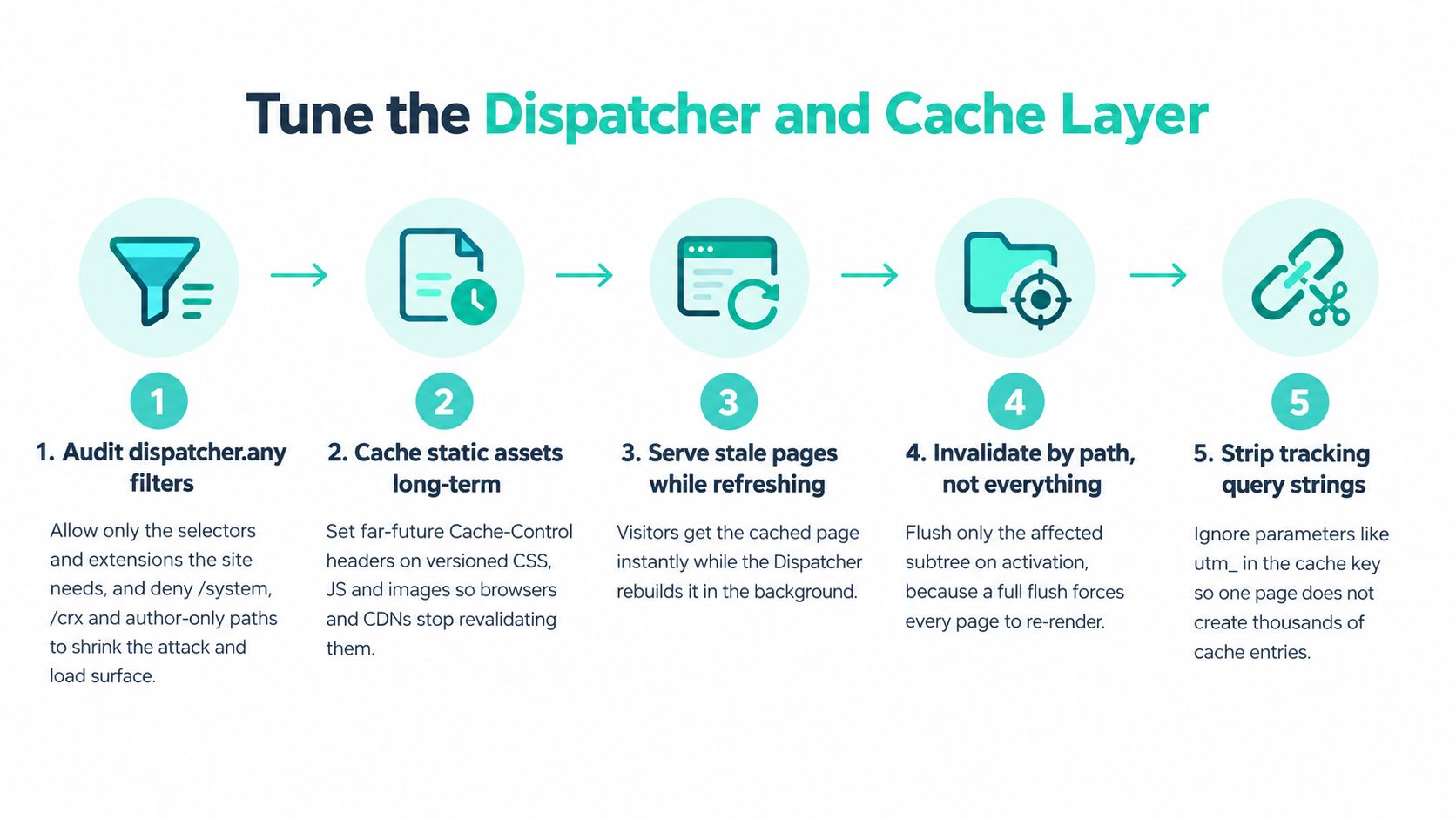
Six Steps in Order
- Audit dispatcher.any filters. Allow only the selectors and extensions the site needs. Deny /system, /crx, and author only paths on the publish facing farm, because unused paths widen both load and attack surface.
- Set statfileslevel deliberately. Configure it so a change under one section flushes that branch rather than the whole site. Start conservatively, then confirm flush scope with a test publish before you trust it in production.
- Control query parameters with ignoreUrlParams. Keep parameters that change content, such as pagination. Drop tracking parameters like utm_source, which otherwise create a separate cache entry for every campaign link.
- Define cacheable response headers. List the headers the Dispatcher may store and set Cache-Control at the CDN. Use long TTLs for hashed asset names and short TTLs for HTML, since HTML changes on activation and assets change on deployment.
- Confirm invalidation end to end. Publish a test page and check it updates within your agreed window. Then check unrelated paths stayed cached, because an update that clears everything trades correctness for origin load.
- Verify with curl -I. Send the same request twice and read Age and cache status headers. The second response should be a hit, and if it isn't, inspect cookies, headers, and query strings before touching publish sizing.
Where Teams Usually Waste the Cache
The common slips are mundane. A cookie varies on every response and makes shared caching impossible. Every publish triggers a root flush. Session bound query strings ride along on ordinary links. Fix those before buying capacity.
Understand what a content delivery network does in this chain, because the CDN doesn't rescue a broken origin cache policy. It amplifies whatever policy you set. A good Dispatcher setup gives the CDN stable, cacheable responses. A bad one gives it thousands of near identical variants.
If anonymous public templates aren't mostly served from cache, tuning JavaScript first is putting polish on a capacity problem.
Stale while revalidate patterns help where your stack supports them, since visitors get cached HTML while refresh happens behind it. Don't use them to mask slow rendering forever. The origin still has to render under load when a campaign, flush, or scaling event empties the cache.
Keep a short cache checklist in the runbook. Note filter changes, statfileslevel, ignored parameters, header rules, and the test URLs you used for verification. When the hit ratio drops after a release, that record turns a long incident call into a comparison.
Personalization and Consent Without Losing Cacheability
Don't start by asking how to switch personalization off. Ask what must stay personal, and where that decision should run. Enterprise AEM sites combine authenticated content, consent, analytics, experimentation, search, and regional variants, and those features can block public caching or add JavaScript that raises TTFB, INP, and LCP, a trade-off described in independent AEM performance guidance on caching and third party scripts.
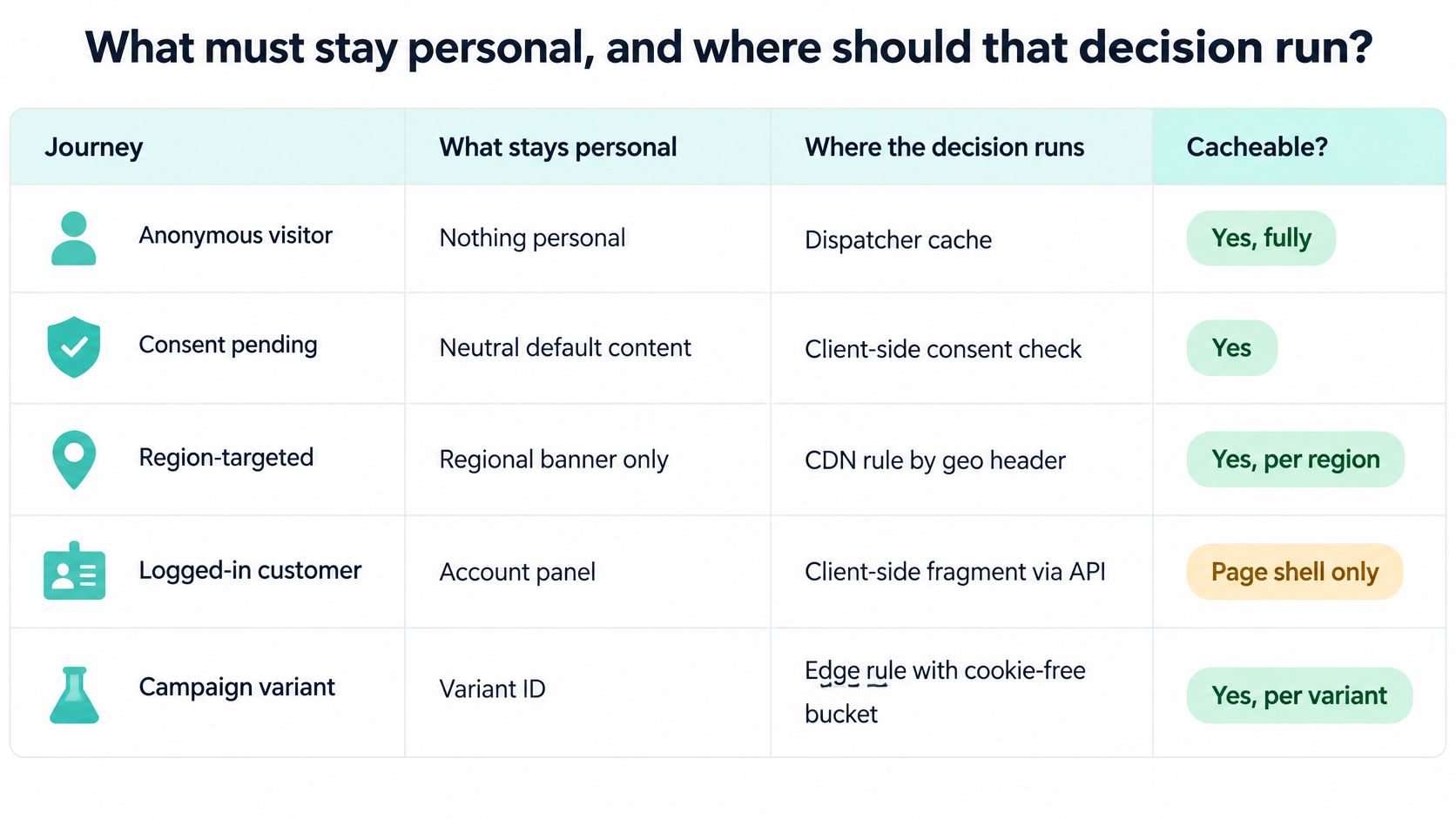
Compare Journeys, Not Features
| Journey | Cacheable at edge | Where personalization runs | Performance cost | Recommended pattern |
|---|---|---|---|---|
| Anonymous visitor, no consent cookie | Yes, full page | Not needed | Lowest origin load | Serve cached HTML to all |
| Consent pending | Yes for the shell | Client-side after the consent script loads | Small INP hit from banner script | Load consent asynchronously, keep HTML cached |
| Region-targeted content | Partly, keyed on geo header | Edge or Dispatcher rule by region | Cache fragmentation per region | Limit to a few variants and key cache on region |
| Logged-in user | No, private responses | Per request at origin, or client-side from a cached shell | Highest origin load and TTFB | Cache the shell, fetch profile data through a lightweight API |
| A/B test | Yes if the variant is set at the edge | Edge bucketing cookie | Moderate, one cache entry per variant | Bucket at the edge and cache per variant |
The working pattern is progressive enhancement. Serve a cached shell with the LCP element fixed, then load personalization after first render so the initial HTML stays shared across visitors. Put late swaps below the fold or reserve their space, otherwise you trade an LCP gain for a CLS failure.
Variant maths is where good intentions break. For example, six regions across three languages produce up to 18 cache variants per page. Hit ratio divides across them, and every publish creates more cold renders at origin.
Use a proper consent management platform but load its script asynchronously and keep it out of the LCP path. Consent JavaScript competes with interaction work, so a heavy banner can hurt INP even when the HTML is fast.
Apply a simple decision rule. Remove a personalization only when its business value is lower than its latency and origin cost. Otherwise move it off the critical path and keep the capability.
Diagnosing Slow Queries, Indexes and JVM Pressure
Start with the Query Performance tool under Tools, Operations. It's the fastest way to separate a cache miss story from an origin story. If slow requests share a query, you've found the thread to pull.
Oak behavior is unforgiving here. A query on an unindexed property traverses a large node set and logs traversal warnings. Adding more heap doesn't fix traversal. Adding the right index does.
Index Work That Holds Up in Production
Create a custom index definition for the property the query filters and sorts on, deploy it through code, and reindex off peak. Then confirm the index is active and has caught up before routing traffic to the new query shape. A half built index gives you a brief improvement followed by the same timeout.
Check query shape as well as the index. Broad path searches, deep descendant queries, and filters on properties authors rarely populate all produce expensive plans. Constrain the path, index the selective property, and paginate results instead of asking publish to assemble an unbounded listing.
| Symptom | Likely cause | Fix |
|---|---|---|
| Queries slow or logging traversal warnings | Query on an unindexed property scans a large node set | Add a custom Oak index for the property, deploy via code, reindex off-peak |
| Publish slows only at peak hours | Heap pressure and long GC pauses | Check GC logs, set min and max heap equal, reduce concurrent jobs, scale out |
| Author UI sluggish after large imports | Workflow and asset-processing backlog | Throttle concurrent workflows, move rendition generation off-peak |
| Replication queue grows after a release | Large activation batch or a blocked agent | Split activations into smaller batches, check agent status and reverse replication |
| Queries fail for a while after a deployment | Index rebuilding and not yet caught up | Confirm index state before routing traffic; schedule reindex in a quiet window |
| Memory climbs over several days | Session or cache leak in custom code | Compare heap dumps taken on consecutive days, fix the retaining code path |
JVM and Background Load
On self managed publish instances, set minimum and maximum heap to the same value to avoid resize pauses. Validate sizing against GC pause time, not heap occupancy alone. A large heap with long pauses still produces slow p75 responses at peak.
On AEM as a Cloud Service you can't set JVM flags, so don't build your plan around them. Focus on indexes, query shape, workflow concurrency, and code that holds sessions or caches open too long.
Track GC pause per minute and the oldest workflow age. Those two signals explain more mystery slowdowns than average CPU ever will.
Asset work belongs in the same conversation. Large imports trigger rendition generation, metadata writes, and workflows that compete with authoring and sometimes publish rendering. Throttle concurrent workflows and move heavy rendition generation outside traffic peaks.
For memory that climbs over days, compare heap dumps rather than restarting and hoping. Repeated restarts hide the retaining code path and turn a fixable leak into a permanent operations ritual.
Replication, Scaling and Cloud Capacity Choices
Scale out publish instances behind the Dispatcher when traffic spikes are short. Move to larger instances when one heavy process, such as a large query or import, dominates a single node. The wrong choice is expensive either way, because horizontal copies don't speed up one bad query and a bigger node doesn't remove a single instance ceiling.

Watch Replication Before You Watch Traffic
Watch the replication agent queue and its oldest item age. A growing queue after a release usually means large activation batches or a blocked agent. Split activations into smaller batches, check agent status, and verify reverse replication is healthy before authors re publish the same content.
Cache consistency gets harder as you scale. Each Dispatcher holds its own cache unless a shared CDN sits in front, so invalidation has to reach every instance. Test a publish against every Dispatcher, not just the load balancer, or you'll ship inconsistent pages and blame the CDN.
| Path | Best for | How it works | Watch for |
|---|---|---|---|
| Scale out publish behind Dispatcher | Short traffic spikes | Add publish instances and pre-warm top URLs | Invalidation must reach every instance's cache |
| Larger publish instances | One heavy query or import dominating | Vertical capacity for a single process | Still a single-instance ceiling |
| AEM as a Cloud Service autoscaling | Sustained or unpredictable load | Built-in publish autoscaling with a set minimum for campaigns | Load test real customer journeys before launch |
| Sitecore XM Cloud (SaaS) | Teams that want vendor-managed scaling | Vendor manages scaling and capacity | Less direct control over capacity planning |
For a launch day example, a team expecting a sharp spike from an email send pre warms its top URLs ahead of the send, raises minimum publish capacity, and alerts on replication queue age. The point isn't the exact instance count. It's deciding those moves before the send, not during it.
Platform comparisons clarify the operating trade-off. In the Sitecore portfolio, SaaS delivery shifts capacity work toward the vendor, while AI capability sits in products such as Sitecore Stream, an AI layer built on Microsoft Azure OpenAI Service for content creation, campaign briefs, personalization, and refinement inside Sitecore workflows. SharePoint decisions are different again. Microsoft's SharePoint agent guidance documents a limit of 20 source items per agent and permission aware answers, so knowledge scope and permissions shape performance and usefulness there.
That cross platform view matters when estates are mixed. AEM capacity is a Dispatcher, publish, and replication problem. Sitecore AI and SharePoint agent capacity are product tier, source scope, and permissions problems. Govern each on its own terms.
Set Performance Budgets and Release Gates This Week
Gates beat one off tuning because regressions arrive with every release. A faster component helps once. A gate keeps the next hero image, tag, or consent change from handing the gain back.
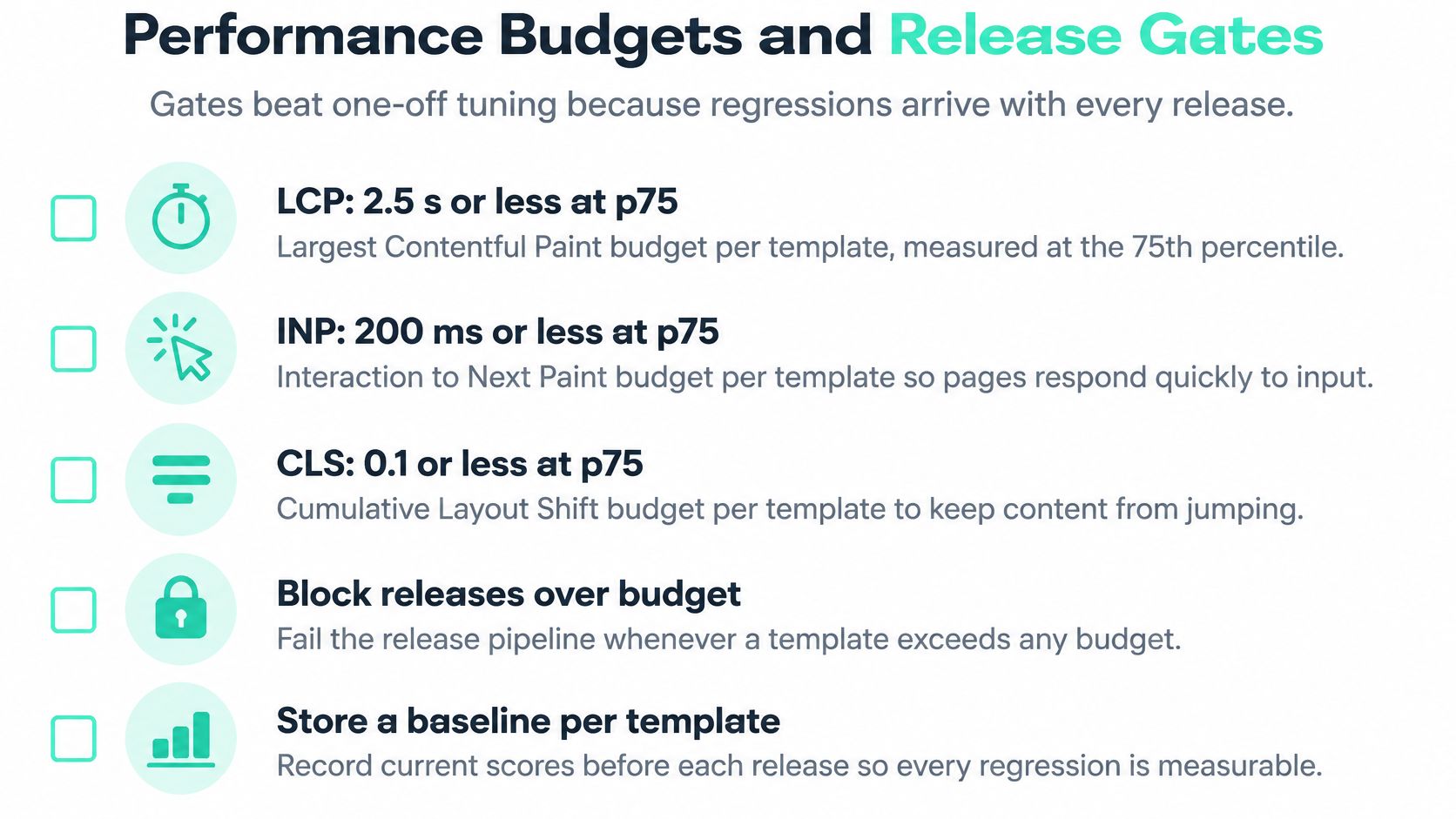
Turn Baselines Into Standing Rules
Set a performance budget per template at p75 using the thresholds you baselined earlier. Add a cache rule tied to your own baseline, so a sharp drop in hit ratio triggers investigation even if LCP hasn't moved yet. Cache deterioration is often the first visible sign of a publish or header change.
Segment every budget by device and region. A page can pass lab tests and fail in one region after a consent or analytics change. That's why AEM performance optimization needs field data in the release conversation, not only synthetic checks in the pipeline.
Write rollback criteria before the next release, while nobody is defending a launch. Define what sustained worsening looks like for your templates and what origin saturation looks like for your publish tier. Put the decision owner next to the rule.
For example, if a product listing template breaches its LCP budget after a hero image change and stays there, the rollback rule fires on evidence, not at a quarterly review. Marketing keeps the image direction, but the rendition or preload gets fixed before it returns.
Governance point: The highest value optimization may not be a faster component. It may be stopping a regression from reaching production.
Assign ownership clearly, because shared ownership often means no ownership.
- Marketing owns component weight. That covers image choice, hero media, and campaign tags they request.
- Platform engineering owns the delivery tier. That covers Dispatcher rules, cache hit ratio, replication queues, and capacity.
- Front end owns the JavaScript budget. That covers bundle size, deferral, and interaction cost.
Annotate every release on dashboards so cache drops can be matched to publish events. Without annotations, teams argue about whether the drop came from traffic, content, or code. With them, the timeline answers most of the question.
Adobe's Sites Optimizer Core Web Vitals opportunities point the same way, toward continuous monitoring of LCP, CLS, and INP with operational telemetry and code level recommendations. Whether you use that tooling or your own RUM stack, the operating model is the gain.
Other platforms need the same discipline in different form. Sitecore Stream groups capabilities as brand-aware AI, copilots and agents, and agentic workflows across products including Content Hub, XP, CDP, Personalize, and Search, with some capabilities requiring Stream Premium tier. Gate those rollouts by product and tier. Treat SharePoint agent rollouts similarly, by source scope and permissions.
Do These Five Things This Week
- Record baselines for three templates. Store p75 LCP, p75 INP, and anonymous cache hit ratio where the release team can see them.
- Write the budgets. Keep them per template, per device, and short enough to fit on one dashboard.
- Add one alert on cache hit ratio. Route it to platform engineering with the template name in the alert.
- Add one alert on replication queue age. Oldest item age matters more than queue length alone.
- Run a load test above expected peak. Use realistic journeys through load testing services or your internal tooling, including consent pending and region targeted paths.
That's enough to start. You don't need a perfect observability platform to govern performance. You need baselines, budgets, two alerts that someone owns, and a rollback rule written before the next release.
If your AEM estate needs baselines, Dispatcher tuning, query fixes, and release gates that survive the next campaign, Kogifi can audit and tune the platform while also advising on Sitecore AI and SharePoint estates that sit beside it. Start with a performance review through Kogifi and bring your p75 field data, cache hit ratio by template, and current dispatcher.any so the first session works from evidence.