



An online storefront is a transactional digital interface where a business presents products or services, supports ordering, and enables purchase through connected commerce services. Payment may occur through another channel, including an invoice or payment at collection, because what makes the sale digital is how the order is placed.
You're likely in a meeting where one team calls the corporate website a storefront, another means the checkout, and a third means the entire commerce platform. That confusion gets expensive. Teams scope a redesign when they need inventory integration, or they buy a checkout tool when they need governed product content across brands and markets. A clear Online Storefront Definition prevents that waste.
Table of Contents
- Localization and Governance
- Accessibility as a Purchase Flow Requirement
- Security, Integration, and Observability
What an Online Storefront Does
A customer finds a jacket through search, opens the product page, and checks whether her size is available nearby. She selects a color, adds the jacket to her cart, chooses click-and-collect, and submits the order. She'll pay in store tomorrow.
That journey already proves the definition. The order was placed digitally, even though payment happens offline. The U.S. Census Bureau defines an e-commerce sale by that ordering mechanism, covering orders placed or negotiated through the internet, a mobile device, extranet, electronic data interchange network, email, or another comparable online system, as described in the Census Bureau account of e-commerce growth during the pandemic.
The infographic below follows that familiar path from discovery to checkout.
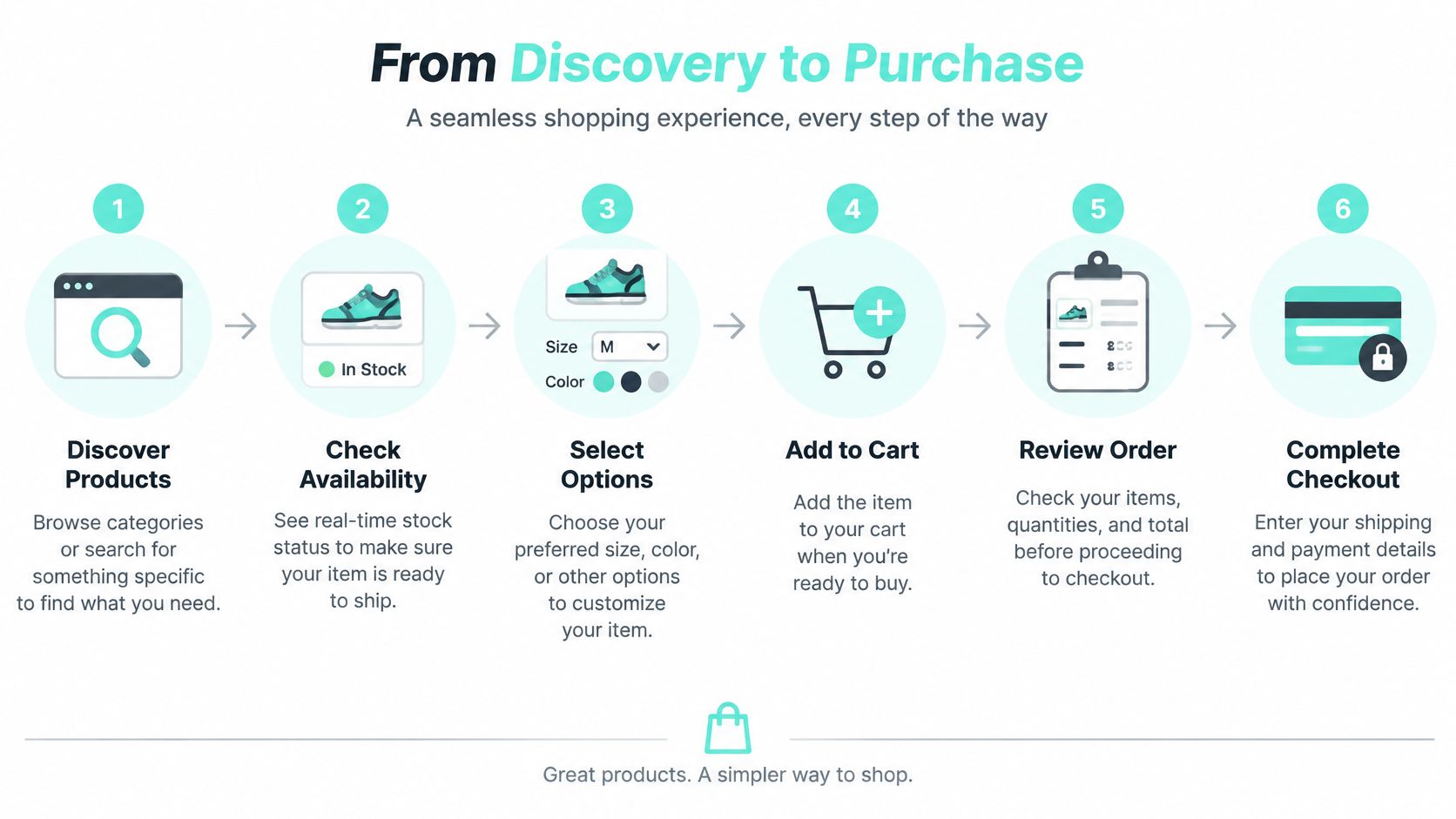
Behind each step, different services do the work. Search and navigation help the customer find the jacket. Catalog and inventory services supply the price, variants, and stock status. Cart and checkout services hold her choices and create the order, then fulfillment reserves the item for collection.
If a visitor can only read about a product, you're looking at a catalog or brochure. If she can configure, price, and order it, you're looking at a storefront.
Brands selling through marketplaces face the same logic on someone else's domain. The Amazon Storefront guide for brand owners is useful context for that branded shop within a marketplace pattern, where presentation sits inside a larger transaction system.
Why Browsing Isn't Transacting
Browsing asks only for accurate content. Transacting asks for accurate content plus pricing, availability, cart state, tax and shipping calculation, and order submission. A broken marketing page costs attention. A broken checkout costs a confirmed sale.
Core Storefront Concepts Explained
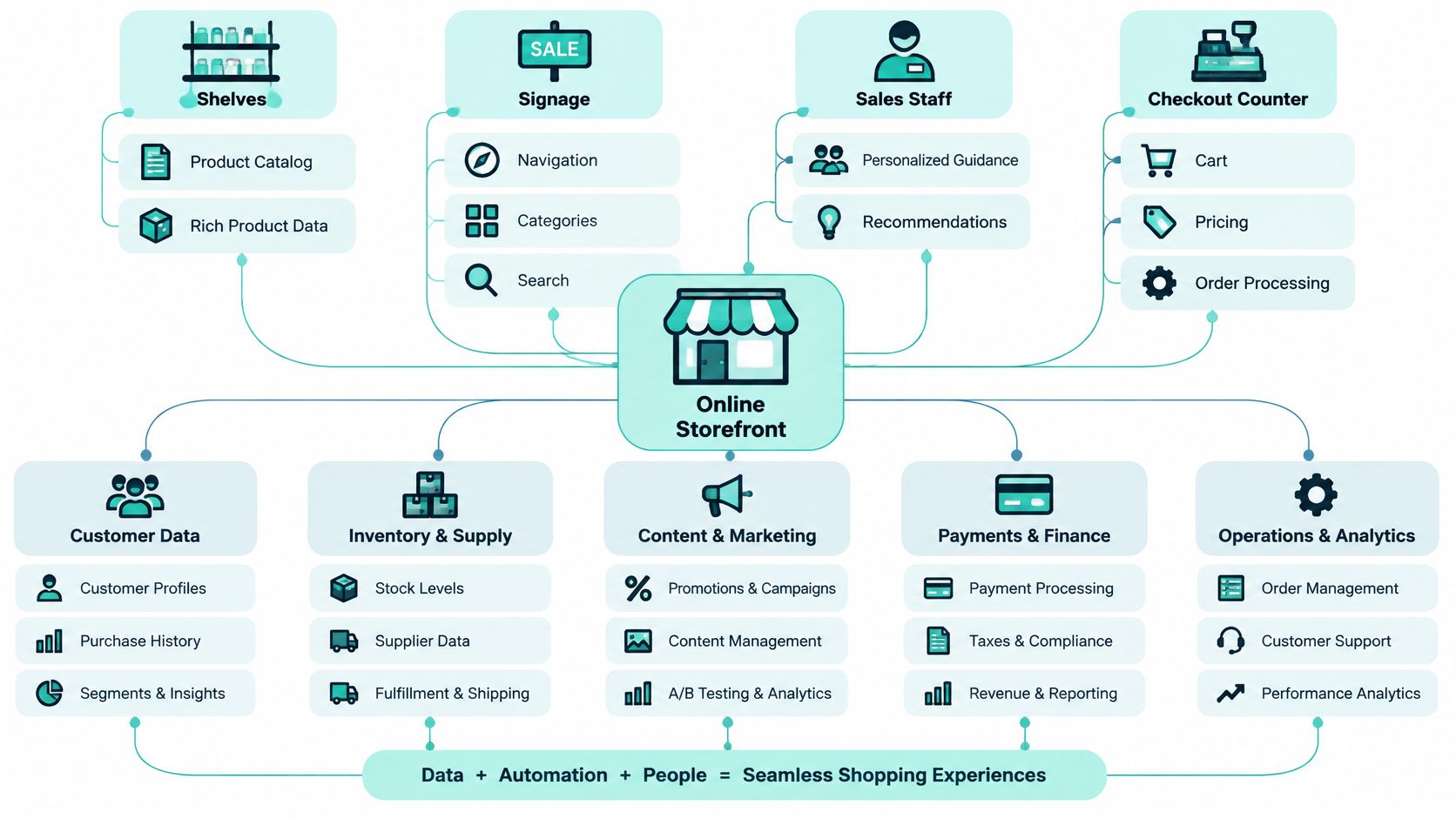
Start with a physical shop, because the analogy teaches quickly. Shelves hold products. Signage helps you find the right aisle. Staff answer questions. The checkout counter takes your order and payment.
From Shelves to Systems
- Shelves become the catalog. Product names, images, descriptions, variants, and rich attributes replace physical stock on display.
- Signage becomes navigation and search. Categories, filters, and search results guide customers who can't ask where anything is.
- Sales staff become guidance. Size guides, comparisons, recommendations, chat, and help content do the advising work.
- The checkout counter becomes cart and checkout. Pricing, promotions, taxes, delivery options, and order creation happen there.
The diagram below extends that analogy into the digital components behind each familiar element.
The analogy breaks in one important place. A physical shelf shows what's physically there. A digital product page shows what connected systems claim is there. If pricing, stock, or product data is stale, the storefront confidently presents the wrong thing.
That's why a storefront isn't just a screen design. It's a transactional digital interface that presents products or services, exposes commercial metadata, and carries the customer from discovery to purchase, as outlined in lecture notes on websites and electronic storefronts.
The Visible Layer and the Coordinated Layer
Keep two layers separate in every scope discussion. The visible interface is what the customer operates, including product pages, selectors, cart controls, and forms. The coordinated commerce layer maintains identity, pricing, inventory, orders, payments, fulfillment, and returns behind that interface.
A content-only website crosses into storefront territory only when its content connects to those transactional behaviors. Until then, calling it a storefront inflates scope and hides missing ownership. Someone still has to govern the price, reserve the stock, and accept the order, even if no one has named that work yet.
Comparing Storefront Architectures
Three terms cause most architecture arguments. Teams use storefront, commerce platform, and headless storefront as if they're interchangeable. They're not. Each names a different layer with different owners.
Storefront Architecture Comparison
| Layer | Primary Purpose | Representative Responsibilities | Key Trade-off |
|---|---|---|---|
| Storefront | Customer-facing transactional experience | Product pages, navigation, cart interaction, checkout presentation | Fast to change visually, dependent on services behind it |
| Commerce platform | Core commercial capabilities | Catalog, pricing, inventory, cart rules, orders, payments, fulfillment | Stable and governed, slower to replace |
| Headless storefront | Decoupled presentation over commerce services | Front end connected through APIs or events, reusable components, multiple channels | Flexibility across channels, more integration and governance work |
Consider a retailer refreshing its design system. In a coupled setup, changing product page templates can mean regression testing order management too. In a headless setup, the front-end team rebuilds the presentation while catalog, pricing, and order services keep running unchanged. The saving is real, but so is the new work. Someone must version APIs, manage contracts between layers, and monitor failures across boundaries.
A second scenario clarifies ownership. Your team adds a mobile app while keeping the web shop. If both experiences call the same cart, pricing, and inventory services, you've added a storefront, not a second commerce platform. Duplicating commerce logic per channel creates price and stock disagreements that customers notice immediately.
Choosing Without Ideology
Headless isn't automatically superior. A single brand with one web channel and modest change frequency may run well on a coupled platform, with fewer moving parts to operate. Multiple brands, regions, or channels usually justify separation because presentation changes far more often than order rules.
For deeper evaluation of service boundaries and integration patterns, the discussion of ecommerce microservices architecture helps teams map which capabilities deserve independent scaling and ownership. Ask three questions before deciding. Which team owns the interface? Which team governs commerce capabilities? Where does one responsibility end and the next begin? If nobody can answer, the architecture diagram is decoration.
How the Core Storefront Components Work
Follow one product from discovery to a completed order. Each component hands state to the next, and each handoff can break the transaction.
Discovery starts with category navigation and search. Both rely on structured catalog data, so inconsistent attributes produce empty results and dead ends. Sound ecommerce product catalog management is therefore a storefront concern, not back-office housekeeping.
The hierarchy below shows how those components stack from discovery to fulfillment handoff.
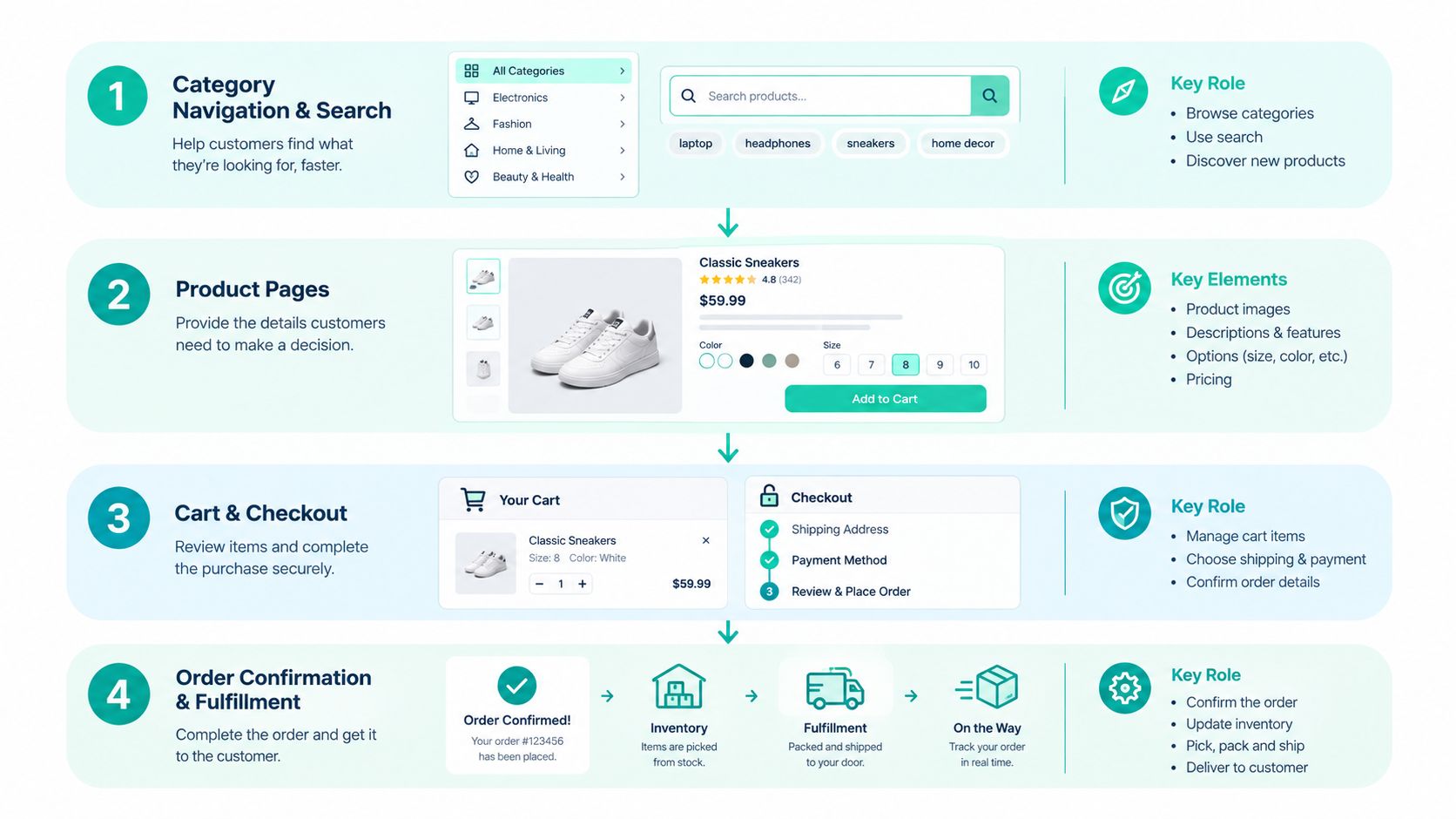
On the product page, the customer reads content, selects a variant, and checks price and availability. That page is making promises on behalf of pricing and inventory systems. If stock data lags, the storefront sells items the warehouse can't ship, and trust damage follows the cancellation email.
Cart, Checkout, and Order Integrity
The cart is a state problem disguised as a page. It must persist across sessions, recalculate promotions and taxes, and survive a customer switching from phone to laptop. Weak cart state management interrupts conversion in the most literal way. The customer's selections disappear.
Checkout then has to support guest and authenticated paths, calculate shipping, handle payment, and recover gracefully when payment fails. Order submission should be idempotent, so a double click or a retried request creates one order, not two. When you connect your store API to messaging or notification services, apply the same discipline, since duplicate confirmations confuse customers as much as duplicate charges.
Acceptance test: Refresh the page mid-checkout, fail a payment deliberately, and retry submission. A complete storefront keeps the cart, explains the failure, and creates exactly one order.
Enterprise Acceptance Criteria
- Persistent cart state: Selections survive session and device changes.
- Payment failure recovery: Customers can correct details without rebuilding the order.
- Audit logging: Teams can reconstruct who changed what and when.
- Observability: Latency and transaction errors are visible before customers report them.
- Returns path: Post-purchase flows connect back to orders and inventory.
If a proposed build can't demonstrate those behaviors, it's a convincing front end, not yet a reliable storefront.
Sitecore AI and the Enterprise Storefront
Watch a product launch inside a large Sitecore estate. A marketer needs a campaign brief for three brands and five markets. Editors need product content that sounds like each brand, in several languages. Shoppers need search that answers questions, not just matches keywords. That workload is where Sitecore Stream fits.
The flow below separates what shoppers experience from the enterprise operations that produce it.
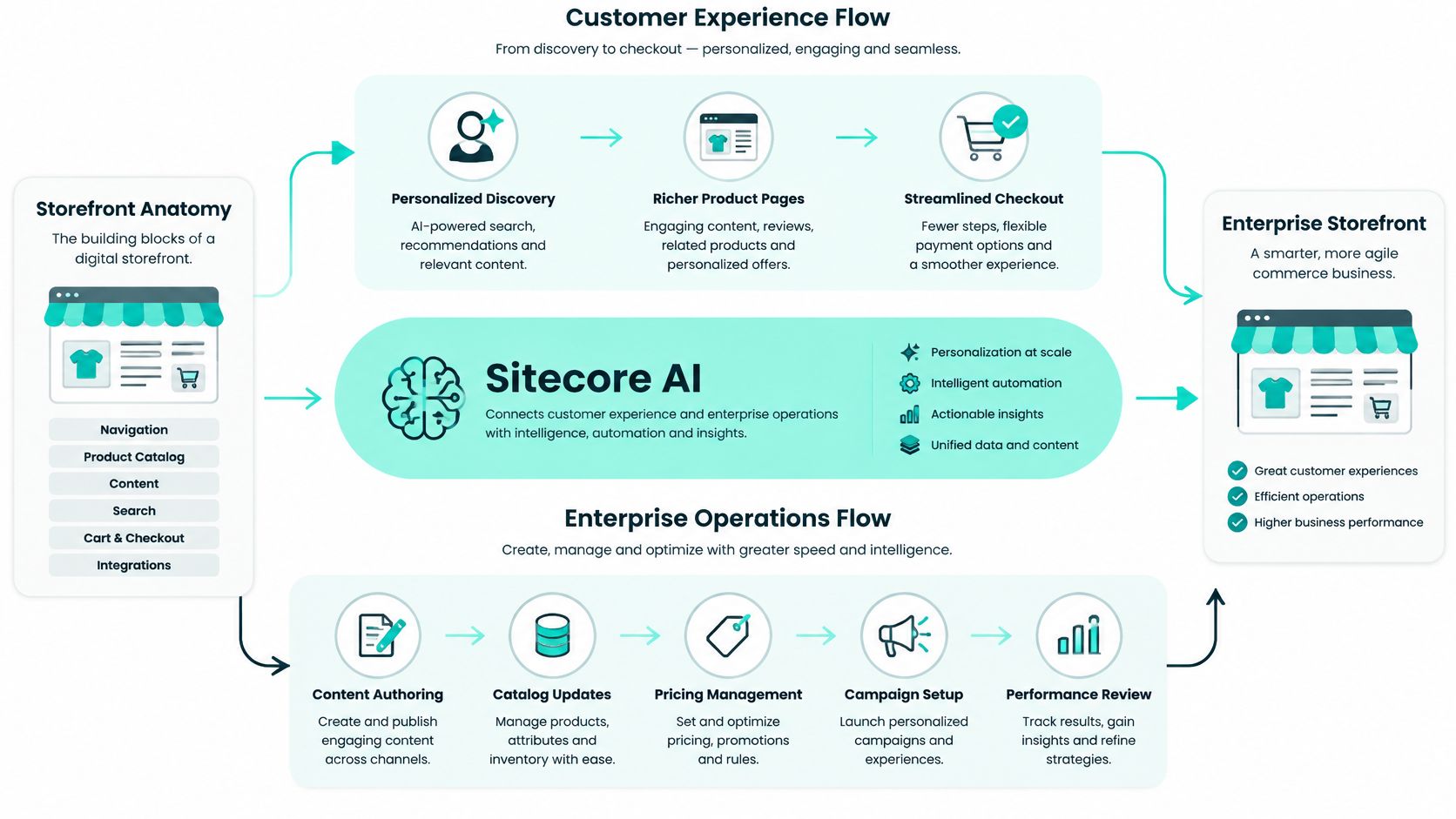
Sitecore Stream is an AI capability layer embedded across Sitecore products rather than a standalone content-generation tool, covering brand-aware AI, copilots and agents, and agentic workflows in the Sitecore Stream AI capabilities documentation. In practice, that means the marketer drafts the brief with brand-aware assistance, editors generate and refine copy inside their existing tools, and translation assistance moves approved content into local markets without a separate copy and paste pipeline.
Copilots Guide, Agents Act
Sitecore distinguishes copilots, which guide decisions, from agents, which automate actions, in its documentation of Stream copilots and agents. The Brand Copilot supports brand-aware chat, brainstorming, and brief generation. The Content Copilot supports content creation and refinement, translation, grounded image tagging in Content Hub, and AI-assisted generation in Experience Platform. The Experience Copilot supports visual search in Content Hub and question-and-answer generation in Sitecore Search.
That division matters for governance. A copilot suggesting product copy keeps a human approving every word. An agent executing a workflow step needs clearer permissions, auditability, and rollback thinking. Don't grant both the same trust by default.
The short video below shows how these capabilities appear inside day-to-day Sitecore work.
For the launch itself, orchestration can suggest tasks and deliverables, send notifications, and link each person into the relevant Sitecore product, as described in Sitecore's announcement of its intelligent DXP and CMS updates. Sitecore describes automation levels from chain-of-thought prompting and human-in-the-loop operation to fully agentic execution.
On the shopper side, those same governed assets feed richer discovery and more relevant experiences, which is where personalization in e-commerce connects content operations to the storefront. Brand kits built from uploaded brand documents keep generated material inside approved voice and terminology.
Planning a rollout also means checking packaging, since the Sitecore Stream free and premium tier matrix shows capabilities such as short-form content assistance, translation assistance, and visual search available in both tiers, while other capabilities sit in only one tier. Phase enablement around that split instead of promising every team everything on day one.
Enterprise Requirements Behind Reliable Storefronts
A storefront that demos well in one language, on one browser, for one product line hasn't proven much. Enterprise reliability is tested by localization, accessibility, security, and integration, all at once.
Localization and Governance
Multi-brand estates multiply every decision. Product content, legal copy, currencies, tax rules, and promotions vary by market, while design systems and components should stay shared. Reusable components with centralized governance let regional teams adapt content without forking templates. Sitecore estates often pair this with connected knowledge in SharePoint, so support articles, policy documents, and internal guidance stay governed in Microsoft 365 while customer-facing experiences draw on approved material through controlled integrations.
That separation is deliberate. Your storefront shouldn't become the document repository, and your intranet shouldn't become the product catalog. Each system governs what it's built to govern, and CI/CD pipelines promote changes through environments with review, not manual edits in production.
Accessibility as a Purchase Flow Requirement
Accessibility belongs inside the definition of a working storefront. If a keyboard user can't operate a variant selector, or a screen reader user can't identify a checkout error, the transaction is unavailable to them, regardless of server uptime. The relevant model is WCAG's POUR framework, where content and controls should be perceivable, operable, understandable, and resilient, as summarized in guidance on web accessibility standards.
The gap is widespread. A 2025 audit of 250 pages across the 50 most-visited e-commerce websites in five European markets found that 94% scored below 7.5/10 for accessibility, according to the Contentsquare Foundation accessibility report. Treat that as a scope warning. Search filters, consent banners, account creation, payment widgets, chat, and returns all sit inside the purchase journey, so third-party components need the same testing as your own templates.
Test accessibility as a user flow, from product discovery through post-purchase support. Automated scans catch markup and contrast defects, but manual keyboard and assistive-technology testing catches broken interactions.
Security, Integration, and Observability
Customer identity, sessions, and payment handoffs concentrate risk. Define authentication, session handling, data retention, and integration credentials explicitly, and log access so incidents can be reconstructed. Integrations then carry that discipline outward to search, customer data, marketing, payment, fulfillment, returns, and support systems.
Finally, assign every capability a home. Presentation belongs in the storefront. Commercial rules belong in commerce services. Editorial content belongs in the content platform. Employee knowledge belongs in connected enterprise systems such as SharePoint. Blurred homes produce duplicated data and unowned failures.
Why Storefronts Extend Beyond Websites
Now challenge the definition you've just learned. Must a storefront live on your branded domain? Increasingly, no.
The commercial scale explains why channels keep multiplying. E-commerce represented 0.6% of total U.S. retail sales in the fourth quarter of 1999 and reached 16.1% in the second quarter of 2020, according to the Census Bureau history of online retail share. Customers followed that growth into marketplaces, social platforms, messaging, and AI assistants, not just websites.
DHL's 2025 survey of 24,000 online shoppers in 24 markets found that 70% had already purchased through social media and 7 in 10 wanted AI-powered shopping features such as virtual try-ons, assistants, or voice search, as cited in Amazon's overview of what ecommerce involves today. Your customers are already shopping where your website isn't.
Interface Versus System of Record
Your online storefront definition needs updating. Separate the customer-facing interface from the underlying commerce capabilities. A social shop, marketplace listing, or AI assistant can act as a storefront surface, while your governed catalog, pricing, inventory, identity, consent, and order services remain the system of record behind all of them.
Not every touchpoint qualifies, though. An advertisement that routes a customer into a shared product and transaction layer is a discovery surface, not a storefront. A surface becomes a storefront when the customer can evaluate a specific offer and initiate an order there. That test keeps terminology honest.
Practical e-commerce omnichannel design works the same way. One orchestrated customer-access layer, many surfaces. One set of commerce services underneath, governing truth. The website is a participant in the storefront, not its boundary.
A Practical Online Storefront Checklist
Use these questions in your next architecture or vendor discussion.
- Surface: Where can customers evaluate offers and initiate orders?
- Ownership: Who governs catalog, product pages, cart, and checkout?
- Identity: How do guest, account, and consent models work?
- Coordination: How do inventory, orders, fulfillment, and returns stay synchronized?
- Markets: Which brands, languages, and currencies are in scope?
- Access: Can every customer complete discovery, checkout, and support independently?
- Protection: Which security controls and audit logs apply?
- Boundaries: What belongs in the storefront, commerce services, content platform, or SharePoint-connected systems?
- AI governance: Which copilots advise, which agents act, and who approves?
- Visibility: How are latency, errors, and failed transactions monitored?
A convincing product page isn't proof of a complete storefront, and a domain isn't proof of omnichannel orchestration. Kogifi is a Sitecore Silver Partner with 70+ DXP projects, 12+ years in operation, and 50+ specialists, providing Sitecore, Adobe Experience Manager, and Microsoft 365/SharePoint implementation and managed services.
Bring your checklist answers to Kogifi and we'll help you turn them into a scoped Sitecore AI, commerce, and SharePoint architecture with clear ownership for every layer. Whether you're defining a first storefront or untangling a multi-brand estate, start the conversation with our team today.