



Your team launches a global campaign. The homepage is polished, Sitecore personalization rules are live, SharePoint assets are linked, and leadership expects every market to get the same experience on day one. Then the reports start coming in. Users close to your primary hosting region see the site quickly. Users farther away wait on banners, scripts, images, and navigation before they can do anything useful.
That pattern usually isn't caused by one bad component. It's a delivery problem. The origin stack may be healthy, but the path between your platform and your audience is too long, too busy, or too exposed.
That's where the question what is a content delivery network stops being academic. For enterprises running Sitecore, Sitecore AI capabilities, or SharePoint at scale, a CDN is part of the core architecture that decides whether digital experience feels local, resilient, and secure, or distant and fragile.
Table of Contents
- The origin stays authoritative
- The edge handles repeat requests
- Routing decides which edge serves the request
- Modern CDNs do more than cache files
- Performance gains show up where DXPs struggle first
- Security belongs in the CDN design, not as an afterthought
- What good CDN design looks like in enterprise platforms
- Sitecore needs cache rules that respect personalization
- SharePoint gets more value from disciplined distribution and access control
- A practical pattern for both platforms
- Does a CDN help SEO
- When does multi CDN make sense
- How do CDNs affect compliance and data residency
- Can a CDN cache API responses in a headless Sitecore build
Your Global Audience Is Waiting So Why Is Your Website So Slow
A familiar enterprise scenario looks like this. Marketing launches a multilingual campaign from one core platform. The New York team sees a fast site in testing, signs off, and assumes the rollout is ready. Users in Riyadh, Singapore, or Tokyo then hit a slower path because every request still travels back to the same origin region for core page assets.

For Sitecore and SharePoint environments, the effect compounds fast. Brand imagery, JavaScript bundles, fonts, document previews, and media libraries all travel farther than they should. Personalization can be configured well and content can be modeled correctly, but the experience still feels sluggish because the delivery layer isn't built for a global audience.
Distance is the hidden bottleneck
A CDN solves that problem by placing cached content on edge servers closer to users, instead of making every request depend on a single origin. IBM describes a CDN as a globally distributed system of edge servers that reduces latency and improves load times, and notes via Cisco reporting that 72% of web traffic crosses through CDNs in modern delivery paths (IBM on content delivery networks).
That matters because your users don't experience architecture diagrams. They experience waiting.
If your platform is centralized but your audience is global, latency stops being a tuning issue and becomes an architecture issue.
This is especially visible in regulated and distributed markets
Teams with audiences in tightly controlled network environments often discover that general connectivity conditions amplify delivery weaknesses. If your business serves users working across constrained networks, remote offices, or international regions, operational context matters just as much as page design. For readers managing access challenges in East Asia, this guide to the best VPN for China in 2026 is useful background because user connectivity conditions can shape how your platform is perceived in practice.
A CDN won't fix poor front end design or oversized assets. It does make good architecture deliver consistently across regions. If you're already reviewing rendering strategy, asset weight, and application behavior, Kogifi's guide on how to optimize website performance is a practical companion to CDN planning.
How a Content Delivery Network Actually Works
A CDN changes the delivery path between your platform and the user. Your origin still creates and owns the content. The CDN decides where that content is served from, how often it is fetched again, and which requests should reach the origin at all.
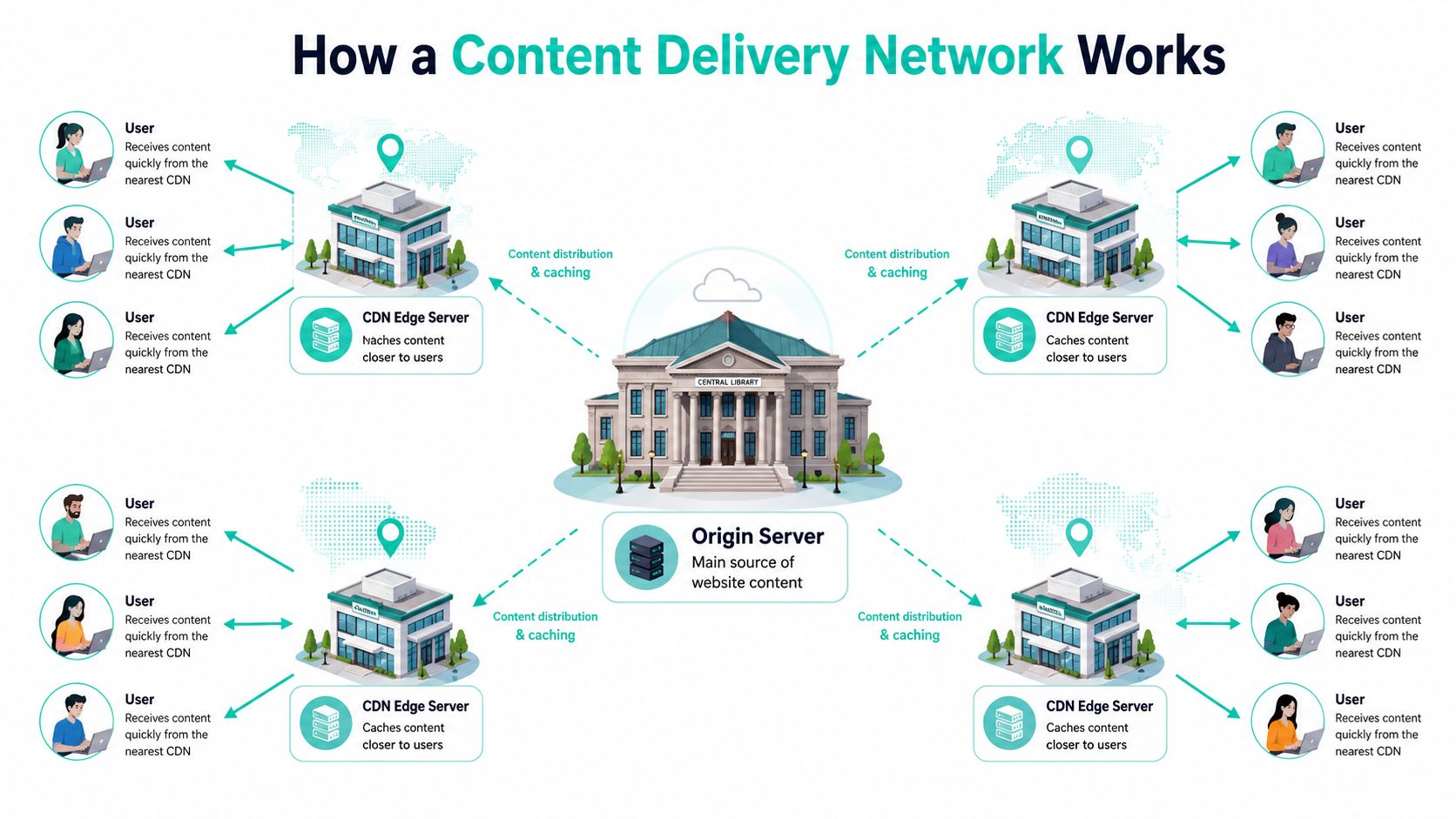
In enterprise Sitecore and SharePoint environments, that distinction matters. If every request has to travel back to a central origin, users far from that region wait longer, origin servers do more repetitive work, and traffic spikes hit the same infrastructure that also handles publishing, rendering, search, and integrations.
The origin stays authoritative
Your origin server remains the source of truth. In Sitecore, that often means the application tier rendering layouts, pulling content, resolving personalization rules, and serving media or APIs. In SharePoint, it may be document libraries, portal assets, page resources, and Microsoft 365-connected services.
The CDN sits in front of that origin and caches eligible responses closer to the user through edge locations, often called points of presence. Cloudflare and KeyCDN both describe the same core model: nearby edge nodes serve cached content so requests do not need to cross the full distance back to origin every time.
That setup improves more than speed. It protects expensive origin capacity for the requests that need application logic.
The edge handles repeat requests
The edge layer stores copies of content users ask for repeatedly. GeeksforGeeks explains the mechanics clearly: on a cache hit, the edge serves the object immediately; on a cache miss, it fetches the object from origin, stores it, and uses that local copy for later requests from the same region (how CDN caching works in system design).
For a DXP, architecture decisions begin to matter. CSS, JavaScript bundles, fonts, image variants, downloadable files, and many media assets should usually be served from the edge. Some HTML can be cached too, but only if cache rules respect publishing frequency, user state, and personalization boundaries.
Common edge candidates include:
- Static assets such as CSS, JavaScript bundles, fonts, and brand imagery
- Media libraries including videos, image variants, thumbnails, and downloads
- Semi-static pages where content changes on a schedule rather than on every request
- Documents and portal assets that global SharePoint users request repeatedly
A poor cache policy causes problems fast. Cache too little, and your origin keeps doing unnecessary work. Cache too aggressively, and Sitecore visitors may see the wrong variant or SharePoint users may get stale files after an update.
Routing decides which edge serves the request
A CDN also makes routing decisions before any cache check happens. It operates as a distributed proxy layer that directs each request to an edge node based on proximity, network conditions, and platform policy. Wikipedia's overview of content delivery networks covers this routing role and why it reduces round trips for end users (content delivery network overview).
For global Sitecore delivery, that means a user in Singapore should not depend on the same network path as a user in Frankfurt. For SharePoint intranets, it means large static resources can be served closer to regional offices instead of crossing long network paths back to a single tenant entry point.
The request flow usually looks like this:
- A user requests a page or asset
- The CDN routes that request to an appropriate edge location
- The edge checks whether the content is already cached
- If the object is cached, the edge serves it immediately
- If it is not cached, the edge fetches it from origin, stores it based on policy, and returns the response
Modern CDNs do more than cache files
Enterprise teams often stop at static asset caching. That leaves a lot of value on the table.
Modern CDN setups can also apply edge rules for redirects, bot filtering, header normalization, image optimization, geographic access controls, and Web Application Firewall enforcement before traffic reaches Sitecore or SharePoint. That is especially useful in composable DXP estates where the browser may call multiple services for search, personalization, commerce, and AI-assisted experiences. The edge can reduce unnecessary origin traffic and screen bad requests earlier in the chain.
Security policy needs the same level of design as cache policy. Kogifi's guide to security features for safe content delivery is a practical reference if you are reviewing tokenized access, TLS configuration, DDoS mitigation, and edge enforcement.
The trade-off is control versus complexity. The more logic you push to the edge, the more carefully you need to test cache keys, cookies, authorization headers, purge behaviour, and fallback paths. In Sitecore XM Cloud, Sitecore XP, and large SharePoint deployments, the best CDN designs are usually selective. Static delivery goes hard to cache. Dynamic and personalized delivery gets explicit rules.
This video is a useful quick visual if you need to explain the concept internally before discussing platform specifics.
Boosting DXP Performance and Fortifying Security
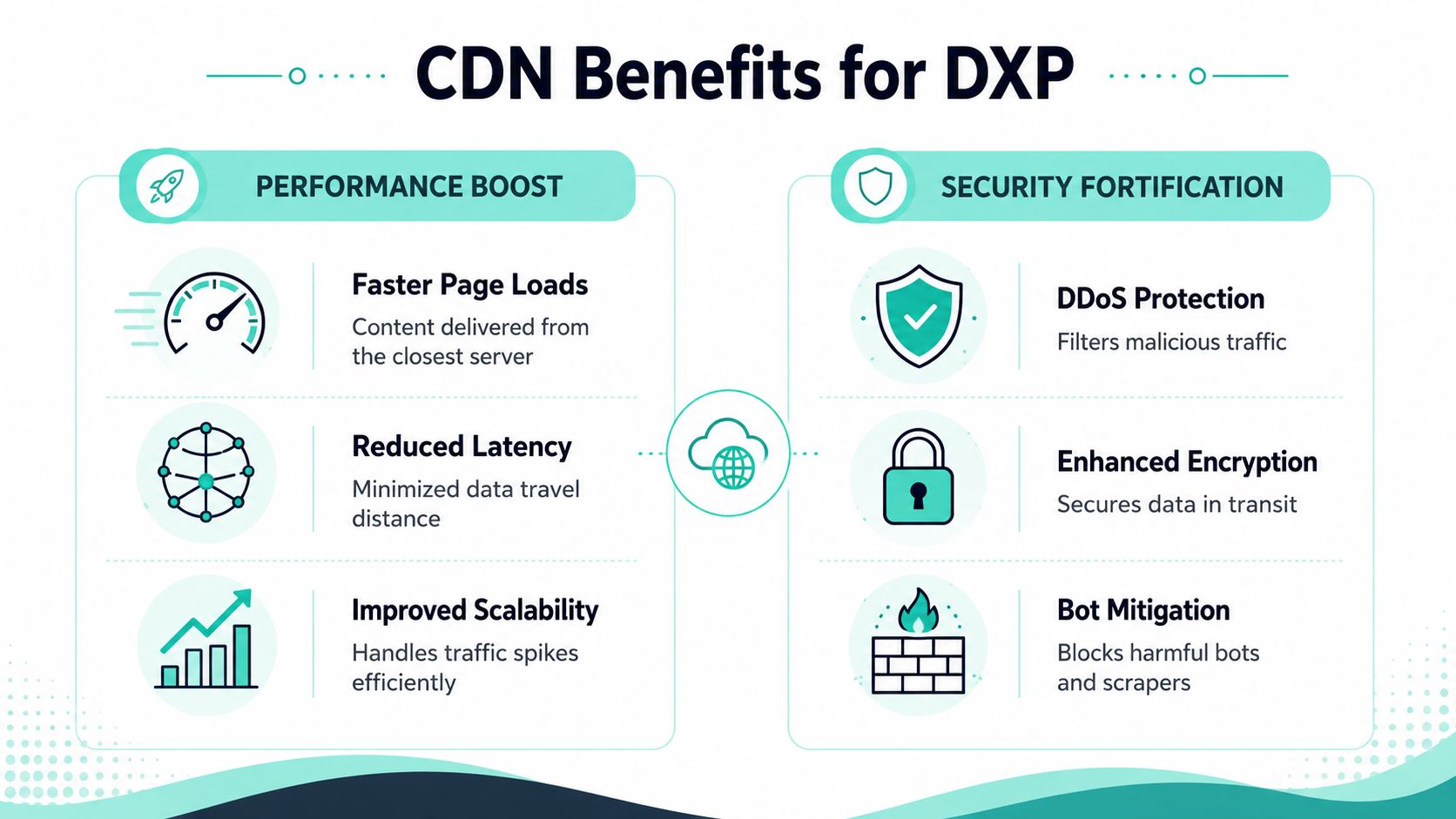
A global campaign goes live, traffic jumps, and the first question from the business is simple. Will the platform hold up?
In Sitecore and SharePoint estates, a CDN often determines that answer. It reduces the amount of repetitive delivery work hitting origin infrastructure, and it puts a control layer in front of public traffic before requests reach application servers, APIs, media libraries, or collaboration entry points.
That matters because DXP performance problems rarely start with business logic alone. They usually start when origin servers are forced to do low-value work at scale.
Performance gains show up where DXPs struggle first
Sitecore has to assemble pages, resolve layouts, call search and commerce services, and support personalization flows that are not cheap to run. SharePoint has a different profile, but the pressure is familiar. Documents, scripts, images, stylesheets, and portal assets still create heavy repeat traffic across regions and time zones.
A well-configured CDN removes a large share of that repeat traffic from the platform.
The direct result is not just faster asset delivery. It is lower origin contention. Sitecore delivery roles have more headroom for rendering and API work. SharePoint environments spend less effort serving the same files over and over. Operations teams also get cleaner scaling signals because they are sizing for application demand, not avoidable static traffic.
In practice, enterprise teams usually see value in four areas:
- Origin offload: Web and application tiers spend less time on repeatable asset requests.
- Peak handling: Product launches, campaign spikes, and intranet surges are less likely to saturate the platform.
- Regional consistency: Users in distant markets rely less on one hosting region for every request.
- Better infrastructure spend: Capacity planning shifts toward business functions such as search, personalization, and integrations.
For composable DXPs, this gets more important. A single page may depend on multiple services, and each unnecessary origin request adds latency and risk. CDN offload gives Sitecore and SharePoint more room to handle the requests that require platform logic.
Security belongs in the CDN design, not as an afterthought
Performance gets attention first. Security usually becomes the deciding factor later.
Because the CDN sits in front of Sitecore, SharePoint, and related services, it becomes part of the platform boundary. It can absorb volumetric attacks, inspect traffic patterns, enforce TLS policies, challenge suspicious clients, and block unwanted requests before they consume origin resources. That changes the architecture conversation from simple acceleration to controlled exposure of enterprise systems.
For DXP teams, the practical impact is clear:
| Security concern | Why it matters to Sitecore or SharePoint |
|---|---|
| DDoS absorption | Preserves availability when hostile traffic targets public endpoints |
| Bot filtering | Reduces scraping, credential attacks, spam submissions, and abusive search traffic |
| TLS termination | Centralizes certificate management and removes connection overhead from origin |
| Traffic inspection | Applies policy before requests reach app servers, APIs, or collaboration surfaces |
This is especially relevant in Sitecore environments with public forms, search endpoints, headless APIs, and AI-assisted experiences. It also matters in SharePoint estates where external access, partner portals, and distributed workforces increase exposure.
What good CDN design looks like in enterprise platforms
The strongest CDN implementations are selective. They do not treat every response the same, and they do not assume edge caching will fix weak application design.
Teams get better results when they separate static delivery from dynamic assembly, define explicit behavior for cookies and headers, and protect personalized or authenticated routes with stricter rules. That is how you improve performance without breaking Sitecore personalization, exposing SharePoint content incorrectly, or creating invalidation problems across regions.
The common failure patterns are predictable:
- Blanket caching policies that ignore personalization, authentication, or content sensitivity
- Weak cache-key design that mixes responses across users, devices, or locales
- No edge security baseline for bots, abusive request patterns, or protocol enforcement
- Assuming origin tuning can wait because the CDN will absorb every problem
I usually advise clients to treat CDN configuration as part of platform architecture, not as a networking task delegated at the end of a project. In enterprise DXPs, cache rules, purge behavior, token handling, and edge security controls all affect business outcomes. They influence uptime, authoring confidence, campaign readiness, and the cost of scaling globally.
If you are reviewing edge protection alongside delivery performance, Kogifi's guide to security features for safe content delivery is a useful checklist for rollout planning.
CDN Strategy for Sitecore AI and SharePoint Platforms
A global Sitecore rollout can look healthy in test, then slow down the moment AI-driven personalization, search calls, consent logic, and regional traffic hit at once. A SharePoint portal can have the opposite problem. Fast static delivery, but poor control over which files should be cached, protected, or kept behind stricter access rules. CDN strategy sits in that gap between raw speed and platform control.

The design question is simple. Which requests should be served at the edge, which should be assembled with context, and which should be inspected but never broadly cached? For enterprise DXPs, that decision affects page speed, origin cost, security posture, and how confidently teams can publish at scale.
Sitecore needs cache rules that respect personalization
Sitecore, especially in headless and composable builds, rarely serves one uniform experience. Content often passes through API orchestration, component rendering, AI decisioning, and visitor context checks before the page is complete. If a CDN treats all HTML the same, performance suffers or the wrong experience gets cached.
The better pattern is to divide delivery by content behavior, not by page template alone.
- Cache stable assets aggressively such as media library items, JavaScript bundles, fonts, and versioned front end resources
- Cache shared rendered fragments carefully where the same output is valid across users, regions, or channels
- Bypass or strictly constrain personalized responses when output depends on profile state, entitlements, experiments, or active session data
- Use edge logic for request shaping such as locale routing, bot screening, header normalization, and API request filtering before traffic reaches Sitecore services
That approach matters more as Sitecore AI usage grows. Personalization does not make the CDN less useful. It makes cache boundaries more important. In practice, the biggest gains usually come from keeping repeatable assets and common fragments at the edge while protecting the decisioning paths that must stay dynamic.
I see the same failure pattern often. Teams either cache too little because they fear breaking personalization, or cache too much and create stale or cross-context responses. Neither scales well. Good Sitecore delivery depends on precise vary rules, predictable purge behavior, and a clear separation between public content, shared content, and user-specific output.
SharePoint gets more value from disciplined distribution and access control
SharePoint has a different traffic profile. Many environments gain the most from edge delivery of scripts, style assets, branded resources, media files, and large document downloads used across offices and regions. That reduces load on origin services and improves response times for distributed workforces.
The constraint is governance.
SharePoint estates often include mixed permission models, collaboration features, and content with very different sensitivity levels. A CDN helps when teams classify what is safe to distribute broadly and what must remain tightly controlled. Public-facing assets and frequently downloaded files are usually strong candidates. Permission-sensitive documents, authenticated collaboration routes, and fast-changing content need stricter handling.
Good SharePoint CDN candidates often include:
- Intranet branding assets used across many sites
- Shared scripts and style resources
- Large media files or documents downloaded repeatedly
- Portal resources requested from multiple regions
Weak candidates include content that changes constantly, depends on user permissions, or creates audit and compliance concerns if cached too broadly.
A practical pattern for both platforms
The most effective enterprise setups map CDN behavior to delivery layers, then test each layer against business rules.
| Layer | Recommended CDN role |
|---|---|
| Static assets and media | Cache aggressively. Use long TTLs where versioning is reliable |
| Rendered HTML | Cache selectively. Vary by locale, device, and context only where justified |
| APIs and data endpoints | Review endpoint by endpoint. Some benefit from caching, many need protection first |
| Authenticated traffic | Inspect, rate-limit, and protect. Avoid broad caching unless behavior is fully understood |
| Origin services | Keep shielded behind the CDN and reduce direct exposure wherever possible |
Operations matter as much as architecture. If purge workflows are unclear, Sitecore campaign pages can serve old assets after release. If SharePoint file updates do not trigger the right invalidation path, users keep pulling outdated documents from edge nodes. Teams using Cloudflare-backed delivery should have a documented process for clearing cache in Cloudflare and tie that process to publishing, release management, and incident response.
A CDN should strengthen the way the platform already works. In Sitecore, that means supporting AI-driven and composable delivery without collapsing everything into uncached origin traffic. In SharePoint, it means accelerating global access while preserving permissions, governance, and operational control.
Choosing the Right CDN for Your Enterprise DXP
By the time most enterprises evaluate vendors, they already know they need a CDN. The harder decision is choosing one that fits the platform they run, not the marketing checklist in a proposal.
This market is large and getting larger. MarketsandMarkets projects the global CDN market will grow from USD 27.25 billion in 2025 to USD 42.89 billion by 2030, which highlights how strategically important these platforms have become across security, cloud integration, and digital experience delivery (MarketsandMarkets CDN market forecast).
What matters more than a feature checklist
A good enterprise decision starts with your architecture profile.
A Sitecore XM Cloud or headless implementation with AI-assisted personalization needs different CDN behavior than a SharePoint intranet or document-heavy portal. One may need stronger edge logic, tighter API control, and more nuanced cache keys. The other may care more about distribution of assets, simpler policy management, and enterprise governance support.
Questions that usually matter most include:
- Where are your users located and how important is strong edge presence in your target markets?
- How much dynamic behavior exists in your DXP, especially around personalization and API composition?
- How mature are the security controls for bot mitigation, DDoS protection, and TLS handling?
- How easy is it to automate cache management through APIs and deployment workflows?
- Can the CDN fit a composable architecture without becoming a brittle manual layer?
The right CDN isn't the one with the longest feature list. It's the one your platform team can operate predictably.
CDN Selection Criteria for Enterprise DXP
| Criterion | Impact on DXP Performance & Personalization | Key Vendor Questions |
|---|---|---|
| Global edge footprint | Affects consistency for users across regions and markets | Where are your strongest edge locations relative to our audiences? |
| Cache control flexibility | Determines whether Sitecore or SharePoint content can be cached safely | Can we define rules by path, header, cookie, and response type? |
| Edge logic capabilities | Helps support personalization, redirects, and request shaping closer to users | What edge execution options are available for dynamic logic? |
| Security tooling | Protects origin and public endpoints | How do you handle DDoS, bot mitigation, and edge TLS? |
| API integration | Affects automation, purging, deployment, and observability | How well do your APIs support CI/CD and operational workflows? |
| Origin shielding and failover support | Reduces origin stress and improves resilience | What controls exist for origin protection and traffic failover? |
| Reporting and debugging | Helps teams diagnose cache behavior and request routing issues | How granular is your logging and troubleshooting visibility? |
| Governance fit | Important for regulated, multilingual, and enterprise content estates | How do you support policy control across multiple domains and teams? |
Vendor evaluation works best when application owners, security teams, and content platform leads all participate. If only procurement drives the process, enterprises often buy a strong network with weak alignment to their actual Sitecore or SharePoint operating model.
A Phased Checklist for CDN Migration and Testing
A CDN rollout goes wrong when teams treat it like a simple switch. It's closer to a controlled architecture change. The traffic path changes, cache behavior changes, and your security perimeter often changes too.
The safest approach is phased. That gives digital teams room to validate behavior before they expose the entire platform to the new edge layer.
Phase 1 planning and discovery
Start with inventory, not configuration.
Build a clear picture of what your platform serves today. For Sitecore, that includes media assets, rendered pages, APIs, search endpoints, personalization surfaces, and any headless front end resources. For SharePoint, include scripts, styles, libraries, downloadable files, and any externally facing pages or portals.
Use this planning checklist:
- Map assets by behavior: Separate static, semi-static, dynamic, and sensitive responses.
- Define cache intent: Decide what should cache broadly, what needs short-lived control, and what must bypass cache.
- Document security needs: Identify public endpoints, form surfaces, login paths, and bot-sensitive areas.
- Pick a pilot scope: Choose one site, region, or traffic pattern that gives useful validation without excessive risk.
If the rollout is part of a broader platform change, this website migration checklist helps structure dependencies that often get missed.
Phase 2 implementation and testing
This phase is where technical teams usually discover hidden assumptions.
A CDN can expose problems that were already present but easier to ignore, such as weak cache headers, inconsistent asset naming, or dynamic endpoints mixed into static paths. That's useful if you catch it before full go live.
Focus on these activities:
Configure delivery policies carefully
Set cache rules, origin access patterns, and security controls based on the inventory you completed.Run controlled performance tests
Test from different regions, not just your hosting region. A CDN project fails if the local office sees improvement but remote markets still struggle.Validate dynamic behavior
Confirm that personalization, authenticated flows, forms, search, and API-driven content behave correctly.Check invalidation workflows
Publishing teams need confidence that updates propagate the way the business expects.Include user acceptance testing
Business users often catch issues that synthetic tests miss, especially with multilingual navigation, document access, and campaign journeys.
Phase 3 go live and optimization
Go live is the start of tuning, not the end of implementation.
Watch live traffic patterns, cache behavior, origin load, and security events closely after launch. The right refinements often become visible only under production conditions, especially in Sitecore stacks with real personalization traffic and in SharePoint estates with region-specific usage peaks.
Key post-launch habits:
- Review cache effectiveness and identify unnecessary origin fetches
- Track routes that bypass cache and confirm they should
- Tune security rules so they block abuse without disrupting legitimate users
- Refine invalidation processes for editors, release teams, and support staff
Teams that treat CDN operations as part of ongoing platform management get the most value. Teams that set it once and ignore it usually end up with stale content, confusing exceptions, and support escalations during campaigns.
Frequently Asked Questions about CDNs and Enterprise Platforms
Does a CDN help SEO
It can. Search engines reward accessible, usable sites, and faster delivery often supports that goal. But a CDN doesn't improve SEO by itself if the page still has poor rendering strategy, weak Core Web Vitals, broken internal linking, or heavy client-side bottlenecks.
For Sitecore and SharePoint teams, the right view is operational. If the CDN reduces asset latency, improves stability, and helps pages load more reliably across regions, that creates better conditions for search performance. It doesn't replace content quality or technical SEO discipline.
When does multi CDN make sense
A multi-CDN strategy makes sense when resilience, contractual flexibility, regional routing control, or risk distribution justify the added complexity. Large enterprises sometimes use it for critical public platforms where they want optionality and failover across providers.
It also adds work. Teams need stronger observability, clearer traffic policies, and tighter operational ownership. For many organizations, a well-run single-CDN approach is the right first step. Multi-CDN becomes more attractive when uptime demands, market coverage, or governance requirements outgrow one provider's comfort zone.
How do CDNs affect compliance and data residency
A CDN doesn't remove compliance responsibility. It changes where traffic is processed, cached, inspected, and sometimes terminated. Legal, security, and platform teams need to review what content is cached, which regions can serve it, how logs are handled, and whether edge processing introduces policy concerns.
This matters in multilingual enterprise platforms, public sector portals, and regulated environments. For Sitecore and SharePoint, governance should define which responses are safe for edge caching and which should remain tightly controlled. Compliance isn't a CDN feature you turn on. It's a policy model you enforce through the CDN.
Can a CDN cache API responses in a headless Sitecore build
Yes, but only when you classify endpoints properly.
Some API responses are good cache candidates. Others should never be broadly cached. In headless Sitecore builds, many teams benefit from caching public or semi-static API responses with careful rules while bypassing highly personalized, authenticated, or rapidly changing endpoints.
A workable decision model looks like this:
- Cache when responses are shared across many users and change predictably
- Use tighter controls for semi-dynamic responses where freshness matters
- Avoid broad caching for user-specific data tied to identity, cart state, profile, or entitlements
- Test invalidation behavior before launch so content updates don't lag behind editorial changes
Discipline is separating public composition APIs from user-specific experience APIs. Once teams do that, the CDN becomes a strong fit for headless Sitecore rather than a source of debugging pain.
If your Sitecore AI or SharePoint platform needs a CDN strategy that improves speed without breaking personalization, governance, or security, talk to Kogifi. Their teams work across DXP architecture, platform audits, upgrades, and ongoing support to help enterprises build global digital platforms that perform reliably under real-world conditions.