


A product launch is scheduled, the campaign email is queued, and the intranet team is preparing an executive town hall. Everyone has checked the functional paths. Nobody has proved that the Sitecore XM Cloud delivery chain, personalization, search, identity, and SharePoint Online dependencies will behave when those journeys arrive together.
That gap is where load testing services earn their place. Enterprise performance isn't a single concurrency figure. It's a governed program that connects user behavior to platform mechanics, resource limits, service dependencies, and remediation.
Table of Contents
- Sitecore XM Cloud requires route-aware scenarios
- SharePoint Online needs authenticated Microsoft 365 realism
When a Marketing Launch Becomes a Performance Incident
A global brand sends a product launch email to two million subscribers while employees open a SharePoint intranet for a live town hall. The public site doesn't immediately go offline. Instead, page delivery slows beyond four seconds, personalization rules stop resolving consistently, and the CMS reports throttling while the front door still appears available.
The initial dashboard looks reassuring. The CDN is serving cached assets, synthetic checks can retrieve the homepage, and basic availability remains green. Yet users requesting personalized product pages trigger a chain of work across Experience Edge, GraphQL, JSS rendering, identity, search, and marketing automation. At the same time, SharePoint readers and editors compete for Microsoft 365 service capacity, Graph calls, search requests, and heavy page components.
A generic load test might have sent repeated requests to one origin and measured average response time. That test wouldn't reproduce cache variation, authenticated personas, personalization decisions, downstream calls, or the different behavior of readers and editors. It would validate the front door while leaving the actual experience path untested.
The failure timeline matters
The first symptom is rising tail latency on a small group of personalized routes. Then cache misses increase backend work. Personalization fallbacks appear, editors experience slower publishing, and retry behavior adds pressure to dependent services. On the intranet, a page with hub navigation, search, embedded media, and Graph-backed components creates a different workload from the public product site, but both estates are consuming operational attention.
The incident response team needs more than a report that says the system handled a certain number of users. It needs to know which journey degraded first, which dependency saturated, and whether the platform failed gracefully. A disciplined incident management approach turns those findings into ownership, escalation paths, and corrective actions before the next launch.
Practical rule: Test the journey users perform, not the URL that is easiest to hit.
The commercial lesson is straightforward. A performance test that omits Experience Edge fetches, JSS hydration, personalization, authenticated SharePoint paths, or downstream calls can produce a clean result and still miss the incident. Load testing services should catch that gap before the war room opens.
What Load Testing Services Actually Measure
Load testing services simulate production-shaped traffic and observe how a platform behaves under an expected workload. The useful output isn't a single pass or fail status. It is a relationship between traffic, latency, errors, saturation, and user-visible behavior across each layer.
For a Sitecore estate, load generators may exercise Experience Edge, GraphQL, layout services, search, personalization, and rendering hosts. For SharePoint Online, scenarios may combine page navigation, list and library access, Graph requests, search, authenticated actions, and concurrent editing. The test must preserve protocol behavior, cookies, tokens, headers, data variation, and realistic pauses between actions.
Match each metric to a question
Concurrency describes how many virtual users or active sessions the test is attempting to represent. Throughput shows the request or transaction volume reaching the delivery path. Together, they answer whether the traffic model is being generated as intended, but they don't prove that users are receiving a good experience.
Response time belongs beside route and transaction context. A homepage, personalized product page, search request, and SharePoint document operation shouldn't share one blended figure. Percentiles matter because a mean can hide the users experiencing the slowest responses. The p95 or p99 tail often reveals cache misses, database contention, thread exhaustion, or a slow downstream integration.
Error rate and throttling expose a different failure mode. A request can return a technically valid response while the platform has begun rejecting, delaying, or degrading work. GraphQL failures, SharePoint throttling responses, authentication errors, incomplete personalization, and dependency timeouts need separate classification.
Resource utilization connects symptoms to causes. CPU, memory, database pressure, connection pools, queues, and network behavior help engineers distinguish an overloaded application from a slow dependency. Browser checks then complete the picture with page weight, rendering time, and Core Web Vitals.
Load Testing Metrics Mapped to DXP and SharePoint Layers
| Metric Family | What It Captures | Layer Instrumented on DXP / SharePoint |
|---|---|---|
| Concurrency and throughput | Generated users, requests, and completed transactions | Load generators, CDN, Experience Edge, SharePoint service entry points |
| Response-time percentiles | Tail latency by route, journey, and transaction | GraphQL, JSS paths, rendering hosts, SharePoint pages and APIs |
| Error and throttle rate | Failed requests, rejected work, timeouts, and degraded responses | GraphQL, REST, Microsoft Graph, personalization, search, downstream services |
| Resource saturation | CPU, memory, connections, queues, and database pressure | Application services, rendering hosts, databases, platform telemetry |
| Browser experience | Page weight, rendering, visual readiness, and Core Web Vitals | Browser, CDN delivery, client-side scripts, embedded components |
A useful real-user monitoring model complements synthetic load tests by showing how actual browsers behave across regions and devices. Teams building an internal capability can also use a performance test engineer for startups as a reference point when defining the skills needed for scripting, observability, and analysis.
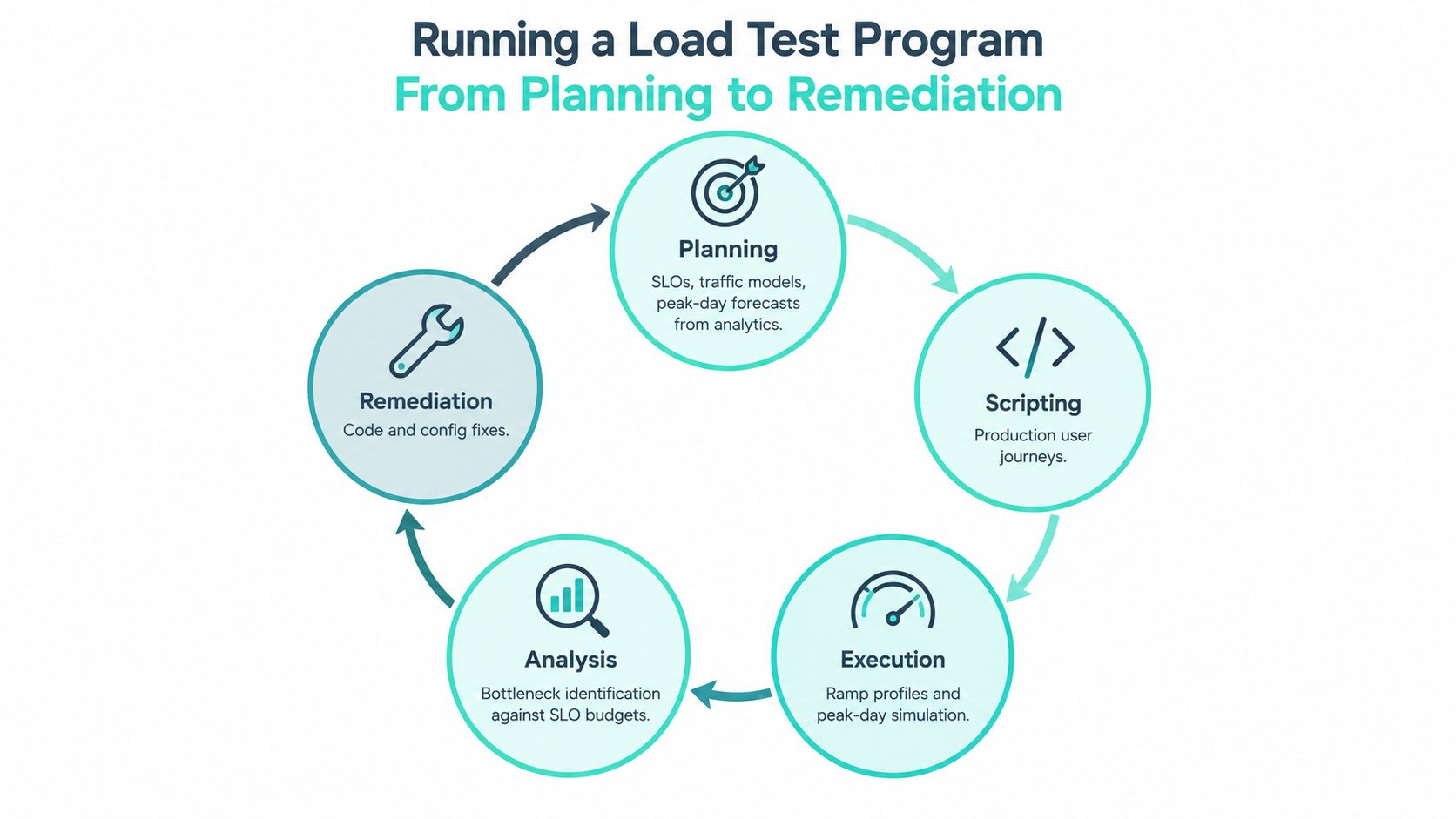
Running a Load Test Program From Planning to Remediation
A reliable program starts with business risk, not a tool. Identify the journeys that matter during launches, campaigns, publishing windows, employee communications, and authenticated work. Set response-time, availability, throughput, and error budgets for those journeys, then derive traffic models from analytics, release history, regional demand, and peak-day forecasts rather than intuition.
The platform inventory should include more than page URLs. Record Experience Edge routes, JSS layouts, personalization rules, search, content APIs, identity, media delivery, publishing, indexing, SharePoint libraries, Graph calls, hub navigation, and third-party marketing services. This inventory becomes the boundary of the test and prevents teams from declaring success after exercising only the simplest public page.
Build journeys that behave like users
Scenario design translates business journeys into protocol-correct scripts. A Sitecore visitor might arrive through a cached route, request a personalized component, use search, and move through JSS-rendered content. A SharePoint employee might authenticate, open a hub page, search a library, load a document preview, and submit an update.
Use realistic think times, randomized identifiers, varied content, valid tokens, and controlled dependency behavior. Production traffic replay can be valuable, but it requires masking, field transformation, token handling, and careful treatment of sensitive data. A synthetic script is safer when its data model accurately represents the production flow.
Execution should ramp traffic in stages. Run a baseline first, then increase concurrency while Application Insights, Log Analytics, APM traces, platform logs, synthetic checks, and browser measurements collect evidence. A production-like staging environment is preferable, but any meaningful difference in topology, content volume, caching, integration configuration, or service limits must be documented.
Analysis must end in a ticket
Correlate latency percentiles and error budgets with resource saturation and traces. If the tail rises when a personalization rule invokes an external service, that is a different remediation from a rendering host exhausting memory. If SharePoint requests receive throttling signals, the response may involve request shaping, batching, caching, or workload scheduling rather than adding more test users.
Scripting is often the cheapest part. Programs stall when nobody owns the findings. Each issue should return to the backlog with a named owner, evidence, a measurable acceptance condition, and a retest date. The next release then reruns the relevant journeys, compares trend data, and updates the traffic model.
The test run is an experiment. The engineering value appears when the team changes the system and proves the change under the same conditions.
Load Testing Versus Stress and Soak Testing
These tests answer different operational questions, so combining them under the label “performance testing” creates weak decisions.
| Test Type | Primary Objective | Traffic Profile | Typical Duration | Best Use Case |
|---|---|---|---|---|
| Load testing | Validate agreed behavior under expected demand | Realistic peak mix within the operating envelope | Long enough to reach steady state and capture tails | Before major releases, campaigns, and intranet events |
| Stress testing | Find the failure boundary and observe degradation | Increasing load beyond expected capacity | Until failure behavior and recovery are understood | Before architecture changes or major scaling decisions |
| Soak testing | Expose long-duration degradation | Sustained moderate or representative load | Extended continuous run | After migrations, feature-flag changes, or steady-state platform changes |
Load testing asks whether the system meets its agreed budgets under expected demand. On XM Cloud, that means preserving the actual relationship between Experience Edge caching, personalization, JSS, search, and downstream services. On SharePoint Online, it means observing authenticated readers and editors while pages, libraries, navigation, Graph, and Search participate in the workload.
Stress testing deliberately goes further. It identifies where graceful degradation ends and cascading failure begins, a distinction emphasized in Google's SRE guidance on cascading failures. Test components separately where possible because an end-to-end run can conceal the weakest subsystem behind the behavior of stronger tiers.
Soak testing finds failures that a short launch rehearsal can't expose. Memory growth, connection exhaustion, cache behavior, background processing, and gradual service degradation may appear only after sustained activity. The trigger is operational: use load testing for release confidence, stress testing for capacity boundaries, and soak testing when a change could alter long-term stability.
Applying Load Testing on Sitecore XM Cloud and SharePoint Online
The architecture determines the test design. Sitecore XM Cloud is a headless foundation for a composable digital experience platform, bundling Experience Manager, SXA, the Sitecore Next.js SDK, Experience Edge, and Pages, with extensions such as Sitecore Search, Personalization, and Content Hub documented by Sitecore. Its delivery model also includes JSS, Layout Service, GraphQL, Unified Identity, Azure Blob Storage, XM Cloud Deploy, GitOps support, container-based development, and automatic updates, as described in the XM Cloud developer introduction.
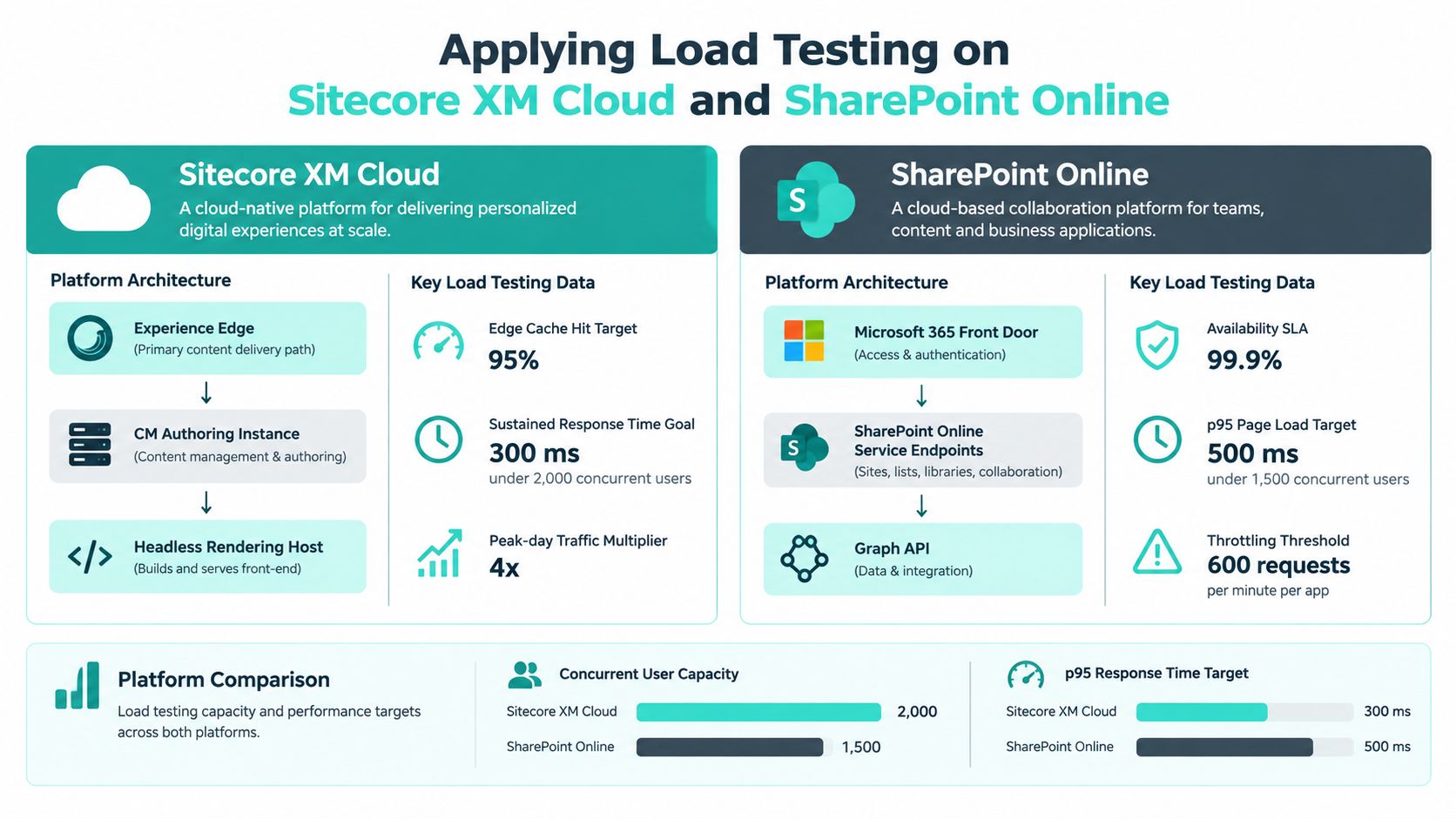
Sitecore XM Cloud requires route-aware scenarios
Start with route families rather than a blended page average. Test cached content, cache misses, JSS-rendered components, GraphQL queries, layout responses, search, media, and personalized experiences separately. Personalization can alter cache behavior and introduce dependency calls, so the script needs authenticated and anonymous personas, segment variation, stable content identifiers, and a way to verify that the expected experience was returned.
Instrumentation should connect browser timing to Experience Edge and rendering telemetry. Application Insights, logs, traces, and request correlation help determine whether a slow route originates in a query, rendering host, external service, or client-side hydration. Sitecore Search is described as an AI-driven, headless discovery platform that predicts and personalizes content and products as users type, which makes search behavior a first-class performance journey rather than a secondary endpoint, as documented in the Sitecore Search guide.
SharePoint Online needs authenticated Microsoft 365 realism
SharePoint scenarios should separate readers, editors, search users, and document-heavy workflows. Measure page composition, library access, list views, hub navigation, Graph latency, authentication, and throttling behavior. Include realistic conditional-access and OAuth handling without placing sensitive credentials in scripts, and respect service responses rather than retrying aggressively until the test creates its own outage.
SharePoint Online is also an intranet and collaboration layer, not only a website. An industry summary places its footprint at more than 200 million users across Microsoft 365 tenants, so governance, identity, integration, and adoption shape the workload as much as page delivery does, according to this Microsoft 365 usage summary. For broader cloud infrastructure optimization, teams should connect test evidence to service health, telemetry, and operating limits rather than treating Microsoft 365 as an opaque origin.
Choosing a Load Testing Services Vendor and Pricing Models
A vendor should demonstrate that it can test your estate, not just describe a familiar tool. Ask for a sample scenario covering Sitecore XM Cloud routes, Experience Edge behavior, personalization, JSS or Next.js delivery, and GraphQL. For SharePoint Online, request authenticated page templates, library and search journeys, Graph calls, conditional-access considerations, and throttling treatment.
Procurement checklist
- Production-shaped scripts: Require reusable assets with realistic personas, data variation, tokens, think times, and dependency handling.
- Regional execution: Confirm that load generation can represent the regions and network conditions relevant to the business.
- Observability integration: Require correlation with Application Insights, New Relic, Dynatrace, Log Analytics, and platform logs where applicable.
- Governance and security: Request SOC 2 evidence, region-specific data residency statements, masking procedures, and an explicit traffic-replay method.
- Remediation ownership: Put joint findings reviews, named engineers, acceptance criteria, knowledge transfer, and retest clauses in the statement of work.
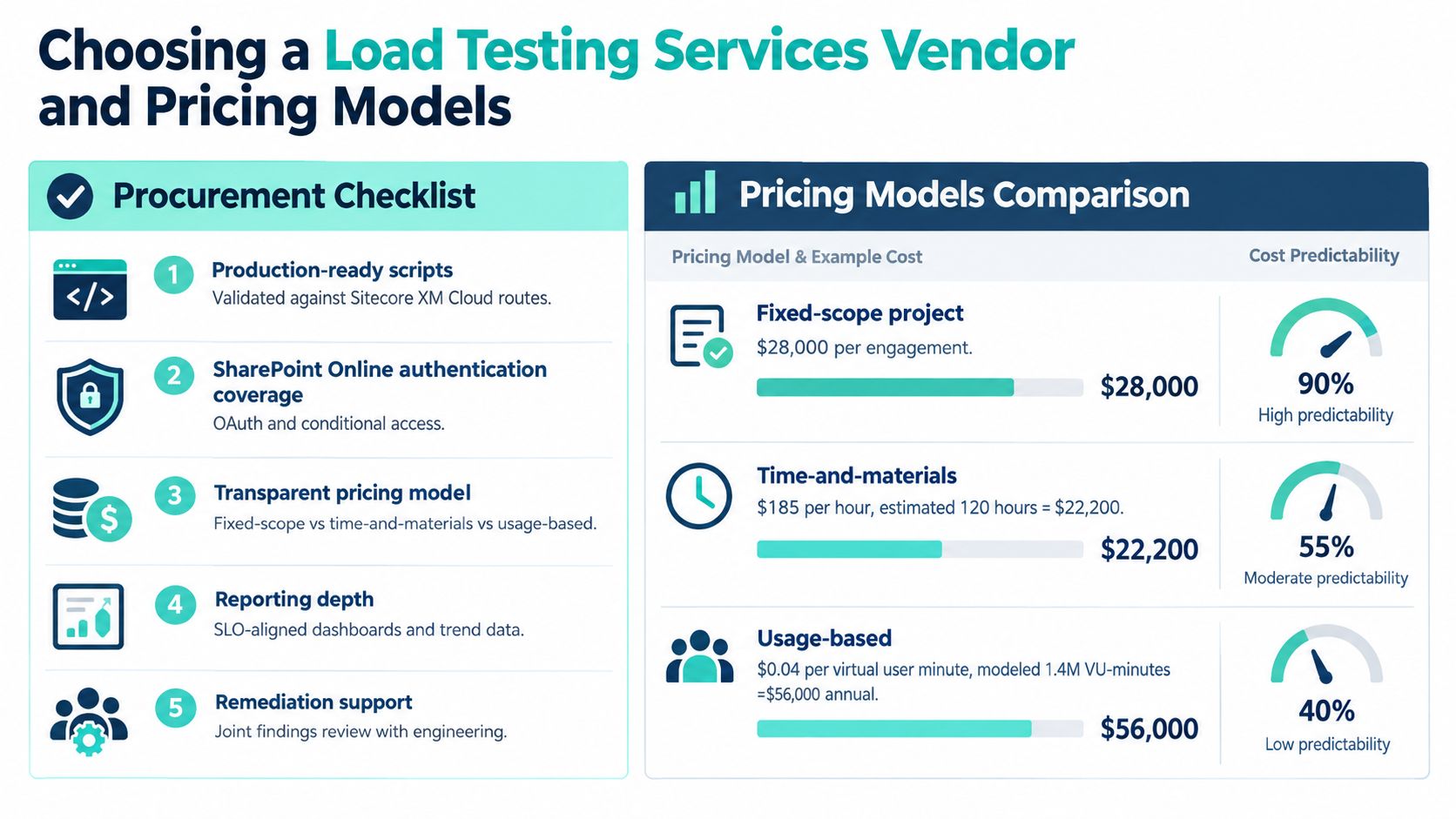
Pricing should follow the operating model. A fixed-fee cycle suits a defined release rehearsal. A retainer fits teams testing frequently across releases. Consumption pricing can work for irregular capacity reviews, but the buyer must understand what virtual-user time, regions, browser execution, data preparation, reporting, and reruns cost. Outcome-linked pricing can align a supplier with p95 latency or error-budget recovery, although the contract must define which platform and dependency variables remain outside the vendor's control.
The deliverable should be runnable scripts, dashboards, evidence, prioritized remediation, and a retest plan. A PDF without engineering participation leaves the buyer dependent on the same vendor for every future change.
A structured vendor selection process helps procurement compare delivery capability, commercial assumptions, security evidence, and knowledge transfer before price becomes the only deciding factor.
Common Pitfalls and Misconceptions in Enterprise Load Testing
A single load test report isn't a performance program. It is a dated observation of one workload, one configuration, one data set, and one moment in an evolving platform.
| Pitfall | Correct Practice |
|---|---|
| Synthetic journeys ignore personalization | Model segments, cache variation, and fallback behavior |
| Scripts bypass Experience Edge | Exercise the delivery path users actually take |
| SharePoint tests cover only anonymous pages | Include authenticated readers, editors, libraries, Graph, and Search |
| Average latency hides slow users | Report route-level percentiles and tail behavior |
| Third-party calls are excluded | Measure, stub, or explicitly bound each dependency |
| Testing happens only before launch | Add performance gates to release and CI/CD workflows |
| Short tests replace soak testing | Run sustained scenarios when long-term stability is at risk |
| The report has no owner | Create backlog items with acceptance criteria and retest dates |
Teams also confuse a successful HTTP response with a successful experience. A page may return status information while browser hydration, personalization, search, or embedded media remains slow. Likewise, a SharePoint page can load while a Graph-backed component, document preview, or search interaction fails under the same user journey.
A report ages quickly when templates, personalization rules, integrations, or Microsoft 365 dependencies change.
The practical correction is governance. Review the journey inventory at release planning, version scripts with application code, preserve trend data, and set thresholds that reflect user-facing objectives. Stress and soak tests belong in the calendar when architecture or steady-state behavior changes, not only after an incident.
A Practical Operating Model and What Comes Next
A 90-day operating model can give an enterprise team control without requiring a separate performance department. The first phase inventories critical journeys, SLOs, platform dependencies, and third-party services across XM Cloud, SharePoint Online, and adjacent marketing technology. It also establishes who owns each journey and which telemetry proves success.
The second phase builds reusable scripts, baselines current behavior, and creates dashboards that connect user timing to platform evidence. Run controlled tests against staging or a canary environment, document differences from production, and turn bottlenecks into engineering work rather than observations.
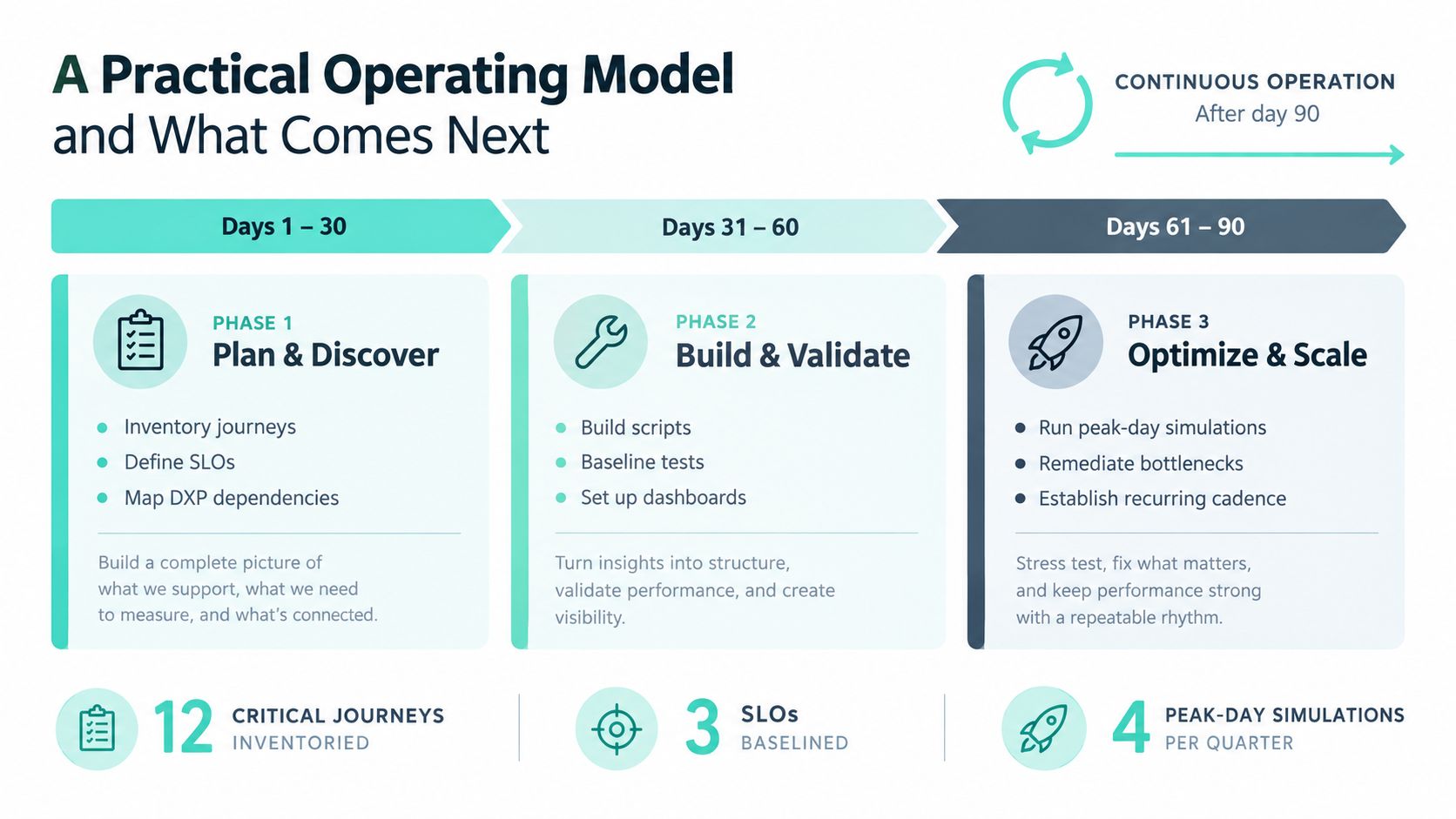
The third phase places the suite in the release pipeline, defines alert thresholds, rehearses peak-day behavior, and establishes a recurring cadence for stress and soak validation. The team should receive the scripts, dashboards, test data approach, remediation backlog, and operating playbook so it can continue after the engagement ends.
Kogifi applies this kind of platform-specific performance work across Sitecore, Adobe, and SharePoint engagements, combining DXP engineering with audits, tuning, cloud optimization, monitoring, and support. The useful outcome isn't a glossy report. It's a repeatable capability that helps internal teams decide whether a release is ready.
Kogifi can assess your Sitecore XM Cloud or SharePoint Online journeys, build production-shaped load scenarios, correlate results with platform telemetry, and support remediation before a major launch. Visit Kogifi to discuss a load testing program your engineering and marketing teams can operate beyond the first test cycle.