


You're already halfway into a selection, even if the RFP hasn't gone out yet. The marketing team has a preferred demo in mind, IT has a platform it trusts, procurement wants a fair process, and a partner has probably shown up with a polished roadmap that changes the field. In enterprise DXP and CMS projects, the vendor selection process rarely starts as a clean comparison. It starts as a set of biases, constraints, and incomplete information that need to be made visible before anyone signs anything.
That's especially true when the decision sits between Sitecore XM Cloud, Sitecore XP, Sitecore Stream, Content Hub, CDP, and SharePoint Online. Each option pulls the program in a different direction on architecture, governance, licensing, and operating model. If you wait until the RFP to sort that out, the process tends to reward whichever vendor presents the slickest story, not the platform that will survive implementation, migration, and day-two operations.
Table of Contents
Why the Vendor Selection Process Matters Before the RFP
A global manufacturer can call the RFP “vendor neutral” and still walk into the room with a fixed shortlist. A regional Sitecore partner may have already run a quarter-long pilot, the CMO may have sat through three executive briefings, and a CDP vendor may have shown a pre-built integration pitch that makes one path feel safer than the others. By the time procurement publishes the document, the process often has only two real contenders, even if the spreadsheet lists six.
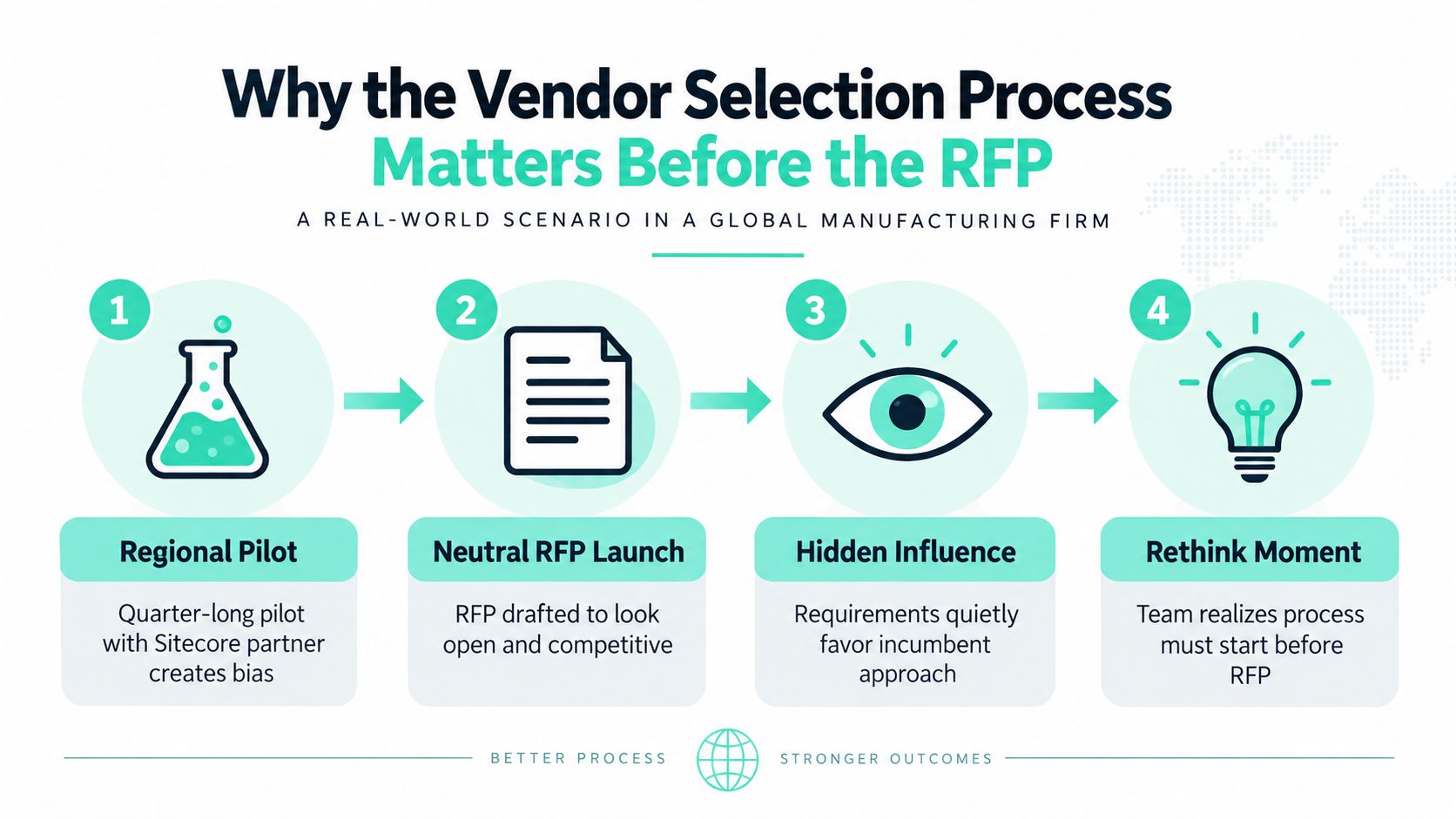
That's why the vendor selection process has to begin before the RFP. The earliest work is not about collecting brochures, it's about surfacing the assumptions already shaping the buy. When the team starts from the platform pitch, requirements drift toward whatever one vendor does well, and the program pays for that later through scope creep, late-stage rework, and contract renegotiation.
What goes wrong when the process starts too late
The problems show up in predictable places. Procurement gets frustrated when the “neutral” process already has a winner. Delivery teams get stuck reconciling features that looked compatible in slides but don't map cleanly to the actual business problem. Leadership loses credibility because the selection appears staged, even if nobody intended it that way.
A disciplined process treats selection as a risk control exercise, not a procurement ritual. It protects the budget, but it also protects the people who will live with the platform for the next five years. That matters whether the destination is Sitecore XM Cloud, Sitecore XP, or SharePoint Online.
Practical rule: if the shortlist exists before the business problem is written down, the RFP is already too late.
If you want a tighter starting point for discovery discipline, the discovery phase project resource is a useful companion. The rest of this guide builds on that mindset, from requirements and criteria through pilot, contracts, and onboarding.
Defining Requirements and Aligning Stakeholders
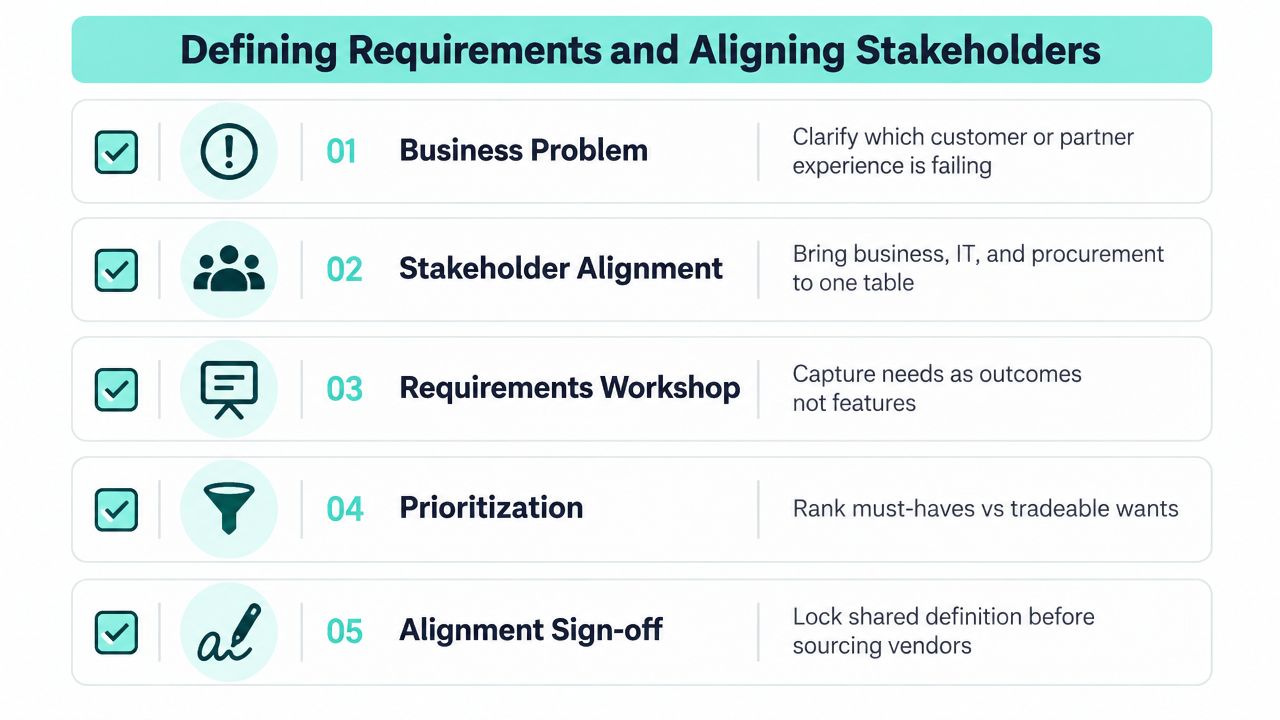
The cleanest selections start with a business problem, not a vendor deck. A customer journey might be breaking because editors can't launch pages fast enough, employees may be trapped in a clumsy intranet search, or partners may be unable to find controlled documents without help from operations. Write that failure state first, because every requirement after that should answer one question, what has to change in the experience and how will the business know it changed?
Build the decision team before you talk to vendors
The core group should stay small, usually three to five people, because larger groups slow decisions and create drift. Marketing owns experience outcomes, IT owns architecture and integrations, security owns the control surface, and procurement keeps the process defensible. Legal, accessibility, and data stakeholders should sit in the extended ring so they can review constraints without turning every conversation into a committee meeting.
The working artifacts should be simple and specific:
- One-page problem statement: define the failed experience and the target outcome.
- Use case catalogue: prioritize the business scenarios that matter most, instead of listing every imaginable feature.
- Constraints register: record budget, timeline, hosting, compliance, identity, and migration boundaries.
- Stakeholder map: name approvers, reviewers, and people whose sign-off is needed.
Start from outcomes, not features. If a team begins with vendor brochures, the loudest demo tends to become the hidden requirement set.
That trap is common in CMS and DXP work because product demonstrations are persuasive. A polished authoring flow or a strong personalization story can make a platform feel like the answer before the team has defined the question. The internal discipline in how to choose a CMS system helps avoid that mistake by forcing the team to separate content governance, operating model, and platform capability.
Lock sign-offs before sourcing
Before any vendor is contacted, the team should have sign-off on the problem statement, the prioritized use cases, the constraints register, and the stakeholder map. That gives procurement something stable to enforce and gives delivery something real to measure against later. It also makes the eventual comparison between Sitecore and SharePoint far cleaner, because the conversation stays tied to the business problem instead of drifting into product preferences.
For teams that want a broader framework on platform fit, how to evaluate DXP vendors for enterprise needs is a practical reference point. One more good habit, if you're defining a digital experience build with external creative or UX support, the finding the right web design agency guide is a helpful example of how to translate a vague need into a clear partner brief.
Building Evaluation Criteria for DXP and CMS Platforms
Criteria work only when they force evidence. In DXP and CMS selections, the biggest mistake is building a scorecard that sounds thorough but can't be verified in a demo, document, or contract. I prefer a side-by-side lens that separates technical fit, security, scalability, integrations, AI and personalization, and accessibility, because that mirrors how enterprise projects fail.
A useful product requirements reference is the product requirements document guide, especially when teams need to convert stakeholder pain into testable requirements instead of feature lists. The same discipline should shape the evaluation criteria, otherwise the RFP becomes a wish list.
DXP and CMS evaluation criteria and what to verify
| Criterion | What to Ask | Evidence to Require | Sitecore Lens | SharePoint Online Lens |
|---|---|---|---|---|
| Technical fit | Does the authoring model match the team's operating model? | Live demo, solution diagram, architecture notes | Compare XM Cloud vs XP, check headless support, and verify how Content Hub and Stream fit the workflow | Confirm page publishing, intranet patterns, and whether the use case needs custom SPFx or Power Platform work |
| Security | How are identity, tenant boundaries, and AI data handled? | Security docs, identity diagram, contract language | Verify SSO, tenant isolation, and contractual treatment of AI-related data flow | Verify Microsoft identity alignment, tenant controls, and admin boundaries inside the tenant model |
| Scalability | What happens under peak traffic and editorial load? | Performance notes, reference architecture, support model | Validate multi-region needs, editorial throughput, and delivery model for global brands | Confirm performance expectations for intranet, knowledge base, and document-heavy workloads |
| Integrations | How do CRM, CDP, analytics, and PIM connect? | Integration map, API documentation, implementation plan | Verify CRM, CDP, analytics, and PIM fit without hiding critical work in services | Verify Microsoft 365 and adjacent system integration, plus any external connector gaps |
| AI and personalization | What is embedded, and what depends on partners? | Product demo, AI governance language, roadmap notes | Inspect Stream, AI-assisted workflows, and how much personalization is native versus partner-built | Check where Copilot-style assistance fits and where custom logic is still required |
| Accessibility | Can teams author and publish to WCAG 2.2 AA standards? | Accessibility statements, author workflow demo, audit evidence | Test templates, components, and author guidance in a real workflow | Validate accessible page patterns, document publishing, and governance for content authors |
The important part is not the checklist itself, it's the evidence. A vendor should show the feature in a live environment, document the architecture, and commit to the contract terms that govern the risk. If the program is a global DXP refresh, I would weight technical fit and security more heavily. If it's an internal portal or knowledge hub, accessibility, governance, and operating cost often deserve more weight.
That weighting should reflect risk, not personal preference. A platform that is beautiful in demo and weak in compliance is a poor fit for regulated work. A platform that is technically sound but impossible for editors to use will create its own backlog after launch.
Turning Criteria Into RFPs and Scoring Matrices
A good RFP does one thing well, it makes vendors answer the same questions in the same structure. The RFI is where you widen the field, often to eight or ten providers, and capture capability claims against your criteria matrix. In a DXP search, that usually includes Sitecore, Optimizely, Adobe, and a SharePoint Online / Office 365 route, because those choices represent materially different operating models.
The output of the RFI should be a shorter list, usually four or five vendors, and the RFP should follow the criteria categories rather than product modules. If you organize the document by “CMS,” “personalization,” or “analytics” and let vendors answer loosely, weak areas get hidden behind marketing language. If you organize it by criteria, vendors have to show where the product fits and where services, extensions, or compromises are required.
Weighted RFP scoring matrix for DXP/CMS selection
| Criterion | Weight | Evidence Required |
|---|---|---|
| Technical fit | 25 to 30 percent | Architecture diagrams, demo mapping to use cases, implementation approach |
| Security and compliance | 15 to 20 percent | Security attestations, DPA language, identity approach, AI handling terms |
| Scalability and performance | 10 to 15 percent | Performance references, hosting model, support for editorial throughput |
| Integrations and APIs | 10 to 15 percent | API docs, integration pattern, CRM/CDP/PIM examples |
| AI and personalization | 5 to 10 percent | Product demo, feature scope, roadmap clarity, governance controls |
| Accessibility | 5 to 10 percent | Accessible templates, author workflow, audit evidence |
| Total cost of ownership | 10 to 15 percent | License model, implementation estimate, operating cost assumptions |
| Vendor viability and references | 5 to 10 percent | Reference calls, support history, roadmap confidence |
Use the same matrix for vendor self-scoring and for a blind evaluator score. That is where the gaps become useful. A sales team may score a feature high because it exists in the roadmap or in a partner package, while engineering scores it lower because it needs custom build work. Reconcile those differences instead of averaging them away.
For Sitecore specifically, the RFP has to ask whether the proposal assumes XM Cloud or XP, whether Stream, CDP, and Content Hub are bundled or separately licensed, and how the architecture changes across those choices. For SharePoint Online, ask about tenant constraints, licensing per user versus per site, and what Microsoft SLA credits cover in the event of a service issue. Those details change both the economics and the operational burden.
Running a Pilot That Actually De-Risks the Decision
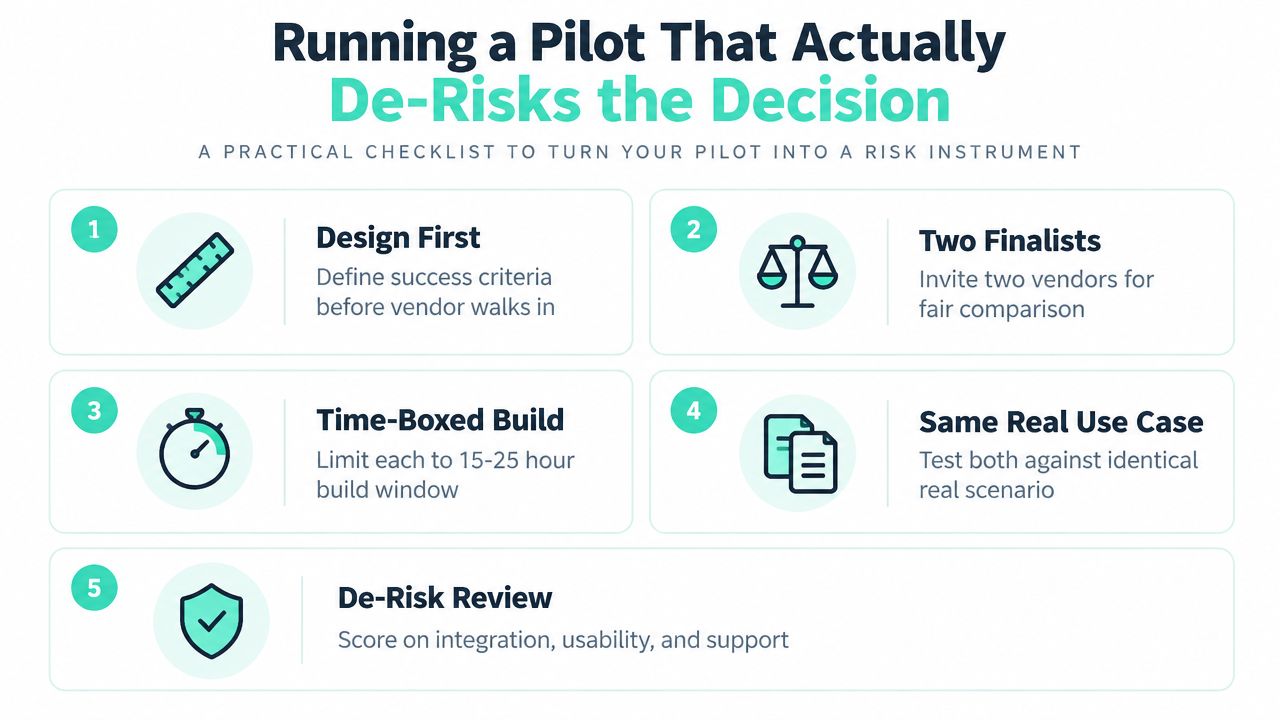
A pilot is not a marketing event. It's a controlled risk test, and it should be designed before the vendor walks in the door. The goal is to make both finalists build against the same real use cases so the team can see how they behave in the organization's own identity, network, and governance conditions.
Scope the pilot like a test, not a showcase
Pick two finalists and give each a 15 to 25 hour build window against the same scenario. That scenario should come directly from the requirements list, not from a generic demo script. Good examples include a multilingual campaign landing page with personalization, a self-service author workflow, or a SharePoint document-to-page publishing flow.
The pilot should measure things the business will feel:
- Time to first page: how fast the team can create and publish a working page.
- Core Web Vitals under load: whether the page remains usable when traffic increases.
- Author task completion time: whether editors can finish common tasks without support.
- Integration behavior: whether the CRM or CDP connection works without hidden services.
- Accessibility result: whether the output reaches at least AA in a real audit.
Run the pilot in your own Azure tenant, your own identity provider, and your own network. If the vendor needs a polished reference tenant to look strong, that is part of the risk.
Set exit criteria in advance. Missed deadlines, hidden licensing for a required connector, or sandbox data residency outside approved regions should all be enough to walk away. That sounds strict, but it prevents the team from talking itself into a compromised fit because the demo was impressive.
The scoring should reuse the same weighted matrix from the RFP. Then write a one-page decision memo that compares pilot evidence to the original claims, instead of re-arguing the whole selection from scratch. In practice, that memo is what leadership remembers when legal, procurement, and delivery ask why one finalist won.
The embedded video below is a useful reminder that evaluation quality rises when teams test real work instead of slides.
Contracts, Security, References, and Migration Risk
By the time contracts open, the decision data should already be converging. The cleanest teams maintain a decision log that ties each elimination or preference to a source, a scorer, a date, and any dissenting view. That log becomes the audit trail for procurement, legal, and security, and it keeps the conversation factual when someone asks why a contender didn't advance.
Contract terms that need to be explicit
A DXP or CMS contract should cover uptime SLAs, response and resolution times by severity, performance credits, and exit assistance. For Sitecore deals, the commercial model also has to spell out whether Stream, CDP, and Content Hub are bundled, co-termed, or separately licensed. Ambiguity here creates expensive surprises later, especially when the implementation team assumes one product boundary and finance signed a different one.
Security review should not stop at a checkbox. Require a DPA, a sub-processor list, SOC 2 or ISO 27001 evidence, and AI governance terms that explain how personalization models are trained, where data is stored, and how users can opt out. Regional data residency commitments matter for any non-US workload, and those commitments should be written into the contract instead of buried in sales assurances.
One practical way to pressure test the human side of the deal is reference checking. The people intelligence for better hiring article is a good reminder that structured conversations reveal more than polished references do, and the same logic applies here. Run two reference calls per finalist, ask about post-launch support and migration experience, and make sure at least one reference comes from your own sector.
Migration risk needs its own register
A platform can look perfect in evaluation and still fail during cutover if migration is treated as an afterthought. The written migration risk assessment should cover content freeze, URL continuity, SEO preservation, redirect strategy, cutover rehearsal, rollback, and the hypercare period before steady-state support begins. For a structured checklist, pre migration risk assessment key steps is a useful internal reference.
| Area | Item to Verify | Owner |
|---|---|---|
| Contract | SLA, exit clauses, commercial model, term length | Procurement |
| Security | DPA, sub-processors, AI governance, residency | Security and legal |
| References | Two calls per finalist, one in-sector reference | Program lead |
| Migration | Freeze plan, redirect plan, rehearsal, rollback | Delivery lead |
The strongest deals leave fewer assumptions for day two. That is the purpose of the legal and security phase, not to slow down progress, but to make the implementation survivable.
Decision Day and a 90-Day Onboarding Plan
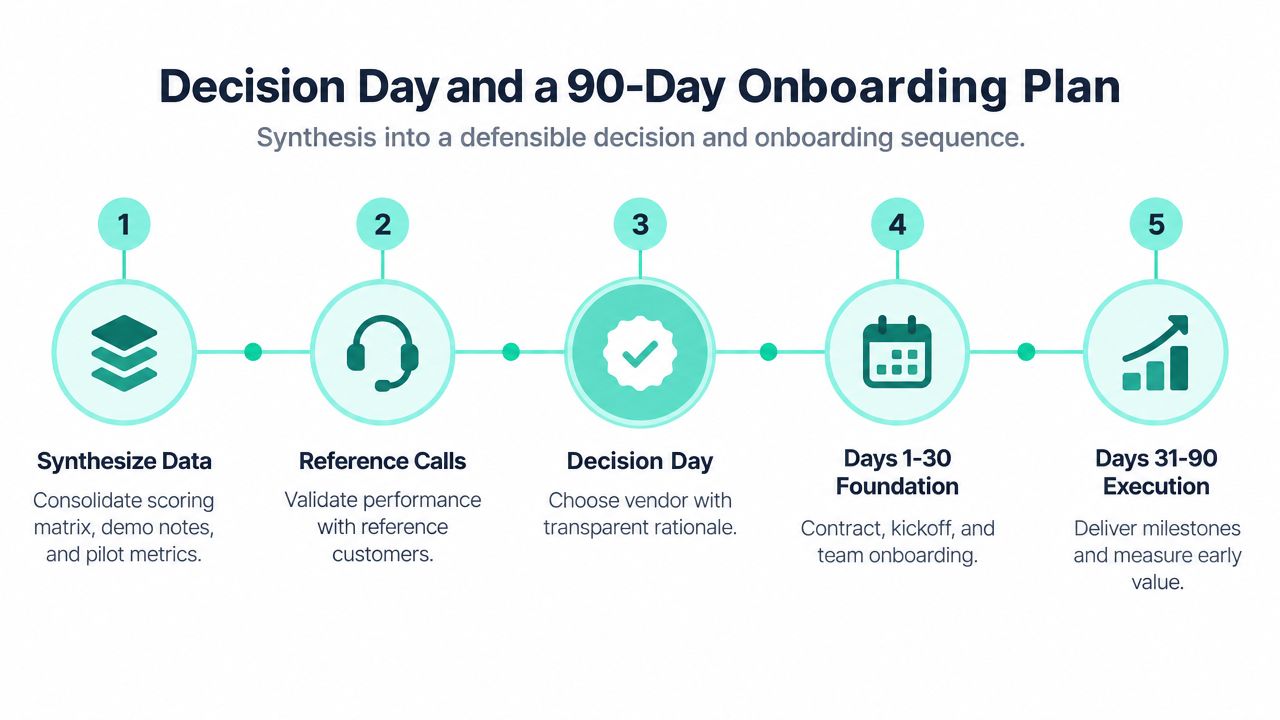
The final decision should fit on one page. I like a leadership brief that compares the selected option, usually Sitecore XM Cloud, Sitecore XP, or SharePoint Online, against the original requirements, then shows how the scorecard, demos, pilot results, and references support that choice. If the winner is obvious only because one commercial term was better, the brief should say that plainly.
Turn the choice into a launch sequence
Before signature, negotiate the remaining points that matter most, usually SaaS subscription terms, AI governance language, SLA credits, and exit support. Once the contract is signed, the onboarding plan should shift into three monthly themes.
- Days 1 to 30, foundations: finalize governance, environments, access, and kickoff roles.
- Days 31 to 60, build: deliver templates, integrations, personalization rules, and editorial workflows.
- Days 61 to 90, validate: test performance, accessibility, and training completion, then confirm readiness for steady-state operations.
Each phase needs a named owner and an exit gate. A governance workshop without access provisioning is just a meeting. A template build without integration validation is just a prototype. A validation month without training evidence leaves the team exposed when business users start publishing.
The same rigor that wins the selection should carry into the first 90 days, or the program will drift before value appears.
That discipline matters whether the platform is a composable Sitecore estate or a Microsoft 365-centric intranet. The onboarding plan is where the decision becomes operational reality, and it is also where weak selections usually reveal themselves.
Kogifi helps enterprises run this process from requirements through platform launch, with Sitecore XM Cloud, Sitecore XP, and SharePoint Online delivery that's grounded in architecture, governance, and migration reality. If you're comparing platforms, rebuilding a DXP estate, or trying to make the selection defensible for procurement and leadership, visit Kogifi and start the conversation.