


A regional Azure outage is rarely just a server problem. A Sitecore site may still have replicated virtual machines while its search index, identity provider, secrets, media storage, DNS routing, and deployment configuration remain unavailable or recover in the wrong order. A SharePoint intranet can face the same problem through disconnected farms, workflows, authentication services, and employee-facing integrations.
That's why disaster recovery on Azure needs to be designed around the digital experience platform, not only the infrastructure beneath it. Replication protects a recovery point. It doesn't prove that a visitor can load the right brand site, that an editor can publish, or that an employee can reach a working intranet after failover.
Table of Contents
- Put recovery actions in the right order
- Automate repeatable work, not judgment
- Set honest expectations
When Azure Disaster Recovery Becomes Business Critical
A regional failure begins as an infrastructure event, but customers experience it as a broken website. Consider a multi-brand Sitecore estate serving audiences across several markets. Front-end applications may still be healthy from the user's perspective, but the content delivery tier can't reach Azure SQL, the search service has stale indexes, and the platform can't retrieve secrets from the recovery environment. Marketing teams see publishing failures first. Customers see errors, missing content, or an unavailable journey.
SharePoint estates have their own failure patterns. An intranet may depend on identity, search, document libraries, Power Platform workflows, custom SPFx components, and integrations with line-of-business systems. Microsoft documents recovery of an on-premises SharePoint farm to Azure Infrastructure Services, confirming Azure as a supported recovery target for SharePoint scenarios (Microsoft's SharePoint disaster recovery material).

The outage question leaders actually ask
During an incident, executives don't ask whether a vault shows healthy replication. They ask whether the public sites, authoring tools, intranet, and integrations are usable, and when they'll be usable. Those answers depend on dependency orchestration, traffic management, data integrity, and people following a tested runbook.
Azure Site Recovery provides the foundational mechanism. Microsoft describes it as a service that replicates physical machines, virtual machines, and Azure-to-Azure workloads to a secondary location, supports failover during an outage, and enables failback after the primary site returns. It also supports recovery drills without affecting production workloads (Azure Site Recovery overview).
What works is a recovery design that connects those capabilities to the application's operating model:
- Content delivery: Restore web and rendering tiers with the correct network routes and traffic rules.
- Content management: Recover authoring, publishing, scheduled jobs, and editor access in a controlled sequence.
- Data services: Confirm database consistency, storage availability, search behavior, and transaction handling.
- Platform services: Re-establish secrets, certificates, identity, queues, monitoring, and external integrations.
- Business operations: Communicate status, freeze unsafe changes, validate critical journeys, and document closure.
Practical rule: Replication is a technical capability. Recovery is a business process that must produce a functioning experience.
For high-availability DXP estates, Azure-native DR is now the sensible baseline because it brings replication, regional infrastructure, automation, and recovery testing into the same operating environment. The design still needs judgment. Sitecore AI workflows, personalized content, search-driven portals, and SharePoint collaboration features can introduce dependencies that generic VM plans overlook.
Planning RTO and RPO for Enterprise Workloads
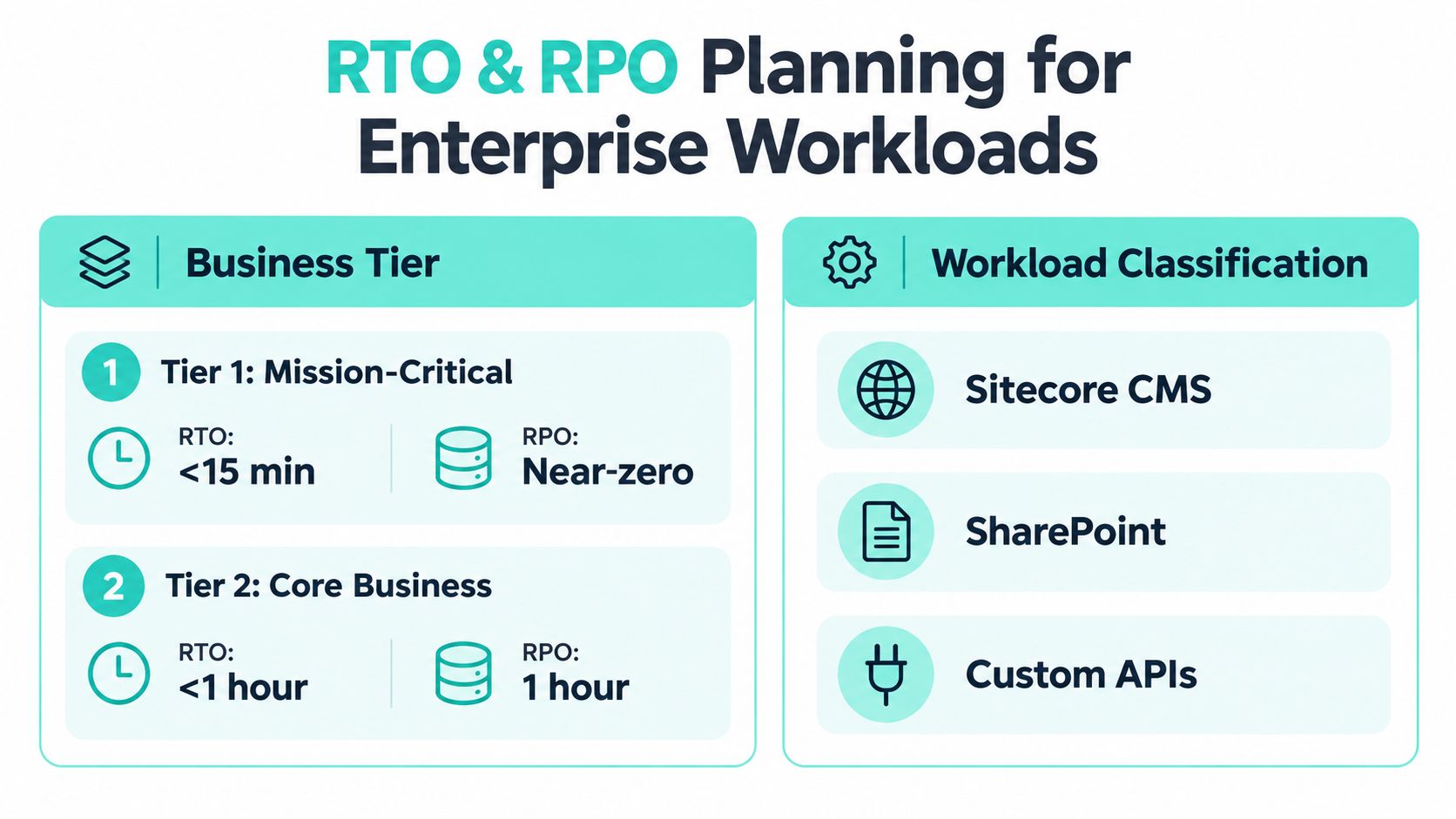
Start with business outcomes, then map them to technical recovery behavior. Recovery time objective, or RTO, is how long a service can remain unavailable. Recovery point objective, or RPO, is how much recent data the business can afford to lose. Treating both as platform-wide values creates bad designs because a public content delivery tier, an authoring environment, search, DAM, and identity often have different tolerances.
Classify the platform before choosing protection
A useful classification separates the experience into recoverable service groups:
- Delivery services need traffic restoration, application startup, cache behavior, and content availability.
- Authoring services need secure editor access, publishing operations, scheduled tasks, and integration health.
- Data services include Azure SQL, storage, indexes, forms, workflow state, and custom APIs.
- Identity and control services include authentication, certificates, Key Vault references, monitoring, and deployment access.
Then ask two questions for every group. What must be available first, and what data must exist when it comes back? A marketing site may tolerate a temporary publishing pause while maintaining delivery. A transactional integration may require a much tighter data objective. A SharePoint intranet might prioritize document access, employee authentication, and search over less critical workflow automation.
Match objectives to Azure recovery methods
Microsoft's Azure SQL guidance gives a clear technical distinction. Zone-redundant high availability is typically under 30 seconds RTO with 0 RPO, while failover groups or active geo-replication are typically under 60 seconds RTO, with RPO dependent on the last replicated changes. Geo-restore is usually measured in minutes or hours for both RTO and RPO, because recovery depends on backup size and storage replication (Microsoft's Azure SQL business continuity guidance).
| Recovery Option | Typical RTO | Typical RPO |
|---|---|---|
| Zone-redundant high availability | Under 30 seconds | 0 |
| Failover groups or active geo-replication | Under 60 seconds | Depends on last replicated changes |
| Geo-restore | Minutes or hours | Minutes or hours |
These figures are Azure SQL benchmarks, not a promise that a complete Sitecore or SharePoint experience will recover in the same time. Application startup, DNS propagation, dependency checks, quota availability, and validation can dominate the recovery time objective.
Use replication when the business needs a fast recovery point and controlled failover. Use backup when the business needs historical retention, protection from corruption or accidental deletion, and a recovery path that isn't tied to the latest replicated state. A restore-only design doesn't satisfy a sub-hour objective just because the database backup exists. For backup planning, document retention, restore scope, and recovery ownership in the same way you would for Microsoft SQL Server backup planning.
Designing Azure Site Recovery for Sitecore and SharePoint Estates
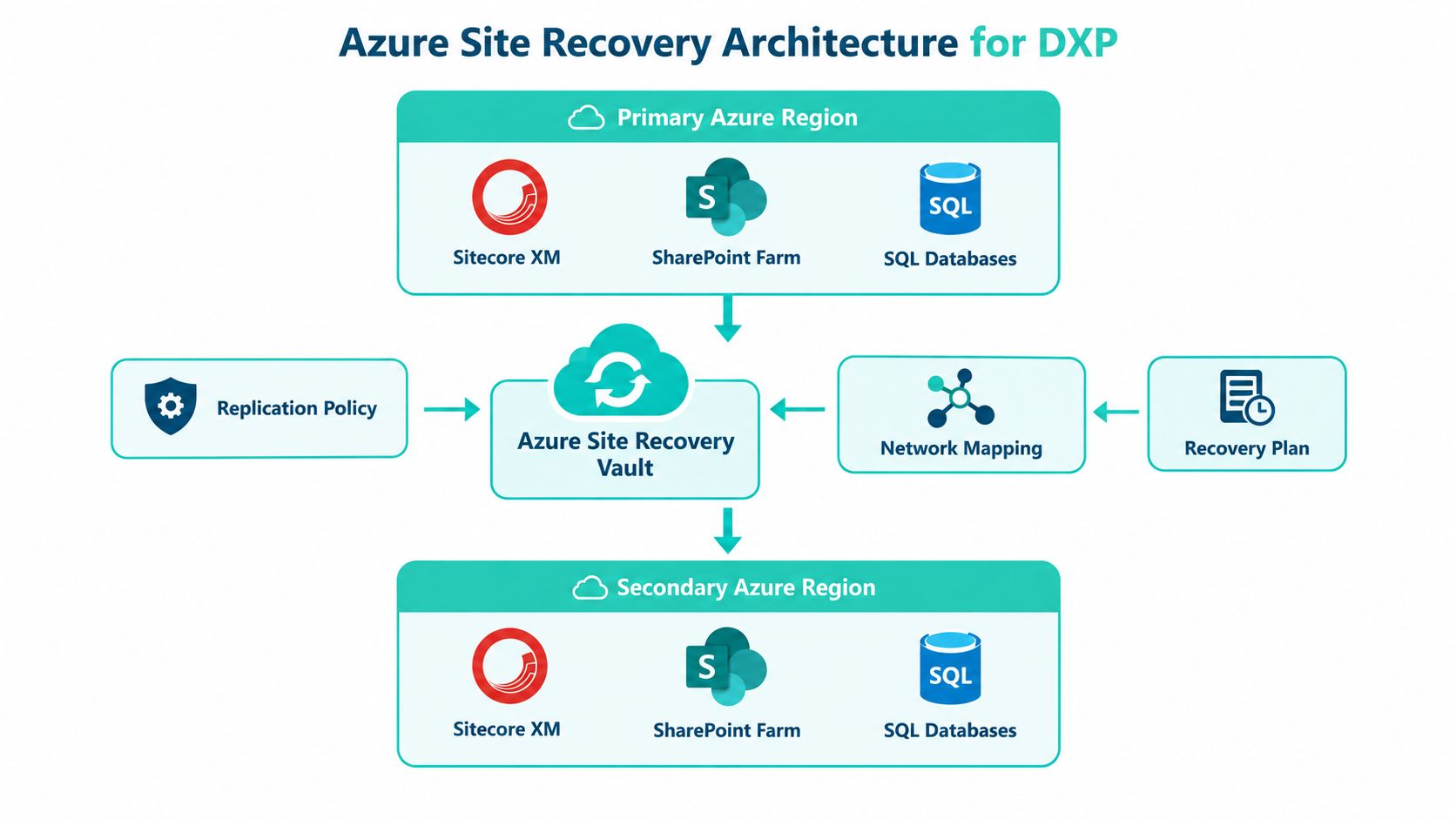
The architecture should begin with the estate map, not the Recovery Services vault. List every Sitecore and SharePoint role, then map its network, data, identity, storage, integration, and traffic dependencies. Sitecore's Azure Managed Cloud architecture includes Azure Front Door with global traffic routing and WAF, Azure Kubernetes Service for CD, CM, and Identity roles, Azure SQL Elastic Pools, Key Vault, Storage, Automation, and Container Registry (Sitecore Managed Cloud architecture).
Choose the recovery topology deliberately
Azure's hybrid BCDR material states that Azure supported 38 regions at the time of publication and contrasts that with VMware's 11 regions. Microsoft also describes Azure as having the largest regional footprint among major clouds in that material (Microsoft hybrid business continuity and disaster recovery solutions). That footprint makes recovery-focused, active-passive designs practical for organizations operating across the USA, Europe, and the Middle East.
Region selection still involves trade-offs:
- Latency: Choose a recovery location that supports acceptable access for the markets that matter most.
- Sovereignty: Confirm that data movement and recovery storage satisfy local obligations.
- Capacity: Check target-region quotas and supported VM families before an incident.
- Isolation: Keep the recovery network sufficiently separate to prevent a shared failure.
- Operational parity: Reproduce routing, security controls, private connectivity, and observability.
For Azure-to-Azure protection, configure the target region, Recovery Services vault, recovery resource groups, virtual network mapping, subnets, network security controls, availability settings, and target compute characteristics explicitly. Microsoft's deployment planner documentation frames planning around 15, 30, and 60 minute RPO targets, while Site Recovery SLA language frames a two-hour RTO for protected instances in on-premises-to-Azure and Azure-to-Azure scenarios (Azure Site Recovery deployment planner guidance). Those service boundaries don't replace application testing.
Sequence Sitecore and SharePoint recovery
A practical recovery plan starts with shared platform services, then brings up data, application roles, and traffic. For Sitecore Managed Cloud, validate how AKS workloads reconnect to Azure SQL Elastic Pools, Key Vault, Storage, Front Door, and supporting automation. For SharePoint, map the farm roles and dependent services to Azure Infrastructure Services, then verify authentication, content databases, search, and custom integrations.
An estate using headless Sitecore, Next.js, or Azure microservices needs the same discipline. Each service must have a recovery owner, a target location, a health signal, and a defined place in the runbook. Architectural decomposition can improve isolation, but it also increases the number of dependencies that must be recovered and tested, which is why Azure microservices architecture planning should include failure paths rather than only deployment paths.
A useful design checklist includes:
- Source and target region selection
- Vault ownership and access control
- Network and subnet mapping
- Recovery order and dependency groups
- Target capacity and quota validation
- Database replication or restore method
- Front Door and WAF traffic behavior
- Key Vault, certificates, and identity readiness
- Search, storage, queues, and external API dependencies
- Failback conditions and post-incident re-protection
Building Layered Backup and Replication Strategies
Replication and backup solve different failure problems. Site Recovery helps move protected compute and its disks to a recovery location. It doesn't replace point-in-time restoration, retention policy, immutable protection, or a clean recovery path after data corruption.
For a Sitecore platform, separate the protection model into compute, data, assets, configuration, and operational state. Replicate workloads that need rapid regional startup. Back up databases, media, configuration exports, deployment artifacts, and platform settings so the team can recover from accidental changes or a compromised current state. SharePoint estates need the same separation across farm data, documents, custom solutions, workflow definitions, and identity-dependent configuration.
A layered model for DXP protection
- Compute replication: Use Azure Site Recovery for eligible virtual machines and recovery groups where regional failover is required.
- Database protection: Select Azure SQL high availability, geo-replication, failover groups, or geo-restore according to the RTO and RPO decision already made.
- Storage protection: Protect media libraries, exports, packages, and configuration files with the appropriate backup and cross-region replication controls.
- Secrets and certificates: Maintain recoverable, access-controlled copies and test that recovery identities can retrieve them.
- Application configuration: Version infrastructure, environment settings, deployment definitions, and integration mappings outside the production runtime.
- Historical recovery: Retain backups long enough to handle corruption, deletion, ransomware response, and audit requirements.
A replica can faithfully reproduce a bad state. Backups give the recovery team a way to move backward.
Avoid overlapping mechanisms without defining ownership. If database replication promotes a secondary while the application still points to the primary, the failover can create confusion instead of continuity. If a restored media store differs from the database state, Sitecore may reference assets that aren't present. If SharePoint workflows recover without their connectors or permissions, document access may work while business processes fail.
The practical answer is a layered recovery contract. For each component, record the authoritative source, replication method, backup method, retention requirement, restore owner, validation test, and failure dependency. Teams managing an outsourced or continuously operated model can compare this approach with managed disaster recovery services, particularly when runbook ownership and controlled drills need to sit outside the application team.
Automating Failover Testing and Recovery Validation
A failover test is successful only when users can complete representative work. Starting a VM proves that Azure can create a VM. It doesn't prove that Sitecore can publish, that a personalized experience can retrieve its data, that SharePoint search works, or that a document workflow can reach its downstream service.
Microsoft's disaster recovery guidance treats recovery as an end-to-end process involving communication, secondary infrastructure preparation, data integrity checks, application recovery, traffic cutover, and post-incident closure (Microsoft Well-Architected disaster recovery guidance). Build the runbook around those outcomes.
Put recovery actions in the right order
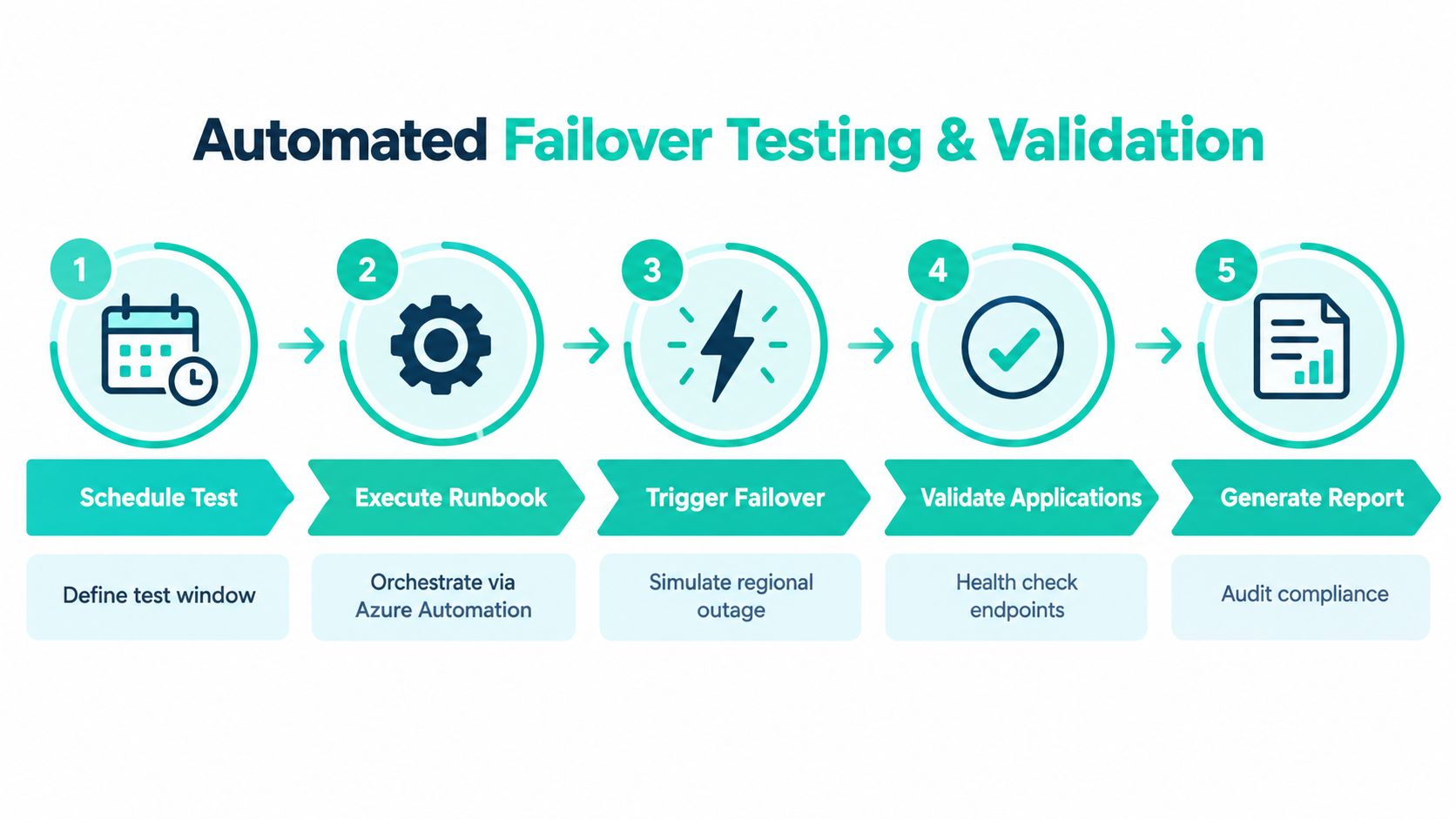
A reliable runbook normally separates preparation, failover, validation, and closure:
- Prepare the test. Define the window, participants, user journeys, expected evidence, rollback conditions, and communication message. Use an isolated recovery network so the exercise doesn't compete with production traffic or create conflicting service identities.
- Recover foundational services. Start identity, secrets, certificates, network connectivity, database targets, storage, and monitoring. Confirm access before allowing application roles to proceed.
- Recover application tiers. Bring up Sitecore CM before testing publishing, then validate CD and rendering behavior. For SharePoint, check farm availability, authentication, content access, search, SPFx components, and connected workflows.
- Cut over traffic safely. Update Front Door behavior, load-balancing rules, application endpoints, and any service aliases through controlled automation. Don't treat DNS as the only cutover task.
- Validate and report. Run health checks, synthetic journeys, content publication tests, document retrieval tests, integration checks, and data integrity reviews. Record failures, owners, remediation dates, and evidence.
Automate repeatable work, not judgment
Azure Automation, deployment pipelines, scripts, and policy checks can handle predictable actions such as starting recovery groups, applying target settings, checking resource health, and generating evidence. Human approval should remain around destructive actions, production traffic changes, data reconciliation, and final business acceptance.
Application validation needs more than a status endpoint. Test a Sitecore visitor journey, a content editor login, a publish operation, an image retrieval request, and a search result. For SharePoint, test an employee sign-in, document access, search, permissions, SPFx rendering, and a representative Power Platform workflow.
Use monitoring to detect drift before the drill. An operational model built around Azure monitoring alerts should flag replication health, RPO degradation, failed jobs, storage errors, certificate expiry, quota pressure, and dependency outages.
Set honest expectations
Microsoft's deployment planner uses RPO targets of 15, 30, and 60 minutes, and Site Recovery SLA language references a two-hour RTO for protected instances. Newer Azure-to-Azure support for certain NVMe-enabled Generation 2 VM families also illustrates why VM compatibility must be checked rather than assumed. The application RTO may be longer because the team still has to rebuild dependencies, obtain capacity, validate data, and perform traffic cutover.
Validation standard: If the business owner can't complete a critical journey in the recovery environment, the test hasn't passed.
Keeping Your Azure Recovery Plan Proven and Ready
A recovery plan decays whenever the platform changes. Sitecore teams add AI workflows, copilots, personalization rules, content models, integrations, and delivery components. Sitecore describes its current platform as AI-enabled and positions AI orchestration, generative copilots, and brand-aware AI across digital experience operations (Sitecore platform). Its Sitecore Stream capabilities extend across CMS, digital asset management, customer data, and related marketing workflows (Sitecore Stream AI capabilities). Each addition can create a new recovery dependency.
SharePoint changes just as quickly through SPFx releases, permissions, document structures, Power Platform flows, and Microsoft 365 integrations. A runbook that worked before a platform release may still start resources while failing the user journeys that matter.
Govern readiness as part of delivery
Keep the plan operational with a small set of habits:
- Version runbooks with the platform: Update recovery order, ownership, scripts, and validation journeys alongside application releases.
- Drill non-disruptively: Use isolated test failovers to prove recovery without interrupting production.
- Review target capacity: Recheck quotas, region availability, VM support, network mappings, and security controls.
- Audit dependencies: Include new AI services, search, personalization, APIs, storage, identity, and content workflows.
- Track evidence: Store test results, failed checks, remediation decisions, and business sign-off.
- Practice communication: Define who declares an incident, who approves traffic cutover, and who communicates customer and employee impact.
The priority order is straightforward. First, map dependencies and establish defensible RTO and RPO objectives. Next, implement replication and layered backup. Then automate recovery actions and run a controlled drill. Finally, make every material Sitecore or SharePoint change update the recovery model.
Disaster recovery on Azure becomes credible when the platform team can demonstrate recovery, not merely describe it. Treat failover as a maintained product capability, with owners, tests, observability, and acceptance criteria.
Kogifi helps enterprise teams stabilize and protect Sitecore, SharePoint, and other DXP estates through dependency mapping, runbook authoring, controlled failover drills, monitoring, and recovery services. Visit Kogifi to discuss an Azure recovery assessment and turn an unproven plan into a tested operating capability.