


You've probably got an intranet already. The harder question is whether employees use it before opening Teams, searching email, or asking a colleague for the same policy they couldn't find last week. That gap rarely comes from a missing web part. It usually comes from weak information architecture, unclear ownership, stale content, and an experience that doesn't connect with the way people work.
The strongest SharePoint intranet solutions treat SharePoint Online as part of a broader digital experience system. They combine governed content, targeted communication, Microsoft 365 workflows, and an employee experience that feels as deliberate as a customer-facing platform. That's where Sitecore AI and DXP expertise adds a useful perspective: personalization and orchestration matter internally too, but they only work when the underlying content and governance are reliable.
Table of Contents
What a Modern SharePoint Intranet Actually Looks Like in 2026
An employee starts the morning on a personalized SharePoint home site. A curated HR news post answers a question about benefits. A Viva Connections dashboard card surfaces pending approvals. A department hub provides the latest report template, without forcing the employee to browse a maze of folders.
That experience defines a modern intranet more accurately than a feature checklist. SharePoint Online, Viva Connections, Teams, Microsoft Search, and workflow surfaces work together as an employee-facing layer across Microsoft 365. Microsoft describes the modern intelligent intranet as a hub-and-site architecture supported by usage analytics, including Microsoft 365 analytics and SharePoint hub and page analytics. The Microsoft intelligent intranet overview also connects SharePoint with Viva Engage, OneDrive, Stream, and business-process automation.
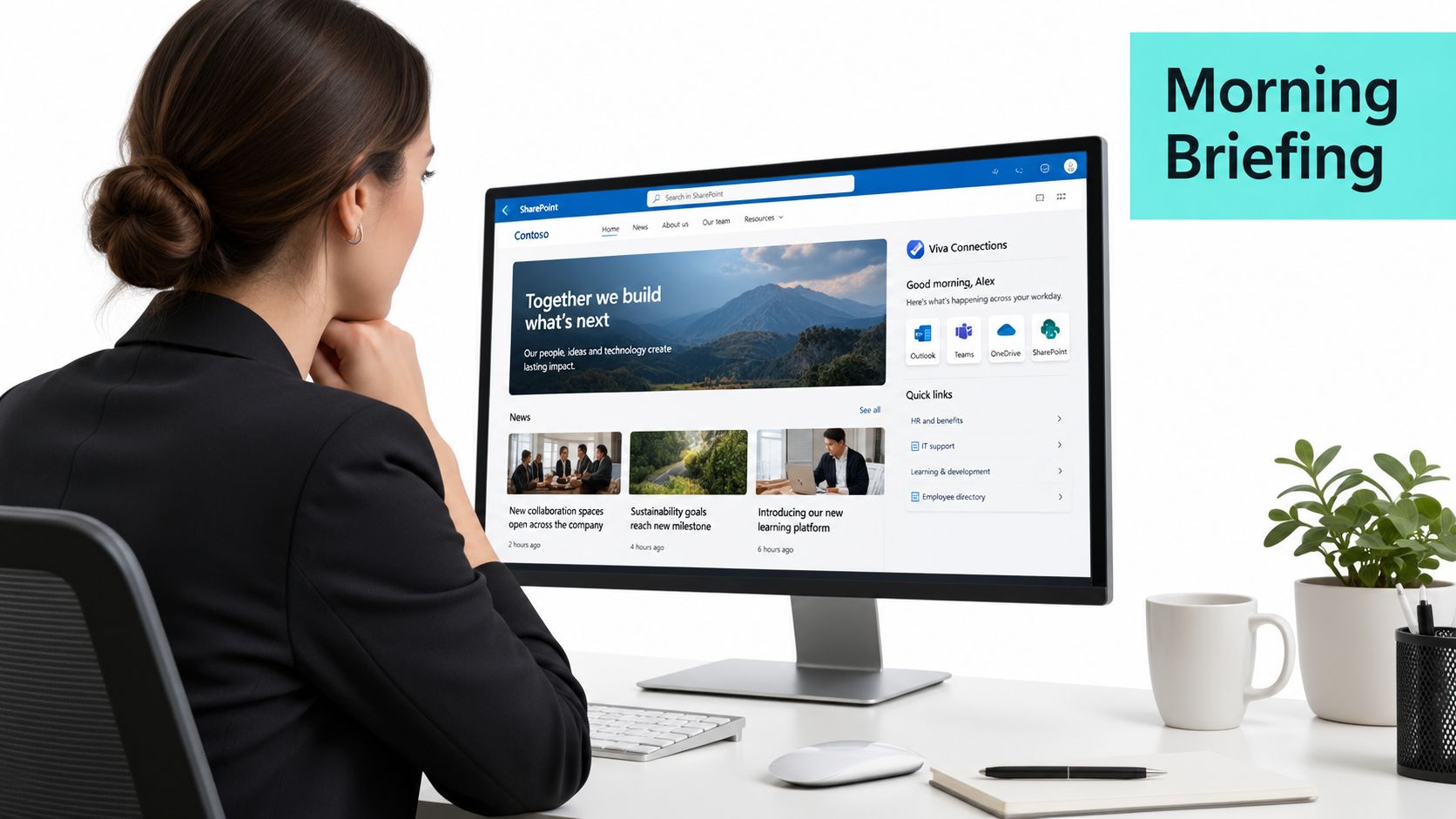
A practical implementation has four characteristics:
- A governed hub-and-spoke structure: Employees can move from a global home site to a function, region, or topic without encountering unrelated navigation.
- Audience-aware experiences: News, quick links, dashboards, and resources reflect a person's role, location, or business area.
- Integrated actions: Power Platform forms and approvals appear where work begins, rather than sending employees to disconnected request systems.
- Accessible content by default: Page structure, headings, contrast, keyboard access, and alternative text are part of delivery, not a late compliance check.
It's not a glorified file share. It's not a static publishing portal. It isn't an isolated intranet island that happens to use Microsoft branding. The useful test is daily behavior: can an employee find trusted information, understand what matters, and complete a common task without leaving the experience?
Microsoft's SharePoint intranet planning guidance puts priorities, personas, governance, and a pilot scenario ahead of broad rollout. That sequence aligns with the practical lessons behind building an internal portal for employees. Start with a meaningful employee journey, then design the architecture around it.
From 2001 File Shares to the Intelligent Intranet
SharePoint's longevity explains why it remains central to enterprise intranets. Microsoft marked 25 years of SharePoint in 2026, tracing the platform's origin to 2001 and describing its progression from collaboration software into a foundation for Microsoft 365 intranets in its 25-year SharePoint history.
The platform's early value was practical. SharePoint gave organizations a structured alternative to unmanaged file shares and document collaboration tools. Later releases added publishing capabilities, richer portals, service applications, personal workspaces, search, and integration with OneDrive. Each phase addressed a limitation that enterprise teams had already encountered: content was difficult to publish, collaboration was fragmented, or employees couldn't discover information across repositories.
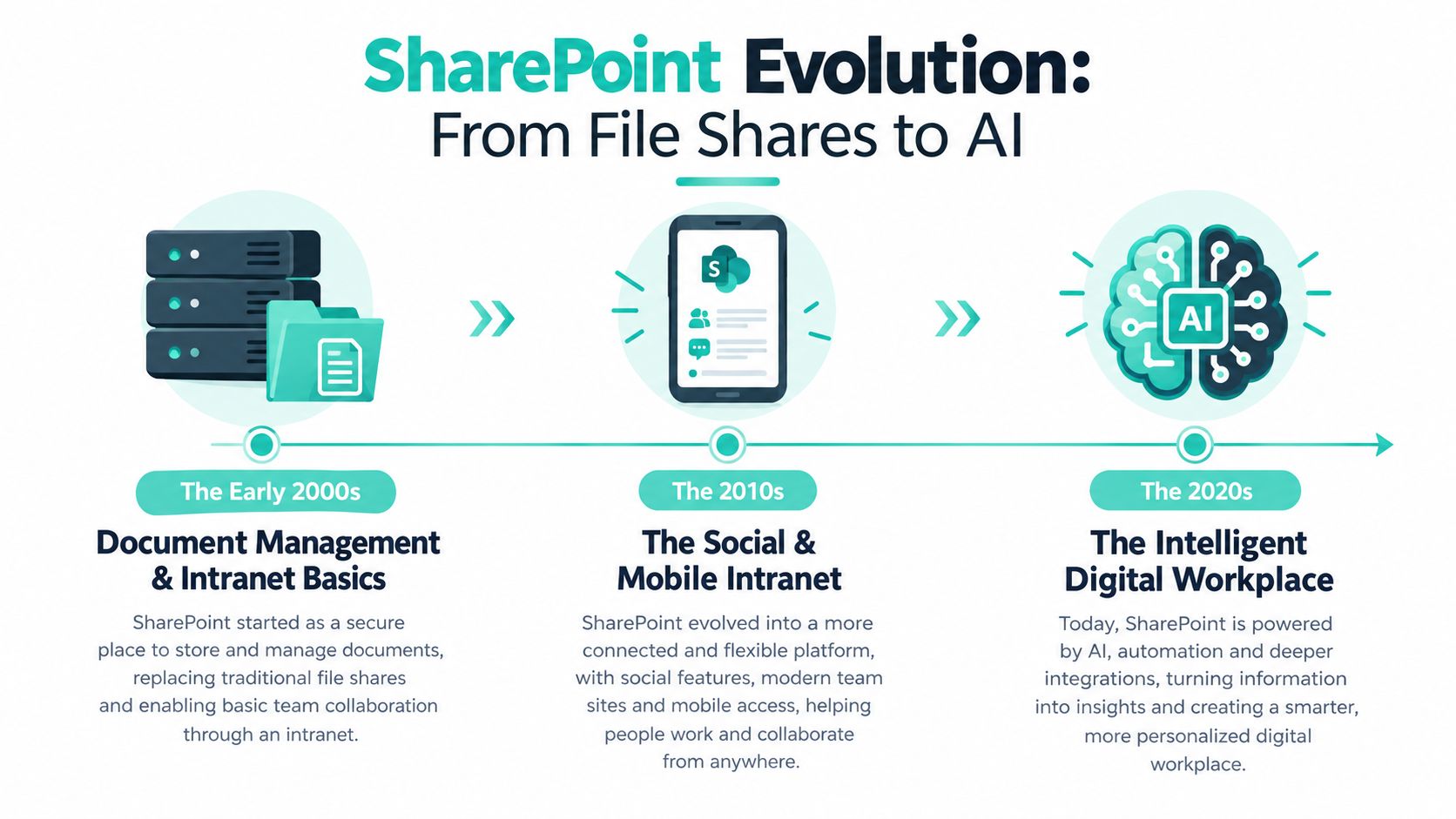
What each platform phase changed
- The early 2000s: Document libraries and collaboration sites gave organizations a governed place for shared content.
- The publishing era: Publishing sites made SharePoint a credible corporate portal, not only a team workspace.
- The service and search era: Service applications, personal sites, and improved search helped connect enterprise content and users.
- The cloud era: SharePoint Online introduced continuous platform evolution, modern pages, hub sites, SPFx, and Microsoft Graph. Teams could build an experience layer that was more programmable and less dependent on traditional portal customization.
- The intelligent workplace era: Viva, Copilot, SharePoint Premium, and Microsoft 365 analytics move the intranet toward contextual discovery, employee communication, and content intelligence.
The important shift isn't a particular release feature. It's the change in operating model. An on-premises portal was often treated as a project with a launch date. SharePoint Online behaves more like a continuously evolving service, so teams need product ownership, analytics, content operations, and release discipline.
That history also explains why how intranets work matters more than selecting an attractive homepage template. Modern SharePoint can expose APIs, support custom components, connect business processes, and personalize content, but the organization still has to define what belongs where and who maintains it.
Core Architecture Patterns for SharePoint Intranet Solutions
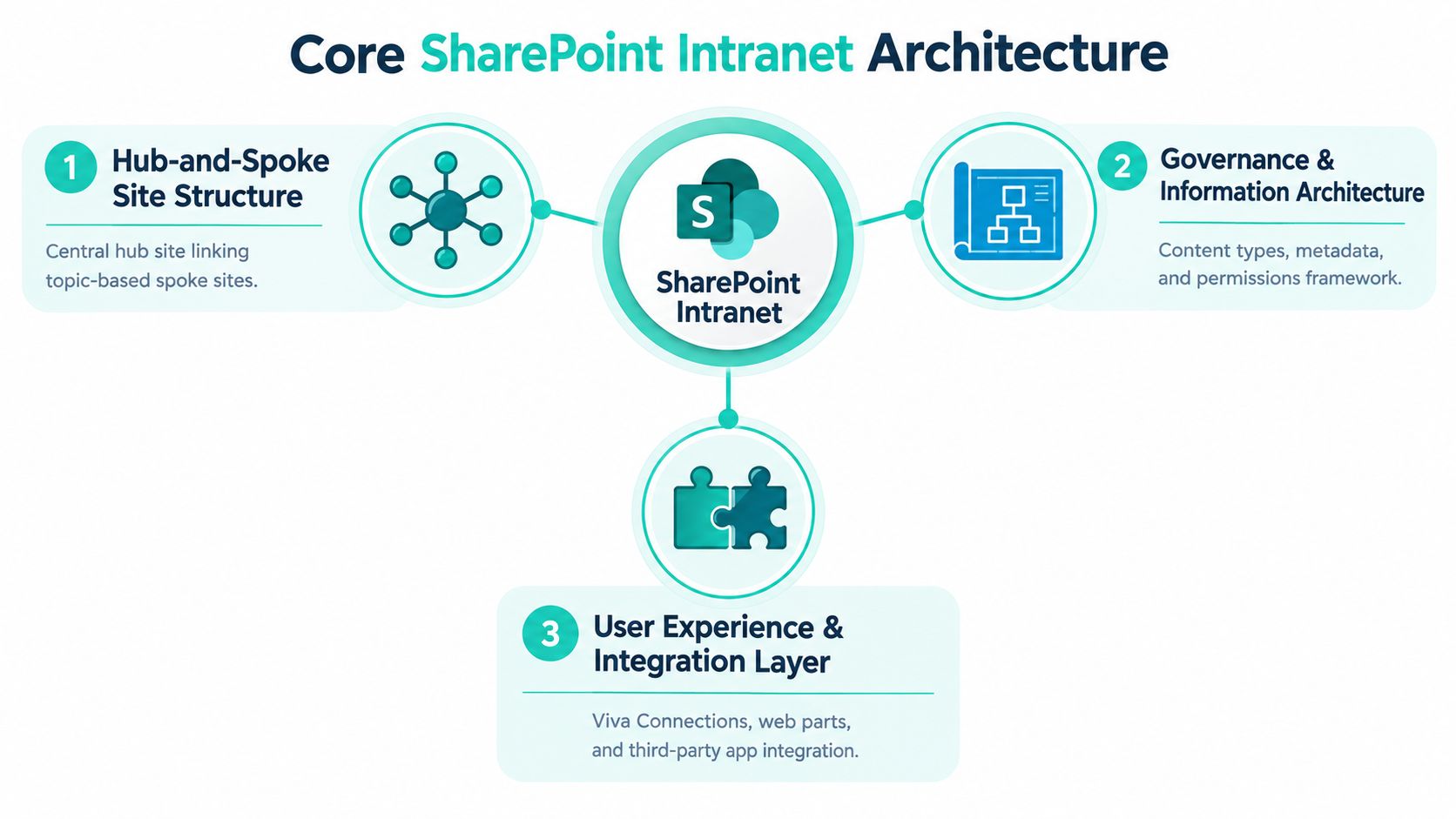
A serious SharePoint intranet solution has three connected layers. The first organizes sites, the second extends the user experience, and the third connects pages to operational work.
Hub-and-spoke site architecture
A central home site or hub provides orientation. Spoke sites hold content for functions, regions, projects, or knowledge domains. Hub association can provide shared navigation, related news, consistent branding, and a recognizable information scent without forcing every department into one oversized site collection.
Hub sites work well when the organization has clear ownership and a limited number of meaningful domains. They work poorly when every team creates a hub, navigation becomes duplicated, or association is treated as a substitute for taxonomy. Multi-hub models make sense for complex enterprises, but they require deliberate cross-hub search, naming, metadata, and lifecycle rules.
SPFx as the bespoke UX layer
Stock web parts are often enough for news, links, documents, events, and standard landing pages. They aren't enough when the intranet needs a staff directory with richer filtering, a role-aware application launcher, a complex status view, or a custom interaction that must behave consistently across SharePoint and Viva Connections.
SharePoint Framework, or SPFx, provides web parts, extensions, and Adaptive Card Extensions for Viva Connections. Teams typically build these components with React and TypeScript, package them through the tenant app catalog, and govern their deployment like any other enterprise software. The SPFx web parts guide is useful background for teams deciding where custom development adds value.
Power Platform for operational work
Power Automate handles repeatable flows such as approvals, notifications, review cycles, and provisioning. Power Apps provides forms for requests that exceed the capabilities of a standard list form. Dataverse becomes the structured data backbone when a process needs stronger relationships, business rules, or reuse across applications.
Consider an employee onboarding hub. SharePoint provides the journey and content, a Power App captures equipment or access requests, and an SPFx directory web part helps the new employee locate key contacts. The parent hub supplies branding and navigation, while Power Automate moves requests to the right owners.
The trade-off is governance. Custom SPFx code needs a maintenance owner, Power Platform solutions need environment and connector controls, and every integration adds an operational dependency. Build custom only where it removes a real employee friction point.
Governance, Taxonomy, and Adoption as Architecture
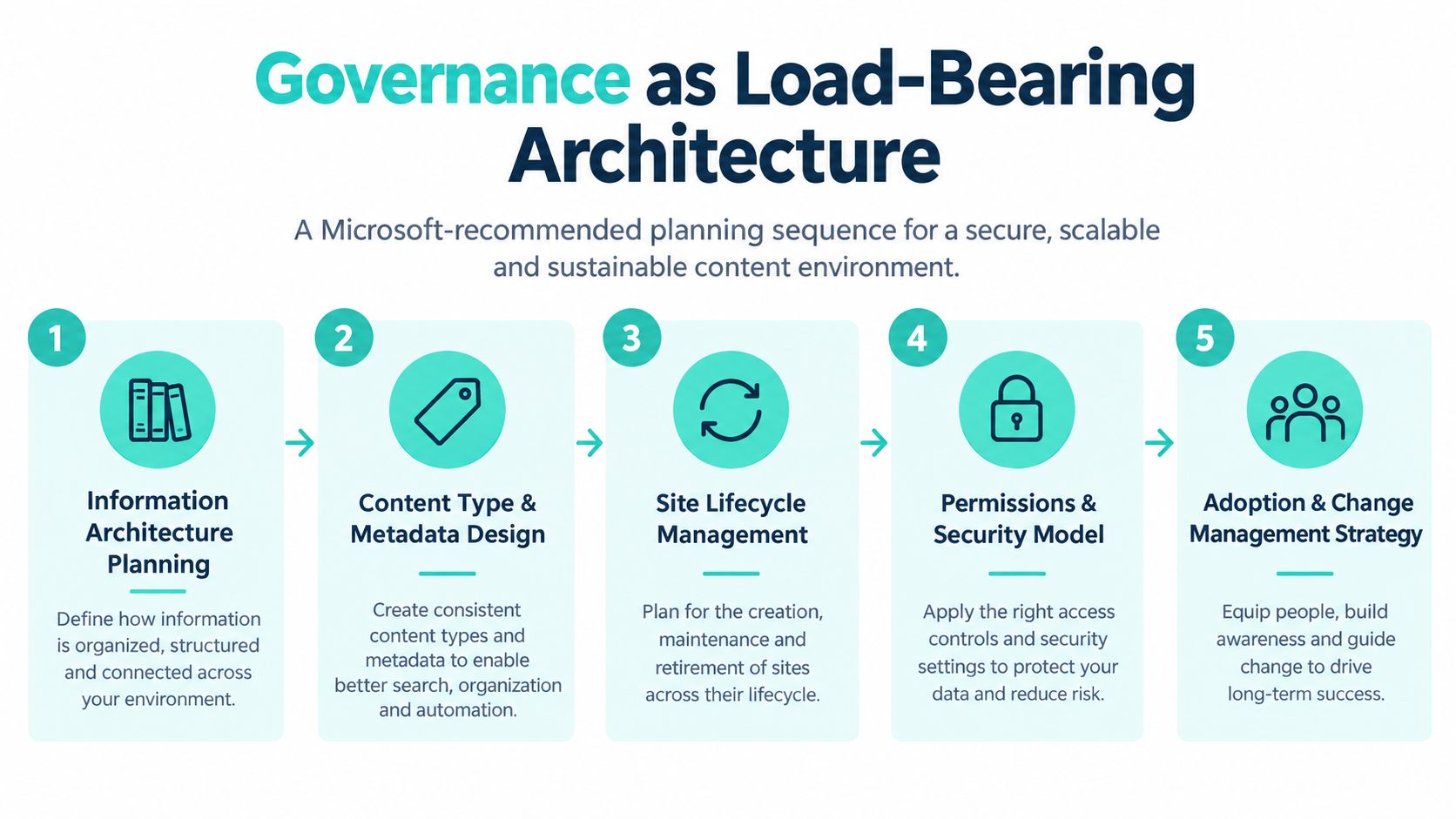
Governance is load-bearing architecture. It determines whether the intranet stays understandable after launch, when departments publish new pages, teams reorganize, and old content reaches the end of its useful life.
Microsoft's recommended planning sequence begins with organizational priorities, audience personas, governance, and a focused pilot scenario. In practice, that sequence should become a delivery framework:
- Plan the information architecture: Define the major employee journeys, content domains, navigation labels, and search expectations.
- Design content types and metadata: Decide how policies, news, procedures, templates, and knowledge articles differ.
- Set site and content lifecycles: Assign owners, review dates, archival rules, and escalation paths.
- Define permissions and security: Choose who can read, contribute, approve, and administer each content area.
- Measure adoption and improve: Use analytics, search behavior, feedback, and user research to identify friction.
Taxonomy decides whether navigation survives
A flat taxonomy can be easier to explain initially, but it often becomes a long list of competing labels. A hierarchical taxonomy can express relationships between business areas, regions, and subjects, but it needs stewardship so that terms don't multiply without control.
The Managed Metadata Service and controlled term sets help teams standardize labels across libraries and sites. In a multi-hub environment, shared terms can support consistent search refiners and content targeting, while local terms can handle genuinely local needs. The mistake is allowing every site owner to invent synonyms for the same concept.
Permissions should follow the operating model
Use SharePoint Groups or Entra ID security groups for stable access patterns. Avoid item-level permissions as a default for intranet-scale content, because exceptions become difficult to audit and maintain. Sensitive content should have a clear boundary, an accountable owner, and a documented access rationale.
Adoption signals provide the feedback loop. Review Viva Connections dashboard placement, search analytics, zero-result queries, page usage, and content freshness. If employees search for a policy and leave without finding it, the answer isn't automatically another homepage banner. It may be a metadata, ownership, or content design problem.
Practical rule: If nobody owns the term set, the navigation, and the review cycle, governance exists only in a document.
Migrating Legacy Intranets to SharePoint Online
Migration isn't a single technical exercise. The right approach depends on whether the source is a file share, classic SharePoint, or a third-party intranet with its own identity and content model.
| Source System | Recommended Tool | Typical Timeline | Main Risk |
|---|---|---|---|
| File shares | SharePoint Migration Tool and SPMT PowerShell batching | Qualitative planning depends on volume and complexity | Recreating folder chaos in the cloud |
| Classic SharePoint | SharePoint Migration Manager with ownership mapping | Qualitative planning depends on customization and redesign | Moving unsupported structures without modernization |
| Third-party intranet | Content extraction, taxonomy translation, and Entra ID reconciliation | Qualitative planning depends on content quality and integrations | Losing context, permissions, or ownership |
File-share migrations benefit from SharePoint Migration Tool assessment and PowerShell batching through SPMT. The common failure is one-to-one folder mapping. That approach preserves familiar paths but also preserves duplicated files, unclear ownership, and navigation built for storage rather than discovery. Use migration as a chance to classify content, remove obsolete material, and redesign high-value journeys.
Classic SharePoint requires a different decision. Some sites belong in communication sites, some need team-site collaboration, and others should associate with a hub. SharePoint Migration Manager can support movement, but it won't decide whether a classic publishing structure still makes sense. Site ownership mapping should happen before content moves, not after users discover that nobody can publish or approve updates.
Third-party platforms such as Igloo, Jostle, or older Sitecore implementations add another layer. Teams need to extract content, translate taxonomies, reconcile identities against Entra ID, and review integrations that may not have direct SharePoint equivalents. Content scraping can move text, but it doesn't automatically preserve meaning, permissions, personalization, or workflow state.
For a mid-sized enterprise, a realistic planning benchmark is 8 to 16 weeks, but the actual schedule depends on scope, content quality, customizations, and decision speed. A parallel-running period helps protect employees while search, links, redirects, permissions, and ownership are validated. The practical guidance in SharePoint migration services reflects the need to treat migration as redesign, not transportation.
Where SharePoint Intranets Meet the Broader DXP Stack
A SharePoint intranet is often the employee-facing part of a wider digital experience platform. Treating it as a sealed internal project creates experience debt, because the enterprise later has to reconcile duplicated content, different taxonomies, disconnected search experiences, and conflicting brand rules.
Sitecore's current positioning centers on SitecoreAI as a composable, cloud-native digital experience platform with AI workflows, generative copilots, and brand-aware AI across the content-experience lifecycle, as described on the official Sitecore platform page. That framing is relevant to intranet programs because the same operating questions apply internally: who creates content, how is it enriched, where is it reused, and how does the right audience receive it?
SharePoint may own employee policies, internal procedures, and collaboration content. Sitecore may manage customer-facing experiences, product storytelling, or commerce journeys. APIs, Microsoft Graph connectors, embedded web parts, and shared content models can connect those environments when there's a genuine business case. The goal isn't to force every asset into one platform. It's to avoid making employees and customers deal with contradictory information.
Different audiences need different personalization
Viva Connections and SharePoint audience targeting can shape the employee experience around role, location, or function. Customer-facing Sitecore AI capabilities address behavioral signals and digital experience orchestration across external channels. Those approaches shouldn't be conflated. Employee personalization should respect organizational context, permissions, and purpose, while customer personalization usually centers on interaction history and journey behavior.
Power BI dashboards and Power Apps forms extend intranet pages into operational tooling without requiring employees to leave Microsoft 365. The broader DXP architecture can then connect operational signals to customer experience processes where appropriate.
Sitecore's portfolio also illustrates the value of orchestration. A Microsoft customer story positions XM Cloud, Content Hub, and OrderCloud as a connected portfolio, with XM Cloud supporting personalized digital experiences, Content Hub centralizing assets through DAM capabilities, and OrderCloud providing an API-first commerce engine. The Sitecore portfolio customer story links those capabilities to content velocity, orchestration, and monetization.
Choosing the Right Partner for Your SharePoint Intranet
Choosing a SharePoint intranet partner is a multi-year capability decision, not a purchase of screens and templates. The platform will evolve, organizational structures will change, and the intranet will need new integrations, components, migrations, and governance decisions after launch.
A credible partner should demonstrate implementation depth rather than relying on polished mockups. Ask to see a live hub site with real SPFx extensions. Request the governance template they use with clients. Identify the architects who will run workshops, make architecture decisions, and remain accountable during delivery.
The hardest questions are concrete:
- Can the partner show a working hub site with production-style SPFx components?
- Does it have a published governance playbook covering taxonomy, ownership, permissions, and lifecycle?
- Will the architects who sell the engagement deliver the architecture?
- Can the team explain a migration from a legacy platform, including what it chose not to migrate?
- How does the partner handle accessibility, multilingual content, analytics, and post-launch support?
A design-first vendor may produce an attractive homepage while leaving search, metadata, ownership, and review cycles unresolved. An offshore-only delivery model may reduce workshop quality when stakeholder alignment, change management, and local content nuance are central to success. Neither concern is about geography alone. It's about whether the delivery model supports the decisions the intranet requires.
| Evaluation Criterion | What to Look For | Red Flag |
|---|---|---|
| SPFx capability | Demonstrable React and TypeScript components, extensions, and deployment controls | Only standard web parts and screenshots |
| Governance | A working playbook for taxonomy, permissions, lifecycle, and ownership | Governance appears as a final handover document |
| Architecture leadership | Named solution architects involved from discovery through delivery | Senior experts disappear after the proposal |
| Migration experience | Evidence of assessment, redesign, reconciliation, and parallel running | One-to-one copying presented as modernization |
| Microsoft 365 integration | Viva Connections, Teams, Power Platform, Search, and analytics patterns | SharePoint treated as an isolated CMS |
| DXP perspective | Ability to connect employee experience with Sitecore, AEM, APIs, and shared content operations | Intranet decisions ignore the wider experience estate |
| Support model | Clear ownership for upgrades, monitoring, incidents, and optimization | Launch is treated as the end of the engagement |
Sitecore's product ecosystem also has operational mechanics that experienced DXP teams understand. Sitecore's order definitions describe Content Hub's Video Indexing AI Tool, which extracts metadata from video assets, alongside measurable delivery concepts such as asset bandwidth and storage. That usage-aware mindset translates well to SharePoint governance, where storage, search quality, custom code, automation runs, and ownership all need operational attention.
Recent recognition also shows that Sitecore's AI-enabled DXP work remains active in the market. Sitecore's 2025 CMSWire IMPACT award announcement confirms recognition for Best Customer Experience Transformation on April 9, 2025, while its broader 2025 Digital Impact Awards materials reflect continuing product and market activity.
Kogifi delivers Sitecore, Adobe Experience Manager, and Microsoft 365 solutions, including SharePoint Online intranets built with SPFx, Power Platform automations, and Microsoft 365 integrations. That combination is relevant when an organization needs its employee portal to fit a wider composable DXP rather than becoming another disconnected estate.
SharePoint intranet solutions succeed when teams design the operating model as carefully as the interface. Kogifi can help assess your current architecture, shape a governed SharePoint Online intranet, and connect it with Sitecore AI and the wider DXP stack. Visit Kogifi to discuss your intranet, migration, or modernization priorities.