Only 13% of employees use their intranet daily, while 31% never do, and that should change how you think about an internal portal for employees. If the portal is just a news page, adoption will stay flat. If it becomes the place where people complete HR, IT, and policy tasks in one secure workspace, it starts to earn a place in the workday.
The best portals behave like an employee service layer, not a document dump. They centralize HR services, documents, payroll, benefits, training, and internal communications in a personalized dashboard, and the true value shows up in user adoption rate, document access frequency, help tickets reduced, and average time to complete HR requests. That's why platform choice, governance, and integration design matter more than visual polish.
Table of Contents
Why Most Employee Portals Fail at Adoption
The adoption gap is the first thing leaders should face. A portal can be technically sound and still miss the mark if employees can't find what they need quickly or if the experience feels like another layer of corporate clutter. The baseline numbers are brutal, 13% daily usage and 31% never using the intranet at all, which tells you the core problem isn't launch, it's usefulness and habit formation. Deel's employee portal overview frames the modern portal as a secure, centralized workspace, and that definition matters because it shifts the design goal from publishing to completion.
A lot of portals fail because they're built like internal magazines. Employees don't log in to admire the homepage, they log in to request leave, download a form, check benefits, or find a policy without asking HR. When the experience is fragmented across email chains, file shares, and separate systems, the portal becomes one more place to search, not the place to finish work.
Practical rule: if a portal doesn't reduce effort, it will usually lose to email, chat, or a bookmarked app.
The KPI set that actually matters
The measurement model should be operational, not theatrical. Monthly active users tells you whether the portal has a real audience. Self-service completion shows whether employees can finish tasks without escalation. Help ticket reduction and average time to complete HR requests tell you whether the portal is doing the work it was meant to do.
That's also why content-only dashboards underperform. A portal that merely posts company news may generate visits, but visits aren't the same as value. If employees still have to call HR, ask IT for every small task, or hunt through shared drives for documents, the portal hasn't replaced friction, it has just wrapped it in a new interface.

The best way to think about the portal is transactional. That doesn't mean every page should become a form, it means each page should help someone complete a task or find a trusted answer with minimal effort. If your internal portal for employees is not reducing the cost of routine work for employees and HR, it's not yet a platform, it's still a brochure.
For a blunt example of what happens when portal work is treated casually, the project failure patterns discussed in this case on project failure are a useful warning. Portal teams don't fail because they can't build pages, they fail because no one owns adoption, governance, or the day-two operating model.
Core Features That Drive Portal Engagement
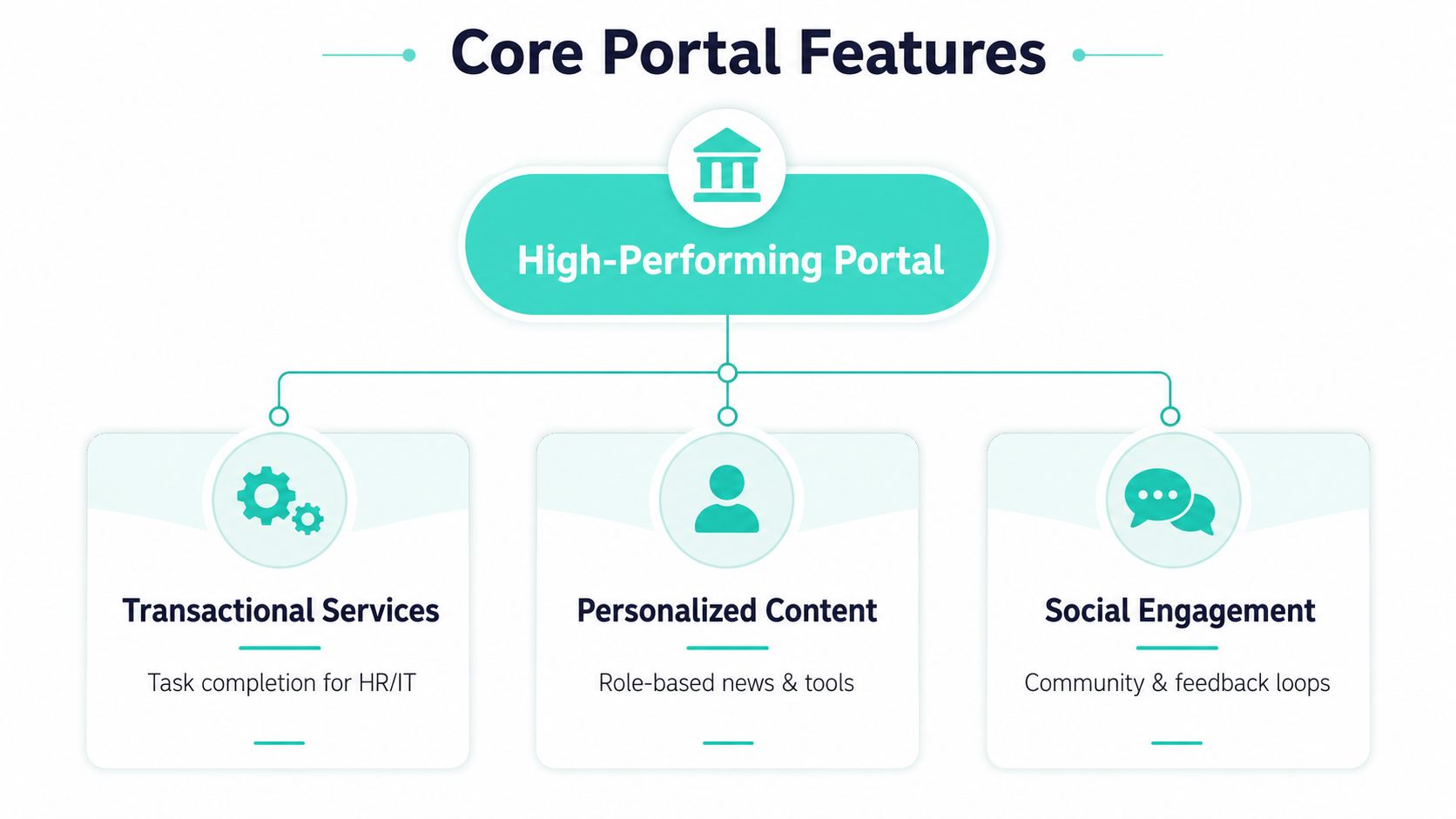
A high-performing portal starts with a clear split between content, transactions, and integrations. That separation sounds simple, yet many teams blur it and end up with a homepage that tries to do everything while doing none of it well. The content layer should hold policies, news, directories, and guidance. The transaction layer should complete HR forms, time-off requests, and IT support actions. The integration layer should connect those tasks to HRIS, calendars, collaboration tools, and service systems.
One of the clearest signals for feature priorities is that 85% of employees use an intranet to access benefits and HR information, which makes employee service content more important than generic internal marketing. The intranet usage roundup also notes that 74% of employees feel they are missing out on company news, which is why communication still belongs in the portal, just not at the expense of task completion. A portal that handles practical needs and keeps people informed earns repeat use.
Information architecture that employees can move through
A workable portal usually uses global homepages, department spaces, regional pages, and project channels. That structure gives employees a way to orient themselves without forcing them to think like content owners. It also supports role-based journeys, which matters when a company has different needs for HR, finance, plant staff, and corporate teams.
The true test is whether people can find what they need without relying on tribal knowledge. Implementation guidance for intranet employee portals recommends iterating if users cannot find content in three clicks, and that advice is sound because findability drives trust. If employees have to chase links or search twice to reach a simple policy, they start bypassing the portal. For teams that are deciding between a lightweight SharePoint setup and a composable DXP, the information model matters as much as the interface, which is why SharePoint intranet development guidance should be reviewed alongside the governance model, not after it.
Frontline access needs a different design
Many portal plans still assume a desktop worker with company email and a managed laptop. That assumption breaks for frontline and deskless teams. The portal needs mobile-first access, email-free sign-in, push or SMS alerts, acknowledgment tracking, translation support, and kiosk compatibility when workers share devices or move across shifts.
A portal for office staff can survive with a browser tab. A portal for frontline teams has to behave like an operational tool.
I'd treat this as a separate audience model, not a responsive-layout afterthought. Shared devices, poor connectivity, and short breaks change how people consume content and complete tasks. If the portal does not support that reality, adoption stays skewed toward office users while the people most in need of simple self-service remain outside the system.
Comparing Platform Approaches for Enterprise Portals
Platform choice for an employee portal is a governance decision presented as a technology decision. Sitecore XM Cloud, SharePoint Online, and Adobe Experience Manager can all support an internal portal for employees, but they are built for different operating models. The right fit depends on whether the organization needs composable experience delivery, Microsoft 365 alignment, or a content-heavy enterprise estate that already sits inside the Adobe stack.
Platform Comparison for Employee Portals
| Capability | Sitecore XM Cloud | SharePoint Online | Adobe Experience Manager |
|---|---|---|---|
| Core strength | Composable delivery, AI-driven personalization, omnichannel orchestration | Native Microsoft 365 integration, quick intranet delivery, role-based sites | Content-heavy enterprise experience delivery |
| Best fit | Multinational portals with layered journeys and multiple content types | Organizations centered on Microsoft 365, Teams, and SharePoint governance | Enterprises already standardized on Adobe tools |
| Personalization | Strong session-based and historical personalization | Available through Microsoft ecosystem layers and Viva-style experiences | Supports targeted content and experience management |
| Governance model | Strong when component reuse, hub-and-spoke structures, and content ownership are defined | Strong when hub sites, communication sites, and permissions are disciplined | Strong when content operations and authoring standards are mature |
| Integration approach | Headless and composable, suitable for broader enterprise stacks | Deep Microsoft 365, Graph, and search alignment | Broad enterprise integration, especially in Adobe-centric environments |
| Multilingual structure | Effective for regional, multilingual, and multi-brand architectures | Works well with regional site patterns and permission boundaries | Strong for large-scale content operations across regions |
| Trade-off | More architecture discipline required, especially around ownership and integration | Less flexible for highly customized experience orchestration | Heavier platform footprint, stronger fit where Adobe is already strategic |
Sitecore stands out when portal teams need AI-driven personalization, content reuse across regions, and a composable model that can support multiple experiences without rebuilding the same content each time. In practice, that matters because the portal is not just a page tree, it is an orchestration layer for tasks, audiences, and content streams. SharePoint Online is usually the practical choice when the organization already works inside Microsoft 365 and needs hub sites, communication sites, and permissions that fit existing operating habits.
AEM fits best when the enterprise already has Adobe governance, content operations, and design systems in place. The core question is not which platform is stronger in the abstract, but which one is closest to how the organization already runs content. If the portal must connect tightly to Teams, OneDrive, and Microsoft search, SharePoint has a native advantage. If the portal needs a more flexible experience layer across brands, regions, and journeys, Sitecore is usually the better architectural fit.
For SharePoint-specific implementation patterns, this SharePoint intranet development article shows the site structure and delivery thinking that usually works best. The larger point is simple. Internal portals fail when platform choice happens before operating model design. The platform should reinforce governance, not force the organization to invent it after go-live.
The best portal platform is the one your teams can govern every week, not the one that looks strongest in a sales deck.
Implementation Roadmap and Governance Framework
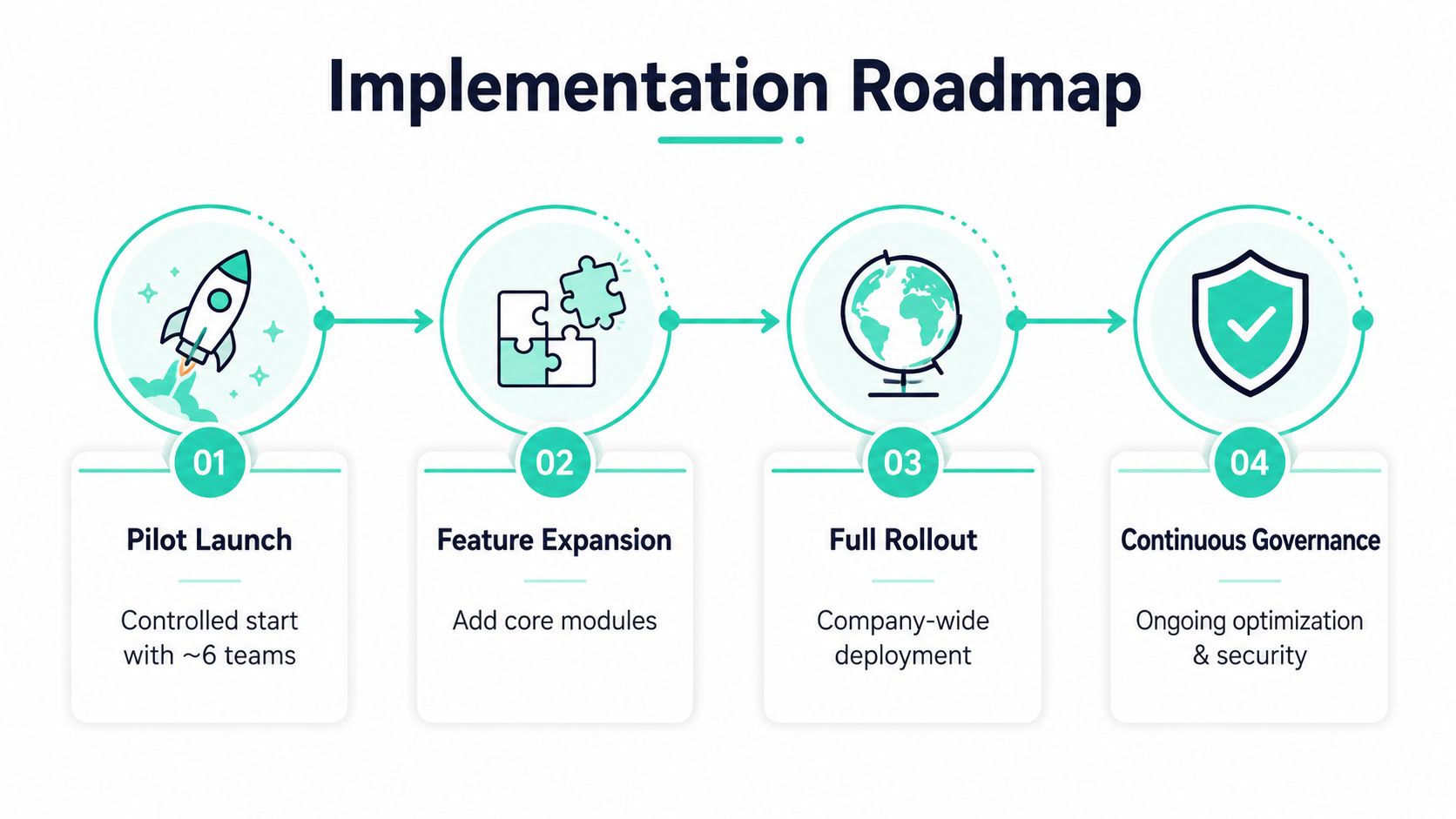
A portal launch should start narrow. A controlled pilot surfaces navigation gaps, ownership gaps, and content ambiguity before the whole company depends on the system. Personnel Today's employee portal guidance recommends beginning with around six straightforward features, and that scope holds up in practice because it keeps teams focused on utility rather than feature theatre.
Pilot scope that people will use
The first release should cover a staff handbook, employee directory, internal vacancies, company information, local resources, and basic HR self-service. Those are not flashy features, but they are the ones employees return to again and again. If the pilot cannot deliver those cleanly, extra social modules or more news blocks will not solve the underlying problem.
The pilot should then expand from observed behavior, not from leadership assumptions. If employees search for a policy repeatedly, that deserves a clearer path. If they ignore a module, remove it or move it. The portal should evolve from evidence, not preference.
Governance that prevents content decay
The governance model needs named content owners, approvers, metadata standards, and lifecycle rules for review and archival. That is the only reliable way to stop stale pages from turning the portal into a source of doubt. Unclear governance is a common reason intranets fail, and the pattern is familiar to anyone who has seen content responsibility spread across too many hands.
A strong portal program usually includes these mechanics:
- Content audits before migration. Remove duplicate pages, obsolete PDFs, and unused sections before they move.
- Structured information architecture. Group content by employee task, not by departmental politics.
- Approval workflows. Make it clear who can publish, who can review, and who can retire content.
- Lifecycle rules. Set review dates so policies, forms, and directories do not linger unchanged for years.
- Department stewardship. Assign each major content area to a business owner, not just a technical admin.
The portal stays healthy only when teams treat governance as a weekly operating rhythm. A launch plan without maintenance ownership usually creates a sharp debut followed by slow decay. A portal with stewardship, review discipline, and clear content boundaries can stay trustworthy long after the project team has moved on. For accessibility-related remediation patterns that often overlap with portal cleanup work, this accessibility remediation guide is useful because the same template, form, and content-structure problems tend to show up in both environments.
Security and Accessibility Requirements
Security is not a separate checklist for employee portals, it's part of the experience design. The portal often sits in front of sensitive HR information, so role-based permissions and authentication design have to reflect what each employee should see and what they should never see. In a SharePoint Online model, that usually means disciplined site permissions and regional boundaries. In a Sitecore model, it means content access and experience rules must be set with the same rigor as the public-facing architecture.
Accessibility has the same status. A portal that fails WCAG-aware design principles creates friction for employees with visual, motor, or cognitive needs, and it often creates friction for everyone else too. The most useful accessibility work happens in templates, navigation, forms, and reusable components, not as a late-stage audit of one page. For practical remediation patterns, this accessibility remediation guide is relevant because portal work usually fails in the same places as broader web estates, inconsistent templates, unlabeled controls, and inaccessible content structures.
Multilingual structure is an architecture decision
Multinational organizations need regional pages, translation workflows, and a clear model for content ownership across languages. This is not just a translation problem. It affects navigation, search, version control, and the way approvals move between central teams and local teams. Consileon's intranet portal evolution article is useful here because it points to hub-and-spoke patterns and role-based structures that fit multilingual governance.
Sitecore generally handles this well when the architecture is set up for multi-brand and regional delivery from the start. SharePoint can also work, especially when regional site patterns and permissions are clearly defined, but the team needs discipline around publishing and ownership. The mistake is to treat language support as a translation layer after the portal structure is fixed. If content, search, and permissions are not multilingual-aware, employees will still feel like they're using different portals stitched together.
Practical rule: security, accessibility, and multilingual delivery should be designed into the portal model before the first content migration, not patched onto it afterward.
Integration Architecture and Personalization
A portal only delivers value when it sits inside the systems employees already use. HRIS, IT service management, Microsoft 365, calendars, and collaboration tools need to appear as part of the employee workflow, not as separate destinations. If the portal cannot complete a task, it becomes a routing screen, and people will go back to the tool that finishes the job fastest.

What to integrate first
HRIS usually sits near the top of the list because it powers profile data, benefits, and employee life-cycle events. ITSM belongs next when employees need to log incidents, request access, or track service status without leaving the portal. Microsoft 365 services, especially calendars, news, and collaboration entry points, help the portal stay inside daily work instead of hovering above it.
The integration pattern matters as much as the system list. In a composable DXP, I often recommend a middleware layer or API gateway that normalizes calls from the portal to HRIS and service platforms, then caches non-sensitive data to reduce latency. A practical example is a portal widget calling an internal endpoint such as GET /employees/{id}/summary, which middleware then assembles from HR, identity, and service desk sources before returning only the fields the portal needs. That keeps the front end simple and avoids hard-coding business logic into page components.
Sitecore's advantage is that it can combine integrations with session-based and historical personalization. The portal can adapt by role, department, location, and behavior without making every user work through the same path. SharePoint's advantage is simpler integration into Microsoft 365 and the ability to use Microsoft Graph and Viva Connections as layers on top of intranet content and services. The decision usually comes down to whether the organization wants a broader composable experience layer or a more native Microsoft workplace pattern. For teams building a customer data and employee context layer together, the same integration logic often aligns with the approach described in Kogifi's enterprise customer data platform overview.
Personalization should be governed, not improvised. Role-based targeting is usually safe when it is tied to identity attributes that already exist in the directory or HR system, while behavioral personalization needs tighter guardrails because it can drift into noisy or inconsistent experiences. A manager in one region should not see the same service shortcuts as a frontline employee in another, and a local policy notice should not override global guidance unless ownership is explicit. That is where governance breaks most intranet programs, teams add targeting rules without clear review paths, then no one can explain why a user sees one page and not another.
Analytics has to track behavior, not assumptions
Portal analytics should answer practical questions. What do employees search for and not find? Which pages drive self-service completion? Where do people drop out of a workflow? What content gets opened and never acted on?
Those questions matter more than page views alone because they show whether the portal is helping people finish work. The strongest programs use analytics to refine navigation, retire dead content, and improve service paths. That closes the loop between integration quality and business value, which is where most internal portal programs either mature or stall.
Measuring ROI and Sustaining Portal Value
ROI for an employee portal should show up in operational terms. Lower HR help desk volume, faster onboarding completion, better policy compliance, and higher satisfaction matter more than a crowded homepage. The measurement model should also track adoption rate, document access frequency, self-service completion times, and content freshness, because those are the clearest signals that the portal still earns a place in daily work.
Stale content is a bigger threat than many teams expect. GovLoop's guidance on making employee portals desirable points directly to out-of-date content as a major reason employees underuse intranet sites, and that matches what usually happens in practice. When policies are old, directories are wrong, and news repeats itself, employees stop trusting the portal and start looking elsewhere for answers.
A sustainable portal program needs content retirement, ownership accountability, and migration discipline that removes dead material instead of preserving every old page. That applies when replacing legacy portals as well. If the move just copies outdated content into a new shell, the old problems travel with it. If the migration includes audits, consolidation, and clear stewardship, the new portal has a real chance to become the daily employee workspace.
Governance failures also weaken measurement. A portal can report healthy traffic while still failing employees if no one owns page quality, review cycles, or taxonomy cleanup, and teams have to watch for that gap rather than assume usage means value. Usage data needs to be paired with content age, ownership status, and task completion results, otherwise the numbers can look positive while service friction stays high.
For organizations modernizing an existing estate, Kogifi builds internal portals on Sitecore, Adobe Experience Manager, and Microsoft 365/SharePoint, with the governance, integration, and accessibility work that makes those platforms usable in practice. If you are redesigning an internal portal for employees and need a platform decision that holds up under real enterprise constraints, visit Kogifi and start a conversation about architecture, migration, and long-term support.