


About 70% of digital transformation and software implementation projects fail globally, and the primary cause isn't the platform. It's poor user adoption and resistance to change according to this digital transformation failure analysis. That single fact should change how enterprise teams talk about the failure of a project.
Most post-mortems still focus on the wrong suspect. They blame Sitecore, SharePoint, the cloud vendor, the integrator, or the migration path. In practice, the pattern is usually more uncomfortable. The project launched. The backlog closed. The go-live announcement went out. Then the actual environment exposed everything the project plan had smoothed over: weak governance, content models that didn't match editorial reality, personalization rules nobody could operate safely, and ownership gaps between IT and the business.
That's why a project can look successful at launch and still fail as a business asset months later. The hardest problems usually show up after deployment, when real authors, marketers, regional teams, search indexes, APIs, identity providers, and analytics workflows all start behaving like production systems instead of workshop diagrams.
Table of Contents
- Failure is not the same as a broken deployment
- Sitecore and SharePoint usually fail for the same reason
- Failure is usually organizational before it becomes technical
- The design reality gap breaks projects after launch
- Why AI pilots collapse inside otherwise healthy programs
- How to use Sitecore AI capabilities without turning them into expensive demos
The Sobering Reality of Digital Project Failure
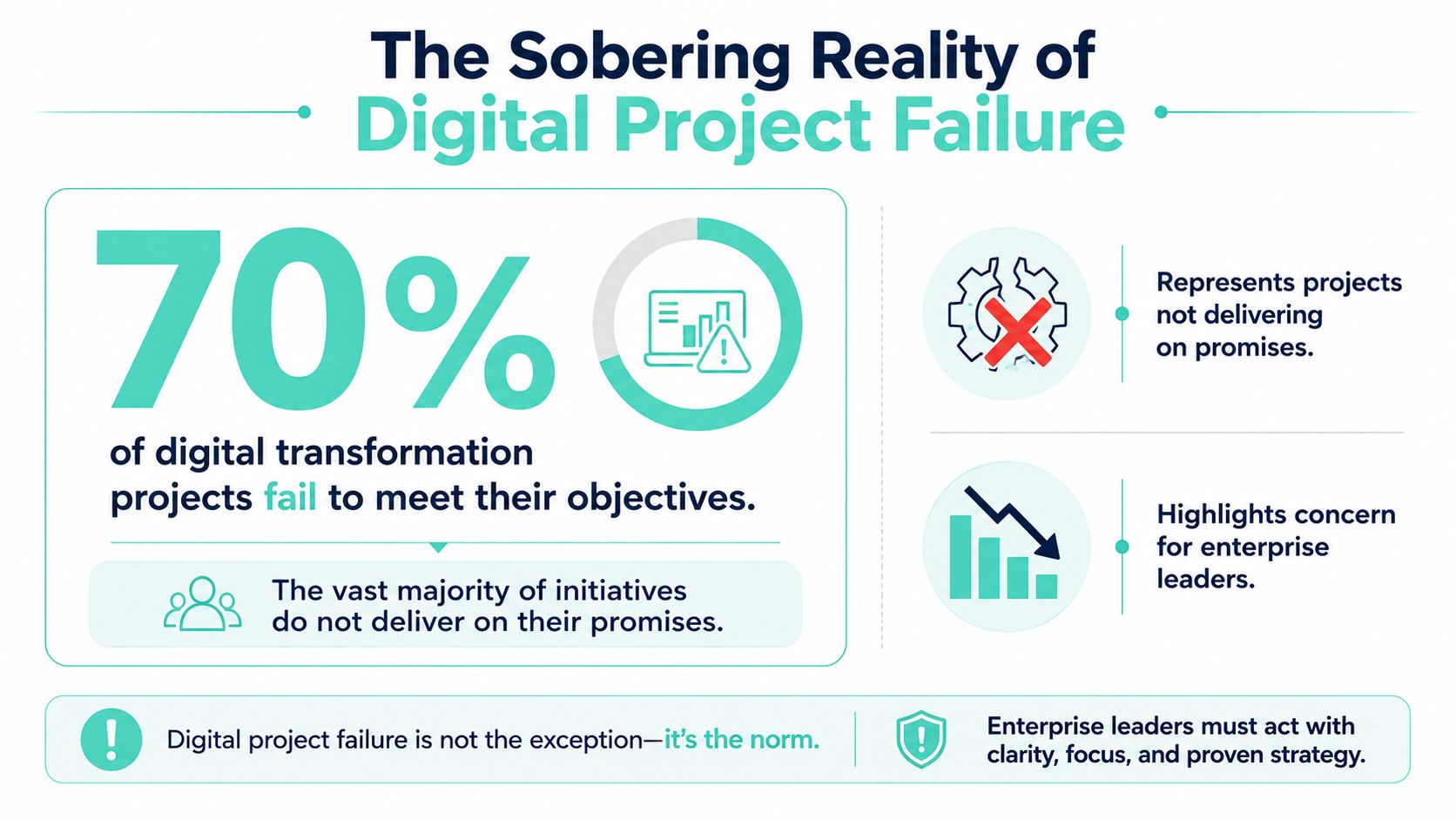
About 70% of digital transformation and software implementation projects fail globally, as cited earlier in the article. That figure matters less as a scare statistic than as a planning constraint. In enterprise delivery, a launch can look successful on paper and still fail within months because the operating model cannot support what was built.
I see this pattern in recovery work. A Sitecore XM Cloud implementation goes live on schedule. A SharePoint intranet launches with the agreed templates, permissions, and integrations. Six months later, search is poor, authors avoid the intended workflows, local teams create manual workarounds, and support demand rises because the design assumed behaviors the business never adopted. The deployment worked. The product did not deliver sustained value.
That distinction matters. Failure in digital programs usually shows up after go-live, in the gap between workshop assumptions and production reality.
Analysts consistently point to weak adoption, unclear ownership, and fragmented governance as major causes of underperformance in transformation programs. The practical lesson is simple. If marketing owns experience goals, IT owns infrastructure, and no one owns taxonomy, content quality, training, or decision rights, the platform will expose that gap fast. Sitecore and SharePoint both magnify unclear operating models because they are flexible enough to reflect good governance and bad governance equally well.
A healthier response starts before the recovery phase. Teams should treat go-live as the beginning of service management, not the end of project delivery. That means naming business owners for content operations, setting measurable post-launch KPIs, and funding stabilization work that covers search tuning, author support, analytics quality, and backlog triage. Our guidance on cloud migration best practices follows the same principle. Production support, governance, and adoption planning belong in the core delivery model, not in a later cleanup plan.
The ownership model is often the clearest predictor of outcome. Programs with shared accountability between business and technology leaders make decisions faster and recover faster when assumptions break. Programs with siloed ownership spend months arguing about whether a problem belongs to platform, content, or operations. That is why addressing project management challenges matters in DXP work. Poor delivery discipline does not stay in the status report. It shows up in failed personalization, weak search relevance, inconsistent publishing standards, and expensive post-launch fixes.
Failure is not the same as a broken deployment
A project can hit its release date and still miss the business case.
In enterprise DXP programs, the warning signs are usually operational:
- The platform is live: Pages render, integrations run, and editors can publish.
- The business value is weak: Personalization stays limited, campaign teams bypass governance, and localization cycles stay slow.
- The support burden grows: Tickets rise, exceptions become standard practice, and each new feature requires workaround architecture.
Success criteria that end at deployment create this outcome. Teams measure whether the build shipped, not whether the organization can run it well.
Sitecore and SharePoint usually fail for the same reason
Sitecore gets blamed when personalization stalls. SharePoint gets blamed when intranets become cluttered and politically contested. In both cases, the platform usually reflects earlier decisions about ownership, standards, and lifecycle control.
The common failure pattern is straightforward. No clear content governance. No durable taxonomy. No agreed decision rights for local variation versus global consistency. No funded plan for post-launch tuning. Once those gaps exist, every new request becomes slower, more expensive, and harder to govern.
That is the sobering part. Many failed projects did ship. They just were not designed to survive real use.
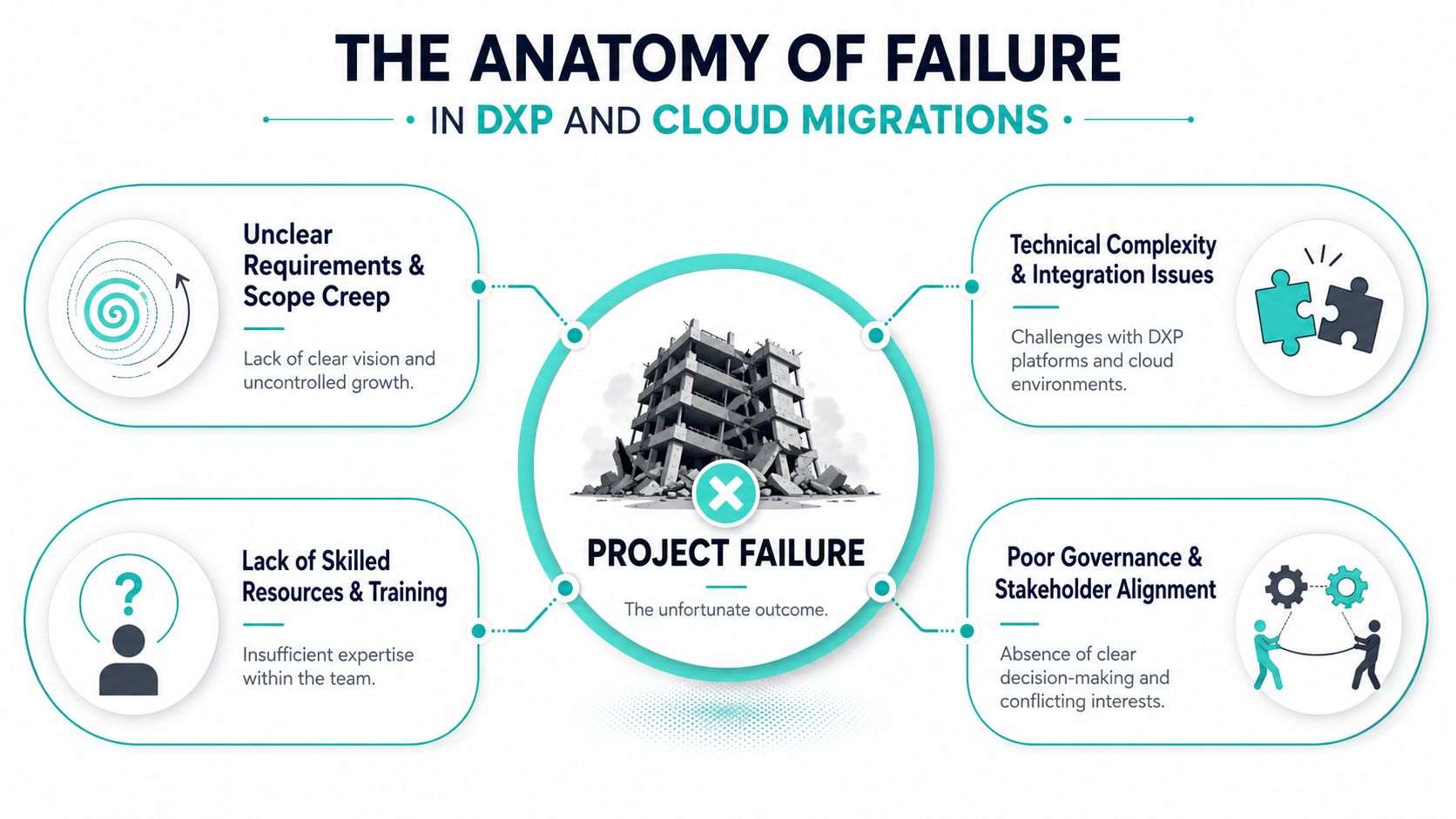
The Anatomy of Failure in DXP and Cloud Migrations
The most damaging projects don't usually fail because of one dramatic mistake. They fail because a chain of reasonable sounding decisions produces an architecture that can't survive production reality.
Failure is usually organizational before it becomes technical
Enterprise teams often describe the root causes with labels like scope creep, poor requirements, or missed dependencies. Those labels are accurate, but they're still too shallow. What matters is how those weaknesses become structural.
If a global Sitecore program signs off on architecture before agreeing content ownership, translation flow, taxonomy, personalization guardrails, and search relevance inputs, the team has already deferred critical design. The project may still move fast in workshops. It won't move cleanly in production.
A useful companion resource on addressing project management challenges is helpful here because it frames recurring delivery problems as management issues rather than tool issues. That's the right lens for DXP and cloud migration work. A project plan can hide ambiguity for months. A live platform won't.
For migration teams, cloud migration best practices are put into practice rather than remaining theoretical. If identity, content structure, integration sequencing, and operational support are left vague, “lift and shift” turns into “move and discover.”
The design reality gap breaks projects after launch
The critical issue is the design reality gap. That's the distance between the system approved in workshops and the system that can function under real editorial, regional, and technical pressure.
A long-standing project management analysis found that the gap between project definition and design reality fit is a major, often unquantified cause of post-launch failure. It also notes that 70% of complex projects fail due to issues like poor initial definition, while existing analysis rarely tracks how those gaps show up 6 to 12 months after a “successful” launch, especially in composable DXP programs for global brands, as described in this project definition and design reality study.
That pattern is familiar in both Sitecore and SharePoint estates.
In Sitecore, the gap often shows up as
- Composable architecture without composable governance: Teams adopt headless delivery with Next.js, Sitecore Search, Sitecore CDP, or Sitecore Personalize, but keep old approval models and fragmented ownership.
- Component libraries that are technically reusable but editor-unfriendly: Authors bypass approved components because naming, field design, or content dependencies are too rigid.
- Regional rollout friction: Global templates work on paper, then local teams hit language, compliance, or campaign needs that weren't modeled.
In SharePoint, the same gap takes a different form
- SPFx solutions without content discipline: The intranet looks modern, but metadata, page ownership, and lifecycle rules are weak.
- Power Platform automations added around unclear processes: Automation accelerates confusion when the underlying approvals were never settled.
- Search and navigation drift: Departments create parallel structures because governance wasn't enforced early.
A weak foundation doesn't collapse when the building is empty. It collapses when people move in.
That's why pre-launch planning isn't enough. Teams need design validation against real operating conditions. Not just workshop consensus. Real author scenarios, multilingual flows, publishing pressure, identity edge cases, and support ownership after handover.
Developing an Early Warning System for Your Project
Most enterprises detect project failure too late. They wait for the lagging indicators: missed budget, executive frustration, support escalation, or a sudden freeze on enhancements. By then, the technical debt is already operational debt.
Leading indicators matter more than status reports
An early warning system needs to track signs that the platform is drifting before the steering committee sees the financial symptoms. In Sitecore, that often starts in the API layer, personalization workflow, content publishing path, and deployment reliability. In SharePoint, it often starts with search behavior, page sprawl, permission inconsistencies, and custom component maintenance.
The teams that do this well don't ask, “Did we launch?” They ask, “Is the platform behaving in a way that supports the business model we approved?”
That means your dashboard should combine technical and operating signals:
- Platform behavior: API responsiveness, indexing health, deployment stability, publishing errors
- Editorial friction: blocked authors, excessive manual workarounds, unused components, workflow exceptions
- Business exposure: failed personalization, poor search experience, campaign delays, regional release bottlenecks
A practical reference for teams that are standardizing reporting and coordination is this guide for project managers using Google apps. The tooling isn't the point. The point is disciplined visibility. A project without consistent operating signals becomes dependent on anecdote.
For customer-facing platforms, I'd also insist on real user monitoring practices. Synthetic checks tell you whether the service is up. Real user monitoring tells you whether actual visitors are experiencing the platform the way the business expects.
Early Warning Indicators for DXP Projects
| Warning Sign (Leading Indicator) | Associated Business Risk | Key Metric to Monitor (KPI) |
|---|---|---|
| API responses begin slowing during content-heavy journeys | Personalization decisions arrive too late, page experience becomes inconsistent | API response time trend |
| Search relevance complaints increase from editors or employees | Users stop trusting site search or intranet search | Search zero-result queries and relevance review queue |
| Authors publish outside agreed component patterns | Brand inconsistency and rising template debt | Ratio of approved component usage to custom workarounds |
| Deployment rollback becomes common | Release confidence drops and urgent fixes displace roadmap work | Deployment failure and rollback frequency |
| Regional teams request exceptions to core templates | Governance fractures and multi-market delivery slows | Exception requests by market or business unit |
| Analytics tags drift from page templates | Reporting becomes unreliable and optimization decisions lose credibility | Tag validation errors and missing event checks |
| Permissions become increasingly bespoke in SharePoint | Content access issues and support overhead increase | Permission exception count |
| Personalization use cases remain in review with no production adoption | AI capability becomes shelfware instead of business value | Number of live use cases versus approved concepts |
If your project dashboard only shows progress, it's hiding risk. Healthy delivery reporting needs friction, variance, and failure signals.
The point isn't to create a bigger PMO ritual. It's to make problems visible while they're still local. Once weak patterns spread across templates, integrations, and operating teams, the failure of a project becomes expensive to reverse.
Implementing Mitigation Frameworks for DXP Success
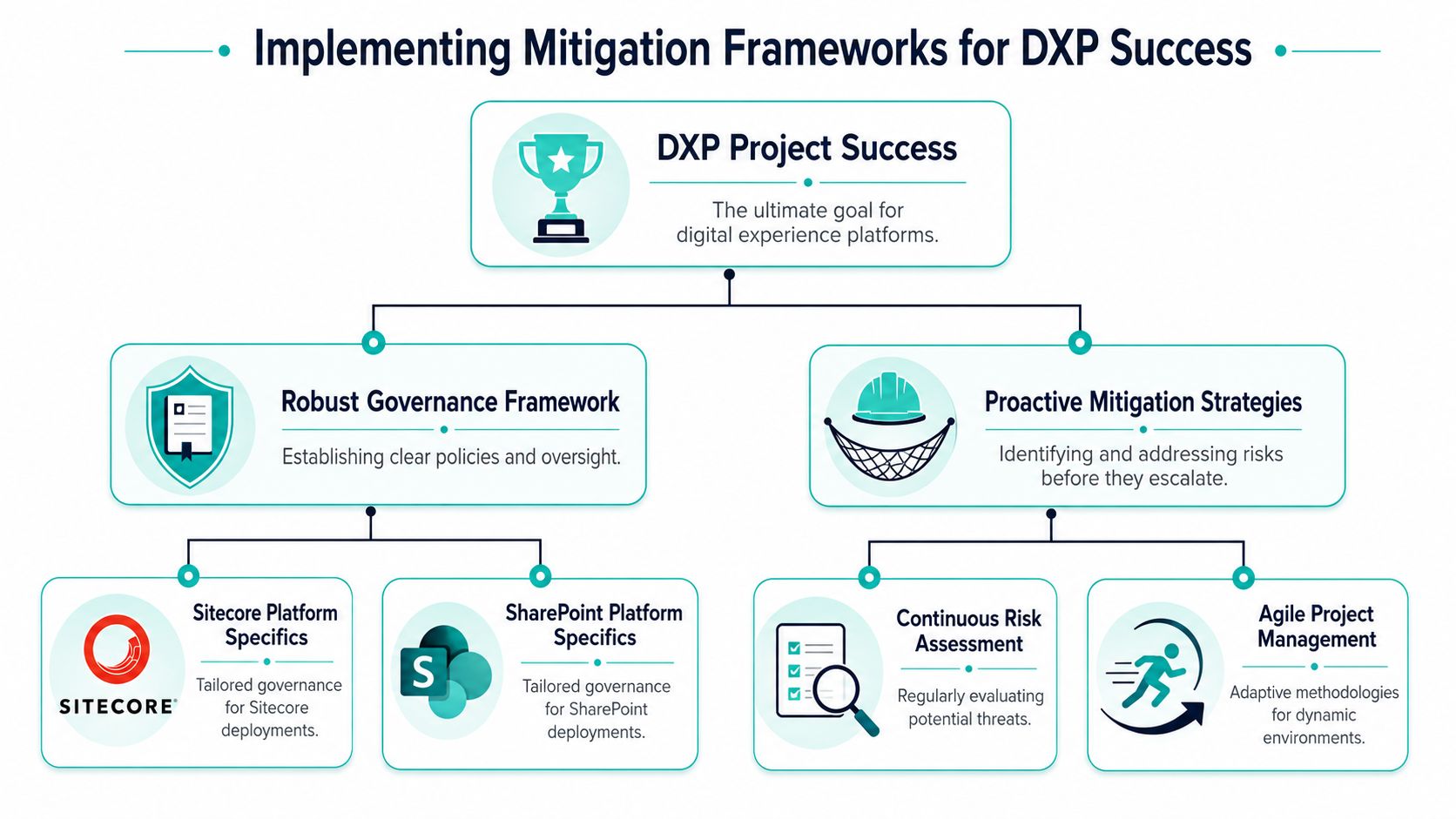
Recovery work costs more than disciplined delivery, especially after a launch that looked successful on paper. In Sitecore and SharePoint programmes, failure often appears later, when the designed operating model collides with editorial habits, regional exceptions, support realities, and integration constraints.
Maturity changes outcomes
Project management maturity affects delivery quality in measurable ways. Organizations with high project management maturity experience only a 27% project failure rate, according to this analysis of project maturity and failure rates.
In enterprise DXP work, that maturity shows up in governance decisions, not in prettier status reporting. Teams spend months refining target architecture, then leave decision rights vague. The result is predictable. Every schema change, personalization rule, search tuning request, component exception, and integration dependency turns into a fresh negotiation.
A mitigation framework needs to settle four points early:
- Who has decision authority?
- What must stay standard across the estate?
- What can vary by market, business unit, or campaign?
- What evidence is needed before new capability goes into production?
A defined pre-migration risk assessment process forces those decisions before the platform becomes harder to govern.
What disciplined delivery looks like in Sitecore and SharePoint
In Sitecore, disciplined delivery starts with a Helix-based component model and strict rules for rendering reuse, datasource design, serialization, and release management. That is what closes the design-reality gap after launch. Editors work within clear patterns. Developers inherit known contracts. Support teams can trace issues without reverse-engineering custom behaviour in every template.
The trade-off is real. Teams give up some local freedom in exchange for lower long-term delivery cost. That is usually the right bargain in multi-brand, multi-market, or regulated environments.
For Sitecore Personalize, CDP, and Search, mitigation depends less on product configuration and more on operating rules. Define who owns audience logic, who approves experiments, what data is allowed, how model or rule performance is reviewed, and when a use case must be rolled back. Without that structure, AI features launch as demos and fail as production services. That is where many post-deployment programmes slip. The platform works technically, but the business cannot run it consistently.
SharePoint needs a different control model, but the principle is the same. Keep the service governable after handover.
- Use SPFx for durable custom experiences instead of letting script snippets become permanent architecture.
- Separate content governance from page design so intranet sprawl is handled as an operating issue, not hidden behind a better homepage.
- Use Power Platform for stable, agreed processes. If the workflow is still contested between departments, automation will hard-code the disagreement.
I see the same failure patterns repeatedly in recovery engagements:
- Markets create their own component variants outside the shared library
- Content teams bypass CI/CD because the platform is treated as publishing, not engineering
- AI features are added before analytics, taxonomy, and identity are dependable
- Support inherits undocumented integration logic after launch
Good mitigation is practical. Standardize where failure is expensive, such as identity, templates, deployment, search schema, and access control. Allow variation where the risk is low, such as campaign content, regional messaging, and approved presentation options.
That is how platforms keep delivering value after go-live, not just at launch.
Using Sitecore AI to De-Risk Personalization Initiatives
AI is now part of most DXP roadmaps, but it's also where weak delivery habits become very expensive. Personalization programs often fail because teams treat AI as a feature layer instead of a managed operating capability.
Why AI pilots collapse inside otherwise healthy programs
The numbers are brutal. 95% of enterprise generative AI pilot projects fail to achieve revenue acceleration, and 80% of organizations report no tangible enterprise-level EBIT impact from their AI investments, according to this analysis of enterprise AI pilot failure. In enterprise DXP work, that usually means pilots look impressive in demos but never become dependable parts of customer journeys.
The usual causes aren't mysterious. Teams launch an AI pilot before they've settled identity resolution, event quality, content readiness, experimentation rules, or business ownership. The model may work. The operating system around it doesn't.
In Sitecore estates, I see this happen when organizations buy into the promise of better personalization without establishing a sequence:
- stable data inputs
- clear use case ownership
- approved decision criteria
- production support responsibilities
- rollback conditions
Without that sequence, Sitecore Personalize becomes a demonstration environment. Sitecore Search produces inconsistent relevance because content hygiene and metadata discipline were never enforced. CDP data exists, but marketers can't trust the segments enough to operationalize them.
How to use Sitecore AI capabilities without turning them into expensive demos
The better approach is narrower and more disciplined.
Start with use cases that have clear operational boundaries. For example, ranking logic in search, audience-based content decisions for a limited set of journeys, or controlled experimentation on a high-value template family. Define who owns the decision, what data is acceptable, and what failure looks like before anything goes live.
Then connect that use case to the rest of the Sitecore stack:
- Sitecore Search should align with content structure and metadata rules
- Sitecore CDP should support governed audience definitions, not endless segment sprawl
- Sitecore Personalize should be tied to explicit journey logic and measurable business decisions
- XM Cloud or XP delivery layers should expose personalization safely through reusable components
That's where a practical AI personalization implementation guide for DXP becomes useful. The main challenge isn't enabling AI. It's making AI accountable to platform governance.
One more point matters. Sitecore AI expertise isn't just about knowing product screens. It's about understanding where AI belongs in the stack and where it doesn't. If identity, analytics, consent handling, component design, and content operations are weak, AI will amplify the disorder. If those foundations are stable, Sitecore's related product portfolio can support personalization in a controlled, scalable way.
The Post-Mortem and Recovery Playbook
When a project is already failing, the worst move is to turn the review into a blame session. Recovery starts by reducing uncertainty, not by assigning fault.
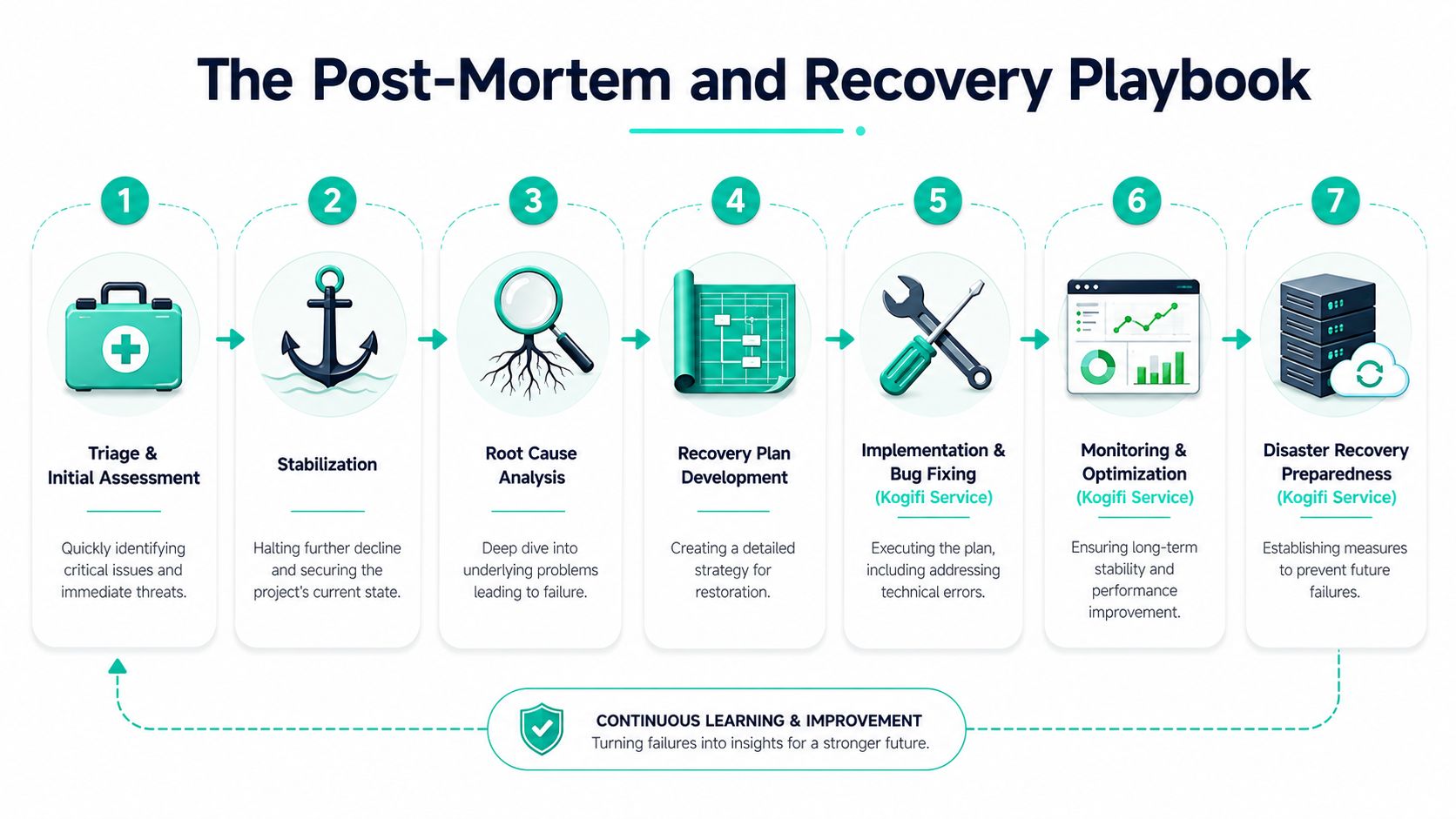
Start with the visual recovery path teams can align around.
Start with triage not blame
The first step is triage. Separate critical service risk from structural design flaws. On a Sitecore platform, that means checking rendering failures, integration backlog, indexing health, deployment safety, cache behavior, and security patch posture. On SharePoint, it means reviewing permissions drift, broken page dependencies, search issues, and fragile customizations.
A useful recovery sequence looks like this:
- Stabilize production first. Freeze non-essential enhancements and reduce release noise.
- Collect evidence. Use logs, monitoring, failed user journeys, support patterns, and release history.
- Classify failures. Distinguish platform defects from governance defects and operating model defects.
- Prioritize by business exposure. Fix what blocks customer journeys, content operations, or internal productivity first.
- Rebuild decision control. Recovery fails if the same approval chaos remains in place.
This is also the stage where teams often misuse optimization evidence. If experimentation data is weak or contradictory, don't force a story. A practical explanation of inconclusive A/B test results is useful because many troubled platforms keep shipping changes based on ambiguous signals. That only compounds rework.
Here's a useful walkthrough for teams that need to reset mindset as well as process.
Recovery requires a funded stabilization window
One recovery mistake shows up constantly. The organization pays for implementation but refuses to fund stabilization as a formal phase. That decision creates predictable failure.
A technical analysis of failed DXP implementations found that the absence of a signed 90-day post-launch stabilization budget causes 68% of implementations to fail within the first quarter after go-live due to unresolved performance bottlenecks and integration errors, according to this analysis of hidden DXP implementation costs.
That's credible because the first quarter after launch is when production truth arrives:
- Real traffic patterns expose bottlenecks
- Actual editors reveal where content models don't fit
- Connected systems surface timeout, mapping, and synchronization problems
- Support teams discover what was never documented well enough
Don't close a project at go-live if the operating platform hasn't proved itself under real use.
A proper recovery playbook therefore needs three distinct tracks. Immediate stabilization, targeted remediation, and durable platform governance. If you skip the third, you'll rescue the service and preserve the failure pattern.
Building a Culture of Successful Delivery
The failure of a project is rarely about one bad sprint, one weak vendor, or one missed deadline. It usually reflects a delivery culture that rewards launch optics over operating truth.
The most reliable enterprises do a few things differently. Business and IT co-own outcomes. Sitecore and SharePoint are governed as products, not one-off implementations. AI initiatives start with narrow operating use cases instead of broad ambition. Stabilization is budgeted. Component reuse is enforced. Exception handling is formal. And post-launch support has the same seriousness as pre-launch design.
That culture matters more than any platform choice. Sitecore can support advanced personalization, search, content orchestration, and composable delivery. SharePoint can support durable intranet, knowledge, and workflow scenarios. But neither platform can compensate for vague ownership, weak taxonomy, unmanaged customization, or absent change management.
Successful delivery is a repeatable capability. It comes from governance that survives personnel changes, architecture that reflects editorial reality, and technical leadership that can say no when a request would damage the estate.
If your last platform project launched on time and still disappointed the business, that wasn't bad luck. It was a signal. The next program should treat post-launch fit, operational maturity, and governed AI adoption as core design concerns from day one.
If your team is trying to recover a struggling Sitecore, AEM, or SharePoint platform, or you want a second opinion before the next migration starts, talk to Kogifi. Their teams work across enterprise DXP delivery, stabilization, upgrades, AI-driven personalization, intranet solutions, and post-launch support for organizations that need platforms to keep performing after go-live.