A familiar production bug usually starts small. A content editor adds the same promo component twice on a Sitecore XM Cloud page, QA clicks the second button, and the JavaScript attached to #promo-toggle only fires on the first instance. Nobody changed business logic. The page still renders. But the DOM is now invalid, the interaction is brittle, and the defect only appears when real content authors use the system the way it was designed to be used.
That's why HTML class vs ID isn't a beginner question. On enterprise platforms, it's an architecture choice that affects maintainability, accessibility, component reuse, and front end stability across Sitecore, SharePoint, and headless delivery models. In composable stacks, the old habit of reaching for an id because an element feels unique often breaks the moment editors duplicate a component or a React tree hydrates differently than expected.
Teams that are aligning content platforms with modern delivery patterns usually run into the same issue elsewhere too. A reusable front end needs predictable selectors, low-specificity CSS, and markup that survives dynamic rendering. That's the same discipline behind MACH architecture principles, where flexibility only works when each layer stays loosely coupled.
Table of Contents
- Uniqueness and document rules
- Why specificity becomes a maintenance problem
- JavaScript targeting in headless builds
Introduction Why Class vs ID Matters in 2026
The simplest version is still true. A class is a reusable label that many elements can share. An id is a unique identifier that should belong to one element in the document.
What changed is the environment around that rule. In Sitecore XM Cloud, Sitecore Search experiences, AI-assisted personalization layers, and Next.js front ends, markup isn't hand-authored once and left alone. Components are assembled dynamically, repeated by editors, rendered server-side, hydrated client-side, and reused across markets and brands. The old “use an id for JavaScript because it's unique” advice stops being safe when uniqueness depends on editorial behavior or runtime output.
That matters even more on enterprise estates where the front end sits on top of a wider product portfolio. Sitecore implementations often include shared Helix-style component libraries, search and personalization features, analytics instrumentation, and AI-driven experience orchestration. SharePoint solutions bring a similar challenge inside Microsoft 365, especially when SPFx web parts are reused on the same page and need clean isolation between structure, style, and behavior.
Architect's view: The selector you choose today becomes a maintenance policy tomorrow.
A team can recover from a single duplicate id. It struggles when those decisions spread across dozens of renderings, templates, and front end packages. CSS becomes harder to override. JavaScript becomes tied to page assumptions instead of component contracts. Accessibility audits start finding duplicate labels and broken relationships.
A practical rule helps. Use class for reusable styling and grouping. Use id only when the element must be unique and the HTML specification benefits from that uniqueness, such as fragment links, form relationships, or a single landmark.
Core Differences at a Glance
The fast answer belongs in a table because most technical leads don't need philosophy first. They need a decision tool.
| Criterion | ID Attribute | Class Attribute |
|---|---|---|
| Uniqueness | Must be unique within a document | Can be reused across many elements |
| CSS syntax | #header | .card |
| JavaScript targeting | Often used for one known element | Used for groups or repeated elements |
| Values per element | One id value per element | Multiple class values can be combined |
| Best fit | Fragment targets, label/input links, unique landmarks | Styling, reusable components, shared behavior |
| Risk in component systems | Duplicate IDs break validity and behavior | Reuse is expected and safe |
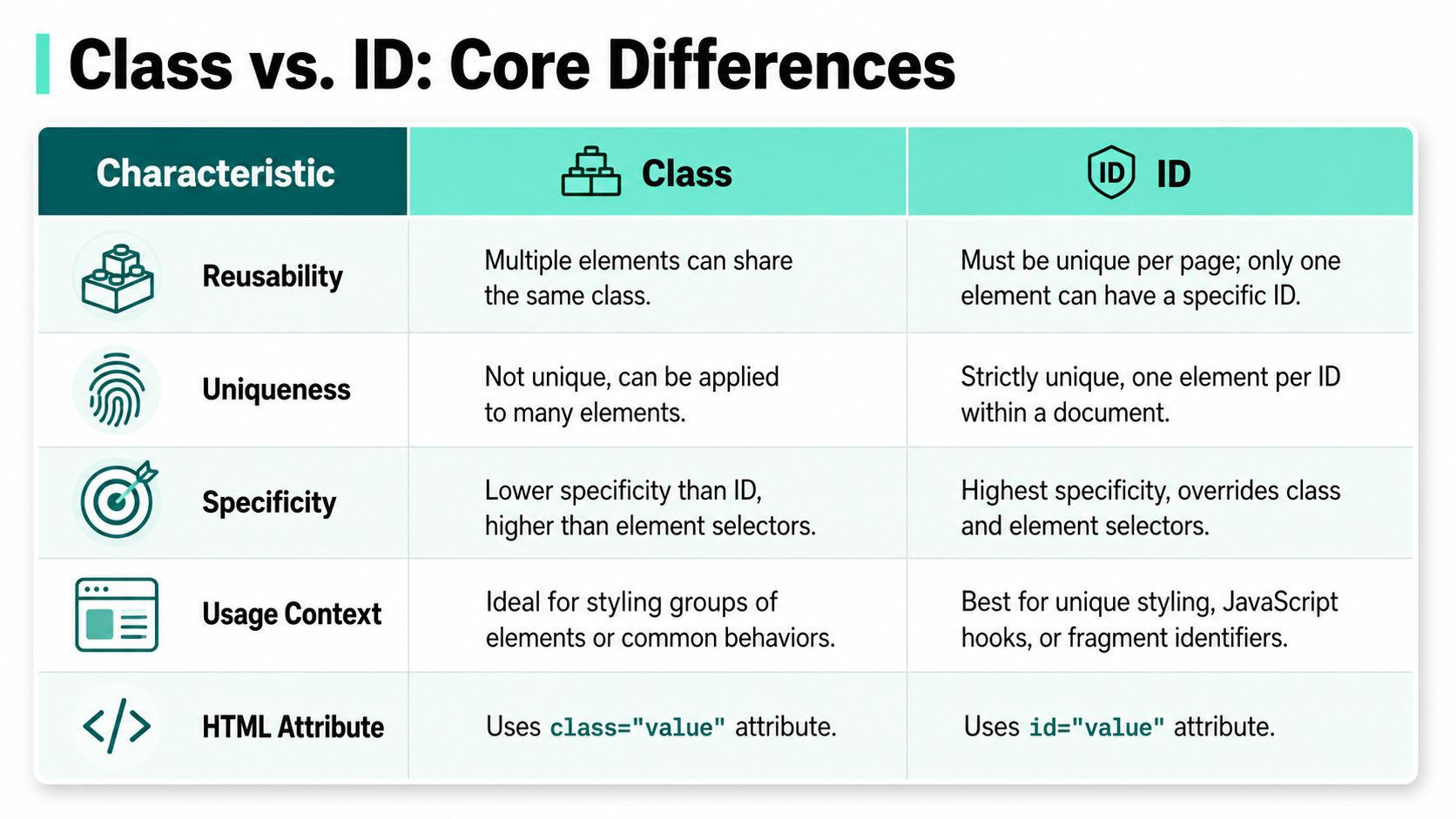
The core rule comes straight from the HTML standard as summarized in this explanation of class vs id behavior. An id must be unique within the document. A class can be applied to as many elements as needed. That difference exists for a reason. Anchors such as href="#section1" depend on one target, while reusable UI patterns depend on many matching elements.
What that means in practice
In CSS, a class usually represents a pattern. Think .btn, .hero, .search-result, or .promo-banner. In a Sitecore component library, that maps cleanly to a rendering that may appear once on one page and five times on another.
An id represents a single instance. Think #main-content or a specific form control relation. If the same rendering can appear more than once, hardcoded IDs are a liability.
A useful mental model is this:
- Use class when you're describing a type
- Use id when you're naming a single, document-wide instance
- If editorial reuse is possible, assume uniqueness will eventually fail
That last point matters on both Sitecore and SharePoint. Content authors don't think in DOM constraints. They think in layouts, campaigns, and reusable blocks. Your markup has to survive that reality.
A Deeper Dive into Mechanics and Specificity
Selector choice turns into an architecture issue once a codebase has shared components, multiple delivery teams, and editor-driven page assembly.
Uniqueness and document rules
An id names one element in one document. A class marks a reusable pattern. That difference sounds basic until the same component is rendered by Sitecore XM Cloud in one route, reused in a personalization variant, then embedded again in a composite layout. In that setup, “unique in the mockup” is irrelevant. Unique in the final DOM is the only rule that matters.
MDN's reference for the HTML id global attribute is clear on the document-level uniqueness requirement. For broad styling and behavior hooks, CSS architecture guidance such as MDN's class selectors reference aligns with what experienced teams already do in practice. Use classes for the default path, and reserve IDs for relationships or landmarks that must point to one specific node.
That distinction matters more on enterprise platforms than on brochure sites. Sitecore and SharePoint pages are assembled from reusable renderings, placeholders, web parts, and author-selected variants. A hardcoded id="promo" survives code review, then fails months later when marketing places the same block twice on a landing page.
Accessibility is one of the places where id still belongs. A <label for="email"> to <input id="email"> association needs a unique target. So do ARIA relationships such as aria-labelledby and aria-describedby. Those are document contracts, not styling conveniences.
Why specificity becomes a maintenance problem
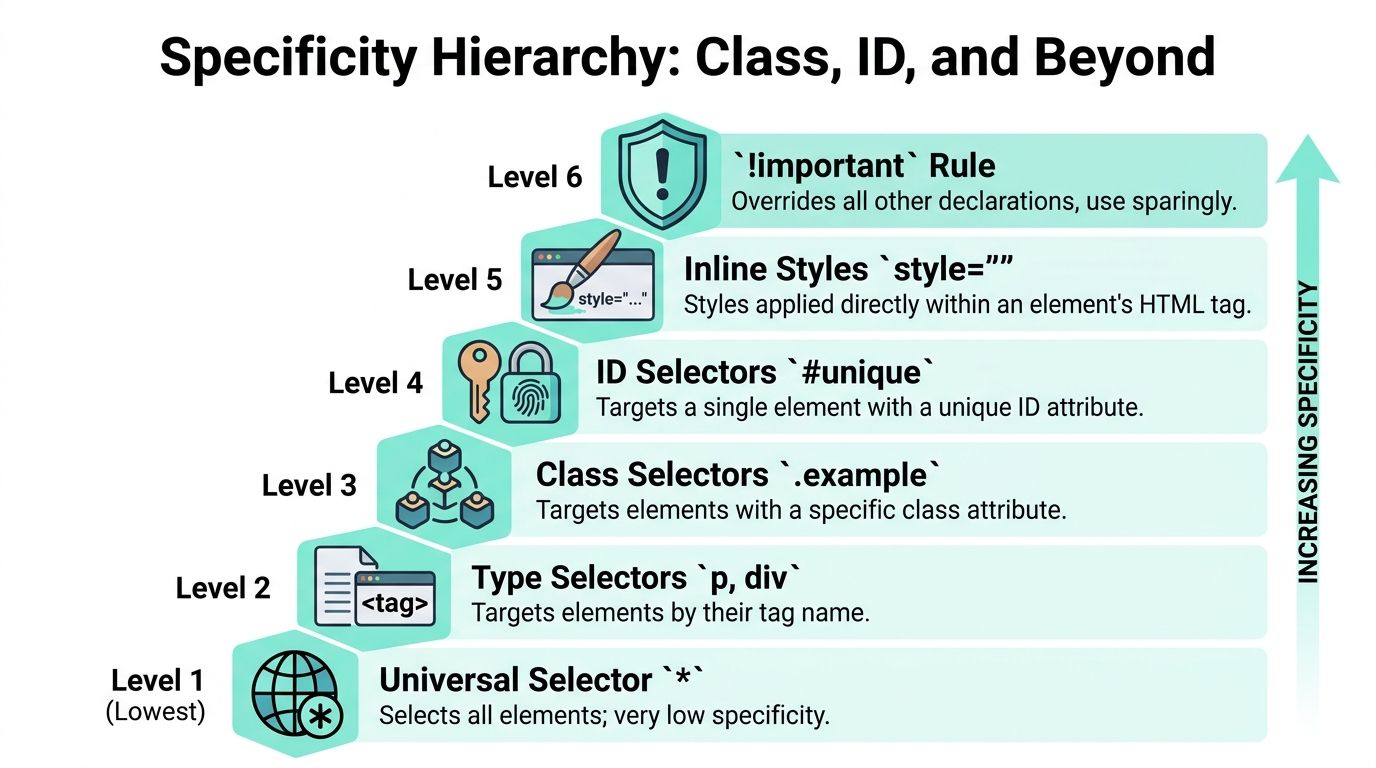
The bigger issue in long-lived front ends is specificity pressure. As explained in Codecademy's specificity breakdown, ID selectors carry more weight than class selectors. That sounds harmless until a shared component needs a new variant, a tenant-specific theme, or an urgent campaign override.
<div id="promo" class="card card--featured"></div>#promo { padding: 2rem; }.card { padding: 1rem; }In that example, the component API says “this is a card.” The selector strategy says “this one-off instance wins.” Over time, teams respond by writing more specific selectors, stacking parent qualifiers, or adding !important. CSS becomes harder to predict, and every release spends more time on override logic than on component extension.
Spacing defects often expose this first. A component with tangled selector precedence can make a simple padding fix look like a rendering bug. Reviewing correct CSS box model usage helps, but selector weight is usually part of the root cause in enterprise codebases.
High-specificity CSS ages badly.
Class-based styling holds up better because it matches how design systems are built. One class can define structure, another can define state, and a third can define a variant. That composition model works with reusable renderings in XM Cloud, SPFx components in SharePoint, and federated front ends where no single team owns the whole page.
JavaScript targeting in headless builds
Modern tutorials often stop at CSS, but the bigger trap now sits in JavaScript.
In a traditional server-rendered site, developers often used IDs for script targeting because there was one page, one DOM, and a stable render path. In headless DXP builds, that assumption breaks down fast. Sitecore XM Cloud with Next.js can render the same component multiple times, hydrate client-side, reorder content by personalization rules, and inject third-party widgets after initial load. An ID-based script hook becomes a fragile contract in that environment.
Use id for true document references. Use classes for styling. Use data- attributes for component behavior.
That pattern makes intent explicit:
<div class="card card--featured" data-module="promo-card"></div>A selector such as [data-module="promo-card"] tells the next developer that JavaScript is attaching behavior to a component pattern, not to a supposedly unique DOM node. It also scales better when the same rendering appears three times on a page, or when a React component is reused across routes.
The same principle shows up in SVG work. Teams get cleaner results when styling and scripting hooks reflect structure and purpose instead of one-off selectors. Kogifi's guide to practical SVG color changes in CSS and inline markup is a good example of that discipline.
For enterprise teams, this is the practical rule. If a selector has to survive authoring freedom, component reuse, and headless rendering, classes and data- attributes are the safer default. IDs still matter, but only where the document needs a single named target.
Debunking Performance Myths
The old argument for IDs usually sounds technical enough to win fast. IDs are faster because the browser can find them directly. Classes require traversal. Therefore, use IDs for performance.
That logic is incomplete.
Why the old benchmark story persists
There is a real kernel behind the myth. As explained in this Stack Overflow benchmark discussion, ID selectors use a direct hash-table style lookup for single-element access, while class selectors require traversal to find matches. Older benchmarks showed ID selection could be over 100x faster for single-element retrieval. The same benchmark discussion also notes that in modern browser behavior the difference is often statistically irrelevant in practice, and one cited Firefox 6 reflow comparison showed 12.5ms for an ID selector versus 10.9ms for a class selector.
That should change the conversation immediately. If your team is debating IDs versus classes to save tiny selector costs while shipping unstable hydration, oversized bundles, or over-specific CSS, it's solving the wrong problem.
What matters more on enterprise platforms
On Sitecore XM Cloud, SharePoint Online, and other enterprise platforms, performance bottlenecks rarely come from choosing .card instead of #card. Teams usually get bigger returns from image strategy, script discipline, cache behavior, and front end rendering choices. That's why platform teams spend time on website performance optimization patterns that address real bottlenecks rather than selector folklore.
A practical takeaway:
- Choose IDs for correctness, not micro-optimizations
- Choose classes for scalable CSS and reusable components
- Profile actual runtime issues before changing selector strategy
There are edge cases where selector complexity matters. But enterprise UI stability almost always benefits more from low-specificity class architecture than from chasing theoretical lookup speed.
Strategic Use Cases in Enterprise DXPs
The best way to settle the html class vs id question is to map it to real platform work.

Sitecore component libraries and reusable styling
In Sitecore, especially with Helix-based solutions, a component library lives or dies by reuse. A card component should be styled with classes because the same rendering can appear in a listing page, a personalized slot, a search result, or an AI-assisted recommendation block.
<article class="card card--news"><img class="card__image" src="..." alt=""><h3 class="card__title">Article title</h3><a class="card__link" href="/article">Read more</a></article>That structure scales. It supports variants, shared styles, and predictable overrides. It also aligns well with React component patterns. If a team wants examples of composable interface structures, it can browse React component solutions to see how reusable patterns rely on class-based composition rather than page-unique IDs.
Where should id still appear in Sitecore? Use it where uniqueness is required by the page:
- Skip links:
href="#main-content"needs one real destination. - Form accessibility: Labels, descriptions, and ARIA relationships may require unique IDs.
- Single landmarks: A page's primary content region can justify one stable unique identifier.
A rendering is rarely unique. A landmark often is.
Sitecore's broader portfolio makes this even more important. When teams layer personalization, search, analytics, and AI-driven experience rules into the same page, selectors need to remain boring and predictable. Classes do that better.
SharePoint and SPFx instance boundaries
SharePoint introduces a different failure mode. In SPFx, the same web part can be added multiple times to one page. If internal markup uses hardcoded IDs for styling or behavior, those instances collide fast.
A safer pattern is to treat the web part root as an instance boundary and keep internal styling class-based:
<section class="employee-directory"><div class="employee-directory__filters"></div><div class="employee-directory__results"></div></section>If instance-level scripting needs one unique reference, generate it programmatically at the container boundary, not across every child element. That preserves reuse while avoiding conflicts between multiple web part instances.
The same principle works across Sitecore and SharePoint. The more reusable the component, the less reason it has to depend on a hardcoded id.
The Headless DXP Challenge The Modern id Trap
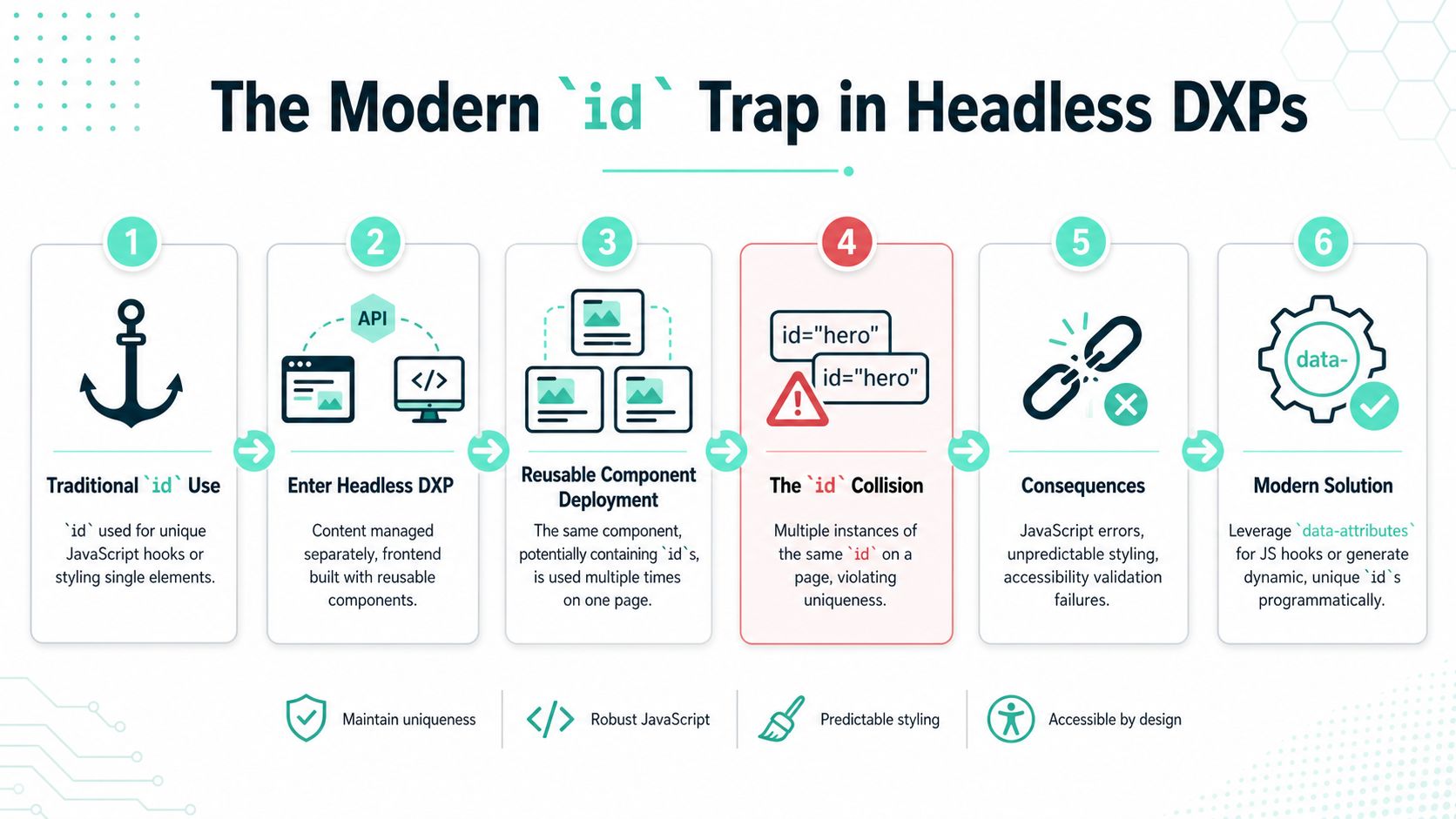
A component looks safe in development. Then content editors place it twice on the same Sitecore XM Cloud page, or a Next.js route renders the same block in two personalized variants, and the old id rule fails under real page assembly.
Where the traditional rule breaks
Traditional HTML advice assumed a developer owned the full document and could guarantee which element was unique. Headless delivery changes that. In Sitecore XM Cloud with Next.js, the final DOM is assembled from reusable components, editor placement choices, personalization rules, and client-side rendering patterns. A component can be locally correct and still be globally wrong once the page is composed.
A newsletter signup, promo accordion, or search filter often starts life as a single tested instance. Then an editor adds it twice in Sitecore Pages.
If that component contains this:
<form id="newsletter-form"><button id="newsletter-submit">Subscribe</button></form>the page now contains duplicate IDs. JavaScript that expects one element can bind to the wrong instance. Accessibility checks can fail. Client and server output can also drift if each side makes different assumptions about uniqueness, which makes hydration issues harder to trace in React-based builds.
This is why older selector advice ages badly in modern DXP work. It was written for page templates. Enterprise teams now build with reusable rendering units.
Why data- attributes are often safer
For behavior targeting, data- attributes usually hold up better than IDs because they describe purpose instead of document-wide uniqueness.
<form data-component="newsletter-form"><button data-action="submit-newsletter">Subscribe</button></form>That gives JavaScript an explicit hook for each instance:
document.querySelectorAll('[data-component="newsletter-form"]').forEach(initNewsletterForm);This pattern matches how headless systems behave. Repetition is normal. Components are meant to be reused, reordered, personalized, and nested. In that setup, data-component, data-action, and similar hooks are usually safer than hardcoded IDs for client-side initialization.
The rule I recommend on Sitecore and SharePoint builds is simple:
- Use
idonly for true document-unique relationships - Use
data-attributes for JavaScript hooks on reusable components - Use classes for styling and visible state
Teams planning for composable delivery should also review Kogifi's guide to headless architecture, because the rendering model explains why DOM ownership changes once the CMS stops controlling one monolithic page output.
The same point shows up in broader modernization work. DocuWriter.ai modernization insights are useful here because selector strategy is rarely an isolated front-end decision. It affects upgrade paths, testing stability, and how safely teams can refactor shared components over time.
In headless builds, unique within one component instance does not mean unique within the final document.
Actionable Best Practices and Migration Strategy
A team inherits a Sitecore XM Cloud front end where every hero, card, and form instance carries its own hardcoded id. The page works until personalization adds a second copy of the same component, Next.js reorders the DOM, and JavaScript binds to the wrong element. That failure pattern is common in headless builds, and it changes how teams should treat class vs id.
A practical decision rule
Use classes as the default selector for styling. They keep CSS easier to override, easier to reuse, and easier to carry across shared component libraries in Sitecore, SharePoint, and other enterprise platforms. As noted earlier, standard guidance on selector usage points in the same direction. Reserve id for cases where the document really needs one unique reference.
Use an id only when one of these conditions applies:
- The page needs a fragment target such as a skip link destination.
- A form control relationship depends on a unique reference.
- An accessibility attribute must point to one specific element.
- A third party integration explicitly requires a document unique identifier.
Everything else should use classes for presentation and data- attributes for behavior.
That split matters more in modern DXP delivery than older tutorials admit. In a monolithic CMS page, an id often stayed unique because one template owned the full output. In a headless Sitecore XM Cloud or SPFx build, components are assembled from multiple sources, reused across routes, and sometimes rendered more than once in the same view. A selector strategy that assumes document wide uniqueness becomes fragile fast.
A workable enterprise convention looks like this:
- Component structure:
.search-card,.search-card__title,.search-card--featured - Behavior hooks:
data-component="search-card"anddata-action="open-details" - States:
.is-open,.is-loading,.has-error
This keeps styling, behavior, and semantics separate. It also gives engineering teams a clearer contract for testing, analytics instrumentation, and component reuse.
How to refactor an ID-heavy codebase
Legacy estates usually need a staged migration. Rewriting selectors everywhere in one release creates unnecessary regression risk, especially on platforms with shared templates, author-managed content, and long-lived front end overrides.
Start with an audit of CSS, JavaScript, templates, and test scripts. Identify where id is serving a valid semantic purpose and where it was only used to win a specificity fight or give JavaScript a convenient hook.
Then change the code in this order:
- Replace style rules first: convert
#promoBannerto.promo-banner - Lower specificity carefully: remove chained ID selectors before touching layout logic
- Introduce component naming: BEM or another clear convention works if teams apply it consistently
- Move JavaScript hooks to
data-attributes: this is usually the safest change for reusable components in Next.js and SPFx - Keep valid semantic IDs: preserve IDs tied to labels, ARIA references, anchor targets, or vendor requirements
- Retest automation: update Playwright, Cypress, or Selenium selectors so tests target stable component contracts rather than brittle page structure
One practical rule has held up well across enterprise rebuilds. If JavaScript needs to find a reusable component, target a data- attribute. If CSS needs to style it, target a class. If accessibility or browser behavior requires a unique document reference, use an id.
For broader legacy cleanup, teams dealing with aging platform code can borrow from DocuWriter.ai modernization insights, especially the principle of reducing tight coupling before attempting wider refactors. The same idea applies here. Replace brittle page-specific selectors with component contracts first, then simplify the rest.
The short version is straightforward. Classes should carry your styling architecture. IDs should stay limited to true document-unique relationships. That approach scales better when components are reused across Sitecore renderings, personalized experiences, and multiple SharePoint web part instances.