


A cloud migration usually gets approved after something has already started breaking down. Release cycles are too slow. Infrastructure support is eating budget. Security reviews are blocking change. Business teams want modern personalization, search, and AI features, but the current platform cannot support them without more custom fixes and more operational risk.
That pattern shows up often in enterprise DXP programs. Sitecore migrations carry application dependencies that go well beyond hosting. Teams have to account for XM Cloud plans, Content Hub integrations, search, CDNs, identity, analytics, personalization logic, and region-specific publishing requirements. SharePoint programs bring a different set of risks, including permission inheritance, document sprawl, workflow history, records retention, and custom components that underpin critical business processes.
Given the significant implications, generic cloud advice does not hold up well in these environments.
For enterprise teams, cloud migration is less about moving servers and more about redesigning how the platform is operated, secured, integrated, and governed after go-live. That is the difference between a migration that stabilizes the estate and one that creates a new set of outages, cost surprises, and workaround-heavy delivery processes. Teams planning that shift usually benefit from a clear enterprise cloud migration strategy for complex platforms before they commit to target architecture or cutover dates.
This guide focuses on that enterprise reality. The goal is not to repeat standard lift-and-shift advice. It is to show what strong execution looks like for large Sitecore and SharePoint migrations where architecture decisions affect authoring, compliance, integration reliability, release management, and the ability to add AI-driven use cases later. In the Sitecore AI ecosystem especially, early platform choices shape what teams can do with content operations, experimentation, recommendations, and workflow automation without another major rebuild.
Table of Contents
1. Conduct a Comprehensive Cloud Readiness Assessment
A migration can look well planned right up to the first failed login, broken publish job, or missing connector. That usually traces back to weak discovery at the start. In Sitecore estates, the hidden risk is rarely the core platform alone. It is the custom pipelines, search dependencies, CD edge assumptions, marketing automation connections, scheduled tasks, and personalization rules built around it. In SharePoint environments, the failure points are often inherited permissions, workflow sprawl, file-share duplication, and quiet dependencies on line-of-business systems.
A cloud readiness assessment needs to document what you run, how it connects, what data it touches, and who supports it. That includes application inventory, dependency mapping, data classification, compliance requirements, identity flows, release processes, and the skills needed to operate the target platform. For teams shaping that work up front, enterprise cloud migration strategy guidance from Kogifi provides a useful planning reference.
Baseline the environment before you touch it
Start with current-state evidence, not assumptions.
Teams need a clear baseline for operational health and cost before migration begins. Measure application response times, availability, error rates, infrastructure utilization, storage growth, publishing duration, search latency, and incident volume. Without that baseline, post-migration reviews turn into opinion contests. One group says performance improved. Another says authoring got slower. No one can prove either side.
This matters even more for enterprise DXP programs with a Sitecore AI roadmap. If the target state includes AI-assisted content operations, personalization, search enrichment, or composable services, current bottlenecks need to be visible now. Authoring latency, publish queue behavior, content indexing time, media delivery performance, and integration lag all shape what the cloud design must support later.
Practical rule: If a service can affect login, content publishing, personalization, search, analytics, or media delivery, document it before migration. “We'll find it in testing” usually means “we'll find it during an outage.”
A useful assessment should answer three hard questions before any cutover plan is approved:
- What should be retired: Old admin tools, stale content repositories, duplicate services, and low-value web apps often create migration work without business value.
- What should be redesigned: Heavy Sitecore customizations, fragile middleware, and SharePoint custom code may be portable, but portability is not the same as suitability.
- Who owns each dependency: Every integration, data flow, and operational process needs a named owner before migration starts.
Here, enterprise teams separate inventory from judgment. The goal is not to move everything. The goal is to move the right things, redesign the parts that will create cloud-era problems, and leave behind the systems that no longer deserve support.
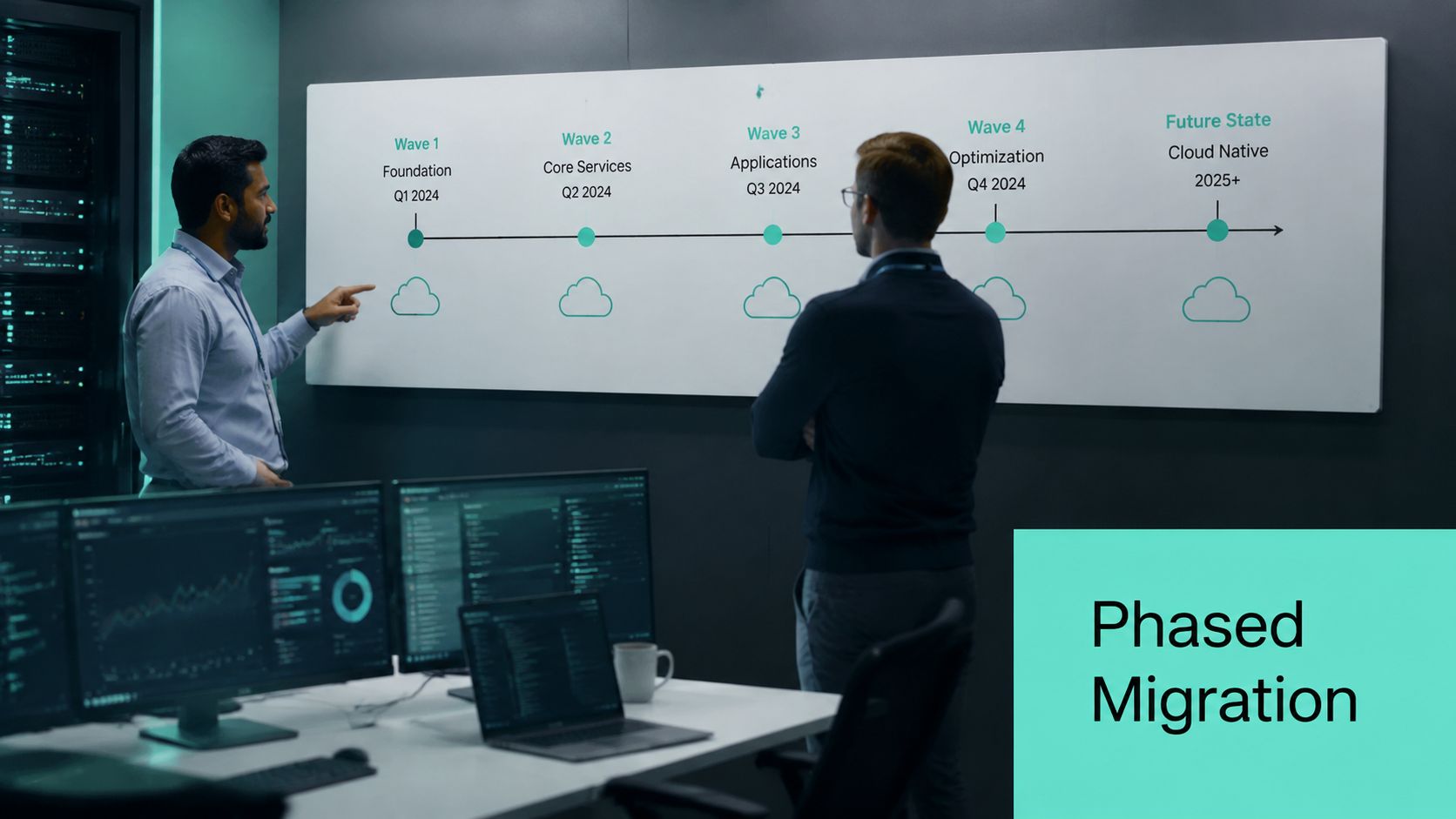
2. Implement a Phased Migration Strategy Wave-Based Approach
The big-bang migration still shows up in planning decks because it looks neat. In practice, it creates too many simultaneous failure points. Enterprise DXP programs work better in waves, especially when customer-facing channels, authoring teams, integrations, and analytics all need continuity.
A wave-based plan lets teams move less critical services first, validate tooling and operating procedures, and then migrate core systems with fewer assumptions. That pattern fits Sitecore estates particularly well. Teams can stage lower-risk services, supporting integrations, or regional properties before moving the most business-sensitive delivery and authoring workloads.
A phased approach also aligns with what current guidance stresses across complex cloud environments: assess workloads, map dependencies, test thoroughly, and sequence migration deliberately rather than forcing everything through one cutover motion.
Here's a visual way to think about staged execution:
Sequence by risk, not by organizational politics
The cleanest migration sequence rarely matches the loudest stakeholder demand. Teams should prioritize by business criticality, technical complexity, dependency depth, and rollback feasibility. A regional microsite, an internal knowledge portal, or a contained integration service often makes a better early wave than the global brand site everyone is anxious to “get done.”
For Sitecore migrations, one practical pattern is to separate supporting services from presentation delivery, and separate delivery from authoring and governance-sensitive data. For SharePoint, separate collaboration workloads from records-heavy content and permission-sensitive repositories.
Move one wave only after the team can explain what succeeded, what failed, what changed in the runbook, and what signals will trigger rollback next time.
A good wave plan includes:
- Clear acceptance criteria: Define what “ready” means for performance, logging, access, and user validation.
- Parallel-environment monitoring: During overlap periods, teams need visibility into both old and new environments.
- Business-calendar awareness: Don't migrate your highest-risk DXP workloads just before peak campaigns, seasonal launches, or regulated reporting windows.
The discipline matters because cloud migrations frequently miss expectations, budgets, or both. A phased model doesn't eliminate that risk, but it does contain the blast radius.
3. Choose the Right Cloud Deployment Model IaaS PaaS SaaS
A lot of migration pain comes from choosing a deployment model based on habit instead of fit. Teams often default to IaaS because it feels familiar, then discover they've recreated their on-premise maintenance burden inside a cloud invoice. Others jump to SaaS too quickly and hit hard limits around customization, integration behavior, or data-handling requirements.
The right answer depends on the platform, the operating model, and how much responsibility your team can own well. For many enterprise DXP programs, this isn't a single-model decision. It's a portfolio decision. You might run customer-facing workloads on managed services, use SaaS where the product is mature enough, and keep specific integrations or custom services in a more controlled model.
If your stakeholders need a concise framework, Kogifi's explanation of IaaS, PaaS, and SaaS in cloud computing is a helpful starting point.
Match the model to the platform's real behavior
Sitecore is the clearest example of why this matters. Older Sitecore architectures often carried assumptions that made sense on virtual machines. Modern Sitecore programs, especially those tied to Sitecore's cloud and AI direction, benefit more when teams evaluate managed services, composable patterns, and operational offloading with clear intent. The question isn't “Can we host this?” It's “What level of control still creates value?”
SharePoint creates a similar trade-off. SharePoint Online reduces infrastructure overhead and standardizes a lot of operations, but some organizations still need hybrid approaches because of integration patterns, content residency concerns, or staged modernization.
A practical evaluation should compare:
- Operational responsibility: Who patches, secures, scales, backs up, and monitors each layer.
- Customization limits: Which integrations, deployment patterns, or code customizations the model supports cleanly.
- Long-term flexibility: Whether the chosen model supports later AI, search, content operations, and governance requirements.
Cortex recommends defining migration success across technical, financial, operational, and business KPIs such as availability, latency, error rates, deployment frequency, cost per transaction, resource utilization, MTTR, automation coverage, user satisfaction, feature velocity, and time-to-market, as outlined in Cortex cloud migration best practices. That KPI discipline is useful when choosing deployment models because it keeps the decision tied to outcomes instead of preference.
4. Establish a Robust Data Migration Strategy and Validation Plan
Infrastructure is usually easier to move than data. Data carries history, permissions, compliance requirements, relationships, and the edge cases accumulated over years of normal business behavior. That's why enterprise cloud migration best practices put so much weight on migration design and validation, not just transfer mechanics.
In Sitecore, data migration often includes content trees, templates, media items, taxonomy, forms data, search indexes, personalization inputs, and workflow states. In SharePoint, it can include document libraries, versions, metadata, list structures, permissions, records policies, and custom workflow artifacts. The hard part isn't just moving this material. It's preserving meaning and usability.
A migration dashboard helps, but it has to be backed by strict verification.
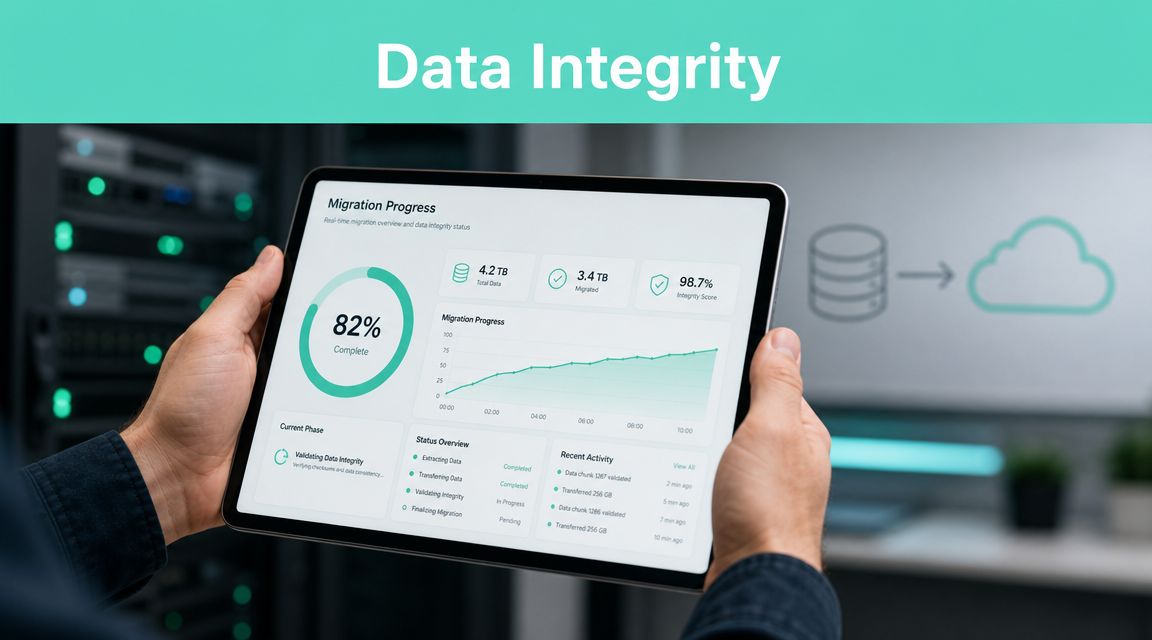
Validate what matters to the business
Device42's guidance is practical here. It highlights data-migration methods such as direct transfer, backup-and-restore, or provider transfer services, with checks for data integrity, compression, encryption, and deduplication, and it treats functional testing, data-migration and storage testing, and scalability and resilience testing as mandatory in Device42 cloud migration best practices.
That advice holds up in real DXP projects. A migration isn't validated because the transfer job completed. It's validated when content renders correctly, permissions behave correctly, links resolve, workflows continue, search returns expected results, and teams can still do their jobs after cutover.
A strong validation plan should include:
- Content integrity checks: Verify item counts, binary assets, metadata, versions, and references.
- Functional business testing: Test publishing, approvals, forms, search, personalization rules, and workflow behavior.
- Permission verification: In SharePoint and governance-heavy Sitecore setups, permission drift causes major post-cutover issues.
Data migration should be treated like product quality assurance, not like bulk file transport.
Pilot migrations are worth the effort. Move a representative subset first. Include content with complex metadata, long histories, unusual permissions, and multilingual or region-specific handling. If the pilot only covers “easy” data, the team learns very little.
5. Implement Comprehensive Security and Compliance Controls from Day One
Security work that starts after architecture decisions have already been made turns into expensive rework. It also creates blind spots that are hard to unwind later, especially in enterprise DXP environments where identities, content permissions, customer data, analytics, and regional access rules all intersect.
Many migrations fall into a false sense of completion. The workloads are running, the URLs resolve, the launch is celebrated, and then months later someone discovers overly broad access, missing logs, weak key management, or policy gaps between environments. Those aren't minor defects. They're signs that security was bolted on instead of designed in.
Teams running Sitecore in cloud environments should pay close attention to identity boundaries, content author roles, administrative access, secrets handling, and how AI-related services interact with governed data. For platform-specific considerations, Kogifi's guide to cloud security for Sitecore DXP is a relevant resource.

Build the controls before cutover
Current guidance consistently points to the same core controls: encryption in transit and at rest, strong access controls, multifactor authentication, and disciplined testing before go-live. The post-cutover operating model matters just as much. CloudOptimo notes that security gaps often appear months into migration and warns that shared-responsibility misunderstandings can leave data, identity, and compliance exposed if security isn't embedded from the start in CloudOptimo's cloud migration pitfalls analysis.
That warning lands hard in SharePoint and Sitecore programs because both platforms can mask permission complexity behind otherwise healthy-looking interfaces. A site might load perfectly while access inheritance, regional restrictions, or audit coverage is already drifting.
Security from day one should include:
- Identity and MFA controls: All privileged access should be tightly scoped and strongly authenticated.
- Encryption and key handling: Protect data in transit and at rest, and define who manages keys and rotation.
- Auditability: Centralize logs for admin actions, content access where relevant, and policy changes.
The hardest security issue in cloud migration often appears after go-live, when no one is watching permission drift closely enough.
6. Design for Cloud-Native Architecture and Scalability
Lifting a platform into the cloud without changing its architecture often preserves the exact bottlenecks you wanted to leave behind. You get a new hosting model, but the same operational friction, the same scaling pain, and the same brittle release patterns.
That's a poor trade in DXP programs. Sitecore especially benefits when teams think beyond server replacement and start designing for managed services, stateless components where possible, CDN-backed delivery, event-driven integrations, and elasticity around traffic spikes. SharePoint-related ecosystems can benefit in different ways, particularly when supporting services and integrations are redesigned to reduce custom infrastructure management.
Don't copy the data center into the cloud
Cloud-native design doesn't require a full rewrite on day one. It does require architectural honesty. Some workloads can be rehosted temporarily. Others should be replatformed. A few should be refactored because they'll remain expensive and fragile otherwise.
Device42 highlights cloud-native optimization through elasticity, scalability, serverless, and CDNs. Those capabilities map directly to enterprise digital experience work because they improve delivery performance, simplify scaling, and reduce operational burden when used intentionally.
In Sitecore-centered programs, this often means:
- Separating stateful and stateless concerns: Keep session and persistence assumptions from limiting scale.
- Using CDN-backed delivery: Especially important for media-heavy, multilingual, or globally distributed experiences.
- Moving event processing to managed patterns: Webhooks, indexing triggers, and integration jobs are strong candidates for serverless or queue-driven handling.
A common mistake is trying to modernize every layer at once. That usually slows delivery and increases risk. A better path is to modernize where the operational gain is obvious first, such as content delivery, asset distribution, integration workloads, or autoscaling boundaries, then refactor deeper dependencies over time.
7. Establish Effective Cloud Governance and Cost Management
A migration program can hit every technical milestone and still miss the business case because no one put rules around spend, ownership, and provisioning. I see this often in enterprise DXP work. The platform goes live, traffic is stable, authors are productive, and six weeks later finance is asking why lower environments run 24/7, why storage keeps growing, and why three teams are paying for overlapping services.
Sitecore and SharePoint migrations are especially exposed to this problem because the bill rarely comes from one obvious platform line item. It spreads across search, asset storage, CDN usage, integration services, observability tools, build pipelines, backup retention, regional deployments, and AI-related workloads. Without clear ownership, cost reviews turn into debates instead of decisions.
Governance has to start before the first production cutover. Define who can provision resources, which templates are approved, what tagging is required, how budget alerts are routed, and who signs off on exceptions. If those controls are added after migration, teams usually inherit inconsistent environments that are harder to standardize.
For enterprise CMS and DXP programs, tagging is not administrative busywork. It is the basis for chargeback, incident routing, and cost analysis. Every resource should map to an application, environment, owner, business unit, and migration wave. If a cost spike appears in content indexing, media processing, or personalization services, the team should be able to identify the source in minutes.
A practical governance model usually includes:
- Provisioning guardrails: Use approved infrastructure templates, quotas, and policy controls so teams do not create one-off environments that become permanent spend.
- Cost visibility by workload: Separate authoring, delivery, search, integration, analytics, and AI services so each area can be reviewed against business value.
- Rightsizing reviews: Adjust compute, database tiers, and storage classes based on actual usage patterns, not worst-case assumptions made during planning.
- Lifecycle rules: Set expiration policies for dev and test environments, snapshots, logs, temporary storage, and old content packages.
- Access and approval controls: Limit who can create high-cost services, expand regions, or change retention settings without review.
Sitecore AI adds another layer of governance. Content generation, search enrichment, copilots, model-backed features, and connector traffic can create variable consumption patterns that do not behave like traditional hosting costs. SharePoint environments have a similar issue when sprawl grows across sites, storage, workflow tooling, and tenant-level integrations. Teams need cost reporting that reflects product lines and use cases, not just subscriptions and resource groups.
The trade-off is straightforward. Tight controls can slow teams down if every change needs manual approval. Loose controls create speed at first, then cost drift, duplicated services, and cleanup work nobody planned for. The better model is policy-driven self-service. Teams can move quickly inside defined limits, and platform owners can intervene only when usage breaks policy, budget, or architecture standards.
Good governance is operational discipline with financial visibility attached. If the migration includes Sitecore XM Cloud, Sitecore Search, Sitecore CDP, SharePoint Online, or hybrid supporting services, set the rules early and review them monthly. That is how cloud cost management stays measurable instead of reactive.
8. Plan for High Availability Disaster Recovery and Business Continuity
A cloud migration that improves flexibility but weakens resilience isn't a success. Enterprise teams need to know exactly how the platform behaves when a service degrades, a region has issues, a deployment fails, or a database restore becomes necessary.
For DXP platforms, the operational stakes are obvious. If content delivery fails, customers see it immediately. If authoring fails during a campaign launch, internal teams feel it just as quickly. If search, personalization, or asset delivery fails only partially, troubleshooting gets even harder because the platform looks “mostly up” while key journeys are broken.
Design for failure before production proves your weak points
Resilience planning should define failure domains, backup and restore procedures, failover logic, health checks, and the exact operational responsibilities during an incident. Teams should know which services must be redundant, which can tolerate delay, and which can be restored rather than continuously replicated.
This is especially important for global Sitecore and SharePoint deployments. Multilingual delivery, regional data handling, CDN behavior, and identity dependencies can all behave differently during failover scenarios. If those flows haven't been tested in a realistic way, the first real incident becomes the design review.
A practical HA and DR plan should include:
- Service-by-service recovery targets: Not every workload needs the same recovery design.
- Automated health checks and failover decisions: Manual intervention should be limited to meaningful approvals and edge cases.
- Runbooks people can follow: Incident procedures must be written for operators under pressure, not for architecture reviews.
Resilience isn't proven by backup jobs. It's proven by a recovery exercise that restores the service your users actually depend on.
For customer-facing Sitecore programs, that often means validating page delivery, content publishing, forms, search, and integration queues during recovery tests, not just database availability.
9. Invest in Team Training Skills Development and Change Management
Some migrations fail technically. More of them stall operationally. The platform moves, but the team doesn't. Old approval habits remain, new deployment paths feel unfamiliar, support responsibilities are unclear, and the people who run the system every day lose confidence in it.
That's why cloud migration best practices have to include training and change management as real work, not side tasks. This is particularly true in Sitecore and SharePoint programs because the migration affects multiple groups at once. Infrastructure teams change how they provision and secure environments. Developers change how they deploy. Content teams may change authoring flows or governance processes. Support teams inherit new tooling and new escalation paths.
Train by role, not by generic cloud syllabus
Broad awareness sessions have value, but they don't prepare teams for operational reality. The platform team needs hands-on practice with infrastructure, observability, and recovery procedures. Developers need practice with pipelines, secrets handling, and deployment troubleshooting. Content and business users need clarity on what changed in workflows, permissions, and publishing behavior.
Cortex emphasizes documenting services and dependencies in a searchable platform and using standardized migration patterns and real-time dashboards to maintain stakeholder visibility. That kind of documentation does more than support engineering. It also lowers organizational anxiety because people can see what changed and where ownership sits.
The most effective enablement plans usually include:
- Role-specific learning paths: Separate tracks for platform engineering, development, security, support, and content operations.
- Knowledge transfer during the migration: Don't save enablement for the end.
- Operational rehearsals: Practice incident handling, cutover tasks, rollback steps, and post-release verification.
In Sitecore AI initiatives, this point becomes even more important. Teams need to understand not only the infrastructure shift but also how AI-enabled content operations, personalization workflows, and connected services should be governed and supported.
10. Observability Infrastructure as Code IaC and Automated Deployment Pipelines
A Sitecore cutover passes smoke tests, traffic starts shifting, and then the first hard problem appears. Content authors report slow publishing, personalization rules fire inconsistently, search latency spikes, and support cannot tell whether the fault sits in code, infrastructure, identity, or an external service. Teams usually discover at that point that deployment automation, monitoring, and environment provisioning were treated as separate workstreams.
They should be designed as one operating model.
For enterprise DXP migrations, especially Sitecore and SharePoint estates with multiple integrations, observability, IaC, and automated delivery determine how quickly teams detect issues, isolate root cause, rebuild environments, and release fixes without creating more drift. The same discipline becomes even more important when Sitecore AI services, content intelligence workflows, or custom connectors are part of the target architecture. Those components add more dependencies, more telemetry, and more failure points.
If you are standardizing repeatable environments across regions or cloud providers, Kogifi's guide to IaC tools for multi-cloud environments is a useful reference for choosing the tooling layer.
Build for diagnosis before you build for speed
Observability needs to be in place before migration waves start. Baselines from the current platform help teams compare response times, publishing duration, search behavior, queue depth, integration failures, and user journey performance after each release. Without that baseline, post-migration troubleshooting turns into guesswork.
IaC closes the other gap. It gives teams a controlled way to recreate application services, networking, identity configuration, storage, and policy settings across lower environments and production. In regulated SharePoint deployments or large Sitecore programs, that consistency reduces audit friction and lowers the chance that a manual fix in one environment creates a production-only failure later.
The pipeline is where those two disciplines meet. Good deployment pipelines do more than ship code. They enforce tests, policy checks, secret handling, approval gates, environment promotion rules, and rollback paths. For Sitecore, that often means validating content schemas, deployment packages, integration endpoints, indexing behavior, and role-specific configuration before production traffic is affected.
This walkthrough gives a useful visual reference for the automation side of the model:
A practical setup usually includes:
- Shared telemetry across the full stack: Collect logs, metrics, traces, deployment events, and security signals in one place so platform and application teams work from the same evidence.
- Journey-level tracing: Instrument login, content publishing, search, API orchestration, personalization, and document workflows, not just server health.
- Version-controlled infrastructure: Use reusable modules, peer review, and policy enforcement so environment changes are visible and repeatable.
- Release guardrails: Run automated tests, configuration validation, and approval gates before production deployment.
- Fast rollback and rebuild paths: Make it possible to restore service with known-good artifacts and reproducible infrastructure definitions.
The trade-off is real. Stronger pipeline controls can slow urgent releases, and deeper telemetry adds implementation overhead. In enterprise migrations, that cost is usually justified. Teams recover faster, audits get easier, and production changes stop depending on tribal knowledge. That is the difference between a cloud platform that looks modern on launch day and one that stays supportable six months later.
10-Point Cloud Migration Best Practices Comparison
A summary table is not enough at this stage. Enterprise teams need a decision lens that helps them judge sequencing, risk, and operational drag across the full program, especially for Sitecore and SharePoint migrations where content, integrations, security, search, workflow, and AI-related services all move at different speeds.
Use this comparison to decide where to spend senior attention first, where shortcuts usually backfire, and which practices create the biggest downstream impact.
| Practice | If delayed, what usually breaks first | Cost pressure | Delivery effort | Enterprise payoff | Best fit for Sitecore and SharePoint programs |
|---|---|---|---|---|---|
| Conduct a cloud readiness assessment | Hidden dependencies surface late. Cutover dates slip, licensing assumptions fail, and integration gaps appear in testing instead of planning. | Medium upfront | High | Better scope control, fewer surprises, cleaner migration waves | Best used at the start of multi-platform DXP programs, especially where Sitecore connects to CRM, CDP, DAM, search, identity, or custom publishing services |
| Implement a phased, wave-based migration strategy | Teams try to move too much at once. Rollback gets messy, support volume spikes, and business users lose trust after early disruption. | Medium to high | Medium to high | Lower cutover risk, better operational learning between waves | Strong fit for SharePoint estates with mixed site quality and for Sitecore programs where content, CD, CM, analytics, and integrations should not all move in one release |
| Choose the right cloud deployment model, IaaS, PaaS, SaaS | The platform lands in the wrong operating model. Teams either inherit too much admin work or lose needed control over customization and compliance. | Varies by model | Medium | Better long-term operating fit, clearer ownership model | Useful where SharePoint Online may replace custom intranet workloads, or where Sitecore teams must decide how much platform management they want to retain |
| Establish a data migration strategy and validation plan | Content arrives incomplete, metadata mappings drift, search quality drops, and regulated records become hard to verify after cutover. | High | High | Stronger data trust, fewer production defects, easier audit support | Critical for SharePoint document libraries, records-heavy environments, Sitecore content trees, media assets, taxonomy, personalization inputs, and historical analytics decisions |
| Implement security and compliance controls from day one | Permission mistakes, policy exceptions, and audit findings start early. Retrofitting controls later is slower and usually more expensive. | High | High | Lower exposure, smoother audits, stronger platform trust | High priority for public sector, healthcare, finance, and any environment where SharePoint permissions or Sitecore customer data tie into regulated processes |
| Design for cloud-native architecture and scalability | Legacy bottlenecks stay in place. Teams pay cloud rates without getting better elasticity, resilience, or release speed. | High | High | Better scaling behavior, cleaner service boundaries, easier modernization | Best applied selectively. Keep stable legacy components where needed, but redesign traffic-heavy Sitecore services, APIs, search layers, and integration points that will limit future AI and personalization plans |
| Establish cloud governance and cost management | Spend drifts fast. Unused services stay online, environment sprawl grows, and nobody can explain which business unit owns which cost. | Medium | Medium | Better forecasting, fewer waste patterns, clearer accountability | Important for large SharePoint tenant restructures, multi-subscription Azure estates, and Sitecore platforms split across production, non-production, DR, and regional environments |
| Plan for high availability, disaster recovery, and business continuity | Recovery expectations stay vague until the first outage. Then teams discover backup, failover, and recovery steps do not match business tolerance. | High | High | Better resilience and more realistic recovery planning | High-value for customer-facing Sitecore estates, employee-critical SharePoint portals, and global publishing operations where downtime hits revenue or internal productivity |
| Invest in team training, skills development, and change management | The platform may launch on time but operations stay fragile. Admins rely on a few specialists, and user adoption stalls. | Medium | Medium | Stronger internal ownership, fewer avoidable incidents, better adoption | Often underestimated in SharePoint migrations with workflow changes and in Sitecore programs adopting new cloud operations, release patterns, or AI-assisted content processes |
| Observability, IaC, and automated deployment pipelines | Troubleshooting stays slow, environment drift grows, and releases depend on manual knowledge that disappears under pressure. | Medium to high | Medium to high | Faster recovery, repeatable environments, safer releases | Particularly useful for Sitecore programs with multiple environments and for SharePoint-related integration layers, provisioning workflows, and custom extensions that need controlled deployment |
A practical reading of the table is simple. Do not rank these practices by how good they sound in architecture workshops. Rank them by blast radius if they are weak.
For example, a Sitecore migration can tolerate some temporary architectural compromise better than poor data validation or weak security design. A SharePoint migration can live with phased modernization, but weak permissions mapping or missing governance will keep creating problems long after cutover. That is the trade-off enterprise teams have to make. Perfection in every category is rare. Clear priorities are not.
Your Next Step From Blueprint to Cloud Reality
These ten practices hold up because they reflect how enterprise migrations succeed. Not through optimism, and not through vendor diagrams alone. They succeed when teams define measurable outcomes, accurately map dependencies, choose the right deployment model for each workload, protect data rigorously, and build governance and operational discipline into the platform from the start.
That matters even more for complex DXP programs. Sitecore migrations often sit at the intersection of customer experience, content operations, integration architecture, and now AI-enabled capabilities. A weak migration plan can leave the business with a cloud-hosted version of yesterday's limitations. A strong one creates room for faster release cycles, cleaner architecture, better observability, stronger security controls, and a more practical path toward AI-assisted personalization and content operations. The cloud should make the platform easier to evolve, not harder to control.
SharePoint migrations deserve the same level of seriousness. The technical move is only one part of the job. Permissions, records handling, document lifecycle rules, search behavior, workflow replacements, and user adoption all shape whether the platform remains trusted after cutover. Teams that treat SharePoint as “just a content move” usually end up cleaning up governance issues long after launch.
The most important shift is mindset. Cloud migration best practices aren't really about moving infrastructure from one place to another. They're about changing the reliability, visibility, security, and adaptability of a business-critical digital platform. That's why pre-migration baselines matter. That's why phased execution matters. That's why post-cutover governance matters. If the program can't show improved performance, stronger resilience, cleaner operations, and clearer cost accountability, it hasn't finished the job.
For Sitecore specifically, platform choices should be made with the product's broader ecosystem in mind. That includes composable architecture decisions, content supply chain requirements, AI-related workflows, search and personalization patterns, and the operational realities of running customer-facing digital experiences globally. The cloud architecture you choose now will either support that roadmap or constrain it. The same is true for SharePoint environments that need to serve as secure, governed collaboration and content platforms across departments and geographies.
If you're planning a migration, start by narrowing the unknowns. Inventory the estate. Baseline performance and cost. Identify dependencies that can break the user experience. Decide which workloads should be rehosted, replatformed, refactored, or retired. Set operational and business KPIs before the first wave moves. Then build the post-migration model as deliberately as the migration itself. That's the part many organizations underestimate, and it's where long-term success is usually won or lost.
If outside help is needed, platform-specific expertise matters. A partner that understands Sitecore's AI direction, composable architecture choices, and enterprise operational patterns will make different decisions than a general infrastructure vendor. The same goes for SharePoint governance-heavy migrations. Kogifi is one relevant option for organizations that need support across DXP implementation, migration planning, modernization, and ongoing operations.
If you're preparing a Sitecore AI or SharePoint cloud migration and need a team that can align architecture, governance, migration execution, and post-go-live operations, talk to Kogifi.