


Your team is launching campaigns faster than ever, but the asset layer underneath often looks stuck in another decade. Brand files live in SharePoint libraries, agency uploads arrive through file transfer links, product imagery sits in e-commerce folders, and someone in marketing still has the “final final approved” version on a desktop. The result isn't just inconvenience. It's missed deadlines, inconsistent customer experiences, and avoidable risk.
That is why digital asset management in the cloud has become a board-level conversation. CMOs need content velocity. CTOs need governance, integration, and security. In enterprise environments built around Sitecore and Microsoft 365, cloud DAM is less about storing files and more about creating a controlled content operating model that scales.
Table of Contents
- A DAM is a system of record, not a folder tree
- Cloud DAM vs. On-Premises DAM At a Glance
- What on-prem still does well
- Why Content Hub fits modern Sitecore architecture
- Where Sitecore AI changes the operating model
- What works in real implementations
- Should every asset move to the cloud
- How long does metadata design usually take
- Can SharePoint and Sitecore Content Hub coexist
- What is the biggest implementation mistake
- Is AI enough to fix a messy asset library
- Who should own the platform
The Unseen Cost of Digital Asset Chaos
The warning signs usually look harmless at first. A regional team downloads a logo from an old campaign folder because it's easier than asking brand. An e-commerce manager republishes a product image that was already retired. Legal approves one usage right, but the approved version never reaches the agency handling localization.

In most enterprises, asset chaos doesn't come from bad people or bad tools alone. It comes from layered history. Share drives, email attachments, desktop exports, CMS media libraries, and cloud storage all coexist. Each one solves a local problem. Together, they create a fragmented operating model where no one can say with confidence which asset is current, licensed, approved, and channel-ready.
What teams actually feel day to day
Marketing feels it when campaign assembly slows down because teams can't find the latest banner set.
IT feels it when business users ask for access to five different repositories just to publish a landing page.
Legal and compliance feel it when rights information is missing, inconsistent, or trapped in spreadsheets.
When teams say they need “better storage,” they usually mean they need better control, better findability, and fewer approval gaps.
The business impact is broad. Search time increases. Rework increases. Brand consistency slips because each region adapts whatever file it can access. Personalization efforts suffer because content can't be trusted or retrieved fast enough for downstream systems.
That's why the market is moving away from scattered repositories. The digital asset management market is projected to expand from USD 5.3 billion in 2025 to USD 10.9 billion by 2029, driven by organizations shifting from fragmented storage to centralized cloud operations for omnichannel content.
The cost no spreadsheet captures well
Some of the worst cost isn't direct spend. It's hesitation.
Teams stop reusing assets because they don't trust what they'll find. Creative and marketing duplicate work. Website managers create local copies “just in case.” Over time, the business loses one of the core advantages of digital operations: publishing once and activating everywhere.
That's the point where digital asset management in the cloud stops being an IT clean-up exercise and becomes a strategic platform decision.
What is Cloud DAM vs On-Premises Storage
A cloud DAM isn't just a file repository hosted somewhere else. It's a governed content system designed for enterprise teams that need to store, enrich, approve, distribute, and track digital assets across channels.
On-premises storage answers a narrower question: where do files live? Cloud DAM answers a harder one: how do teams manage assets as business objects with metadata, rights, permissions, workflow, and distribution logic.
A DAM is a system of record, not a folder tree
The easiest way to explain the difference is this. A shared drive or basic storage platform is a warehouse. A DAM is a smart library with rules, indexing, access controls, version history, and clear circulation paths into the rest of the stack.
That matters because enterprise content doesn't stay in one place. It moves into websites, commerce systems, CRM workflows, campaign tools, portals, and creative applications. A cloud DAM acts as the control layer for that movement.
According to a 2025 cloud asset management report, 90% of IT decision-makers see a hybrid multicloud model as their ideal framework. That's one reason cloud DAM has become attractive in distributed IT environments. It provides central governance and secure global access without forcing every workload into the same infrastructure pattern.
For a broader practical overview of operating models, this guide to cloud-based digital asset management is useful if you're evaluating where DAM fits in a larger content ecosystem.
Cloud DAM vs. On-Premises DAM At a Glance
| Attribute | Cloud DAM (SaaS) | On-Premises DAM |
|---|---|---|
| Infrastructure model | Hosted by the vendor in the cloud | Hosted on customer-managed servers |
| Access | Suited to distributed teams needing secure remote access | Often optimized for internal network access and controlled environments |
| Scalability | Easier to expand as asset libraries and user demand grow | Expansion usually requires infrastructure planning and internal provisioning |
| Maintenance | Vendor handles platform updates, resilience, and core operations | Internal teams handle maintenance windows, upgrades, and platform operations |
| Security controls | Commonly includes encryption, MFA, SSO, and audit-oriented controls | Security posture depends heavily on internal architecture and operational maturity |
| Workflow speed | Strong fit for real-time collaboration across regions and partners | Can work well internally, but collaboration often depends on VPN and local setup |
| Cost profile | Operational subscription model | Capital and operational mix, with ongoing internal support effort |
| Integration style | Typically API-first and designed for modern SaaS ecosystems | Integration can be strong, but often requires more custom ownership |
What on-prem still does well
On-premises DAM hasn't disappeared because some organizations still need it. If you operate under strict data residency rules, face exceptional security constraints, or process very large media files in environments where transfer speed is a major issue, local infrastructure may still be the right home for part of the workload.
Practical rule: Don't compare cloud DAM to a shared folder. Compare it to the full cost and complexity of governing digital assets across your website, intranet, portals, commerce stack, and regional teams.
That's also why “cloud versus on-prem” is often the wrong framing. In enterprise architecture, the primary decision is which assets and workflows belong in which tier.
The Powerhouse of Composable DXP Sitecore Content Hub
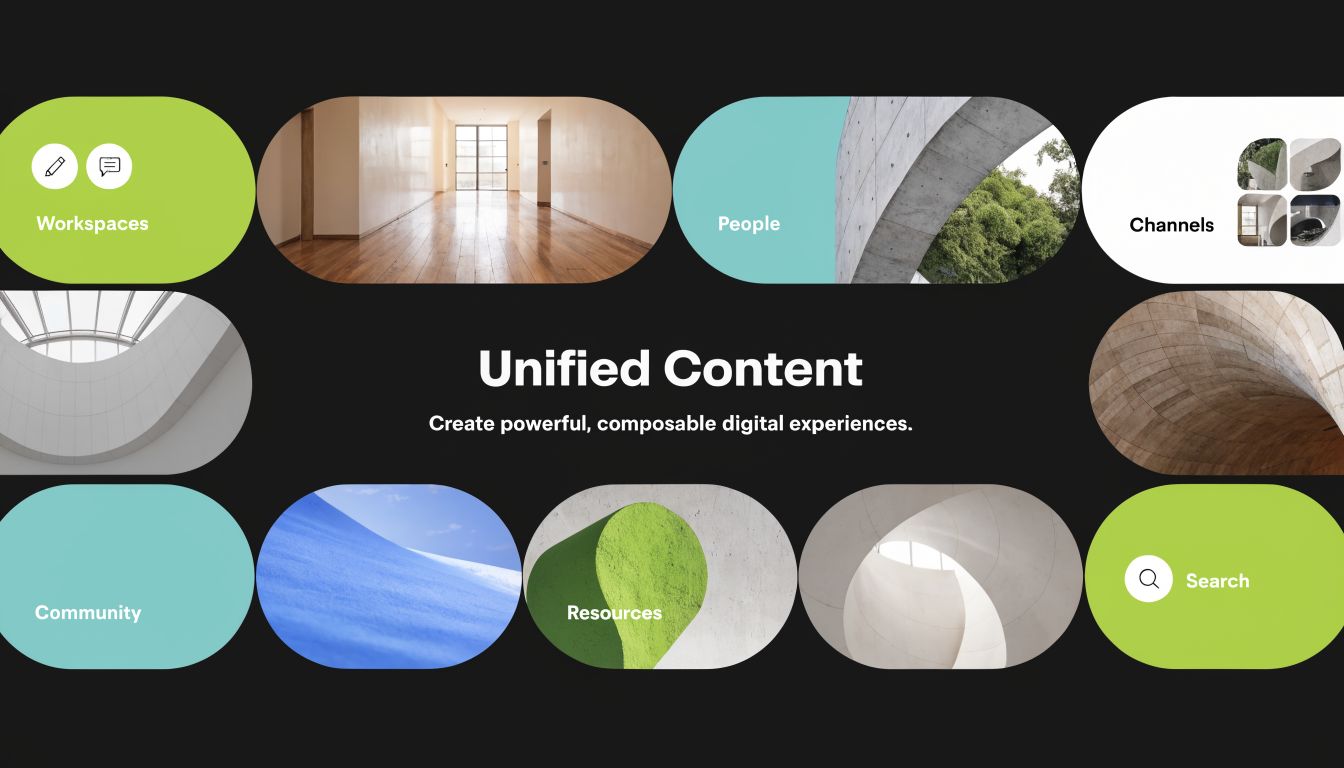
In Sitecore-centered enterprises, the most effective DAM implementations don't sit off to the side. They become part of the content operating core. That's where Sitecore Content Hub stands out. It isn't just a repository for approved images and videos. It's the layer that connects content operations, metadata, workflow, and activation across a composable DXP.
Why Content Hub fits modern Sitecore architecture
When organizations adopt Sitecore XM Cloud, OrderCloud, headless delivery, or broader composable services, content sprawl often gets worse before it gets better. Teams have more channels, more variants, and more demands for localization and personalization. If the asset layer stays manual, the rest of the architecture can't deliver at full value.
Content Hub solves that by acting as a single source of truth for rich media and related metadata. Assets can be governed centrally, then made available to downstream systems in the right form. That includes websites, commerce experiences, campaign execution, and internal production workflows.
Dedicated enterprise DAM matters in these scenarios. Vendors in this category describe deployments handling hundreds of thousands of weekly assets and millions of total files, with rich metadata, AI tagging, and integration APIs supporting publishing across the stack, as noted in this overview of enterprise cloud DAM scale and architecture.
A practical implementation view of this model appears in Kogifi's article on streamlining workflows with Sitecore Content Hub, especially for teams connecting content operations with Sitecore delivery platforms.
Where Sitecore AI changes the operating model
The architectural value of Sitecore Content Hub becomes much stronger when metadata is treated as a first-class product, not a side task. Manual tagging alone won't keep up with enterprise content volume. Teams need AI-assisted enrichment to improve discoverability, accelerate reuse, and reduce the dependency on tribal knowledge.
In practice, that means several things:
- Asset ingestion becomes structured. Teams don't just upload files. They assign content types, business ownership, campaign context, rights status, and lifecycle state.
- Search gets business-aware. Users can filter by attributes that map to real delivery needs, such as channel, market, approval state, or expiration risk.
- Renditions become operational. Instead of manually exporting variations, downstream tools pull the correct approved asset or format.
- Governance travels with the file. Rights, version history, and workflow status stay attached to the asset, rather than being tracked outside the system.
A DAM only becomes strategic when metadata is strong enough that other systems can trust it.
That's why Sitecore AI capability matters. It reduces manual effort in classification and helps teams retrieve the right asset faster, but the bigger value is architectural. Better metadata enables composable delivery.
Here's a concise product view that helps stakeholders understand the platform shape before solution design discussions:
What works in real implementations
The strongest Sitecore Content Hub programs usually share a few traits.
They define taxonomy before migration
Organizations that migrate first and classify later usually recreate old chaos in a new platform. A content model needs clear asset classes, mandatory fields, ownership rules, and retention logic from the start.
They connect Content Hub to delivery systems early
A DAM that isn't wired into the CMS, commerce stack, and campaign workflow often becomes another destination users must remember. It needs to serve published experiences, not just archive master files.
They distinguish creation from governance
Creative tools remain the place where assets are produced. Content Hub becomes the place where approved assets are governed, versioned, distributed, and reused. That separation avoids trying to turn the DAM into a design tool.
They design for regional operating models
Global organizations need one core governance model with room for local variation. Permissions, localized portals, market-specific metadata, and rights handling should reflect that reality.
If the enterprise is already invested in Sitecore, Content Hub usually makes more strategic sense than forcing a generic storage system to play the role of a DAM. It aligns with composable architecture, supports content reuse, and gives AI and metadata a practical job inside the DXP rather than treating them as standalone features.
Using SharePoint as a Foundational Asset Repository
Many enterprises already have a substantial SharePoint footprint, and that matters. It would be unrealistic to tell a Microsoft 365 customer to ignore that investment and move every asset use case into a dedicated DAM immediately.
SharePoint can play an important role in digital asset management in the cloud, especially for internal collaboration, document control, and departmental repositories. The key is to use it for the workloads it handles well, and not force it into rich-media marketing scenarios it wasn't designed to lead.
Where SharePoint works well
For documents, working files, internal templates, presentations, and collaborative review cycles, SharePoint is often a solid fit.
Its strengths are familiar to most enterprise teams:
- Document collaboration: Teams can co-author in Microsoft 365 and keep working inside Word, PowerPoint, and Excel.
- Version control: Internal users can track revisions without relying on file naming habits.
- Permissions management: Access can align with teams, departments, and existing Microsoft identity structures.
- Operational integration: Teams, Outlook, and the wider Microsoft environment reduce friction for day-to-day business use.
For many organizations, SharePoint is the right foundational repository for office documents and internal knowledge assets. It can also act as a staging area for content that eventually flows into a DAM or CMS.
A useful reference point is Kogifi's overview of SharePoint platform capabilities, particularly for organizations evaluating where collaboration ends and dedicated content operations begin.
Where SharePoint starts to strain
SharePoint becomes less comfortable when marketing and commerce teams need richer metadata, complex rights governance, asset renditions, external distribution patterns, and direct activation across DXP channels.
That usually shows up in a few ways:
| Use case | SharePoint fit | Dedicated DAM fit |
|---|---|---|
| Internal documents | Strong | Strong |
| Marketing imagery | Usable at smaller scale | Stronger for governance and reuse |
| Video-heavy libraries | Can become cumbersome operationally | Better suited to media-oriented workflows |
| Brand portals for partners | Possible with effort | Common DAM pattern |
| Channel-ready renditions | Limited without added process | Core DAM capability |
| Rights-sensitive global distribution | Harder to govern consistently | Better metadata and workflow control |
SharePoint is often good enough for collaboration. It is rarely enough on its own for enterprise brand operations.
The practical pattern that works is coexistence. Use SharePoint for document-centric collaboration and internal business content. Use Sitecore Content Hub when assets need stronger taxonomy, lifecycle control, external sharing discipline, and reliable activation into websites, commerce, and campaign systems.
That split keeps the Microsoft ecosystem productive without asking it to become the content supply chain engine for every media workflow.
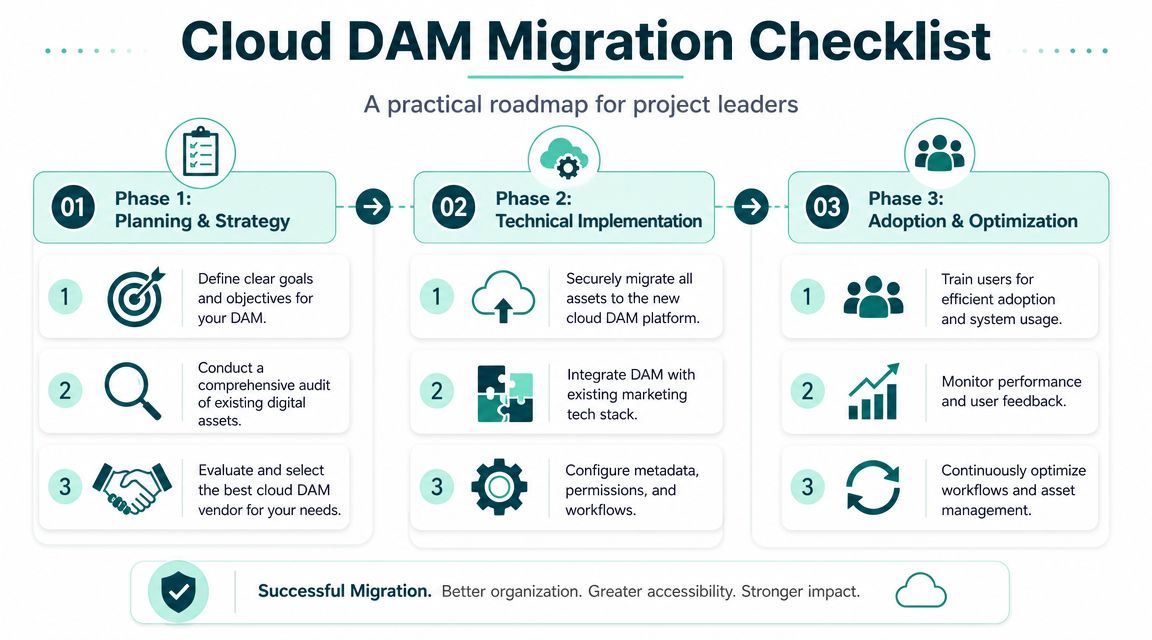
Your Cloud DAM Migration and Implementation Plan
A cloud DAM project succeeds or fails long before the first file is migrated. Most problems come from weak metadata decisions, unclear ownership, or poor integration planning. The technical move is important, but the operating model matters more.
Phase 1 planning and governance
Start with discovery. Inventory where assets live, who owns them, which systems consume them, and what business rules already exist, even if they're informal.
Focus on these questions first:
- Which assets matter most? Product media, campaign imagery, videos, sales collateral, regulated content, and brand files don't all require the same treatment.
- Who approves what? Brand, legal, regional marketing, product teams, and agencies often hold pieces of the lifecycle.
- What metadata is mandatory? Campaign, market, language, rights status, file type, owner, expiry, and approval state are common examples.
- Where will assets be used? Sitecore, SharePoint, commerce, CRM, portals, and creative tools each create different integration needs.
For organizations planning broader transformation at the same time, this guide to an enterprise cloud migration strategy is a useful companion because DAM migration rarely happens in isolation.
Phase 2 migration and integration
Once governance is defined, cleanse the source estate before bulk migration. Remove duplicates, archive obsolete content, and flag assets with missing ownership or unclear rights. There's no benefit in transferring disorder at scale.
Then move in controlled waves:
- Pilot first: Choose a business unit or asset class with high value and manageable complexity.
- Validate metadata mapping: Make sure source properties map cleanly into the target taxonomy.
- Test real retrieval patterns: Don't stop at upload success. Confirm that editors, marketers, and regional teams can find what they need.
- Connect downstream systems early: Sitecore, SharePoint, portals, and workflow tools should be part of validation, not a later phase.
A practical cross-check during this stage is to review broader asset management best practices and adapt the governance mindset to digital assets. The principle is the same. Clear ownership and lifecycle rules prevent operational decay.
Don't define success as “all files moved.” Define it as “approved assets can be found, trusted, and published without workaround.”
Phase 3 adoption and optimization
Training should be role-based, not generic. Editors need search and selection patterns. librarians and content managers need taxonomy stewardship. Administrators need governance controls and integration oversight.
After go-live, watch for these signals:
- Search friction: Users still ask colleagues for files instead of using the DAM.
- Metadata drift: Teams bypass required fields or create inconsistent tags.
- Local shadow storage: Business units continue saving copies outside the platform.
- Integration gaps: Editors still download and reupload assets manually into Sitecore or SharePoint.
Optimization usually means tightening taxonomy, simplifying workflows, and refining permissions. A DAM should become easier to use over time. If it feels heavier every month, governance is probably misaligned with the business.
Measuring ROI and Building the Business Case for Cloud DAM
The business case for cloud DAM is strongest when you stop pitching software and start describing operating costs, risk, and publishing velocity. Executive teams rarely object to better asset control. They object to vague justification.
Frame the cost discussion correctly
On-premises and fragmented storage models often look cheaper than they are because the cost is spread across teams and budgets. Infrastructure, support time, manual approvals, duplicate content creation, inconsistent rights handling, and delayed publishing rarely appear as one line item.
Cloud DAM changes that conversation. It replaces scattered process overhead with a more visible platform investment, but it also reduces hidden operational drag. In cloud environments, buyers typically benefit from vendor-managed updates, resilience features, and security controls such as encryption and multi-factor authentication, as described in this overview of cloud DAM operating characteristics.
Build an ROI model executives can use
A workable ROI model usually includes three categories.
Efficiency gains
Measure how teams search, review, approve, and publish today. If marketers, editors, and agencies spend less time hunting for files or recreating missing assets, that recovered time has real value.
Risk reduction
Wrong-asset usage creates legal, brand, and operational exposure. Rights-aware governance, version control, and auditability reduce that risk. For many regulated or global organizations, that reduction is a major part of the justification.
Revenue enablement
This is often the most strategic category. Faster campaign assembly, better content reuse, and more reliable personalization all support revenue-generating activity. The DAM doesn't generate revenue by itself, but it removes friction from the systems and teams that do.
A CFO-ready DAM case usually combines lower operating friction with reduced governance risk and faster time to publish.
For Sitecore organizations, the strongest argument is that DAM improves the return on the rest of the stack. Personalization, headless delivery, and omnichannel experiences all depend on trusted assets, strong metadata, and dependable integration.
Frequently Asked Questions about Cloud DAM Implementation
Should every asset move to the cloud
No. Cloud is the default direction for most DAM programs, but not every workload belongs there. Some organizations still need on-premises or hybrid patterns for strict data residency, extreme security compliance, or very large high-bitrate video workflows where transfer speed is the main bottleneck, as discussed in this guidance on when hybrid DAM still matters.
The right question is which workload belongs where. Brand portals and distributed marketing assets may fit the cloud well. Certain sensitive archives or performance-heavy media pipelines may need hybrid placement.
How long does metadata design usually take
Longer than stakeholders expect, and that's normal.
Metadata design isn't a workshop where people brainstorm labels for a few hours. It usually involves reconciling how marketing, legal, e-commerce, regional teams, and content operations describe the same asset. If you rush it, users won't trust search and editors will build side systems.
Can SharePoint and Sitecore Content Hub coexist
Yes, and they often should.
A clean pattern is to let SharePoint handle document collaboration and internal business content while Sitecore Content Hub manages governed marketing and experience assets. That keeps each platform focused on what it does well. It also avoids forcing one tool to satisfy both office collaboration and omnichannel brand activation.
What is the biggest implementation mistake
Treating DAM as a migration project instead of an operating model change.
When teams focus only on moving files, they miss the hard parts: ownership, taxonomy, rights, workflow, integration, and adoption. The result is a cloud repository that still behaves like a shared drive.
Is AI enough to fix a messy asset library
No. AI helps with tagging, enrichment, and findability, but it can't replace governance. It works best when asset classes, approval states, and required metadata fields are already defined clearly.
Who should own the platform
Shared ownership works better than isolated ownership.
IT should own platform integrity, security alignment, and integration architecture. Marketing or content operations should own taxonomy, workflow, and asset governance. When only one side owns the DAM, adoption usually suffers.
If your team is weighing Sitecore Content Hub, SharePoint, or a hybrid cloud DAM model, Kogifi can help map the architecture, governance model, and integration approach around your actual content operations rather than a generic platform checklist.