


Your release calendar is the actual bottleneck. A regional landing page, a search tweak, and a personalization test are all waiting on one CMS upgrade. Finance has asked whether another suite licence will fix it. It will not. The decision turns on the five-year running cost and the governance you will have to staff, not on the line on the order form.
Table of Contents
What a Composable DXP Means for Enterprise Teams
A composable DXP is a set of independent services, content management, search, personalization, commerce, analytics, and digital asset management, joined by APIs and orchestrated by a modern front end. It is not one bundled suite wearing a new name.
Think of a monolith as a car sold as one sealed unit. A composable DXP is a car built from parts you chose, so the engine can be replaced without rebuilding the chassis. The shift started roughly a decade ago, when teams separated presentation from content and business services so websites, apps, portals, and commerce could share the same APIs. The MACH Alliance later formalized that direction as MACH: microservices-based, API-first, cloud-native SaaS, and headless.
Cloud buying is already the larger share of the market. A 2025 digital experience platform market analysis from Market Research Future estimated that cloud-based deployments represented 54% of the DXP market in 2025.

Composability changes who decides procurement, architecture, governance, and release cadence, not only which CMS is installed.
Run two checks on your own estate before you fund a program. Does one release train block every change, including a copy fix? Does one vendor's roadmap set the pace for search, personalization, and the front end? If both answers are yes, you are paying for coupling.
If those answers are fuzzy, ask editors and site owners how likely they are to recommend the current stack to a sister brand. The Formbricks Net Promoter Score calculator turns that internal pulse into a score you can put beside the licence renewal.
Composable vs Monolithic DXP Side by Side
Score the architecture against the work you ship in practice. The eight rows below are the ones that move money and calendar, not the feature checklist in a vendor deck.
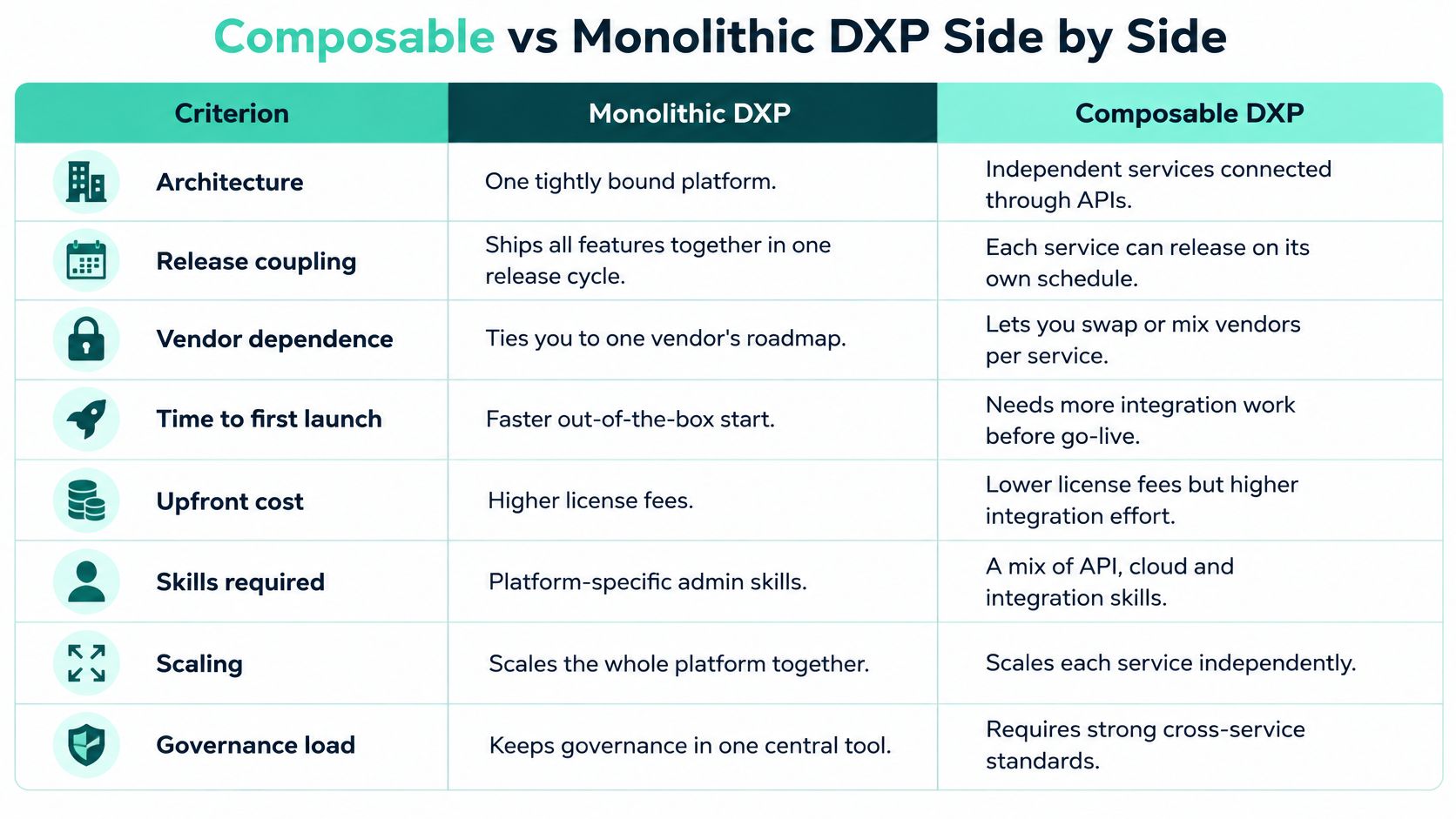
| Criterion | Monolithic DXP | Composable DXP |
|---|---|---|
| Architecture | One tightly coupled suite | Independent services connected by APIs |
| Release coupling | One release train for all features | Each capability deploys on its own schedule |
| Vendor dependence | One vendor for most capabilities | Best-of-breed per capability, with component-level exit |
| Time to first launch | Faster, with preconfigured features | Slower to start, per 2025 IT leader survey |
| Upfront cost | Lower integration spend | Higher initial cost, per 2025 IT leader survey |
| Skills required | Platform administration skills | Higher skill levels across APIs, cloud and frontend |
| Scaling | Scales as one unit | Selective scaling per service under load |
| Governance load | Centralized approval paths | Needs platform team, API ownership and shared standards |
The MACH Alliance's reading of Gartner records the projection that 70% of organizations would be mandated to acquire composable DXP technology by 2026, compared with 50% in 2023. Treat that as a buying signal, not a precise adoption census. Mandates do not staff an integration team for you.
The rows that decide most projects
Time to first launch favors the monolith when you have one brand, one locale, and a site that can live inside preconfigured templates. Integrations are already wired. A composable start is slower because you have to agree contracts between services before the first page is public.
Upfront cost follows the same split. A 2025 survey of 561 senior IT decision-makers at organizations with more than 5,000 employees, reported by The Publive, found that composable and MACH implementations were perceived as taking longer to initiate, costing more initially, and requiring significantly higher skill levels than monolithic alternatives. Licence savings do not erase that first-year bill.
Release coupling and vendor exit are where composition earns its keep. One search vendor, one personalization service, or one front end can be replaced without a full re-platform. A suite makes you wait for the vendor's combined release, then test everything that rode along.
Score each row against your own priorities. A weak score is a warning to plan for, not a verdict against composability. If skills and time-to-launch score poorly and you only run one site, stay on the suite.
How the Layers of a Composable DXP Fit Together
Passengers see one journey through an airport. Check-in, baggage, security, and boarding are separate systems, linked by standard hand-offs. A composable DXP works the same way. The visitor sees one site. Behind it, services fail, scale, and release on their own clocks.
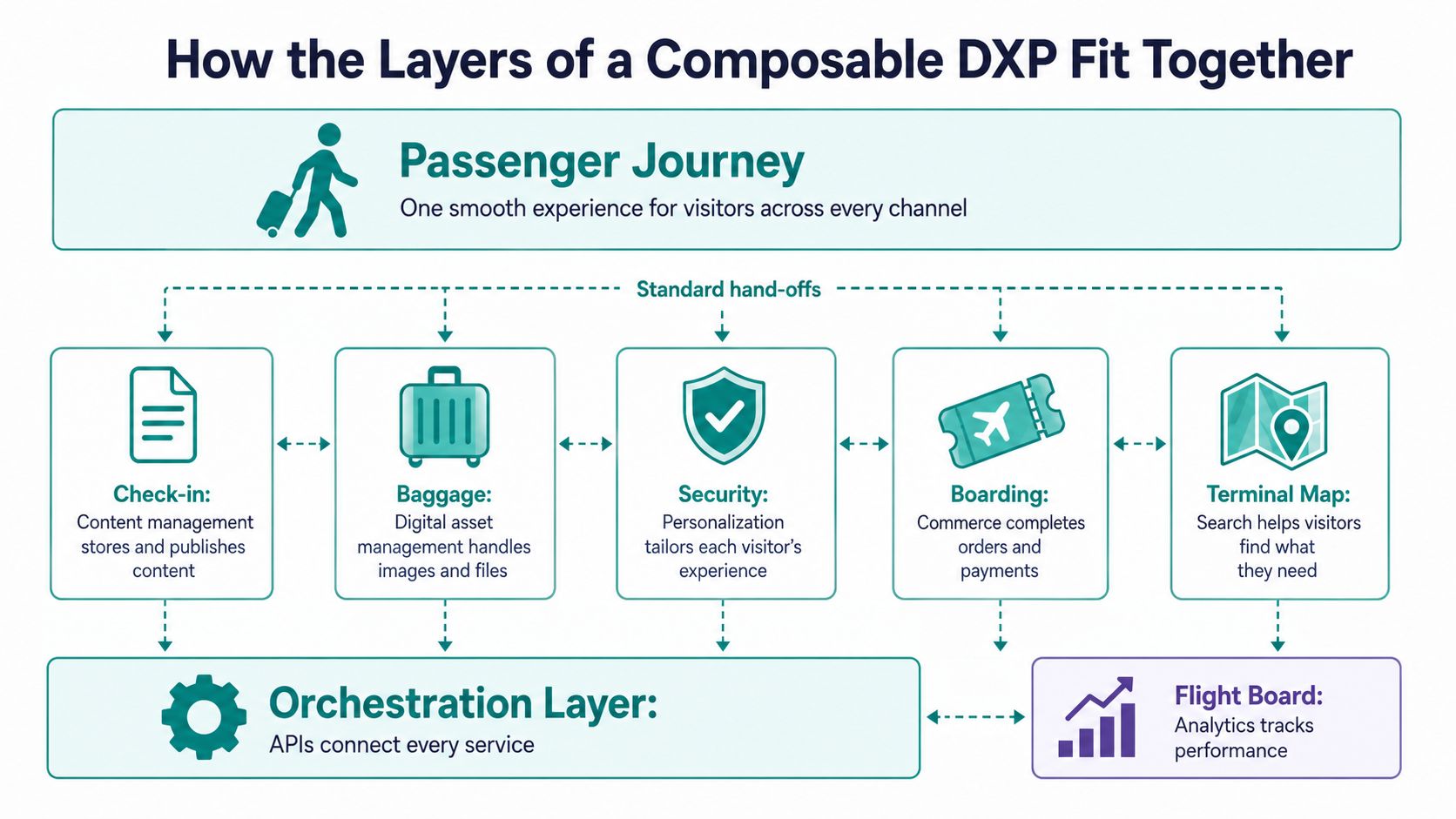
Five layers and what each must own
- Content management: Governed content and content models live here. Sitecore XM Cloud or Adobe Experience Manager is a typical system of record for marketing pages.
- Business services: Commerce, search, personalization, digital asset management, and analytics sit beside the CMS. Each one should have a named owner and a versioned API.
- Experience orchestration: An API gateway authenticates requests, applies rate limits, routes traffic, and assembles responses. This is the hand-off desk, not a second CMS.
- Presentation: A headless front end renders each channel. Next.js is the usual choice when the content API is stable and brands share a component library.
- Platform controls: Identity, observability, caching, and CI/CD are not add-ons. Design them with the first service, or every later seam inherits the gap.
An API-first approach is what keeps those hand-offs boring. Version the content API, run contract tests in the pipeline, and refuse a release that breaks a consumer you still support.
Where speed actually comes from
Performance does not come from chopping a monolith into microservices. It comes from selective scaling and independent optimization. Cache at the edge, regenerate pages only when content changes, and scale search when search is the hot path.
Set a latency budget for the gateway, the content API, search, and personalization. Put timeouts and circuit breakers on every downstream call. When personalization is slow, serve the default experience instead of holding the page. Measure the whole journey, not a single service benchmark in isolation.
Composability is a way to decide which part fails, scales, and changes independently, not a way to reduce infrastructure.
Choosing Sitecore, AEM and SharePoint for Each Layer
Assign a job before you assign a product. Two authoring tools for the same page is how content drifts and nobody can say which version is live.
| Product | Role in the stack | Best fit |
|---|---|---|
| Sitecore XM Cloud | SaaS headless content and authoring | Marketers publishing to headless front ends |
| Sitecore XM Cloud Plus | Content plus AI search, personalization, customer data and analytics | Estates where personalization is a priority |
| SitecoreAI | Cloud-native SaaS with 20+ pre-built AI agents across the content lifecycle | Teams embedding AI in content and optimization workflows |
| Sitecore Stream | Generative AI on Azure OpenAI Service via Sitecore Cloud Portal | Ideation, campaign briefs and on-brand copy |
| Adobe Experience Manager | Enterprise content and experience delivery, headless or hybrid | Organizations already invested in the Adobe stack |
| SharePoint Online | Intranets, team sites and content, extended with SPFx and Power Platform | Employee-facing channels and internal workflows |
| Microsoft Azure | Shared hosting, API gateway, microservices and CI/CD | Common runtime for composable services |
Sitecore AI inside the content lifecycle
Sitecore is the anchor when marketing sites, personalization, and AI-assisted authoring have to share one operating model. Sitecore describes SitecoreAI as a fully cloud-native SaaS digital experience platform connecting AI visibility, content management, personalization, and conversion optimization. Its workflow model includes more than 20 pre-built AI agents for content creation, tagging, translation, personalization, and content activation. That is AI inside the lifecycle, not a chatbot bolted beside the CMS.
Sitecore Stream is the generative layer across Sitecore products. Sitecore documentation states that it is built on Microsoft Azure OpenAI Service and opened through the Sitecore Cloud Portal. Use it for ideation, campaign briefs, and on-brand message refinement, under the same cloud governance as the rest of the portfolio.
XM Cloud Plus is the bundle when personalization is the reason you are composing at all. It combines content management with AI-powered search, personalization, customer data management, and analytics. Sitecore's October 2023 announcement reported that XM Cloud had received more than 100 major-brand adoptions by then, and called it the fastest-selling SaaS product in the portfolio. For headless delivery, pair XM Cloud with a Next.js front end and a Helix-based component library so brands share components instead of forking pages.
If you are still choosing an authoring tool by how many people will touch it, this roundup of best content tools by team size is a useful filter before you lock a system of record.
AEM for the Adobe estate, SharePoint for employees
Keep Adobe Experience Manager when the organization already runs Adobe for assets, analytics, and campaign delivery. Forcing a second marketing CMS on top of that stack doubles authoring training and splits the content model. Use AEM headless or hybrid for the public experience, and do not mirror those pages into Sitecore.
SharePoint Online is the employee channel, not the public website. Microsoft states that more than 200,000 organizations and 190 million people use SharePoint for intranets, team sites, and content management. Extend it with the SharePoint Framework (SPFx), Power Apps, and Power Automate, and treat that content as a source for Copilot Studio. One rule covers all three products: one system of record per content type, and never two authoring tools for the same page.
How to Migrate From a Monolith in Six Steps
Do not cut the whole estate over in a weekend. Move one seam, prove it, then retire the piece it replaced.
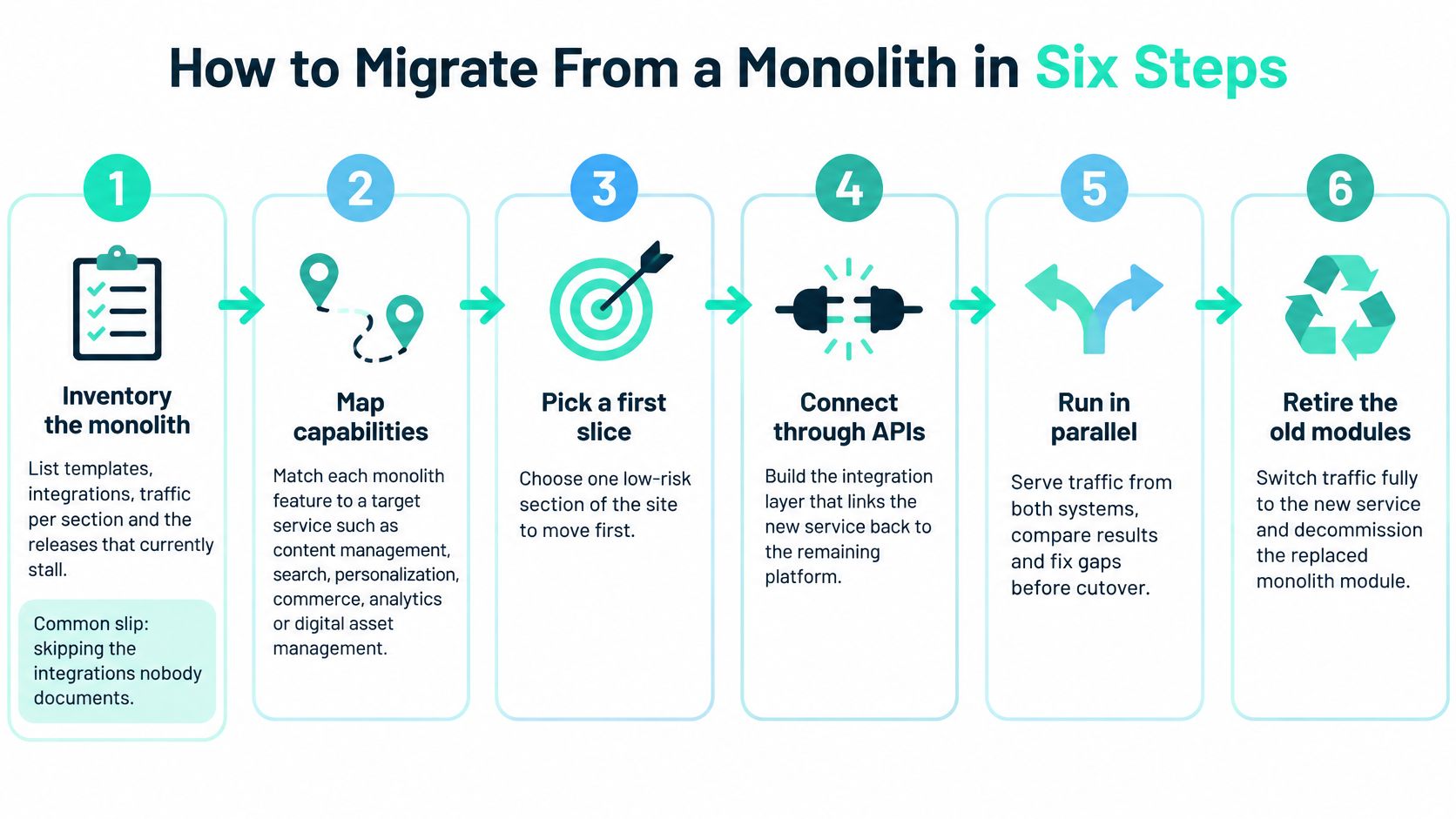
Inventory the monolith. List templates, integrations, traffic per section, and the releases that stall. You need this so the first slice is a real bottleneck, not a pet project. The common slip is skipping the integrations nobody documented. A CMS migration checklist keeps identity, search, and analytics from disappearing between spreadsheets.
Map capabilities. Split content, search, personalization, commerce, identity, and analytics, and mark which ones are worth replacing. Not every feature should move. A form that ships twice a year can stay inside the suite.
Choose the first seam. Pick a low-risk slice, such as a new regional site or site search. Never start with checkout. A failed search experiment is recoverable. A failed payment path is a board conversation.
Put an API layer in front. Stand up a gateway, versioned content APIs, and contract tests in CI/CD so new parts can read legacy data. Without contracts, the old templates and the new front end drift apart within a sprint.
This walkthrough of a strangler-style cutover shows how traffic moves before the old modules go dark.
Build the headless front end and route traffic gradually. Use the strangler pattern. Send a share of URLs to the new stack, watch latency and errors, then widen the share. The common slip is a cutover that misses legacy URLs and breaks SEO. Map every URL and redirect before you route. RedirHub's guide to website migrations is the practical reference for that redirect map.
Decommission only after two stable release cycles and a documented rollback path. Turning the old server off on launch day is how you discover the integration that still writes to it.
- Decision rights: Who can add a vendor, and who can refuse one.
- Reference architecture: The allowed patterns for APIs, identity, and front ends.
- Ownership: A named owner for each component and each content model.
- API versioning: How long an old contract stays supported.
- Accessibility and localization: Shared rules, not a per-brand interpretation.
- Incident escalation: Which seam owner is paged when a journey fails.
- Data stewardship: Who may join customer data to content.
- Vendor exit: How content and configuration leave if a component is dropped.
- Audit the stalls. Note where releases wait, and which vendor contracts renew soonest. Renewals are the cheap moment to exit a component.
- Pick one seam. One capability or one new site. Not a program that touches every template.
- Pilot with a rollback. Fix the latency and deployment metrics before you widen traffic. If you cannot roll back, you do not have a pilot.
A migration is complete when the old system has no live traffic, not when the new one launches.
Governance and Rollout Patterns That Keep Composable Under Control
Tool sprawl shows up faster than the architecture diagram predicts. A 2024 composability survey of 168 participants, summarized by Frans Riemersma, found that 82.7% used alternative applications instead of built-in features in their central platform. That is what happens when each team optimizes its own tool and nobody owns the seams.
The minimum governance set
A content governance framework has to name people, not only standards. Put these on one page and assign an owner to each:
Scale the ceremony to the estate. Two brands usually need a lightweight architecture review and shared design tokens. A multinational estate needs a product or platform team, automated quality gates, and a named owner for every integration seam.
Three illustrations, not case results
An airport authority runs a multilingual information portal. Wayfinding components are shared. Each language team fills content. Nobody forks the component to "just fix" a label.
An energy provider runs a partner portal on one identity service. Commerce and content both trust that login. A second identity product is refused unless the first one cannot meet the control.
A manufacturer rolls a shared component library across regional sites, one region at a time. The next region starts only after the previous region ships on the shared library without a local fork.
Pilot one brand or one region, prove the seams, then scale the component library. A library nobody is required to use is a slide, not a platform.
What Composable Costs and Returns After Launch
Licensing is one line in a five-year model. The lines that surprise finance are the ones that continue after go-live.
| Cost category | Migration phase | Run phase | Common blind spot |
|---|---|---|---|
| Licensing | Subscriptions for each component | Renewals on different vendor schedules | Overlapping features paid twice |
| Integration middleware | Build API layer and contracts | Maintain gateway and contract tests | Versioning cost grows with each service |
| Observability and security testing | Set up telemetry and test suites | Ongoing monitoring and penetration testing | Often underbudgeted |
| Specialist skills | Hire or train architects, frontend and cloud engineers | Retained team cost | Skill premium over monolith administrators |
| Upgrades and release coordination | Cutover planning | Multi-vendor upgrade calendars | Failures surface at the integration seams |
| Reversal cost | Usually not budgeted | Incurred only if a component fails | Must be modelled before the choice |
No honest five-year savings percentage fits every estate. Build the model from the variables that move the number: brands, locales, channels, integrations, release frequency, traffic volatility, and internal engineering capacity. Price each integration seam on its own. Every extra seam adds versioning, monitoring, and testing.
A practical way to pressure-test those lines is a DXP ROI calculator for digital investment. Put migration cost and run cost in separate columns so a cheap licence cannot hide an expensive operating model.
Metrics that show whether it paid back
Selective scaling behind an API gateway, edge caching, and incrementally regenerated pages cut repeated origin work. Each added service also adds network hops and cache-invalidation work. Measure the journey, not the service in isolation.
Track p95 and p99 latency, cache-hit ratio, origin-request volume, deployment frequency, change-failure rate, and recovery time for each capability. Compare them with the monolith baseline you captured before the first seam moved. If deployment frequency is up and change-failure rate is up with it, you bought speed and lost control.
Compose the capabilities where replaceability has measurable business value. Keep platform-native features where the integration overhead outweighs the flexibility.
Decide Which Capabilities to Compose First
Stay on a suite when you have one brand, one locale, infrequent releases, and a small engineering team. The preconfigured stack will beat a composed one on time and on skills.
Move toward a composable DXP when several brands or locales share content, several channels need the same data, releases are blocked by one shared cycle, and you can staff APIs and cloud operations.
Choose a selective hybrid when only search, personalization, or a single regional site needs independence. Leave commerce and the core CMS where they are until a seam has a measured reason to move.
Do this next, in order:
Kogifi can run that audit, build XM Cloud headless front ends on Next.js and Azure, and support the pilot. Scope and commercial terms should be confirmed in a discovery conversation before the pilot starts.
Kogifi designs and runs enterprise platforms on Sitecore, Adobe Experience Manager, and SharePoint, including composable stacks where only the seams that earn their keep are split out. If your release train is blocking the next site, start with an audit of that one bottleneck rather than a full re-platform. Visit Kogifi to set up that conversation.