


At many companies, approximately 20 end-to-end customer journeys account for more than 70% of total costs and more than 80% of the customer experience, and organizations applying a horizontal approach were on pace for nearly 20% lower service-delivery costs and more than 35% improvement in work efficiency and service quality, according to McKinsey research on next-generation operating models. That concentration changes how you should run DXP delivery. You're not shipping pages. You're protecting the journeys that carry most cost, revenue, and reputation.
Table of Contents
Why Delivery Has to Run as One Connected Process
Think about a hotel stay. Guests don't award five stars for a polished lobby if booking failed, check-in stalled, or checkout produced the wrong bill. They judge the whole stay, and visitors judge a digital platform the same way.
End to end processes for delivery mean one connected flow from discovery through design, development, governance, CI/CD, launch, and daily operations. Ownership crosses marketing, IT, and agency teams instead of stopping at each handoff. A website, commerce journey, intranet, or service portal spans content, identity, data, workflow, fulfillment, and support, so optimizing one screen in isolation doesn't fix the flow.
The typical failure is polite and expensive. Every team hits its own target while the whole process stalls. The site launches on time, but content approvals wait three weeks. The build passes, but nobody owns redirects. Search works, but regional editors can't publish without a developer.
Multi-brand programs multiply that risk. Each brand, market, and language adds another approver, another content model exception, and another place where a decision can sit unanswered.
If nobody can name the owner of a handoff, that handoff is already your delay.
What follows is a practical stage map with outputs and exit gates, discovery and design steps, pipeline checks, governance rights, launch and operations discipline, and where Sitecore AI and SharePoint fit. I'd use it to find the stage where work waits longest, then fix decision rights there before buying more tooling.
The Seven Stages and What Each One Must Deliver
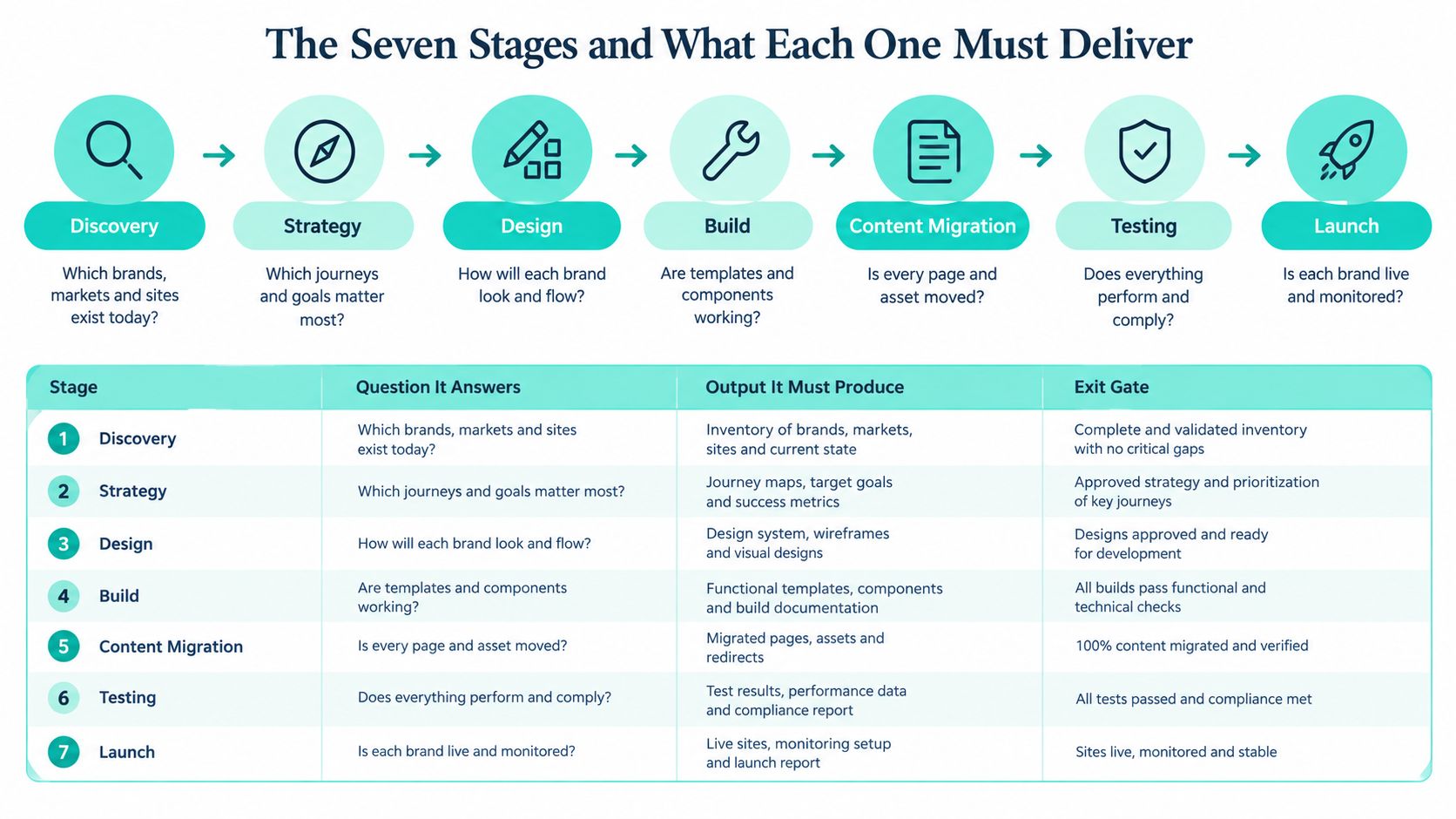
| Stage | Core question | Main output | Exit gate |
|---|---|---|---|
| Discovery | Which journeys matter most, and for which brands and markets? | Journey map and brand, market and language inventory | Stakeholders sign off the ranked journey list |
| Design | How do brands share patterns without looking identical? | Design tokens, component specifications and accessibility annotations | Accessibility review and design approval for each brand |
| Development | How are components built once and reused safely? | Helix-based components, headless front end and content models | Code review and component tests pass |
| Governance | Who decides what changes, and when? | Decision matrix, component ownership and release calendar | A named owner approves each change request |
| CI/CD | How does a change reach production without manual risk? | Automated build, tests and one promoted artifact | Quality gates pass in staging |
| Launch | Is the experience ready for live traffic? | Launch checklist, redirects, tracking and rollback plan verified | Go/no-go signed by business and technical owners |
| Operations | How do we detect and fix problems after go-live? | Monitoring, SLA targets and incident runbooks | SLA targets accepted and a named on-call owner for each brand |
Stages overlap in real programs. Discovery for a second market can continue while developers build the first component. That overlap is healthy, provided no stage closes without its exit gate.
A Three-Brand XM Cloud Example
Say you're delivering Sitecore XM Cloud for three brands. Discovery ranks journeys by cost and conversion, not by stakeholder volume. Design produces shared design tokens and per-brand component specifications, so brands differ deliberately rather than by accident. Development builds a Helix-based component library with shared content models.
Governance then assigns a named owner to every component. CI/CD promotes the same build from staging to production. Launch requires a go/no-go decision signed by business and technical owners, and operations sets service-level targets for the first month on live traffic.
Teams most often skip the governance gate. They discover ownership disputes during launch week, when a legal banner, pricing component, or tracking change suddenly has three claimants and no approver. Audit first where the most handoffs occur. That's usually where your end to end processes are already leaking time.
How to Run Discovery and Design for Multi-Brand Sites
Discovery works when it produces decisions, not a bigger backlog of opinions. This is the sequence I'd run before design starts in earnest.

- Inventory everything. List every brand, market, language, and existing site, including acquired brands still on legacy platforms. The common slip is discovering a forgotten regional site after templates are frozen.
- Map top journeys from evidence. Use analytics on cost, conversion, search demand, and support contact reasons. Don't rank journeys by workshop enthusiasm.
- Run cross-functional journey workshops. Bring marketing, IT, regional editors, legal, and service teams into the same map. Mark every point where work waits for approval, data, or translation. A structured discovery phase for your project keeps those sessions tied to scope rather than wish lists.
- Decide shared versus brand-specific. Use one rule. Share any component whose behavior is identical across at least two brands. Building a brand variant before the shared version exists is how libraries fork permanently.
- Define tokens before screens. Set colour, type scale, spacing, and interaction states as design tokens, then write component specifications per brand. Tokens let brands look distinct without rebuilding behavior.
- Set accessibility and localization criteria early. Agree the accessibility target, commonly WCAG 2.2 AA, and localization needs such as right-to-left layouts for Arabic markets before designers commit layouts. Retrofitting either is slower and more expensive.
- Sign off the first release scope. Publish a journey priority list that names what's in, what's deferred, and who accepted that trade-off.
Watch how those decisions translate into site maps, content models, and component priorities before you lock scope.
The Regulated Brand Edge Case
A regulated brand may genuinely need its own content model, approval chain, or disclaimer pattern. Allow it, but require the reason in writing and review it at each release. Exceptions without an expiry review become permanent architecture.
Building a CI/CD Pipeline That Protects Every Release
A release pipeline is a decision flow, not just a sequence of automated checks. The delivery lead owns the gates and escalation path; engineers own build quality; business approvers accept the release scope. Track four measures together using the DORA metrics guide: change lead time, from a version-control commit to a successful production deployment; deployment frequency; change failure rate; and recovery time.
Report lead time as a median so an unusually large release does not distort the trend. DORA research associates elite delivery performance with frequent deployments, short lead times, and fast recovery. Set targets for each product and risk class. A campaign microsite and a transactional portal should not carry identical release risk, and higher release frequency is useful only while failure rates and recovery remain controlled.
Governance rule: Increase deployment frequency only while change failure rate and recovery time stay controlled.
Sitecore Specific Rules
Keep code separate from content. Serialize templates, renderings, and structural items through the Sitecore CLI, so structural changes are versioned and reviewable. Editors publish content through the usual workflow. Developers should not edit production templates to fix a campaign.
Build once, then promote the same artifact through development, staging, and production. If each environment gets a separate build, staging may test something different from the production release. Review pull requests against agreed code review best practices to catch Helix layer violations and rendering mistakes before they reach later pipeline gates.
Choose automated checks based on brand and product risk. Run accessibility and priority journey tests, and consider automating typography checks in CI/CD for multi-brand estates. A missing font licence or incorrect font family can create brand and legal compliance problems across sites.
Route structural changes through the pipeline, including emergency fixes. A template changed directly in production can disappear at the next deployment, with no clear record of what changed or who approved it.
| Pipeline stage | Check | Gate to pass | Metric to log |
|---|---|---|---|
| Pull request | Peer review and linting | One approved reviewer and no lint errors | Review time per change |
| Build | Compile, Helix layer rules and unit tests | Build succeeds and tests pass | Build duration |
| Security scan | Dependency and secret scanning | No critical findings open | Findings by severity |
| Serialization check | Template and rendering diff from Sitecore CLI | Diff reviewed, no unintended removals | Structural items changed per release |
| Staging deploy | Automated journey tests and accessibility checks | Priority journeys pass on staging | Test pass rate |
| Approval | Business and governance sign-off | Named approver confirms scope | Approval wait time |
| Production deploy | Progressive rollout with feature flags | Error rate stable across the rollout | Change failure rate and lead time |
| Rollback | Automated revert to the previous artifact | Rollback tested before each release | Recovery time |
Instrument the full path for Sitecore, AEM, or SharePoint, from pull request and build through promotion, approval, deployment, alerts, rollback, and incident closure. Each handoff needs an owner, and each gate needs a recorded result. If a production failure cannot be traced to a commit and an approver, the pipeline automates steps without providing accountability.
Governance That Keeps Shared Components Consistent Across Brands
Dashboards show a process. They don't decide anything.
That distinction matters because 98% of operations executives say digital tools have improved end-to-end visibility, yet 82% still struggle to balance short-term needs with long-term strategic change, according to PwC's digital supply chain survey. Visibility without decision rights produces well-instrumented delay. In DXP delivery, you'll see every stuck approval clearly and still miss the campaign date.
Start with component ownership. Every shared component has one named owner who approves changes, reviews forks, and decides retirement. Not a team inbox. A person.
Thresholds That Prevent Arguments
- Copy edit: Follows the normal publishing workflow for that brand and market.
- New brand-specific variant: Needs brand approval and a reuse check from the platform team.
- Change touching more than two brands: Goes to the platform council before build starts.
- Approval waiting more than two business days: Escalates automatically to the platform lead.
Agree regional definitions in writing. If one market calculates conversion at form start and another at qualified submission, every performance review becomes an argument about arithmetic. Shared definitions are governance, not reporting trivia. A documented design system governance model helps keep tokens, components, and naming decisions enforceable rather than advisory.
Publish a release calendar with blackout periods around major campaigns, peak trading, and regulatory deadlines. Track outcome measures, not meeting activity. I'd watch approval cycle time, share of pages built from shared components, and number of brand-specific forks still open.
Allow regional variants where language, law, or market behavior demands them. Require a documented reason and a sunset date. That single rule stops temporary campaign hacks becoming permanent maintenance cost.
| Decision | Central platform team | Brand team | Regional team |
|---|---|---|---|
| New shared component | Approves and owns | Requests and tests | Consulted on localization |
| Brand-specific variant | Consulted on reuse | Approves and owns | Consulted |
| Design token change | Approves | Consulted | Informed |
| Regional content publish | Informed | Consulted | Approves and owns |
| Emergency hotfix | Approves and runs | Informed same day | Informed same day |
| Retiring a component | Approves | Consulted on usage | Consulted on usage |
Launch Readiness and Operations After Go-Live
Launch isn't a deployment. It's an evidence check.
- Redirects mapped: Every retired URL points to a tested destination.
- Analytics verified: Tags fire correctly on each brand, market, and consent state.
- Load tested: Results cover expected peak traffic, including search and personalization calls.
- SEO metadata checked: Titles, descriptions, canonicals, and structured data reviewed on priority templates.
- Accessibility retested: Checks run on the live build, not only design files.
- Rollback rehearsed: The team has restored the previous artifact in staging under time pressure.
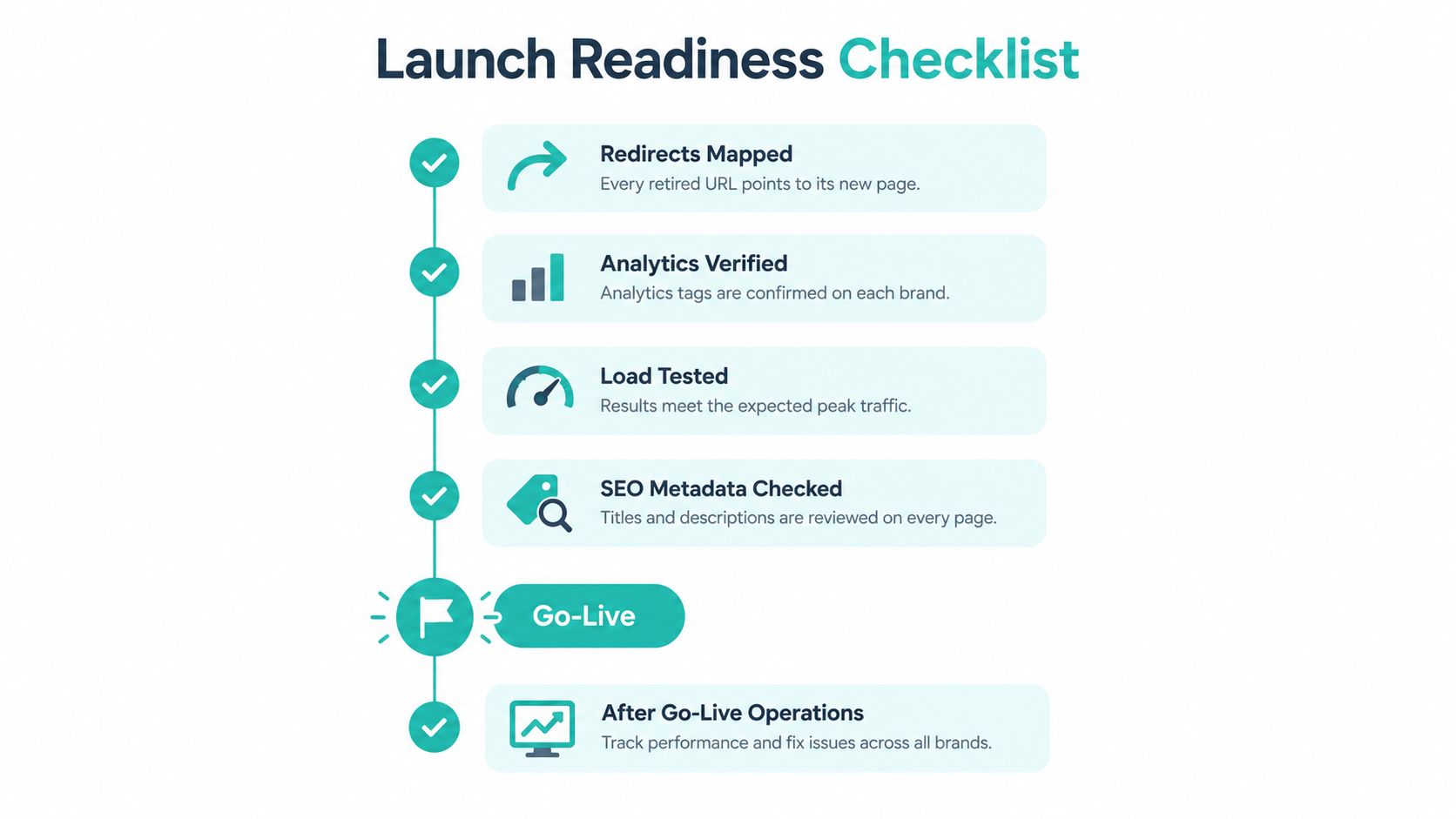
Then run hypercare for the first two to four weeks, when real content, traffic, and integrations expose what staging missed. A clear model for what hypercare involves helps business owners understand why support intensity should rise briefly rather than drop at go-live.
Run Incidents as a Closed Loop
Use the lifecycle in NIST's incident handling guidance, which connects preparation, detection and analysis, containment, eradication, recovery, and post-incident activity. Each phase reduces a different loss. Preparation limits confusion. Containment limits blast radius. Recovery proves service is trustworthy again, not merely reachable.
Recovery is the step teams skip. After restoring a Sitecore service, clear caches, validate the search index, check personalization rules, and run synthetic journeys for each brand. On SharePoint, verify permissions, search crawl results, and Power Automate approvals. Measure time to detect, time to contain, time to restore, recurrence rate, and the share of corrective actions closed.
| Phase | Action on the platform | Evidence to keep |
|---|---|---|
| Preparation | Runbooks, role cards and content and configuration backups | Current runbook version and last restore test date |
| Detection and analysis | Correlate CDN, WAF, CMS, identity and deployment logs | Synchronized timestamps and affected brands listed |
| Containment | Disable a faulty release with a feature flag or freeze publishing | Time of containment and scope of impact |
| Eradication | Fix the faulty component, template or content model | Change record linked to the root cause |
| Recovery | Restore service, clear caches, validate search index and run synthetic journeys | Journey test results per brand |
| Post-incident review | Root-cause review and tracked corrective actions | Corrective actions closed and recurrence rate |
For operations across the USA, Europe, and the Middle East, define a handoff rule before you need it. The outgoing on-call owner records current hypothesis, actions taken, next check time, and affected brands. The incoming owner accepts explicitly. Silent timezone handoffs are where incidents age without progress.
Where Sitecore AI Fits Each Delivery Stage
Sitecore AI adds value when it supports governed delivery work from discovery through launch. The decision rights and proof metrics at each stage still belong to the team that owns the outcome.
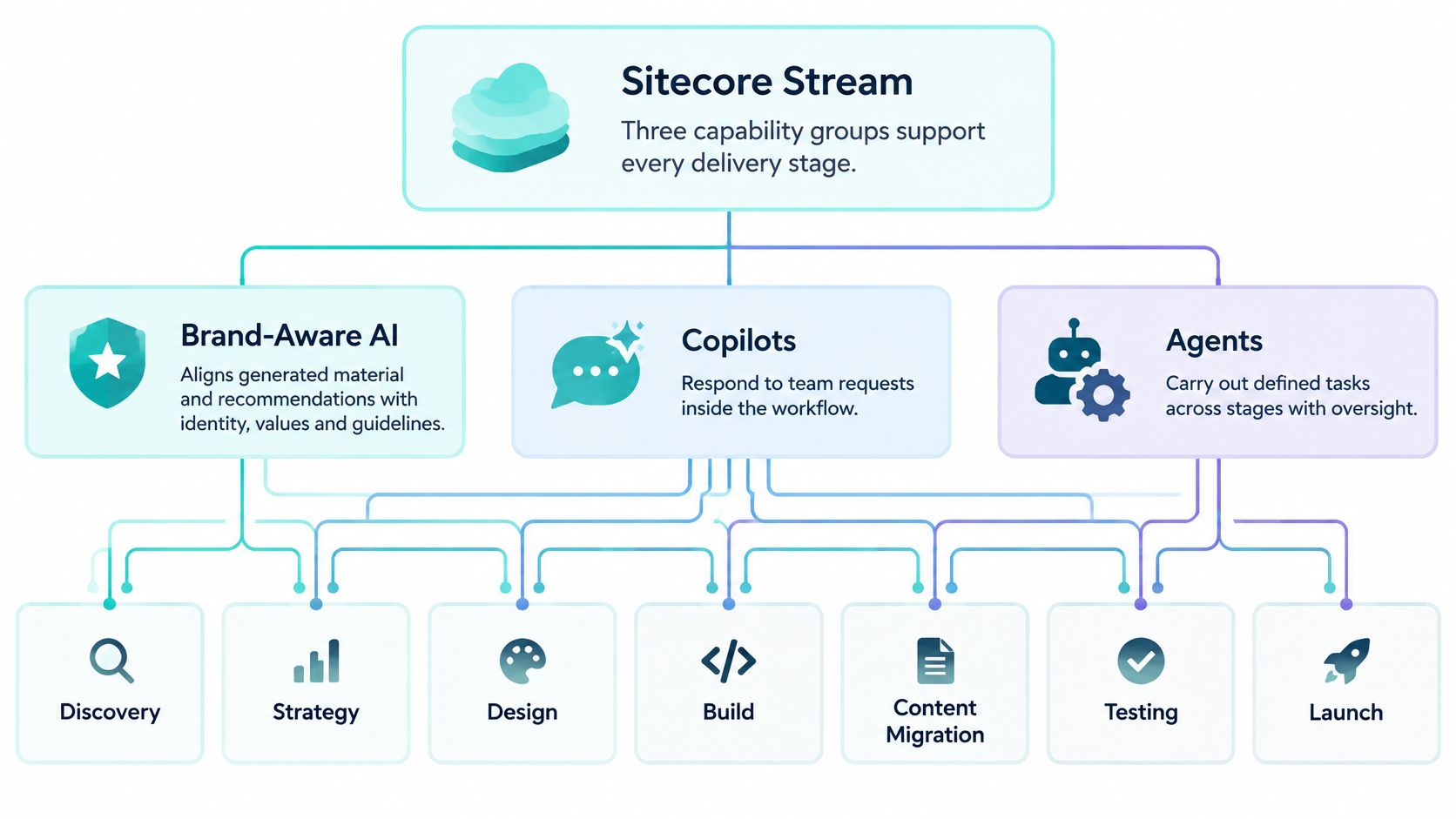
Sitecore Stream groups its capabilities as brand-aware AI, copilots and agents, and agentic workflows. Brand-aware AI aligns recommendations and generated material with an organization's identity, values, and guidelines, as outlined in Sitecore's announcement of its intelligent DXP and CMS updates. Copilots support brand, content, and experience work through natural-language or predefined prompts. Documented examples include campaign-idea generation, drafting and refining content, translation, image tagging in Content Hub, visual search, and question-and-answer generation in Sitecore Search.
Use copilots for work where a person can review the output before it moves downstream, such as design concepts, content creation, and localization. Agentic workflows coordinate human input with AI actions for campaign management, including suggested tasks, deliverables, notifications, and links to the relevant Sitecore product. They fit multi-brand execution when coordinating work across teams is a larger burden than producing an initial draft. Set an owner to accept, revise, or reject each proposed deliverable.
Stream can ground outputs in uploaded brand documents through retrieval-augmented generation, retrieving relevant material from ingested documents rather than relying only on general model knowledge, as described in the Sitecore Stream documentation. Sitecore says Stream is built on Microsoft Azure OpenAI Service and large language models. For governance, the practical question is whether source documents are current, approved, and suitable for use.
Sitecore Search serves the experience layer as a headless, AI-driven discovery platform. Teams can tune discovery logic separately from the XM Cloud front end, avoiding a front-end rebuild for changes to search and recommendations. Assign an owner to review those changes and define evidence of success, such as whether results match the intended content and product priorities.
Keep named human approvers at governance and launch gates. AI can draft, tag, translate, and coordinate, but people should approve regulated claims, pricing, and go-live readiness. Clean brand documents, taxonomies, and content models before enabling generation. Conflicting or outdated inputs can produce fluent output that is still wrong.
Running SharePoint Delivery Across the Same Seven Stages
SharePoint Online intranets fail for the same reason public sites fail. Teams optimize sites and libraries while approval journeys remain unresolved.
In discovery, inventory sites, libraries, content types, and approval chains by region and department. Flag where approvals stall, who can delegate, and which documents nobody trusts. Employee journeys such as policy acknowledgement, travel approval, and onboarding deserve the same ranking discipline as customer journeys.
In design and development, build SPFx components once and deploy them across sites. Regional intranets should share one component library, one accessibility standard, and one search configuration approach. Put variants through the same ownership rules you'd apply to Sitecore components.
Pipeline and Governance for Microsoft 365
Package SPFx solutions through the tenant app catalog, promote the same build between environments where possible, and gate releases with accessibility, permissions, and search checks. Don't let a developer upload a package manually because a department head is waiting.
Assign a site owner and a named decision owner to every Power Automate approval flow and content type. In operations, track approval cycle time, search usage, failed flow runs, and unresolved requests per region.
An unregistered regional flow isn't agility. It's an approval process your governance matrix can't see.
If a regional team builds its own Power Platform flow outside the catalog, require registration with the platform owner, an accountable approver, and a review date. That keeps local speed without creating invisible process debt.
Confirm Your Delivery Process Before You Scale
Run this audit this week on one brand's flow, preferably the one with the most handoffs.
- Journey ownership: Every priority journey has a named owner across marketing, IT, and operations.
- Exit gates: Each of the seven stages has a written gate and a person authorized to pass it.
- Delivery measures: Deployment frequency, lead time, change failure rate, and recovery time are captured per product.
- Decision matrix: Platform, brand, and regional leads have signed who approves shared and local changes.
- Incident readiness: The runbook has been restored successfully in the last quarter, not just reviewed.
- Human approval points: Sitecore AI and SharePoint automation use cases document where a person must approve.
Treat any failed item as a blocker for adding the next brand, market, or AI workflow. Scaling a broken handoff only multiplies delay.
For organizations that want an external readiness assessment, Kogifi delivers Sitecore XM Cloud and XP implementations, multi-brand hub-and-spoke setups, audits and performance tuning, governance models for component reuse, and 24/7 SLA-backed support across the USA, Europe, and the Middle East. Use that assessment to strengthen internal owners, not replace them.
Book a readiness review of your Sitecore AI, XM Cloud, or SharePoint delivery flow and we'll map your stages, gates, decision rights, and proof metrics against the audit above. Visit Kogifi to start with one brand, fix its slowest handoff, and scale from evidence rather than optimism.