



A Sitecore or SharePoint launch can look successful from the outside while the actual risk is only just starting. The homepage loads. Editors can log in. Leadership sends the launch email. Then the first live workflows hit production conditions, not test conditions. A personalization rule misfires, a publishing queue sticks, search results look incomplete, a document permission behaves differently for a real user group, or a finance approval path stalls because one integration doesn't respond the way it did in UAT.
That's the moment enterprise teams remember that go-live is not the finish line. It's the handoff into the most fragile operating window your platform will face.
For Sitecore teams, that window often exposes the edges between CMS, CDP, personalization, search, forms, analytics, and external APIs. For SharePoint teams, it usually shows up in permissions, document lifecycle, navigation, search, Teams integration, and business process ownership. In both cases, the issue isn't whether defects exist. The issue is whether you've prepared a controlled way to detect, triage, communicate, and close them before confidence drops.
A lot of teams call that support. In practice, it needs to be something tighter than standard support. It needs to be launch-focused, temporary, staffed correctly, and governed with clear exit rules. That's why mature enterprise teams treat hypercare as mission control, not a help desk queue.
If you're planning a launch or you've just come through one, strong DXP support strategies for post-launch stability matter as much as the build itself.
Table of Contents
- What belongs in hypercare
- Sitecore and SharePoint examples
- A simple scoping test
- How to decide duration without guessing
Introduction The Moment After Go Live
The first day after launch is usually noisy in ways project plans never fully capture. Editors are trying real publishing patterns. Business users are testing journeys they care about, not the scripted ones from UAT. Service teams are forwarding screenshots. Someone from leadership asks whether the traffic spike is normal. At the same time, the implementation team is tired, the BAU team is only partly briefed, and everyone wants to believe the hard part is over.
In enterprise DXP work, that belief causes trouble.
Hypercare exists because the live environment introduces pressure you can't fully simulate. Sitecore can be technically healthy while authors struggle with workflow states, search indexing timing, or personalization logic in production. SharePoint can be available while users still hit permission inheritance issues, broken metadata assumptions, or search experiences that don't match how departments work.
The most dangerous launch problem is not a visible outage. It's a slow drop in trust while small issues pile up faster than your team can classify them.
That's why the answer to what is hypercare can't stop at “extra support after go-live.” For a serious Sitecore or SharePoint rollout, hypercare is a managed stabilization period with named owners, fixed communication rhythms, and a clear line between incidents, user enablement, and future enhancements.
A good hypercare model gives leaders three things immediately. It makes issue ownership obvious, keeps business-critical journeys under constant observation, and stops every post-launch question from becoming an unstructured escalation.
When teams skip that discipline, they usually end up with a war room in name only. Messages scatter across email, Teams, and ticketing queues. Developers get pulled into low-value requests. Stakeholders hear different status updates. The platform may still recover, but the operating model doesn't.
What Hypercare Really Means for DXP Launches
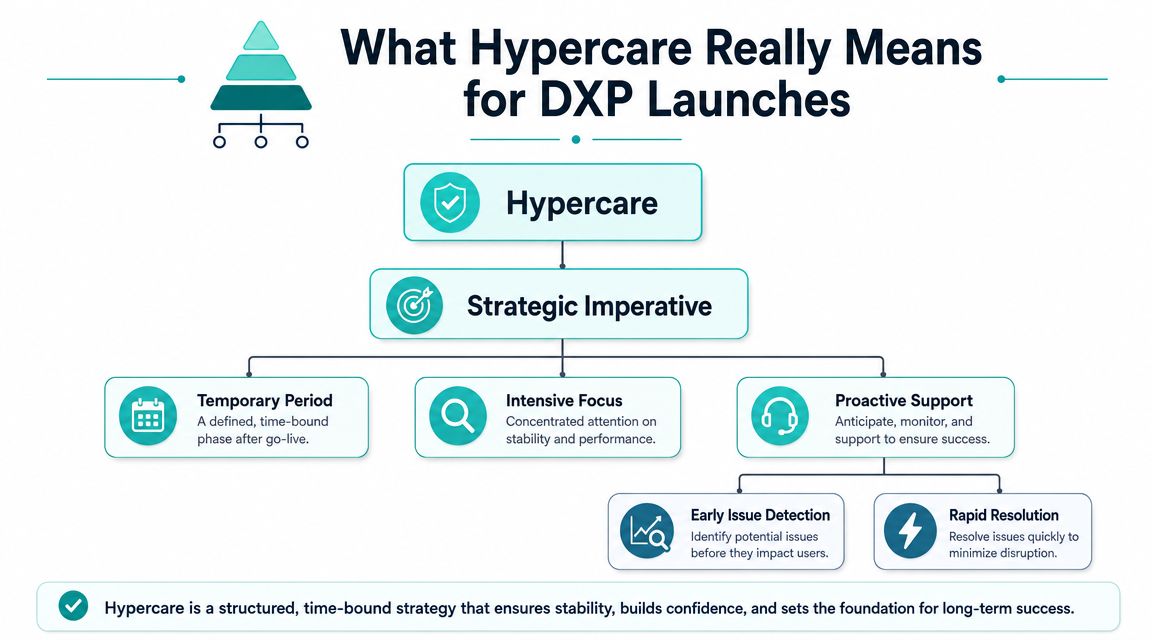
Hypercare is the short-term stabilization phase immediately after go-live. In enterprise implementations, sources describe it as temporary rather than ongoing support, with durations that can range from a few days to several weeks for simpler rollouts and several months for larger or more complex deployments, because the purpose is to validate that key business processes work correctly in the live environment, as described in this enterprise hypercare definition.
That's the formal definition. For DXP teams, the practical meaning is sharper.
Hypercare is the operating mode you use when failure is still expensive, user habits are still forming, and platform behavior needs close observation across multiple connected services. On a composable Sitecore build, that can mean watching content delivery, search, personalization, forms, APIs, identity, and analytics together. On SharePoint, it can mean monitoring document access, page performance, navigation, search relevance, and business process flows in parallel.
Why standard support isn't enough
BAU support is designed for steady-state operations. It assumes known ownership paths, normal ticket volumes, and routine SLAs. Hypercare assumes the opposite. It starts at the point where uncertainty is highest and tolerance for delay is lowest.
Think of it as launch mission control. Regular support keeps the system running once it's in orbit. Hypercare is the team watching every signal during separation, first trajectory checks, and early course corrections.
That distinction matters for Sitecore in particular. If Sitecore Search, personalization rules, or external integrations behave unexpectedly, the visible symptom may look like a simple content problem while the root cause sits in dependency timing or service orchestration. A normal queue-based support model is too slow and too fragmented for that stage.
What good hypercare includes
A useful hypercare model always includes three elements working together:
- Heightened monitoring that focuses on live business journeys, not just server health
- Rapid-response triage so the team can classify and route issues fast
- Proactive communication so stakeholders know what's happening before rumors fill the gap
For Sitecore XM Cloud and related products, I'd also add one rule. Monitor by journey, not by component. “Homepage is up” tells you very little. “Anonymous user can find a product, view personalized content, submit a form, and reach the confirmation page without error” tells you far more.
Practical rule: If your hypercare board is organized only by technical component, you'll miss business-impacting failures that cross systems.
That's why the best hypercare teams combine platform telemetry with business validation. They don't wait for users to prove the launch is unstable. They actively test the journeys that matter most.
Defining the Scope and Duration of Hypercare
Organizations often grasp the definition of hypercare but mismanage its scope. They say they want intense post-launch support, then they treat every request as part of hypercare. That's how stabilization turns into a catch-all for incidents, training gaps, backlog ideas, and deferred design changes.
Hypercare needs boundaries. Otherwise it becomes expensive and hard to end.
Some guidance describes 4–12 weeks as a typical duration, while also noting that a key challenge is balancing smoother adoption and faster issue resolution against the high resource allocation and deciding when the benefits flatten out, as discussed in this hypercare duration and ROI tradeoff overview.
What belongs in hypercare
For enterprise Sitecore and SharePoint launches, I divide post-go-live work into four buckets:
| Bucket | Included in hypercare | Not included in hypercare |
|---|---|---|
| Live defects | Publishing failures, broken components, access errors, search issues, workflow failures | Cosmetic improvements with no operational impact |
| Performance and stability | Error spikes, API failures, slow page delivery, indexing lag, failed background jobs | Broad optimization ideas that need discovery |
| User-critical enablement | How-to support for priority launch workflows | General platform training for non-critical roles |
| Governance and handoff | Known issue logging, root-cause capture, BAU knowledge transfer | New roadmap items or enhancement workshops |
That separation sounds simple, but it prevents the most common launch mistake. Teams often route feature requests into hypercare because stakeholders are still highly engaged. That burns specialist time and delays actual stabilization work.
Sitecore and SharePoint examples
A Sitecore XM Cloud rollout for a single brand site may need a compact hypercare window if the scope is narrow, the integrations are limited, and the authoring model is familiar. The hypercare focus there is usually content operations, publishing, forms, personalization checks, analytics validation, and close review of any headless or API-dependent components.
A global SharePoint intranet is different. If it includes departmental ownership, multilingual content, document libraries, custom metadata, audience-based navigation, and process integration, the stabilization period often needs to run longer. Not because the platform is weak, but because operational ownership is distributed. You're validating technology and behavior at the same time.
A simple scoping test
When a request appears during launch week, ask three questions:
- Does this block or degrade a critical live process?
- Did this capability exist in the approved go-live scope?
- Does delaying it increase operational risk before BAU handover?
If the answer is yes across those tests, it likely belongs in hypercare. If not, it probably belongs in the backlog, support queue, or adoption plan.
Don't let launch adrenaline redefine scope. Hypercare should protect production, not absorb every post-launch wish list item.
How to decide duration without guessing
Duration should follow complexity, issue patterns, and operating readiness.
Use a shorter window when the launch is contained, ownership is clear, and incident trends settle quickly. Extend it when your rollout includes phased regions, multiple business units, high-risk integrations, or new authoring and approval models that users are still learning.
For Sitecore AI and personalization-heavy portfolios, there's one extra consideration. If your launch depends on content rules, audience logic, experimentation, or data-driven experience delivery, stabilization should include enough time to validate that decisions are producing expected live behavior. The CMS may be stable before the experience model is.
That's why good hypercare plans define both what is covered and when the team is allowed to stop. Without both, the phase drifts.
Assembling Your Enterprise Hypercare Team
Hypercare fails when it's staffed like a ticket queue. It works when it's staffed like an operations cell with technical depth and decision authority.
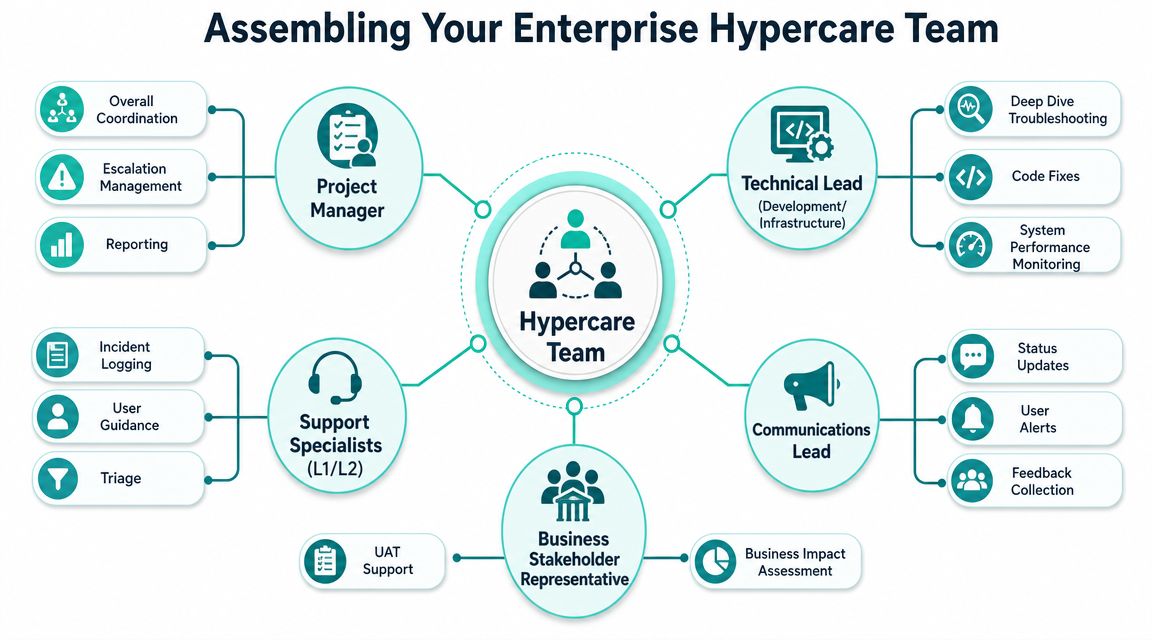
Industry guidance describes effective hypercare as intensive, measurable support with dedicated roles such as a hypercare manager, support agents, communication specialists, and data analysts, often with around-the-clock monitoring of performance metrics and error logs during the highest-risk post-launch period, as outlined in this guide to hypercare team roles and monitoring.
A DXP launch needs those roles, but enterprise Sitecore and SharePoint work also needs clear platform ownership. You need people who can connect a symptom to architecture, not just log the ticket neatly.
Who owns decisions in the first hours
The best hypercare teams usually include a blend of client, partner, and platform specialists. What matters isn't the org chart. It's whether each issue has a single owner and a fast escalation route.
A practical enterprise setup looks like this:
- Hypercare lead: Runs cadence, controls priorities, and makes sure incident status is visible.
- Client product owner: Decides business impact and signs off on workarounds when trade-offs are needed.
- Technical lead: Owns deep diagnosis across code, integrations, infrastructure, and platform configuration.
- Support coordinators: Triage incoming issues, confirm reproducibility, and keep the board clean.
- Communications owner: Sends user notices, stakeholder summaries, and war-room updates.
- Business process experts: Validate whether the platform is supporting live operations as intended.
One of the most useful planning exercises is to map these roles before go-live against your wider digital team structure for enterprise delivery. It exposes the usual gaps quickly, especially around business decision-making and communications.
What the platform specialists actually do
For Sitecore, the technical bench should reflect the actual architecture. That may include CMS specialists, front-end engineers for headless delivery, search specialists, integration developers, DevOps support, and someone who understands personalization or AI-driven experience behavior if those capabilities are live on day one.
For SharePoint, the roles are different. You typically need a SharePoint administrator or architect, someone strong in permissions and information architecture, workflow or automation expertise where applicable, and business-side owners who understand document usage and governance.
Here's where many teams under-resource hypercare. They assign one good developer and assume that's enough. It usually isn't. A launch problem might sit in code, configuration, content model design, role mapping, cache behavior, index timing, or user process misunderstanding. You need enough range to diagnose across those layers without waiting for a chain of handoffs.
This short discussion is useful context for enterprise teams planning the support mix:
A hypercare team shouldn't debate who owns an issue while the business is waiting. Ownership must already be agreed before launch day.
The strongest teams also separate decision speed from documentation quality. They resolve first, then capture the learning properly. If you force every issue through heavyweight process in the first critical hours, you slow down the one thing hypercare exists to provide.
Essential Hypercare Runbooks and Checklists
Hypercare gets messy when the team relies on memory. It gets controlled when the team relies on runbooks.
You don't need massive documentation. You need lean operational documents that remove ambiguity. Everyone should know where issues are logged, how severity is assigned, who approves workarounds, when stakeholders are updated, and what checks are performed every day.
The documents that prevent launch chaos
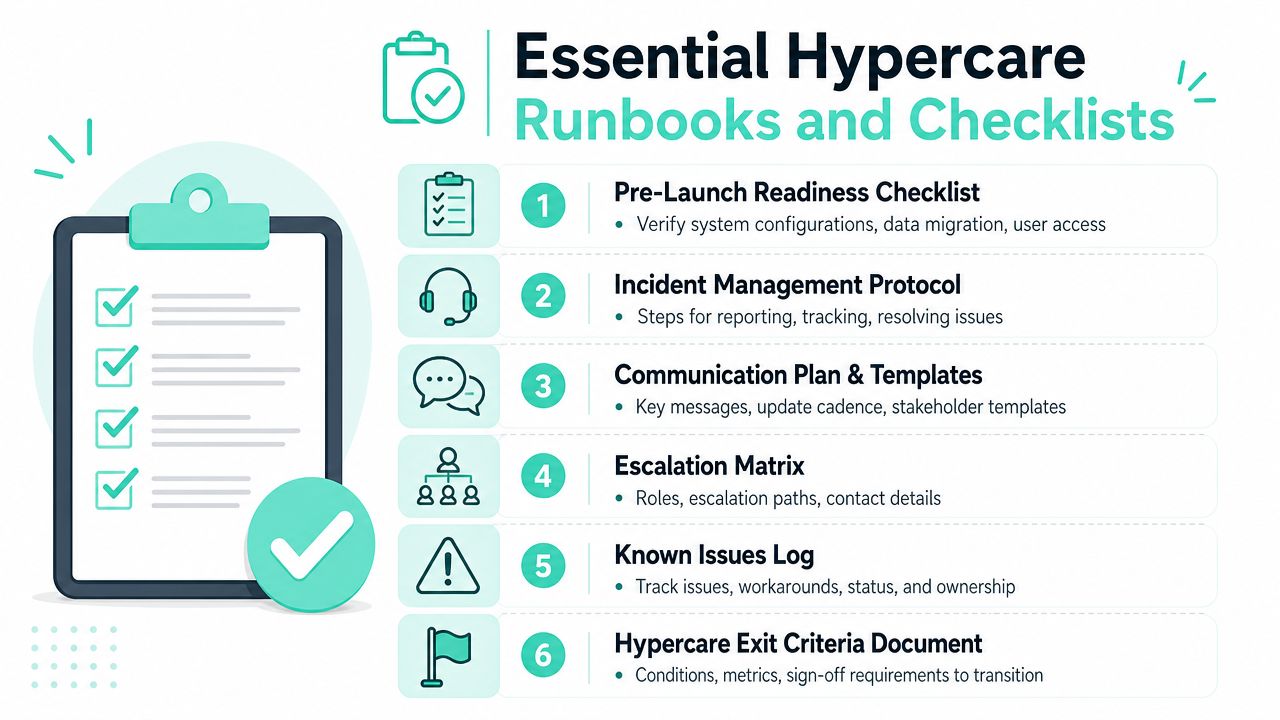
At minimum, I'd expect these artifacts to exist before go-live:
- Pre-launch readiness checklist: Confirms access, monitoring, rollback plans, contact lists, and launch-critical journeys.
- Incident triage matrix: Defines severity, business impact, response owner, and escalation path.
- War-room communication plan: States which channel is used for operations, which for executives, and which for end-user notices.
- Known issues log: Captures workarounds, root-cause status, and whether the issue blocks BAU handover.
- Daily operational checklist: Lists every repeated validation step by platform area.
- Exit criteria document: Makes the end of hypercare a governance decision, not a vague feeling.
Teams that already use a strong website maintenance checklist for operational discipline usually adapt faster to this style of launch control because the habit of repeatable checks is already there.
A practical daily runbook for Sitecore and SharePoint
For Sitecore, a useful daily hypercare runbook often includes checks such as:
- Publishing health: Confirm scheduled and manual publishing behaves as expected.
- Search and discovery: Verify index freshness and key result pages for business-critical queries.
- Experience validation: Review personalization behavior, forms, CTAs, and confirmation states on priority journeys.
- Integration watch: Check failures or unusual patterns in API-driven components and downstream services.
For SharePoint, the daily runbook usually leans more toward:
- Access and permissions: Confirm priority user groups can reach the right sites, pages, and libraries.
- Document operations: Validate uploads, metadata behavior, approvals, and versioning in critical libraries.
- Search relevance: Test known content retrieval patterns from real departments.
- Navigation and page integrity: Confirm high-use entry points and cross-site navigation remain intact.
A war room should also have simple communication templates ready. One for critical incident acknowledgement. One for stakeholder summary. One for end-user advisory. Writing those during a live issue wastes time and creates inconsistency.
Operator's note: The runbook isn't bureaucracy. It's what lets a tired team stay accurate under pressure.
If the launch is global, create timezone-aware ownership windows and a single source of truth for current issue state. Otherwise the same incident gets rediscovered repeatedly by different regions.
Measuring Success and Handing Over to BAU
A hypercare phase without exit logic becomes permanent anxiety. Teams keep extra people involved because nobody wants to be the person who says support can step down. That caution is understandable, but it's also expensive and destabilizing for BAU ownership.
Good hypercare ends through evidence and governance.
Many generic guides miss the operational need for explicit handoff criteria and exit conditions, which is a major gap for large Sitecore or SharePoint rollouts where ownership must formally transfer from implementation to BAU support, as noted in this discussion of hypercare handoff and exit criteria.
What to measure during stabilization
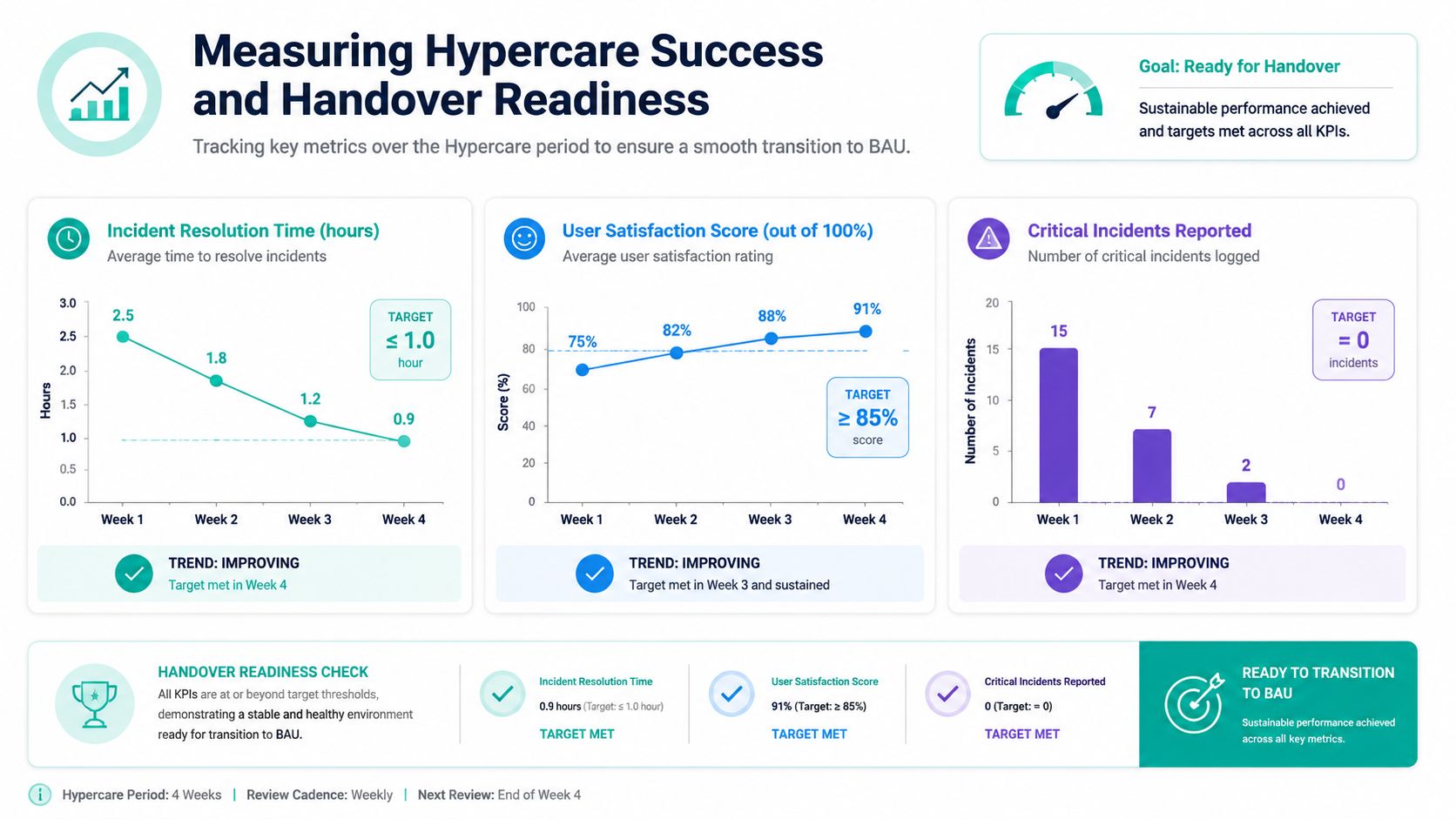
The right metrics aren't exotic. They're the ones that tell you whether the platform is becoming predictable.
Common measures include:
- Response time and resolution time: Are issues being handled at the speed expected for launch support?
- Issue volume: Is the volume stabilizing, especially for high-severity incidents?
- Adoption and engagement signals: Are users completing launch-critical tasks with less assistance?
- Platform behavior: Are recurring errors, performance anomalies, or operational interruptions trending down?
For Sitecore, I also look for signs that content teams have moved from escalation to routine operation. Editors should know how to publish, update, and validate live experiences without constant technical intervention. For SharePoint, I watch for fewer access disputes and fewer process questions around document handling and approvals.
How to avoid hypercare creep
The formal handover should include more than a final meeting. It should package the operational reality of the launch into something BAU can own with confidence.
A clean handoff usually includes:
- Resolved versus accepted known issues with clear ownership after transition
- Updated support documentation that reflects what occurred in production
- Knowledge transfer sessions for BAU analysts, admins, and service owners
- Sign-off from business and technical owners that exit criteria have been met
The main trap is confusing “quieter than week one” with “ready for BAU.” A platform can feel calmer while still depending on specialist memory. If key fixes, workarounds, or monitoring rules are still trapped inside the implementation team, hypercare hasn't really finished.
That's also why ROI discussions matter at this stage. If you want to know whether the post-launch model was proportionate, you need to compare the cost of extended specialist support with the measurable reduction in business risk and operational friction. That same discipline is useful in broader ROI measurement for digital platforms, especially when leadership asks whether hypercare was oversized or ended too late.
Exit hypercare when the platform is supportable by the target operating model, not when the project team is eager to move on.
That one rule prevents most bad handovers.
Conclusion Your Partner in Post Launch Success
If you're asking what is hypercare, the practical answer is simple. It's the controlled stabilization period that protects your launch from drifting into confusion, slow incident handling, and unclear ownership.
For Sitecore and SharePoint, that discipline matters because go-live rarely tests one thing at a time. It tests content operations, permissions, integrations, search, business workflows, user confidence, and support readiness all at once. Hypercare gives you a way to manage that pressure deliberately.
The pattern that works is consistent. Define scope tightly. Staff the phase with real decision-makers and platform specialists. Run from documented checklists. Measure the signals that tell you whether the environment is stabilizing. End the phase with explicit handoff criteria, not optimism.
Teams that treat hypercare as an optional extra usually feel the cost elsewhere. They pay for it in business disruption, fractured communications, and delayed adoption. Teams that treat it as part of the launch architecture usually get a calmer transition and a cleaner move into BAU.
If you're planning a Sitecore, Sitecore AI, or SharePoint launch and want a structured post-go-live model, talk to Kogifi. Their teams design, deliver, and support enterprise DXP and CMS environments with the operational rigor complex launches need.