


Your customer data probably isn't broken in one obvious place. It's spread across systems that were each implemented for a valid reason. Sitecore handles content and engagement. CRM owns account history. Commerce tracks orders. Support stores service interactions. SharePoint often carries partner, employee, or controlled internal records that never make it into customer-facing platforms. The result is familiar: teams can see data everywhere, but they can't act on it with confidence.
That's where enterprise customer database management either becomes a strategic capability or a permanent source of friction. In a Sitecore estate, the database layer can't be treated as a back-office concern. It drives segmentation, search relevance, personalization logic, consent handling, reporting quality, and increasingly, AI execution. If the data model is weak, Sitecore AI has less useful context. If identity resolution is inconsistent, Personalize and CDP activation become guesswork. If SharePoint sits outside the design, internal stakeholder journeys remain disconnected from external ones.
The companies investing here aren't doing it as a side project. The global customer data management market is projected to reach USD 10.31 billion by 2028, growing at a 20.00% CAGR, which reflects the pressure to consolidate fragmented records into unified databases for better decision-making and activation, according to Data Bridge's customer data management market analysis.
Table of Contents
- Use Sitecore as the engagement hub
- Give SharePoint a defined role
- Choose integration patterns deliberately
- Where Sitecore AI fits in the stack
- What good activation actually looks like
- How teams should govern AI output
- Phase the change instead of replacing everything at once
- Modernization succeeds when operating discipline follows the launch
Architecting Your Single Customer View
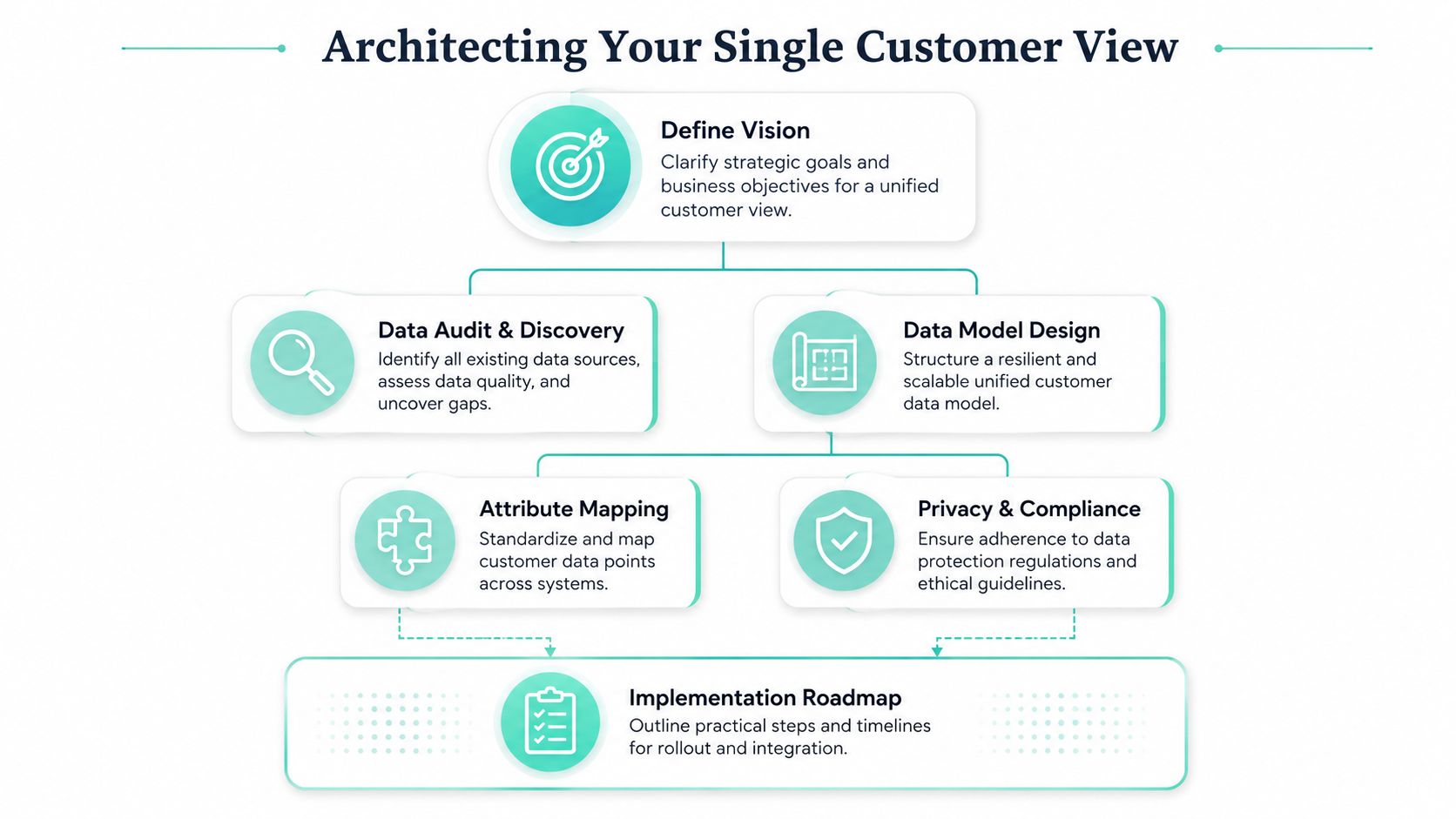
A single customer view isn't a dashboard. It's an architectural decision about what record becomes authoritative, how identities are linked, and where activation happens. In Sitecore-led environments, this matters because experience orchestration depends on consistent profile context across web, email, search, commerce, and service touchpoints.
The first mistake I see is starting with channel requirements instead of entity design. Teams jump into personalizing XM Cloud components before they've defined core customer attributes, event naming standards, consent states, and system ownership. That usually creates a model that works for one journey and breaks as soon as another business unit joins the program.
Start with the operating model
A resilient customer database model begins with a practical sequence:
- Define business entities first. Customer, account, household, subscriber, buyer, partner, and employee-contact shouldn't be mixed casually. Each entity needs a distinct purpose.
- Separate profile data from behavioral data. Static attributes such as language, region, consent status, and account tier shouldn't live in the same pattern as event streams like page views or form starts.
- Assign ownership by source. CRM may own legal account names, Sitecore CDP may own real-time behavior, and SharePoint may own internal relationship metadata for partner or employee-facing scenarios.
- Model for change. New brands, regions, and channels will arrive. If every new attribute requires redesign, the schema is too rigid.
A strong single view also depends on controlled vocabulary. “Country” and “market” can't mean one thing in CRM and something else in Sitecore Search. “Last activity” can't be timestamped differently across systems without creating reporting noise.
Practical rule: If a field affects segmentation, compliance, or personalization, define its meaning, owner, allowable values, and update path before you expose it to marketers.
Design identity resolution before activation
Identity resolution is where most customer database management efforts either mature or stall. Anonymous traffic from XM Cloud, authenticated users from portals, CRM contacts, commerce buyers, and support identities rarely line up cleanly on day one. You need deterministic rules for when profiles merge and when they stay separate.
In practice, that means deciding which identifiers are strong enough to unify records. Email may work for some journeys. In other cases, you need a combination of account ID, login ID, subscription reference, or another governed identifier. Merge logic should also define what happens when records conflict. Which source wins for preferred language? Which source wins for consent state? Those decisions shouldn't be made ad hoc inside campaigns.
For Sitecore programs, I prefer a layered model: collect behavioral signals early, keep anonymous histories intact, then stitch to known identities only when the confidence threshold is clear. That protects data quality and preserves useful pre-login context. It also supports the kind of unified experience architecture described in Kogifi's guide to a customer 360 view in enterprise platforms.
A usable single view has a few recognizable characteristics:
| Design area | What works | What fails |
|---|---|---|
| Schema design | Shared definitions across systems | Channel-specific field sprawl |
| Identity rules | Explicit merge logic with source priority | Manual merges with no audit trail |
| Consent handling | Centralized status and propagation rules | Consent stored differently per tool |
| Activation readiness | Profiles built for Sitecore segmentation and AI use | Data lake records nobody can operationalize |
A single customer view should reduce decision time for teams. If it only adds another layer to maintain, the architecture is wrong.
Integrating Data Across Sitecore and SharePoint
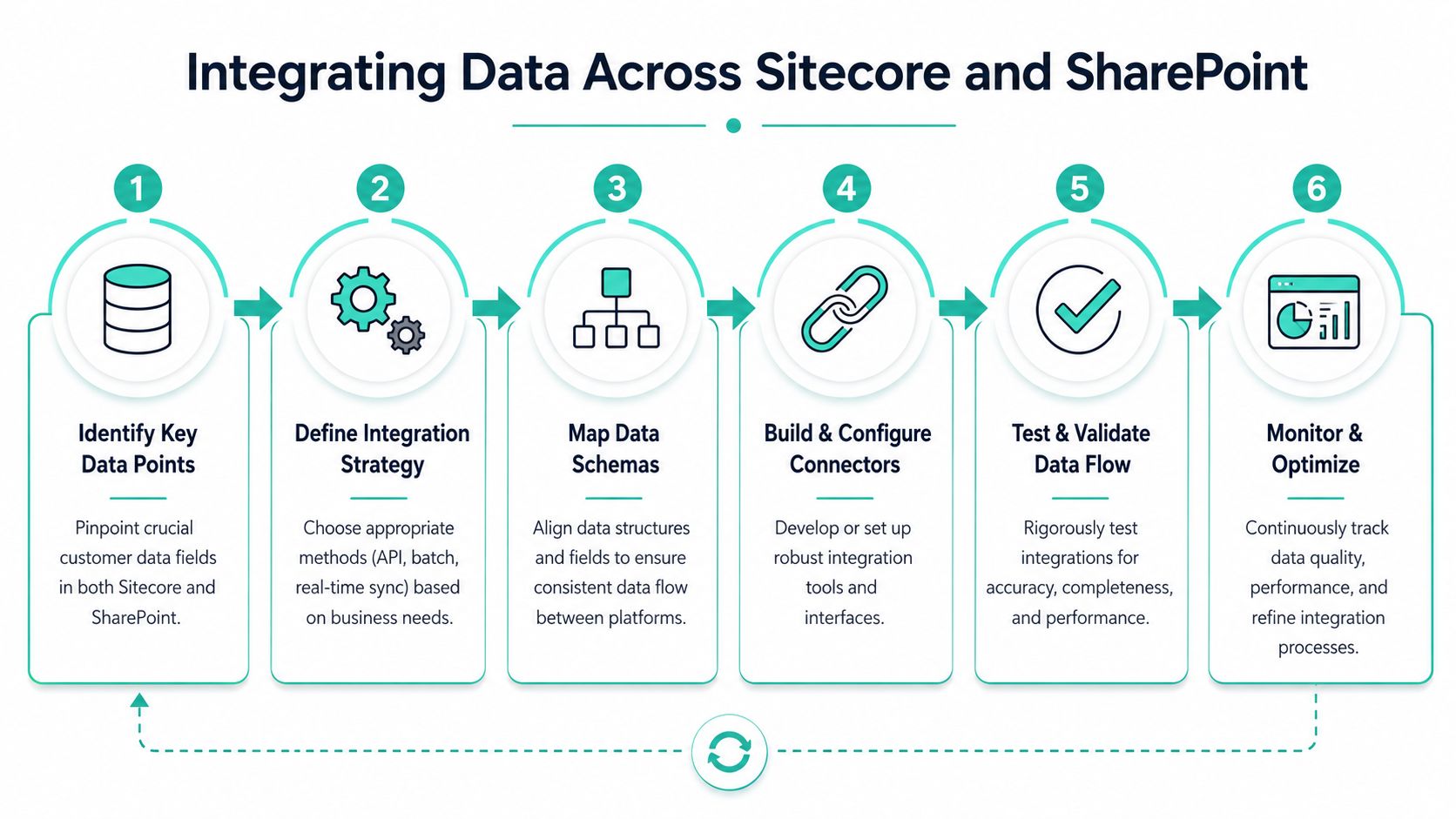
Integration quality determines whether the database is operational or just technically connected. In a Sitecore estate, I treat Sitecore CDP and adjacent DXP services as the outward-facing engagement layer, while SharePoint supports structured internal information that shapes customer and partner experiences behind the scenes. Those roles are different, and that's useful. Problems start when teams blur them.
Use Sitecore as the engagement hub
Sitecore should receive and activate the signals that drive experience delivery. In practical terms, that often includes content interaction from XM Cloud, search behavior, form submissions, event streams, and profile attributes used by Personalize, Search, or downstream orchestration. The data model must support both content-driven journeys and account-driven journeys.
That matters even more as Sitecore's AI layer expands. SitecoreAI was launched in June 2025 as a unified AI-powered digital experience across XM Cloud, Sitecore DXP, CDP and Personalize, Search, and DAM with real-time decisioning and automated content creation, translations, and SEO analysis, as outlined in Altudo's overview of SitecoreAI. If those systems are fed inconsistent attributes, AI orchestration inherits the inconsistency.
A strong pattern is to push normalized records into Sitecore CDP, then activate segments and decisions from there. Don't build separate audience logic in every tool. That creates drift fast.
Give SharePoint a defined role
SharePoint belongs in the architecture when internal data matters to the external experience, or when internal stakeholders need the same customer context in a secure, role-based workspace. I've seen this work well for partner programs, distributor portals, employee service hubs, and sales enablement scenarios where Microsoft 365 remains the natural operating environment.
SharePoint Online is not your replacement for customer activation. It is, however, a reliable home for governed lists, internal process content, document-centric records, and workflow-connected metadata that enriches broader customer database management. When designed properly, SharePoint can surface account-related references, service documentation, approval states, and partner operational data without forcing those records into the public DXP.
Useful integration patterns include:
- Profile enrichment from internal systems. SharePoint lists can store controlled business metadata that enriches records visible in Sitecore experiences.
- Portal adjacency. Employee or partner users can access governed records in SharePoint while customer-facing interactions remain in Sitecore.
- Workflow synchronization. Power Platform processes can validate or approve internal changes before selected attributes are exposed to Sitecore services.
Kogifi's work on customer data integration solutions for composable ecosystems reflects this kind of pattern, where data is ingested from multiple touchpoints, normalized, and pushed back into systems that need it.
Choose integration patterns deliberately
Not every connection should be real-time. Teams often over-engineer this. If a field changes rarely and only supports reporting or internal review, batch synchronization is easier to support. If the field controls eligibility, personalization state, or secure access, the integration needs lower latency and stronger monitoring.
Use this decision frame:
| Integration need | Better fit |
|---|---|
| Experience decisioning in Sitecore | Near real-time or event-driven sync |
| Reference metadata from SharePoint | Scheduled sync or API lookup |
| Internal document workflows | SharePoint-native handling with selective exposure |
| Cross-platform reporting reconciliation | Batch pipelines with validation checkpoints |
Don't integrate because a connector exists. Integrate because a downstream decision depends on the data arriving with the right meaning and timing.
Maintaining Impeccable Data Quality and Governance
Most customer database failures aren't caused by missing software. They're caused by tolerated ambiguity. A field gets reused for a second purpose. An import bypasses validation. One team merges contacts manually while another creates a new record because they don't trust the existing one. The damage shows up later in segmentation, reporting, and AI output.
That's why data quality can't be treated as a cleanup exercise at the end of implementation. It has to be operational.
Bad data spreads faster than teams expect
Typical customer databases contain 15–30% duplicate records, and quarterly audits with algorithmic deduplication are recommended to restore a single source of truth, according to Coffee Dunn's customer data management best practices. In real delivery work, that figure explains a lot of what marketing and service teams describe as “platform inconsistency.”
A duplicate isn't just a cosmetic issue. It can split behavior across profiles, break suppression logic, misstate consent, and confuse AI-driven recommendations. In Sitecore environments, it also weakens decisioning because one person can appear to be several partial identities with incomplete histories.
The organizations that control this well usually do three things consistently:
- Audit on a schedule. Not when there's a campaign issue. On a fixed cadence with ownership.
- Use match logic with business context. A duplicate rule should reflect actual identity confidence, not simplistic string comparisons.
- Push corrections back outward. If you only fix records in one reporting layer, operational tools will recreate the same problem.
Governance needs named owners and enforceable rules
Governance breaks down when it lives only in policy documents. It works when every critical field has an owner, every inbound integration has rules, and every system participates in a contract.
A practical governance model includes these elements:
- Data stewards by domain. Customer profile data, consent data, engagement data, and internal reference data need named business and technical owners.
- Data contracts for integrations. Every system publishing into the customer database should define required fields, allowed values, format rules, and failure handling.
- Change control for schema updates. If someone adds a field that affects segmentation or AI prompts, there should be a review path.
- Metadata discipline. Teams need a shared understanding of field meaning, lineage, and intended use.
That last point often gets ignored because it looks administrative. It isn't. Metadata is what keeps customer database management understandable after the original implementation team moves on. For a good explanation of why this matters inside a DXP program, Kogifi's article on metadata management in enterprise platforms is worth reading.
Clean data is not the output of one project. It's the output of repeated decisions that stop bad records from becoming normal.
Driving Personalization with Sitecore AI
Sitecore AI becomes useful when the underlying customer database is trustworthy enough to support automated decisions. Without that foundation, AI just accelerates weak inputs. With it, Sitecore's stack can move from static targeting to adaptive orchestration across content, search, and customer journeys.

Where Sitecore AI fits in the stack
SitecoreAI is built as a composable SaaS platform on Sitecore XM Cloud and integrates 20 AI-powered agents within Agentic Studio to automate workflows from campaign planning to content migration, according to CMSWire's coverage of SitecoreAI. That framing matters because it shows Sitecore AI isn't a bolt-on assistant. It's a workflow layer across the DXP.
In practice, those agents become most valuable when they can draw from governed profile data, content metadata, behavior streams, and clear audience logic. That allows teams to generate content variations, shape recommendations, support migration tasks, and tighten orchestration without rebuilding context manually for every campaign.
The broader Sitecore portfolio also matters here. SitecoreAI bundles entry-level entitlements to the core CMS, CDP, Stream, Search, Personalize, and Content Hub under a single usage-based entry model without a separate AI-layer charge, as described in Verndale's SitecoreAI platform overview. From an architecture standpoint, that encourages tighter use of shared data across previously separate workstreams.
What good activation actually looks like
The strongest Sitecore AI implementations don't ask AI to invent strategy. They use it to execute against structured intent. That usually looks like this:
- Audience refinement in CDP. Profiles are segmented using behavior plus governed attributes, then passed into Sitecore decisioning and experience delivery.
- Brand-aware content support. Teams use Sitecore Stream and Content Hub to create or adapt assets within defined editorial and brand constraints.
- Search and recommendation alignment. Search relevance improves when customer context and content metadata are both maintained carefully.
- Journey assistance for marketers. Agentic Studio reduces the manual work of planning, testing, and operational setup.
Sitecore Stream has also expanded rapidly. The latest update introduced over 250 AI-driven features across XM Cloud, Content Hub, and Experience Platform, including brand-aware AI and copilots for strategy execution, according to CMSWire's review of the Sitecore Stream update. For teams already operating in Sitecore, that changes the design conversation. The question is no longer whether AI exists in the stack. The question is whether your customer database gives it dependable context.
A short product demo helps make that more concrete:
How teams should govern AI output
AI activation still needs human guardrails. Marketers should review prompt patterns, content approval rules, audience boundaries, and fallback logic. Architects should review where decisions are made and which data points feed them. Security teams should review what sensitive fields are never exposed to AI workflows.
I also recommend that teams compare Sitecore-native capabilities with broader operational AI tooling when they're defining workflows. A practical external reference is Iwo Szapar's list of Recommended AI solutions for businesses, especially for teams deciding what belongs inside the DXP and what belongs in adjacent productivity or planning layers.
For organizations that need implementation support, one option is Kogifi's delivery work around Sitecore, customer data integration, and AI-driven personalization in composable architectures. The key is keeping Sitecore AI connected to governed profile data, not isolated as a content experiment.
Implementing Enterprise-Grade Security and Compliance
Customer data architecture is only credible if access, encryption, and retention are designed into the platform from the start. Security controls can't be patched in after integration work is complete, especially in estates that combine public experience platforms with internal Microsoft 365 environments.
Treat access design as architecture
Security benchmarks call for role-based access control, AES-256 encryption for stored data, and TLS/SSL for data in transit, according to Schedly's guidance on managing customer databases effectively. Those aren't advanced extras. They're baseline requirements.
In enterprise Sitecore and SharePoint programs, I'd translate that into a concrete checklist:
- Limit access by role and function. Marketers don't need raw exports of all customer records. Content authors don't need admin-level profile access. Internal portal users should only see the records tied to their role.
- Encrypt data at rest and in transit. This applies across storage, backups, middleware, and any integration path carrying profile or consent data.
- Separate operational and analytical access. Reporting users often need trends and segments, not direct record editing rights.
- Review service accounts and integration identities. These are often granted too much access because they're created early and forgotten later.
When teams are refining access models across DXP, CRM, and Microsoft 365, it helps to look at broader IAM practices as well. Accelerate IT Services has a useful primer on protecting sensitive data with IAM that aligns well with how enterprise identity should support data governance.
The fastest way to create risk is to make customer data broadly visible for convenience and promise to tighten permissions later.
Build retention and request handling into operations
Retention rules are where compliance becomes operational. Schedly's guidance states that marketing contacts must be deleted automatically after 3 years to comply with GDPR requirements in the scenario described there, and related procedural controls include handling data subject requests within a defined operational window. The important implementation lesson is that deletion, correction, and access workflows must be executable, not theoretical.
That means your architecture should answer these questions clearly:
| Compliance area | Operational requirement |
|---|---|
| Retention | Define system rules for automatic deletion where policy requires it |
| Data subject access | Route requests to the right systems and teams without manual scavenger hunts |
| Correction and deletion | Propagate changes across connected platforms, not only the source system |
| Auditability | Keep records of approvals, actions taken, and system responses |
SharePoint also deserves attention here. Internal documents, lists, and workflow records may contain customer-related references that fall under governance obligations. If SharePoint is part of the wider customer database management ecosystem, it can't sit outside the retention and access model.
Your Playbook for Database Modernization
Most modernization programs fail when teams try to replace every legacy behavior at once. The safer pattern is to modernize the customer database in controlled phases, each with a clear operational outcome. In Sitecore environments, that often means separating content modernization, customer data unification, and AI activation into a sequence rather than a single release train.
Phase the change instead of replacing everything at once
A workable modernization plan usually has four practical stages.
Discovery and audit. Start by inventorying source systems, profile owners, identity keys, integration dependencies, consent models, and internal data stores. This initial step uncovers duplicate logic, hidden exports, SharePoint lists that matter more than expected, and fields no one can define clearly.
Architecture and target design. Build the future model around customer entities, event capture, identity resolution, activation pathways, and governance. If you're moving toward Sitecore XM Cloud, CDP, Personalize, Search, and AI-driven orchestration, it is essential for composable boundaries to be explicit.
Phased implementation. Don't migrate everything together. Move a high-value domain first, validate identity rules, connect the minimum useful integrations, and prove operational governance before adding more channels or brands.
Optimization and operating model. The launch isn't the finish line. You need quality monitoring, deduplication routines, access reviews, schema change control, and AI oversight to keep the model trustworthy.
A useful reference during planning is Kogifi's guide to database migration best practices for enterprise platforms, especially when you're balancing platform change with business continuity.
Modernization succeeds when operating discipline follows the launch
The strongest modernization outcomes usually share the same traits:
- They reduce manual reconciliation. Teams stop exporting CSVs just to answer basic customer questions.
- They clarify system purpose. Sitecore activates and orchestrates. SharePoint manages internal collaboration and governed business context. CRM remains authoritative for its domain.
- They build for future AI use. Structured data, stable identity, and clean metadata make later automation far easier.
- They treat governance as part of delivery. Ownership, review cycles, and retention controls are implemented with the platform, not after it.
There's also a market reason to modernize now rather than keep extending fragmented stacks. CRM systems are projected to reach $126.17 billion in 2026 and grow to $320.99 billion by 2034 at a 12.4% CAGR, with 87% of CRM systems cloud-based and an average return of about $8.71 for every $1 spent, according to Salesmate's CRM statistics roundup. Those figures are projections and market indicators, but they underline the same point architects see in delivery. Cloud-based, connected customer data foundations are becoming the default expectation, not the experimental option.
A modern customer database isn't just cleaner than a legacy one. It's more usable. It lets teams personalize through Sitecore, secure access correctly, integrate SharePoint where internal data matters, and adopt AI without feeding it fragmented records.
If your organization is working through Sitecore modernization, customer data integration, or SharePoint-connected experience architecture, Kogifi can help define the target model, map integration boundaries, and implement a customer database that supports personalization, governance, and long-term platform stability.