


Your teams are probably doing good work and still shipping a fragmented experience.
One business unit has a polished Sitecore website built with reusable Next.js components. Another has custom page builds that only look similar. The intranet team has SharePoint pages assembled from different SPFx web parts, each with its own spacing, naming, and content rules. Marketing wants faster localization and AI-assisted content production. Engineering wants fewer one-off requests. Nobody wants another committee.
That's where design system governance stops being theory and becomes operating infrastructure. Without it, the system is just a library people bypass when deadlines get tight. With it, teams know what gets added, who approves changes, how releases work, and how the platform enforces the rules instead of relying on memory.
Table of Contents
- Why Ungoverned Design Systems Fail
- What each model looks like in practice
- How to choose without overengineering
- How governance works inside Sitecore XM Cloud
- Where Sitecore AI fits and where it should not
- How to govern SharePoint without killing flexibility
Why Ungoverned Design Systems Fail
Ungoverned systems don't fail because the components are ugly. They fail because nobody can tell which component is canonical, which variant is allowed, or which team owns the decision when two implementations conflict.
That's why mature organizations formalize governance. According to InVision's research on mature design systems, 79% have official governance, resulting in up to 60% better ROI by maintaining consistency between intended patterns and implementations (Netguru summary of InVision research). The important part isn't just the statistic. It's the mechanism behind it. Teams get better returns when approved patterns survive the trip from design file to production component.
In enterprise platforms, the breakdown is easy to spot:
- Design creates one pattern. Product teams request exceptions before the first sprint ends.
- Engineering forks components locally. Nobody deprecates the old version, so both stay alive.
- Content authors improvise. Rich text fields and flexible layouts become a back door for off-system UI.
- Regional teams localize differently. Brand consistency weakens across markets and business units.
Practical rule: If your system can be ignored without friction, you don't have governance. You have documentation.
This gets expensive in quiet ways. QA finds mismatches late. Accessibility issues reappear in slightly different forms. Rebranding takes longer because nobody trusts where shared styles end and local overrides begin. If that sounds familiar, it's the same class of problem discussed in technical debt reduction work. Design drift and technical debt usually travel together.
The fix isn't another UI kit. It's a decision model, a contribution model, and platform enforcement that makes the governed path easier than the custom one.
Foundations Choosing Your Governance Model
A governance model has to match the way your organization ships. If the model ignores org reality, teams route around it.
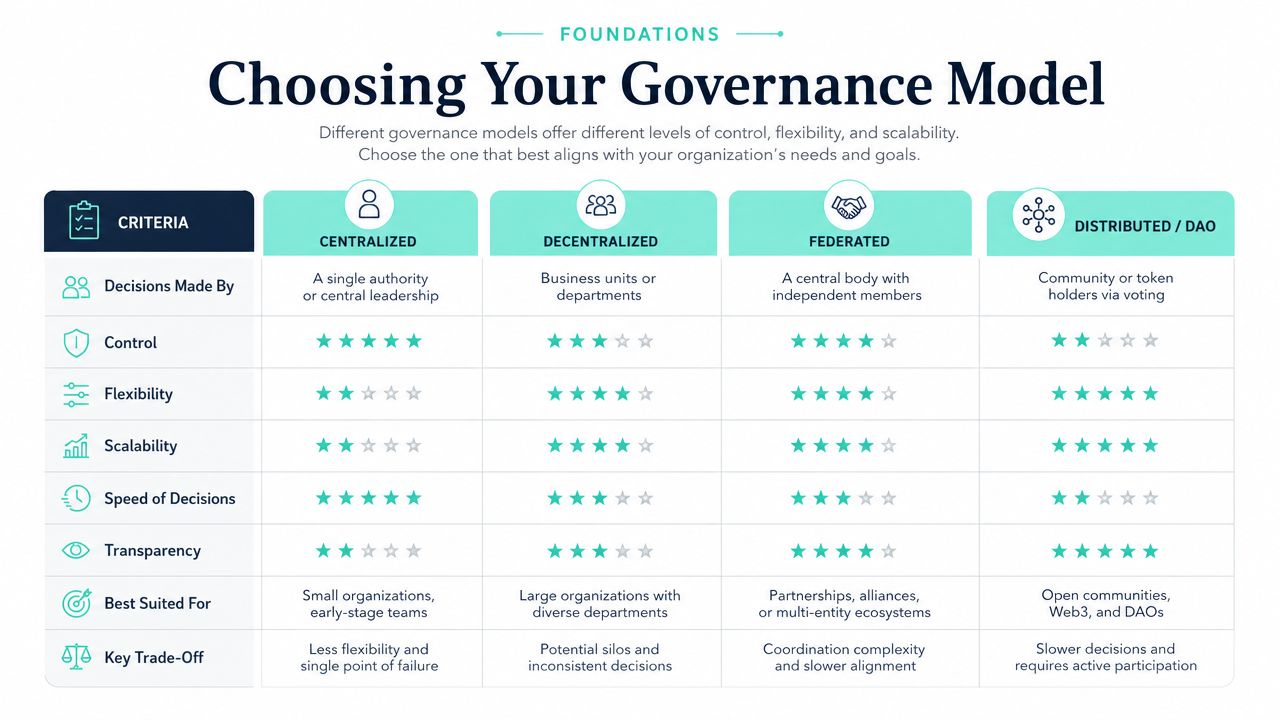
A useful benchmark comes from Sealab's governance guidance. It identifies Centralized, Federated, and Hybrid as primary models and sets 80% component coverage as the target for production UI built using system components versus custom code. That target is practical because it leaves room for edge cases while still forcing the organization to treat custom UI as the exception.
What each model looks like in practice
| Model | Best For | Pros | Cons |
|---|---|---|---|
| Centralized | Large organizations with strict brand control and shared release processes | Clear ownership, strong consistency, easier standards enforcement | Can become a queue, slower for domain teams |
| Federated | Enterprises with autonomous business units and distinct product ownership | Local expertise stays close to the product, contribution volume spreads across teams | Standards drift if decision rights are vague |
| Hybrid | Growing organizations with shared platform standards and distributed delivery teams | Balances control with speed, scales better across regions and product lines | Needs explicit rules for when central standards overrule local preference |
The image above includes broader governance language, but for design systems in Sitecore and SharePoint estates, most enterprises land on hybrid. Centralized sounds safer than it is. Federated sounds flexible until every portfolio reinvents the same card, alert, and navigation patterns.
The right model is the one that preserves a single source of truth while letting domain teams contribute without waiting on a central bottleneck for every change.
That balance matters beyond design. If governance is already a board-level topic in your organization, broader control frameworks like Logical Commander on GRC help frame why design system decisions also need auditability, ownership, and escalation paths.
How to choose without overengineering
Use three decision tests.
- How many teams publish to the platform: If one core team owns all delivery, centralized can work. If multiple portfolios release independently, hybrid is usually safer.
- How often brand exceptions are legitimate: If regulated or tightly branded journeys dominate, favor stronger central control. If regional or product-specific variation is normal, build a governed exception path.
- Where your platform architecture already lives: A shared component library, shared tokens, and shared pipelines naturally support hybrid governance. If every product stack is isolated, federated governance may be your current reality even if it isn't your target.
A lot of governance mistakes start in content operations, not component engineering. If your page templates, author permissions, and publishing rules aren't aligned, component governance won't stick. That's why a broader content governance framework should sit beside the design system model, not behind it.
Defining Roles and Contribution Workflows
Governance breaks down when everybody can suggest changes and nobody clearly owns the decision. Teams don't need a large council. They need named roles, decision rights, and a workflow with visible gates.
Miro reports that 89% of leaders say improving collaboration and teamwork is critical to achieving company goals, and design system governance supports that by defining clear roles, decision rights, and contribution models (Miro research and design governance article). In practice, that means removing ambiguity. Collaboration improves when teams know who decides, not when everyone gets equal veto power.
The minimum role set that works
A lean enterprise governance setup usually includes:
- Design System Lead: Accountable for standards, backlog priorities, and exception decisions. This role protects the source of truth.
- Platform Architect: Owns implementation patterns across Sitecore, Next.js, SPFx, tokens, and release dependencies.
- Core Contributors: Designers and developers who build approved additions to the system.
- Component Guardian: A domain representative for key product areas such as commerce, search, intranet, or localization. This person validates whether proposals solve a real repeated need.
- Content Operations Lead: Checks authoring impact, template fit, and publishing implications.
A simple RACI works well:
| Activity | Design System Lead | Platform Architect | Core Contributor | Component Guardian | Content Ops Lead |
|---|---|---|---|---|---|
| New component proposal | A | C | R | C | C |
| Variant approval | A | C | R | C | I |
| Technical implementation | C | A | R | I | I |
| Documentation update | A | C | R | I | C |
| Deprecation decision | A | C | I | C | C |
A contribution workflow teams will actually follow
Keep the flow short, but make each gate real.
Propose the need
Start with the problem, not the UI. “We need a campaign card” is weak. “We need a reusable card that supports editorial image, category label, CTA hierarchy, and localized metadata across Sitecore landing pages and SharePoint news rollups” is reviewable.Check for overlap
Most requests are variants in disguise. Governance should force comparison against existing components, fields, and token rules before new work starts.Review decision rights
Decide whether the request is a new component, an extension, or an exception. At this stage, many teams fail. They review design quality and skip taxonomy.Build with implementation contracts
Figma alone isn't enough. The proposal needs props, states, content constraints, accessibility rules, and authoring behavior.Document the adoption path
Every accepted contribution needs usage guidance. A component nobody knows when to use becomes another source of drift.
If your workflow approves visuals without approving authoring rules and code contracts, the platform will fragment the moment teams scale.
The same discipline shows up in publishing operations. A well-run content publishing workflow is often the difference between a governed system and a library that falls apart during campaign pressure.
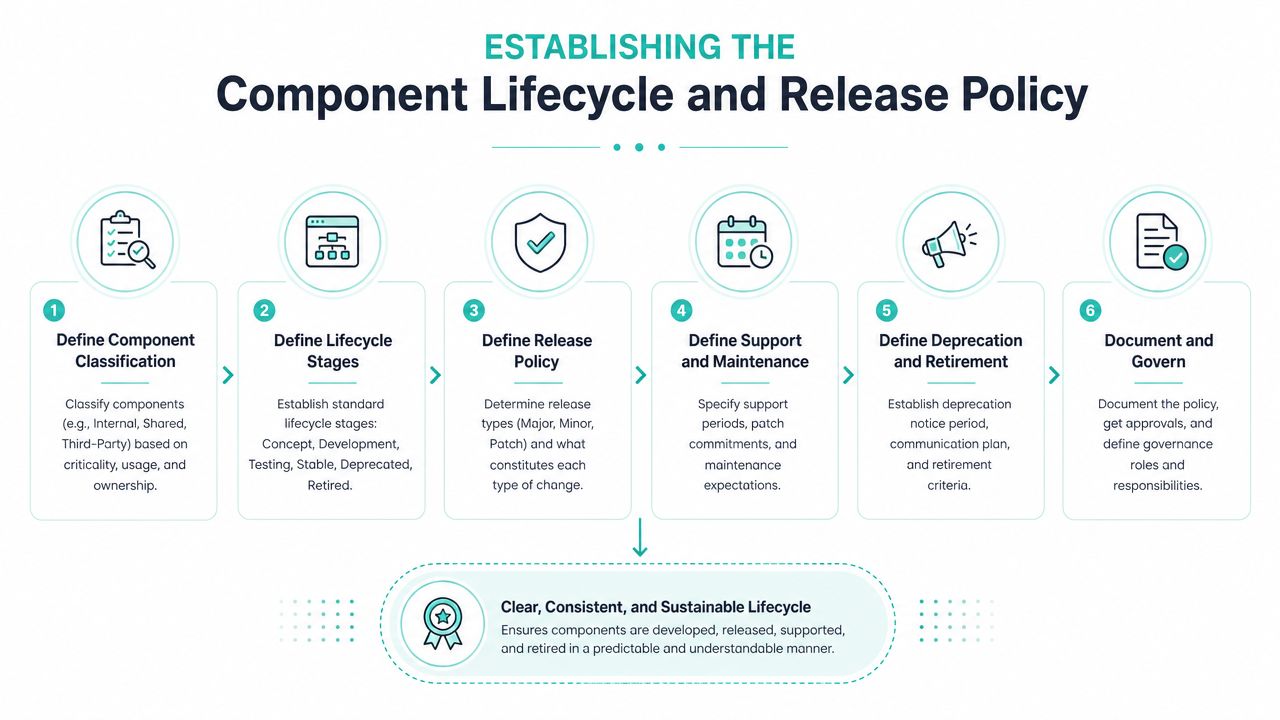
Establishing the Component Lifecycle and Release Policy
A component is rarely the thing that breaks governance. The break usually happens six weeks later, when one team ships a variation into Sitecore, another rebuilds it in SharePoint, and nobody can tell which version is approved, supported, or on the way out.
Treat components like managed products
Enterprise teams need a lifecycle that covers design, code, content, and authoring behavior. If any one of those is missing, release policy turns into repository hygiene instead of governance.
A practical lifecycle usually looks like this:
- Proposed
The request is tied to repeated business need, target platforms, and a defined content shape. - In review
Architecture, accessibility, analytics, authoring constraints, and token usage are checked together. - Approved for build
The team has signed off on templates, rendering rules, implementation scope, and ownership. - Released
Code, documentation, changelog, and author guidance ship at the same time. - Measured
Adoption, misuse, override rates, and support issues are tracked. - Deprecated
New usage stops. Existing instances stay supported for a defined period while migration starts. - Archived
The component is removed from active catalogs and replaced in documentation, code references, and authoring guidance.
This matters more in Sitecore and SharePoint than in a design-only workflow. In Sitecore XM Cloud, a component release can affect renderings, templates, personalization rules, search behavior, and content author training. In SharePoint, the same policy has to account for web part sprawl, page template drift, and local site-owner customization.
One rule saves a lot of pain. Do not release a component until the consuming team can answer three questions quickly: where it can be used, what content model it expects, and what will break if they upgrade.
The lifecycle also has to line up with the wider content life cycle governance model. A component is not deprecated while live Sitecore items, SharePoint pages, or reusable content blocks still depend on it. At that point, the work is operational, not theoretical.
For organizations modernizing intranet and collaboration environments, this is also where release policy intersects with a broader SharePoint cloud transition strategy. Migration without lifecycle control usually ports old inconsistency into a new environment.
For a short walkthrough of governance thinking in practice, this overview is useful:
Release discipline builds trust
Semantic versioning still works because it sets expectations clearly.
| Release type | What it means | What teams should expect |
|---|---|---|
| Major | Breaking change | Migration required before upgrade |
| Minor | New capability without breaking existing use | Optional adoption, low risk |
| Patch | Fix or small improvement | Safe update in normal release cadence |
The changelog should do real operational work. It should tell delivery teams what changed, why it changed, who needs to care, and what action is required. In enterprise programs, that often means separate notes for front-end developers, Sitecore authors, SharePoint site owners, QA, and platform support.
Migration guidance needs the same level of precision. Screenshots help, but they are not enough. Teams need field mapping, prop changes, token updates, author instructions, analytics implications, and retirement dates for old variants. If Sitecore AI is being used to generate new content variations or summaries at scale, that guidance should also state whether the new component changes prompt structure, metadata needs, or content review rules.
Architect's note: Release policy becomes credible when change is predictable. Teams adopt a system they can plan around.
Ad hoc publishing from a shared repository does the opposite. It creates silent breakage, local forks, and long-lived exceptions that survive every replatforming effort.
Enforcing Governance in Sitecore and SharePoint
The biggest mistake in design system governance is treating enforcement as a design-team responsibility. In enterprise delivery, governance has to be wired into the DXP and intranet stack.

How governance works inside Sitecore XM Cloud
Sitecore governance works best when the component model, content model, and deployment model reinforce each other.
In Sitecore XM Cloud, a governed system usually starts with a shared front-end library in Next.js, supported by a structured component catalog and a Helix-aligned architecture. Shared rendering patterns should map to defined content templates, tokenized styling rules, and documented authoring constraints. That gives architects a stable chain from content item to rendered component.
The strongest implementations tend to enforce governance in five places:
- Component registration: Only approved renderings appear in the authoring toolbox.
- Template alignment: Components bind to specific field structures instead of accepting arbitrary content shapes.
- Tokenized styling: Spacing, color, and typography come from governed tokens, not local hard-coded overrides.
- Rendering parameters: Editorial flexibility exists, but only through approved switches and variants.
- Pipeline discipline: Pull requests and release pipelines check that changes stay inside the agreed contracts.
Often, generic design-system advice fails. It talks about components as visuals. Sitecore requires components to behave as content-bearing products. If the card looks correct but accepts uncontrolled rich text, inline styling, or inconsistent CTA logic, governance has already been lost.
Where Sitecore AI fits and where it should not
The most interesting governance opportunity in the Sitecore ecosystem is AI inside governed boundaries.
As covered in CMSWire's analysis of SitecoreAI, SitecoreAI consolidates XM Cloud DXP, Customer Data Platform, Asset Management, Personalization, and Analytics into a single composable, AI-based suite, helping marketers move from search-driven to discovery-driven experiences by unifying data and AI across the product ecosystem.
That matters for governance because AI output should never invent the interface. It should operate inside approved components.
A practical operating model looks like this:
| Governance layer | What Sitecore AI can support | What must stay governed by humans and platform rules |
|---|---|---|
| Content generation | Draft copy variants, localized copy, content expansion | Component selection, required fields, legal review |
| Personalization | Variant ideas within approved slots and page structures | Eligibility rules, experience design, measurement policy |
| Asset usage | AI-assisted content operations across managed assets | Brand-safe templates, metadata standards, usage rights |
| Analytics interpretation | Surfacing performance signals for existing experiences | Structural changes to the design system |
Sitecore's AI-powered capabilities also include text generation for multiple SEM variants, long-form blog posts, and new language variants of existing content items, plus image generation and editing from text prompts (Brimit overview of Sitecore AI capabilities). Used correctly, that helps marketing teams scale within the system. Used poorly, it floods the platform with content that appears compliant but breaks information architecture, voice, and review discipline.
AI should accelerate approved patterns. It should not become a side door for ungoverned layouts, fields, or interaction models.
How to govern SharePoint without killing flexibility
SharePoint governance is a different problem. Sitecore usually breaks through front-end variation and content-model drift. SharePoint often breaks through page assembly freedom.
The answer is to treat SPFx web parts as the governed component layer and keep page-making flexible only within curated boundaries. Standard intranet patterns should ship as approved web parts for news, hero areas, alerts, quick links, searchable directories, and resource listings. Each should carry the same design tokens, naming rules, accessibility expectations, and editorial guardrails.
What works in SharePoint:
- Controlled page templates: Give authors page compositions that start with approved sections and web parts.
- Tenant-level standards: Centralize theme, navigation, metadata, and reusable content patterns.
- SPFx packaging discipline: Don't let every department publish its own near-duplicate component set.
- Power Platform integration rules: Workflow automation should support governance, not create parallel UX patterns outside it.
What usually fails:
- A broad “site owner freedom” model with weak template controls.
- HTML embed workarounds that bypass the system.
- Department-specific web parts that solve one need and then spread without review.
- Intranet redesigns that fix the homepage but leave the rest of the tenant structurally unchanged.
For organizations modernizing legacy intranets as part of wider Microsoft 365 work, this SharePoint cloud transition strategy is a useful companion read because migration decisions and governance decisions are tightly connected. If you migrate uncontrolled sprawl into SharePoint Online, you've just moved the problem.
The common thread across Sitecore and SharePoint is simple. Governance sticks when authors can still move fast, but only through approved building blocks.
Measuring Governance KPIs and Driving Adoption
A familiar pattern shows up six months after a design system launch. The Figma library looks tidy, the component repo has grown, and the live Sitecore or SharePoint estate still tells a different story. Authors keep requesting exceptions. Delivery teams keep cloning patterns. AI-assisted content starts appearing in places the model was never designed to support.
If governance is not measurable in production, leadership will treat it as process overhead instead of delivery control.
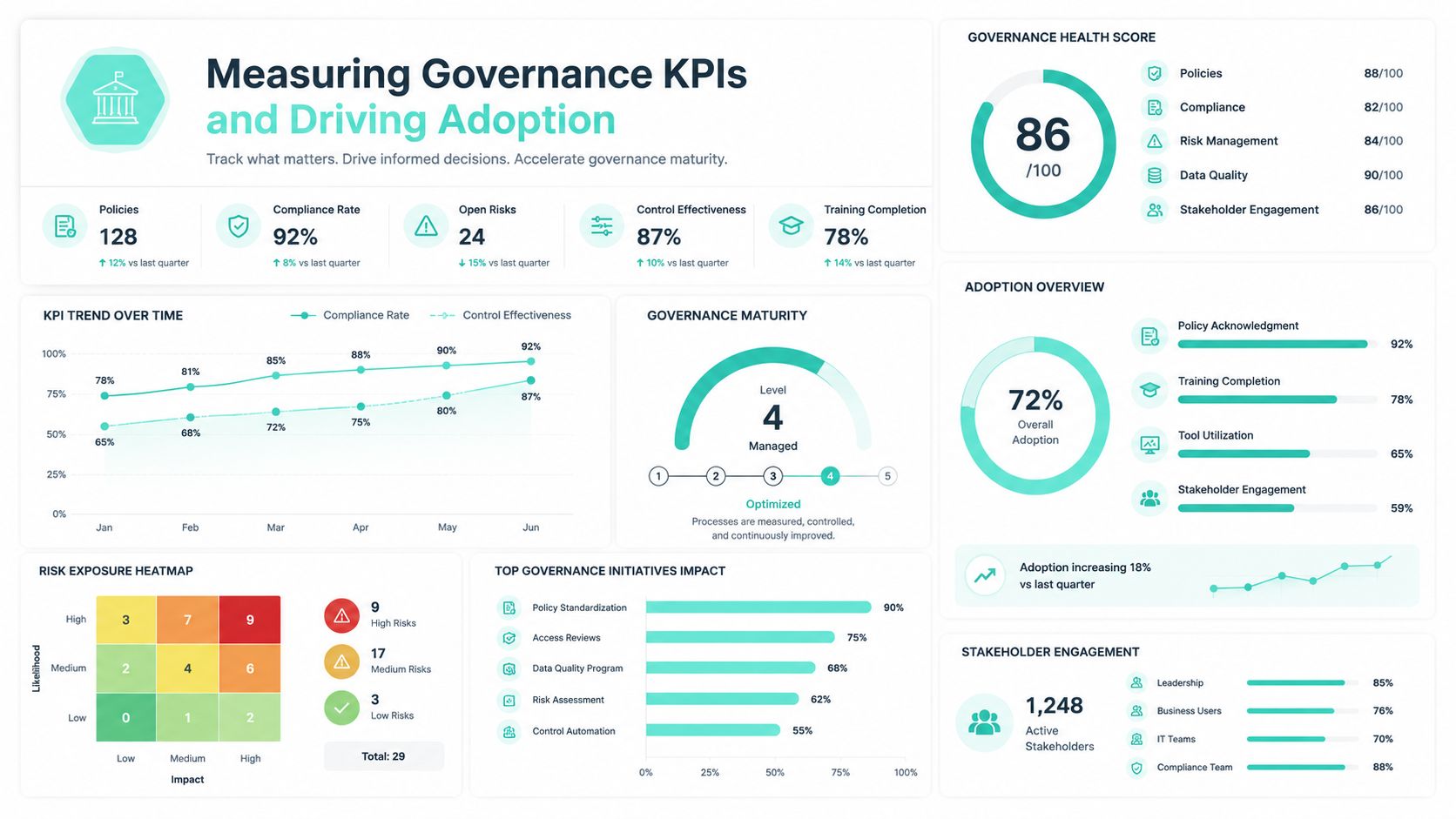
Start with a baseline that shows whether teams are using approved patterns, creating near-duplicates, or forcing the platform around the rules. Four metrics usually expose the problem fastest: system usage rate, variant sprawl rate, override rate, and rebuild or rework time. Together, they show both technical drift and behavior drift.
The dashboard that matters
The right governance dashboard answers a narrow set of operational questions. Are teams building with approved components? Where are they overriding standards? Which parts of the estate cost extra time because design and implementation no longer match?
| KPI | What it tells you | What a bad signal usually means |
|---|---|---|
| System usage rate | How much production UI uses approved components | Teams are still relying on custom builds |
| Variant sprawl rate | Whether near-duplicate variants are accumulating | Weak review discipline or poor core component design |
| Override rate | How often teams step outside token or prop rules | The system is too rigid, or rules are not enforced |
| Rebuild or rework time | How much effort goes into translating or fixing mismatches late | Design and implementation contracts are out of sync |
Then add supporting indicators that reflect platform reality, not just library hygiene:
- Documentation coverage: Each active component needs usage guidance, constraints, authoring rules, and implementation examples.
- Exception backlog aging: Old exceptions tend to harden into unofficial standards.
- Accessibility compliance status: This matters across public websites, regulated journeys, and employee intranets.
- Backlog review health: Contribution requests should move through review in a predictable cadence.
- Adoption by team or business unit: This shows where governance is working and where enablement is missing.
- Template compliance in Sitecore and SharePoint: Measure how often teams publish through approved page templates versus bespoke page assembly.
- Authoring bypass incidents: Track direct HTML embeds, custom code injections, or unmanaged web parts that sit outside the approved model.
Counting components is a weak KPI. A large catalog can hide duplication, unclear ownership, and poor reuse just as easily as a small catalog can hide missing capability.
Measurement rule: Track production behavior, publishing patterns, and exception volume. Do not treat design file activity as proof of governance.
Enterprise teams should also separate KPI views by platform. In Sitecore, measure SXA or XM Cloud component reuse, rendering variant growth, serialization discipline, and how often teams request content structures outside the approved schema. If Sitecore AI is generating copy variations, review where that content enters the workflow and whether authors are still publishing inside governed templates. AI-generated content inside a controlled component model is manageable. AI-generated page structure outside that model creates drift much faster.
In SharePoint, the stronger indicators are different. Track template usage, SPFx web part duplication, unmanaged department-level customizations, and accessibility issues repeated across site collections. SharePoint governance fails unnoticed when local site owners can publish around tenant standards without any operational review.
Accessibility needs its own monitoring cadence. For teams running public services, regulated content, or broad employee communications, ADA Compliance Pros' strategy guide is a useful reference for setting up ongoing monitoring. Governance should reduce repeated accessibility defects in production, not just document intent.
Adoption is a delivery problem
Teams adopt a system when it helps them ship with less friction, fewer reviews, and fewer late fixes.
That means adoption work has to map to real platform tasks. Train developers on building a real campaign page in Sitecore XM Cloud with approved renderings, placeholders, and content constraints. Train intranet teams on assembling a department landing page in SharePoint with governed templates and approved SPFx parts. Abstract training gets polite attention. Task-based training changes behavior.
Three practices usually improve adoption fastest:
Publish release notes by audience
Engineers need API changes, prop changes, token updates, and migration impact. Authors need content rules, template changes, and examples of what belongs where. Stakeholders need to know what risk or delivery time improved.Show approved patterns in working platform contexts
A coded example in Storybook helps. A working Sitecore page model or SharePoint template helps more because teams can see the approved route from brief to publish.Reward reuse and cleanup
Recognize teams that removed duplicate variants, retired exceptions, or migrated legacy pages onto governed templates. That shifts governance from review burden to delivery standard.
A simple operating cadence is enough for many organizations:
- Monthly governance review: Review KPI trends, exceptions, and deprecations.
- Release office hours: Give teams a place to ask how to use new or changed components.
- Quarterly cleanup cycle: Retire stale variants, close old exceptions, and update documentation.
- Author enablement sessions: Focus on content constraints, publishing rules, and accessibility expectations.
Segment the message. Engineers care about implementation detail and upgrade impact. Authors care about what they can publish and what will be rejected. Marketing and communications leaders care about speed, brand control, and lower compliance risk. Governance gains traction when each group sees how it removes friction from their part of delivery.
If your Sitecore or SharePoint estate is showing signs of component sprawl, inconsistent authoring, or hard-to-govern AI adoption, Kogifi can help you turn design system governance into a working platform model. That includes XM Cloud and Next.js component governance, SharePoint Online and SPFx intranet standards, lifecycle and release policies, accessibility-aware patterns, and the operational controls that keep large multi-brand platforms usable over time.