


Your team probably knows the symptoms already. Content sits in draft because nobody knows who owns the next step. Regional teams publish slightly different versions of the same page. Brand, legal, and SEO reviews happen in email threads. Someone updates a hero image in one place and forgets the other channels. Then the business asks for personalization, localization, faster releases, and AI support on top of a process that still depends on manual coordination.
That's why a content publishing workflow matters at enterprise scale. In Sitecore and SharePoint environments, workflow isn't just about moving a page from draft to live. It's how you govern structure, approvals, assets, metadata, personalization inputs, and post-publish maintenance across a complex digital estate. When the workflow is weak, every downstream capability gets weaker too.
Table of Contents
- Define the actors before the steps
- Turn governance into executable rules
- Model content for reuse not for pages
- Map the lifecycle to real platform behavior
- How Sitecore should handle each stage
- How SharePoint should handle each stage
- Templates are operational controls
- Metadata makes automation possible
- Composable delivery changes the speed equation
- Use Content Hub as the operational center
- Feed AI from governed content not from chaos
- Close the loop after publish
From Chaos to Control Your Modern Content Publishing Workflow
Most enterprise teams don't have a content problem. They have a coordination problem.
The content exists. The subject matter experts exist. The CMS exists. What breaks is the chain between them. Pages are drafted in one tool, reviewed in another, approved by exception, and published by whichever person still remembers the latest file name. In that environment, speed drops, quality drifts, and governance becomes reactive.
The turning point in modern publishing operations was the move from isolated publishing tasks to governed, repeatable, cross-functional systems. That shift matters because publishing is no longer a one-time launch. It's an ongoing lifecycle with ownership, decision rights, and scale requirements, especially for multilingual and global brands, as described by the Content Marketing Institute's guidance on repeatable publishing processes.
What controlled operations actually look like
A strong content publishing workflow has a few visible traits:
- Clear ownership: One person authors, another edits, another approves, and the publisher role is explicit.
- Named states: Draft, review, approved, scheduled, published, archived, and retired mean something operationally.
- Platform enforcement: Sitecore workflow states, SharePoint approvals, permissions, and version history back up the process.
- Traceable assets: Images, documents, and reusable components are stored centrally instead of being attached to emails.
- Post-publish discipline: Teams revisit live content for updates, localization, and performance-led changes.
That's the difference between “we publish content” and “we run a content operation.”
Practical rule: If your process depends on memory, Slack messages, or someone asking “is this final?”, you don't have a workflow yet.
In enterprise Sitecore programs, I've seen the biggest failures come from treating workflow like a narrow editorial feature. It isn't. It's part content governance, part system architecture, part operating model. If the workflow ignores DAM, metadata, regional approval paths, and post-publish responsibilities, the CMS becomes a bottleneck instead of a platform.
Why this matters in Sitecore and SharePoint
Sitecore and SharePoint solve different parts of the same problem. Sitecore is where structured digital experience delivery, composable content, search, personalization, and omnichannel presentation come together. SharePoint is often where collaboration, document review, internal knowledge workflows, and business approvals begin. Enterprise teams usually need both.
That's also why workflow design has to extend into the wider content supply chain. The handoff from ideation to authoring is only one part of the system. Asset retrieval, metadata enrichment, review routing, publishing, localization, and live optimization all need to connect cleanly.
A modern workflow shouldn't feel rigid to authors. It should remove ambiguity. When that's done well, marketing gets faster launches, IT gets control, and regional teams stop reinventing the same process in local spreadsheets.
Building Your Foundation Roles Governance and Content Modeling
You can't fix workflow by drawing boxes and arrows first. You need the underlying operating model.
In practice, that means defining who acts, what standards they follow, and what kind of content object they're working on. Sitecore and SharePoint both support strong enterprise process control, but they only work well when those three foundations are explicit.
Define the actors before the steps
Generic labels like “editor” or “admin” usually create confusion. Enterprise teams need role definitions that map to permissions and responsibilities in the platform.
A practical baseline often looks like this:
| Role | Primary responsibility | Typical platform focus |
|---|---|---|
| Content Author | Creates and updates content items or documents | Sitecore authoring permissions, SharePoint member access |
| Managing Editor | Reviews structure, clarity, readiness | Sitecore workflow review states, SharePoint page approval |
| Brand or SEO Specialist | Checks metadata, taxonomy, compliance to standards | Template field validation, managed metadata, page properties |
| Legal or Compliance Reviewer | Signs off regulated content | Restricted approval path, documented review state |
| Regional Approver | Confirms local market suitability and language nuance | Language versions, regional site sections, approval variants |
| Publisher | Controls release timing and go-live | Sitecore publish rights, SharePoint scheduling and major version release |
Limit overlap. If too many people can approve, no one owns quality. If too many people can publish, governance becomes ceremonial.
Turn governance into executable rules
A governance document that nobody reads won't improve your content publishing workflow. The useful version is short, operational, and enforceable.
Your governance playbook should answer questions like these:
- What content types exist: Article, landing page, campaign page, product page, support article, news item
- What each type requires: Mandatory fields, metadata, legal review, translation need, expiry rule
- Who can move content forward: Which roles can edit, submit, reject, approve, or publish
- What “ready” means: Content complete, imagery approved, metadata filled, accessibility checked
- What happens after publish: Owner assigned, review date set, archive policy defined
SharePoint teams often keep governance in policy documents and then fail to map it into content types, approval settings, and document library rules. Sitecore teams make a different mistake. They build advanced templates and workflows but don't align them with actual editorial decision rights.
A useful companion for that operating model is a documented content governance framework that ties business rules to platform behavior.
Governance works when an author can't accidentally bypass it.
Model content for reuse not for pages
Sitecore separates itself from document-centric approaches. In SharePoint, content often starts life as a page, document, or list item. In Sitecore, especially in composable architectures, the smarter pattern is to model reusable content entities first and then assemble experiences from them.
A weak model stores content as page-shaped blobs. That makes reuse, personalization, and localization harder.
A strong model breaks content into structured elements such as:
- Reusable text objects: Headline, summary, body, disclaimer
- Media references: Approved asset, focal point, rights information
- Taxonomy fields: Audience, region, product line, campaign theme
- Behavioral signals: Tags that can support Search, Personalize, and targeting logic
- Lifecycle fields: Owner, review date, expiry status, archive candidate
For SharePoint, the equivalent discipline is using content types, site columns, managed metadata, and page templates instead of letting every team improvise. SharePoint is strongest when it governs collaboration and document-backed editorial review. Sitecore is strongest when it governs structured digital experience delivery.
Model for reuse first. Workflow becomes simpler because the system is handling consistent objects instead of one-off pages.
The Core Workflow Stages in Sitecore and SharePoint
A well-structured content publishing workflow is usually built as a staged pipeline, often organized into planning, creation, review, publishing, and tracking to reduce handoff friction and maintain clear ownership, as outlined in this workflow guidance from Activepieces. That structure is useful, but enterprise teams usually need a more operational view inside the platform.
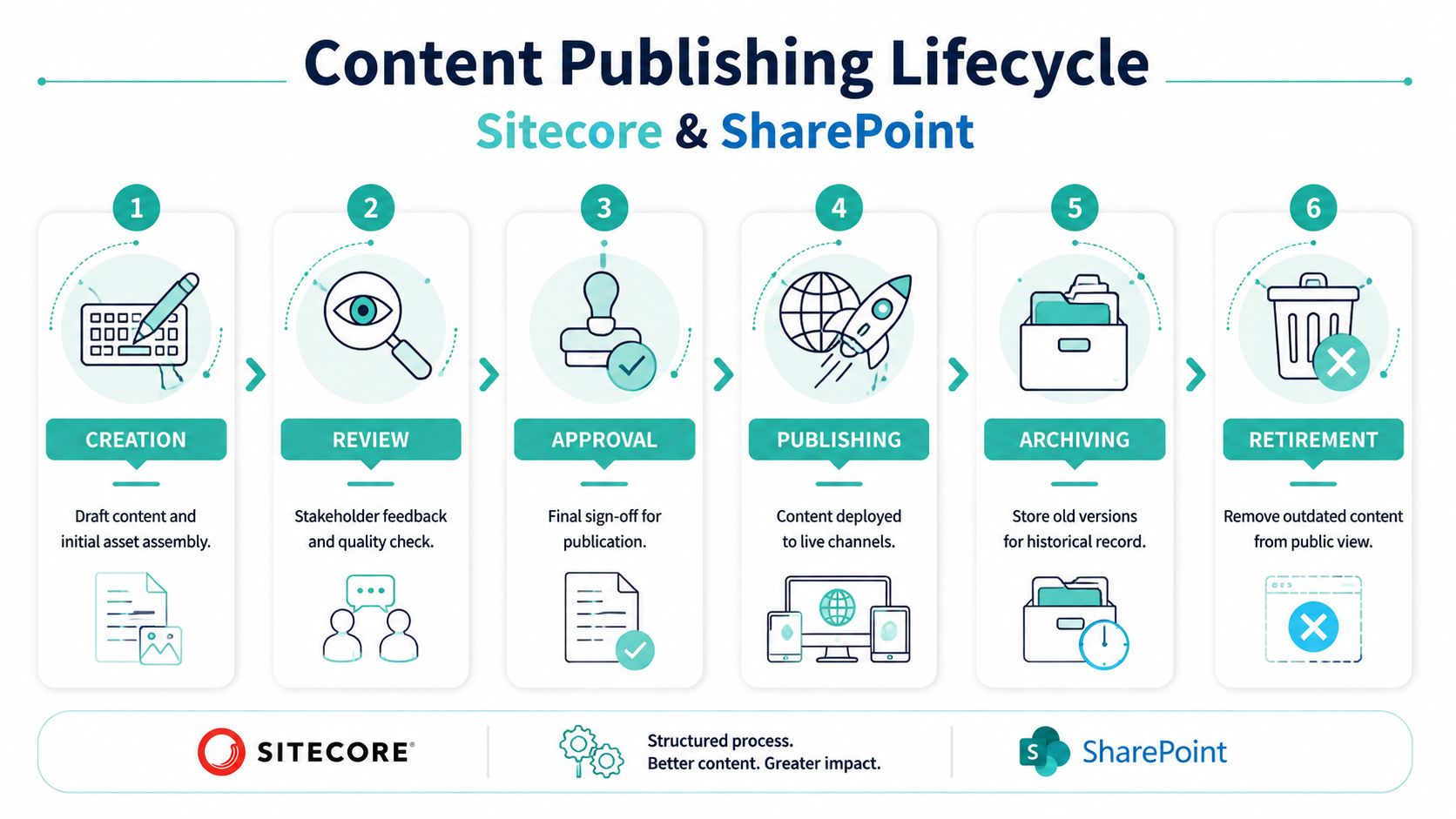
For Sitecore and SharePoint, the lifecycle should usually run through creation, review, approval, scheduling, publishing, archiving, and retirement.
Map the lifecycle to real platform behavior
The common mistake is to describe workflow as a conceptual process and never map it to what the software enforces.
Use this sequence instead:
- Create
Authors draft content, attach assets, and complete required metadata. - Review
Editors and specialists check language, structure, compliance, metadata, and channel fit. - Approve
Decision-makers sign off. Rejection sends the item back with comments. - Schedule
The business chooses release timing, dependencies, and regional sequencing. - Publish
Content moves to live channels with the right language versions and presentation. - Archive
Old versions remain available for audit and rollback. - Retire
Outdated content is removed from public view according to policy.
How Sitecore should handle each stage
Sitecore gives you the most control when workflow, templates, and publishing restrictions are designed together.
- Creation in Sitecore: Use data templates with required fields so authors can't submit half-finished items. Separate page composition from content entry where possible. In XM Cloud or headless implementations, keep content entities structured and reusable.
- Review in Sitecore: Build workflow states in the Workflow Designer. Typical paths include Draft, Awaiting Editorial Review, Awaiting Compliance Review, Approved for Publish, and Published. Configure commands for submit, reject, and approve instead of relying on informal communication.
- Approval in Sitecore: Approval rights should be restricted by role. Regional content can use parallel trees, language versions, or market-specific branches depending on how much variation is required.
- Scheduling and publishing in Sitecore: Use publishing restrictions and scheduled publish windows where needed. Keep publishers separate from authors for regulated or high-risk environments.
- Archiving and retirement in Sitecore: Don't just unpublish manually. Use lifecycle rules, ownership fields, and archive states. If your environment supports automated review reminders, connect them to page age, inactivity, or campaign end dates.
One useful reference point is a defined content life cycle that includes ownership, archive triggers, and retirement logic rather than stopping at publish.
A page without an owner and review date is already future technical debt.
How SharePoint should handle each stage
SharePoint excels when the workflow starts with collaboration, document-backed review, or intranet publishing.
Use the platform this way:
- Creation in SharePoint: Draft in page libraries, document libraries, or lists depending on content type. Standardize with content types, page templates, and required columns.
- Review in SharePoint: Use page approval and versioning for straightforward review paths. Keep comments in-platform instead of email whenever possible.
- Approval in SharePoint: For simple publishing, native approval settings may be enough. For more complex routing, escalation, or conditional branching, use Power Automate.
- Scheduling in SharePoint: Use scheduled publishing for news and internal communications, but make sure approver availability is built into the process.
- Archiving and retirement in SharePoint: Apply retention labels, records policies, or archive libraries depending on governance requirements.
A good SharePoint workflow is usually narrower than a Sitecore DXP workflow. That's fine. SharePoint doesn't need to be the presentation engine for every digital journey. It needs to be dependable, structured, and integrated into the larger content operation.
Accelerate and Scale with Automation Templates and Metadata
Manual workflow doesn't fail all at once. It fails under volume.
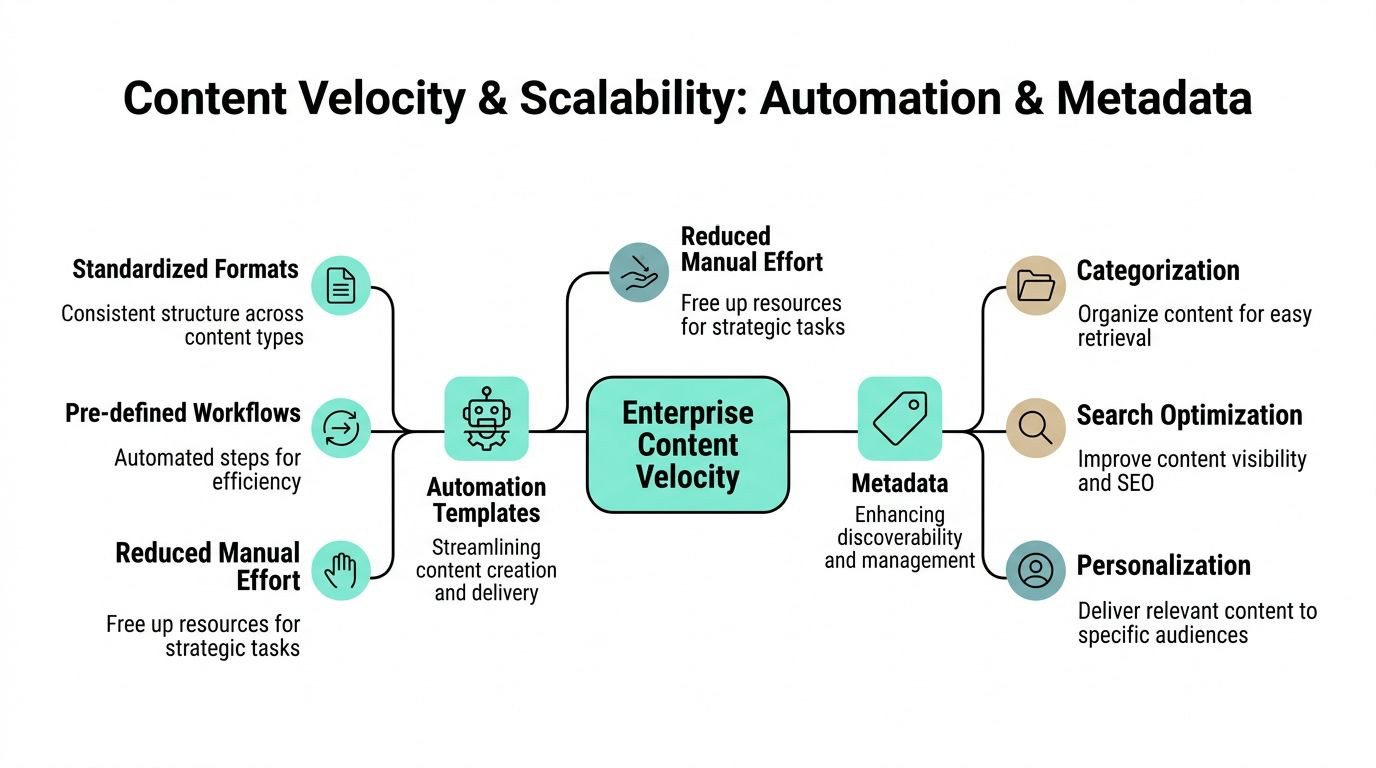
When one team publishes a few pages per month, people can compensate for weak structure. When multiple teams are publishing across brands, regions, channels, and campaigns, that stops working. The only reliable answer is to standardize the content object itself and let the platform automate around it.
Templates are operational controls
In Sitecore, data templates aren't just developer artifacts. They are workflow controls. A landing page template can require campaign taxonomy, hero media, summary text, canonical settings, and ownership fields before the item can move forward. In SharePoint, the same principle applies through content types, site columns, and page templates.
That's how you stop inconsistency at the start instead of trying to catch it during review.
High-performing teams also reduce delays by standardizing roles, version control, and approval paths, while limiting reviewer count, setting deadlines, and centralizing assets in a content hub to prevent rework, as noted in Impact's guide to high-performance content operations.
Metadata makes automation possible
AI, personalization, search relevance, and content reuse all depend on metadata quality. Without it, the workflow becomes a manual relay race.
The most useful metadata usually includes:
- Audience signals: Buyer, partner, student, patient, employee
- Regional markers: Market, language, legal jurisdiction
- Content purpose: Awareness, support, product education, campaign response
- Lifecycle fields: Publish date, review date, expiration trigger, owner
- Asset relationships: Linked image set, downloadable file, video variant
Sitecore Content Hub is often the right place to centralize this logic for assets and reusable content components. It can act as the asset system of record while Sitecore delivery products consume approved material downstream. SharePoint can support collaborative classification, but it isn't usually the best place to orchestrate omnichannel content reuse on its own.
Composable delivery changes the speed equation
Composable architecture improves workflow when teams use it to separate concerns, not when they fragment responsibility.
In XM Cloud environments, a practical model is to keep these concerns distinct:
| Concern | Best practice |
|---|---|
| Content structure | Managed in templates and content models |
| Assets | Governed in Content Hub DAM |
| Workflow | Enforced in approval states and connected processes |
| Delivery | Handled by composable front ends and deployment pipelines |
| Optimization | Driven by analytics, search behavior, and personalization data |
That structure lets teams release presentation changes without redesigning the editorial process every time. It also creates cleaner integration points for AI services, metadata enrichment, and downstream automation.
One implementation option for organizations that want structured workflow support in Sitecore and automated archival processes is Kogifi, alongside native platform capabilities and internal delivery teams.
Integrate Your Ecosystem with Sitecore AI DAM and Analytics
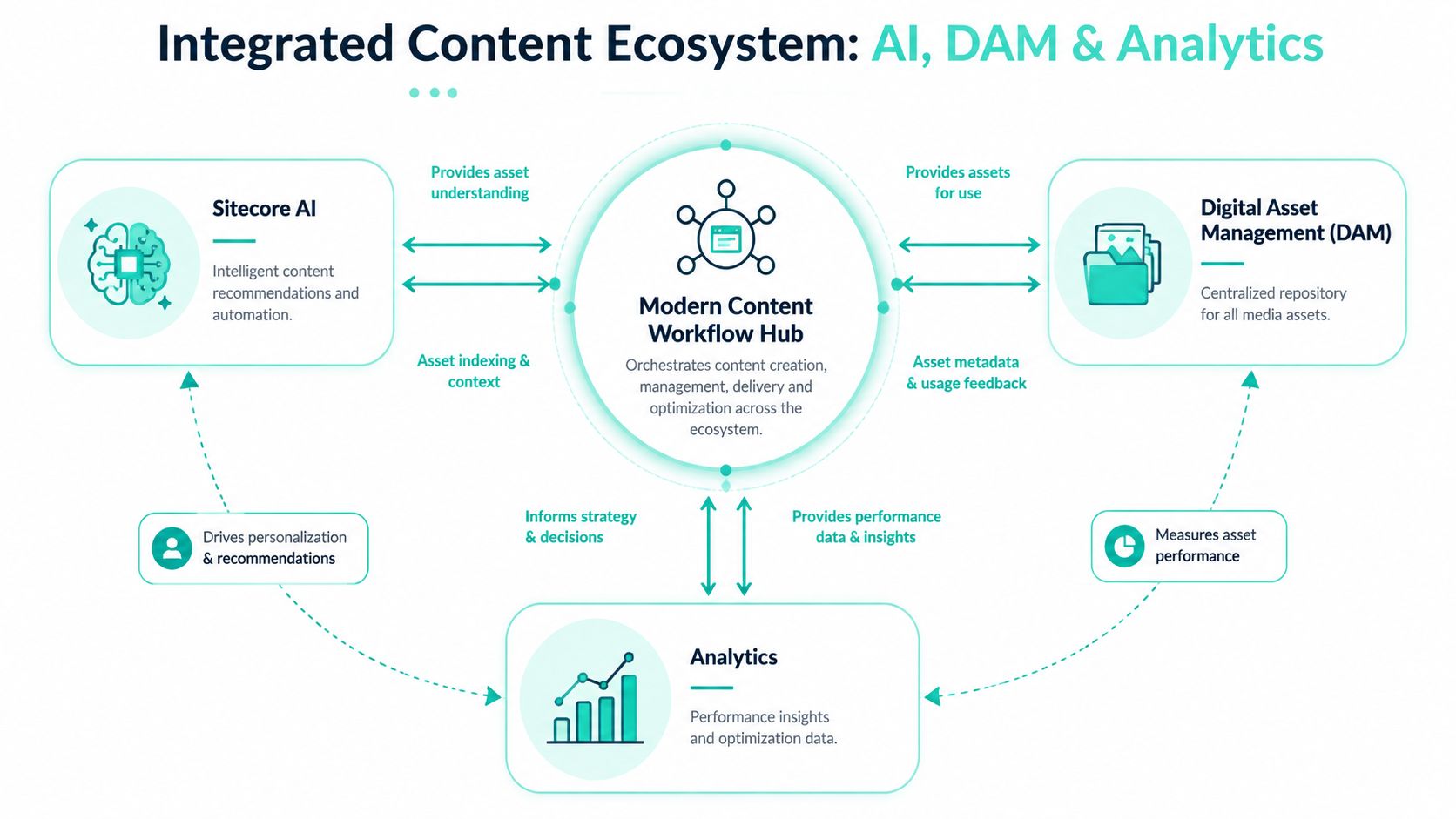
A content publishing workflow gets much more valuable when it becomes the hub for assets, discovery, personalization, and measurement. That's where Sitecore's product portfolio changes the conversation. Instead of treating workflow as a narrow editorial path, you use it as the operational layer that feeds AI and receives performance signals back.
The challenge after launch is often bigger than the launch itself. Content operations frequently stop at publication, while modern enterprises still have to manage versioning, localization, and personalization across channels from a single source of truth, as discussed in WoodWing's perspective on post-publish workflow operations.
Use Content Hub as the operational center
Enterprise teams usually waste time in the same places. They search for the latest approved asset. They recreate variants that already exist. They publish content with outdated imagery because nobody trusts the shared folder structure.
Sitecore Content Hub, including DAM capabilities, solves that when it's implemented as a governed repository instead of a media dump. Assets should carry ownership, usage rights, taxonomy, market relevance, and status. Workflow states in delivery platforms can then pull from a clean asset foundation.
For teams evaluating that operating model, this overview of digital asset management in the cloud is a useful reference point.
If authors have to ask where the approved version lives, the DAM isn't integrated into the workflow yet.
Feed AI from governed content not from chaos
Sitecore AI strategy either becomes credible or becomes theater at this point.
Sitecore Search works best when content and metadata are structured enough to support retrieval, ranking, and discoverability. If taxonomy is inconsistent, search becomes noisy. If titles, summaries, and relationships are well modeled, Search can support better findability for both customers and internal teams.
Sitecore Personalize becomes more effective when the workflow produces reliable audience and intent signals. If every content item includes meaningful tags such as audience, stage, product line, or region, those fields can inform segmentation and experience rules. Personalization then starts with governed content inputs, not last-minute manual targeting.
A practical enterprise pattern looks like this:
- Workflow captures structure: Required fields and approval gates enforce quality.
- Content Hub governs assets: Media, rights, and variants stay controlled.
- Search indexes governed content: Discovery improves because metadata is consistent.
- Personalize consumes contextual signals: Experiences adapt by audience or journey logic.
- AI-assisted variation happens inside guardrails: Teams can generate or refine variants, but only from approved source content and metadata.
That's the right order. AI doesn't fix weak operations. It amplifies whatever structure already exists.
Close the loop after publish
Post-publish operations should feed back into planning. That means analytics must be attached to content objects, not treated as a separate reporting exercise.
Useful patterns include:
- Flagging underperforming content for editorial review
- Routing high-value pages into personalization testing
- Triggering localization updates when a source version changes
- Identifying stale assets linked to still-live pages
- Using search behavior to improve taxonomy and page relationships
In Sitecore programs, composable architecture delivers its full value. Analytics, search, personalization, DAM, and workflow can remain distinct services while still sharing metadata and decision points. SharePoint can contribute collaboration and approval context, but Sitecore typically carries the heavier load for public-facing experience orchestration.
Managing Global Operations Localization and Cloud Migration
Global teams don't struggle because translation exists. They struggle because content ownership, market variation, and release control aren't designed together.

Localization needs branching control not duplication
The fastest way to create global publishing chaos is to duplicate content trees for each market and let them drift. That gives local teams freedom, but it also creates maintenance debt and inconsistent brand behavior.
A stronger model compares like this:
| Approach | Works well when | Trade-off |
|---|---|---|
| Full regional duplication | Markets need heavy legal or commercial divergence | Reuse drops and maintenance expands |
| Shared source with language versions | Core content is stable across markets | Needs disciplined translation workflow |
| Shared components with regional overrides | Brand consistency matters but local nuance is required | Modeling is more complex up front |
In Sitecore, language versions, fallback strategy, and reusable components usually offer the best long-term control. In SharePoint, translation and regional approval often start in collaborative review spaces before final publishing into controlled destinations.
Regional approval should sit inside the workflow, not outside it. A local approver needs a clear state transition, a defined SLA, and visibility into what changed in the source version.
Cloud migration changes workflow design
Moving to Sitecore XM Cloud isn't just infrastructure migration. It changes how teams think about deployment, integration, and editorial responsibility.
Here's where the conversation becomes practical.
In managed SaaS and composable setups, the workflow should be refactored around these realities:
- Authoring stays structured: Templates, components, and workflow states remain critical.
- Delivery becomes decoupled: Front-end release cycles don't need to match content approvals.
- Integrations need explicit contracts: DAM, translation, analytics, and personalization services should exchange defined metadata and events.
- Environment strategy matters: Teams need clear rules for content promotion, testing, and release responsibility across environments.
The gain is operational elasticity. The discipline required is architectural clarity. If your old workflow relied on ad hoc CMS customization, cloud migration is the moment to simplify it.
Measure What Matters KPIs for Workflow Optimization
If a workflow can't be measured, it can't be improved. Teams often instrument campaign outcomes but ignore the operational path that produced them. That leaves bottlenecks invisible.
A content workflow is the operational backbone that determines who does what, when, and how. It's more than an editorial checklist. It's a sequence of steps and handoffs that moves content from idea to publication and beyond, and mature operations require measurable tracking, as described by Content Science's explanation of content workflow.
Track operational flow first
The most useful workflow KPIs are usually operational before they are promotional.
Start with measures such as:
- Time to publish: How long content spends from intake to live release
- Stage duration: Where items stall most often, such as review or legal approval
- Rework frequency: How often content is rejected and sent backward
- Approval load by role: Whether one stakeholder is acting as a bottleneck
- Archive compliance: Whether outdated pages are reviewed and retired on time
This doesn't require invented dashboards or vanity metrics. Sitecore workflow history, Content Hub metadata, SharePoint versioning, Power Automate logs, and analytics tools already provide useful signals when they're wired into a reporting model.
The best workflow dashboard usually starts by showing delay, not traffic.
Tie workflow data to content outcomes
Operational efficiency matters because it affects content quality and business responsiveness. But don't stop at duration metrics.
Connect workflow tracking to outcomes such as:
- Content discoverability: Are metadata-rich items easier to find and reuse
- Experience relevance: Are tagged assets and structured content supporting better personalization
- Update responsiveness: Can teams revise live pages quickly when business conditions change
- Lifecycle hygiene: Are obsolete pages removed before they damage trust or create legal risk
In Sitecore environments, this often means combining workflow state data with search behavior, personalization inputs, and page performance. In SharePoint, it usually means connecting collaborative approval history with document freshness and publishing consistency.
A good content publishing workflow doesn't just move faster. It creates a cleaner system for continuous improvement.
If your Sitecore or SharePoint environment is struggling with approvals, metadata quality, localization, DAM integration, or the move to composable architecture, Kogifi can help assess the current workflow, map the target operating model, and implement a governed publishing process that supports AI, personalization, and enterprise scale.