The content life cycle is the playbook for managing your digital assets, guiding everything from the first spark of an idea to its eventual retirement. Think of it as the complete journey your content takes, a strategic map that turns raw concepts into experiences that connect with your customers and drive results.
Understanding the Enterprise Content Life Cycle
It’s helpful to think of the content life cycle not as a simple checklist, but as a sophisticated digital supply chain. Raw ideas are the base materials. From there, they are refined, assembled, approved, and delivered as polished digital products. For any enterprise running on a powerful platform like Sitecore, mastering this cycle isn't just a good idea—it's essential for keeping operations smooth and getting a real return on your investment.
Without a structured process, content operations quickly descend into chaos. You end up with inconsistent messaging, teams duplicating work, and zero visibility into what's actually working. This is exactly where a well-defined life cycle, managed through a platform like Sitecore, turns messy, manual handoffs into a seamless, automated workflow.
The Modern Content Supply Chain
A properly managed life cycle is your guarantee that content stays relevant, compliant, and optimized for performance. It builds a governance structure that lowers risk and gives your teams the clarity they need to work together effectively. This systematic approach is a core principle behind modern enterprise content management solutions, where having both control and agility is the name of the game.
The market data backs this up. The global content services platforms market was valued at USD 53.95 billion in 2022 and is on track to hit USD 190.59 billion by 2030. This growth is fueled by the enterprise-level demand for intelligent systems that can wrangle content effectively.
This diagram breaks down the eight critical stages of an enterprise content life cycle, from the initial planning all the way to archival.
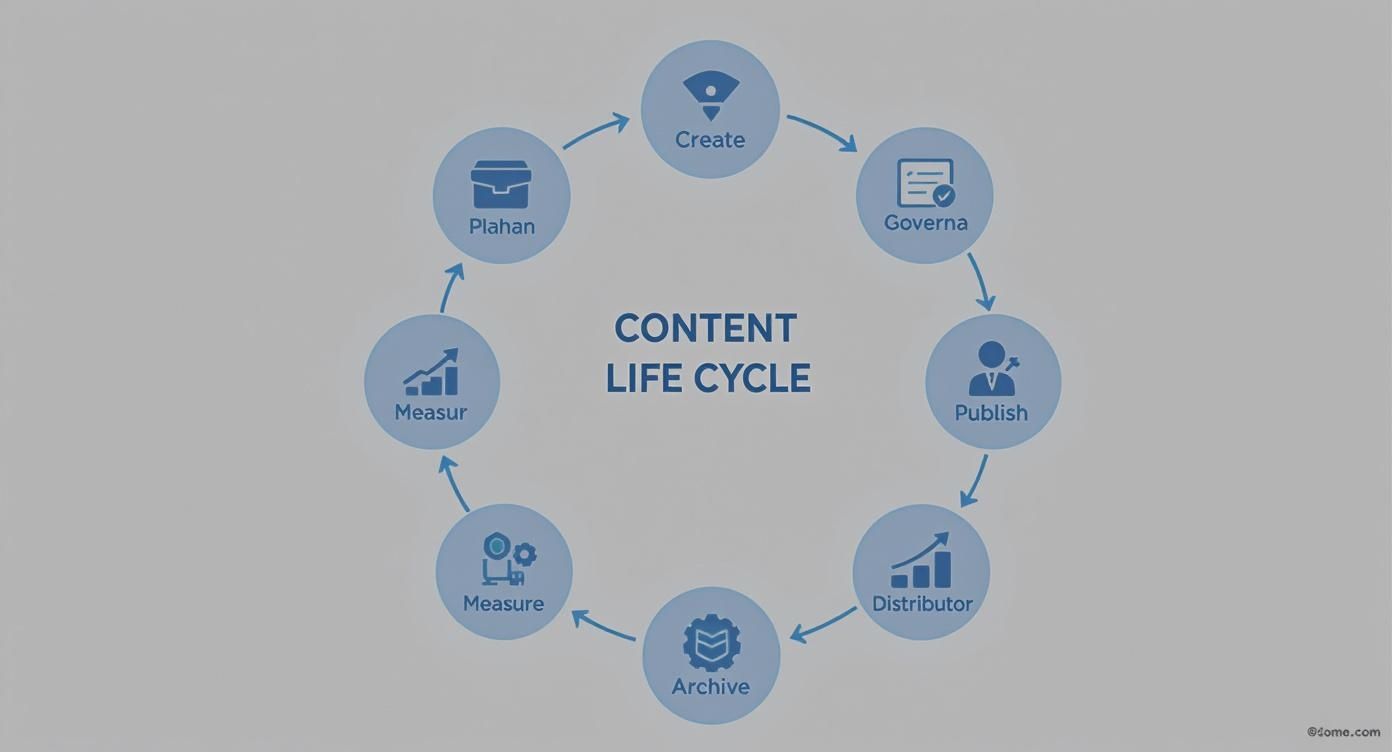
Notice how the process is circular. That's intentional. The insights you gain from the "Measure" stage feed directly back into the next "Plan" phase, creating a powerful, continuous loop of improvement.
Here's a closer look at each stage and why it's so important for a large organization.
The Eight Stages of the Modern Content Life Cycle
This table provides a high-level overview of the eight stages, outlining what each one aims to achieve and its role within an enterprise setting.
By breaking down the process this way, you can map each step to specific tools, teams, and workflows, creating a clear and repeatable system for content operations.
Why It Matters for Sitecore and SharePoint Users
For organizations invested in both Sitecore and SharePoint, the content life cycle acts as the connective tissue between these two powerful platforms. SharePoint often shines as the collaborative hub for initial creation, drafting, and document-level governance. Once the foundational work is done, Sitecore takes the baton to handle the more complex tasks of personalization, omnichannel publishing, and deep performance analytics.
By mapping each stage of the content life cycle to the specific capabilities of these platforms, you create a powerful, end-to-end system. This system governs content from its first draft in a SharePoint document to its final, personalized delivery via the Sitecore Experience Platform.
This integration isn't just about efficiency—it's about making sure every single asset is managed with precision, delivering a consistent and impactful brand experience across every digital touchpoint.
Planning and Creating Your Content Foundation
The first steps in any content life cycle—planning and creation—are where your strategy stops being an idea and starts becoming a tangible asset. This isn't just about coming up with blog topics. It's a focused effort to define your audience, map out their journey with your brand, and spot any critical gaps in your existing content. For an enterprise, this foundation needs to be rock-solid to handle things like sophisticated personalization and delivering content across every channel.

This is precisely where Sitecore’s powerful tools come into play. With the Sitecore Experience Platform (XP), your teams can dig into user data to build out detailed personas and figure out exactly what a customer needs at each touchpoint. This data-first approach takes the guesswork out of content, ensuring every piece you create has a clear purpose and a specific audience in mind.
From Collaborative Draft to Strategic Asset
The actual writing and creation process often kicks off in a collaborative space like SharePoint. It’s the perfect spot for drafting initial versions, getting subject matter experts (SMEs) to weigh in, and collecting feedback. Working in this kind of controlled environment ensures the core message is accurate and locked down before it ever moves into a marketing-focused platform.
Once a draft is ready, it moves into the Sitecore ecosystem—often into a tool like Sitecore Content Hub. The Content Marketing Platform (CMP) inside the Hub is built to manage entire campaigns from one central dashboard. Marketing teams can take that draft from SharePoint, align it with a specific campaign, assign it out to creators, and track its progress all the way to the deadline.
This smooth handoff is a key part of a modern content supply chain, which is all about connecting different systems into one unified production line.
Building a Framework for Personalization
One of the most important things you can do in these early stages is set up a solid content taxonomy and metadata framework. Honestly, this is the secret sauce that makes Sitecore’s advanced personalization work so well.
Think of taxonomy and metadata as the DNA of your content. Without it, Sitecore's personalization engine can't identify the right content to deliver to the right person at the right time. A well-planned structure is non-negotiable for success.
This means creating a logical system of tags, categories, and attributes that define what each piece of content is about, who it’s for, and where it fits in the customer journey. Getting this right from the start makes everything that comes later—like content discovery, reuse, and personalization—exponentially easier. And to lay that groundwork effectively, choosing the best content planning tools is a crucial first step.
The demand for high-quality digital assets is exploding. The digital content creation market, valued at USD 37.28 billion in 2025, is expected to hit USD 122.11 billion by 2034. This surge is fueled by the need for multimedia content and the rise of cloud platforms that support real-time collaboration and omnichannel publishing—both central to a modern content life cycle. Having an efficient, scalable creation process is no longer just a nice-to-have; it's a necessity.
Implementing Robust Content Governance and Publishing
You can't have confidence in your content without an airtight governance model and a predictable publishing process. This stage is where you move beyond simple drafts and approvals, building automated, multi-step workflows that ensure every asset is legally sound, on-brand, and high-quality before your audience ever sees it. This isn't about creating bottlenecks—it's about building a reliable system that prevents embarrassing errors and protects your brand.

In a large enterprise, this process rarely happens in a single system. It often involves a smart pairing of a collaboration hub and a Digital Experience Platform (DXP). The goal is to create a seamless handoff from internal review to the public-facing experience.
SharePoint as the Initial Gatekeeper
Think of SharePoint as the first checkpoint in your governance journey. It's the perfect place for those early, document-level reviews where legal teams, product experts, and other key stakeholders need to weigh in. Inside SharePoint, its version history creates a clean, transparent audit trail, tracking every single change and comment before the content even gets close to your DXP.
This separation of duties is incredibly efficient. It lets subject matter experts focus purely on accuracy and compliance within a tool they already know, keeping the core information clean. Once that internal sign-off is complete, the approved content is ready to graduate to a more dynamic, customer-facing environment.
Sitecore for Experience-Focused Approvals
Once that content moves into a platform like Sitecore, the focus of governance shifts dramatically. You're no longer just checking raw information; you're approving the final customer experience. This is where you put Sitecore’s powerful workflow engine to work, building multi-step approval chains that mirror your real-world organizational structure. You can assign specific roles and permissions to ensure the right people review the right things at exactly the right time.
For instance, a Content Author might submit a new page. The workflow then automatically routes it to a Content Editor for a brand voice check, and finally to a Publisher for the final sign-off. Every step is logged, and notifications are sent out automatically, which means no more manual email follow-ups or chasing people down the hallway. For a deeper dive, check out our detailed guide on building a content governance framework.
The real magic of Sitecore’s workflows is that they are context-aware. Approvals aren't just about the words on a page. They are about how those words look on a mobile device, how they interact with personalization rules, and how they fit into the overall journey.
Sitecore’s built-in versioning and rollback capabilities add another critical layer of risk management. If a mistake somehow makes it live, you can instantly revert to a previous version with a single click. It's a crucial safety net that protects the live user experience.
Sitecore vs SharePoint in Content Governance Workflows
So how do these two platforms really work together? It's helpful to see their roles side-by-side. Each platform brings a different strength to the table, creating a governance process that's stronger than either could be alone.
By using both platforms in tandem, you’re not just adding steps—you’re creating a robust, end-to-end governance model that enforces rules without killing your content velocity. This dual-gatekeeper approach ensures every single piece of content is thoroughly vetted before it ever becomes part of the customer experience.
Distributing and Personalizing Content at Scale
Once your content gets the green light and goes live, the real work begins: getting it in front of the right people. This is where distribution and personalization come in, turning static assets into experiences that connect with your audience. For large enterprises, this means ditching the old "publish and pray" method for a smarter strategy: "create once, publish everywhere" (COPE). This idea is baked right into Sitecore's DNA.
Thanks to a headless or composable DXP, a single piece of content created in Sitecore can show up perfectly on any channel. It doesn’t matter if it’s a website, a mobile app, a customer portal, or an email—the experience feels consistent and seamless. This approach gets rid of the headache of making different content versions for each platform, keeping your brand strong and getting campaigns out the door much faster.
Powering Experiences with Sitecore Personalize
The magic of Sitecore’s ecosystem really shines when you move beyond simply sending content out to personalizing it intelligently. Sitecore Personalize is a real-time engine that tweaks digital experiences on the fly based on who the user is and what they’re doing. It’s how you stop shouting one-size-fits-all messages and start having relevant, one-on-one conversations.
Setting up the rules is surprisingly simple. For example, you could create a rule to show a specific case study to any visitor from the manufacturing industry. Or, you could have another rule that swaps a generic call-to-action for a special offer when a returning customer visits the site.
By connecting user data with content variations, Sitecore Personalize turns your website into a dynamic conversation. It's no longer just a source of information but a responsive tool that guides users toward their goals, increasing engagement and conversion rates.
This is what separates a basic CMS from a true Digital Experience Platform. It lets you take all the rich taxonomy and metadata you set up during content creation and use it to drive actual business results. To see how all the pieces fit together, you can learn more about how content personalization software functions in an enterprise environment.
Testing and Optimizing for Engagement
Personalization isn’t a one-and-done task. To get it right, you have to test and optimize constantly. Sitecore has built-in A/B and multivariate testing tools that let marketers experiment with different versions of content to see what truly connects with different audiences.
You can test just about anything on a page:
- Headlines: Find out which title actually gets people to click.
- Images: See which visuals grab more attention and drive engagement.
- Calls-to-Action (CTAs): Test button colors, text, and placement to see what drives conversions.
- Component Variations: Compare two completely different page layouts to measure which one performs better overall.
These tests give you hard data, taking the guesswork out of optimization. Better yet, Sitecore’s AI-powered recommendation engine can spot user behavior patterns and automatically suggest relevant content, like related articles or products. This automates a huge part of the personalization process, making sure that even on massive, complex websites, users always have a logical next step to take.
Centralizing Assets with a DAM
A unified omnichannel experience is about more than just words. Every single image, video, and PDF needs to look and feel consistent everywhere. This is where Sitecore Content Hub’s Digital Asset Management (DAM) becomes a critical part of the content life cycle. The DAM is your single source of truth for every digital asset you own.
Instead of having images saved on random hard drives or scattered across different systems, the DAM puts everything in one central place. When the marketing team in Europe needs a product image, they get the exact same approved version as the team in North America. This level of control is essential for protecting your brand’s integrity, preventing the use of old or unlicensed assets, and creating a truly seamless customer experience.
Measuring and Optimizing for Peak Performance
Hitting "publish" on a piece of content isn't the finish line. Far from it. It's actually the starting block for the next, crucial phase of the content life cycle. The real magic happens when you start measuring what’s working and use that data to fuel a cycle of constant improvement. Without that feedback loop, you’re just creating content in a vacuum, unable to prove its value or adapt to what your audience actually wants.

This is where a powerful Digital Experience Platform like Sitecore really flexes its muscles. Its built-in analytics go way beyond simple page views, tracking detailed user interactions, goal conversions, and even assigning engagement value scores. It gives you a clear picture of which content is hitting the mark with specific audience segments and which is falling flat.
Identifying Your Key Performance Indicators
To measure anything effectively, you first have to define what success looks like. Your Key Performance Indicators (KPIs) can't be generic; they need to tie directly to real business goals. While the specifics will vary, most enterprises track a mix of engagement and conversion metrics.
Here are a few key metrics to keep an eye on within Sitecore:
- Engagement Value: A composite score that tells you how valuable a visitor's actions are. It's based on predefined goals, like someone downloading a whitepaper or signing up for a newsletter.
- Path Analysis: This shows you the actual journeys users take through your site, revealing which pieces of content are most effective at moving them toward a conversion.
- Content ROI: By assigning a monetary value to your goals, Sitecore helps you calculate the return on investment for specific campaigns or even individual blog posts.
- Time on Page and Bounce Rate: These are the classics for a reason. They give you a quick, baseline understanding of user interest and how relevant your content is.
These insights create a powerful feedback loop that feeds right back into your planning stage. If you see that a certain blog post format consistently drives high engagement value, you know to make more of it. If a key landing page has a shockingly high bounce rate, that's your cue to start optimizing.
From Reactive Adjustments to Predictive Decisions
While the built-in analytics are powerful, the next evolution in content performance is all about artificial intelligence. This is where tools like Sitecore Discover enter the picture. Discover uses AI and machine learning to analyze performance patterns at a scale no human team could ever hope to match.
Instead of just telling you what happened yesterday, AI-driven tools can predict what will resonate with your audience tomorrow. This shifts your content strategy from making reactive adjustments to making predictive, data-informed decisions.
Sitecore Discover can spot subtle connections between content attributes and user behavior, giving you actionable insights to guide what you do next. For example, it might find that articles featuring video lead to 20% higher conversion rates among a specific demographic, giving you a clear signal to adjust your content mix. This kind of predictive capability is quickly becoming a cornerstone of modern content management.
The growth of AI-driven analysis is undeniable. The global content intelligence market was valued at USD 2.1 billion in 2024 and is projected to hit USD 15.1 billion by 2033, driven by the demand for platforms that can optimize the entire content life cycle. As businesses demand greater ROI from their content, these intelligent tools are becoming less of a luxury and more of a necessity. You can learn more about the content intelligence market growth on custommarketinsights.com.
By integrating these advanced measurement and optimization practices, you ensure your content doesn’t just perform well today—it continually evolves to meet the future demands of your audience.
Managing Content Retention and Archival Securely
Not every piece of content is meant to last forever. The final stages of the content life cycle—retention and archival—are often an afterthought, but they're critical for keeping your digital ecosystem clean, compliant, and efficient. Deciding when to retire content is just as important as deciding what to create in the first place.
Without a plan, your content repository can quickly become a digital graveyard filled with outdated, irrelevant, and even non-compliant information. This digital clutter doesn’t just slow down system performance; it makes it harder for users to find what they need and can even create legal risks if old data isn't handled correctly. A proactive approach to archival ensures your digital presence stays sharp and effective.
Establishing Clear Retention Policies
The first step is creating a clear, documented retention policy. This isn't just an IT task—it requires a team effort, bringing together marketing, legal, and compliance to set the rules. For example, financial reports might need to be kept for seven years, while a landing page for a past webinar can probably be retired after six months.
Tools like SharePoint are great for managing the early stages of this process, especially for internal documents. Its records management features let you apply retention labels that automatically kick off a review or archival process after a set time. This creates a fully compliant and auditable trail long before content is ever considered for public deletion.
A well-defined retention policy acts as the automated gatekeeper of your content ecosystem. It systematically separates valuable, evergreen assets from temporary, outdated materials, ensuring your content repository remains a high-performing business tool rather than a disorganized digital attic.
Automating Archival and Deletion Workflows
Once you have your policies, technology can do the heavy lifting. In a DXP like Sitecore, you can set up workflows or use add-on modules to automatically identify content that’s reached its expiration date. These systems can flag items for review, unpublish them, or move them into an archive. Automation is the only way to manage this effectively at an enterprise scale.
For instance, a typical automated workflow could look something like this:
- Identify Inactive Content: The system automatically scans for pages that haven't been updated or received significant traffic in over a year.
- Notify Content Owners: An automated email goes out to the content owner, asking them to review the page.
- Initiate Archival: If the owner approves, the content is unpublished and its status changes to "Archived" within Sitecore.
- Schedule Deletion: After a set time in the archive, the content can be permanently deleted from the system.
Sitecore Content Hub as a Long-Term Archive
Some content is too valuable to just delete. It might be needed for legal holds, knowledge preservation, or future campaigns. This is where a tool like Sitecore Content Hub shines as a secure, long-term archive. Instead of hitting delete, you can move valuable but inactive assets from your DXP into Content Hub's Digital Asset Management (DAM) system.
Archiving assets in Content Hub preserves all their rich metadata and history in one central, searchable place. Imagine you want to launch a new product. Instead of starting from scratch, you could search the archive for a successful campaign from five years ago. All the images, videos, and messaging would be right there, ready to be analyzed or repurposed. This turns your archive from a dusty storage closet into an active, valuable knowledge base that saves your team time and money.
Frequently Asked Questions
When you're running an enterprise-level content operation, practical questions about how different platforms should work together are bound to come up. Let's tackle some of the most common ones we hear about Sitecore and SharePoint to help you dial in your strategy.
What Is the Main Difference Between Sitecore and SharePoint in Content Management?
The biggest difference comes down to their core purpose. Think of SharePoint as your internal workshop—it's primarily a hub for internal collaboration and document management. It’s brilliant for the early stages of the content life cycle, like drafting documents, managing versions, and getting approvals from stakeholders inside your company.
Sitecore, on the other hand, is your digital showroom. It's a Digital Experience Platform (DXP) built for creating customer-facing experiences. Its real strength is in publishing, personalizing, and measuring how your content performs across all your digital channels. One is for making the product, the other is for selling it.
How Does Sitecore Content Hub Fit into the Content Life Cycle?
Sitecore Content Hub acts as the central nervous system for your entire content operation, supporting multiple stages of the life cycle. It's not just one tool, but a combination of several key functions that work together:
- Content Marketing Platform (CMP): This is for your planning and creation stages, helping you orchestrate campaigns and manage workflows for your creative teams.
- Digital Asset Management (DAM): For distribution, it serves as the single source of truth for all brand assets—every image, video, and logo lives here.
- Product Content Management (PCM): It centralizes all your product information, making sure the details are consistent no matter where they appear.
In short, Content Hub connects the dots between planning, creating, managing, and distributing your content. It ensures everything runs as one cohesive process from start to finish.
Can You Automate Content Archival Between the Two Platforms?
Absolutely. Not only is it possible, but we highly recommend automating this for the sake of efficiency and compliance. A common way to set this up is to use SharePoint's retention policies to automatically flag documents for archival. Once a document is flagged, a custom connector or a middleware tool can trigger an action in Sitecore.
This action could be anything from unpublishing the related web page to moving its assets into Sitecore Content Hub for long-term storage. You could also have it flag the content for a final manual review. This creates a smart, semi-automated workflow that uses SharePoint's governance muscle to keep your Sitecore repository clean and up-to-date.
What Is the First Step to Building a Content Governance Model?
The very first, most critical step is to assemble a cross-functional governance committee. You need people in the room from marketing, IT, legal, and any key business units. Their first job is to define and write down the rules of engagement for all content.
Before you can even think about building workflows or assigning permissions, you have to agree on the standards. This means defining who owns what content, creating brand and style guidelines, outlining the review process, and establishing a clear content taxonomy. A documented framework is the blueprint for a successful governance model.
Getting this foundational work done ensures that when you start configuring workflows in Sitecore or SharePoint, they actually reflect and enforce how your organization needs to operate. If you're adapting content for global audiences, you might find helpful parallels in various book translation FAQs, which deal with similar challenges of maintaining consistency and accuracy across different contexts.
At Kogifi, we specialize in designing and implementing robust content life cycle strategies using platforms like Sitecore and SharePoint. https://www.kogifi.com