


You're probably here because accessibility just stopped being abstract.
A legal demand letter landed in counsel's inbox. A procurement review exposed failures in a public sector bid. An internal audit flagged the intranet, customer portal, or marketing estate as non-compliant. Then someone ran a scanner, found a long list of issues, and the room split in two. One group wants a quick patch. The other wants a rebuild. Both are usually reacting to symptoms, not causes.
In enterprise environments, website accessibility remediation isn't a front-end cleanup task. It's a platform problem with design system, CMS schema, component library, content workflow, QA, and governance consequences. That's especially true in Sitecore and SharePoint estates, where the HTML users experience is often the end result of multiple layers of templates, renderings, web parts, search-driven components, personalization rules, and editorial behaviors.
The teams that get this right treat remediation as architecture. The teams that don't usually burn budget fixing the same issue twice.
Table of Contents
- Why scan-only audits fail
- What a usable audit backlog looks like
- How to audit Sitecore and SharePoint properly
- Prioritize journeys before pages
- Use phases that leadership can defend
- A practical scoring model for enterprise teams
- Sitecore remediation starts in templates and schemas
- How Sitecore AI and the product portfolio help governance
- SharePoint remediation lives in SPFx and authoring rules
- Done in development is not done in production
- Where real-user testing changes the outcome
- What to validate before sign-off
Beyond Compliance The Enterprise Accessibility Imperative
Accessibility usually gets attention when risk becomes visible. Counsel asks what the organization is doing. Procurement asks for evidence. Leadership asks whether this is an isolated issue or a systemic one. In most enterprise estates, it's systemic.
The scale of the problem is hard to overstate. As of the 2026 WebAIM Million report, over 96% of the world's top one million homepages contain detectable WCAG accessibility failures, with an average of 56.1 errors per page, up from 51 in 2025, a 10.1% increase. For enterprise teams, that should end the idea that accessibility is a niche edge case. It's the norm in digital delivery unless teams deliberately engineer against it.
What matters is how that reality intersects with your stack. A large Sitecore estate with shared renderings, headless front ends, Search, Personalize, and Content Hub workflows can spread one inaccessible pattern across dozens of sites. A SharePoint intranet can do the same through reusable page templates, SPFx web parts, navigation patterns, and document publishing habits. In both cases, one bad component becomes organizational debt.
Risk is legal, commercial, and operational
A demand letter is only one trigger. Accessibility failures also affect search visibility, task completion, employee productivity on intranets, and the quality of customer experience in forms, search, account areas, and support journeys.
Equalweb notes that a major regulatory shift arrived on April 24, 2024, when the U.S. Federal Register updated Title II of the ADA to require state and local governments to meet WCAG 2.1 AA for websites and mobile applications, and it also states that companies with inaccessible websites lose an estimated $6.9 billion annually to competitors due to exclusion of the disability market. The same source says 73% of disabled customers encounter accessibility barriers on more than a quarter of sites they visit and 98% of websites fail WCAG 2.1 compliance in its cited analysis of the market environment in this accessibility regulation overview.
Practical rule: If remediation is framed as “fixing a few front-end issues,” leadership will underfund it. If it's framed as platform risk, customer access, and governance debt, decisions get better.
That's also why legal preparedness and technical remediation have to move together. If your team is working through exposure and response planning, guidance on protecting your site from accessibility lawsuits is worth reviewing alongside the engineering plan.
Surface fixes create repeat cost
The common mistake is to treat the visible defect as the root cause. A missing label in a form isn't always a content issue. It may come from a Sitecore rendering parameter setup, a disconnected data source pattern, a headless component contract, or an SPFx property pane configuration that never enforced accessible labels in the first place.
That distinction changes budget decisions. Teams can spend months patching rendered HTML across templates and pages, then reintroduce the same barriers in the next release because the component contract never changed.
A serious enterprise remediation program starts with one assumption. If the platform can still generate inaccessible output by default, the remediation isn't finished.
Auditing and Triaging Your Digital Estate
The first deliverable in a serious remediation effort isn't a fix. It's a backlog you can trust.
Most first-time enterprise clients arrive with one of two things. Either they have a scanner export with hundreds of repeated findings and no prioritization, or they have a manual report with accurate observations but no connection to actual components, templates, owners, or release paths. Neither is enough to run remediation.
Why scan-only audits fail
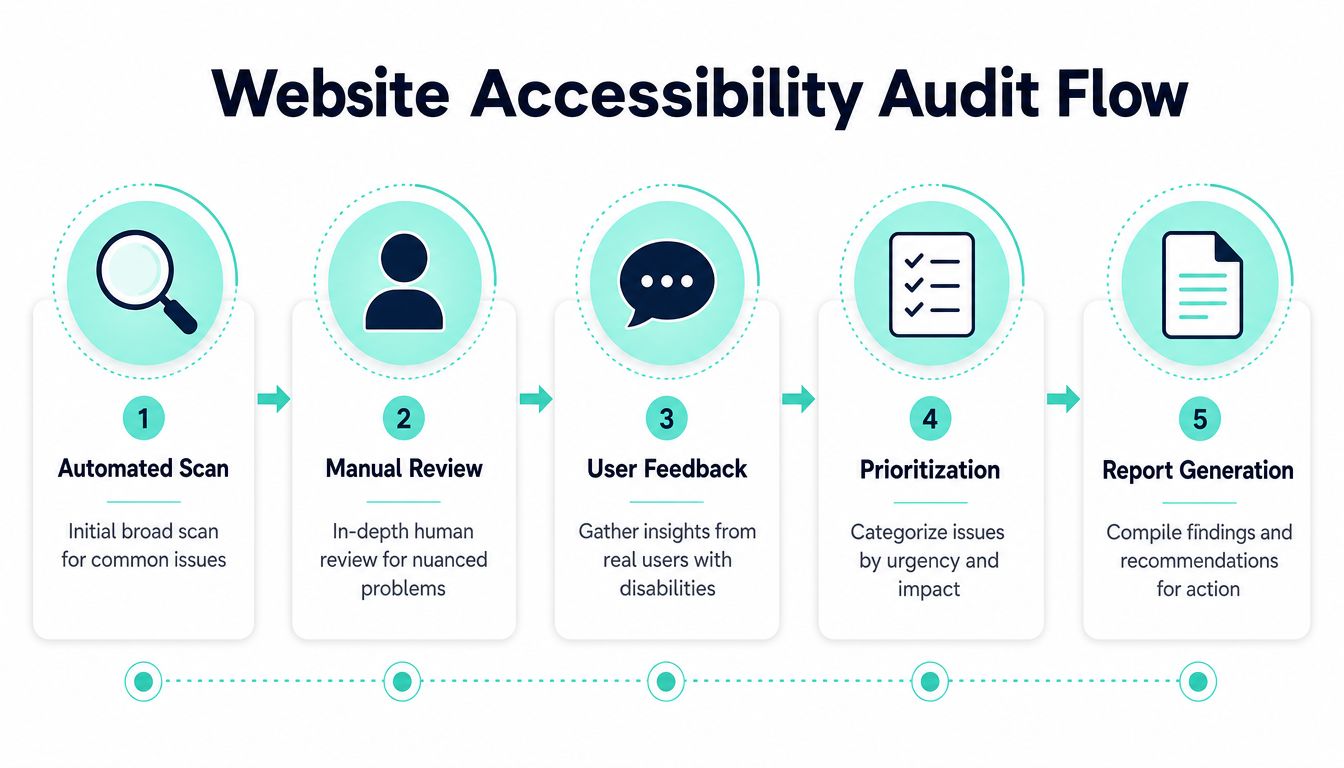
Automated scanning is useful, but it's only one layer. According to Accessible.org's remediation planning guidance, automated scans alone flag only approximately 25% of issues, which makes scan-only planning a direct path to incomplete remediation.
That lines up with what enterprise teams see in practice. Scanners catch low-contrast text, missing alt text, empty links, and some form issues well enough. They don't tell you whether keyboard order still makes sense inside a mega menu, whether a modal traps focus after personalization changes, whether a search autocomplete announces state changes properly, or whether a multi-step form is understandable when read linearly through a screen reader.
A reliable audit has three parts:
- Automated discovery: Use tools such as axe and Lighthouse to find repeatable, programmatic failures across templates, key journeys, and representative page types.
- Manual expert review: Walk the same journeys against WCAG criteria with engineers or specialists who can map each issue back to the component or template responsible.
- Assistive technology testing: Validate with screen readers, keyboard-only navigation, zoom and reflow behavior, and other real interaction modes before anything enters the backlog as “ready to fix.”
A scanner can tell you that something is broken. It usually can't tell you where the platform allowed it to break.
If you need an outside benchmark before building an internal workstream, a structured website accessibility audit can help teams compare scanner output with a broader manual review model.
What a usable audit backlog looks like
An audit report becomes actionable only when it reflects how enterprise teams deliver. That means every issue needs more than a severity label.
A useful backlog usually includes:
Affected journey
Login, search, contact, job application, checkout, document access, intranet news publishing, and similar flows.Platform origin
Sitecore template, rendering, SXA component, headless front-end component, SharePoint page template, SPFx web part, document library pattern, or editor-authored content.Fix type
Code, schema, content, design token, copy, authoring rule, or third-party dependency.Owner
Front-end, back-end, Sitecore architect, SharePoint developer, content operations, design system team, or QA.Verification method
Rescan, keyboard retest, screen-reader retest, or editorial workflow check.
A plain bug list won't expose system-wide causes. A platform-aware backlog will. That's the difference between remediating a site and remediating an estate.
For teams that are still cleaning up discovery practices generally, a broader website audit checklist can help structure the inventory before accessibility work starts.
How to audit Sitecore and SharePoint properly
Sitecore and SharePoint both demand a deeper audit lens than most marketing sites.
For Sitecore, inspect these layers separately:
| Layer | What to inspect |
|---|---|
| Content model | Required fields, alt text enforcement, heading misuse, link text patterns |
| Renderings and components | Semantic output, landmarks, labels, focus behavior, ARIA usage |
| Headless front end | React or Next.js rendering patterns, hydration effects, keyboard handling |
| Search and personalization | Result templates, zero-state messaging, live region behavior, variant output |
For SharePoint, the audit usually needs to separate:
| Layer | What to inspect |
|---|---|
| Out-of-box pages | Theme contrast, page structure, navigation, web part configuration |
| SPFx web parts | Semantic HTML, keyboard access, focus states, accessible naming |
| Document experience | PDFs, Office documents, page attachments, links to files vs HTML alternatives |
| Authoring behavior | Heading order, image descriptions, table misuse, embedded media handling |
The practical point is simple. Don't audit rendered pages only. Audit the machinery that produces them. That's where enterprise remediation either succeeds or stalls.
Crafting a Prioritization and Remediation Roadmap
Once the audit is complete, the pressure shifts. Leadership wants dates. Product owners want scope control. Engineering wants clear ownership. Accessibility leads want legal and user risk addressed first. A workable roadmap has to satisfy all four.
That doesn't happen with a generic high-medium-low spreadsheet. It happens when the roadmap reflects user journeys, platform dependencies, and release reality.
Prioritize journeys before pages
The strongest remediation plans start with critical flows, not homepage perfection.
A user doesn't experience your platform as a static page library. They try to search, complete a form, log in, locate a document, enroll, apply, or complete a transaction. If one journey is blocked by keyboard failure, missing labels, poor focus management, or inaccessible component state changes, that issue outranks a long list of cosmetic defects on low-value pages.
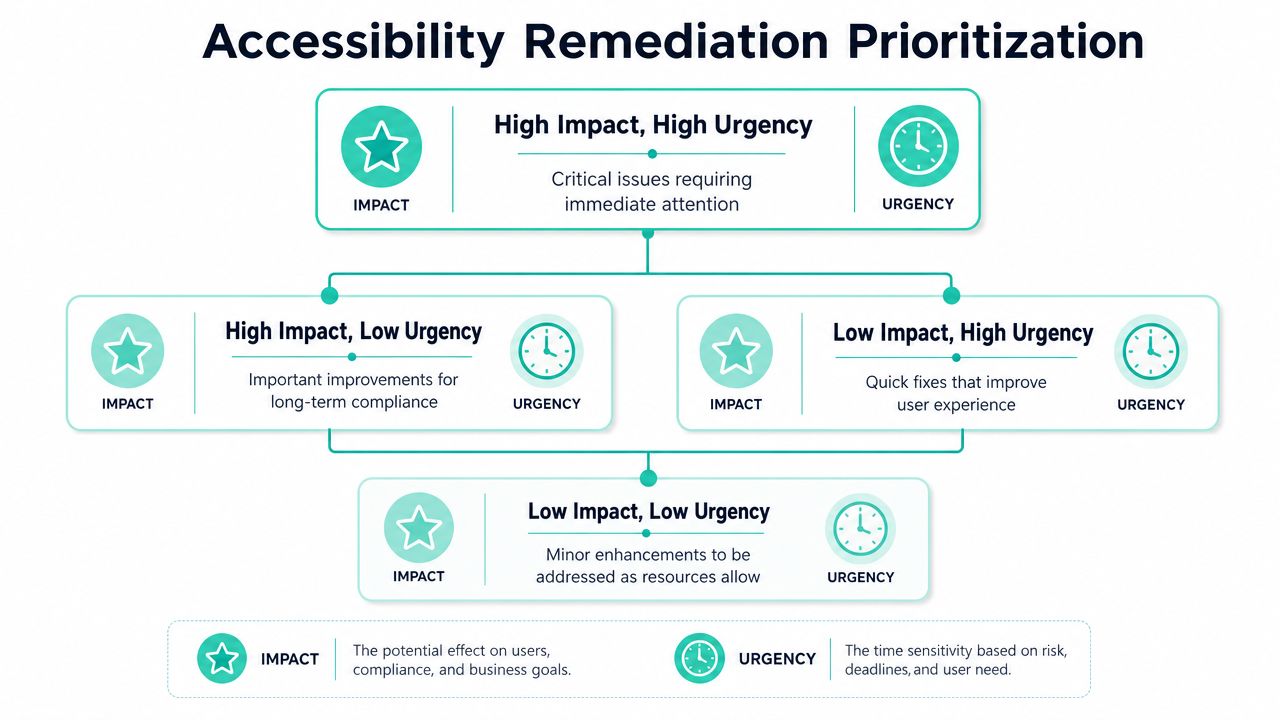
In enterprise environments, I usually want teams to sort work using four lenses:
- User blockage: Can the user complete the task at all?
- Business criticality: Is the journey tied to revenue, service delivery, hiring, support, or employee productivity?
- Reach: Is the issue produced by a shared component or isolated page content?
- Cost to fix correctly: Can the team patch the symptom now, or does the issue require schema, template, or component refactoring?
That last point matters most in Sitecore and SharePoint. A quick fix on one page can be the wrong decision if the same problem is being generated systematically elsewhere.
Use phases that leadership can defend
A phased plan makes accessibility visible as delivery, not theory. TestParty's remediation guidance describes a phased approach with critical high-traffic user flows scheduled in early sprints during Months 2 to 4, followed by feature-by-feature and edge-case work during Months 4 to 10 in its remediation methodology.
That structure works because it creates meaningful progress early without pretending the estate can be fixed in one release. It also gives leadership a narrative they can explain. Critical barriers are being removed first. Shared components are being corrected. Lower-risk edge cases are scheduled rather than ignored.
A pragmatic roadmap often looks like this:
| Phase | Focus | Typical examples |
|---|---|---|
| Immediate | Blocking issues in core journeys | Form labels, keyboard traps, inaccessible login or search patterns |
| Structural | Shared component and template fixes | Sitecore renderings, SPFx web parts, navigation, accordions, modals |
| Editorial | Content and document cleanup | Alt text, heading hierarchy, link text, file alternatives |
| Hardening | Regression controls and edge cases | CI checks, authoring guardrails, retesting, legacy plugin replacement |
Decision test: If fixing one component removes the same defect from many pages, that work usually deserves priority over page-by-page patching.
A practical scoring model for enterprise teams
You don't need a mathematically perfect model. You need one that helps teams make the same decision consistently.
A defensible backlog can score each issue or work item by combining:
Journey severity
Blocking, degrading, or minor friction.Reuse level
Shared component, template family, or isolated page instance.Compliance exposure
Public website, customer portal, employee system, or regulated service context.Implementation path
Content fix, front-end adjustment, schema update, design system change, or vendor dependency.
This is also where teams should separate quick wins from cheap distractions. Missing alt text in a controlled image component may be a quick win if the field already exists and editors just need workflow enforcement. Recoloring one campaign page may be a distraction if the underlying design token remains non-compliant across the full estate.
The best roadmaps aren't optimistic. They're credible. They show what gets fixed first, what needs architectural intervention, and what can't be signed off until the reusable platform layer changes.
Platform-Specific Remediation for Sitecore and SharePoint
Generic accessibility guidance tells teams to fix the HTML. That's incomplete advice for enterprise CMS platforms.
In Sitecore and SharePoint, rendered HTML is often the final expression of deeper decisions made in templates, fields, rendering variants, APIs, front-end contracts, component libraries, and editorial constraints. If those decisions don't change, inaccessible output keeps coming back.

Sitecore remediation starts in templates and schemas
Many enterprise programs lose time this way. Teams see broken output in a Next.js front end and start patching JSX, CSS, and JavaScript. Sometimes that's necessary. Often it isn't sufficient.
Birdeatsbug reports that 42% of enterprise remediation efforts stall because teams try to fix HTML outputs from headless Next.js front ends without addressing the underlying CMS schema, which means the work requires schema refactoring rather than overlays or output patches in its enterprise remediation analysis.
For Sitecore, that's exactly the right warning.
A proper Sitecore remediation review should inspect:
Templates and field definitions
If image components allow publishable content without meaningful alt text rules, editors will keep producing inaccessible output. If rich text fields are the default answer to structured content, heading hierarchy and link semantics will drift. If link fields don't encourage accessible link text patterns, “read more” spreads everywhere.
The fix often sits in the template model itself:
- required or validated fields for meaningful image descriptions
- structured fields instead of free-form rich text where semantics matter
- guidance in field help text and editorial workflows
- restrictions that prevent decorative images from being treated like informative ones, and vice versa
Renderings and component contracts
Helix-style Sitecore implementations make accessibility easier when each rendering has a clear semantic contract. The mistake is allowing one component to render differently depending on loosely controlled content combinations.
For example, a “card” component might become a link wrapper in one variant, contain multiple nested links in another, and use heading markup inconsistently across implementations. That kind of flexibility pleases content teams short term and creates accessibility debt long term.
Strong remediation means standardizing component behavior:
- one agreed heading strategy per component context
- one interactive pattern per card or teaser type
- predictable label generation for CTAs, forms, and search modules
- visible and keyboard-discernible focus states at the design-token level
For broader architectural thinking around inclusive component design, this guide to accessibility website design is useful background.
SXA, headless, and search-driven output
In Sitecore SXA and XM Cloud estates, accessibility often breaks inside renderings that are technically reusable but semantically weak. Search components, hero banners, carousels, tabs, accordions, and promo blocks deserve first-class scrutiny because they repeat everywhere.
Headless implementations add another layer. If your GraphQL or layout data contracts don't distinguish content meaning cleanly, the front end ends up guessing. That usually leads to ARIA overuse, brittle conditional rendering, and inaccessible state changes.
How Sitecore AI and the product portfolio help governance
Sitecore's broader platform becomes useful beyond pure content management.
SitecoreAI brings together XM Cloud, Content Hub, MRM, CMP, CDP, Personalize, and Search into a composed AI-first SaaS platform, and the platform includes 20 pre-built agents in Agentic Studio designed to automate workflows and help marketers launch campaigns in days instead of weeks, as described in this overview of SitecoreAI.
For accessibility remediation, the value isn't that AI “solves accessibility.” It doesn't. The value is operational:
- AI-assisted content workflows can flag incomplete alt text, weak link text, and risky content patterns before publishing.
- Content Hub governance can centralize media metadata standards so image accessibility isn't reinvented in each site.
- CMP and MRM workflows can force accessibility checks into campaign production instead of leaving them to late QA.
- Personalize can be used carefully to improve task clarity without creating inaccessible dynamic changes.
Sitecore Search also matters. Altudo's summary of the platform notes that Sitecore Search uses powerful indexing and querying capabilities to deliver context-aware results, while Sitecore Personalize uses machine learning to analyze real-time user interactions and provide dynamic recommendations in its Sitecore platform guide. In practice, that means remediation teams should inspect the search result templates, filters, suggestions, and recommendation modules as part of the accessibility baseline, not as an afterthought.
Don't let personalization or AI-generated workflow speed create inaccessible variants faster. Governance has to scale with automation.
SharePoint remediation lives in SPFx and authoring rules
SharePoint has a different failure pattern. The platform gives teams accessible foundations in many areas, but enterprise intranets often lose that advantage through customization, rushed SPFx development, branding changes, and uncontrolled document publishing.
The remediation priorities are usually these.
Build accessible SPFx web parts by default
If a custom web part uses div-based click targets, non-semantic tabs, poor focus management, or unlabeled controls, it can undermine an otherwise solid intranet. Teams should prefer native HTML elements first, then use Fluent UI patterns carefully rather than recreating interactions from scratch.
In SPFx, focus on:
- button and link semantics
- keyboard operation for accordions, filters, and dialogs
- programmatic labels for search boxes and custom form controls
- visible focus indicators that survive theming
- announcements for async state changes and results updates
A web part that “looks right” in SharePoint authoring mode can still fail badly in keyboard-only use or screen-reader navigation.
Fix authoring behavior, not just code
A large share of SharePoint accessibility work sits with publishers, not developers. Teams often upload inaccessible PDFs, misuse heading levels in news pages, paste table-heavy content from Word, or embed media without proper alternatives.
That means remediation has to include:
- content templates with enforced structure
- editorial guidance inside the publishing experience
- approval workflows that check for missing descriptions and poor heading order
- governance for documents, especially when HTML alternatives are more usable than file downloads
Treat navigation and search as product features
Intranets live or die on findability. SharePoint hubs, global navigation, local navigation, and Microsoft Search experiences should be tested as real tasks, not static UI. If keyboard users can't move efficiently, or screen-reader users get inconsistent region names and repetitive link patterns, the intranet becomes technically present but operationally frustrating.
The key difference between successful and failed SharePoint remediation is usually this. Successful teams standardize accessible web parts and authoring rules. Failed teams chase defects page by page while the same bad patterns keep entering the system.
Validating Fixes with QA and Real User Testing
A remediation ticket isn't done because a developer says the code now passes a browser extension. It's done when the fix survives retesting in the experience users actually have.
That sounds obvious, but it's where many programs slip. Teams close issues based on local development checks, then discover in staging or production that personalization changed the DOM order, a third-party script interfered with focus, or a modal works with one screen reader and breaks with another.

Done in development is not done in production
Validation needs its own discipline. Accessible.org's phased model describes verification through assistive technology retesting, peer code review against WCAG 2.1 AA, and targeted scans, not a single pass at the end of a sprint. That's the right operating model. The point of QA is to prove the fix works under real conditions and hasn't broken adjacent behavior.
For enterprise teams, that means testing across:
- production-like content and data states
- authenticated and anonymous experiences
- desktop and mobile patterns
- personalization and search variants
- browser combinations that matter to your user base
- keyboard-only and screen-reader flows through full tasks, not isolated components
Where real-user testing changes the outcome
The strongest case against automated-only validation is the one that matters most to leadership. It misses real failure.
AccessiBe's glossary summary cites that 63% of enterprise sites passing automated audits still fail real-user testing with disabled participants, especially in multi-step forms and dynamic overlays in its remediation overview. That should reshape how teams define “complete.”
Automated tools are excellent at confirming that some classes of defects were reduced. They are poor substitutes for humans navigating a journey under actual constraints. A form can have labels and still be confusing. A modal can have ARIA and still trap users in an awkward focus loop. A search flow can be technically operable and still be disorienting because result changes aren't communicated clearly.
Real-user testing answers the question scanners can't. Can someone actually finish the task without friction, confusion, or workaround?
For teams formalizing this process, a practical guide on how to conduct usability testing helps connect accessibility verification to broader research practice.
What to validate before sign-off
I like sign-off criteria that are narrow enough to be enforceable and broad enough to protect users. A remediated component or journey should clear four gates:
Code gate
The implementation uses semantic HTML correctly, supports keyboard use, exposes accessible names and state, and avoids unnecessary ARIA.Functional gate
The complete journey works in context. Login works. Search works. Filtering works. Form errors are understandable and recoverable.Assistive technology gate
The behavior is retested with relevant screen readers and keyboard-only use.Regression gate
CI or release checks confirm the fix won't immediately be undone by another component update or content deployment.
This is also where enterprise teams should be honest about exceptions. If a third-party dependency remains inaccessible, document it, isolate its risk, and define a replacement or mitigation path. Don't mark the estate compliant and hope the issue disappears.
Establishing Governance for Continuous Compliance
Remediation is a project only once. After that, it becomes an operating model.
Most accessibility regressions don't happen because teams stopped caring. They happen because the system kept shipping. New campaigns launched. New components were added. Editors published under deadline. A plugin update changed markup. A personalization variant introduced a new interaction. Without governance, the backlog slowly rebuilds itself.
Turn fixes into standards
The first job after remediation is to convert one-off fixes into reusable rules.
That usually means:
- Design system updates: Accessible color tokens, focus treatments, spacing, error states, and component behavior become the default, not optional guidance.
- Component library hardening: Sitecore renderings, headless UI components, and SPFx web parts should be versioned and documented with accessibility acceptance criteria.
- Authoring standards: Editors need clear rules for headings, links, images, documents, and embedded media, written in the language they use every day.
A governance model also needs documentation people can find. A formal content governance framework helps when organizations need to connect content operations, compliance, and publishing ownership.
Define ownership across teams
Accessibility programs fail when everyone is “aware” and no one is accountable.
A practical model assigns distinct responsibilities:
| Team | Ownership |
|---|---|
| Design | Tokens, component patterns, interaction states |
| Development | Semantic output, keyboard support, focus management, CI checks |
| Content operations | Alt text, headings, link text, document quality |
| QA | Assistive technology retesting, regression validation |
| Product or platform owners | Prioritization, exception management, release gates |
That structure matters more in Sitecore and SharePoint than in simpler stacks because platform owners sit closer to the reusable layer where the biggest accessibility gains happen.
Build compliance into delivery
The final step is to shift left without turning accessibility into ceremony.
Good governance usually includes role-based training, accessibility checks in pull requests, component-level acceptance criteria, and release processes that treat accessibility defects like quality defects, not editorial preferences. For Sitecore teams, that means checking templates, renderings, and content workflows before new features go live. For SharePoint teams, it means reviewing SPFx web parts and publishing patterns before they spread.
Accessibility holds when teams stop treating it as a specialist review at the end and start treating it as a normal condition of shipping.
If your organization is entering its first serious remediation cycle on Sitecore or SharePoint, get the architecture right early. Front-end fixes matter. They just don't hold unless the platform beneath them stops generating the same problem.
If your team needs help turning accessibility from a reactive cleanup into a durable delivery model, Kogifi works with enterprise Sitecore and SharePoint platforms to address remediation at the component, schema, authoring, and governance levels where long-term results persist.