


Web accessibility isn’t just a technical box to check off—it’s a core part of any serious enterprise strategy. Think of it as creating a digital experience that works for everyone, no matter their ability. It’s about turning potential barriers into a welcoming front door for millions of customers. This mindset is crucial for legal compliance, building a strong brand, and tapping into massive, overlooked markets, especially on sophisticated platforms like Sitecore and SharePoint.
Why Accessibility Is a Strategic Imperative
Imagine your digital storefront has a big “Open” sign, but the door is locked for over one billion people around the world. That’s exactly what an inaccessible website does. For too long, accessibility has been treated as a niche concern or a compliance headache. But that view misses the bigger picture: accessibility is a powerful driver for business growth, customer loyalty, and setting your brand apart from the competition.
Making accessibility a priority is no longer optional. It directly impacts your legal standing, how customers see you, and ultimately, your bottom line.
The Business Case for Inclusive Design
Here’s the thing: an accessible website creates a better user experience for everyone, not just users with disabilities. When you focus on clear navigation, readable text, and predictable interfaces, all your visitors benefit. This naturally leads to people staying on your site longer and higher conversion rates. It’s also a huge win for SEO, since search engine crawlers love well-structured, easy-to-navigate sites.
Ignoring accessibility, on the other hand, comes with huge risks and missed opportunities. Many large-scale analyses reveal that a staggering percentage of websites are not compliant with current web accessibility standards. This exclusion isn’t just a social issue; it’s an economic one. Companies collectively lose billions each month by failing to meet accessibility needs.
Globally, the World Health Organization estimates that over 1 billion people have a recognized disability. This demographic wields a combined annual disposable income of about $6.9 trillion.
By treating accessibility as a strategic priority, organizations can tap into this vast market, mitigate legal risks associated with non-compliance (like ADA lawsuits), and build a brand reputation centered on inclusivity and corporate responsibility.
Building on an Enterprise Foundation
For large organizations, rolling out a solid accessibility strategy needs a powerful and flexible foundation. Enterprise platforms like Sitecore and SharePoint are more than just content management systems; they are the architectural backbone for creating digital experiences that are scalable, secure, and inclusive.
When configured by experts, these platforms give you the tools to enforce accessibility standards across thousands of pages. For instance, in Sitecore, developers can create inherently accessible content templates, making sure every new page starts from a compliant baseline. SharePoint’s modern framework allows for the use of pre-vetted, accessible web parts, which makes content creation much simpler for non-technical users.
These platforms become the central hub for governance, letting teams manage content while keeping accessibility standards high. To learn more about how a strong CMS underpins these efforts, check out our detailed article on the benefits of a Content Management System. The key is to move beyond the default settings and actively design these systems for inclusivity right from the start.
Decoding WCAG for Practical Application
Trying to get a handle on the Web Content Accessibility Guidelines (WCAG) can feel a bit like wading through a thick legal textbook. But at its heart, the goal is actually quite simple: to create one universal standard for web accessibility that works for everyone, from individuals to global organizations.
To make it less intimidating, it’s helpful to think about the conformance levels—A, AA, and AAA—like building a safe, reliable car.
- Level A is the bare minimum. Think of it as the engine, wheels, and frame. Without these, the car just won’t run. If your site doesn’t meet Level A criteria, you’re putting up major roadblocks for users with disabilities.
- Level AA is the industry standard and the level most businesses should be aiming for. This is like adding seatbelts, airbags, and anti-lock brakes. These features handle the most common and critical safety issues, making the website dependable and usable for the vast majority of people.
- Level AAA represents the gold standard of accessibility. This is your advanced driver-assist technology, like lane-keeping assist or adaptive cruise control. While it’s a fantastic goal, achieving it across all content isn't always practical, but it shows a deep commitment to truly inclusive design.
Translating Principles into Practice
The real power of WCAG isn't about memorizing every single rule; it's about understanding the why behind them. Every guideline is there to solve a real human problem. For instance, a core part of WCAG is providing text alternatives for images and other non-text content. Learning more about understanding alt text for images shows just how much this simple step helps people who rely on screen readers.
Let's break down a few other key examples:
Keyboard Navigation: For anyone with a motor impairment who can't use a mouse, the keyboard is their only way to get around a site. Making sure every link, button, and form field can be reached and activated with the Tab key is non-negotiable for accessible design.
Color Contrast: Text that blends into its background is hard for anyone to read, but for people with low vision or color blindness, it can be completely illegible. WCAG sets out specific contrast ratios to make sure your content is clear for as many people as possible.
Clear Labels and Instructions: We've all been confused by vague form fields or mysterious buttons. For someone using a screen reader, that confusion becomes a dead end. Clear, properly coded labels are essential so that assistive technology can accurately describe what each element does.
Enterprise Platforms and Content Governance
On large-scale platforms like Sitecore or SharePoint, trying to apply these principles consistently without a solid governance plan is nearly impossible. Your content authors need clear guidelines and pre-built components that have accessibility baked in right from the start.
For example, a Sitecore template can be built to require alt text on every image, which stops authors from publishing content that doesn’t meet the standard. In SharePoint, modern web parts can be configured to be accessible by default, taking the guesswork out of it for your teams.
A strong accessibility strategy isn't just about compliance; it's about driving real business growth by enhancing your brand and opening up new markets.
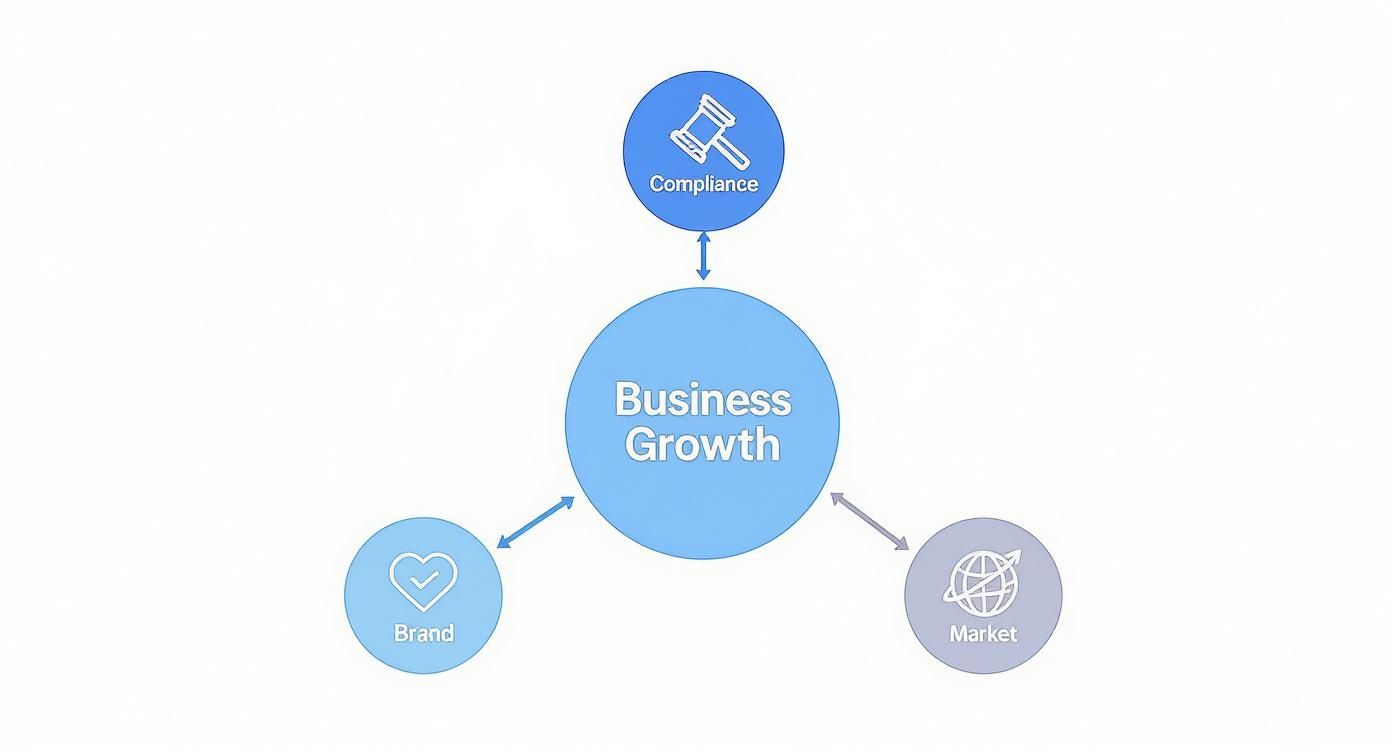
As you can see, these elements all work together. They aren't separate goals but interconnected results of making accessibility a priority.
By turning abstract WCAG guidelines into concrete actions and embedding them within your platform's architecture, you move from a reactive, checklist-based approach to a proactive culture of inclusivity.
Ultimately, making this work comes down to having clear rules that everyone can follow. A well-defined content governance framework ensures that every piece of content published helps, rather than hurts, your accessibility goals. It turns WCAG from a complicated rulebook into a practical roadmap for building websites that truly work for everyone.
A Blueprint for Designing Accessible Components
Great accessibility starts at the atomic level—the individual components that are the building blocks of your entire digital experience. An inaccessible navigation menu or a confusing form field can create a dead end for a user, no matter how beautiful the rest of the site is.
When you focus on creating inclusive components from the ground up, you embed accessibility directly into your design system. This isn't just about compliance; it's about preventing costly fixes down the line and delivering a better experience for everyone.
This proactive approach is especially critical within enterprise ecosystems like Sitecore and SharePoint. When developers build a library of pre-vetted, accessible components, content authors can create new pages with confidence, knowing the foundational elements are already solid. In Sitecore, this often means creating a library of reusable renderings and sublayouts. In SharePoint, it means developing custom SPFx web parts with accessibility as a primary requirement.
Crafting Accessible Navigation
Your navigation is the map to your website. If users can’t read it, they're instantly lost.
For many users with motor impairments, a keyboard is their primary way of getting around. That means every dropdown menu, link, and button must be fully operable using just the Tab, Shift+Tab, and Enter keys.
A common pitfall is the "mega menu" that appears on hover but vanishes the moment the mouse moves away. A keyboard-only user might never be able to reach the submenu links inside. The fix is to ensure menus are triggered by a click or an Enter key press and can be navigated logically with arrow keys. In Sitecore, this functionality can be built directly into the navigation rendering, making it a default behavior for all site headers.
Designing Inclusive Forms
Forms are often the most crucial point of interaction, whether for a contact inquiry, a purchase, or registration. An inaccessible form is a direct barrier to conversion.
The most fundamental rule? Every single input field must have a programmatically associated <label>.
Placeholder text is not a substitute for a label. While it might look clean, it disappears once a user starts typing, forcing them to rely on memory. More importantly, screen readers often ignore placeholder text entirely, leaving users with no context for what information to enter.
SharePoint's modern web parts for forms typically handle this correctly, but any custom solutions require strict adherence to this principle. Other key considerations include:
- Clear Error Messages: Errors should be descriptive (e.g., "Please enter a valid email address") and programmatically linked to the right field so screen readers announce them automatically.
- Logical Grouping: Use
<fieldset>and<legend>elements to group related controls, like a set of radio buttons or checkbox options. This provides essential context for assistive tech. - Visible Focus States: Always provide a clear visual indicator, like a prominent outline, showing which element is currently selected via keyboard.
The Power of ARIA for Dynamic Content
As websites become more interactive with carousels, accordions, and modal dialogs, standard HTML sometimes falls short. This is where Accessible Rich Internet Applications (ARIA) comes in. ARIA adds extra attributes that give assistive technologies the context they need to understand what a component is and what it's doing.
ARIA is like a set of stage directions for screen readers. It doesn't change how an element looks, but it tells the assistive technology what the element is doing—whether a menu is expanded, a button is pressed, or new content has just appeared on the page.
For example, aria-expanded="true" tells a screen reader that an accordion panel is open. A Sitecore component for a tabbed interface can use role="tab", role="tabpanel", and aria-selected attributes to create a fully understandable experience.
Proper ARIA implementation is a hallmark of professional development and a key aspect of mastering how to design user interfaces for today's web. You can learn more about crafting intuitive experiences in our guide on how to design user interfaces.
Implementing Accessibility in Sitecore and SharePoint
An enterprise platform is only as accessible as the strategy you build on it. Platforms like Sitecore and SharePoint come packed with powerful tools, but unlocking true accessibility website design demands real expertise and a deliberate, thoughtful implementation. It’s about going beyond the default settings to architect an inclusive digital experience from the ground up, starting with the content model itself.
This approach transforms the platform from a simple content bucket into a robust engine for accessibility governance. The goal is to make the accessible path the easiest path for your content authors, developers, and admins, ensuring that compliance and consistency become second nature, even at a massive scale.
Architecting Accessibility in Sitecore
Sitecore’s biggest strength is its component-based architecture and powerful content modeling. When you leverage these features correctly, they become your best friends in enforcing WCAG compliance across thousands of pages. The strategy doesn’t start on the page—it starts inside the content templates.
By building templates with accessibility in mind from day one, you can create guardrails for your content team. For example, a developer can make the alternative text field for images a required field. Simple, right? But this one change prevents authors from ever publishing an image without that crucial piece of information. Similarly, a custom validation rule can be added to the rich text editor to flag when a heading structure skips a level (like jumping from an H2 to an H4), a common mistake that totally disorients screen reader users.
These small, programmatic checks add up to create a powerful layer of governance. They shift the burden away from manual author checklists and toward an automated, system-enforced standard.
Building accessibility into the core templates and renderings ensures that every new piece of content starts from a compliant foundation. This proactive approach is far more effective and scalable than trying to fix thousands of individual pages after they've gone live.
Personalization for Inclusive Experiences
An advanced application of accessibility website design in Sitecore leverages its powerful personalization engine, such as that found in Sitecore Personalize. While most teams use it for marketing, it can be a game-changer for delivering tailored experiences to users with different needs. Imagine a user profile that indicates a preference for high-contrast design.
With that data, Sitecore could dynamically:
- Apply a high-contrast CSS stylesheet across the entire site just for that user.
- Serve a simplified layout that strips out animations and busy visuals.
- Prioritize text-based content over media carousels or interactive widgets.
This isn't just about one-size-fits-all compliance anymore. This is a genuinely adaptive and user-centric experience that shows a deep commitment to inclusivity.
SharePoint Best Practices for Modern Sites
Over in the SharePoint ecosystem, the shift to the Modern experience has brought huge accessibility improvements right out of the box. Microsoft has poured a lot of resources into making its default web parts and site templates more compliant. Still, customization and content strategy are where your expertise (or lack thereof) will really show.
A core principle is to favor native, out-of-the-box web parts whenever you can. These components have already been through Microsoft's own accessibility testing gauntlet. When you do need custom web parts, they must be developed using the SharePoint Framework (SPFx) with strict adherence to WCAG principles, especially keyboard navigation and proper ARIA attribute usage.
Governance and Content Authoring in SharePoint
For content authors on SharePoint, the focus is all about using the available tools correctly. This means sticking to straightforward but essential practices that maintain the platform's accessible foundation.
- Use Proper Heading Styles: Train authors to use the built-in styles (Heading 1, Heading 2, etc.) in text web parts. This creates a logical structure that screen readers can follow. Tell them to stop just making text bold and bigger to fake a heading.
- Provide Meaningful Link Text: Links should never say "Click Here." They need to be descriptive. Use "Read the Q3 Financial Report" instead of "Download the report here."
- Choose Accessible Web Parts: Admins should curate the list of available web parts, removing older or custom components known to have accessibility problems.
- Add Alt Text to Images: Just like in Sitecore, SharePoint has a field for alternative text on all images. Making its use a non-negotiable habit is vital for users who rely on screen readers.
Ultimately, whether you're on Sitecore or SharePoint, an effective accessibility strategy is a mix of smart technical architecture, developer diligence, and clear content guidelines. The platforms provide the framework, but it takes expert implementation to unlock their potential and create digital experiences that are truly open to everyone.
Auditing and Testing Your Website for Accessibility
Launching an accessible website is a huge win, but the real work starts the day after. Accessibility website design isn't a "set it and forget it" project. It's a living commitment to quality that needs a solid auditing and testing process to back it up.
Without constant checks, even the most compliant site can slowly drift out of spec as new content gets published and features are updated. This is especially true on dynamic enterprise platforms like Sitecore and SharePoint, where the digital experience is always evolving. A disciplined testing routine is what keeps your site inclusive for everyone.
The Three Layers of Accessibility Testing
A truly effective audit isn't a single action—it’s a combination of automated, manual, and user testing. Each layer catches different kinds of problems, and if you only use one, you're guaranteed to have blind spots.
Automated tools are fantastic for a first pass. They're great at finding the low-hanging fruit—things like missing alt text, obvious color contrast errors, or basic ARIA mistakes. But here's the catch: they can only spot about 30% of all potential WCAG violations. An automated tool can see if an image has alt text, but it has no idea if that text actually makes sense.
That's where manual testing comes in. This is where trained testers methodically go through your site, checking components against WCAG criteria. They’ll do things like navigate the entire site using only a keyboard, run through it with a screen reader, and make sure every button and link has a clear focus state. It’s a hands-on approach that catches the nuanced, context-sensitive issues that automated scans always miss.
Finally, the most powerful insights come directly from user testing. This involves people with disabilities navigating your site with their own assistive technologies. Their real-world experiences reveal usability roadblocks that no compliance checklist could ever predict. For a thorough and legally sound process, performing an ADA review is a critical step in this phase.
Many accessibility studies show that a large percentage of homepages have detectable WCAG failures, with dozens of errors per page. The most common culprits? Low contrast text, missing alt text, and broken navigation—all things a multi-layered testing process would catch.
Building an audit process isn't about chasing a perfect score one time. It's about creating a repeatable cycle of testing, reporting, and fixing that becomes a natural part of your development and content workflows.
A Starter Audit Checklist for Sitecore and SharePoint
To get started, your team can build a checklist that’s tailored to your platform. This isn’t so different from a standard usability review. In fact, our guide on creating a user experience audit checklist offers some great frameworks you can adapt.
Here’s a foundational checklist to get you started, with a focus on Sitecore and SharePoint environments:
- Keyboard Navigation: Can you get to and activate every single link, button, and form field using only the Tab, Shift+Tab, Enter, and arrow keys? Pay close attention to custom Sitecore components and SharePoint web parts.
- Screen Reader Compatibility: Fire up a screen reader (like NVDA, JAWS, or VoiceOver) and navigate through your key user journeys. Do the page titles, headings, and link texts actually describe where you are and where you're going?
- Form Accessibility: Check that every form field has a properly linked
<label>. When you trigger an error, are the validation messages clear and announced by the screen reader? - Content Structure: Make sure your heading levels are logical (H1, then H2, then H3) and don’t skip. In Sitecore, you can often enforce this at the template level to prevent content editor mistakes.
- Media Alternatives: Do all videos have accurate captions? Is there a transcript available for any important audio-only content?
Common Questions About Accessibility Website Design
Stepping into the world of accessibility website design always brings up good questions. Teams are often curious about the real costs, the specific legal risks, and how to justify the investment beyond simply "doing the right thing." Here, we’ll tackle some of the most common questions and myths we hear from organizations using enterprise platforms like Sitecore and SharePoint.
Our goal is to give you the clarity you need to champion accessibility, make smarter decisions, and push your projects forward with confidence.
Is Accessibility a One-Time Project or an Ongoing Cost?
One of the biggest misconceptions is treating accessibility like a one-off project. It’s actually an ongoing commitment, much like website security or performance tuning. Your digital presence isn’t static—new content gets added, features are updated, and third-party tools change. Every single modification can accidentally break compliance.
On platforms like Sitecore, this means accessibility has to be woven into your content governance and development lifecycle. Building accessible components is a great start, but maintaining compliance over time requires continuous monitoring, regular training for authors, and periodic audits. The initial investment in a solid, accessible foundation is significant, but the ongoing maintenance is far less expensive than retrofitting a broken site or facing a lawsuit.
How Can We Justify the ROI on Accessibility?
The return on investment for accessibility is about much more than just dodging legal trouble. While avoiding lawsuits is a strong motivator, the business case is far broader and more positive than that.
- Expanded Market Reach: An accessible site opens your brand to a massive, often-overlooked market segment. This translates directly into more potential customers and revenue.
- Enhanced SEO Performance: Many accessibility best practices—like proper heading structures, alt text, and descriptive links—are exactly what search engines are looking for. A more accessible site is often a higher-ranking site.
- Improved User Experience for All: Features designed for accessibility, such as clear navigation and high-contrast colors, create a better experience for every single visitor. This boosts engagement and improves conversion rates across the board.
Think of it less as a cost and more as an investment in quality and market growth.
Will Making Our Site Accessible Hurt Our Design Aesthetic?
This is a common fear, but it's totally unfounded. Accessibility website design doesn't mean boring design; it means thoughtful design. The principles that guide accessibility—clarity, structure, and ease of use—are the same principles that define great design for any audience.
A skilled team can integrate accessibility seamlessly without sacrificing a modern, visually compelling aesthetic. In fact, accessibility constraints often spark more creative problem-solving. Using Sitecore’s flexible layouts and components, designers can build beautiful, dynamic experiences that are also fully compliant. It’s not a choice between an accessible site and a beautiful one; the goal is to create one that is both.
Accessibility shouldn't be seen as a set of restrictive rules that stifle creativity. Instead, it's a framework for inclusive problem-solving that leads to more robust, user-friendly, and ultimately more effective designs for everyone.
What Is the Biggest Mistake Companies Make with Accessibility?
The single biggest mistake is treating accessibility as an afterthought. When it’s shoved to the end of a project, it becomes a frantic, expensive, and often incomplete box-ticking exercise. At that point, fixing fundamental architectural issues in a Sitecore or SharePoint build is incredibly difficult and costly.
A proactive approach is the only way to go. Digital accessibility testing has shown a massive jump in detected issues per webpage as testing technology evolved to match modern WCAG standards. This more detailed testing uncovered many hidden barriers affecting the estimated 1.3 billion people worldwide with disabilities. It also showed that roughly one-third of issues could only be found by human testers. You can explore the 2025 Digital Accessibility Index to see more of these findings. This data proves that baking accessibility into every stage—from initial design and platform architecture to content creation and deployment—is the only effective way to manage risk and build a genuinely inclusive experience.
At Kogifi, we specialize in building and maintaining enterprise-grade digital experiences on platforms like Sitecore and SharePoint with accessibility at their core. If you're ready to make your digital presence truly inclusive, let's talk about how our expertise can help you achieve your goals. Visit us at https://www.kogifi.com.