


At 2:14 AM, a routine content deployment can become a platform incident. Sitecore content management may be unavailable, delivery nodes may stop responding, and the marketing team may have no reliable answer to a basic question: when will publishing and customer experiences be restored? The same uncertainty appears in AEM author and publish tiers, or in a SharePoint Online tenant where identity, permissions, files, and collaboration services all matter at once.
That's the operational gap most disaster recovery procedures miss. Documentation can describe a recovery path, but only repeated, platform-specific exercises prove that people, dependencies, credentials, data, and traffic routing work under pressure. Gartner data cited by Systnet found that 72% of organizations weren't well-positioned in disaster recovery capabilities, while the same source package cited downtime costs of about $5,600 per minute, or more than $300,000 per hour (Systnet's disaster recovery statistics summary). A proven disaster recovery strategy has to go beyond a policy document. It must become an executable habit.
Table of Contents
- Stabilize the secondary site first
- Reconcile data instead of overwriting it
- Validate the primary site from a clean baseline
- Cut over in controlled stages
- Test the gap between confidence and evidence
What Disaster Recovery Procedures Mean for Enterprise Platforms
A global Sitecore estate can fail in separate layers. Authoring may be unavailable while cached pages still render. A content delivery node may remain online but lose search, media, identity, or database access. In a headless implementation, the web front end can return successfully while the content API, Experience Edge integration, or personalization service is impaired.
A procedure that says “restore Sitecore” leaves operators guessing. It must identify affected services, the person authorized to fail over, traffic to pause, dependencies to check, and evidence that recovery succeeded. AEM requires the same precision across author, publish, dispatcher, CDN, Oak repository, replication agents, and integrations. SharePoint Online is managed by Microsoft, yet recovery still requires decisions about tenant availability, user content, permissions, version history, restore options, and business communication.
Documentation is only the starting point
ISO 22301:2019 defines an international business continuity management system framework for planning, implementing, maintaining, and improving documented controls that protect against disruption and support recovery. Its practical implication is clear: services should remain within acceptable time frames and predefined capacity during an incident.
A document records the intended response. It does not prove that the response works.
Operational rule: If an operator has not performed a recovery step, treat that step as unverified.
Security Magazine reported that 50% of organizations tested only annually or less frequently, while 7% did not test at all (Security Magazine's disaster recovery testing coverage). An annual review confirms that a runbook exists. It may not reveal an expired certificate, missing service principal, undocumented dependency, or instruction that assumes access to the failed environment. Teams can believe they will recover in hours while exercising the process only once a year.
A proven disaster recovery strategy therefore needs scheduled failover and failback drills, not just approved documentation. The drill should use representative journeys and record who made each decision, which dependency failed, and how the platform returned to normal service.
Platform recovery needs dependency awareness
Sitecore procedures should cover content databases, media, search indexes, configuration, identity, xDB-related services, delivery topology, and cache behavior. AEM recovery may depend on Oak repository integrity, author startup, publish availability, replication queues, dispatcher state, and CDN cache invalidation. SharePoint Online procedures should reflect Microsoft 365 service health, available restore mechanisms, user access, site collection recovery, and re-permissioning.
The useful test is specific: can the named team restore a representative customer journey, publish content, authenticate an editor, and verify data integrity within the agreed target? If the answer depends on an untested credential, undocumented owner, or unavailable environment, the procedure is not ready.
Setting RTO and RPO Targets That Match Real Business Risk
RTO, the Recovery Time Objective, defines how long a service can remain unavailable. RPO, the Recovery Point Objective, defines how much recent data the business can afford to lose. Neither should be copied from an old infrastructure SLA without checking the platform's current role in revenue, customer service, internal operations, and regulatory obligations.
AWS research reported that 69% of organizations targeted an RTO of four hours or less, 74% targeted an RPO of four hours or less, and 21% targeted an RPO under one minute (AWS disaster recovery survey report). Those figures describe common objectives, not a justification for assigning the same target to every component in a DXP estate.
Build a recovery target worksheet
Start with a service inventory rather than a product inventory. A Sitecore solution may contain several recovery tiers, just as an AEM estate or SharePoint implementation does. Score each component against revenue impact, user disruption, data-loss tolerance, regulatory exposure, and dependency centrality.
| Component | Tier | RTO Target | RPO Target |
|---|---|---|---|
| Sitecore content delivery and API layer | Critical | Business-approved | Business-approved |
| Sitecore authoring and publishing | High | Business-approved | Business-approved |
| AEM publish and dispatcher path | Critical | Business-approved | Business-approved |
| AEM authoring repository | High | Business-approved | Business-approved |
| SharePoint employee communications | High | Business-approved | Business-approved |
| SharePoint archive or low-use workspace | Standard | Business-approved | Business-approved |
Use the worksheet to force a decision for every dependency. Search indexes may be rebuildable and therefore tolerate a different RPO from transactional content. Media storage may need independent replication because a database restore alone won't recreate the asset library. A headless front end may recover quickly but still be unusable if its API, authentication, or personalization dependencies haven't recovered.
Make the targets testable
A target is defensible only when the team can measure it during an exercise. Record the start time, the moment the service becomes technically available, and the moment a business transaction or content journey succeeds. For a content platform, “green health endpoint” isn't enough. Test author login, content retrieval, search, media delivery, representative page rendering, publishing, and cache behavior.
The infrastructure risk management guide is useful when turning this mapping into a broader risk register. Keep ownership with business and technical stakeholders together. Engineers can estimate recovery mechanics, but product owners must approve the consequences of downtime and data loss.
Backup and Failover Patterns for Sitecore, AEM, and SharePoint
The recovery pattern should follow the target, not the other way around. A cold recovery environment costs less to operate but requires more work during an incident. Warm standby reduces activation effort while introducing replication, capacity, and configuration responsibilities. Active-active or hot standby can reduce interruption, but it creates a larger consistency and operations problem.
For Sitecore, protect the components independently. Database backups or replication cover structured content and application state, while media libraries need their own integrity and replication checks. Search indexes should be treated as recoverable artifacts unless the business case requires replicated search. In XM Cloud, Sitecore manages hosting, monitoring, and maintenance as part of its SaaS model, so the procedure should emphasize supported recovery responsibilities, content governance, integrations, deployment configuration, and validation rather than assuming customer-controlled infrastructure. Sitecore describes XM Cloud as a managed, self-service platform containing Experience Manager, Pages, Headless SXA, Headless Services, the Next.js SDK, and Experience Edge (Sitecore XM Cloud introduction).
AEM recovery commonly separates Oak repository protection from publish availability. Repository snapshots and backups help recover content, while publish instances, dispatcher behavior, replication agents, OSGi configuration, and CDN state require separate validation. SharePoint Online is managed within Microsoft 365, which changes the mechanics of infrastructure failover. Procedures focus more on service health, version history, recycle bin recovery, tenant-level controls, identity, permissions, and business continuity than on attaching a restored content database.
| Pattern | Platform | Cost | Complexity | Best For |
|---|---|---|---|---|
| Cold backup and restore | Sitecore, AEM, SharePoint | Lower operating cost | High incident effort | Lower-criticality workloads |
| Pilot light | Sitecore and AEM dependencies | Moderate | Requires activation automation | Systems needing a prepared recovery foundation |
| Warm standby | Sitecore, AEM, supporting services | Higher | Requires replication and capacity validation | Short recovery windows without full duplication |
| Active-active | High-value delivery estates | Highest | High consistency and routing complexity | Revenue-critical experiences |
| Managed-service recovery | XM Cloud and SharePoint Online | Vendor and service dependent | Shared responsibility | SaaS platform continuity with customer-side validation |
Replication isn't automatically a backup. It can copy corruption, accidental deletion, or compromised content into the secondary environment. Maintain isolated or immutable recovery points where the threat model requires them, and verify that the recovery team can access those copies without relying on credentials inside the failed security boundary. A cloud-native backup disaster recovery guide can help teams compare those storage and orchestration choices. For SQL-backed Sitecore estates, document the operational details of backing up and recovering Microsoft SQL Server separately from the application runbook.
Building a Runbook That Works During a Real Outage
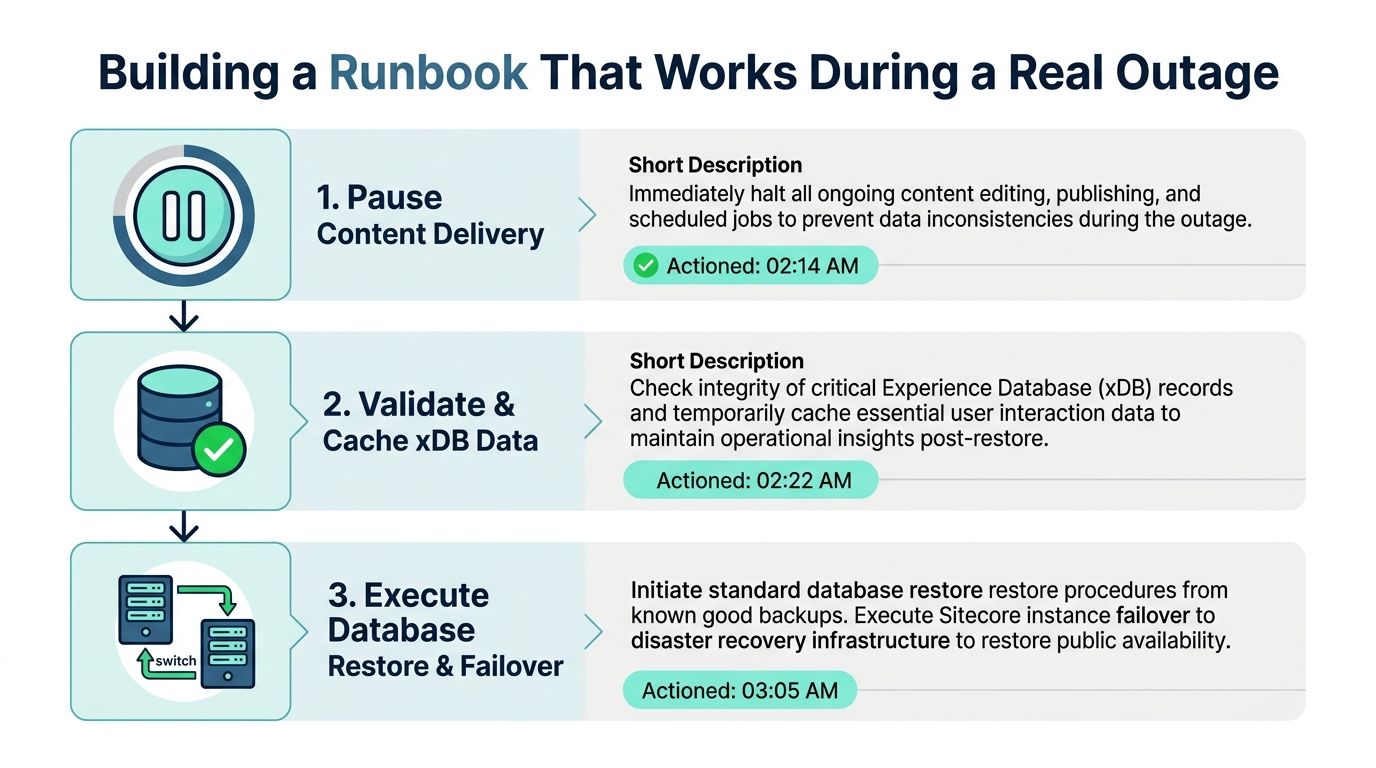
A useful runbook names the operator, the command or console action, the dependency that must be ready first, and the evidence that confirms success. It doesn't tell an engineer to “restore the platform” and leave the critical sequence to improvisation.
Sitecore XM Cloud sequence
XM Cloud recovery starts by controlling change. Pause content delivery changes and publishing activity if the incident could create inconsistent content or cache behavior. Confirm the status of managed services and integrations, then validate xDB-related data synchronization where those services are part of the implementation.
The operator should then confirm the approved failover configuration, including connection settings for any dependent managed SQL service or integration endpoint. Restore or rebuild search state from the warm replica or approved recovery source, validate the index against representative content, and only then repoint traffic through the approved routing mechanism. Don't declare success when the environment responds. Test a content API request, a rendered page, an authenticated editor journey, a media asset, and a search query.
AEM sequence
AEM restoration must respect Oak and author startup dependencies. Restore the approved Oak backup or snapshot, verify repository integrity, start the author tier, and confirm that required configuration and OSGi bundles are consistent with the recovery baseline. Publish instances should come online only after author services and replication prerequisites are available.
Re-enable replication agents deliberately. Drain and inspect the queue rather than assuming every item transferred correctly. After publish validation, purge dispatcher and CDN caches through the approved purge API, then render representative content paths from the public edge. Check author-to-publish behavior, asset retrieval, authentication, and third-party integrations.
SharePoint Online sequence
Start with the Microsoft 365 service health check. If the issue is service-wide, an internal restore action may not address the root cause. If user content is affected, use OneDrive restore-from-history where appropriate, then inspect SharePoint site recycle bins and recovery options before escalating to broader tenant-level action.
PowerShell, Azure CLI, and kubectl can support surrounding automation, but commands must be environment-specific and stored with the runbook's tested version. Never paste generic production commands into an emergency procedure. Each action needs a precondition, an owner, a timestamp, and a verification result.
Verification standard: A recovered platform must pass a business journey, not just an infrastructure check.
Failback Procedures Most Teams Forget Until It Is Too Late
Failover creates a temporary operating model. Failback is the controlled migration back to the primary environment, and it can be more dangerous because teams often relax discipline once customers can access the service again. Treat it as a separate change with its own approval, maintenance window, rollback criteria, and communications plan.
Stabilize the secondary site first
Before moving anything, freeze unnecessary changes on the secondary environment. Capture a full state record, including application versions, configuration, content timestamps, pending jobs, search status, cache state, certificates, identity configuration, and integration health. The incident commander should confirm that the primary site is ready, not merely reachable.
For Sitecore, identify content and xDB interactions created during the outage window and determine which writes must be reconciled. For AEM, inspect replication queues and author changes before draining them toward the primary repository. SharePoint operations should account for user content versions, restored files, permissions, and any manual work performed while normal services were unavailable.
Reconcile data instead of overwriting it
The safest failback process defines the source of truth for each data class. Transactional logs may need replay against the primary database. Content changes may require editorial comparison and conflict resolution. Search indexes should generally be rebuilt or validated from the accepted content state rather than treated as authoritative business data.
Conflict handling needs named owners. A database engineer can replay logs, but a content owner may need to decide whether two editorial changes can be merged. In AEM, replication backlog must be inspected for ordering and failure. In Sitecore, xDB-related interactions need an explicit treatment plan because restoring the primary without accounting for secondary activity can create silent analytical gaps.
Validate the primary site from a clean baseline
Rebuild or restore primary infrastructure from an approved baseline. Apply the same patch and configuration standard used by the recovered environment, then verify certificate chains, identity claims, secrets, service connections, search availability, and monitoring. A primary site that was merely restarted may retain the defect that caused the incident.
Run smoke tests against representative content paths rather than a single homepage. For a DXP, that means author access, publishing, API responses, media, search, personalization dependencies where applicable, and cache headers. For SharePoint, verify representative sites, document access, version history, workflows, and permissions with test accounts that reflect real user roles.
Cut over in controlled stages
Lowering DNS TTL before an outage can help planned migration, but it isn't a substitute for an approved traffic strategy. Coordinate the CDN origin swap, application routing, and cache invalidation so that users don't receive mixed content from both environments. Shift read-only traffic first when the architecture supports it, then observe stale-cache behavior and origin health before enabling writes.
Keep the secondary environment available during the rollback window. Define the exact signal that triggers reversal, such as failed authentication, stale content, replication errors, or unacceptable error responses. Failback isn't complete until the primary serves the agreed business journeys and the recovery team has confirmed that the secondary is no longer receiving unintended writes.
Test the gap between confidence and evidence
The gap is substantial. A 2025 report found that more than 60% of organizations believed they could recover from downtime within hours, but only 35% could, while 25% tested disaster recovery once a year or less (Unitrends State of Backup and Recovery Report 2025). Security Magazine also reported that only 23% recovered data in seconds or minutes, despite 32% expecting to do so, and that 73% had experienced a recovery failure at some point (Security Magazine's recovery testing findings).
Use a tiered program:
- Monthly component restores: Verify backup integrity, application restores, bare-metal recovery where relevant, and search or media reconstruction.
- Quarterly tabletop exercises: Walk through decision rights, dependencies, communications, and cyber escalation without changing production traffic.
- Biannual sandbox failover: Rebuild a partial environment in a recovery region and test authentication, networking, APIs, and representative journeys.
- Annual full game day: Inject a simulated regional or platform loss, execute the runbook, measure actual RTO and RPO, and test failback.
Automation reduces manual error but doesn't remove the need for validation. Azure Site Recovery runbooks can orchestrate Azure recovery actions, AWS CloudEndure can support workload replication and recovery workflows, and Terraform-driven rebuilds can recreate infrastructure from reviewed definitions. Use those tools to make recovery repeatable, then test the resulting environment with the same rigor as a manual procedure.
Each exercise should produce executive reporting that includes target versus actual RTO, target versus actual RPO, failed steps, unowned dependencies, and remediation cost. That turns a drill into funded engineering work instead of an archived compliance artifact.
Merging Cyber Recovery and Disaster Recovery Into One Plan
Ransomware and destructive cyber incidents must be handled inside the primary recovery procedure. A backup altered, encrypted, deleted, or blocked by a compromised identity system cannot support a safe restoration. Research found that only 36% of organizations had coordinated disaster recovery and cyber-recovery plans (cyber recovery and disaster recovery research). Build one coordinated procedure with separate investigation controls, rather than maintaining disconnected DR and cyber binders.
| Recovery Layer | Standard DR | Cyber-Incident DR | Combined Control |
|---|---|---|---|
| Backup source | Replicated or backed-up data | Immutable, isolated, known-good copy | Recovery-point trust verification |
| Identity | Restore access and service accounts | Assume credentials may be compromised | Out-of-band rotation and re-permissioning |
| Content | Restore application and data | Check for malicious or unauthorized changes | Content fidelity and integrity review |
| Platform startup | Bring services online | Preserve evidence and restrict activation | Staged startup with security approval |
| Communications | Notify users and owners | Coordinate legal and incident response | One message owner and parallel workstreams |
For XM Cloud, rotate identity and integration credentials outside the suspected blast radius, validate connected services, and keep broad authoring access disabled until the environment is trusted. For AEM, check Oak repository integrity before activating author services, then review replication and package history. For SharePoint Online, combine version and tenant-level recovery with audited re-permissioning. Restoring files without reviewing permissions can recreate the incident.
Align the procedure with your cybersecurity standards for critical infrastructure, especially where evidence handling, privileged access, and approval controls affect recovery decisions.
Use this decision tree during the incident:
- Is the backup boundary trusted? If not, isolate it and select the last known-good immutable copy.
- Is identity trusted? If not, rebuild claims, rotate credentials, and restrict privileged access.
- Is content faithful? If not, quarantine suspicious content and involve content owners.
- Can operations resume safely? If not, keep authoring restricted while investigation continues.
Legal reporting, customer communications, and forensic work should run alongside technical recovery, not hold it indefinitely. Define separate operations windows, evidence-handling rules, and approval gates before the outage. Cyber recovery uses the ordinary recovery process with stricter trust checks. Treat helper environments as hostile until the team verifies their identity, integrity, and access paths.
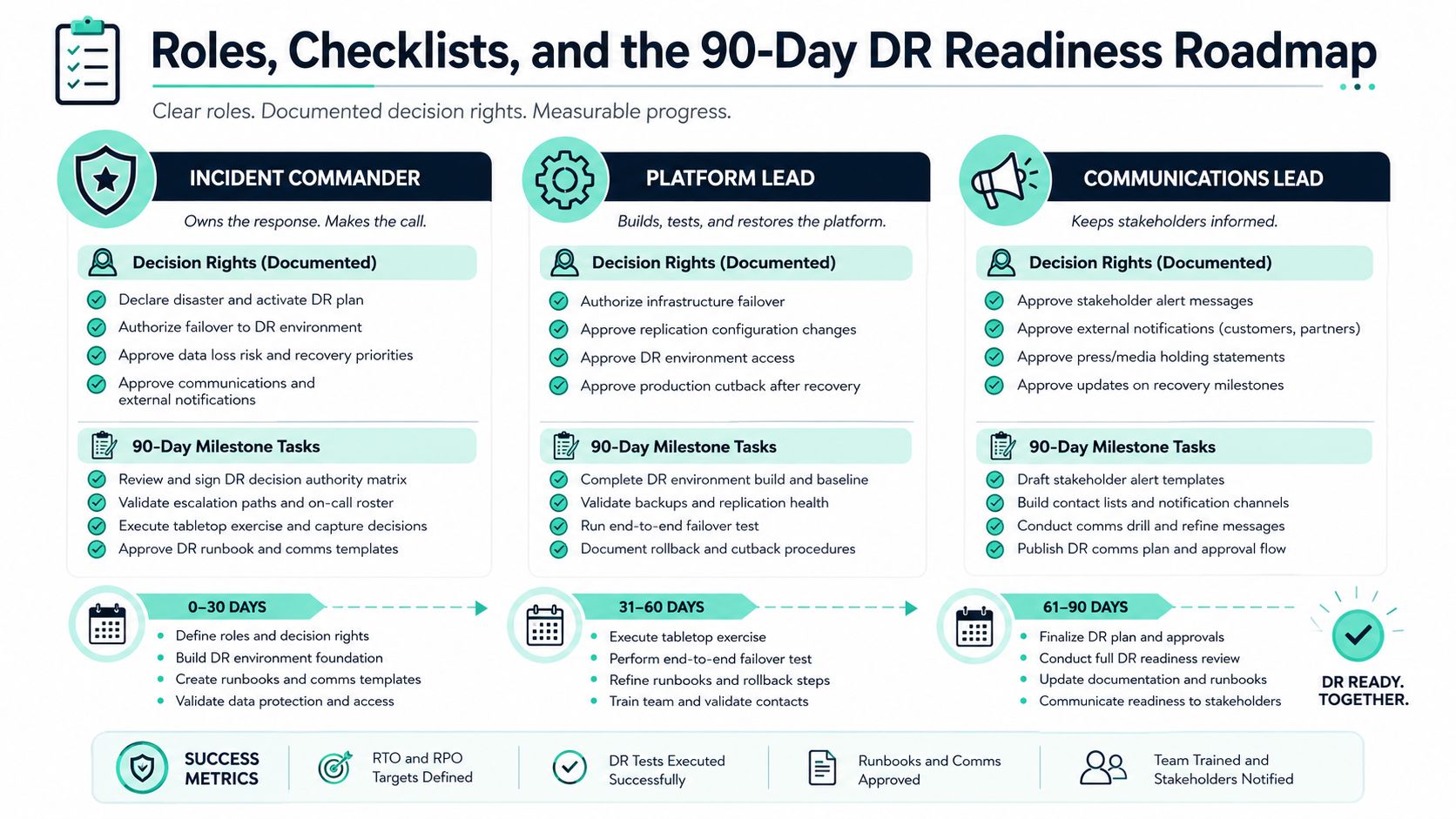
Roles, Checklists, and the 90-Day DR Readiness Roadmap
Operational ownership must be explicit. The Incident Commander authorizes failover and rollback. The Platform Lead owns the Sitecore, AEM, or SharePoint procedure. The Communications Lead drafts stakeholder alerts and maintains the audience list. A Cyber Liaison controls security escalation, evidence handling, and access decisions. Each role needs a named backup and an escalation route that bypasses email.
Pre-event checklist
- Backup evidence: Record the last successful backup or replication validation for each platform.
- Target approval: Confirm current RTO and RPO sign-off from business owners.
- Runbook currency: Record the tested version and its last review.
- Contact readiness: Test the escalation tree and non-email contact routes.
- Recovery trust: Verify immutable or isolated vault access.
- Exercise schedule: Put the next tabletop and technical drill on the calendar.
For regional organizations, a practical resource such as disaster planning for Houston businesses can complement an enterprise checklist, but the platform runbooks still need to reflect your actual Sitecore, AEM, and Microsoft 365 dependencies. Keep operational maintenance records alongside DR documentation, using a website maintenance checklist to catch configuration drift that could undermine recovery.
The 90-day execution plan
Days 1 to 30: Inventory applications, integrations, data stores, identities, media, search, and delivery paths. Assign tiers and obtain business approval for targets.
Days 31 to 60: Write platform-specific runbooks, add dependency gates and verification checks, then have another operator execute them in a controlled environment. Fix ambiguous ownership before the drill.
Days 61 to 90: Run a controlled failover, measure actual recovery, test failback, and close the findings with named owners and due dates.
A failover isn't finished when traffic returns. Complete a post-incident review and publish a runbook diff within five business days of the exercise or event. Kogifi can assess, stabilize, and support Sitecore, AEM, and SharePoint environments, including recovery planning and ongoing incident response, as one option for teams that need additional platform engineering capacity.
Kogifi helps enterprise teams design and operate recovery procedures for Sitecore XM Cloud, AEM, and SharePoint Online, from dependency mapping and runbook authoring to controlled failover drills and platform stabilization. Visit Kogifi to discuss a tested disaster recovery approach for your DXP estate.