


The most popular advice about a content managed website is also the least useful: choose a CMS, migrate the pages, and let the platform solve the rest. That approach treats publishing software as the product. In enterprise environments, the product is the operating model around content, including ownership, approval, localization, reuse, personalization, accessibility, search, and release control.
The market reflects the scale of that problem. The global Web Content Management market was valued at USD 14.51 billion in 2025 and is projected to reach USD 32.18 billion by 2031, according to Mordor Intelligence's Web Content Management market outlook. Cloud deployment represented 55.47% of market share in 2025, while content creation and management represented 39.86%. Those figures describe a mature enterprise software category, not a niche tool for marketing teams.
A practical architecture must therefore answer a harder question: how will an organization govern content across brands, regions, channels, and internal audiences without multiplying duplication and approval bottlenecks? This guide uses SitecoreAI and its related portfolio as the main reference architecture, then places SharePoint Online where it works best, as an intranet and internal knowledge backbone.
Table of Contents
- What a Content Managed Website Really Means Today
- The repository is the source of truth
- Templates define the rules
- Workflow controls publication
- Presentation and delivery complete the chain
- Start with multilingual operations
- Make accessibility part of the system
- Govern people and content together
- Budget the experience, not just the server
- Phase one starts with evidence
- Phase two turns requirements into architecture
- Phase three migrates in controlled waves
- Phase four is launch with hypercare
What a Content Managed Website Really Means Today
Buying a CMS isn't the same as creating a content managed website. A CMS gives people somewhere to store and edit content. A managed website gives an organization a repeatable way to decide what gets created, who approves it, where it appears, how it is localized, and when it should be retired.
That distinction matters most in multi-brand and multi-region estates. A central team may define a component library and brand rules, while regional editors adapt offers, legal language, imagery, and calls to action. Without clear governance, every market creates its own version of the same content. The platform then becomes a storage system for inconsistencies rather than a control point for scale.
The useful definition is operational:
A content managed website is a governed content system connected to a reliable digital delivery experience.
That system normally includes a structured repository, taxonomies, reusable components, editorial workflow, localization rules, permissions, search, analytics, and publishing controls. Personalization can sit on top, but it shouldn't compensate for weak content structure. If the organization can't identify the canonical product description, approved legal copy, or current regional offer, adding automated targeting only makes the confusion harder to audit.
The practical explanation of web content management is useful as a starting point, but enterprise buyers need to go further. They should map the operating model before comparing feature lists.
A good assessment asks:
- Who owns each content type?
- Which fields are mandatory before publication?
- What can regional teams change?
- Which assets and components are reusable?
- How are translations requested, reviewed, and updated?
- What evidence shows that a page was approved?
- Which content belongs in the public web platform, and which belongs in an employee knowledge system?
SitecoreAI is a strong reference for customer-facing experience management because it connects content, customer data, personalization, and search within a broader experience platform. SharePoint Online has a different center of gravity. Microsoft describes it as a web-based collaboration and document-management platform for storing, organizing, sharing, and accessing information securely, which makes it a natural fit for internal knowledge rather than every public digital experience.
How a Content Managed Website Actually Works
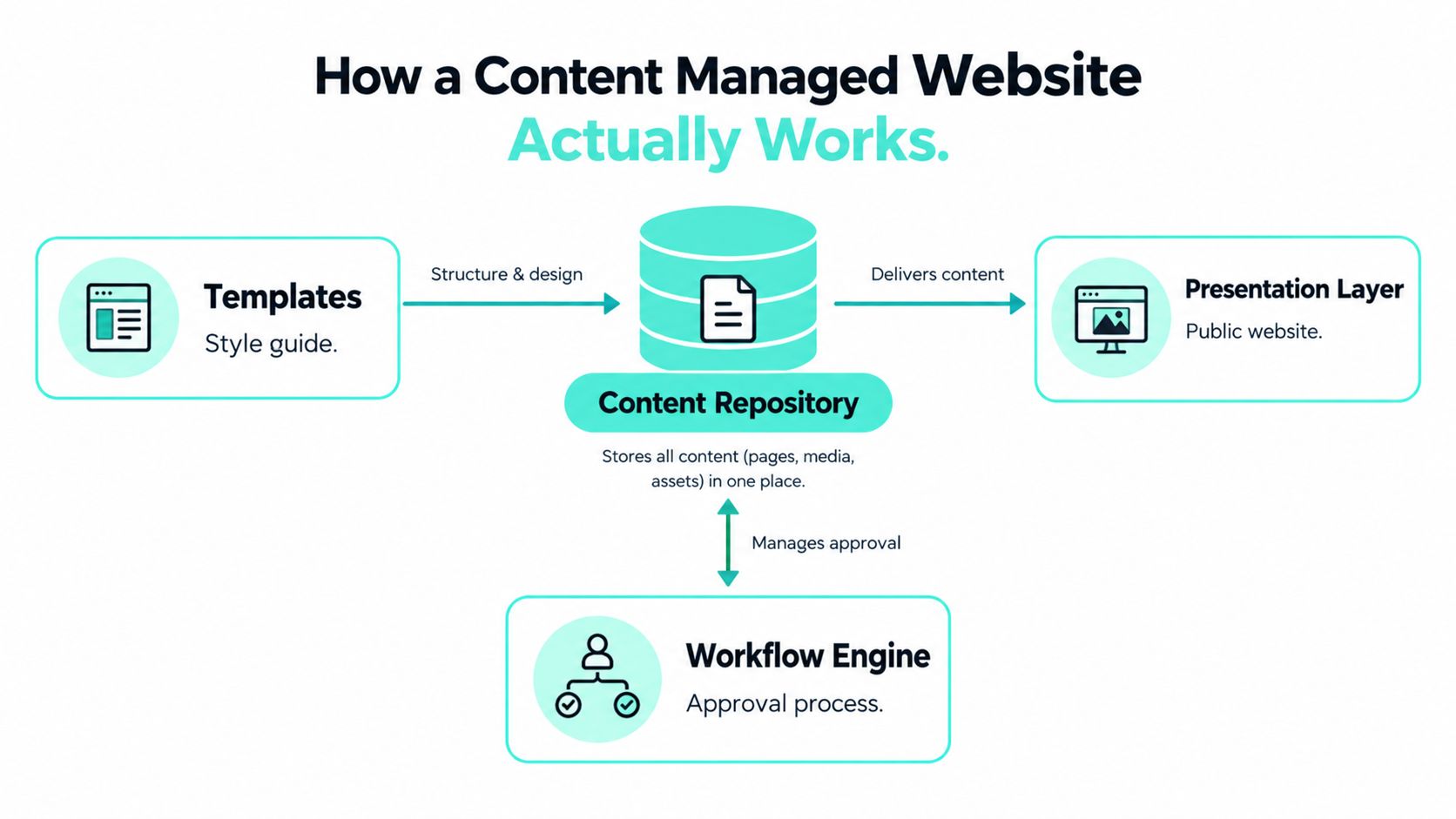
Think of a content managed website as a publishing house rather than a page editor. Authors create material, editors check it, a production system applies presentation rules, and a delivery layer makes the approved result available to readers.
The repository is the source of truth
The content repository stores structured entries such as product descriptions, locations, biographies, FAQs, campaign content, and legal notices. A mature repository separates content from presentation. A product description shouldn't need to be rewritten just because the organization introduces a new page layout or mobile experience.
Taxonomies make that repository usable. Editors can classify content by market, audience, product, language, lifecycle, or campaign. Those classifications support filtering, reuse, search, and personalization. They also expose weak modeling quickly. If teams rely on folders and free-text labels for everything, automated governance becomes difficult.
Templates define the rules
Templates describe the shape of a page or content item. They establish required fields, allowed components, validation rules, and relationships. A template for a location page might require an address, opening information, accessibility details, and a regional owner. A template for a campaign landing page might allow approved hero, form, proof point, and call-to-action components.
Templates protect authors from having to make design decisions that should already belong to the system. They also protect the brand from uncontrolled layouts.
Workflow controls publication
The workflow engine moves content through review, approval, translation, legal validation, and publishing. A simple blog may need one editor. A regulated enterprise may require separate marketing, legal, accessibility, and regional approvals.
Workflow should reflect risk, not organizational habit. Low-risk metadata changes can move quickly. Claims, pricing, regulatory statements, and customer-facing policy content need stronger checks. Role-based permissions should make the permitted action obvious, rather than relying on training to prevent mistakes.
Presentation and delivery complete the chain
The presentation layer renders approved content through templates and components. In a traditional system, the repository and rendering layer may live inside one platform. In a composable system, content services, search, personalization, front-end applications, and delivery infrastructure may be separate services.
That separation gives teams flexibility, but it creates responsibility. Someone must manage contracts between systems, preview behavior, caching, deployments, observability, and failure handling. A content managed website works when authors see a dependable preview, developers control the rendering system, and operations teams can trace a published item from source to visitor experience.
Monolithic vs Composable Architectures
The monolithic versus composable debate is often presented as a technology preference. In practice, it's an ownership decision. A monolithic CMS concentrates authoring, content storage, rendering, workflow, and administration in one product. A composable architecture separates those capabilities so teams can combine services and deliver content to several front ends.
| Dimension | Monolithic CMS | Headless / Composable |
|---|---|---|
| Editing experience | Usually integrated and familiar to marketers | Can be strong, but preview and context require deliberate design |
| Delivery model | The CMS commonly renders the website directly | Front ends consume content through APIs or SDKs |
| Integrations | Fewer moving parts at the start | More flexibility across search, personalization, commerce, and apps |
| Upgrade path | Platform upgrades can affect themes, modules, and customizations | Services can evolve independently, but contracts must be maintained |
| Team ownership | One platform team often owns most capabilities | Product, content, engineering, data, and operations share responsibility |
| Governance | Centralized controls are easier to establish initially | Governance can scale across channels if schemas and ownership are explicit |
| Cost profile | Simpler architecture can reduce early operational overhead | Greater flexibility can increase integration and skills requirements |
A monolith works well when one organization owns one primary web experience, the content model is stable, and the editorial team values a tightly integrated authoring environment. It can also be the right answer where the enterprise lacks the engineering capacity to operate multiple services. The danger appears when every exception becomes a plugin, custom module, or local workaround.
Composable architecture earns its place when an enterprise has multiple brands, regions, channels, or delivery teams. A shared content service can feed a public site, campaign experience, partner portal, or application without forcing every channel to adopt the same presentation layer. A front end can evolve independently from editorial workflows, provided the content contracts remain clear.
The practical overview of MACH architecture helps explain the principles, but production decisions need more than architectural vocabulary.
What works in production
Composable succeeds when the organization defines:
- A canonical content model with explicit ownership.
- Stable APIs or SDK contracts between content and delivery.
- A shared component library with accessibility built into the component behavior.
- One preview and publishing model that authors can understand.
- Central observability for search, APIs, builds, deployments, and rendering.
- A clear service ownership map, including who responds when a dependency fails.
What doesn't work is splitting a simple website into many services because “headless” sounds modern. Each service adds operational work, security review, integration testing, and failure modes. Composable architecture should reduce organizational friction, not merely redistribute it across more repositories and deployment pipelines.
The enterprise case is strongest when decoupling supports governance. Regional teams can work within controlled content boundaries, while platform teams maintain reusable delivery patterns. The trade-off is that the enterprise must fund architecture, testing, integration, and operational skills instead of assuming the CMS will hide those responsibilities.
Why SitecoreAI Leads Enterprise Composable
SitecoreAI is positioned as a unified platform built on XM Cloud, bringing together content management, customer data, personalization, search, embedded AI assistance, and agentic workflows. SitecoreAI's platform description also records Sitecore's announcement of the rebrand on November 4, 2025.
For a customer-facing estate, the useful reference pattern is not “AI replaces editors.” It is a governed combination of XM Cloud authoring and delivery, Content Hub for assets and content operations, Personalize for audience decisions, and Search for discovery. The value comes from connecting those capabilities to a shared content model and a consistent publishing process.
The marketer experience matters. SitecoreAI includes a visual, component-based page editor, personalization, A/B testing tools, and AI assistance throughout the experience-management workflow, as described in Sitecore's XM Cloud platform material. In a headless implementation, XM Cloud can support a Next.js delivery model with Sitecore SDK options, while authors still need an in-context Pages editing experience that shows how structured content will appear.
| Capability | Out of the Box | Integration Required | Custom Build |
|---|---|---|---|
| Structured authoring | Content fields, templates, components, and editorial tools | Enterprise taxonomy and ownership model | Unusual content types or complex business rules |
| Multi-site management | Shared platform patterns and reusable components | Regional governance, translation services, and domain strategy | Exceptional market-specific publishing rules |
| Personalization | Personalization and testing capabilities | Identity, consent, analytics, and audience data | Advanced decisioning or proprietary scoring |
| Search | Sitecore Search capability | Indexing strategy, synonyms, security trimming, and source connections | Specialized ranking or domain-specific retrieval |
| AI assistance | Embedded assistants and workflow support | Review policy, permissions, data controls, and editorial standards | Organization-specific agents and actions |
| Headless delivery | XM Cloud with front-end SDK and hosting patterns | Next.js application, deployment, monitoring, and caching | Bespoke channel experiences and complex orchestration |
A later industry summary of SitecoreAI describes 20+ pre-built AI agents, an Agentic Studio no-code agent builder, and a commercial model with no token limits or separate AI line item. Those capabilities can reduce friction, but they don't remove the need for editorial review. AI is most useful for tagging, finding, summarizing, suggesting metadata, supporting SEO and generative-engine visibility, and helping teams move through large estates. Generated claims, translations, accessibility descriptions, and customer-facing copy still require human accountability.
Production rule: Treat AI as an acceleration layer around a governed content model, not as the owner of publication decisions.
The steering committee should also examine trade-offs. XM Cloud and a composable delivery model can reduce dependence on traditional infrastructure management, but total cost can rise if the organization lacks front-end, integration, cloud, search, and content operations expertise. Vendor consolidation can simplify procurement while increasing dependency on one ecosystem. The platform is powerful, but its success still depends on taxonomy quality, component discipline, preview design, release engineering, and clear ownership.
Where SharePoint Online Fits the Stack
SharePoint Online belongs beside a public-facing DXP, not automatically inside it. Microsoft defines SharePoint Online as a collection of cloud and web technologies for storing, sharing, and managing digital information, while its broader description emphasizes collaboration and document management. That positioning makes it particularly effective for employee portals, policy repositories, HR documentation, project knowledge, and departmental information.
The typical enterprise stack connects SharePoint Online with Microsoft 365 services. Teams can provide the collaborative workspace, OneDrive can support personal and working-file storage, Power Automate can orchestrate approvals and notifications, and Entra ID can provide identity and access control. SharePoint also supports document collaboration, co-authoring, version history, retention labels, and information protection patterns that are central to internal governance.
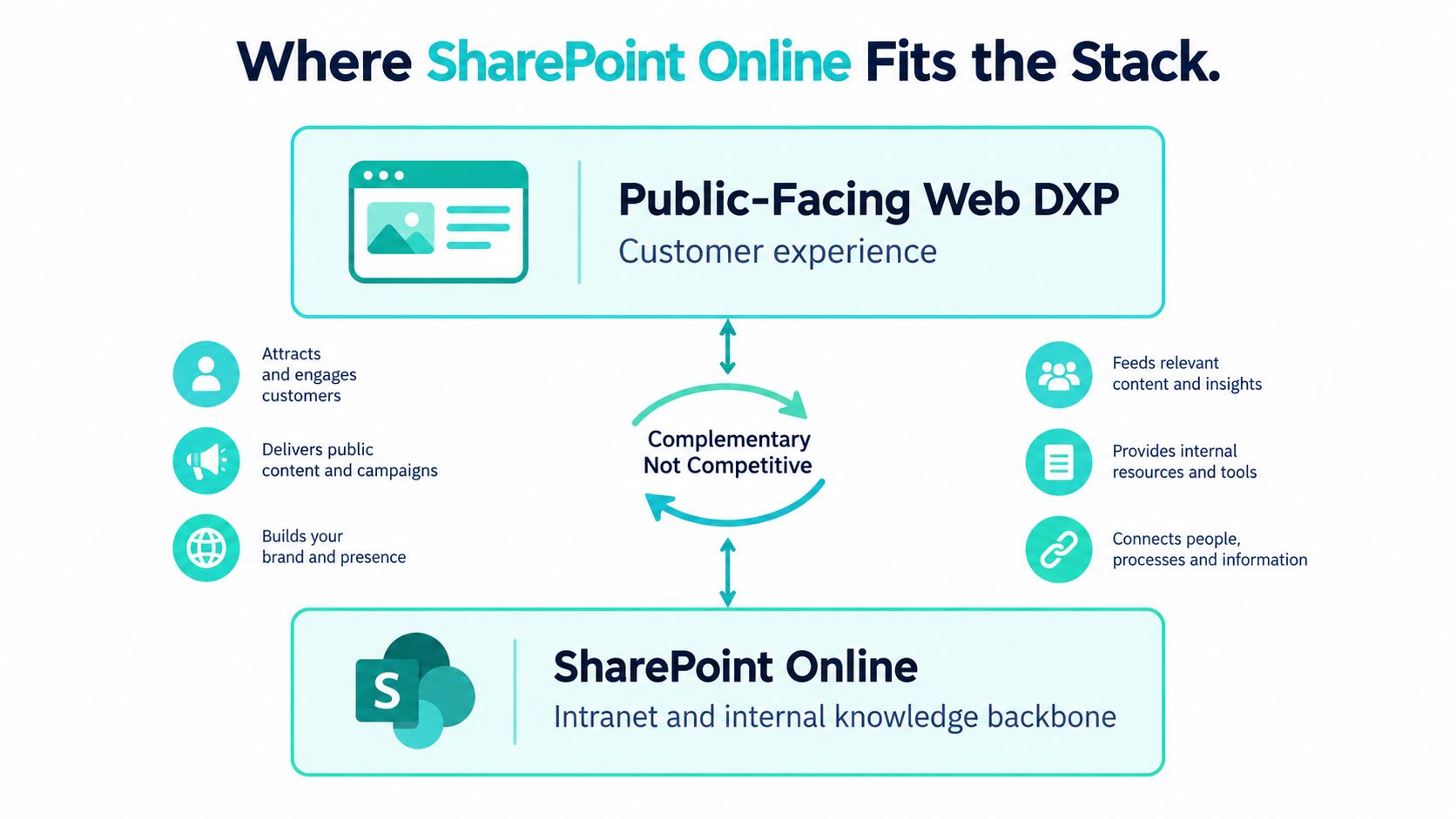
Public web content and intranet content follow different editorial logic. A customer-facing page must support brand presentation, search visibility, conversion journeys, localization, and public accessibility. An internal policy may require an owner, approval history, audience restrictions, retention handling, and acknowledgement by employees. Trying to force both use cases into one publishing model usually creates unnecessary complexity.
The boundary should be explicit
A sensible division looks like this:
- Public DXP: Product experiences, campaigns, customer journeys, public search, regional web delivery, and personalization.
- SharePoint Online: Internal policies, employee communications, operational documents, department knowledge, and collaboration.
- Controlled integration: Selected data or approved content crosses the boundary through APIs, search connections, or governed publishing workflows.
SharePoint becomes the wrong choice when the requirement is a highly branded, public, search-driven experience with advanced personalization or front-end freedom. Its Microsoft integration is valuable, but integration convenience shouldn't override audience, content model, accessibility, performance, or delivery requirements. The SharePoint intranet solutions overview reflects the stronger use case, where SharePoint acts as an internal knowledge and collaboration platform with an intentional information architecture.
Choosing a Platform and Enterprise Considerations
Platform selection should start with operating constraints rather than a vendor bake-off. Ask each platform to demonstrate the workflows that create risk in your estate, using real content types, real permissions, real locales, and real approval roles.
Start with multilingual operations
Localization isn't a translation button. Teams need a source-language model, locale relationships, translation memory or translation-service integration, regional ownership, fallback behavior, and rules for when a changed source item invalidates a translated version. The model should also distinguish global content from market variations. Otherwise, editors either overwrite local changes or duplicate global content into unmanageable branches.
Make accessibility part of the system
Set WCAG 2.2 AA as the target where that standard applies to the organization, then test both the public experience and the authoring environment. A component can pass a page-level review while still creating inaccessible output when editors misuse headings, links, forms, media, or color choices.
The platform should provide semantic components, keyboard-accessible interactions, meaningful validation, and usable editorial controls. Custom tooling may still be necessary for testing and governance. Accessibility belongs in design tokens, component acceptance criteria, content templates, automated checks, and manual review.
Govern people and content together
A useful governance model names owners for content types, taxonomies, components, locales, workflows, and technical services. Permissions should follow responsibilities, with audit trails that show who changed, approved, translated, and published an item. A global editor shouldn't automatically receive unrestricted control over every regional site.
Use a decision matrix before procurement:
| Enterprise Concern | Monolithic Strength | Composable Strength | Trade-off to Manage |
|---|---|---|---|
| Authoring | Integrated experience with fewer handoffs | Can support channel-specific experiences | Preview and context must be designed |
| Localization | Central workflows can be simpler to administer | Services can connect specialist translation and regional systems | More integration and ownership decisions |
| Accessibility | Shared templates can enforce patterns | Components can be reused across channels | Every front end must honor the same standards |
| Performance | Rendering and caching may be centrally managed | Edge delivery and front-end optimization are flexible | Personalization and API calls need careful budgeting |
| Security | Fewer major boundaries to configure | Content and delivery can be isolated by service | Identity, secrets, and permissions span more systems |
| Total cost | Lower initial operational complexity | Better fit for varied channels and team autonomy | Skills, monitoring, integration, and change management cost more |
Budget the experience, not just the server
Performance budgets should cover page weight, rendering, third-party scripts, API calls, image behavior, caching, and personalization. Set targets for Core Web Vitals before build work starts, then test representative templates rather than one optimized landing page. Edge delivery helps, but it can't repair inefficient components or excessive client-side orchestration.
Security design should cover identity integration, content isolation, environment separation, secrets, auditability, and data residency. Regional requirements may affect where data is stored and processed. These decisions belong in architecture, not in a late compliance review.
Finally, calculate total cost of ownership across licensing, hosting, integration, front-end delivery, support, content migration, translation, training, testing, and ongoing editorial operations. A useful outsource website development playbook can help teams structure delivery-capacity decisions, but the financial model still needs to reflect the platform and operating model selected.
Migration and Implementation Roadmap
A migration succeeds when the organization changes how it manages content, not merely where it stores pages. A mid-sized multi-brand estate should plan a realistic sequence of discovery, design, implementation, migration, validation, and stabilization rather than treating launch as a single weekend event.
Phase one starts with evidence
Begin with a content inventory that identifies page types, owners, locales, assets, redirects, dependencies, search value, legal obligations, and lifecycle status. Remove obsolete content before migration. Define the target taxonomy and content model, then confirm who can approve each content type.
The checkpoint is a signed content inventory and governance model. If the team can't agree what should move, it isn't ready to automate migration.
Phase two turns requirements into architecture
Stand up the XM Cloud environment, define environments and deployment controls, confirm the Next.js delivery approach, and map integrations for identity, search, analytics, translation, forms, commerce, and customer data. Create the component library with accessibility and responsive behavior included from the start.
Run authoring workshops with global and regional editors. A technically elegant model fails if editors can't preview localized content or understand which fields they own.
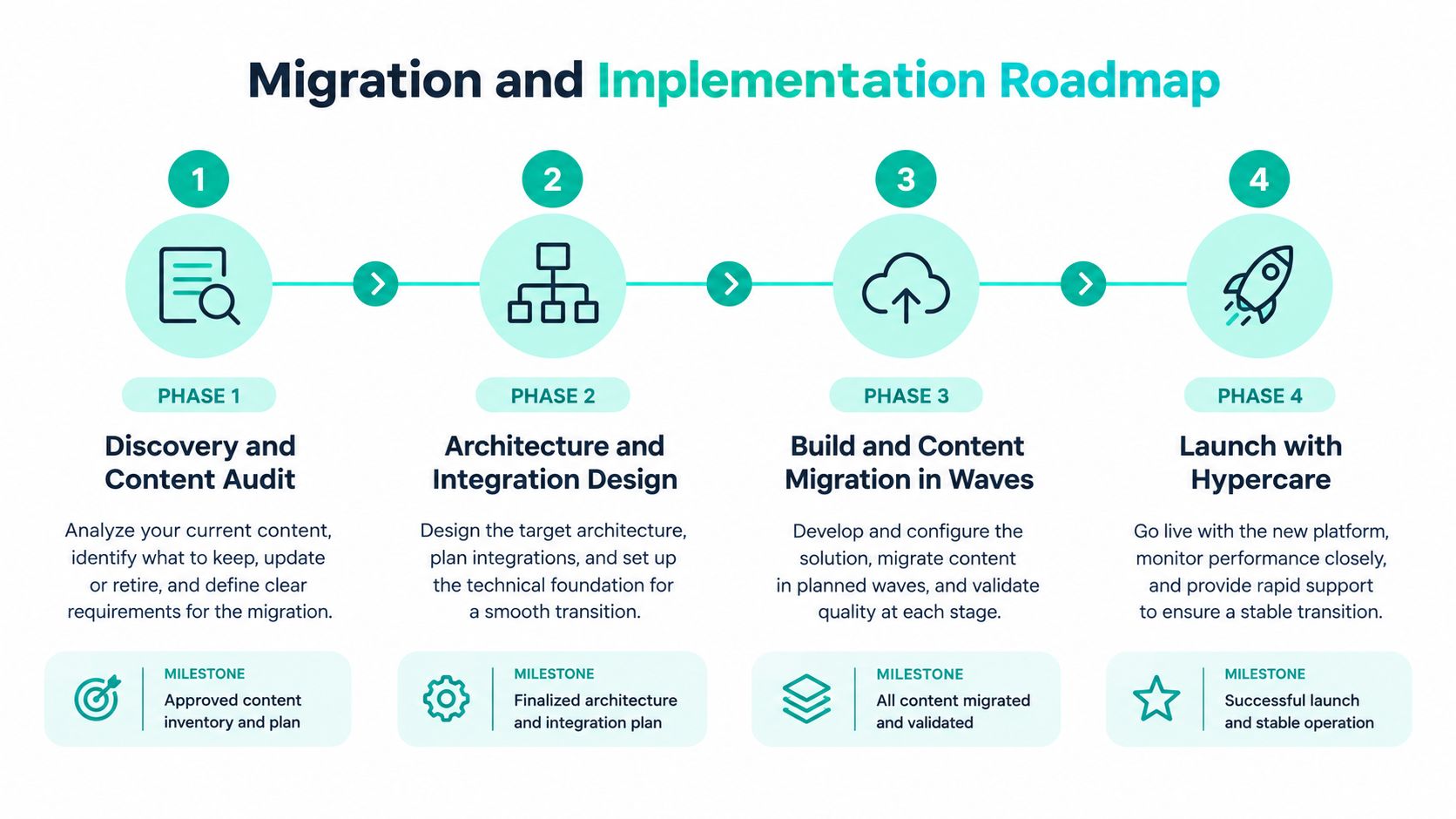
Phase three migrates in controlled waves
Build and migrate by content family or region, not by a random page queue. Start with a representative regional content set, including shared content, local variations, translations, media, redirects, and approval paths. Validate the model before scaling the process.
Run editorial acceptance, link checks, metadata checks, search validation, accessibility testing, and performance testing during every wave. The CMS migration checklist is useful for turning these controls into accountable work items.
Phase four is launch with hypercare
Before cutover, complete accessibility and performance audits, verify redirects, test publishing recovery, confirm analytics, and obtain business sign-off for the migrated regions. Keep content owners and technical responders available during hypercare. Monitor failed builds, broken integrations, search gaps, authoring problems, and unexpected rendering behavior.
The project usually fails earlier than launch. Common causes include skipping governance design, underestimating legacy cleanup, and leaving localization until the end. A short implementation that preserves those problems is more expensive than a deliberate migration that exposes them early.
Use the following video as an additional implementation reference:
Pre-Implementation Checklist and Final Takeaways
Before selecting a platform, score the current operating model against a practical checklist. The score matters less than the evidence behind it. If teams disagree about ownership, content status, or regional authority, the platform workshop should resolve those disagreements before configuration begins.
- Complete the content audit: Record content types, owners, locales, assets, dependencies, redirects, and retirement decisions.
- Define the governance model: Document editorial roles, approval chains, permissions, audit requirements, component ownership, and escalation paths.
- Validate multilingual workflows: Test source content, translation requests, regional adaptation, fallback behavior, and update propagation with representative content.
- Set accessibility targets: Use WCAG 2.2 AA where applicable, and test both the authoring experience and rendered components.
- Set performance budgets: Define Core Web Vitals targets, page-weight expectations, script policies, API limits, caching rules, and personalization boundaries.
- Review security and compliance: Confirm identity integration, content isolation, data residency, retention, auditability, and incident responsibilities.
- Model total cost of ownership: Include licensing, hosting, integration, migration, translation, training, support, monitoring, and ongoing content operations.
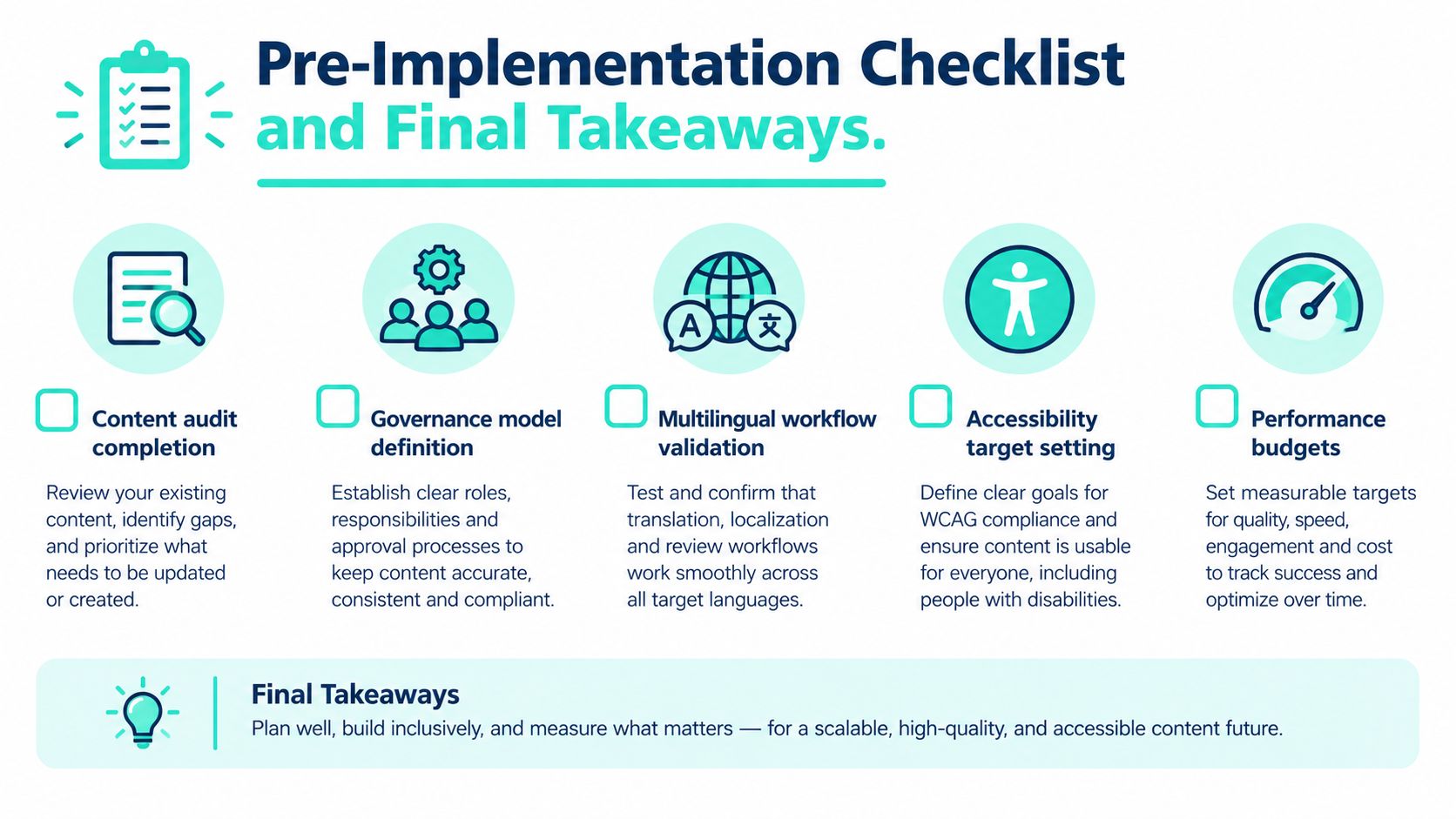
The central decision isn't which CMS has the longest feature list. It's how content operations will run across a multi-brand, multi-region estate. SitecoreAI provides a strong working reference for customer-facing content, personalization, search, and composable delivery. SharePoint Online provides a complementary foundation for internal knowledge, documents, collaboration, and employee workflows. The boundary between them should be intentional.
Score your existing operating model against this checklist before inviting vendors to demonstrate products. Then turn each gap into a test scenario using real content, real roles, real locales, and real approval paths. Kogifi designs and delivers Sitecore XM Cloud platforms, headless Next.js experiences, SharePoint Online intranets, migrations, governance models, and ongoing enterprise support. Visit Kogifi to discuss an architecture grounded in your content operations rather than a generic feature comparison.