


Six months after a major Viva Connections rollout, the intranet looks modern to employees but fragile to the team that maintains it. Shared script editor components are failing as pages move to the modern experience, provider-hosted add-ins still depend on an aging IIS farm, and vendor widgets loaded through iframes keep appearing in accessibility findings. IT won't approve another custom master page, security doesn't want new endpoints, and business units still expect richer dashboards, directories, and personalized content.
That pressure is where SPFx web parts earn their place. They give an enterprise team a supported way to add client-side experiences to SharePoint and Microsoft 365, while keeping the page, permissions, deployment model, and upgrade path under clearer control. The important question isn't how to make a demo render. It's how to build a component that remains useful after the next tenant change, dependency update, accessibility review, and platform retirement.
Table of Contents
The Intranet Problem SPFx Web Parts Were Built to Solve
The intranet team has three competing demands. Employees want a polished experience that feels like one product. Security wants fewer independently hosted services. Developers want a platform that doesn't break every time Microsoft updates the host.
Older customization approaches put those demands at odds. A script editor could inject almost anything, but it also encouraged page-level code that was difficult to govern and easy to break. Provider-hosted add-ins separated the user experience from SharePoint, which created hosting, authentication, patching, and monitoring responsibilities outside the platform. Iframe-based widgets might deliver a quick visual result, but they often introduce focus management, responsive behavior, and accessibility problems.
The team doesn't need more clever snippets. It needs a repeatable component model that fits the modern intranet operating model described in this overview of how intranets work.
The practical turning point
An SPFx web part runs client-side in the user's browser inside a SharePoint page. Microsoft describes client-side web parts as browser-executed controls and as the building blocks of modern SharePoint pages in its client-side web part documentation. That distinction matters because the host page remains SharePoint, rather than becoming a shell around an unrelated application.
Deployment also becomes more manageable. A packaged solution can move through the tenant App Catalog, while the web part uses Microsoft 365 services and approved permissions instead of forcing every business unit to operate its own application endpoint. Microsoft also documents that SPFx web part solutions can extend Microsoft Teams, giving the same package another Microsoft 365 surface.
Architectural rule: Put presentation in the web part, platform data and workflow logic in the services designed to own them, and avoid turning a page component into an ungoverned application.
SPFx isn't a magic replacement for every customization. It still requires dependency management, permission review, testing, and operational ownership. Its value is that those responsibilities sit inside a recognizable Microsoft-supported model, rather than being scattered across page scripts, iframe providers, and abandoned farms.
SPFx Web Parts Explained as Building Blocks for SharePoint Pages
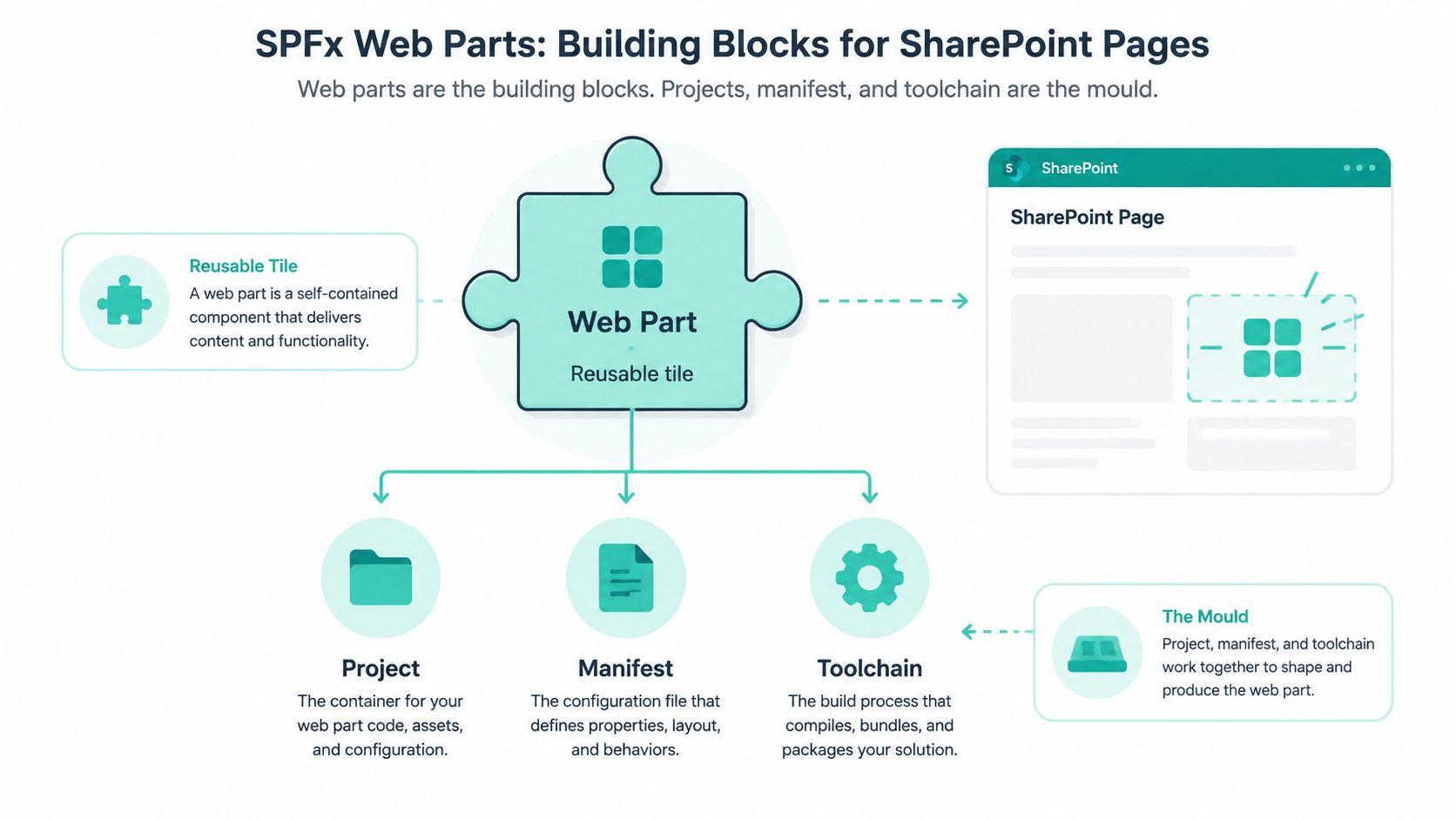
Think of a modern SharePoint page as a layout made from reusable building blocks. An SPFx web part is one of those blocks, a configurable tile that an author places into a page section. It might render an employee directory, a news digest, a search experience, or a dashboard. The visual component is only the finished tile. The project, manifest, source code, and build process form the mould that produces it.
Microsoft's SharePoint Framework overview describes SPFx as Microsoft's client-side extensibility model for SharePoint pages. Its first production release reached developers in February 2017, and Microsoft's training and release material shows continued platform evolution through SPFx 1.21 and subsequent roadmap work.
The manifest is the contract
The web part manifest is a JSON contract between the solution and SharePoint. It declares the component's identity, version, properties, supported hosts, and other metadata that tells SharePoint how to register and present the package.
That contract deserves more respect than it gets in many quick tutorials. A missing or mismatched identifier can leave a package apparently deployed but unusable on a page. Properties defined in the manifest and exposed through the property pane also determine how site owners configure the component without editing code.
The project around the manifest supplies the implementation. Node.js provides the runtime for the development tools, Yeoman scaffolds the project, TypeScript is transpiled into browser-ready JavaScript, and the build system packages the result. Existing projects commonly use Gulp, while Microsoft's roadmap points toward an open webpack-based toolchain orchestrated by Heft.
What happens in the browser
The runtime sequence is straightforward:
- SharePoint reads the deployed manifest and registers the client-side component.
- An author adds the web part to a modern page.
- SharePoint instantiates the component inside its page zone.
- React, or another supported client-side implementation, renders the interface.
- The component calls approved services when it needs data.
No server-side code runs inside SharePoint itself. That keeps the execution model familiar to front-end teams, but it also means bundle weight, browser behavior, network calls, and client-side error handling become part of the production design.
A useful reference point for architects is Microsoft's SharePoint platform guidance, particularly when deciding whether a requirement belongs in a custom component, a standard web part, or a separate application surface.
How SPFx Web Parts Fit Into a Modern Microsoft 365 Architecture
An SPFx web part is a rendering tier, not an entire business application. It owns the presentation and lightweight interaction on a SharePoint or Viva Connections surface. Power Apps is a better home for complex forms and canvas-style experiences, Power Automate coordinates workflows and triggers, and Teams provides another host surface for Microsoft 365 components.
A sensible data flow might begin with the web part requesting user and group information through Microsoft Graph. The user interacts with a dashboard action, the web part sends an event through an approved Power Automate HTTP trigger, and the flow writes the business record to Dataverse. The page then displays an aggregated result, combining SharePoint content, Graph data, or a service response without embedding the workflow rules in the React component.
Where the boundaries belong
The most maintainable architecture gives each platform service a narrow responsibility. The web part should format data, manage local view state, handle loading and error states, and provide a responsive accessible interface. Power Automate should own orchestration and notifications. Dataverse or SharePoint should own persisted business data. Power Apps should own a richer data-entry experience when a property pane or compact form can't meet the requirement.
| Layer | Primary Role | Calls Into | Owned By |
|---|---|---|---|
| SPFx web part | Page presentation and lightweight interaction | Microsoft Graph, SharePoint APIs, approved services | Front-end and SharePoint engineering |
| Power Apps | Complex forms and canvas experiences | Dataverse, SharePoint, connectors | Power Platform team |
| Power Automate | Workflow orchestration and notifications | Dataverse, SharePoint, Graph, connectors | Automation owner |
| Microsoft Graph | Microsoft 365 identity and collaboration data | Users, groups, Teams, and related services | Microsoft 365 platform team |
| Teams | Additional host surface | SPFx packages and Microsoft 365 services | Teams and collaboration team |
| SharePoint | Content, pages, permissions, and shell | Web parts, lists, libraries, and services | SharePoint platform team |
This separation aligns with MACH architecture principles, especially the discipline of keeping independently owned capabilities loosely coupled. It also makes replacement easier. A Power Apps form can evolve without forcing a page component rewrite, and a web part can change its presentation without duplicating workflow logic.
The trade-off is coordination. Permission scopes, environment strategy, error handling, and observability must be agreed across teams. A web part that calls several services directly may look fast to build, but it becomes difficult to test and govern. Use direct calls for read-heavy presentation where they make sense, and move durable business actions behind a controlled service or flow.
SPFx Web Parts Versus the Five Extension Types
A web part is only one choice in the SPFx toolbox. Microsoft documents five extension types for production use across Microsoft 365 subscriptions, including Application Customizers, Field Customizers, Command Sets, Form Customizers, and Search Query Modifiers in its extension overview.
The decision rule is simple. Choose the most constrained extension that solves the requirement. A constrained surface gives developers less freedom, but it also limits accidental side effects and makes the component easier for site owners to understand.
| Extension Type | Renders On | Use It When | Intranet Example |
|---|---|---|---|
| Web part | A page content zone | The requirement needs a new visual area on a modern page | A personalized employee directory on the intranet home page |
| Application Customizer | Page chrome, such as a header or footer placeholder | The experience must appear across selected pages or sites | A tenant-wide help banner or accessibility link |
| Field Customizer | A list or library column cell | A value needs a custom visual treatment | A document status cell with an accessible progress indicator |
| ListView Command Set | The list or library command surface | Users need an action tied to selected items | A document library button that starts a review workflow |
| Form Customizer | A list item form | The default create, edit, or view form isn't sufficient | A structured onboarding request form |
| Search Query Modifier | Search query behavior | Search needs controlled query transformation | A governed search experience that applies a business filter |
The five extension types don't all create a visible page tile, so the comparison should happen before development begins. An Application Customizer is the wrong answer for a dashboard. A web part is excessive for a single list-cell rendering change.
Keep the same ownership boundaries used elsewhere in Microsoft 365. The extension should present context-specific UI, while Power Automate, Dataverse, SharePoint, and Graph remain responsible for durable data and actions. That approach prevents a command button from growing into a hidden workflow engine.
A Real Enterprise Intranet Web Part Example
An employee directory is a better test of SPFx design than a greeting message. It has identity, permissions, search, fallback behavior, accessibility, and operational questions that a production intranet must answer.

Start with a data contract instead of a component. Define the fields the page needs, such as display name, job title, department, location, profile photo, and contact link. Microsoft Graph is preferable for directory data because it represents Microsoft 365 identity information through a supported service boundary, while a legacy SharePoint user information list call may be incomplete or shaped around site membership rather than the organization directory.
A deliberately small service boundary
The component shouldn't know how every data source works. Give it a service that returns the contract, then let the service choose Graph or a fallback list.
export interface IEmployee {displayName: string;jobTitle?: string;department?: string;location?: string;photoUrl?: string;profileUrl?: string;}export class DirectoryService {public constructor(private readonly context: WebPartContext,private readonly fallbackListTitle: string) {}public async getEmployees(): Promise<IEmployee[]> {try {const graphClient = await this.context.msGraphClientFactory.getClient("3");const response = await graphClient.api("/users").select("displayName,jobTitle,department,officeLocation,mail").get();return response.value;} catch {const response = await this.context.spHttpClient.get(`${this.context.pageContext.web.absoluteUrl}/_api/web/lists/getbytitle('${this.fallbackListTitle}')/items`,SPHttpClient.configurations.v1);const data = await response.json();return data.value;}}}The sketch is intentionally incomplete. A production implementation should add paging, filtering, cancellation, explicit error states, and safe handling for missing profile data. PnPjs can also provide a consistent SharePoint data access layer, but it doesn't remove the need to define permissions and failure behavior.
Manifest and operating context
The manifest should expose sensible preconfigured entries, such as a default list title or department filter, while scoped properties let each page owner configure the instance. The React component receives the service and properties through the web part's service scope rather than constructing global clients inside the render tree.
Graph permissions need an administrative decision. If the solution requires User.Read.All, the tenant administrator must review and grant consent before the Graph path works for users. The fallback isn't a substitute for permission governance. It gives the page a controlled degradation path when consent is unavailable, data is incomplete, or a service call fails.
Power Apps could deliver the directory interface with less custom front-end code, especially if the requirement includes editing records or complex filters. An SPFx web part is usually more appropriate when the experience is primarily a fast, branded read surface embedded in an existing SharePoint page.
Governance, Versioning, and the Full Lifecycle of an SPFx Web Part
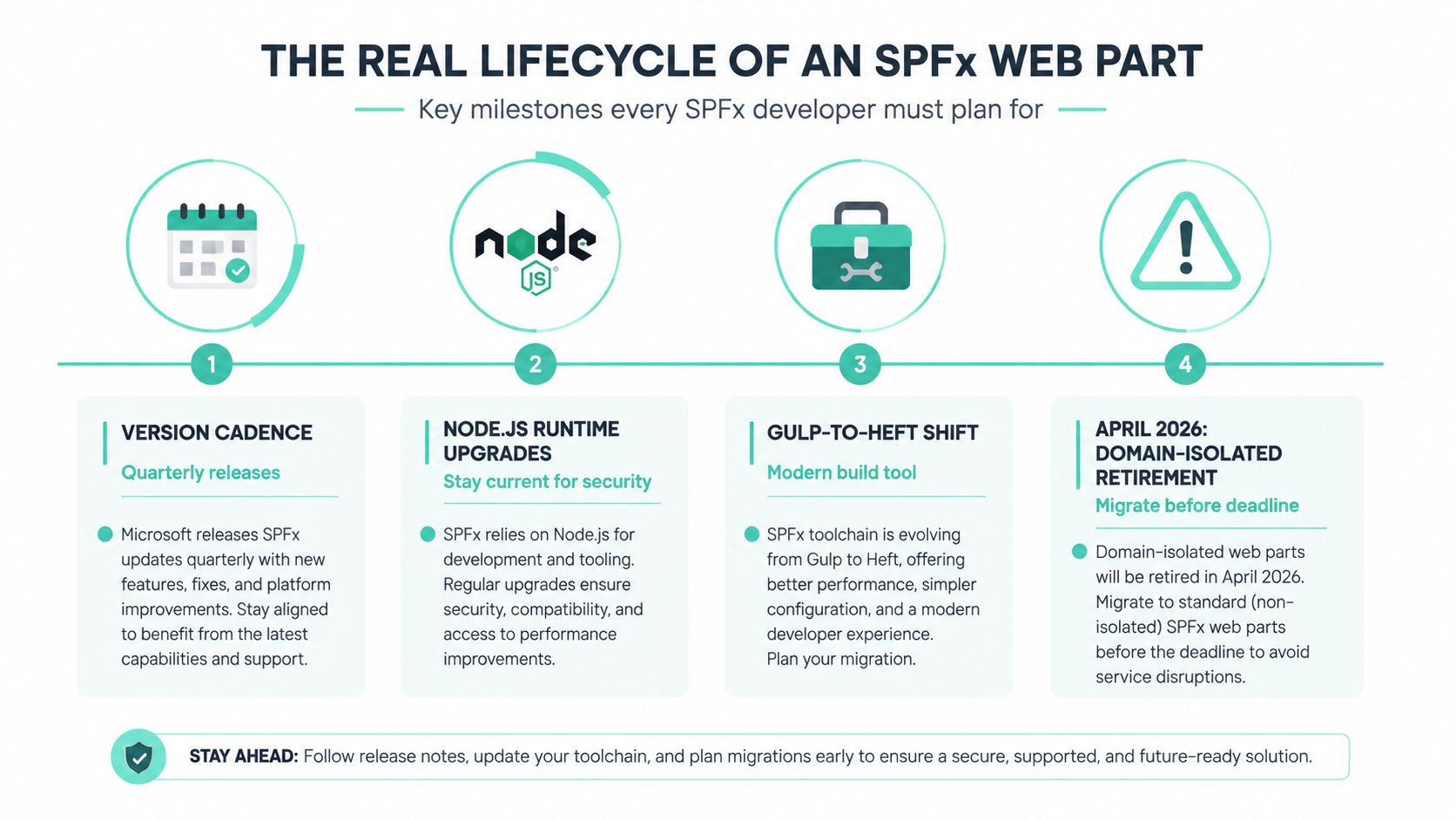
An SPFx web part becomes an enterprise asset as soon as people depend on it. The scaffold is only the first commitment. Its owner must maintain the SPFx version, Node.js runtime, package dependencies, permissions, build process, manifests, accessibility behavior, and deployment package for the full period of use.
Microsoft continues to invest in the framework. The official release material records SPFx 1.21.0 on April 23, 2025 and points to roadmap activity for a later release in 2026, as documented in the SPFx 1.21 release material. That cadence supports planned upgrades, while making an old project harder to treat as finished.
Governance catches what development misses
Every release can affect the supported development environment, dependency expectations, or build assumptions. Standardize the Node runtime in local development and CI, pin it deliberately, and record the choice in the solution inventory. Different developer runtimes often surface compatibility problems only during packaging.
Microsoft's roadmap says SPFx 1.21 added flexible layouts and card configuration options. A later update describes SPFx 1.22 as intended to address npm audit security issues and move from Gulp to an open webpack-based toolchain orchestrated by Heft, according to the Microsoft roadmap discussion. Existing Gulp projects need a migration plan before a build-server change forces the issue.
Maintain a register with at least:
- Solution identity: Package name, manifest IDs, owner, business purpose, and supported hosts.
- Runtime and framework: SPFx version, Node version, package manager, build system, and pinned dependency policy.
- Permissions: Graph scopes, administrator consent status, data classification, and renewal responsibility.
- Deployment: App Catalog location, environments, release approvals, rollback package, and page inventory.
- Retirement risk: Use of domain isolation, deprecated APIs, unsupported libraries, or assumptions about page layouts.
The deadline belongs on the roadmap
Microsoft announced that new tenants created from April 2, 2025 would no longer be able to use domain-isolated SPFx web parts, and support for existing tenants would end on April 2, 2026. Any solution using that isolation model needs an architecture review and migration plan before the retirement date.
The migration scope includes every affected page, owner, permission, and replacement path. Developers can repair a manifest or rebuild a package, but governance identifies the business impact. Assign an upgrade owner to each web part, review Node pins regularly, and keep the inventory current.
The same release discipline used for automation applies to SPFx. Practical version control practices for CI/CD pipelines help keep the package, configuration, dependencies, and infrastructure assumptions traceable.
Deployment and Performance Patterns That Actually Hold Up
A web part that works in a developer workbench isn't necessarily ready for a busy intranet. Production readiness means a controlled package path, repeatable configuration, measurable performance, clear telemetry, and a rollback option that doesn't depend on the original developer being online.
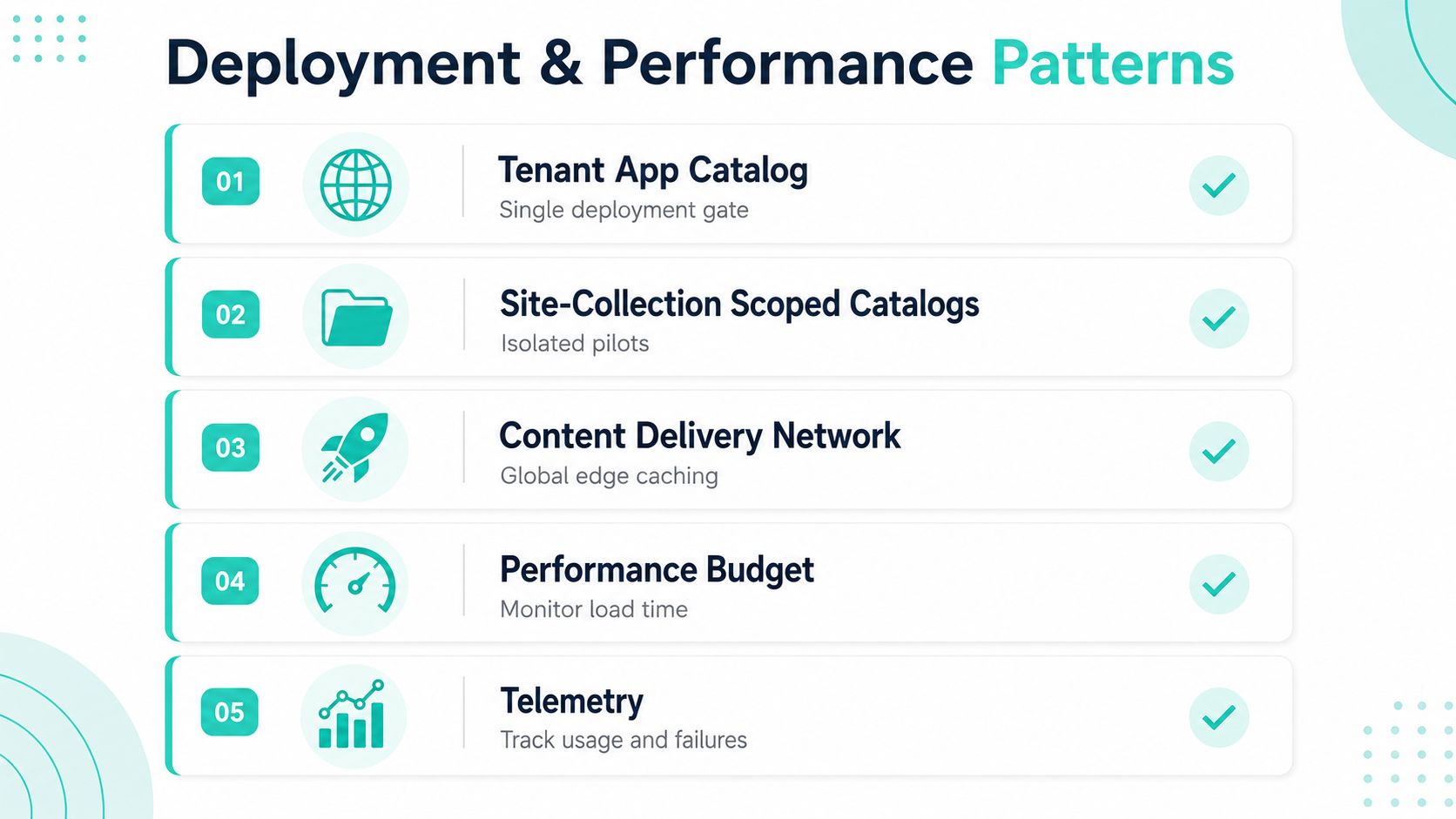
Use the tenant App Catalog as the main deployment gate. A site-collection scoped App Catalog is useful for an isolated pilot or a business-owned trial, but it shouldn't become an uncontrolled alternative production channel. Move the same package through development, test, and production using an ALM process, rather than manually dragging files between environments.
A practical release checklist
- Package discipline: Validate the manifest, permissions, supported hosts, and package contents before approval.
- Environment promotion: Build once where possible, then promote an identifiable artifact through controlled environments.
- Rollback readiness: Keep the prior known-good package and document how pages return to it.
- Feature control: Use feature flags or scoped properties when a new behavior needs gradual exposure.
- Operational visibility: Record load failures, service errors, and meaningful usage events without collecting unnecessary personal data.
Performance starts with the browser payload. Microsoft recommends keeping visible custom web parts under 2 seconds to load and off-viewport custom web parts under 4 seconds, according to the SPFx performance guidance. That guidance makes code splitting, dynamic imports for infrequently used property-pane logic, removal of dead dependencies, reuse of SPFx-provided React and Fabric libraries, and client-side caching practical review criteria rather than abstract optimization advice.
Microsoft's production-build example shows a bundle shrinking from 1255 KB in debug to 177 KB in release after minification and optimization, as described in SPFx production bundling guidance. The same material notes that an optimized web part bundle containing Angular can still exceed 170 KB, so library choice affects the starting point.
Network calls deserve equal attention
Cache data that doesn't change on every render. Batch Graph or SharePoint requests where the API supports it, avoid fetching fields the interface never displays, and defer secondary content until the user needs it. A CDN can improve asset delivery, but it won't rescue a component that makes unnecessary sequential service calls.
Set a performance budget in pull-request review, test on representative page layouts, and preserve telemetry through deployment. The difference between a web part that survives years of intranet use and one that gets removed during the next Viva Connections launch is usually operational discipline, not visual polish.
Where SPFx Web Parts Are Headed Next
The next phase of SPFx isn't defined by a single new component type. It's defined by maintenance decisions. Microsoft's retirement of domain-isolated web parts on April 2, 2026 means teams still using that model must migrate, validate permissions, and check every page placement before support ends. The change favors simpler supported deployment patterns, but it creates immediate work for estates that treated isolation as permanent architecture.
The build system is changing too. Microsoft's roadmap describes a move from Gulp toward an open webpack-based toolchain orchestrated by Heft, with SPFx 1.22 addressing npm audit concerns in that roadmap update. Teams still maintaining Gulp-based projects should assess their build pipeline, dependency tree, CI images, and local onboarding process before the migration becomes urgent.
Code-first isn't the default for every experience
Adaptive Card Extensions, Teams apps, Power Apps, and standard SharePoint components will continue to absorb scenarios that once led directly to custom web parts. That doesn't make SPFx irrelevant. It changes the selection test.
Use SPFx when the page needs a custom client-side interface, when the interaction belongs naturally in a SharePoint or Viva surface, and when the team can own the package through its lifecycle. Prefer a low-code surface when configuration, workflow, and data entry dominate the requirement. Prefer a Teams-focused experience when the primary context is collaboration rather than intranet discovery.
Sitecore's SitecoreAI direction adds another consideration for organizations running a broader composable experience estate. Sitecore describes SitecoreAI as an umbrella for XM Cloud, Sitecore Search, Sitecore Personalize, CDP, Content Hub, and Agentic Studio, bringing those enterprise products under one roof in the SitecoreAI portfolio discussion. In that environment, SPFx may serve the employee surface while Sitecore manages external content and experience capabilities. The architecture should connect those platforms intentionally, not force one to impersonate the other.
SPFx web parts aren't a finished, low-maintenance choice. They're a mature Microsoft-supported foundation that still demands version ownership, security review, performance testing, and migration planning. Teams that treat them like enterprise assets can keep benefiting from the model. Teams that treat them like page snippets will eventually inherit the lifecycle pain they were meant to remove.
Kogifi helps enterprise teams design, build, modernize, and maintain SharePoint Online intranets with SPFx components, Power Platform workflows, and Microsoft 365 integrations. Visit Kogifi to discuss an SPFx estate audit, a new web part architecture, or a lifecycle plan for your existing intranet.