





53% of data-center operators experienced an outage during the preceding three years, and 54% of the most recent significant, serious, or severe outages cost more than $100,000. Disaster recovery is therefore an enterprise survival function, not a backup afterthought.
For Sitecore, Adobe Experience Manager, and SharePoint estates, the question isn't whether data is backed up. It's whether the complete digital service can return in the right order, with identity, search, commerce, APIs, content, personalization, and editorial operations working together. A platform can appear restored while customers still can't authenticate, marketers can't publish, employees can't access documents, or a headless frontend serves stale and incomplete experiences.
Table of Contents
- Sitecore requires deployment and content evidence
- SharePoint recovery is more than document restoration
Why Disaster Recovery Matters for Enterprise Digital Platforms
Uptime Institute's 2024 Global Data Center Survey found that 53% of operators had experienced an outage during the preceding three years. Among respondents reporting their latest significant, serious, or severe outage, 54% said it cost more than $100,000, while 16% reported costs above $1 million. On-site power-distribution problems were the leading cause of impactful outages, accounting for 54% of incidents in 2024.
Those figures change the conversation with an IT director. A failed publishing platform can interrupt transactions, customer self-service, employee communications, identity systems, and content delivery at the same time. For a multinational organization, one incident can also affect regional sites, localized content, campaign launches, partner portals, and internal authoring workflows.

Recovery is a business service
A mature disaster recovery business doesn't sell backup retention as the finished product. It operates a broader service covering continuity planning, resilient cloud architecture, monitoring, incident response, failover, restoration testing, and post-incident stabilization. Uptime Institute estimates that 10 to 20 high-profile IT outages or data-center events occur globally each year with serious financial, customer, operational, or reputational consequences, which reinforces why recovery readiness needs executive ownership.
The practical distinction is simple. Backup preserves data. Recovery restores a usable business capability. That means validating the customer journey, the author journey, and the employee journey, not merely checking whether a database or virtual machine starts.
Practical rule: A recovery plan isn't credible until a business owner can sign off that the restored service supports its intended work.
The same logic applies to smaller organizations. A Congressional Research Service summary on disaster recovery cites historical estimates that 40% of businesses don't reopen after a disaster, another 25% close within one year, and a Small Business Administration estimate that 90% fail within two years after being struck by a disaster. The estimates vary by study, but the operational lesson is consistent: recoverable data, alternate systems, documented ownership, and tested procedures influence survival.
Teams beginning this work should pair platform analysis with established disaster recovery best practices. Cyber exposure also deserves separate attention, particularly for smaller operators with limited technical resources. Guidance on cyber risk solutions for Australian trades can help connect technical recovery planning with broader business risk decisions.
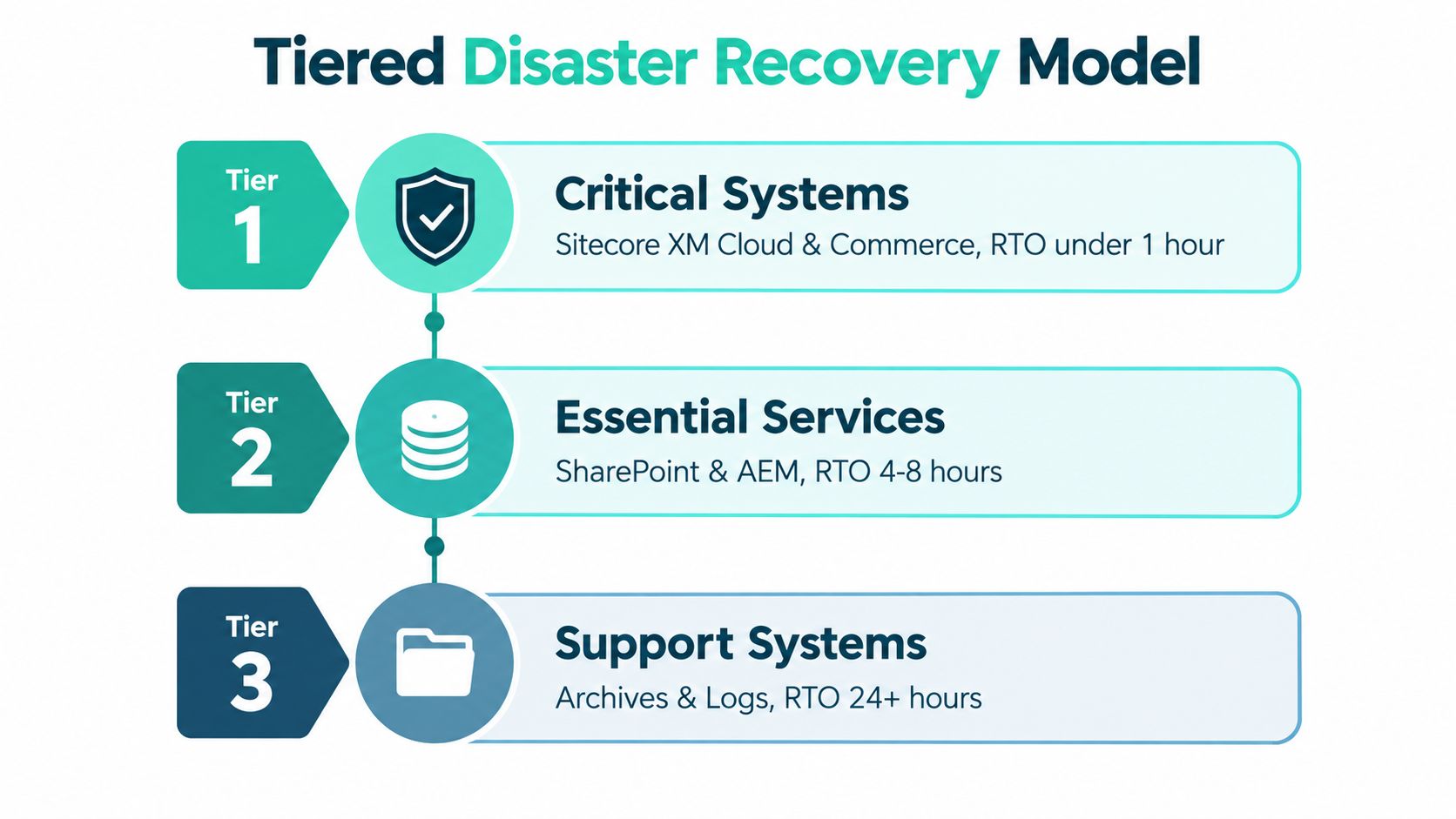
Building a Tiered Disaster Recovery Model
Treating every CMS, integration, and support service identically wastes recovery investment. Uptime Institute's annual outage analysis reports that 54% of respondents said their latest significant, serious, or severe outage cost more than $100,000, while 20% reported costs exceeding $1 million. Those economics support a tiered model based on business impact, not infrastructure ownership.
Start by separating the digital estate into services:
- Critical customer services include publishing, authentication, commerce transactions, and core APIs. These usually need the strictest RTO and RPO because failure directly interrupts revenue or access.
- Essential experience services include search, personalization, media delivery, analytics, and localization. Some can operate in a degraded mode, while others must return before the customer journey is considered usable.
- Support services include authoring tools, archives, logs, reporting, and noncritical editorial utilities. They still need protection, but their recovery targets may be less demanding.
Set objectives from the business backward
Assign each service a business-approved Recovery Time Objective, the maximum acceptable downtime, and Recovery Point Objective, the maximum acceptable data-loss window. Then map dependencies around the strictest downstream requirement. Commerce may depend on identity, pricing, payment, inventory, search, and media services, so restoring the commerce application alone won't meet its objective.
A practical design keeps immutable backups and infrastructure definitions in an isolated account or region. Transactional data should usually replicate more frequently than editorial assets, because losing a recent order or account change has a different consequence from losing a draft component. Noncritical personalization or search can sometimes fail gracefully, provided the base experience remains useful and secure.
Validate the service, not the server
Recovery validation should include:
- Traffic switching: Confirm DNS or traffic-routing changes reach the recovery environment.
- Trust services: Check certificates, identity-provider integration, permissions, and secret rotation.
- Experience delivery: Validate CDN behavior, cache warm-up, media retrieval, and frontend rendering.
- Content services: Confirm publication, version history, language variants, and editorial approvals.
- Search and APIs: Test index integrity, API contracts, commerce dependencies, and downstream responses.
A platform that starts but can't serve realistic demand hasn't recovered. Recovery testing should therefore include representative load and a complete customer journey, from entry and authentication through content delivery and transaction completion.
Sitecore XM Cloud and SharePoint Recovery Patterns
Sitecore XM Cloud and SharePoint Online can both support enterprise experiences, but their recovery boundaries differ. A headless Sitecore implementation may distribute responsibilities across XM Cloud, Next.js applications, Helix-based component libraries, composable APIs, identity, search, media, deployment pipelines, and CDN services. SharePoint Online intranets often combine document libraries, SPFx components, Power Platform automations, Microsoft 365 integrations, permission sets, and employee identity.
Sitecore requires deployment and content evidence
For XM Cloud, preserve the infrastructure definitions, environment configuration, frontend build artifacts, deployment workflows, API contracts, and content model decisions that make the solution reproducible. A multi-brand hub-and-spoke estate also needs evidence that shared components, brand rules, language variants, and local publishing permissions survive restoration.
The test shouldn't stop when the Sitecore environment becomes available. Restore a clean environment, redeploy the approved frontend, reconnect required services, validate search indexes and personalization rules, and ask editors to create, approve, publish, and roll back content. Check accessibility and multilingual behavior before declaring the exercise successful.
SharePoint recovery is more than document restoration
SharePoint Online recovery must account for the operating model around the site. A document library may be available while permissions, approval states, Power Automate flows, SPFx dependencies, or Microsoft 365 identity integration remain broken. For an intranet, recovery also includes navigation, search relevance, employee communications, localized pages, and access for different workforce groups.
Run separate tests for corrupted content, ransomware-style modification, privileged-account compromise, and unavailable external dependencies. Recovery teams should document who can approve a clean rebuild, who controls access restoration, and how business owners validate restored libraries and workflows.
Deleted content introduces a different operational question from disaster recovery. A focused guide to deleted item recovery in SharePoint can sit alongside the broader recovery runbook, but it shouldn't replace platform-wide dependency testing.
Recovery evidence is the record that connects a technical restoration to a business-approved result.
Leveraging Sitecore AI for Operational Resilience
Sitecore Stream is an AI capability layer embedded across supported Sitecore products, not a standalone content-generation tool. Sitecore describes three principal groups, brand-aware AI, copilots and agents, and agentic workflows. That distinction matters because resilience depends on controlled workflows, not on adding an isolated drafting feature.

In XM Cloud, Content Copilot can generate or optimize text-based components directly in Page Builder. Marketers can then create A/B tests for optimized content and personalize pages for defined audiences, keeping authoring, experimentation, and audience adaptation connected to the component or page.
Sitecore documents that Stream uses Microsoft Azure OpenAI Service and retrieval-augmented generation to ground output in organization-specific material. Brand kits provide reusable context such as tone and guidelines, while uploaded documents supply brand-specific information retrieved during brand ingestion. For multi-brand organizations, this is more governable than asking every author to recreate brand instructions manually.
From authoring assistance to recovery control
The resilience connection appears when teams treat AI as part of an observable operating workflow. Security AI and automation can help detect anomalous changes, identify affected workloads, isolate compromised identities, preserve evidence, and prioritize recovery actions. IBM's 2025 global breach study reported that 65% of organizations were still recovering from a breach. Among organizations that had fully recovered, 76% said recovery took longer than 100 days.
The same study reported that extensive use of security AI and automation shortened breach lifecycles by 80 days and reduced average breach cost by $1.9 million compared with organizations that didn't use those capabilities. Those figures don't mean Sitecore Stream alone performs breach recovery. They support a broader architecture in which AI-assisted detection, controlled content workflows, and automated operational actions work across CMS, DAM, CDP, identity, and infrastructure teams.
Use a dedicated incident management best practices process to define escalation, evidence handling, approvals, and communication. Sitecore AI can improve content governance and workflow speed, but teams still need known-good backups, clean rebuild procedures, secret rotation, and human sign-off.
Sitecore's portfolio expansion also matters operationally. Sitecore states that Stream capabilities became available across its CMS, digital asset management solution, and customer data platform, including variant generation through Content Copilot and A/B/n testing in XM Cloud. That creates a governance surface across editorial, DAM, customer-data, security, and experimentation teams.
The Cloud Migration Resilience Paradox
Cloud migration removes some infrastructure responsibilities, but it doesn't remove the recovery boundary. A Sitecore XM Cloud implementation can still depend on a SaaS identity provider, DNS, certificates, external APIs, deployment pipelines, CDN behavior, search services, and vendor-controlled data. SharePoint Online can still depend on Microsoft 365 identity, Power Platform flows, tenant permissions, SPFx packages, and connected business systems.
| Assumption | Operational reality |
|---|---|
| The vendor manages the platform, so recovery is complete | Your organization still owns journey validation, configuration, integrations, content governance, and business sign-off |
| Cloud infrastructure provides resilience automatically | Identity, certificates, deployment artifacts, external APIs, and vendor-controlled data may remain dependencies |
| A successful backup proves readiness | Only an executed restoration can demonstrate dependency order, integrity, and usable service |
| A green application status means customers are served | CDN, cache, search, personalization, and payment paths may still fail |
Kaseya's 2025 backup and recovery survey found that 60% of more than 3,000 IT professionals believed they could recover in under a day, but only 35% truly could. It also reported that 12% tested disaster recovery only ad hoc or not at all. The gap isn't evidence that cloud platforms are naturally weak. It shows that stated confidence and tested capability measure different things.
Test the journey, not the checklist
A generic checklist might confirm that a database restored and a deployment completed. An end-to-end test asks whether a customer can authenticate, find a localized page, load media, receive the right experience, submit a transaction, and receive confirmation. For an intranet, it asks whether an employee can authenticate, locate a document, trigger a workflow, and access the result with the intended permissions.
Cloud programs should be evaluated alongside a practical cloud modernization services guide, but modernization and resilience aren't interchangeable. Teams must preserve recovery evidence for every service they add or outsource. The right cloud migration challenges review includes failure ownership, dependency access, configuration export, vendor recovery commitments, and testing rights.
Practical Implementation Roadmap for Enterprises
Start with a dependency map that a recovery engineer can execute under pressure. Inventory CMS databases, media stores, search indexes, deployment pipelines, configuration secrets, identity systems, infrastructure definitions, CDN behavior, analytics, commerce services, and third-party APIs. Record both technical dependencies and business owners, because a system can be technically available while no one is authorized to approve its return.
Build the recovery boundary
Document the order in which the platform must return:
- Establish the recovery foundation: Restore isolated infrastructure definitions, access controls, secrets-management procedures, and approved deployment artifacts.
- Restore data and platform services: Rebuild CMS data, media, search, commerce, and integration services according to their RTO and RPO requirements.
- Reconnect experience delivery: Deploy the Sitecore frontend or SharePoint components, validate CDN behavior, reconnect identity, and test external API contracts.
- Validate business journeys: Run customer, editor, employee, publishing, search, personalization, and transaction scenarios.
- Capture sign-off: Have technical owners and business owners record whether the service meets its approved objectives.
Use a clean room
A clean-room restoration is more revealing than an in-place restart. It tests whether the organization can rebuild from known-good infrastructure and content without relying on undocumented server state, compromised credentials, stale configuration, or assumptions held by one engineer.
For Sitecore, validate Helix component deployment, content publication, search indexes, personalization rules, media delivery, language variants, and accessibility. For SharePoint, test SPFx packages, permissions, document libraries, Power Platform automations, search, navigation, and Microsoft 365 identity integration.
Measure recovery evidence
Exercises should record:
- Time to containment: How quickly the team isolated the incident and stopped further damage.
- Clean rebuild time: How long it took to create a trusted recovery environment.
- Dependency restoration: Whether identity, APIs, search, CDN, certificates, and workflows returned in the required order.
- Data-loss window: What content, transactions, or configuration changes fell outside the recovered point.
- Business validation: Whether users completed approved customer, editorial, and employee journeys.
Repeat the exercise after material architecture or ownership changes. Assign executive and technical decision rights before the incident, including who can declare a disaster, authorize traffic switching, approve a rollback, and communicate service status.
Choosing a Trusted Recovery Partner
Internal teams should own business priorities and approvals, but they may not have enough platform-specific repetition to test every recovery boundary. A partner becomes useful when it can map dependencies across Sitecore, AEM, SharePoint, identity, search, commerce, APIs, deployment, and content operations, then produce evidence that business owners can audit.
Evaluate providers against practical criteria:
- Platform depth: Look for certified Sitecore, Adobe, and Microsoft expertise, not only generic infrastructure credentials.
- Composable delivery experience: Confirm the team understands XM Cloud, Next.js, Helix libraries, SPFx, Power Platform, Azure services, CI/CD, and external integrations.
- Recovery execution: Ask for the method used for backup orchestration, dependency mapping, runbook authoring, monitoring, replication, failover planning, controlled drills, and stabilization.
- Experience quality: Require multilingual, accessibility, search, personalization, and content-publication checks in the acceptance criteria.
- Operating coverage: Confirm how monitoring, incident response, escalation, SLA-backed support, and post-incident remediation work.
Kogifi is a Sitecore Silver Partner with formal partnerships across Adobe and Microsoft ecosystems. Its stated delivery record includes 70+ DXP projects, 12+ years in operation, and 50+ specialists, with services spanning Sitecore implementation and upgrades, Adobe Experience Manager, SharePoint Online, disaster recovery for failing or at-risk platforms, 24/7 SLA-backed support, monitoring, and AI-driven personalization.
Choose evidence over reassurance
A recovery partner shouldn't just promise resilience. It should help produce a dependency register, recovery runbooks, clean-room results, test records, exception logs, business sign-offs, and an improvement backlog. Those artifacts make readiness visible to IT leadership, security teams, auditors, and business owners.
The strongest model combines internal ownership with specialist delivery. Enterprise leaders define acceptable downtime, data loss, regulatory constraints, customer commitments, and decision rights. The partner supplies platform knowledge, recovery orchestration, testing discipline, and operational capacity across regions.
Recovery readiness also needs maintenance. New integrations, brands, languages, workflows, identity changes, personalization rules, and frontend releases can alter the recovery boundary. Each significant change should trigger an update to dependency evidence and, where appropriate, a targeted recovery test.
A credible disaster recovery business therefore behaves less like an emergency repair vendor and more like an ongoing engineering and governance function. It proves that interconnected digital experience platforms can be rebuilt, validated, and operated safely after failure.
Kogifi helps enterprises assess dependencies, create recovery runbooks, execute controlled restoration drills, and stabilize Sitecore, AEM, and SharePoint platforms. Visit Kogifi to discuss a recovery evidence program built around your RTOs, RPOs, integrations, multilingual experiences, and business-critical customer or employee journeys.






