


62% of cloud migration projects either fail or prove more difficult than anticipated, while 37% fail to meet their intended objectives, according to a 2025 analysis of migration outcomes (Soocial's cloud migration failure analysis). Those figures describe more than infrastructure programs. They reflect what happens when organizations move platforms without fully understanding the applications, identities, data flows, integrations, ownership models, and governance controls attached to them.
That distinction matters for Sitecore and SharePoint estates. A server can be provisioned quickly, but an enterprise DXP or intranet carries years of accumulated decisions. Personalization rules depend on profiles and consent. Search depends on indexes and crawlers. Components depend on rendering conventions, APIs, and design systems. A migration that treats those relationships as implementation details usually discovers them during cutover, when remediation is most expensive.
Table of Contents
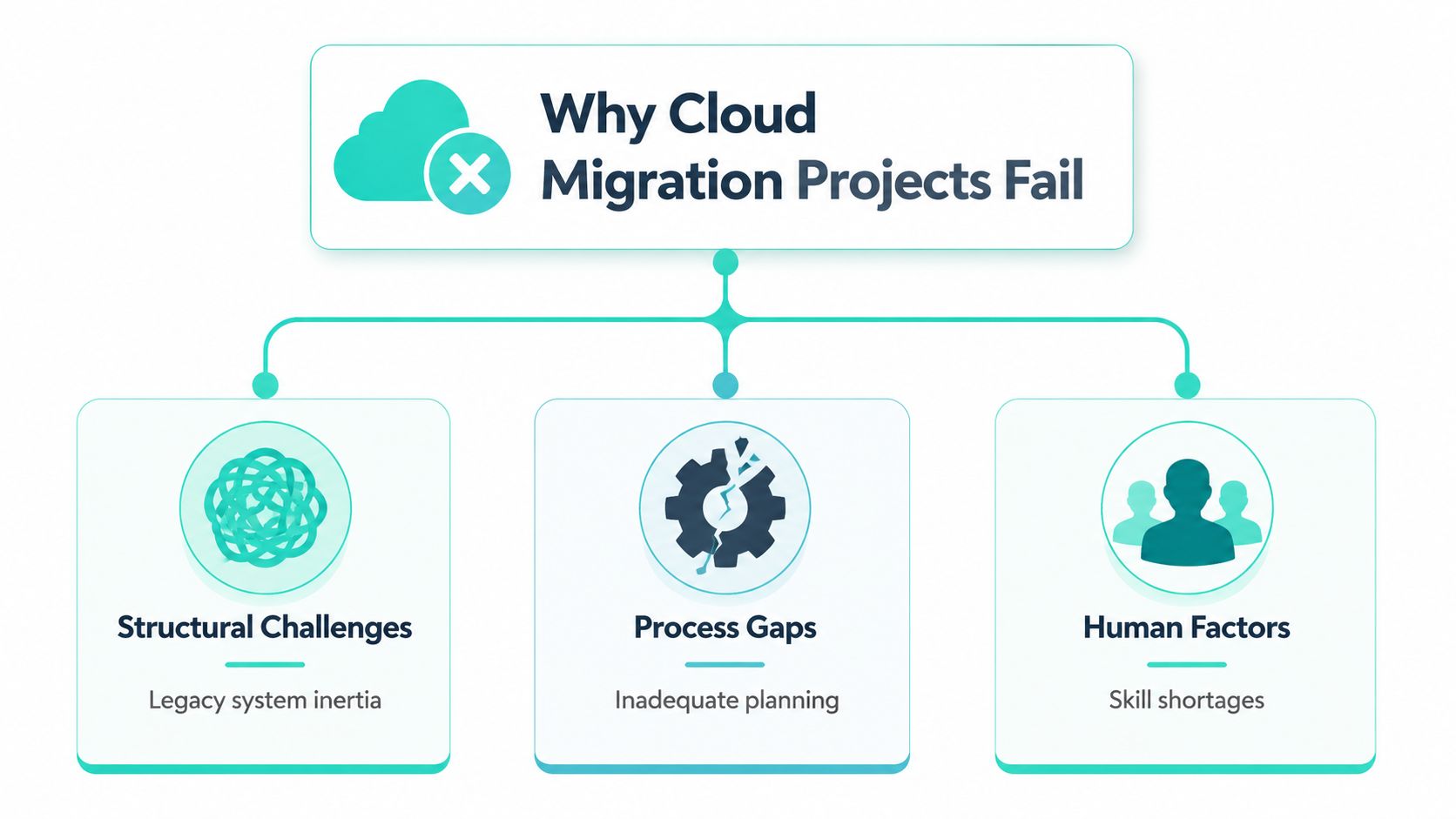
Why Cloud Migration Projects Fail More Often Than Expected
Cloud migration programs often fail at the operating-model level before infrastructure becomes the problem. A 2025 analysis reports that security is the primary concern for 46% of organizations, while 31% of migrations miss planned timelines and legacy application complexity remains the leading cause (Soocial's cloud migration failure analysis). Earlier industry reporting, citing Unisys, found that one in three cloud migrations failed because organizations had not made cloud adoption part of their core business strategy (DuploCloud's cloud migration statistics).
For Sitecore and SharePoint estates, the risk sits in dependencies that rarely appear in a server inventory. Content models, publishing workflows, identity claims, search indexes, personalization rules, analytics tags, translation services, APIs, and support ownership all affect whether the migrated service works. Long-term efficiency and short-term delivery risk often coexist in migration programs.
A widely cited 2023 signal found that 69% of IT leaders experienced budget overruns, 50% named spend management as their top migration challenge, 38% struggled with integration, 30% reported security problems, and 20% faced unforeseen costs (DuploCloud's cloud migration statistics). The same source places average cloud migration savings at 20–30%. Those savings depend on controlling scope, retiring obsolete components, and assigning owners for the services that remain.
The difference between relocation and transformation
A basic infrastructure move checks compute, storage, network paths, and operating-system compatibility. A Sitecore or SharePoint migration must also preserve editorial workflows, publishing topology, identity providers, search behavior, analytics, localization, accessibility, deployment pipelines, and business ownership. These relationships determine whether the platform delivers a usable service.
Technical completion therefore provides only part of the acceptance test. Editors may be unable to publish, marketers may lose audience context, employees may struggle to find policies, and support teams may inherit an environment they cannot operate. The workload has moved, but the business capability has not.
Nutmeg Technologies' guide to migrating to the cloud offers a broad business and technology starting point before platform-specific planning. Delivery teams should then document decision rights, owners, dependencies, rollback conditions, and acceptance criteria before selecting migration tooling.
Practical rule: If the migration plan lists servers but not business capabilities, it is an infrastructure schedule, not a transformation plan.
Review organizational failure patterns early, including the assumptions and escalation gaps examined in this analysis of the failure of a project. The goal is to expose unclear ownership and weak decision paths before a production wave depends on them.
Hidden Dependencies and Integration Complexity
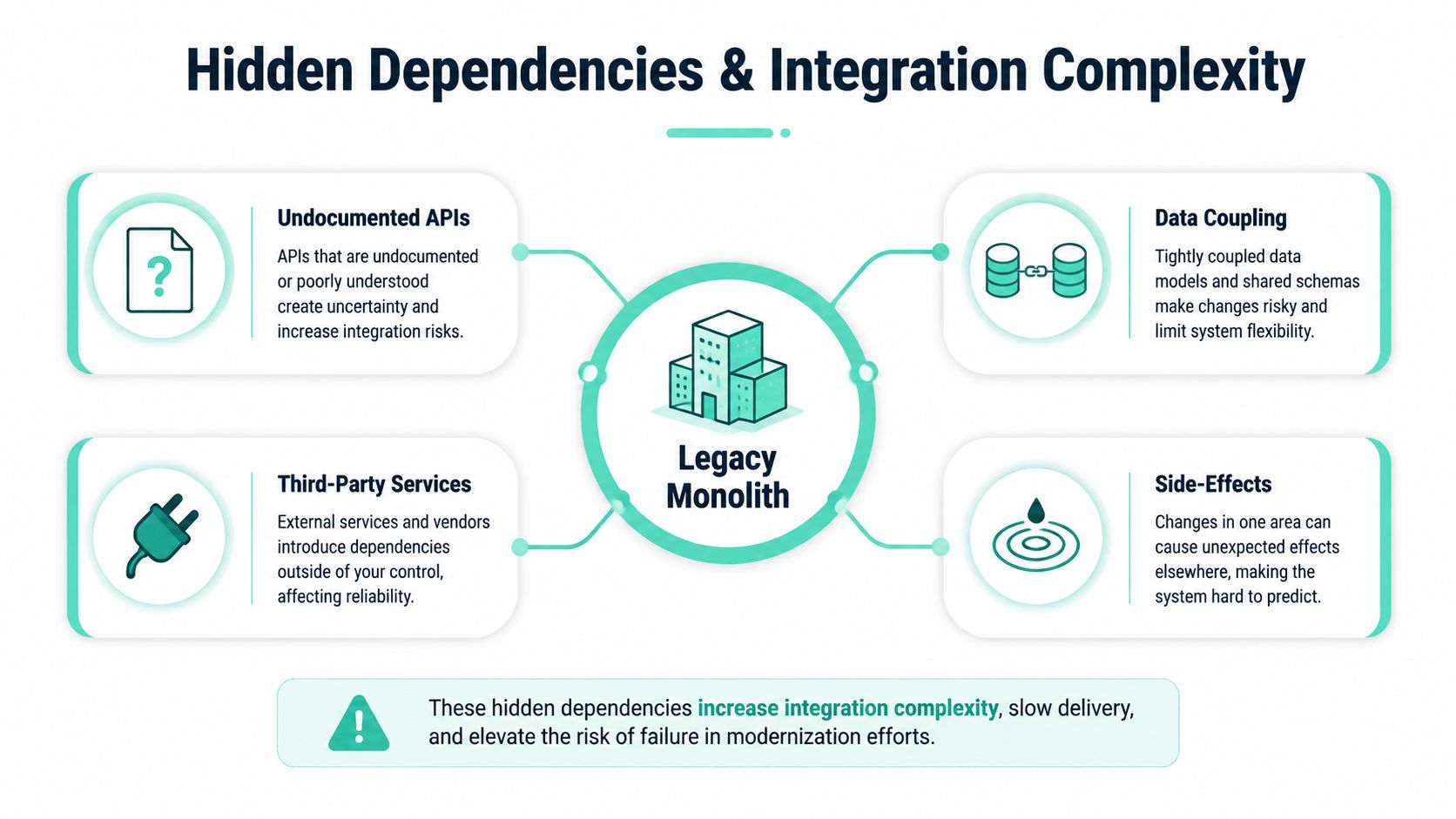
Dependency discovery and feasibility assessment remain among the hardest migration problems across organizations, as discussed in SoftoBiz's analysis of cloud migration challenges. Enterprise architects see the same pattern repeatedly. Teams identify the headline systems, then discover late in the program that the CMS depends on identity services, search, DAM, analytics, commerce, translation, and internal APIs in ways no single owner documented.
A Sitecore estate can include multi-site definitions, shared templates, serialized items, custom pipelines, personalization data, xConnect dependencies, scheduled jobs, and integrations created by different teams over time. A SharePoint intranet can conceal equally important relationships in permissions, Microsoft Graph calls, SPFx components, Power Automate flows, Teams links, employee directories, and departmental ownership rules. These connections often determine whether a migration wave is viable.
Build the map before choosing the wave
A dependency map should function as a delivery control, not a static architecture poster. Record what calls what, which system owns each data object, which identity context crosses each boundary, and what fails when a service becomes unavailable. Separate findings into four categories:
- Runtime dependencies: APIs, databases, queues, search services, and authentication flows required for a page or intranet feature to work.
- Content dependencies: Shared media, taxonomy, reusable components, language variants, and references between content items.
- Operational dependencies: Deployment jobs, scheduled tasks, cache invalidation, monitoring, backups, and support ownership.
- Business dependencies: Campaign approvals, legal review, employee communications, reporting, and downstream processes.
Use the map to design migration waves. Group applications by coupling and business capability, rather than by whichever team is available first. A low-risk content site can be a useful pilot, yet it may provide little evidence if it uses a different identity model and publishing path from the critical sites that follow.
Validate coexistence, not just cutover
Parallel-run planning often receives too little attention. During coexistence, editors may update both systems, search indexes may diverge, and integrations may reference different versions of a record. Define reconciliation rules, assign defect ownership, and specify the authoritative platform for each data class before the first synchronized run.
The dependency management guidance for Sitecore projects provides useful context for turning discovery into an active delivery discipline. The harder challenge lies in proving that every important connection still behaves correctly after the migration. A successful cutover therefore requires integration tests, failure scenarios, and an owner who can approve each dependency, not merely a completed platform transfer.
Sitecore XM Cloud Migration Challenges and Mitigation
Moving from Sitecore XP or a monolithic CMS to Sitecore XM Cloud changes more than hosting. It changes the delivery model, front-end architecture, deployment responsibilities, content structure, and the way teams think about marketing capabilities. Sitecore's newer platform direction also matters. Sitecore announced SitecoreAI as a consolidated, AI-first DXP combining XM Cloud, Sitecore Search, Sitecore Personalize, Customer Data Platform, Content Hub, and Agentic Studio (Addact's overview of SitecoreAI).
Audit the existing Sitecore estate
Start with an inventory that developers, marketers, and operations can all use. Record templates, renderings, placeholders, pipelines, scheduled jobs, roles, languages, sites, integrations, analytics dependencies, and content ownership. For XP estates, identify which capabilities are used, which are merely installed, and which depend on historical data or custom implementations.
The headless transition deserves separate attention. A Next.js front end introduces new concerns around rendering, route resolution, layout data, caching, preview, personalization, and deployment. Helix principles can support a cleaner component architecture, but migration teams still need to inventory existing renderings and decide which components should be retained, consolidated, or redesigned.
Refactor content and plan the operating model
Content migration is an opportunity to correct an inherited model, not a reason to copy every item. Define a target taxonomy, field structure, media strategy, language relationship, URL policy, and ownership model before bulk transfer. A multi-brand hub-and-spoke design should identify what belongs in shared libraries and what must remain brand-specific.
Sitecore-managed SaaS also shifts responsibility. The team no longer manages every infrastructure layer, but it still owns content quality, integration behavior, security decisions, release coordination, and operational readiness. Plan CI/CD, environment promotion, secret handling, observability, and incident procedures alongside the content work.
Personalization needs a deliberate redesign. Historical XP implementations may depend on accumulated profiles, rules, or marketing automation journeys that don't translate directly into cloud-native capabilities. Document the business intent behind each journey, then map it to the appropriate combination of Sitecore Personalize, CDP, search, analytics, or external services.
For a structured platform decision, use this comparison of Sitecore XP and Sitecore XM Cloud. The right answer depends on capability usage, content complexity, front-end readiness, integration constraints, and the operating model the organization can support.
SharePoint Online Migration Challenges for Enterprise Intranets
SharePoint migrations often involve the organization's main unstructured content estate, not a small departmental repository. In an Office 365 governance survey, 47% of organizations said at least 60% of their unstructured content was stored in SharePoint repositories (AvePoint's Office 365 governance survey). That concentration makes classification, permissions, ownership, and retention central migration concerns.
The first mistake is treating every site, library, and document as migration-ready. Enterprise SharePoint environments accumulate obsolete content, duplicate files, broken links, inherited permissions, unclear owners, and workflows that nobody remembers approving. Moving that material unchanged transfers governance debt into SharePoint Online.
Rationalize before transferring
Create a content disposition model with business owners. Each item should have a clear destination, owner, sensitivity classification, retention expectation, and language requirement. Some content belongs in a modern site, some in a controlled library, some in a records process, and some shouldn't move.
Permissions require equal care. Replace broad inherited access with role-based groups where possible, document exceptions, and test access as real user personas. Identity transitions can expose problems that weren't visible on-premises, especially when groups, external collaboration, service accounts, and employee lifecycle processes don't align.
Rebuild the intranet experience
Classic customizations rarely deserve a direct copy. Review each web part and determine whether it should become an SPFx component, use a standard SharePoint feature, connect to Microsoft Graph, or be retired. Power Platform flows need their own inventory because they may depend on old URLs, list structures, service accounts, approval chains, or undocumented business rules.
Plan for coexistence when departments can't move together. Keep navigation, search behavior, announcements, and support ownership clear while sites transition. For bilingual intranets, define how language variants, navigation, metadata, and translation workflows will work in the target model. Accessibility also belongs in acceptance criteria. Test keyboard navigation, semantic structure, contrast, labels, and document accessibility rather than treating WCAG considerations as a visual polish phase.
A specialized SharePoint migration services model can help when internal teams need capacity for content assessment, SPFx redevelopment, Power Platform remediation, and post-cutover support. The delivery partner should work from your governance decisions, not use tooling as a substitute for them.
Comparing Migration Approaches Across Platforms
No single migration pattern fits every Sitecore or SharePoint estate. The choice should reflect business urgency, dependency density, content quality, team capability, and tolerance for parallel operations. A lift-and-shift approach can preserve familiar behavior, but it may also preserve the very coupling and governance debt that made the old platform expensive to change.
Migration Approach Decision Matrix
| Approach | Best For | Timeline | Risk Level | Skill Requirements |
|---|---|---|---|---|
| Lift-and-shift | Stable workloads with limited customization and well-understood dependencies | Usually shorter than modernization, though discovery still determines the schedule | Moderate when dependencies are documented, high when legacy coupling is unknown | Existing platform knowledge, cloud operations, testing discipline |
| Replatforming | Sitecore or SharePoint estates that need a supported cloud target while retaining selected business behavior | Medium, because content, integrations, and components need adaptation | Moderate to high, depending on redesign scope and coexistence needs | Platform migration, integration, identity, content modeling |
| Composable modernization | Organizations pursuing headless delivery, shared services, improved governance, and cloud-native experience capabilities | Longer planning and implementation path | High early design risk, lower long-term coupling when architecture is sound | Next.js or modern front-end delivery, APIs, CI/CD, data governance, product ownership |
| Hybrid transition | Enterprises with multiple brands, regions, or workloads that cannot move together | Variable, often extended by dependency sequencing | High coordination risk unless ownership and interfaces are explicit | Cross-platform architecture, release management, integration testing |
For Sitecore, replatforming can be appropriate when the existing content model is salvageable and the organization needs XM Cloud without redesigning every experience immediately. Composable modernization makes more sense when the team is ready to separate presentation, content, search, personalization, and data responsibilities. SharePoint programs often combine replatforming with selective redesign, retaining governed content while rebuilding custom intranet functionality with SPFx and Power Platform.
Score readiness before promising dates
Score readiness across three dimensions, using qualitative ratings such as low, medium, and high:
- Technical readiness: dependency visibility, API health, identity design, content quality, test automation, and target architecture.
- Organizational readiness: executive sponsorship, product ownership, editor availability, operational training, and decision speed.
- Governance readiness: security approvals, retention rules, accessibility criteria, release controls, and post-migration accountability.
A low score in any one dimension should change the approach or sequence. Teams often compensate for technical uncertainty with aggressive schedules, but no timeline fixes missing ownership or undocumented integration behavior.
How AI Capabilities Change the Migration Calculus
AI changes the migration conversation because modern DXP capabilities are increasingly embedded in the platform rather than bolted on as separate experiments. Sitecore's current positioning includes embedded AI workflows, brand-aware AI, generative copilots, and agentic automation across CMS, DAM, CDP, and content operations (CMSWire's reporting on Sitecore AI copilots and agentic workflows). An independent SitecoreAI scorecard describes an Essentials tier with a consolidated suite, unlimited AI, a Unified Data Layer, Conversion Optimization, Agentic Studio access, Marketer MCP, Agent API, and 20+ pre-built AI agents (DXP Scorecard's SitecoreAI assessment).
That packaging affects the business case. Delaying a platform move may avoid immediate delivery disruption, but it can also leave teams with fragmented content operations, disconnected search, and manual workflows while the target platform develops a more integrated operating model. Migration is no longer only a hosting decision. It's also a decision about whether the current content and data model can support governed automation.
Prepare the data before introducing agents
AI features need usable inputs. Before enabling copilots or agentic workflows, clean naming, taxonomy, metadata, content ownership, permissions, and brand rules. Separate authoritative content from drafts, define which sources agents may access, and establish review requirements for generated or transformed content.
For Sitecore estates, this means treating Content Hub, Search, CDP, Personalize, and XM Cloud as related capabilities rather than isolated products. A unified data layer is valuable only when teams agree on identity, consent, event quality, audience definitions, and data stewardship. Otherwise, automation accelerates inconsistent decisions.
Governance principle: An agent can automate an approved process, but it shouldn't be allowed to invent the process.
Evaluate AI readiness during migration discovery. Map high-value use cases such as content variant creation, metadata enrichment, internal search assistance, personalization recommendations, and campaign workflow support. Then classify each use case by data sensitivity, human approval requirement, auditability, and failure impact.
This approach changes sequencing. Some organizations should migrate content and governance first, then activate AI capabilities after quality controls are in place. Others may justify earlier adoption where a controlled workflow can reduce manual effort without exposing sensitive data. The right choice depends on business value and risk, not enthusiasm for the technology.
Governance Runbook and Testing Practices
A migration runbook should make failure visible before production. Governance isn't a committee meeting at the end of a wave. It's a set of decisions, evidence, owners, and gates that the delivery team uses every day.
Establish measurable wave controls
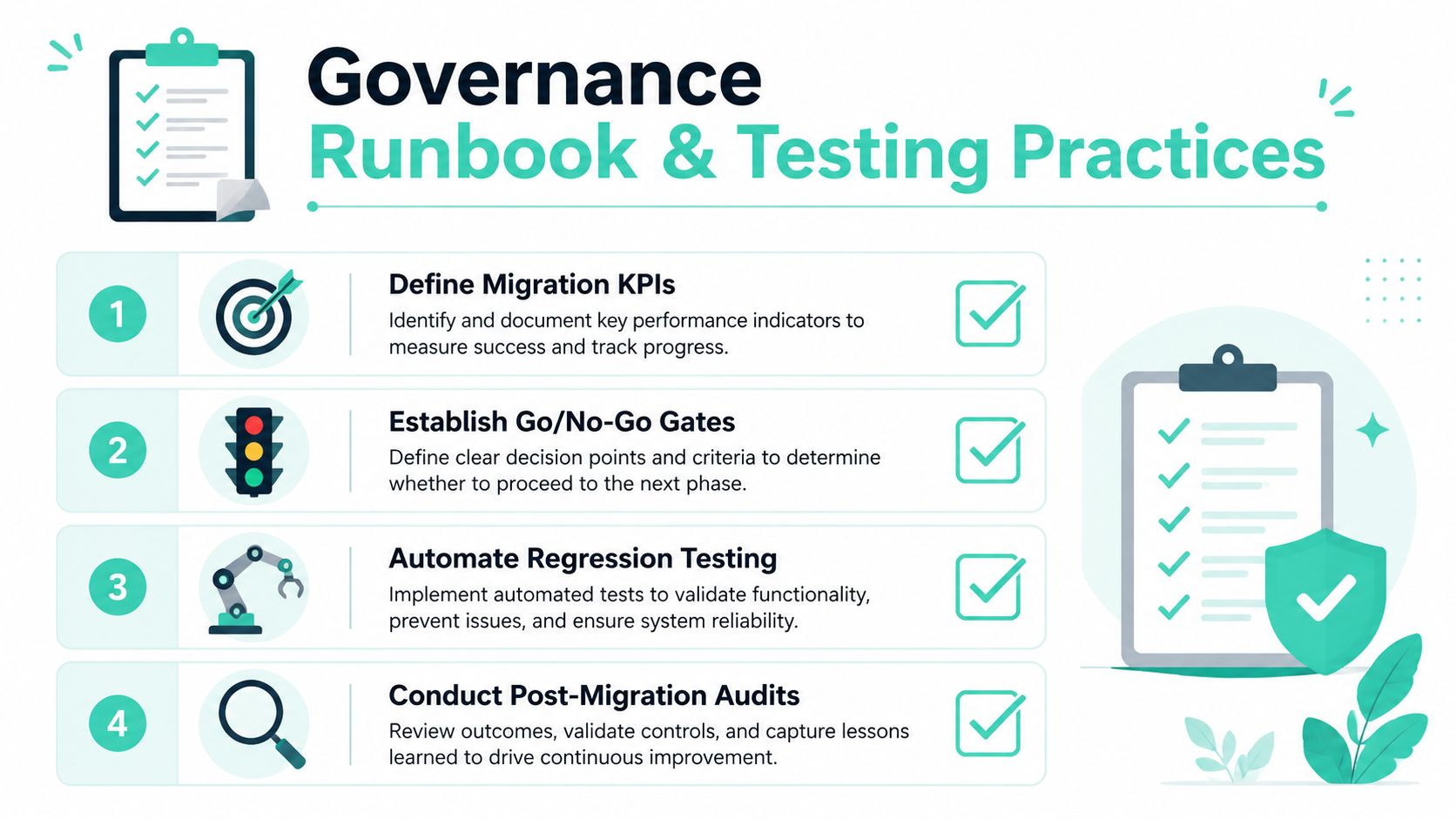
Track migration health at workload and business-capability level. Useful indicators include dependency-map completion, content validation status, failed integration tests, unresolved security findings, accessibility defects, search relevance issues, publishing failures, rollback readiness, and forecast-versus-actual spend. The exact threshold should be agreed before the wave begins.
A practical gate sequence looks like this:
- Discovery gate: Owners confirm the application inventory, dependency map, data classification, integration list, and migration disposition.
- Build gate: The target architecture, content model, identity flows, component inventory, and deployment pipeline pass review.
- Rehearsal gate: The team completes a representative migration rehearsal, validates performance, records defects, and confirms rollback ownership.
- Go or no-go gate: Business, security, operations, and product owners approve cutover using documented evidence.
- Stabilization gate: Monitoring shows acceptable behavior, support teams have handled real incidents, and remaining defects have owners and deadlines.
Test the conditions that cause failure
Don't benchmark only in an ideal environment. The technical study of VM migration performance shows that migration duration and downtime can vary sharply as VM size grows, while lower dirty-page rates and higher available bandwidth reduce migration duration and post-migration overhead (the VM migration performance benchmark. Profile realistic bandwidth, latency, workload activity, cache behavior, search indexing, and content publishing patterns.
Automate regression coverage for Sitecore routes, rendering data, personalization behavior, search, forms, analytics events, and localization. For SharePoint, test permissions, navigation, SPFx components, Graph integrations, Power Platform flows, document previews, and language variants. Execute rollback rehearsals, not just rollback documentation.
The following video can help teams frame testing and governance discussions before formalizing their runbook:
Post-migration audits should verify cost ownership, access reviews, backup behavior, monitoring coverage, content governance, and operational handoffs. The migration ends only when the target platform can be run safely by the people who inherit it.
Your Prioritized Migration Action Plan
Start with discovery, not tooling. Build an application and integration dependency map, identify authoritative data sources, classify content, and assign business owners. For Sitecore, audit templates, renderings, personalization, analytics, integrations, and front-end readiness. For SharePoint, review sites, libraries, permissions, SPFx components, Power Platform flows, language variants, and accessibility requirements.
Next, select a migration pattern that matches readiness. Create waves by coupling and business capability, fund parallel validation, and define go or no-go criteria before the first production move. Prepare the operating model at the same time, including monitoring, incident ownership, security evidence, cost accountability, and rollback procedures.
Then make AI readiness part of platform design. Clean metadata and taxonomy, establish brand and approval rules, and decide which SitecoreAI workflows can be introduced safely after the content foundation is reliable. For broader engineering guidance, these cloud migration insights from TekRecruiter provide useful context for planning disciplined cloud programs.
Bring in specialized capacity when dependency discovery, Sitecore architecture, SharePoint redevelopment, or test automation exceeds the internal team's bandwidth. That's cheaper than discovering the gap during cutover.
Kogifi helps enterprise teams audit, replatform, and modernize Sitecore XM Cloud and SharePoint Online estates, including dependency mapping, headless delivery, SPFx redevelopment, governance, testing, and post-migration support. Visit Kogifi to discuss a migration plan built around your actual integrations, content model, and operating capacity.