



Read enough guides on how to remove bad search results and the advice converges: file a request with Google, wait, check the query again. That's the last resort dressed up as a first step. It fails more often than it works, takes months to find out, and leaves the damaging page exactly where it was.
Removal is not deletion. A delisting changes what one search engine shows for one name-based query. The article, the recall notice, the PDF, the cached copy and the data broker record all stay online, still crawlable, often still ranking under a variation of the phrase you were watching. Every tool in this space, Google's included, works on visibility rather than the source.
So the first question isn't which form to submit. It's who owns the page the problem lives on. That answer decides whether you're editing a Sitecore component, emailing a webmaster, filing a policy request, or spending a year on suppression.
Table of Contents
- Triage Bad Results by Where the Problem Lives
- Remove the Page at Its Source First
- Request Removals in Google and Bing
- Apply Site-Level Fixes Without Breaking Indexing
- Suppress Results with Owned Content and Authority Pages
- Measure Whether Results Are Really Gone
- Set Ownership and a Monitoring Routine
Triage Bad Results by Where the Problem Lives
Every bad result belongs to one of three places: a page you control, a copy of a page someone else controls, or a result that's accurate and unflattering. The remedy follows from that, not from which search engine is involved. Sort the case before you sort the fix, because the most expensive mistake here is spending legal budget on a page that needed an editor.
Capture the record before anything moves. You'll need it for every route, and you can't reconstruct it later:
- The exact query, market and device. A result that ranks on desktop in Germany can be invisible on mobile in the US, and the fix differs by market.
- Two URLs. The ranking URL and the canonical page URL are often different, especially with tracking parameters or an AMP variant in play.
- Dated screenshots. Full page, date visible. Publishers edit, and your proof disappears with the edit.
- The publication date. Age changes the remedy. An outdated page qualifies for a refresh request; a fresh allegation doesn't.
- One classification. Inaccurate, defamatory, private, unlawful, or merely unfavorable. Only some of those doors open to a search engine.
The five cases below cover most of what enterprise teams face.
| Problem | Where it lives | First move |
|---|---|---|
| Inaccurate or outdated page you control | Your own CMS or site | Correct or delete the page, then request a refresh |
| Inaccurate page on a third-party site | The publisher's domain | Contact the webmaster for a correction or removal |
| Personal data such as phone, address or ID | Third-party site or data broker | Publisher request, then Google personal information removal |
| Copyright or other legal violation | Third-party site or copies | DMCA or legal removal request |
| Accurate but unfavorable coverage | Reputable news or public record | Suppress with owned content; removal rarely qualifies |
Search engines mirror public pages. An accurate but embarrassing article usually stays unless its publisher changes it, and a request asking Google to hide a correct fact is a request that gets refused.
Say a supplier's 2019 recall notice still ranks on page one for the brand name months after the recall closed and the product was reissued. Nothing in the notice is false, so a legal letter has no target. The publisher needs to add the closure date, and then the stale snippet needs a recrawl request. That's two weeks of work against a year of correspondence.
Rule of thumb: if the source is yours, fix it first. If it belongs to someone else, start with the publisher. Search tools come third, and only once you know exactly which URL you want hidden.
If you're unsure which URLs are live, stale, duplicated or orphaned across markets, an enterprise SEO audit gives you the inventory before you file anything.
Remove the Page at Its Source First
Publishers change pages for people who make the change easy. A one-page note with the URL, the exact sentence, the supporting document and a clear request gets answered far more often than a letter that threatens litigation and gives the editor a reason to stop replying.
The job comes down to two moves: document what's there, then find the person who can change it.
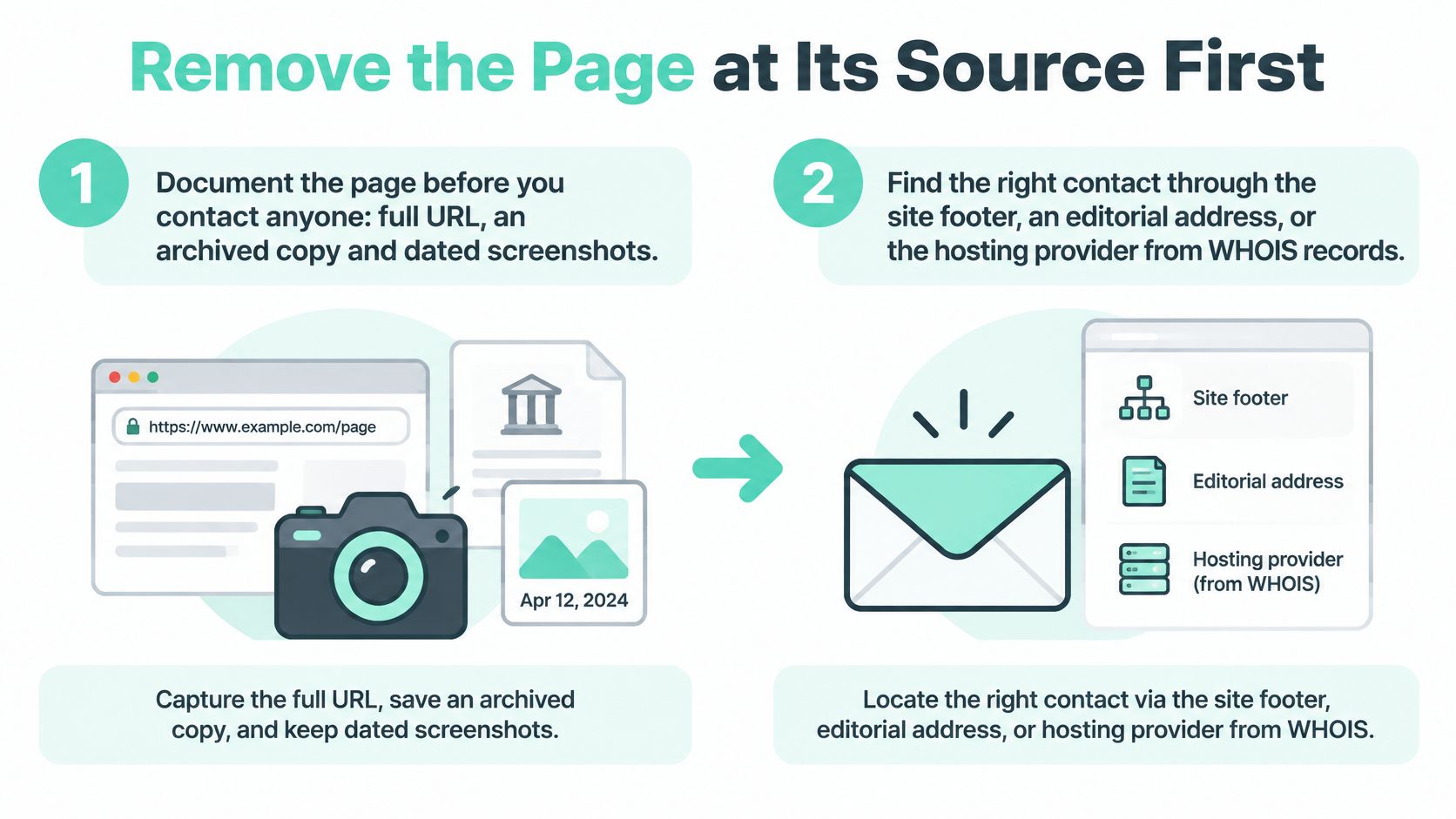
- Archive the page. Save the full URL, a Wayback Machine copy and dated screenshots of the whole page, including headline, byline and timestamp. If the page changes mid-negotiation, that archive is the only proof of what it said.
- Find the decision maker. The footer, a corrections policy page, an editorial address, or a WHOIS lookup that surfaces the host or the agency running the site. Send it to a named editor when you can find one. A generic contact form is where requests go to be ignored.
- Write a request you'd answer yourself. One page or less: the URL, the sentence quoted exactly, the evidence attached (closure notice, court dismissal, corrected figure), and the outcome you want. Correction, update, anonymization or removal, in that order of preference. Ask for a reply date rather than a consequence.
- Offer the smallest fix that solves your problem. A publisher who won't delete an article will often add an update note, drop a name or correct a date. Take the smaller change. It removes the damage from results just as effectively and gets agreed to far more often.
- Escalate by case type, not by volume. Copyright goes to the host as a DMCA notice. Defamation or privacy goes to counsel with a specific legal claim. Neither helps against an accurate article. Volume is a warning about precision: Google received 3.5 billion copyright-related search-result removal requests in 2024, according to Transparency Report data reported by Gigazine, and a notice naming the wrong URL disappears into that pile.
- Confirm the change, then request a recrawl. Check the live page, not your inbox, then submit the URL in Google Search Console's Removals tool so the stale snippet drops. Google's removal FAQ is blunt about the order: request correction or deletion from the originating publisher first, because the search engine generally can't remove the source itself.
The Sitecore AI check that catches most stale pages
When the page lives in Sitecore, the correction isn't finished at save. Confirm the item is published rather than sitting in the authoring database, and that it has reached Experience Edge, the publishing target that serves XM, SitecoreAI, Content Hub and Content Hub One. Then load the live URL and read it.
On a hybrid-headless build, corrected content can be live in the CMS and still missing from the rendered page because a JSS Next.js or Angular front end built with the Sitecore Cloud SDK hasn't been rebuilt or revalidated. Publishing, rebuilding the front end and clearing the cache are three separate steps. File a recrawl request before the third one and you lock the old text into the index for another cycle.
Two mistakes account for most failed outreach. Threatening emails make publishers dig in, and demanding deletion of accurate material wastes the goodwill you'll need for the next request.
Request Removals in Google and Bing
Every removal tool shares one ceiling. Search Console Removals, the personal information request, DMCA and legal removals, and Bing Webmaster Tools content removal change what appears in results. None of them touch the underlying page.
The framework most markets now work from started with the Court of Justice of the European Union's May 13, 2014 ruling in Google Spain SL, Google Inc. v. Agencia Española de Protección de Datos, which let individuals ask search engines to delist links returned for their names when information is inadequate, irrelevant, no longer relevant or excessive, weighed against public interest. Google opened its European request process on May 29, 2014. By the latest figures in Google's transparency database, it had received 2,218,678 requests covering 8,544,810 URLs, delisting 4,045,040 URLs and declining 3,412,381. Selective is the right word.
That's one slice of a much larger intake. As of November 2024, Google had received more than 10.1 billion requests to remove URLs from search results, according to Transparency Report data reported by Gigazine.
| Case | Tool | Scope | Limit |
|---|---|---|---|
| Outdated page already updated at source | Google Search Console Removals | URL and cached snippet | Temporary, about six months, until the source change is recrawled |
| Personal data under policy eligibility | Google personal information removal request | Specific URLs for a named person | Each URL reviewed individually; reputational harm alone is not enough |
| Copyright infringement | Google DMCA removal request | Infringing URLs | Requires a valid copyright claim |
| Outdated or harmful content in Bing | Bing Webmaster Tools content removal | Specific URLs | Eligibility rules differ from Google; check before filing |
The personal information route asks for each affected URL, evidence linking the requester to the record, and the concrete risk. Eligible categories include phone numbers, home addresses, email addresses, government identifiers, financial credentials, medical records, doxxing and intimate imagery.
Practical rule: file one URL per line item. A single submission with mixed outcomes is hard to read, harder to appeal, and tells you nothing about which argument worked.
Treat a refusal as information. It usually means the source is still live and still defensible, so go back to the publisher or move to suppression.
Apply Site-Level Fixes Without Breaking Indexing
Site-level controls stop a fixed problem from coming back. They're also the fastest way to pull an entire section of a site out of search by accident, which is why the control table matters more than the confidence of whoever is editing the template.
| Control | Right use | Common mistake |
|---|---|---|
| noindex meta robots or X-Robots-Tag | Keeps a live page out of results | Using robots.txt instead, which blocks crawling but not indexing |
| 410 Gone | Retired URL with no successor page | Redirecting everything to the homepage |
| Canonical tag | Duplicates, mirrors and parameter versions | Canonicalizing to a page that is itself noindexed or redirected |
| robots.txt disallow | Stops crawling of paths you do not want fetched | Expecting it to remove URLs that are already indexed |
The sequence below is the one I'd hand an editor.
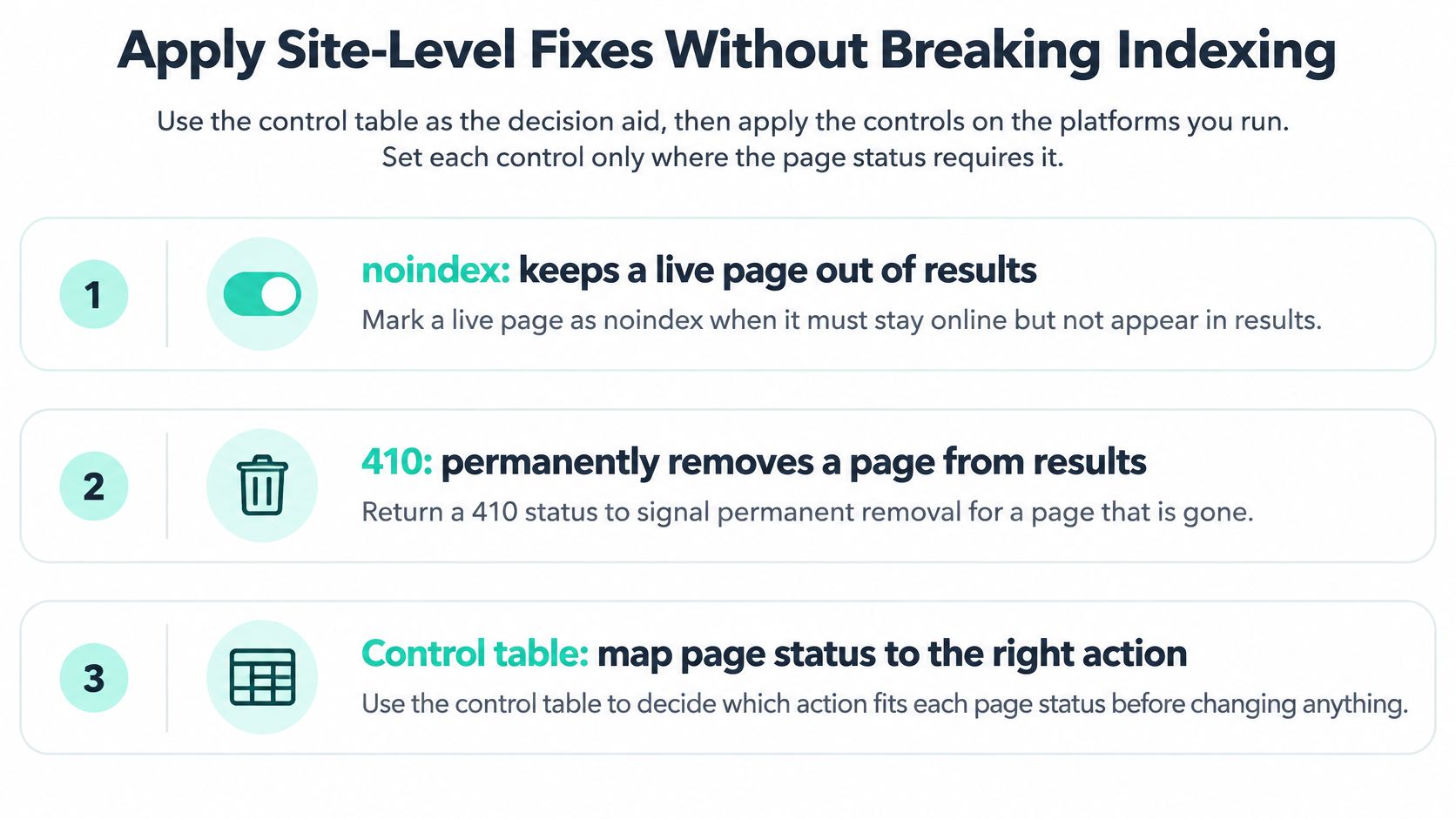
Set directives at the template, not the page
On SitecoreAI, put robots directives and canonical fields on the component and page templates so an editor can't ship a page with the field left blank. The platform's capability model runs across experience design and delivery, audience and insights, personalization, experimentation, search and optimization (SitecoreAI documentation), and that breadth creates a specific trap: the audience layer can unify visitor data, resolve identities and build reusable audiences, which means a page you've retired from search can still be delivered to a known segment. Turn the page off, not just its visibility.
On multisite setups, check noindex and canonical settings per brand. Templates clone, and one brand's directive becomes another brand's problem. Confirm that the page-level fields are published with the page, not only saved in authoring.
What the SharePoint estate needs
On a SharePoint intranet, the equivalent failure is a withdrawn policy still surfacing in an answer because it sits in a stale library. Microsoft separates what a Microsoft 365 Copilot license covers, such as asking questions across files, pages, lists and libraries, editing pages and lists, simple rules and approvals, and Autofill metadata, from what consumes Copilot Credits, which includes large or unbounded content sets, site creation, large-scale editing and scheduled multistep AI workflows (Microsoft's SharePoint guidance).
Scope matters twice there. An unbounded content set is both a credit cost and a route for retired documents to reach answers. Exclude archive libraries from the search scope, pin the current policy page to the top, and expect daily service-protection limits to suspend features once someone hits a ceiling.
Build the directive once and reuse it. How to implement search engine optimization covers the technical layer in more depth.
Suppress Results with Owned Content and Authority Pages
Suppression is the honest answer when removal isn't available, but be clear about what it does. The damaging page stays live at its source, and nothing you publish changes that. What owned publishing changes is which result earns the click on page one. It is slow work measured in months, it fails without consistent output, and it belongs after the source work, never instead of it.
Suppression doesn't remove anything. It buys you the first page while the source work continues.
- Audit what already ranks. List every owned property appearing for the name, the name plus scandal, the name plus review, and the obvious variants. You're building on positions you already hold, not starting from zero.
- Publish substantive pages. A leadership bio, a company history, case studies, and a dated statement of the facts. Each one has to be worth reading on its own merits, because thin name-stuffed pages create policy risk and can make the situation worse.
- Claim the profiles the name already ranks on. A Google Business Profile, professional networks, industry directories. Completion beats creation here.
- Earn third-party coverage. Press releases, conference speaking pages, partner announcements. Third-party pages carry more weight than anything you host yourself.
AI-assisted publishing inside your CMS compresses the production side of this work. Used well, it sustains a cadence of accurate owned pages without doubling the content team. Used badly, it mass-produces the exact thin content that search systems exist to discount.
Set the timeline expectation before the first publish. Expect a year, not a quarter. Page-one results for an established name typically need a year or more of steady owned publishing and profile work before they shift, and the original article stays live the entire time. For multi-country brands, localized pages on a multisite Sitecore estate carry that work into each market, reviewed against that market's results.
Mark the factual pages up properly with schema markup for SEO so the statement of facts, the leadership page and the case studies are machine-readable.
Measure Whether Results Are Really Gone
Request-level success rates flatter everyone. Between May 2014 and March 2015, Google received 218,320 European requests, and 101,461 produced at least one successful delisting, about 46.5%, according to The Verge's report on Google's transparency figures. Measured by URL, the picture tightens: by May 2015 Google had evaluated 925,586 URLs submitted through 255,143 requests and declined 58.7% of them, implying roughly 41.3% were removed.
Same programme, two different numbers, because one request can carry several links with completely different facts attached. That gap is why a single removal rate in a board report tells nobody anything.
| Metric | How to measure | Why it matters |
|---|---|---|
| Confirmed delistings | URLs removed per tool, logged by reference number | Shows what the search tools actually changed |
| Publisher corrections | Source pages changed, checked against the live URL | Shows the source was fixed, the only fix that lasts |
| Stale-cache removals | Snippets compared with the live page after recrawl | Shows outdated text has left results |
| Ranking displacement | Position of the target query each week over a fixed window | Shows whether owned content is pushing the result down |
| Reappearance | New matching URLs found each month across search and image results | Shows whether the problem is returning |
Count each one concretely. Log URLs by reference number per tool. Compare the live page against the cached snippet after a recrawl. Record the target query's position weekly over a fixed window rather than whenever someone remembers. Sweep for new matching URLs monthly, including image results and name variants.
Don't count it: a delisting isn't a win if the same page still ranks under a name variant or a related query.
Report one line per intervention: what you did, what moved, which metric, and the date. Leadership can scan twenty of those in a minute, and you can defend every one of them.
Set Ownership and a Monitoring Routine
Exposed data doesn't stay put. It reappears on legitimate sites, on data brokers, in cached results, in image indexes and on copied pages, often simultaneously. Search Engine Land's 2026 guide reports that Google's expanded "Results about you" function covers phone numbers, email and home addresses, government-issued IDs, financial and medical information and non-consensual explicit imagery, including AI-generated deepfakes, and can monitor for new matching results and notify users (Search Engine Land). Monitoring, not a one-off form, is the baseline.
Assign an owner per incident class before you need one. Communications owns reputational damage. Legal owns defamation and copyright. IT or security owns exposed personal data. One named lead keeps the evidence log so nobody re-argues what was already decided.
Classify incidents by harm: doxxing, identity theft risk, employee safety, regulatory exposure, or reputational impact. The label sets the timeline.
Decision rule: if the source is yours and fixable, act within a week. If personal data or a legal claim is involved, escalate to counsel the same day.
Run the routine monthly. Check brand and executive names in search and image results, review monitoring alerts where they apply, and re-verify every URL you previously resolved. For the search side, a set of AI search monitoring tools extends coverage beyond the classic results page, which matters now that generated summaries answer brand queries.
Keep one caveat in view. AI-generated or false content can qualify for removal in some of Google's pathways, but removing the search result doesn't establish that the source is false and doesn't stop reposting. Build for reappearance, not permanent erasure, and set the routine inside a wider content governance framework so publishing standards prevent the next incident.
When a corrected page never reaches production, the platform is the problem. Kogifi does that recovery work on Sitecore AI and SharePoint estates, and its bugfixing and recovery results include a 150% ROI boost.
Kogifi builds and maintains the enterprise platforms this work depends on, from Sitecore XM Cloud and SitecoreAI implementations to SharePoint intranets, so a correction reaches the live page and the index instead of stalling in an authoring environment. If your removal case keeps resetting because the source page won't publish cleanly, or your multisite estate can't keep noindex and canonical rules straight per brand, bring us the technical side. Visit Kogifi to talk through the platform work while your team keeps ownership of the decisions.