


Missing form labels appeared on 48.2% of the home pages analyzed in WebAIM's 2025 Million report. That's not an ecommerce conversion benchmark, but it exposes a delivery-quality problem every commerce leader should recognize: customers can't reliably complete a journey when the interface doesn't explain what to enter.
Improving ecommerce customer experience means treating those failures as business controls. For an enterprise Sitecore estate, the priorities are measurable checkout friction, bounded AI decision-making, and accessible components that remain usable after personalization. SharePoint then supports the service operation with governed knowledge, rather than becoming another uncontrolled answer source.
Table of Contents
- What Ecommerce Customer Experience Covers and How to Measure It
- Where Customer Friction Turns Into Lost Revenue
- How to Instrument Checkout Friction Step by Step
- Composable Architecture for Sitecore Customer Experiences
- Deciding Which AI Tasks Run Alone and Which Need People
- Building Accessible Personalization for Global Shoppers
- Search, Performance and Localization Guardrails
- Start With a Checkout and Accessibility Audit
What Ecommerce Customer Experience Covers and How to Measure It
Ecommerce customer experience is the sum of every interaction a shopper has with a brand, from search and product discovery through checkout, delivery, returns, and support, judged by whether each step is easy, trustworthy, and fast. It's a business discipline because marketing, engineering, commerce operations, and service teams jointly determine the outcome.
A polished storefront can still produce a poor experience if payment authorization fails, delivery promises are unclear, or service agents can't explain a refund. Measure the whole journey, not just the screens your digital team owns.
Core Ecommerce Customer Experience KPIs and Reference Values
The references below are diagnostic context, not universal targets. Cart abandonment also needs a precise denominator: the industry benchmark concerns carts, whereas checkout abandonment concerns customers who enter checkout.
| Metric | What It Shows | Benchmark |
|---|---|---|
| Cart abandonment rate | Share of started checkouts not completed, tracked separately from abandoned carts | About 70% average online cart abandonment, Baymard |
| Checkout form elements | Visible fields and controls on a default checkout | 23.48 average in the US; 12 to 14 in optimized flows, Baymard |
| Serious online complaint rate | Consumers reporting a serious problem in the past 12 months | 26% online vs 16% offline, EU |
| Customer satisfaction (CSAT) | Post-purchase satisfaction score | Set by the team using a consistent survey and response scale |
| First-contact resolution | Support issues solved on the first contact | Set by the team by issue category, excluding reopened cases |
| Search-to-add-to-cart rate | Share of searches leading to an add to cart | Set by the team by query intent and product category |
The European Commission's 2025 Consumer Conditions Scoreboard reports serious problems among 26% of online purchasers versus 16% of offline purchasers, a ten-percentage-point gap, making online purchasers about 60% more likely to report a problem serious enough to justify a complaint. It also reports that 93% of online shoppers expressed concerns about targeted advertising, reinforcing why consent belongs in the CX scorecard.
Establish an Owned Baseline
Choose three KPIs per journey stage and record them for four weeks before changing the experience. These are practical operating choices, not industry benchmarks. Assign one owner per metric, including responsibility for its definition, instrumentation, and response when performance deteriorates.
For discovery, combine search success, search-to-add-to-cart, and product engagement. For purchasing, use checkout completion, payment success, and contribution margin; for service, combine satisfaction, resolution, and repeat contact.
Use a shared customer engagement metrics framework to keep definitions consistent across marketing and engineering. Otherwise, a campaign team can report success while commerce operations absorbs more failed orders.
Where Customer Friction Turns Into Lost Revenue
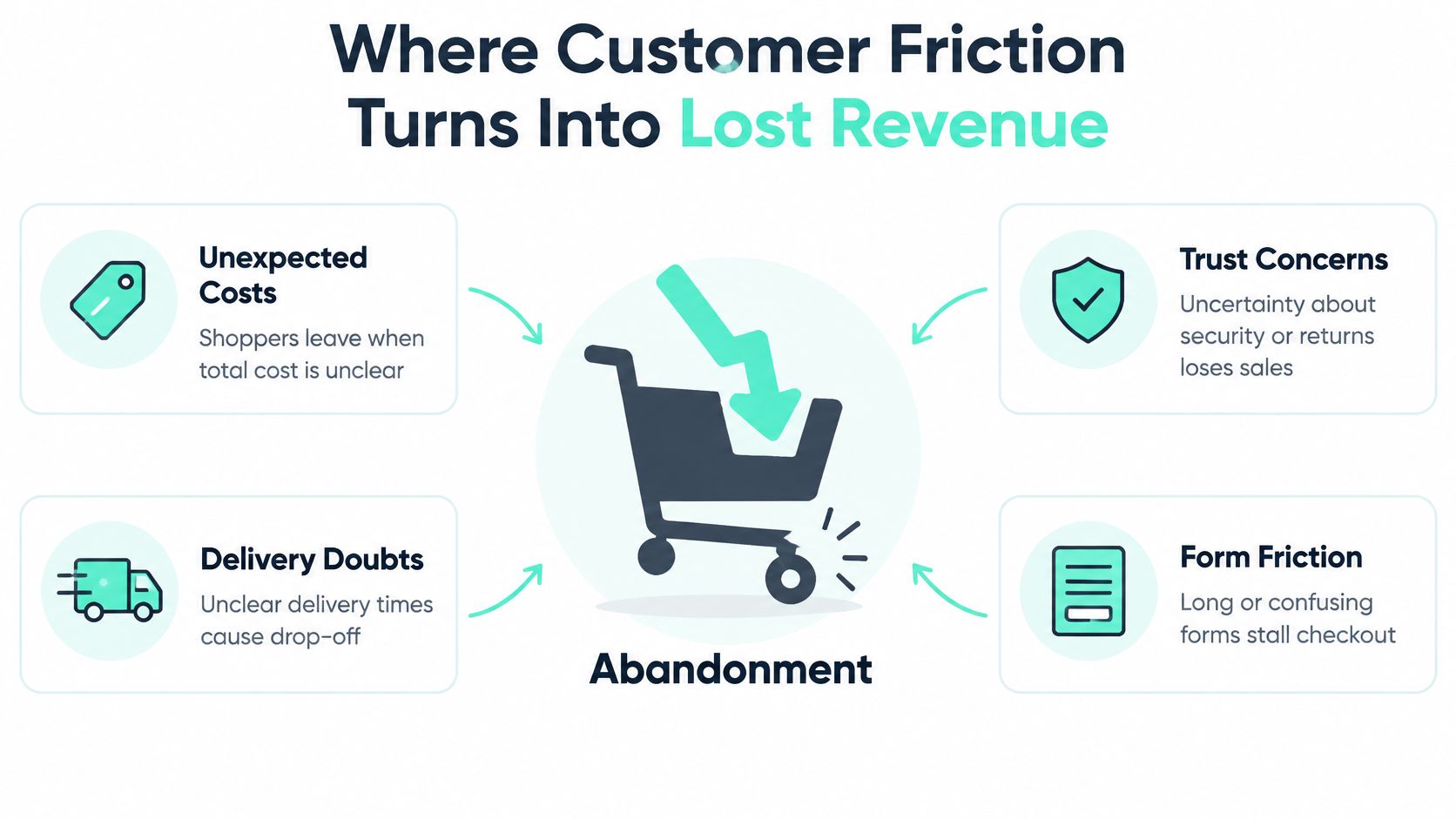
Average online cart abandonment is roughly 70%, but 42% of US shoppers said they'd abandoned because they were browsing or weren't ready to buy, according to Baymard's cart-abandonment analysis. Don't count every abandoned cart as recoverable revenue.
The influenceable reasons in the same analysis include extra costs, slow delivery, distrust of payment security, and forced registration. Treat these as distinct failure modes, not a single abandonment problem.
Abandonment Reasons and the Fix for Each
The Baymard rows describe reported reasons, not mutually exclusive slices of a single population.
| Reason | Share | Action |
|---|---|---|
| Browsing or not ready to buy | 42% of US shoppers | Tag stated browsing intent as non-loss in analytics |
| Extra costs such as shipping, taxes or fees | 40% | Show total landed cost on the product page |
| Slow delivery | 20% | Publish delivery dates before checkout |
| Distrust of card information | 19% | Show credible security signals at the point of payment |
| Forced account creation | 18% | Offer guest checkout |
| Preferred payment method unavailable | 61% would abandon the basket, DHL 2024 | Show accepted payment methods before checkout |
The payment finding comes from DHL eCommerce's 2024 survey of 12,000 shoppers across 24 countries, in which 61% of global online shoppers said they would abandon their basket if their preferred payment method was unavailable, as reported in its 2024 ecommerce trends report.
These friction points need different remedies.
Separate Intent From Failure
Use optional exit surveys and consent-aware session tags to distinguish browsing, delivery rejection, payment failure, and account friction. Don't infer a shopper's motivation from an exit event alone.
Show the landed cost when the destination is known; otherwise, provide an explicit estimate and explain what's missing. Publish delivery dates rather than vague shipping speeds, and display accepted payment methods before customers invest effort in the form.
For WooCommerce-specific diagnostics, Robosize's guide can help teams measure and reduce cart drop-off. Enterprise teams should connect that work to a broader cart-abandonment reduction plan.
Sequencing rule: Fix influenceable exits first. Scope sprint-sized changes around costs, delivery clarity, and account requirements rather than promising to recover every abandoned cart.
How to Instrument Checkout Friction Step by Step
Checkout telemetry must explain which interaction failed, not merely where a session ended. Baymard reports that 65% of benchmarked sites perform at a mediocre or worse checkout level, with an average US checkout displaying 23.48 form elements versus an optimized flow of 12 to 14, in its checkout usability benchmark. That comparison implies approximately 40% to 49% fewer visible elements, not an equivalent conversion lift.
Build a Diagnostic Event Model
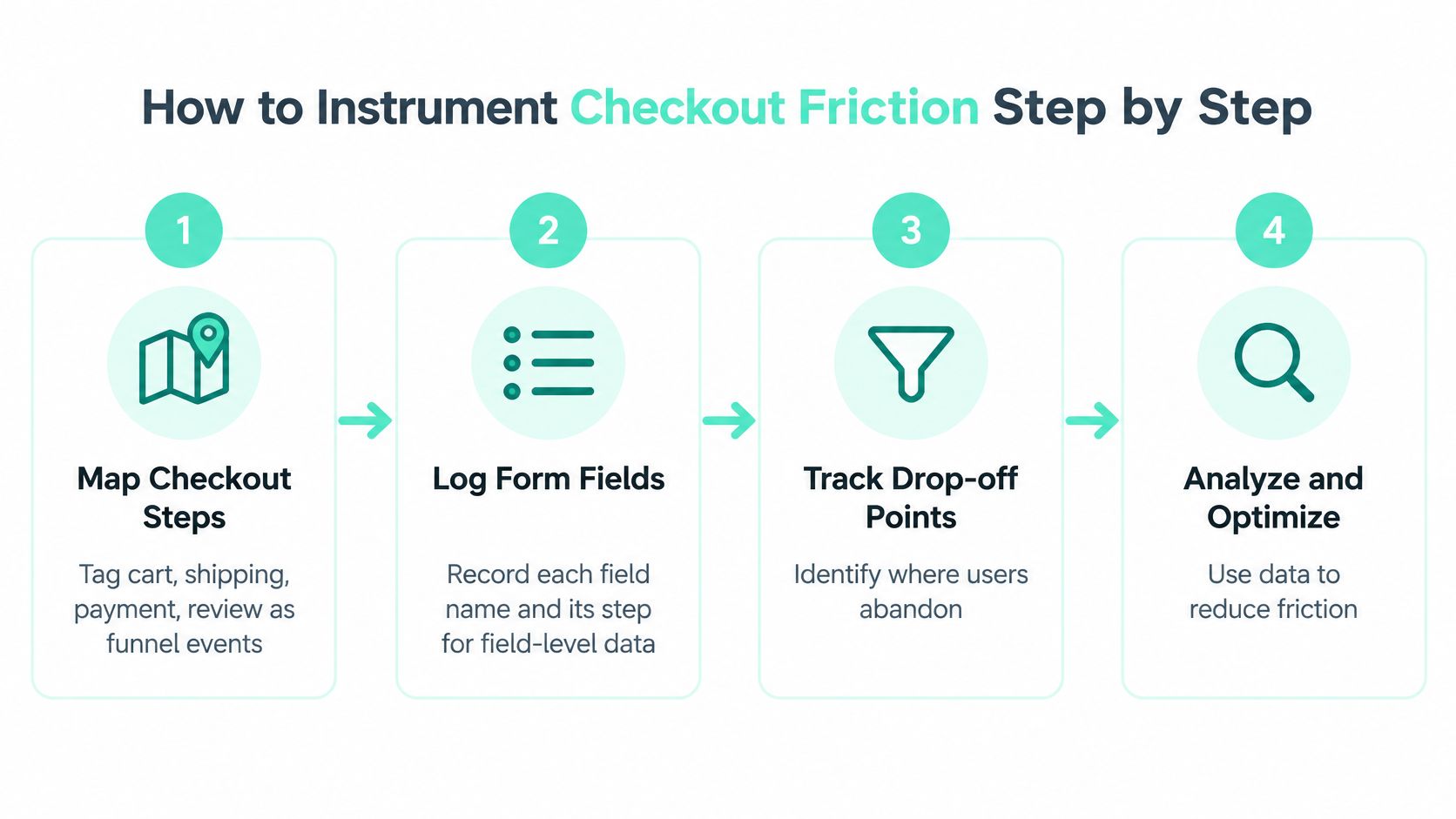
Map checkout steps. Tag cart, shipping, payment, and review as funnel events, including conditional steps for business buyers or regional requirements. Don't assume the interface's page count matches the shopper's actual workflow.
Give every field a stable identifier. Record its name, step, visibility state, and validation outcome so teams can compare equivalent fields across releases. Log metadata, never raw card details, passwords, or unnecessary address content.
Capture interaction failures. Track validation errors per field, back-button events, step latency, payment failures, and retries. A payment retry isn't necessarily another shopper, so correlate events without inflating the denominator.
Segment before diagnosing. Compare device, country, browser, and customer type because regional addresses, tax rules, and payment options create different failure patterns. An overall improvement can conceal a regression for mobile guest buyers.
Use the resulting event model to connect interface behavior with completed orders.
Simplify Without Moving the Cost Elsewhere
Remove unnecessary effort. Use address autocomplete with a manual-entry fallback, progressive disclosure, inferred billing details, and guest checkout. Don't force an autocomplete result when a customer has a valid address the provider doesn't recognize.
Preserve required information. If fulfillment needs a value, infer it safely or collect it at the appropriate step rather than hiding it. Removing a field from the interface while leaving a backend requirement unchanged moves the failure downstream.
Judge the commercial outcome. Compare completed orders and contribution margin, including fraud losses, fulfillment failures, and support costs where attributable. More payment-button clicks don't prove the change helped.
For the relationship between checkout design and later order corrections, Mayra Order Edit checkout insights provide a useful practitioner reference. Keep corrections and cancellation needs visible in the test design rather than treating order submission as the end of the journey.
Schedule an initial check after two weeks, as an operating checkpoint rather than a guarantee of statistical significance. Field errors should fall and completion should improve in the intended segments; if contribution margin declines, roll back and investigate before extending the change.
Composable Architecture for Sitecore Customer Experiences
Separate content management from audience decisioning and transactions. In Sitecore's product portfolio, XM Cloud is the cloud-hosted, headless web CMS, while Sitecore Personalize applies advanced decisioning and machine learning to determine which experience an audience receives.
That distinction matters for Sitecore AI work. A decisioning capability can select an approved experience; it shouldn't automatically gain permission to change prices, issue refunds, or rewrite transactional policy.
Content teams need a governed workspace behind the storefront.

Platform Layers in a Composable Ecommerce Stack
| Layer | Platform Role | Ecommerce Example |
|---|---|---|
| Reusable content and experiences | Sitecore XM Cloud | Product stories, landing pages and shared promotion blocks |
| Audience decisioning | Sitecore Personalize | Offers for returning visitors and regional banners |
| Front-end delivery | Next.js on JSS applications | Storefront pages that consume managed content |
| Search and tracking | Capabilities added to JSS applications | Product and content search with audience tracking |
| Commerce transactions | Brand-selected commerce engine | Cart, pricing and order management, chosen per brand |
XM Cloud documentation identifies tracking, personalization, and search capabilities that can be added to JSS applications. A Next.js storefront can therefore remain decoupled from the CMS, but its developers still need explicit integration contracts for identity, events, consent, and failures.
The commerce-engine row is an architectural choice, not a promise that XM Cloud supplies inventory, pricing, or order management. Keep those systems authoritative and expose only the operations each experience needs.
Make Decisioning Observable
For each Personalize decision, record the eligible audience, consent state, selected experience, experiment allocation, and downstream outcome. Use stable identifiers so analysts can distinguish a successful decision from a successful render and, ultimately, a successful purchase.
Set a default experience for timeouts or unavailable services. A customer should still be able to buy when an optional recommendation cannot load.
This video provides additional context for the experience-platform discussion.
For Regal Rexnord, we moved from on-premises Sitecore XP to headless XM Cloud using a Next.js hub-and-spoke model. The move reduced go-live timelines by 35% to 50% and made publishing twice as fast. Those are project outcomes, not performance guarantees for another estate.
Headless also adds a front-end build pipeline, component ownership, and CI/CD responsibilities. A composable DXP architecture works when teams govern dependencies, not just when they buy separate services.
Share content models and component libraries across brands. Separate presentation by region or channel only where the customer journey genuinely requires it.
Deciding Which AI Tasks Run Alone and Which Need People
Adding a chatbot isn't an AI operating model. Define what the system may do before deciding how conversational it should sound.
In the US, 60% of shoppers want retailers to offer AI-powered shopping features, while 71% would abandon a retailer if its returns process failed to meet expectations, according to DHL's 2025 ecommerce trends announcement. Interest in assistance doesn't imply permission to execute financially sensitive actions.
AI Autonomy Tiers for Customer-Service Tasks
| Tier | Example tasks | Required control |
|---|---|---|
| Low risk | Comparison, order tracking, routine questions | Runs autonomously, with disclosure of confidence and data use |
| Medium risk | Starting a return, changing a delivery address | Confirmation step and an undo path |
| High risk | Payments, refunds, account changes, disputed orders | Human approval and handoff with full conversation and order history |
These are recommended governance tiers, not inherent properties of a task. An address change becomes high risk when fraud signals, dispatch status, or account-recovery concerns make reversal unsafe.
Low-risk tracking still requires authentication and authorization. Disclose uncertainty in plain language rather than presenting an uncalibrated confidence percentage as a guarantee.
For medium-risk actions, show the proposed change before execution and obtain explicit consent. If an undo path isn't technically possible, explain that limitation and escalate.
Put Enforcement Outside the Conversation
For Sitecore journeys, use Personalize for experience selection and enforce transaction permissions in the service layer. The model mustn't be able to bypass approval by generating different wording or invoking a more permissive endpoint.
Carry the same rules across Sitecore or AEM experiences, CRM, and service channels. Audit the source consulted, proposed action, approval, execution result, and handoff, while minimizing sensitive content in logs.
Measure unauthorized-action attempts, confirmation completion, escalation quality, and resolution after handoff. Chat containment alone is a poor success metric when the system can trap customers in an unresolved conversation.
Use SharePoint as Governed Service Knowledge
Microsoft's SharePoint agent guidance allows up to 20 source items, including sites, document libraries, folders, lists, and files, and states that answers respect users' existing permissions. Curate current returns, refund, and policy content rather than connecting an entire intranet.
Permission trimming isn't a customer-publication policy. Keep restricted internal guidance separate from content approved for customer-facing answers, especially when middleware uses a service identity.
Microsoft's Copilot in SharePoint administration guidance provides KnowledgeAgentScope modes of AllSites, IncludeSelectedSites, ExcludeSelectedSites, and NoSites. KnowledgeAgentSelectedSitesList defines selected sites, while restricted access control policies can further limit visibility to a specified group.
Microsoft also warns that generated answers may be incomplete, inaccurate, or outdated. Require reviewed-source citations for high-risk answers and route disputes to a person with the conversation and relevant order history.
Building Accessible Personalization for Global Shoppers
Across 59,400 ecommerce product pages, 64% had at least one critical accessibility failure and 96% failed at least one automated WCAG check, according to the State of Ecommerce Accessibility methodology. These are findings about tested product pages, not a prediction of your estate's defect rate.
The commercial exposure is concrete. An inaccessible variant selector can stop a purchase; an unusable returns form can turn a self-service task into a support contact.
Personalization must preserve the customer's ability to operate the interface.

Test Personalized States, Not Just Default Pages
Consider a recommendation module that moves above product options after a customer signs in. If that update unexpectedly shifts keyboard focus or changes navigation order, a relevant recommendation can make the page harder to use.
AI-generated content introduces a different failure mode. A product description may omit sizing context, while generated imagery arrives without meaningful alternative text or required disclosure.
Don't let either variant bypass editorial approval because its default component passed testing. Accessibility acceptance must cover the rendered state, content, and interaction together.
Govern Components Centrally and Validate Locally
Define WCAG-aware acceptance criteria in the Sitecore or AEM component library, then make them release requirements.
- Structure and labels. Use semantic HTML, programmatic input labels, and accessible names that remain consistent across personalized variants.
- Errors and focus. Associate validation messages with their fields, announce relevant updates, and return focus predictably after dialogs.
- Content operations. Require useful alternative text, sizing information, and translation review where the content demands them.
- Interaction coverage. Test keyboard operation and screen readers across devices, languages, identity states, and checkout integrations.
Automated CI scanners catch repeatable defects, but they can't determine whether product information is meaningful or a complex interaction is understandable. Manual testing must cover the tasks customers perform.
Use an accessible website design approach that connects design-system rules to release ownership. Measure defect density by template and reusable component, plus task completion and repeat support contacts where attribution is credible.
Segment by accessibility needs only through voluntary, privacy-respecting research or declared preferences. Don't infer disability from browsing behavior.
Prioritize checkout, search, and filters, then repair shared components before applying page-specific patches. A corrected reusable control prevents regional teams from repeatedly fixing the same defect.
Search, Performance and Localization Guardrails
Search quality, rendering stability, and regional correctness need release gates, not separate improvement backlogs. Each can invalidate an otherwise sensible personalization decision.
Search Must Connect Queries to Purchases
Index approved product and editorial content through the search integration serving your Sitecore JSS application. Track query, result click, product view, and add-to-cart with compatible identifiers so analysts can calculate search-to-add-to-cart without confusing content clicks with product intent.
Review zero-result queries weekly. This quarter, test whether your highest-priority failed queries need synonyms, better product attributes, or missing inventory rather than automatically broadening every result set.
Performance Needs a Template Budget
Set load and interaction budgets for product and checkout templates, then report actual behavior alongside funnel outcomes. Measure real-user performance as well as controlled tests because regional networks and customer devices won't match a developer's laptop.
Keep optional personalization outside the critical render path. Reserve space for changing modules so a late banner decision doesn't move the purchase controls after customers begin interacting.
Localization Must Reach Transactions
Share a content model across markets, but support local address formats, tax presentation, currencies, payment methods, and legal text explicitly. Translation alone doesn't make a checkout local.
This quarter, run a complete purchase and return scenario in each priority market using its actual integrations. Compare country-level abandonment with payment failures and validation errors before concluding that a translated page has solved the regional problem.
Performance and localization changes should pass through the same component governance as accessibility. A regional override mustn't silently break a shared template.
Start With a Checkout and Accessibility Audit
Begin this week by pulling the last 90 days of funnel events by device and country. Use that history to identify seasonal or campaign effects, then establish the four-week baseline before releasing journey changes.
An audit should produce a prioritized delivery backlog, not a presentation that leaves ownership unresolved.
Turn Findings Into Funded Work
Confirm measurement integrity. Reconcile completed-order events with the order system and investigate duplicate purchases, missing consent states, and broken session correlation. Don't optimize a funnel whose denominator changes between dashboards.
Inspect checkout at field level. Count visible elements in each conditional path and examine validation, latency, payment retries, and abandonment. Include guest, returning, and business-customer flows where those journeys exist.
Test the product estate and critical tasks. Scan the top 50 product templates with automated WCAG tools, or all templates if the estate contains fewer. Then manually test keyboard use on checkout, search, and filters, including personalized states.
Rank by exposure and reuse. Combine affected journey volume, severity, commercial consequence, and the number of templates using the component. A shared payment-input defect deserves different treatment from a cosmetic issue on an isolated campaign page.
Assign owners and sprint the top five fixes. Give each item an engineering owner, business approver, acceptance test, and rollback condition. Keep the initial scope narrow enough to attribute the outcome.
Review monthly without ignoring incidents. Compare journey KPIs and contribution margin, investigate material regressions immediately, and roll back changes that lower margin. Separate interface effects from inventory, promotion, and fulfillment changes before drawing conclusions.
Decide Whether to Repair or Rebuild
Repair the current implementation when defects come from configuration, content, or poorly governed components. Consider a rebuild when required capabilities repeatedly demand unsupported extensions, fragile integration workarounds, or release processes the organization can't operate safely.
Our Platform Audits evaluate Sitecore, Adobe Experience Manager, and SharePoint environments for performance, security, and compliance. Our Sitecore services include Experience Commerce (XC), audit and optimization, Content Hub and Search, CDP and Personalize training, and an Airport Digital Experience Accelerator; Experience Commerce work can scope a rebuild when the audit exposes transactional platform limits.
This quarter, approve the audit scope, named owners, and baseline dashboard before any redesign begins.
Kogifi offers platform audits, Sitecore commerce implementation, and AI personalization expertise to connect customer-experience improvements with measurable operational controls. Visit Kogifi to discuss a checkout and accessibility audit, governed Sitecore decisioning, and a SharePoint knowledge scope your service team can maintain.