


A Sitecore XM Cloud and SharePoint Online estate can run for months without a failed deployment while its Azure and Microsoft 365 costs drift upward. Then editors report slower Edge responses, the platform team gets pulled into a FinOps review, and leadership asks for an explanation that no single dashboard can provide. The invoice is rarely caused by one dramatic mistake. It usually reflects small architectural decisions that no longer match demand.
For enterprise teams, cloud infrastructure optimization means connecting Sitecore AI capabilities, XM Cloud delivery services, search, analytics, Azure governance, and SharePoint lifecycle controls to the way people use the platform. The work isn't a one-off cleanup after a budget shock. It's an operating discipline that protects cost, latency, reliability, and delivery speed together.
Table of Contents
- Days 1 to 30 build the baseline
- Days 31 to 60 deliver the first tuning wave
- Days 61 to 90 integrate the operating model
When the Cloud Bill Quietly Becomes the Loudest Problem
After twelve months in production, an enterprise DXP often looks stable from a release perspective. Sitecore XM Cloud deployments complete, SharePoint Online remains available, and no incident has forced a major architectural review. Yet the monthly invoice keeps climbing because the estate has evolved around campaigns, new brands, integrations, editors, and collaboration habits rather than a consciously maintained capacity model.
The common drivers are familiar to anyone operating the estate. Always-on App Service plans support Content Management and Delivery workloads even when demand is uneven. Edge and CDN traffic expands during campaigns. Search indexes may be duplicated during replatforming or retained after a migration. In SharePoint Online, storage grows through Teams meeting recordings, document versions, recycle bins, and Power Automate run history.
The invoice is a diagnostic signal
A rising bill doesn't automatically mean the architecture is wrong. A campaign may have generated valuable traffic, or a higher service tier may be protecting a critical authoring workflow. The problem appears when nobody can connect spend to workload behavior, ownership, and business value.
That's why I treat the Azure invoice as an architectural signal. It often reveals drift in topology, tagging, retention, autoscaling, or ownership. The right response isn't to disable services indiscriminately. It's to identify which resources are carrying productive demand, which are protecting reliability, and which are surviving because nobody has assigned an owner.
A practical review should combine billing analysis with application telemetry and platform ownership. Teams looking for a broader framework can also use these cost reduction strategies that work as a useful starting point, then apply the principles to the specific behavior of XM Cloud and SharePoint.
Start with workload boundaries
For a Sitecore estate, separate Content Management, Content Delivery, Edge, search, analytics, integrations, and non-production environments in the cost model. For SharePoint, distinguish collaboration sites, intranet publishing, archives, automated workflows, and storage retention.
Kogifi's cloud cost optimization guidance follows this practical direction, treating optimization as a combination of measurement, architecture, governance, and ongoing remediation. Once those boundaries are visible, the next question becomes precise: which capacity, data, or platform control no longer matches demand?
What Cloud Infrastructure Optimization Really Means
Think of an office building designed around actual occupancy patterns, not the maximum number of people who might theoretically enter it. The building still needs safe exits, reliable heating, secure access, and enough capacity for busy periods. It doesn't run every system at its worst-case setting all day.
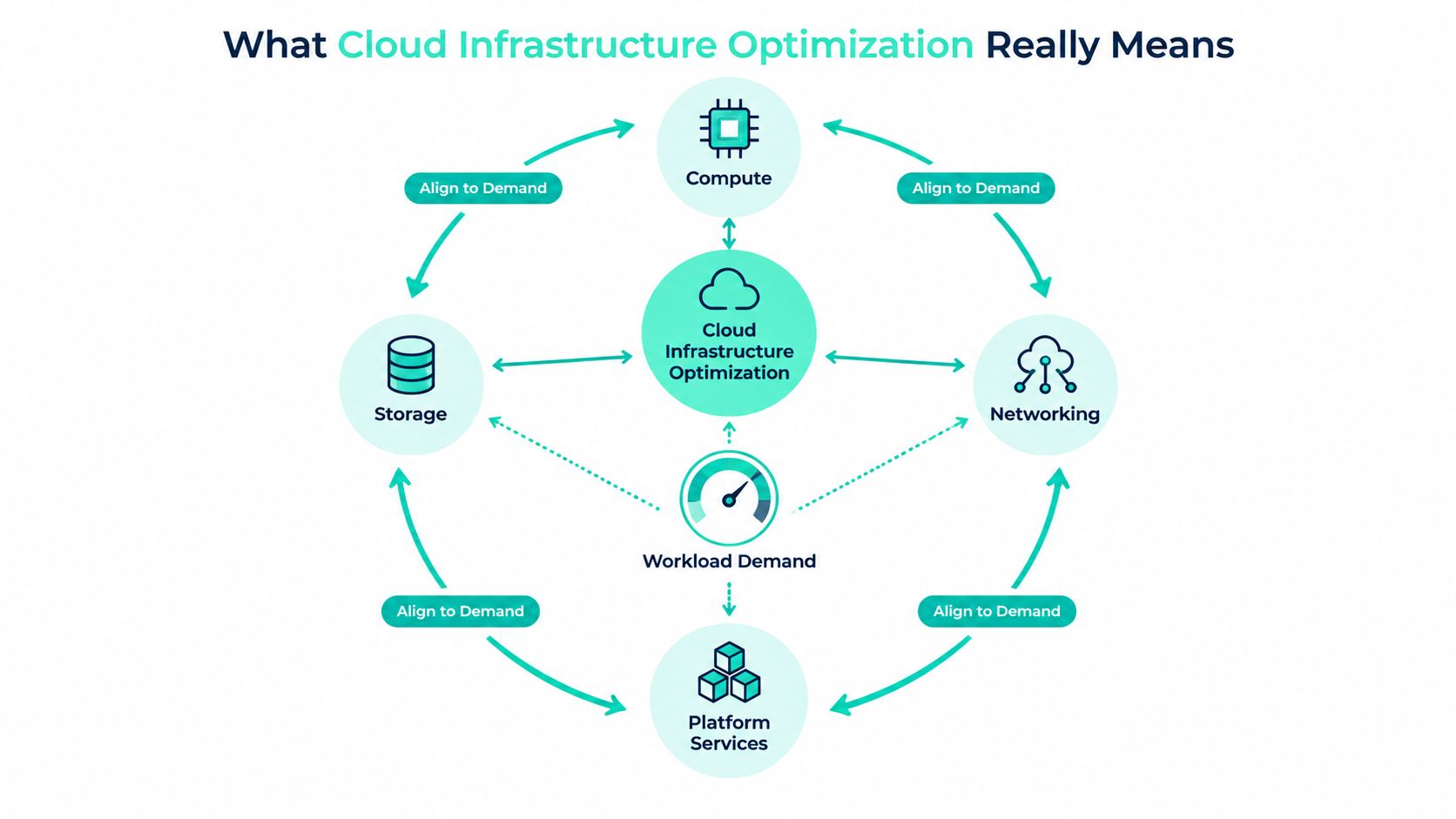
Cloud infrastructure optimization applies the same principle to Azure and Microsoft 365. It aligns compute, storage, networking, and platform services with workload demand while preserving the reliability, security, scalability, and developer velocity the business expects.
Map the principle to the DXP
In Sitecore XM Cloud, optimization starts by separating the behavior of Content Management from Content Delivery. Authoring traffic, Experience Editor activity, publishing operations, indexing, and headless delivery don't create the same resource profile. A single blanket sizing decision can therefore leave one role overprovisioned while another struggles during a release or campaign.
The same applies to Edge and CDN configuration. Cache behavior, invalidation patterns, personalization, and campaign peaks should be measured together. Search also deserves independent treatment. Index capacity and query behavior can change during replatforming, content imports, and large publishing events.
SharePoint Online requires a different set of controls. Site lifecycle policies, storage retention, document versioning, recycle-bin management, and Power Automate history all influence the long-term footprint. The platform is managed, but the content estate still needs ownership and lifecycle decisions.
Optimize, don't simply cut
Cost cutting removes capacity or service features because they look expensive. Optimization asks whether the capacity produces an acceptable outcome. A lower tier that increases authoring latency, causes failed publishing, or creates operational work isn't a saving. It has transferred cost from Azure into lost productivity and incidents.
Fair cloud benchmarking must remain relevant to the target application, portable across systems, scalable to large environments, and simple enough for teams to reproduce and understand, as described in this cloud benchmarking framework.
The useful test is therefore multidimensional. Measure spend alongside latency, error rates, deployment safety, storage behavior, and carbon efficiency. Those measurements create the evidence needed to decide whether tuning is working.
The Four KPIs That Tell You If Optimization Is Working
A raw monthly invoice is a poor optimization KPI. It can rise because usage created value, fall because traffic disappeared, or stay flat while reliability deteriorates. A managed Sitecore and SharePoint estate needs a balanced scorecard that connects financial efficiency to user and platform outcomes.
| KPI Family | Example Metric | Why It Matters for XM Cloud and SharePoint |
|---|---|---|
| Cost | Cost per thousand page views from XM Cloud Edge, cost per active editor session, Azure spend per SharePoint site | Connects spend to workload activity instead of treating the invoice as one undifferentiated total |
| Performance | XM Cloud time to first byte, Edge cache hit ratio, p95 headless API latency, SharePoint Online page load time | Shows whether a saving has damaged customer or employee experience |
| Reliability | SLO compliance, deployment rollback rate, mean time to detect | Prevents teams from approving changes that reduce spend by increasing operational risk |
| Sustainability | Workload carbon efficiency, CPU hours consumed versus provisioned | Adds resource efficiency and emissions awareness to the operating decision |
Cost needs a unit
For XM Cloud, cost per thousand Edge page views and cost per active editor session can reveal different problems. A delivery cost anomaly may point to cache behavior or campaign demand, while an authoring anomaly may indicate inefficient editorial workflows or oversized supporting services.
For SharePoint, spend per site or per business unit is more actionable than a tenant-wide total. It gives an owner a concrete question to answer: is the site still active, is its retention policy appropriate, and does its storage support a current business purpose?
Performance and reliability set the guardrails
A rightsizing change should be rejected if time to first byte, API latency, publishing reliability, or editor productivity moves outside the agreed operating envelope. Track p95 behavior rather than relying only on averages, because averages can conceal the users who experience the slowest responses.
The waste problem is substantial enough to justify disciplined measurement. A 2025 report estimated that 21% of enterprise cloud infrastructure spend, or $44.5 billion, was wasted, while only 43% of respondents had real-time visibility into idle resources and 39% had that visibility into orphaned resources, according to FinOps in Focus coverage.
Sustainability belongs in the review
Carbon-aware optimization remains immature. The 2025 State of FinOps report, summarized in this analysis of cloud waste and FinOps execution, says only 3% of FinOps practices optimize based on carbon considerations and 15% optimize based on cost. That gap makes carbon efficiency a useful differentiator for teams building a more complete governance model, even when cost remains the immediate priority.
Architectural Patterns That Pay You Back
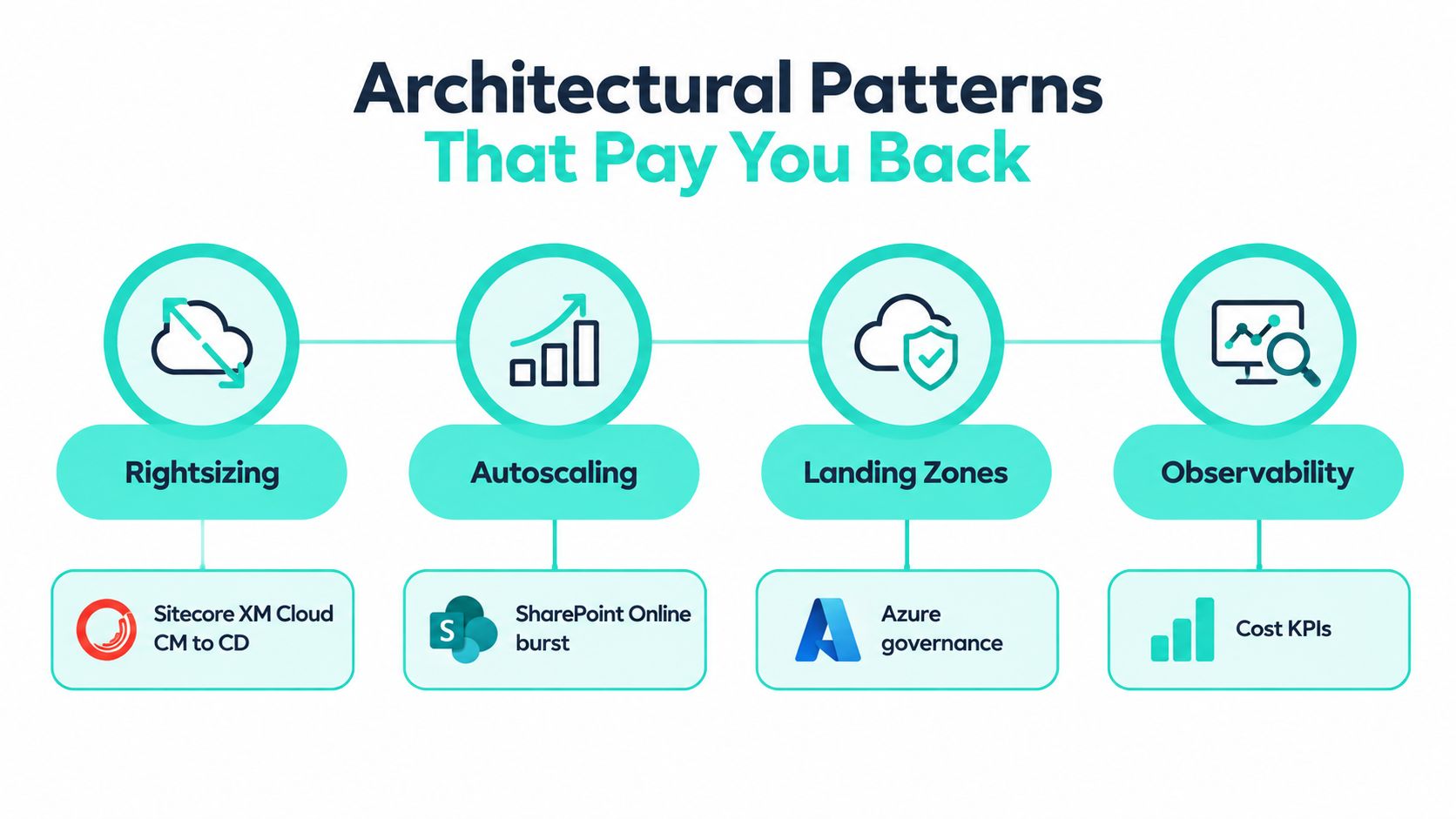
The strongest optimization results come from architecture patterns that make efficient behavior the default. Rightsizing, autoscaling, landing zones, and observability aren't separate initiatives. They reinforce one another when applied to the actual Sitecore and SharePoint topology.
Rightsizing follows evidence
Profile Content Management and Content Delivery independently. In estates with oversized P-series App Service plans, the right move may be to reduce capacity after reviewing publishing activity, Experience Editor usage, indexing, memory pressure, and request latency. Predictable baseline demand can then support a reservation decision, while variable demand stays flexible.
Kubernetes estates need the same discipline at the container layer. A 2024 benchmark found that 37% of organizations have at least half of their workloads needing container rightsizing, as reported in the Fairwinds Kubernetes benchmark. The lesson applies to search and supporting services around a DXP: provision from observed demand, not from a speculative peak.
Autoscaling needs workload signals
CPU is useful, but it isn't always the best trigger. Sitecore CD front ends can scale on HTTP queue length, Solr capacity can respond to search-service requests, and SharePoint crawl-related workloads should be assessed through processor behavior and crawl activity. The rule should reflect the bottleneck users feel.
Azure governance provides the boundary conditions. A landing zone can isolate Sitecore CM, CD, Solr, and SharePoint integration subnets, while Azure Policy blocks unapproved SKUs and requires ownership metadata. That keeps optimization from depending on memory or individual judgment.
Application Insights, Log Analytics, and Azure Front Door logs complete the pattern. Correlating them lets an engineer connect an XM Cloud page fault to CDN behavior, App Service telemetry, and database metrics without switching between unrelated investigations.
Practical rule: If a cost recommendation can't be connected to a workload metric and an owner, it isn't ready for production automation.
Teams designing broader platform boundaries can use Kogifi's cloud-native architecture patterns as a reference point for connecting composable DXP services with Azure operating controls.
A 30 Day Audit and Remediation Workflow
A useful audit shouldn't freeze delivery. Run it alongside normal releases, keep findings tied to named owners, and rank changes by expected value, risk, and effort.
Week 1 is discovery. Pull 90 days of Azure Cost Analysis, App Service metrics, Solr query logs, and SharePoint audit data into one workspace. Establish a baseline for each workload and business unit, then record the topology, dependencies, environment, and current owner.
Week 2 is analysis. Tag every Sitecore role and SharePoint site with owner, environment, and criticality. Score each resource for idle capacity, orphaned ownership, excessive retention, poor cache behavior, or unclear business purpose. Rank the findings by annualized saving versus implementation effort, without treating every recommendation as safe to automate.
| Week | Stage | Key Inputs | Outputs | Owner |
|---|---|---|---|---|
| Week 1 | Discovery | Azure Cost Analysis, App Service metrics, Solr logs, SharePoint audit logs | Workload baseline, topology inventory, initial ownership map | Platform engineering lead |
| Week 2 | Analysis | Tags, utilization trends, search behavior, storage and lifecycle data | Waste score, prioritized backlog, risk assessment | FinOps and solution architecture |
| Week 3 | Remediation | Approved quick wins and rollback plans | Rightsized services, retired idle resources, documented validation | Service owners |
| Week 4 | Governance | Successful changes, policy requirements, CI/CD metadata | Azure Policy assignments, tagging controls, weekly report | Cloud platform team |
Make the third week deliberately practical
Week 3 is for changes with clear evidence and a rollback path. Deallocate idle App Service slots, right-size search capacity, remove orphaned SharePoint sites, and move non-production workloads to B-series plans where burst behavior supports the decision. Validate every change against latency, error rates, publishing, search, and editor workflows.
Week 4 turns those decisions into controls. Add tags to CI/CD, codify approved SKUs through Azure Policy, and publish a weekly optimization report that shows the action, owner, financial effect, and reliability result.
For a deeper operational checklist, use this digital experience platform performance audit guide alongside the cost review. Performance evidence keeps the team from calling a technically cheaper platform an optimized one.
Tooling and Automation for FinOps at Scale
Tool selection should follow operating maturity, not dashboard fashion. Azure Cost Management, Advisor, and Policy cover the foundation for most Sitecore XM Cloud and SharePoint estates. They provide cost visibility, recommendations, and preventive controls without creating another external dependency.
A dedicated FinOps layer becomes useful when teams need consistent showback, chargeback, ownership reporting, and anomaly detection across subscriptions or business units. Microsoft Fabric FinOps kits and Cloudyn-style capabilities can support that model. The tool earns its place when finance, platform engineering, and product owners need a shared financial language, not merely because the estate has more resources.
AIOps is different. Datadog Watchdog, New Relic AI, and Azure Monitor's AI-assisted capabilities can correlate signals across XM Cloud, Solr, SharePoint, and Azure. They're valuable when alert noise obscures real incidents and when the team has runbooks that translate detection into safe remediation. Without those runbooks, AIOps often produces more recommendations than the engineers can trust.
| Category | Typical Tools | Strength | Best Fit |
|---|---|---|---|
| FinOps | Azure Cost Management, Advisor, Policy, Microsoft Fabric FinOps kits, Cloudyn-style tools | Allocation, budgets, anomaly detection, governance | Enterprise Azure estates requiring showback or chargeback |
| AIOps | Datadog Watchdog, New Relic AI, Azure Monitor capabilities | Cross-signal correlation and operational pattern detection | Mature teams with baselines and tested remediation runbooks |
| Traditional monitoring | SCOM, Nagios, platform-specific monitoring | Familiar infrastructure visibility and established alerting | SharePoint on-premises estates that remain inside the optimization perimeter |
Use a staged adoption path
Start with native Azure capabilities and ownership tags. Add FinOps reporting when allocation decisions become difficult. Introduce AIOps only after the team has agreed on thresholds, escalation paths, and rollback procedures.
Multi-cloud or multi-platform teams should also establish shared policy, identity, tagging, and exception handling. This practical multi cloud governance guide offers useful context for that broader operating model.
Kogifi can be included as a delivery and managed-support option for enterprise Sitecore, Azure, and SharePoint estates, particularly where audits, performance tuning, monitoring, and SLA-backed incident response need to connect with implementation work. The operational detail matters more than the product label, so the engagement should define owners, runbooks, and measurable acceptance criteria.
Teams building those controls can use Azure monitoring alerts guidance to keep notifications tied to action instead of creating an unmanageable stream of warnings.
Closing the Developer Disconnect
Another dashboard won't solve a workflow that never reaches the engineer who can change the resource. In Sitecore XM Cloud and SharePoint delivery programs, FinOps often sits with finance or a central platform team, while developers create App Service plans, search indexes, integration services, provisioning scripts, and retention rules through delivery pipelines.
The disconnect persists because reports arrive after the deployment, ownership tags are incomplete, and no closure loop tells the delivery team what its change cost. A platform lead may know that spend rose, but the engineer who introduced an oversized plan may never see the financial effect alongside the pull request that created it.
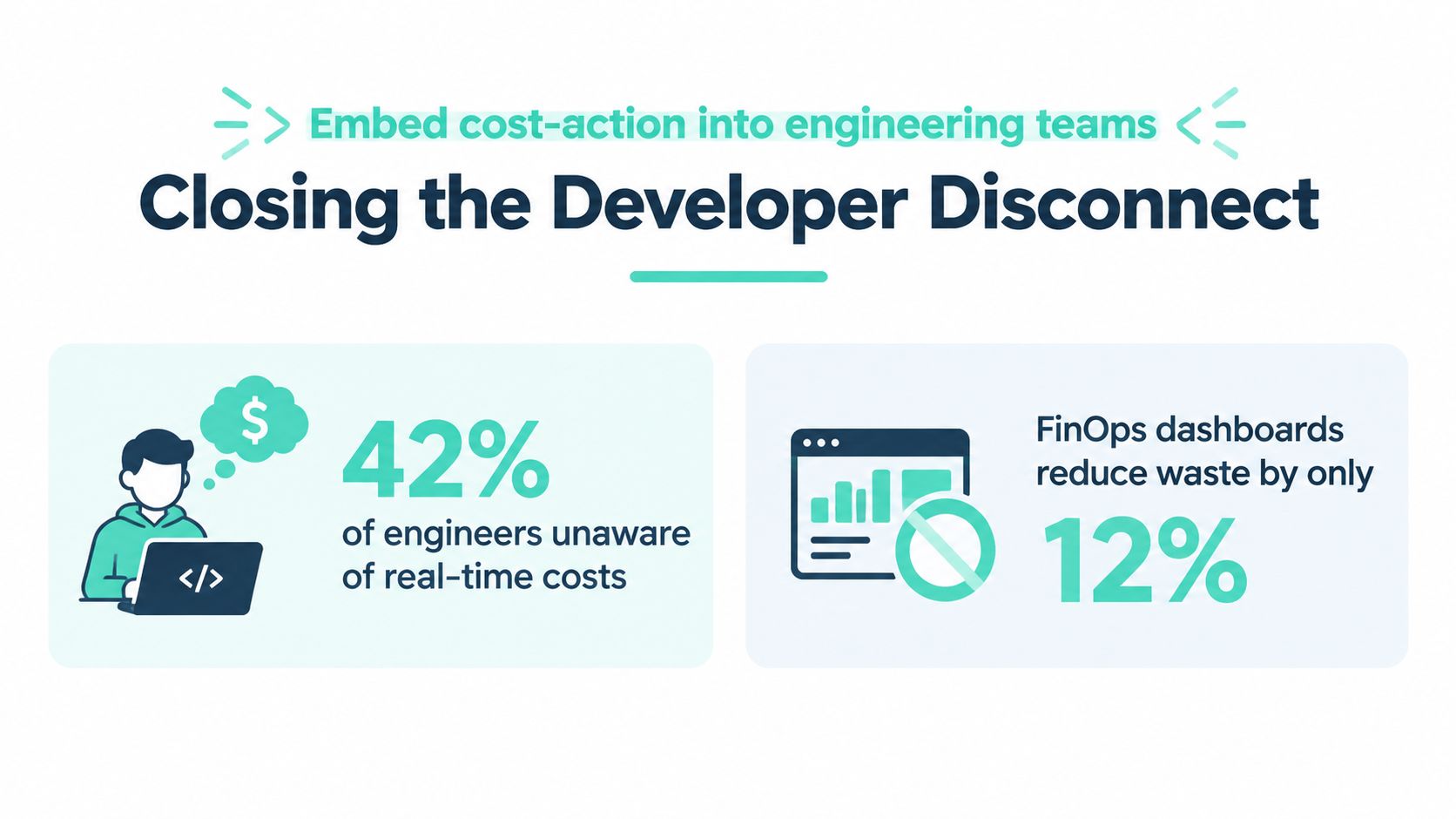
The evidence supports a workflow problem rather than a tooling shortage. The 2025 industry report cited earlier says 71% of developers don't use spot orchestration, 61% don't rightsize instances, and 48% don't track and shut down idle resources, with waste taking an average of 31 days to identify and eliminate when automation is limited. Those findings point to missing ownership and action loops, not merely missing visualization.
Put cost beside the change
For Sitecore XM Cloud, tag every Edge and Content Delivery role by environment, feature, brand, and owner. Surface cost anomalies inside the same pull-request pipeline that already runs security and quality checks. A change that adds a search index or expands a delivery service should show its expected operational effect before approval.
SharePoint needs equivalent controls. Provisioning scripts should require a business owner and lifecycle state. Archive retention should be reviewed as an operational decision, because a technically valid policy can create an invisible storage burden when nobody owns its long-term consequences.
The useful end-state is one page showing the cost delta of the last deployment, its reliability impact, and the next right-sized action available before the next release window.
Rewarding teams for rightsizing and lifecycle cleanup also changes behavior. Uptime remains a gate, but engineers should see efficient resource use as part of delivery quality, not as finance work delegated after launch.
A 90 Day Enterprise Optimization Playbook
A 90-day operating rhythm brings Sitecore XM Cloud tuning, SharePoint governance, and managed support into one conversation. The exact resources will vary by estate, but the sequence should remain practical: establish a shared baseline, deliver evidence-backed changes, then integrate the controls into weekly operations.
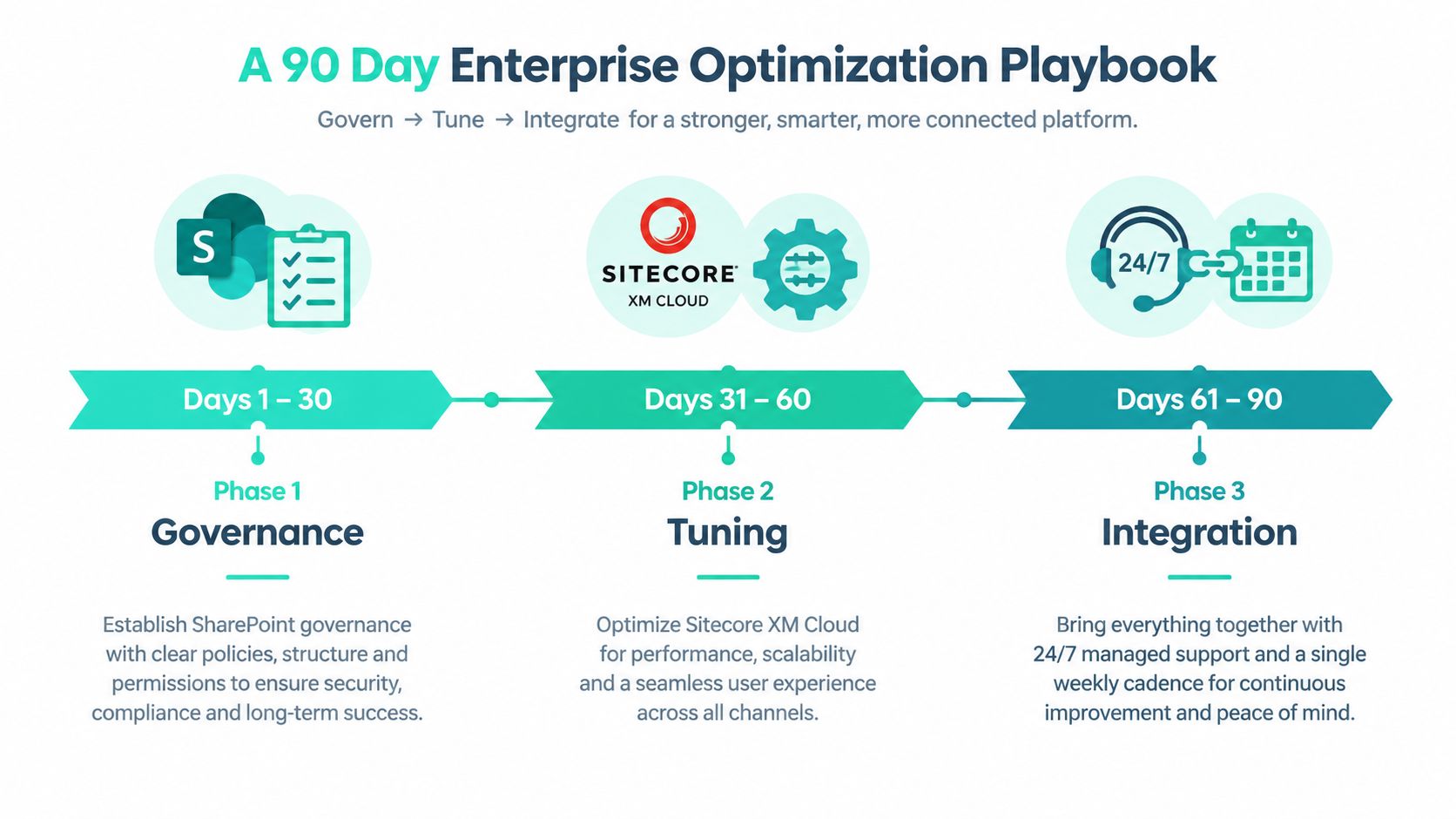
Days 1 to 30 build the baseline
Create one tagging convention across Azure and Microsoft 365. Export Microsoft Cost Management data, define budgets for App Service plans, Edge roles, and SharePoint storage, and document the Sitecore XM Cloud topology by environment, region, dependency, and owner.
The output should be a usable operating map, not a presentation. It needs to show which services support authoring, delivery, search, analytics, integrations, collaboration, and archival content. It should also identify exceptions, because some higher-cost configurations exist for security, resilience, or contractual reasons.
Days 31 to 60 deliver the first tuning wave
Use the audit workflow to choose changes with clear evidence. Rightsize App Service plans, establish autoscaling profiles for Edge, prune obsolete search indexes, and automate SharePoint site lifecycle decisions. Stand up Azure Monitor workbooks and a Log Analytics baseline so the team can compare behavior before and after each change.
XM Cloud's product model makes this work especially important. Sitecore describes XM Cloud as a fully managed, self-service cloud deployment platform built around its headless CMS, Pages editor, SXA, Headless Services, Next.js SDK, and Experience Edge, designed for omnichannel delivery in the cloud through Sitecore's XM Cloud product documentation. That managed model removes some infrastructure decisions, but it doesn't remove the need to optimize the surrounding Azure services, integrations, search behavior, observability, or content lifecycle.
Days 61 to 90 integrate the operating model
Wire cost anomaly alerts to a managed-support runbook with named escalation owners. Hold FinOps reviews with engineering representatives, establish a SharePoint governance council cadence, and make Sitecore release windows subject to cost and reliability SLOs.
Sitecore's broader portfolio also affects the operating model. XM Cloud serves headless content management, while XP, Personalize, Discover, Search, and Connect address marketing orchestration, experimentation, AI-driven discovery, search, and integration use cases, as outlined in this Sitecore portfolio overview. Teams should therefore assign cost and performance ownership by capability, not assume that every experience feature belongs to the same platform budget.
XM Cloud includes built-in analytics and can extend into personalization and customer data capabilities, while XM Cloud Plus combines content management with AI-powered search, personalization, customer data management, and analytics, according to Sitecore's XM Cloud and experience platform overview. That makes governance especially important as the estate expands. Each new capability needs a clear owner, measurable workload signal, retention policy, and support path.
Run this 90-day rhythm repeatedly. The difference between a stable, efficient estate and one that keeps relighting the same Azure and Microsoft 365 fires isn't a single optimization project. It's the weekly connection between platform telemetry, engineering decisions, content governance, and managed support.
Kogifi audits, tunes, and supports enterprise Sitecore XM Cloud and SharePoint Online estates across Azure, combining platform engineering, FinOps governance, performance work, and SLA-backed managed services. Visit Kogifi to discuss a practical optimization plan built around your topology, workload evidence, and release cadence.