


A FinOps Foundation survey covered 1,245 organizations, each spending an average of $44 million annually on cloud services, a scale that explains why cloud cost optimization now belongs in executive operating reviews rather than occasional infrastructure cleanup. Industry summaries tied to cloud optimization research place wasted cloud spend at 27% to 29% across 2023 to 2026 survey cycles (CIO Dive). In a DXP estate, that waste rarely comes from one dramatic architectural mistake. It accumulates through idle Sitecore Content Delivery roles, oversized search infrastructure, forgotten media, duplicated environments, and SharePoint storage that nobody owns.
Table of Contents
- Rightsizing begins with telemetry
- Scaling must return to baseline
- Use flexible capacity selectively
- Make cleanup part of delivery
- Inform teams before enforcing controls
- Govern before the invoice arrives
- Optimize after waste is visible
Why Cloud Cost Optimization Has Become a Board-Level Discipline
A global retailer running Sitecore XP on Azure can see its monthly bill rise from $58K to $117K after Black Friday traffic triggers autoscaling. The traffic spike is expected. The costly failure is leaving additional Content Delivery roles active after demand drops, while orphaned media libraries continue consuming storage capacity for weeks.
That distinction separates scaling and optimization. Autoscaling responds to demand. Cloud cost optimization ensures the estate returns to an efficient baseline afterward. It aligns compute, storage, licensing, and DXP-specific services with actual workload demand while protecting performance, security, and delivery speed.
For Sitecore, AEM, and SharePoint estates, the largest opportunities often sit outside generic virtual-machine rightsizing. Idle CD or publish roles, inefficient indexes, duplicated environments, forgotten media, and storage tier sprawl can keep generating charges long after their business value has disappeared. The same audit should examine scheduled publishing, search operations, retention policies, and ownership of shared storage.
The financial context has changed. Cloud spend behaves like a consumption-based operating expense rather than a fixed infrastructure purchase planned around a long capital cycle. The 2024 FinOps research covered organizations averaging $44 million in annual cloud services spend and described growing attention to wasted spend and commitment-based hyperscaler discounts (CIO Dive). Traffic, experimentation, indexing, data retention, and deployment behavior can all move the bill.
What the board expects
The CFO needs forecast accuracy and a clear explanation for variance. The CIO needs financial controls that do not slow delivery. The CTO needs architects to preserve resilience and user experience while removing waste. Platform leaders need named owners and timely action, not a monthly invoice that arrives after the money has been spent.
The FinOps Foundation's 2025 State of FinOps report identified optimization as a top priority for 50% of practitioner respondents (FinOps Foundation). As noted above, the 2024 research also reflects concern about idle and misconfigured resources. For DXP leaders, that concern becomes actionable when every environment, index, CD role, media store, and SharePoint repository has an owner, a lifecycle rule, and a measured cost.
The practical question is not “How do we reduce Azure?” It is “Which Sitecore, AEM, and SharePoint workloads create business value, and which resources are merely still running?” A guide to hybrid cloud for founders provides useful context for deciding where workloads should run and who should govern them.
A credible program also needs a migration and ownership model. Teams planning a replatform can use this enterprise cloud migration strategy as a reference, then connect each migration decision to resource ownership, lifecycle rules, and measurable workload costs.
Core Techniques Behind Sustainable Savings
Sustainable savings begin with a measurable trigger, an accountable owner, and a validation step. Without those three controls, a recommendation remains a backlog item rather than a cost decision.
Rightsizing begins with telemetry
Use rightsizing when CPU or memory utilization stays below 40% for 14 consecutive days. Review the Azure Advisor recommendation, then compare it with campaign launches, publishing windows, indexing operations, and other known peaks before changing the resource.
The platform team owns the change, while the application owner confirms that a lower tier will not affect response time or deployment behavior. Static instance labels are insufficient. A Sitecore CD role or AEM publish node may appear oversized during a quiet period because it is reserved for a scheduled publishing event. Check the workload calendar before reducing capacity.
Scaling must return to baseline
Autoscaling fits spiky DXP traffic, particularly on Content Delivery and AEM publish tiers. Configure minimum instance counts, scale-out thresholds, scale-in thresholds, and cooldown periods around observed workload behavior. An inflated minimum or slow scale-in policy can cost more than a deliberately fixed deployment.
Predictable workloads, including SQL, Solr masters, and nightly batch processing, are better candidates for Reserved Instances and Savings Plans. One industry summary cites discounts of 40% to 72% below on-demand pricing, while rightsizing programs are associated with roughly 36% cost reduction for underutilized compute estates (Obsium). Make those commitments only after the baseline is stable. Otherwise, an organization can reserve capacity for waste it has not yet removed.
Use flexible capacity selectively
Spot capacity suits fault-tolerant rendering jobs, build agents, and workloads that can restart without customer impact. Keep it away from a production CM role or a stateful database that cannot tolerate interruption.
Storage tiering offers another recurring saving. Apply lifecycle policies to older Solr indexes, xDB data, and media blobs, moving them to Cool or Archive tiers where access patterns allow. In DXP estates, storage sprawl often comes from retained indexes, duplicated media, and repositories with no defined lifecycle. The storage owner must set retrieval requirements first. Lower storage pricing creates an operational problem if teams need immediate access to retained content.
Make cleanup part of delivery
CI/CD pipelines should destroy ephemeral environments after merge or test completion, rather than waiting for a quarterly review. Give developers an exception path for environments that must persist, and attach an owner and expiry date to every exception.
For a financial view that includes infrastructure, licensing, people, and operating effort, teams can use this guide to calculate total cost of ownership.
Watch the practical walkthrough before applying changes to production:
| Technique | Activation Trigger | Typical Savings | Owner |
|---|---|---|---|
| Rightsizing | CPU or memory remains below 40% for 14 consecutive days | Qualitative reduction in unused capacity | Platform lead |
| Autoscaling | Traffic varies materially across operating periods | Qualitative reduction during quiet periods | SRE or platform team |
| Reserved capacity | Stable baseline is established after cleanup | 40% to 72% below on-demand pricing | FinOps and infrastructure |
| Spot capacity | Workload tolerates interruption and restart | Qualitative reduction for eligible jobs | Engineering owner |
| Storage tiering | Data has predictable access and retention patterns | Qualitative reduction in storage cost | Data or platform owner |
| CI/CD cleanup | Environment reaches merge, test, or expiry state | Qualitative reduction in abandoned resources | Delivery engineering |
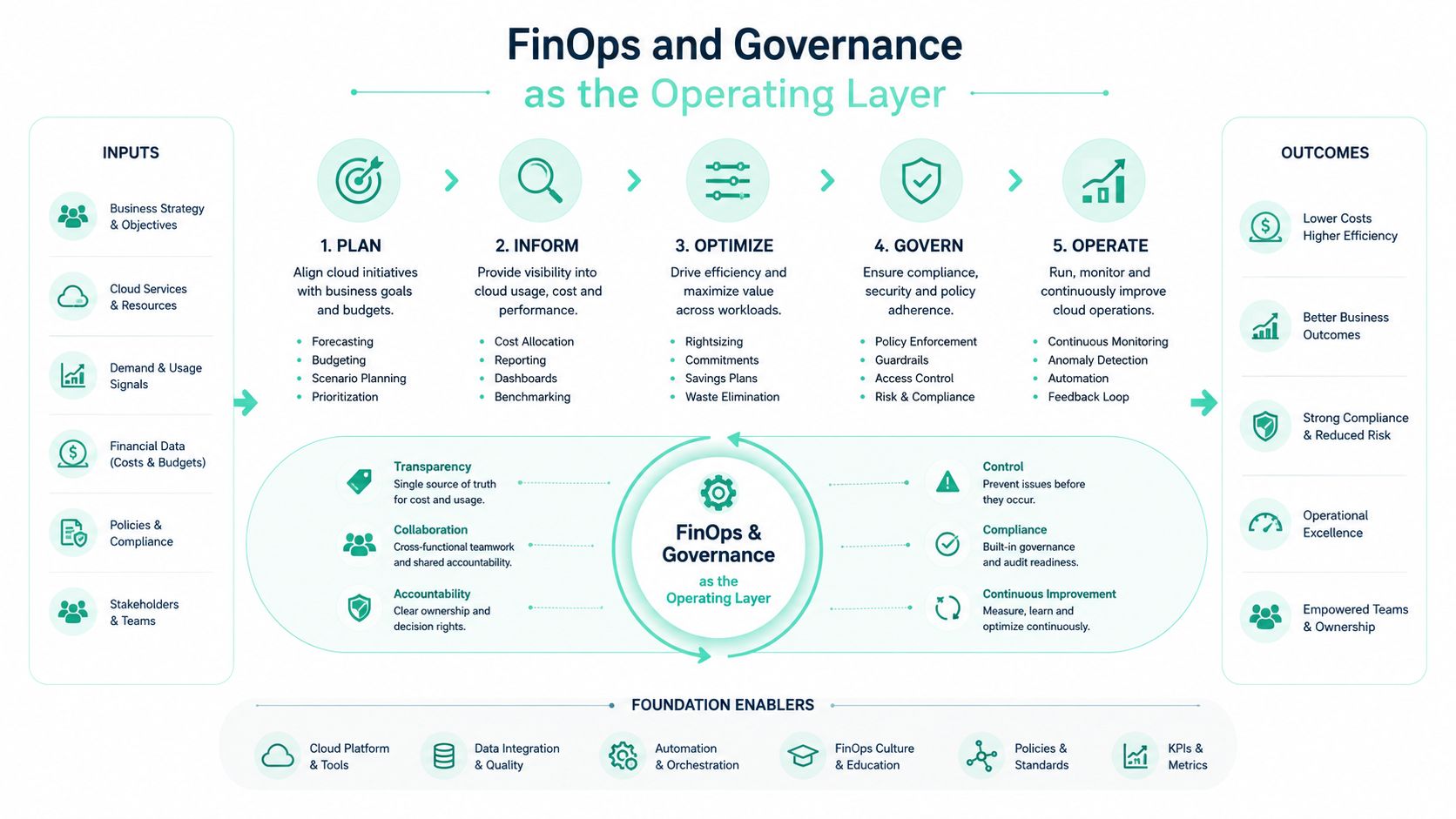
FinOps and Governance as the Operating Layer
FinOps connects engineering choices with financial accountability. For DXP estates, that connection must follow the architecture. Idle Sitecore CD roles, oversized AEM publish tiers, unused SharePoint environments, mismanaged indexes, and storage tier sprawl can all appear as ordinary platform spend unless ownership and workload context are visible. A practical operating model runs through an inform, govern, optimize loop, with each stage producing information or action for the next.
Inform teams before enforcing controls
Start with allocation. Tag every Sitecore role, AEM author and dispatcher tier, and SharePoint workload with an owner, environment, business unit, and application. Showback reports should translate Azure consumption into workload language. “App Service spend increased” provides little direction. “The regional Sitecore CD tier retained campaign capacity after traffic returned to normal” points to a specific review.
A published internal rate card makes the impact easier to assess by translating Azure list prices into chargeback or showback values. Engineering teams do not need to become finance specialists, but they should see how an extra role, database tier, index configuration, or storage policy affects their product.
Govern before the invoice arrives
Budgets, anomaly alerts, approval workflows, policy enforcement, and production resource locks should act before a billing cycle closes. Their purpose is to prevent unowned resources and flag unusual consumption while the responsible team can still respond.
Documentation alone will not protect an estate. Azure Policy, deployment templates, and pipeline checks should reject or quarantine resources without ownership and lifecycle metadata. Automate shutdown schedules for non-production environments. Route production changes through a controlled approval path, particularly when they add CD capacity, persistent authoring infrastructure, search resources, or new storage tiers.
Optimize after waste is visible
Commitment discounts fit a stable requirement, not a baseline inflated by temporary campaigns or abandoned roles. Benchmark material reports average cloud waste of 28% to 34% of total spend across more than 700 enterprise environments, defining idle resources as those below 5% average utilization over 30 days and overprovisioned resources as those sized above twice their P95 utilization requirement (Vendor Benchmark).
Practical rule: Remove idle and oversized capacity first. Buy commitments against the stabilized baseline, not the historical peak.
Teams formalizing controls across mixed environments can use this hybrid cloud governance KPI guide to connect cost measures with operational ownership. The goal is a decision path for each material resource, not another report. Each exception should have an owner, a reason, and a review point.
Azure-Specific Implications for Sitecore and AEM
Azure costs become easier to control when resource groups follow the DXP architecture. A Sitecore XP deployment may separate Content Management, Content Delivery, xDB, databases, Solr, and media storage. An AEM estate commonly separates authoring, publishing, dispatcher, asset storage, and integration services. Give each role its own cost view, because idle CD capacity, index growth, and storage tier sprawl require different corrective actions.
Tune the application layer first
Size App Service plans for Sitecore CD roles and AEM publish services against representative CPU, memory, request, and deployment telemetry. Rightsizing can remove persistent waste, yet sharing several applications on one plan can create contention if capacity assumptions are unclear. Review each plan's baseline usage, peak behavior, and deployment impact before changing its tier.
Autoscaling generally fits CD and publish tiers better than CM and authoring roles. CM instances often stay online at a size set for occasional editorial peaks, even though daily demand is modest. Check whether each role needs continuous peak capacity. If the workload is predictable, a smaller footprint with controlled scaling and defined availability windows may be sufficient.
Premium v3 can balance performance and operational flexibility for many application workloads. Isolated stamps provide stronger separation and networking characteristics, while requiring a larger infrastructure commitment. Choose between them based on compliance, workload density, traffic behavior, and failure-domain requirements. The most expensive tier is not automatically the least costly production design.
Treat data and search as separate cost decisions
SQL tiers and elastic pools should reflect xDB collection patterns, Core database activity, reporting demand, and peak publishing operations. A pool can improve efficiency when databases peak at different times. It can also become a shared bottleneck when several workloads reach high demand together, so review utilization by database rather than judging the pool only by its average.
Search frequently hides cost in shard counts, replica settings, and oversized nodes. For Solr or managed search, examine index growth, query behavior, rebuild frequency, replica requirements, and master-node utilization. A shard layout created for migration or performance testing may remain long after that demand has ended. Removing unnecessary replicas or resizing nodes can save more than broad application changes.
Blob Storage lifecycle policies should cover media libraries, exports, backups, and obsolete renditions. Keep data retention aligned with legal and business requirements, then move infrequently accessed assets out of hot storage. “Keep everything hot forever” is rarely an intentional policy.
| DXP Component | Azure Service | Primary Cost Lever |
|---|---|---|
| Sitecore CD or AEM publish | Azure App Service or compute service | Rightsizing, autoscaling, minimum capacity |
| Sitecore CM or AEM author | Azure App Service or compute service | Smaller steady-state footprint, controlled availability |
| xDB and Core databases | Azure SQL Database | Tier selection, elastic pool fit, query and storage behavior |
| Solr and managed search | Azure compute or managed search | Node size, shard count, replicas, index lifecycle |
| Media and digital assets | Azure Blob Storage | Hot, Cool, and Archive lifecycle policies |
| Integration and background jobs | Azure Functions or compute service | Execution pattern, scheduling, and cleanup |
Architects comparing established XP patterns with XM Cloud should include operational cost, ownership, and scaling responsibility in the decision. The comparison of Sitecore XP and Sitecore XM Cloud provides a practical starting point for assessing those trade-offs.
SharePoint Online and DXP Intranet Cost Levers
SharePoint Online cost optimization begins with information ownership. It is Microsoft 365's cloud collaboration and document management service, built around sites, document libraries, and lists. Its direct connections to Microsoft Teams, OneDrive, Power Automate, Power Apps, and Power BI mean an intranet review must account for content, collaboration, automation, and licensing together, as described by Office 365 for IT Pros and TSI Technologies.
Storage growth needs ownership
SharePoint sites and OneDrive accounts collect documents, versions, recordings, duplicate assets, and obsolete project material. Orphaned sites and Teams create a particular problem. They may remain accessible even after the people who understand their purpose have left.
Assign a lifecycle to every site collection, Team, and major library. Site owners can receive renewal prompts, inactive workspaces can enter an archive state, and retention labels can preserve required records without keeping every working copy in an active collaboration location.
External sharing affects both governance and data growth. Guest access should have a business owner and a scheduled review. Broad sharing, uncontrolled copies, and missing retention rules can expand the tenant's footprint without improving employee productivity.
Power Platform consumption needs metering
Power Automate flows often start as departmental automations and become operational dependencies. Power Apps can follow the same path, developing from a prototype into a widely used business application. Premium connectors may then introduce licensing requirements that were absent from the original intranet budget.
Meter flow runs, app usage, connector types, and inactive owners. A flow with low usage but high business impact needs a different decision from an abandoned automation. Renewal reviews should identify both before licensing commitments are made.
SPFx governance affects maintainability and spend. A shared component library can reduce duplicate custom solutions, while poorly governed customizations create upgrade work, testing overhead, and support demand. Review whether each SPFx solution is reusable, has an accountable owner, and depends on supported components.
Viva modules can also create quiet license consumption when teams enable features without a clear adoption or value plan. Keep capabilities that have an owner and a defined user need. Retire or review those that cannot support a renewal decision.
An enterprise SharePoint intranet development program should cover site provisioning, archive automation, retention labels, external-sharing controls, and Power Platform usage alerts. The aim is a governed tenant where inactive content and expanding automation are visible before renewal discussions begin.
Monitoring, Tooling, and the Metrics That Matter
A cost tool earns its place by improving decisions, not by adding dashboards. Azure Cost Management gives Azure estates the baseline: budgets, alerts, exports, and Azure Advisor recommendations. Use those controls to assign spend to Sitecore roles, AEM author and publish tiers, SharePoint workloads, environments, and owners.
AWS Cost Explorer and Google Cloud Billing reports provide similar visibility in multi-cloud estates. Each platform reports its own services and naming conventions, so product-level comparisons need a shared allocation model. A business unit should be able to trace the cost of one digital product across clouds without translating three billing structures.
Third-party FinOps platforms add showback, unit economics, anomaly detection, commitment analysis, and allocation workflows. They make sense when subscriptions, clouds, and products need consolidated reporting. They also add license cost and rely on accurate tags, ownership, and resource metadata. An advanced platform cannot allocate an orphaned resource reliably.
Track metrics that change behavior
Useful metrics connect cloud spend to DXP activity:
- Cost per active user: Helps evaluate SharePoint intranets, portals, and authenticated experiences.
- Cost per request: Exposes efficiency in Sitecore CD, AEM publish, and search-heavy workloads.
- Idle resource percentage: Highlights provisioned capacity with little meaningful use, including dormant CD roles and oversized index nodes.
- Commitment discount utilization: Shows whether Reserved Instances and Savings Plans match actual steady-state demand.
- Waste-to-spend ratio: Brings unused, orphaned, and overprovisioned capacity into one estate-level view.
Daily reviews should flag anomalies, unexpected scaling, failed cleanup jobs, and new untagged resources. Weekly reviews should examine rightsizing candidates, storage growth, index behavior, and environment expiry. Monthly reviews should assess commitment utilization, product-level unit economics, forecast variance, and unresolved ownership, per the commitment utilization thresholds established above.
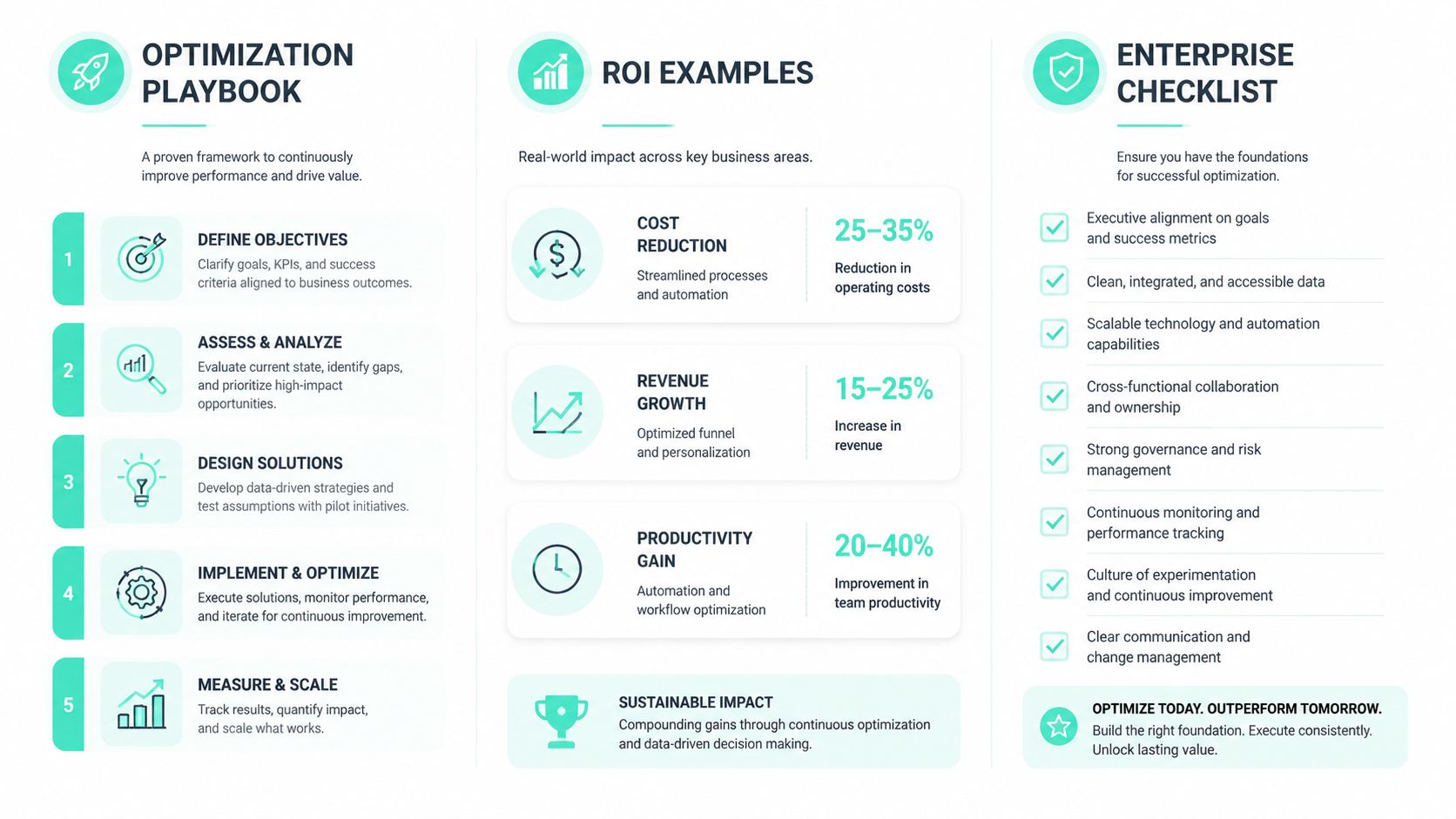
Optimization Playbook, ROI Examples, and Enterprise Checklist
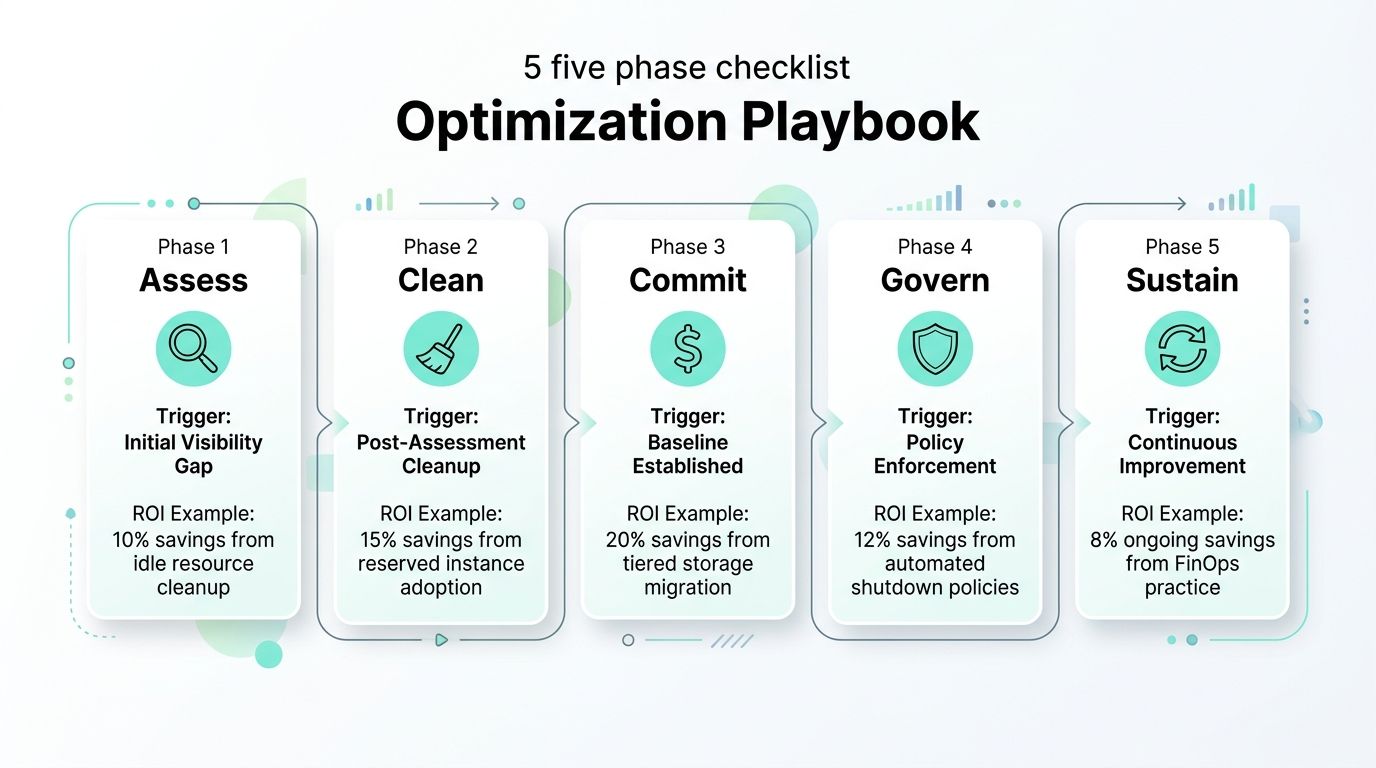
A useful playbook turns cloud cost optimization into operating controls rather than a one-time cleanup. For Sitecore, AEM, and SharePoint estates, the largest opportunities usually sit in idle CD or publish capacity, oversized search infrastructure, abandoned environments, and storage tier sprawl.
Assess
Start when the organization cannot explain spend by DXP role, environment, or business unit. Inventory Sitecore CM, author, CD, and database roles, AEM author and publish services, SharePoint sites, Teams, Power Platform, search, storage, and network movement. Record ownership, workload purpose, utilization, retention requirements, and environment expiry dates.
Clean
Once allocation is visible, remove capacity that does not support current demand. Retire dormant CD roles, delete abandoned environments, archive inactive SharePoint sites, and apply lifecycle policies to media, documents, backups, and indexes. Review Solr shards, replicas, and rebuild copies separately. Mismanaged indexes can cost more than their query workload justifies.
Commit
Commit only after the baseline is stable. Reserved capacity and Savings Plans suit predictable SQL, application, and search demand. They do not correct an oversized footprint or compensate for an environment that should have been removed. Review commitment utilization continuously and compare it with actual DXP demand before adding coverage.
Govern
Set policies, budgets, approval workflows, expiry metadata, resource locks, and showback. Sitecore and AEM resources need role-level tags and environment controls. SharePoint needs site ownership, retention, and archival rules. Power Platform consumption and premium connectors need alerts before renewal or expansion.
Sustain
Review the estate on a fixed cadence. AI workloads can add substantial costs through egress, inter-region transfer, managed-service fees, and idle GPU capacity, so optimization must cover data movement and retention as well as compute. For DXP platforms, track storage growth, index behavior, scaling events, and cleanup failures alongside invoice totals.
Enterprise checklist
- Tagging hygiene: Every resource has an owner, environment, business unit, and lifecycle.
- Showback cadence: Teams receive workload-level cost views often enough to act.
- Commitment coverage: Commitments match stable demand and receive utilization reviews.
- Lifecycle automation: Environments, media, indexes, sites, and documents follow expiry or archival rules.
- Search discipline: Solr shards, replicas, and indexes match query and rebuild requirements.
- Platform metering: Power Platform usage and premium connectors have actionable alerts.
- DXP review: CM, author, CD, publish, database, and search roles are assessed separately.
- Business metrics: Cost per active user and cost per request accompany infrastructure totals.
For practical implementation ideas, Credit for Startups cost optimization advice offers a useful comparison of financial controls and engineering actions. Kogifi supports enterprise DXP teams with Sitecore, AEM, and SharePoint audits, Azure architecture reviews, rightsizing, lifecycle automation, FinOps governance, and managed support.
If your estate has unexplained spend, Kogifi can assess ownership, workload sizing, storage behavior, search infrastructure, and governance controls. Turn the findings into assigned actions, review dates, and measurable operating targets.