


Your intranet is probably doing too many jobs with too little structure. Employees find policies in SharePoint, submit requests through a form, wait for an approval hidden inside someone's inbox, and discover the latest figures in a spreadsheet that nobody owns. Marketing may be orchestrating personalized customer journeys in Sitecore, while internal teams still depend on disconnected lists and manual handoffs.
That's the practical starting point for understanding what Power Platform is. It isn't a collection of drag-and-drop app builders. Used properly, it's an enterprise operating model for connecting data, automating work, delivering internal applications, publishing portals, and coordinating AI agents across Microsoft 365 and business systems.
Table of Contents
- Establish the operating boundaries
- Prove value with bounded solutions
- Expand through reusable capability
Understanding the Power Platform Ecosystem
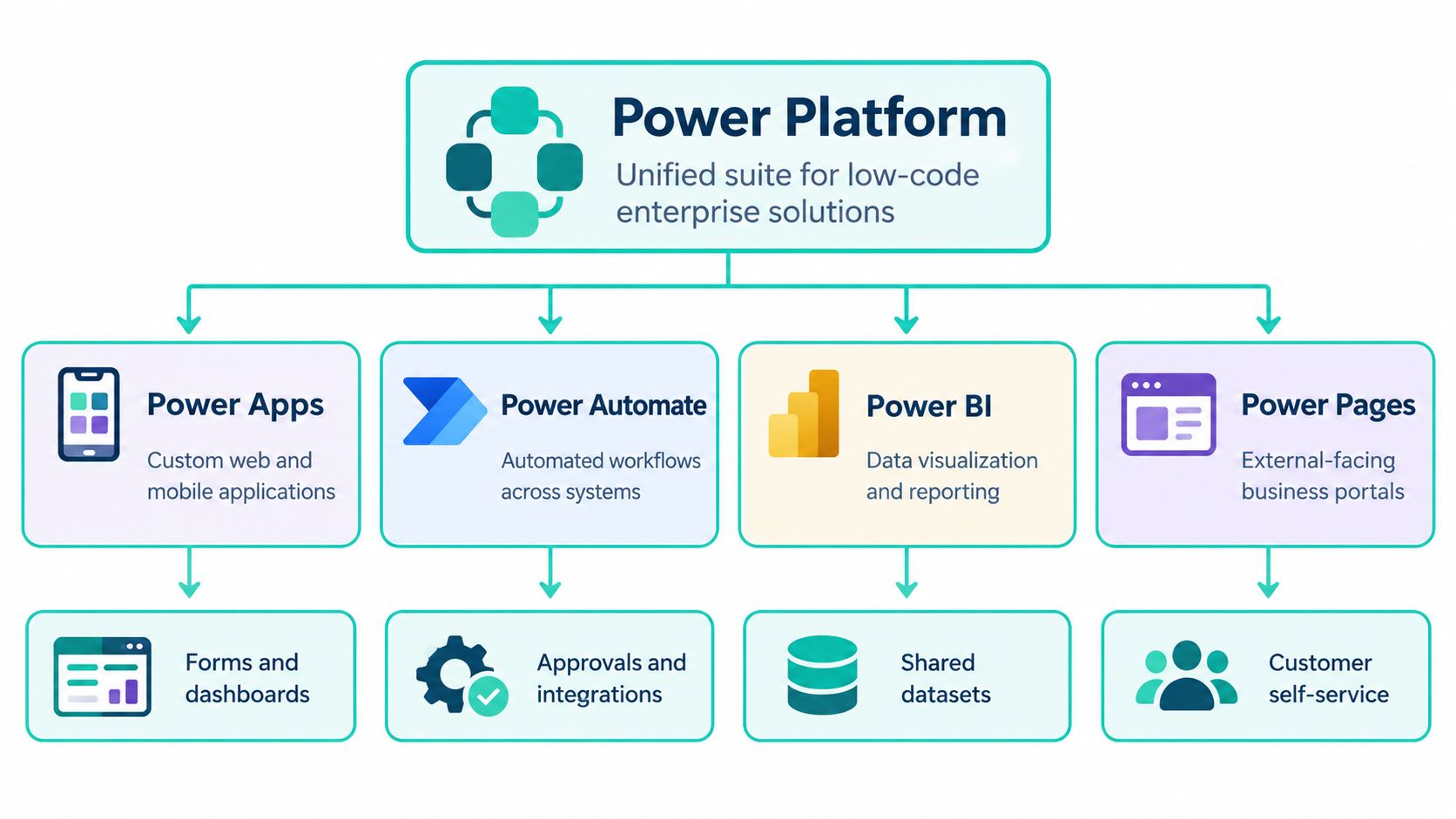
Microsoft Power Platform provides a low-code foundation that sits alongside SharePoint, Teams, Dynamics 365, Azure, and other enterprise services. Microsoft's Power Platform developer documentation identifies five principal product areas: Power Apps, Power Automate, Power BI, Power Pages, and Copilot Studio. They can run independently, but their strategic value increases when they share data, identity, connectors, and governance.
Consider an employee service process. SharePoint might hold policy documents and departmental news. Power Pages could provide an external request portal, Power Apps could give service staff a structured case interface, Power Automate could route approvals and notifications, Power BI could expose operational trends, and Copilot Studio could help employees find answers or initiate a process conversationally. Dataverse can provide the shared foundation for records that need stronger structure and control than a document library or simple list.
A platform operating model, not a menu of tools
The distinction matters for SharePoint leaders. A portal can publish information effectively, but it doesn't automatically create a coherent business process. Power Platform adds the application, automation, analytics, and agent layer that turns an intranet into a working environment.
Microsoft was publicly presenting Power Platform as a portfolio at its October 2018 Ignite event, an important point in its evolution from separate services toward a unified product family. The platform's historical significance is its collaboration model: business users can assemble solutions with low-code or no-code tools, while professional developers extend those solutions with code, integrations, custom connectors, security, and governance.
A useful Microsoft 365 ecosystem perspective places Power Platform in the broader stack. SharePoint remains valuable for content and collaboration. Power Platform handles the operational layer around that content. Sitecore remains suited to advanced customer-facing experience orchestration, brand governance, and personalization.
The platform also has clear boundaries. It isn't a universal replacement for a high-scale transactional system, a complex digital experience platform, or every integration workload. The value comes from choosing the right boundary, then making the handoff between systems explicit.
Core Components That Drive Enterprise Workflows
Each Power Platform service solves a different architectural problem. Confusing those roles is how teams end up forcing a SharePoint list to behave like a case-management system or asking Power BI to compensate for inconsistent source data.
Match the component to the job
Power Apps delivers custom web and mobile applications. Business teams can create forms and operational interfaces, while developers can add code components, custom connectors, and integrations. It's a strong fit when users need a controlled experience rather than direct editing of lists or spreadsheets.
Power Automate handles cloud and desktop workflow automation. Approval routing, notifications, synchronization, provisioning, and review cycles can become repeatable services instead of personal routines. The workflow should own the process logic, not merely send an email when somebody changes a column.
Power BI provides interactive analytics and data visualization. Its quality depends on the underlying data model and ownership. A polished dashboard built on manually maintained files still produces fragile decision support.
Power Pages creates externally facing business websites and portals. It can support customer, partner, supplier, or citizen interactions without requiring every portal to begin as a full custom web application.
Copilot Studio enables conversational and AI-driven agents. An agent can guide a user through a process, retrieve relevant information, or initiate an approved action, provided its data access and permissions are designed carefully.
Microsoft reports more than 1,500 connectors, linking Power Platform with Microsoft 365, Dynamics 365, Azure, SQL databases, Salesforce, and other systems through governed interfaces. Those connectors reduce point-to-point development, but they don't remove integration design. Teams still need to define ownership, error handling, authentication, data quality, and lifecycle management. A practical integration strategy for Microsoft environments should identify which system remains authoritative before a connector is configured.
Dataverse creates the shared business layer
Dataverse stores structured business records and provides a common data model, role-based security, auditing, and fine-grained access controls. That makes it appropriate for cases, approvals, assets, and service processes that need dependable relationships and permissions.
The five services can work separately, but the architecture becomes more powerful when Power Apps presents the data, Power Automate moves the process, Power BI analyzes it, Power Pages exposes a controlled portal, and Copilot Studio provides an agent interface. For readers comparing broader automation approaches, this AI agents and RPA roundup offers useful context, but product selection still has to follow the organization's data, identity, and governance model.
Dataverse vs SharePoint Lists Making the Right Data Choice
The most consequential design decision often happens before anyone builds a screen. Where should the business record live? SharePoint lists are familiar and useful, but familiarity isn't the same as architectural suitability.
Use a SharePoint list when the process is lightweight, closely tied to collaboration, and primarily document-centric. Examples include a simple content inventory, a small team action register, or metadata supporting a document library. SharePoint permissions, views, versioning, and Microsoft 365 integration may be enough.
Choose Dataverse when the record represents a governed business object with relationships, role-based access, auditing, or a longer operational lifecycle. A service case connected to customers, activities, approvals, and ownership is a better Dataverse candidate than a wide list with loosely controlled columns.
Three questions settle the decision
Who owns the data? If Dynamics 365, Azure SQL, or another line-of-business system is authoritative, Power Platform should integrate with that source rather than create a competing copy.
What happens when the process grows? More users, more relationships, more security rules, and more automation increase the cost of keeping business logic inside an unmanaged list.
Can synchronization fail safely? Duplication creates reconciliation work. If teams copy records between SharePoint, Dataverse, and external systems without a clear master, a successful flow can still produce an unreliable estate.
| Data Type | Best Location | Governance Level | Scalability |
|---|---|---|---|
| Documents and lightweight collaboration metadata | SharePoint lists and libraries | Microsoft 365 permissions and ownership | Suitable for straightforward team processes |
| Structured cases, approvals, assets, or service records | Dataverse | Role-based security, auditing, and controlled access | Designed for governed application workloads |
| Financial, customer, or operational system-of-record data | Dynamics 365, Azure SQL, or another authoritative platform | Governed by the owning enterprise system | Determined by the source platform and integration design |
Practical rule: Keep content where SharePoint is strong, keep governed business records where Dataverse is strong, and don't duplicate an authoritative external record merely because Power Apps makes it easy.
A well-designed SharePoint intranet development approach treats the list-versus-Dataverse decision as part of information architecture, not as a late technical preference. Dataverse introduces governance and design overhead, but unmanaged duplication creates a larger maintenance problem.
Power Platform and Sitecore AI Complementary Strengths
Power Platform and Sitecore AI belong in the same enterprise conversation, but they shouldn't be forced into the same role. Sitecore Stream is the AI layer across Sitecore's digital-experience portfolio. Sitecore describes its core capabilities as brand-aware AI, AI copilots and agents, and agentic workflows, supporting content creation, marketing operations, and project management across content management, digital asset management, and customer data products.
Sitecore's brand-aware AI uses a configured brand kit containing brand documents, guidelines, context, and tone of voice. That context matters when marketers generate, adapt, and govern content across sites and campaigns. Sitecore identifies copilots for brand, campaign, content, experience, and optimization work, which positions Stream inside the experience lifecycle rather than as an isolated writing assistant.
Power Platform addresses a different center of gravity. It digitizes internal processes, connects Microsoft 365 workloads, supports operational apps, and gives business teams a governed path to automate work. A SharePoint intranet might use Power Automate for employee approvals, Power Apps for a structured request form, and Power BI for service reporting, while Sitecore manages the public brand experience.
Different strengths, connected architecture
Sitecore's experience products can use behavioral and contextual information for personalization, including location, IP address, and past behavior, according to Sitecore's personalization documentation. Sitecore Cortex can suggest personalization rules from data collected during component testing, and external machine-learning platforms can integrate with the processing layer.
Sitecore Stream also supports AI-assisted page personalization in XM Cloud, including generating or rewriting text for different audiences. In Sitecore XP, the content copilot can generate content and modify length, tone of voice, and grammar, and Sitecore states that this capability is available to XP 10.2 and later users. Sitecore CDP provides generative insights and campaign recommendations, while Sitecore Personalize can automate actions after experiments.
Power Platform shouldn't attempt to replace those experience capabilities. Its role is to connect employee operations, business data, approvals, and reporting to the wider Microsoft estate. The strongest architecture gives Sitecore ownership of customer-facing content and personalization, while Power Platform supports the internal processes that keep those experiences supplied, approved, measured, and maintained. The result resembles AI-powered personalization in enterprise experience programs, with each platform doing the work it was designed to do.
Licensing Models and Action Limit Considerations
Power Platform licensing can look simple during a prototype and become operationally significant in production. The key mistake is to estimate cost from the number of flows alone. You need to understand which context runs the flow, how many actions it performs, and whether the SharePoint connector becomes the bottleneck.
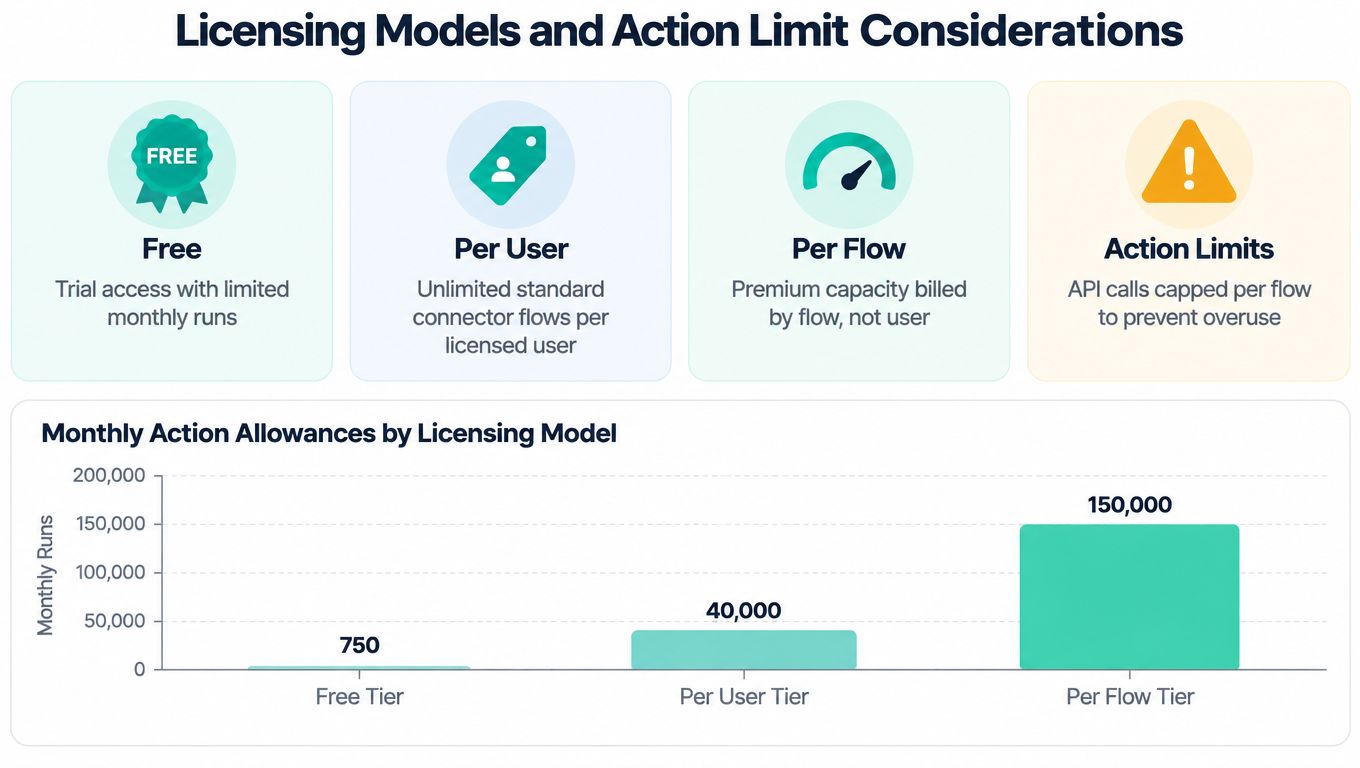
Microsoft documents daily action entitlements of 6,000 actions for Microsoft 365 and several lower-tier contexts, 40,000 for Power Automate Premium and certain Power Apps-triggered contexts, and 250,000 for a Process or per-flow license in the relevant context. These figures come from Microsoft's Power Automate licensing FAQ.
Every trigger and action counts. That includes connector operations, HTTP calls, variable initialization, scopes, and Compose actions. A flow that appears modest in the designer can consume capacity quickly when it loops through records, calls several services, and runs repeatedly throughout the day.
Compare capacity before choosing a design
The licensing choice should follow the workload:
- Microsoft 365 context: Appropriate for eligible standard scenarios, but the documented daily action entitlement is lower than premium and Process contexts.
- Power Automate Premium: Provides a higher documented daily entitlement of 40,000 actions in the applicable context.
- Process or per-flow licensing: Supports a documented allowance of 250,000 actions for a Process or per-flow license.
- Per-user and broader plans: Useful where an individual regularly runs premium capabilities across multiple processes, but they still require workload and connector analysis.
These are not interchangeable monthly run allowances. The infographic language used by many licensing summaries can obscure the fact that Microsoft's operational limits are expressed through contexts and daily action entitlements. Validate the current commercial terms before procurement, because licensing details can change.
SharePoint introduces another constraint. Microsoft documents a 600-actions-per-minute service limit for the SharePoint connector. Reusing one SharePoint connection across several flows doesn't increase that connector-level ceiling, and action limits apply to the relevant user or flow context rather than pooling across the tenant.
Design for the production pattern, not the happy-path test. Batch records, reduce unnecessary actions, control concurrency, and isolate high-volume workloads before users depend on them.
Enterprise Governance and Scalability Requirements
A Power Platform estate becomes difficult to manage when every team can create applications and flows without shared controls. The visual builder isn't the risk. The risk is unknown ownership, unrestricted data movement, unmonitored connectors, and production solutions that nobody can release or support.
Microsoft defines environments as containers for Power Apps, Power Automate, and Dataverse resources. Organizations can use them to separate development, testing, production, business units, or regulatory boundaries. That separation limits the blast radius of a faulty change and gives administrators a meaningful place to apply policy.
Governance controls that change the outcome
Data loss prevention policies classify connectors into groups such as Business and Non-Business. A flow or app can be prevented from combining connectors across incompatible classifications, which reduces the chance that corporate data moves into personal or unapproved services.
Production governance should also include:
- Named ownership: Every application, flow, table, and connection needs a responsible business and technical owner.
- Environment strategy: Development, test, and production resources shouldn't share the same change path.
- Solution packaging: Components should move as managed solutions rather than being rebuilt manually.
- Lifecycle controls: Releases need review, rollback planning, and evidence of what changed.
- Monitoring: Administrators need visibility into failures, inactive assets, connector use, and capacity consumption.
For production delivery, Microsoft's governance guidance recommends integrating Dataverse with Git-based source control, Azure DevOps pipelines, pull-request governance, role separation, and controlled automation identities. This is the point where citizen development and professional engineering meet. Business users can define useful processes, while developers and administrators provide the release discipline, security model, and integration quality required for enterprise operation.
Operational reporting also needs controls. Teams assessing telemetry-driven BI controls should connect dashboard ownership to data lineage, refresh reliability, access permissions, and action taken from the insight. A dashboard without accountable data stewardship is presentation, not governance.
Microsoft reported 48 million monthly active Power Platform users, representing 40 percent year-over-year growth, in its 2024 Annual Report. The same report describes a platform broad enough to require application-estate discipline, not just departmental automation habits. Microsoft's 2023 Annual Report also stated that more than 63,000 organizations had used AI-powered capabilities in Power Platform, while 25 million users benefited each month from solutions built with Power Apps. Those figures are documented in Microsoft's 2024 Annual Report, and they reinforce the architectural point: adoption at this scale needs ownership, monitoring, licensing controls, and release management.
Building a Power Platform Adoption Roadmap
Adoption works best as a controlled progression. Starting with governance doesn't slow delivery. It prevents the first successful prototype from becoming the template for an estate that nobody can inventory or support.
Establish the operating boundaries
Begin by documenting the environment strategy. Decide where development, testing, and production solutions will live, who can create environments, and how business units or regulatory boundaries affect separation.
Then classify connectors. Put approved corporate services into the right Business group, restrict combinations that create data-exfiltration risk, and define an exception path for legitimate integration needs. The policy should be understandable to makers, not just administrators.
Create ownership records before the first production release:
- Business owner: Defines the process, priority, and acceptable outcome.
- Technical owner: Maintains the solution, integrations, and release path.
- Data owner: Approves access, retention, and authoritative sources.
- Support owner: Handles incidents, monitoring, and user communication.
Prove value with bounded solutions
Choose a small set of visible processes with clear users and measurable operational outcomes. A SharePoint intranet approval workflow, employee request app, or management dashboard can demonstrate value while testing identity, permissions, connector policy, ALM, and support responsibilities.
Don't start with a broad promise to automate everything. A narrow workflow exposes design weaknesses early. It also gives makers a safe pattern to reuse, including naming, error handling, solution packaging, and documentation.
Expand through reusable capability
Once the initial solutions work in production, establish a center-of-excellence function that supports training, reusable components, monitoring, and architecture decisions. Expansion should follow evidence from real usage patterns. Retire abandoned flows, consolidate duplicate solutions, and review whether a SharePoint list has become a Dataverse candidate as the process matures.
Kogifi delivers Microsoft 365 and SharePoint intranets with SPFx components, Power Platform automations, and Microsoft 365 integrations. Its delivery record includes 12+ years in operation and 70+ DXP projects, facts provided on the Kogifi company site. For a Sitecore-led organization, that combination can support a coordinated model in which Sitecore handles digital experiences and Power Platform supports internal operations.

Review the roadmap at each release checkpoint. Confirm that owners still exist, permissions match responsibilities, connectors remain approved, failures are visible, and the solution still belongs on the platform. That discipline is what turns low-code delivery into a durable enterprise capability.
Kogifi designs and supports SharePoint intranets, Power Platform workflows, Power Apps solutions, and Sitecore digital experience architectures, with governance and integration built into the delivery model. Visit Kogifi to discuss your current intranet, Sitecore, or Microsoft 365 estate and define a practical roadmap for connected, maintainable enterprise solutions.