


A global manufacturer's marketing team has a familiar problem. Product information lives in a composable Sitecore XM Cloud estate, sales teams work in Microsoft Teams, campaign documents accumulate in SharePoint, and compliance officers expect sensitivity labels and access controls to survive every handoff. Each platform works well in isolation. The failure appears at the seams.
That seam is where the Microsoft 365 ecosystem earns its place in the enterprise architecture. It provides collaboration, identity, document management, workflow automation, and operational telemetry around digital experience platforms such as Sitecore XM Cloud and Adobe Experience Manager as a Cloud Service. Treating Microsoft 365 as a productivity suite attached to a DXP creates avoidable rework. Treating it as connective tissue produces a more durable composable stack.
Table of Contents
- Days 0 to 30 establish control
- Days 31 to 60 instrument the seams
- Days 61 to 90 operationalize adoption
The Microsoft 365 Ecosystem Inside the Modern Enterprise
The manufacturer's campaign team starts in Sitecore XM Cloud. Marketers assemble product narratives, localization teams prepare regional variants, and the digital team manages delivery through a headless experience layer. A sales leader then creates a Teams deal room for a strategic account. The team needs approved product assets, campaign briefs, pricing documents, and legal guidance without forcing users to search across unrelated repositories.
Compliance adds a harder requirement. Every artifact must land in SharePoint with the correct sensitivity label, ownership model, retention behavior, and audit trail. A simple file upload won't solve that problem. The integration must understand identity, content state, metadata, permissions, and the distinction between customer-facing experience content and internal working documents.
Microsoft 365 began as Office 365. Microsoft announced Office 365 on October 19, 2010, opened it to public beta on April 18, 2011, and launched it generally on June 28, 2011 as a subscription service built around enterprise collaboration tools including Exchange, SharePoint, and Lync or Skype-related services. Microsoft expanded the brand into Microsoft 365 in 2017, then rebranded consumer Office 365 plans to Microsoft 365 on April 21, 2020, as documented in the Microsoft 365 history.
The enterprise boundary that matters
In a mature architecture, each platform has a clear job:
- Sitecore XM Cloud owns experience delivery: It manages structured content, presentation, personalization, and the customer-facing journey.
- Adobe Experience Manager owns its agreed experience domains: AEM can remain the authoring and asset platform where its workflows, metadata, and delivery capabilities already fit the operating model.
- Microsoft 365 owns collaboration and identity: Teams, SharePoint, OneDrive, Exchange, Entra ID, and the Power Platform support employee work and controlled business processes.
- Azure hosts integration logic: Functions, APIs, event processing, monitoring, and security policies mediate traffic between systems.
- Line-of-business systems own transactions: ERP, CRM, product lifecycle, and service platforms remain authoritative for their business records.
The practical lesson is simple. Don't make SharePoint a replacement CMS for customer experiences, and don't make Sitecore or AEM an employee document repository. Design the integration surfaces before rollout, including Microsoft Graph, webhooks, event contracts, search indexing, identity federation, and document governance.
Employees also need a coherent entry point. A well-designed intranet login experience should route users into approved workspaces without hiding the underlying ownership model. The user sees one connected workplace. The architecture still preserves distinct systems of record.
Microsoft reported 48 million monthly active Power Platform users and 40% year-over-year growth in its 2024 Annual Report, while Teams reached 320 million monthly active users in FY24 Q1, according to Microsoft's 2024 Annual Report. Those figures describe scale, not successful governance. At enterprise scale, workload boundaries and control points matter more than the number of available features.
Core Workloads That Make Up Microsoft 365
The easiest way to explain Microsoft 365 to leadership is to describe it as a managed workplace rather than a product catalog. Each workload has a primary job, and the architecture works when users can move between those jobs without creating duplicate records or uncontrolled copies.
Exchange Online is the postal system. It routes messages, calendar invitations, and meeting relationships. Outlook is where users coordinate time and communication, but email shouldn't become the permanent system of record for campaign assets, procedures, or operational decisions.
SharePoint is the filing room. It stores governed documents, pages, lists, and intranet content. Site owners, permissions, retention, sensitivity labels, and lifecycle rules belong here. SharePoint Online is the cloud version of SharePoint in Microsoft 365, and it should hold the durable internal knowledge that teams need to find and reuse.
Teams is the meeting floor. Channels provide working context, conversations, meetings, and access to connected files. Teams becomes difficult to govern when every discussion creates a new workspace without a business owner, naming standard, expiration rule, or connection to the underlying SharePoint site.
OneDrive is the personal desk. It supports individual working files and controlled sharing, but it shouldn't become a shadow departmental repository. When a document becomes a team record, move it into the appropriate SharePoint location.
Power Platform is the workshop. Power Apps lets teams build business applications, Power Automate orchestrates processes, and Power BI supports analysis. The workshop needs guardrails, because a useful prototype can quickly become a business-critical application with unclear ownership and weak lifecycle management.
| Workload | Primary Function | Integration Surface |
|---|---|---|
| Exchange Online | Mail, calendars, and meeting coordination | Microsoft Graph, Outlook, Teams |
| SharePoint Online | Documents, pages, lists, and intranet content | Microsoft Graph, SPFx, Power Platform |
| Microsoft Teams | Collaboration, channels, meetings, and app experiences | SharePoint, Graph, Power Apps, bots |
| OneDrive | Individual work files and controlled sharing | SharePoint, Graph, Office apps |
| Power Platform | Business apps, workflows, reporting, and automation | Connectors, Dataverse, Graph, SharePoint |
| Microsoft Entra ID | Identity, access, and application authentication | Conditional Access, service principals, APIs |
| Microsoft Graph | Cross-workload data and action interface | Microsoft 365 services and approved connectors |
| Security and Compliance | Investigation, labeling, retention, and policy oversight | Purview, Defender, audit data |
Microsoft Graph is the operator's switchboard. It exposes approved relationships between users, groups, files, messages, calendars, sites, and applications. Entra ID is the security desk checking each visitor's badge. The Security and Compliance tools are the audit vault, where administrators investigate activity and enforce information controls.
Copilot and agents sit across the workplace. They can turn governed content into summaries, recommendations, search results, or orchestrated actions. That makes permissions and data classification prerequisites, not administrative details. An agent can only be as trustworthy as the content and access model it can reach.
Connecting Microsoft 365 to Sitecore AI and Adobe DXPs
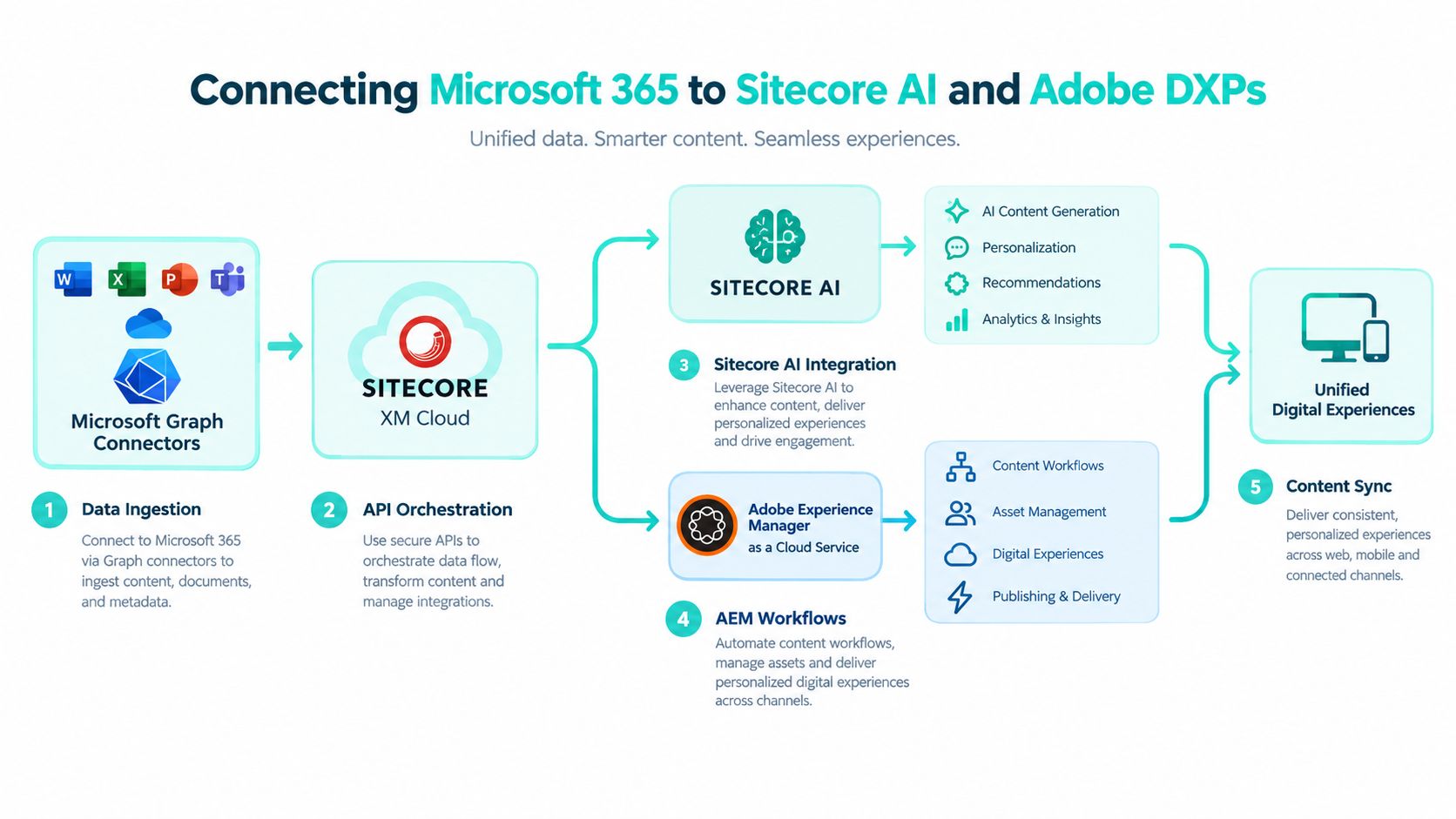
The strongest integration pattern starts with ownership. The DXP owns customer experience. Microsoft 365 owns employee collaboration and identity. Azure-hosted services own orchestration. That separation prevents Teams from becoming an accidental CMS and keeps Sitecore XM Cloud or AEM from absorbing internal workflow responsibilities.
A Microsoft Graph connector can expose selected SharePoint or Teams content to a DXP search experience. The connector should ingest only approved content types, carry source identifiers and security metadata, and preserve a clear update strategy. Search indexing without permission trimming is not an integration success. It's a content exposure risk.
For Sitecore XM Cloud and Sitecore AI scenarios, Azure Functions can mediate events between campaign systems and Microsoft 365. A publish event might trigger a workflow that creates a review task in Teams, places approved campaign collateral into SharePoint, or sends a notification through Outlook. The function layer should validate the event schema, authenticate through Entra ID, apply idempotency, and record failures for operational review.
Sitecore's AI-enabled XM Cloud platform was presented in 2025 as part of an intelligent DXP intended to help enterprise teams manage the content lifecycle from strategy through delivery and build connected experiences with data and AI, as described in the Sitecore Digital Impact Awards announcement. Sitecore XM Cloud Plus also brought content management, AI-powered search, personalization, customer data management, analytics, and generative AI capabilities into a cloud offering, according to Sitecore's XM Cloud Plus announcement.
Integration patterns that hold up
SharePoint Embedded can provide the document backbone behind an XM Cloud campaign workflow while allowing a custom user experience outside standard Microsoft 365 navigation. That approach keeps document storage and Microsoft 365 controls in place without forcing campaign users into a generic repository interface.
AEM integrations require the same discipline. AEM Assets may remain authoritative for managed digital assets, while SharePoint and OneDrive support internal briefs, approvals, and working documents. Synchronization should be selective, metadata-aware, and explicit about which system owns the asset rendition, lifecycle, and publication state.
Copilot Studio agents can consume approved DXP content for sales enablement, but the agent should answer from a curated content boundary rather than an unfiltered tenant. The Adobe Experience Manager integrations guidance is useful when mapping AEM content, identity, APIs, and downstream employee experiences.
The following video provides an additional visual reference for the platform relationship.
SharePoint, SPFx, and Power Platform as the Intranet Backbone
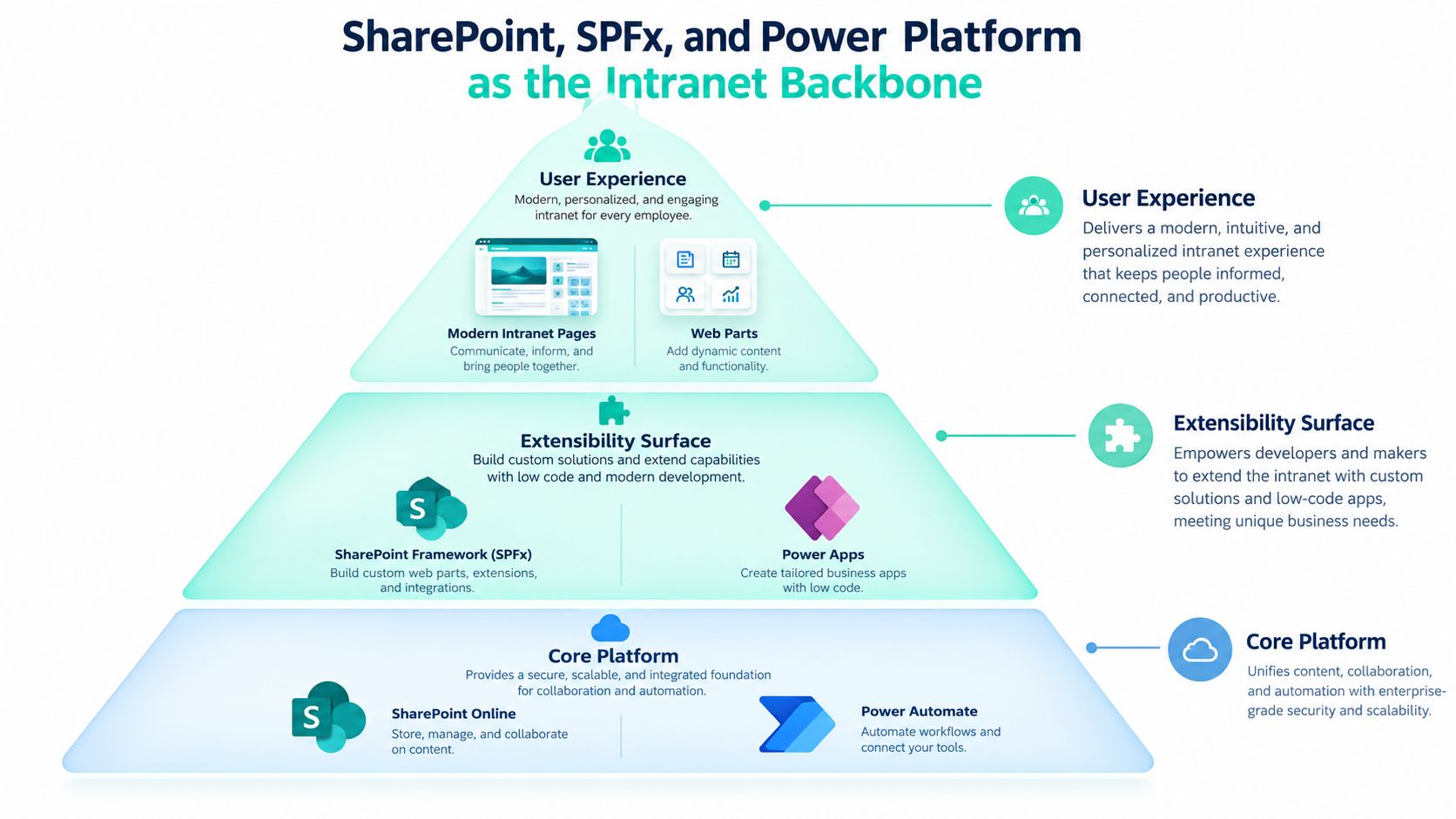
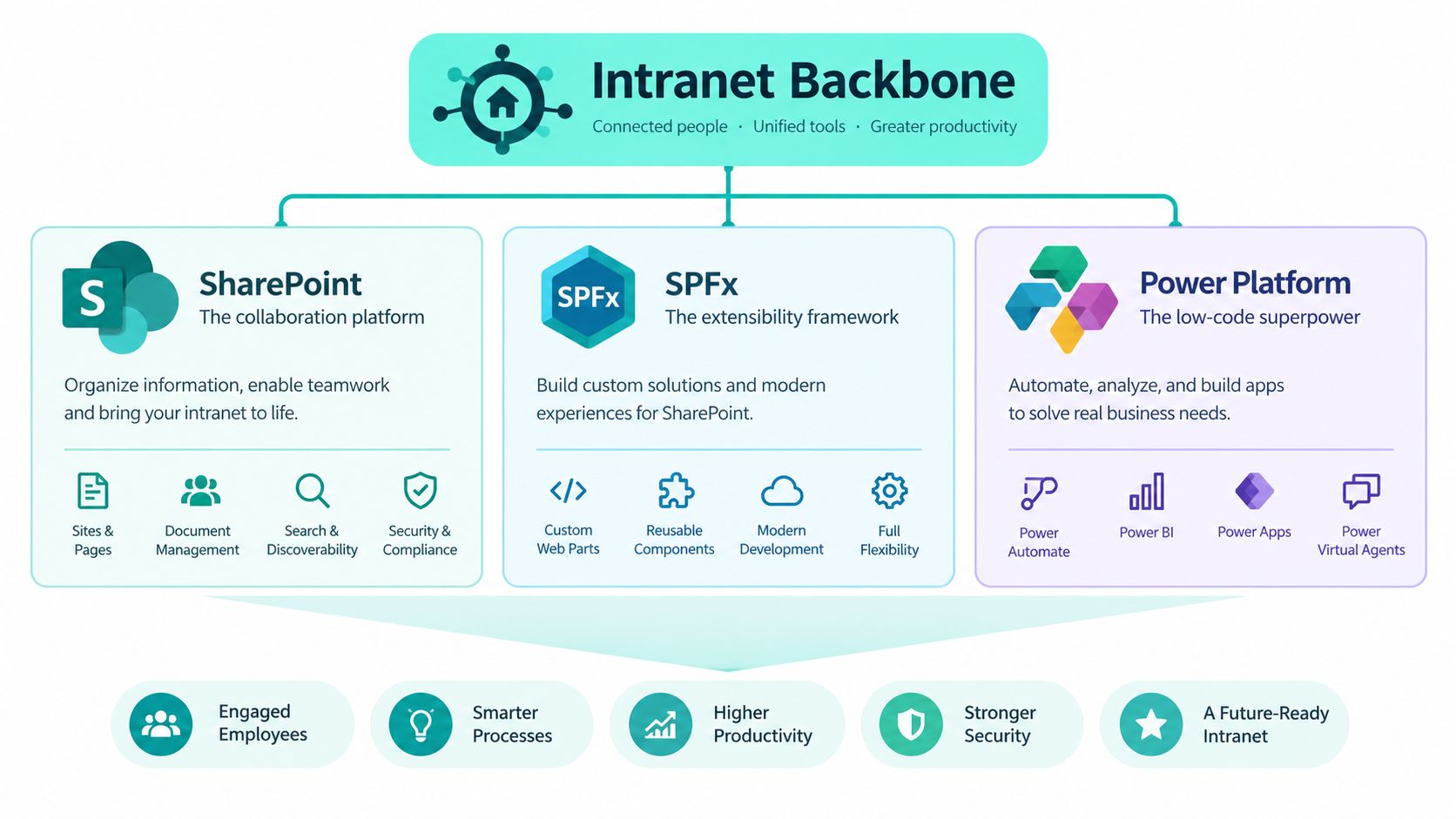
SharePoint Online, SPFx, and Power Platform form the practical extensibility surface for a Microsoft 365 intranet. Use them together, but don't blur their responsibilities.
Start with SharePoint Online as the content and navigation foundation. Modern pages should own editorial content, news, department information, policies, and structured lists. Information architecture comes before visual design. Define site types, content types, metadata, search behavior, ownership, and lifecycle policies before building custom components.
Use SPFx for experience extensions. Microsoft documents SPFx as the recommended development model for modern SharePoint pages and web parts. SPFx web parts and extensions can connect users to line-of-business data, personalized navigation, search tools, and task experiences while respecting the SharePoint page model.
Use Power Apps and Power Automate for business processes. A canvas app can capture a request or guide a service interaction. A cloud flow can route approval, update a record, notify a Teams channel, or create a controlled task. Don't embed complex transactional logic in page scripts when a governed application or API belongs behind the experience.
A delivery model for enterprise teams
A Helix-style architecture maps cleanly to this stack:
- Foundation: SharePoint structures, design system, authentication, common services, telemetry, and reusable Power Platform components.
- Feature: SPFx web parts, search experiences, approval flows, employee services, and bounded business capabilities.
- Project: Brand, region, department, or program-specific configuration that composes existing features without forking the foundation.
Keep source code in GitHub or Azure DevOps. Build SPFx packages through a controlled pipeline, validate dependencies, run security checks, and promote through tenant-scoped deployment rings. Power Platform solutions should move through development, test, and production environments as managed artifacts rather than manual exports.
Deployment rule: If an automated deployment uses a developer's personal identity, it has already failed the audit test.
Tenant app catalogs need explicit ownership. Feature stapling across site collections can produce inconsistent behavior if administrators don't document where and how features activate. Service principal authentication matters because pipelines must continue when an employee changes role, leaves the organization, or loses access.
The SharePoint intranet development approach reflects the practical combination of SharePoint Online, SPFx components, and Power Platform automation. The architectural decision is not whether to customize. It's whether customization remains reusable, observable, testable, and reversible.
Governance by Design for Agents, Copilots, and Citizen Development
Governance that begins after deployment is already late. Copilot, agents, and citizen-built Power Apps can traverse SharePoint, Teams, Graph, and external connectors, so the provisioning pipeline must enforce boundaries before users create content or automation.
Microsoft's Power Platform governance guidance has moved toward policy-driven control through Managed Environments, environment groups, automated routing, centralized reporting, and governance pillars focused on security, consistency, visibility, and scalability across the application lifecycle. The Power Platform governance whitepaper supports the core architectural position: enforce guardrails before app creation instead of cleaning up uncontrolled deployment later.
The need is sharper for agents. Microsoft says active agents in the Microsoft 365 ecosystem grew 15x year over year, and 18x in large enterprises. Third-party research cited in Microsoft's work trend material reported that 51% of respondents identified oversharing and data loss as the top barrier to successful Copilot deployment, while 86% were limiting Copilot Studio deployments because of governance concerns, as discussed in Microsoft's report on agents and human agency.
Controls must follow the data
Oversharing in SharePoint is the obvious risk. Unmanaged connectors create another route for Graph data to leave approved boundaries. Poor labeling gives Copilot access to content that users could technically reach but shouldn't treat as authoritative. These are architecture failures, not merely training gaps.
| Workload | Control | Tooling | Owner |
|---|---|---|---|
| SharePoint | Site ownership, access reviews, expiration, sensitivity labels | SharePoint admin center, Purview | Collaboration and records teams |
| Teams | Workspace provisioning, naming, guest access, lifecycle | Teams admin center, Entra ID | Collaboration operations |
| Power Platform | Environment routing, DLP, solution lifecycle, maker review | Power Platform admin center, Managed Environments | Center of excellence |
| Copilot and agents | Data boundary, publisher approval, action permissions | Copilot controls, Purview, Entra ID | AI governance group |
| Graph connectors | Source validation, permission trimming, monitoring | Graph, Azure monitoring, connector controls | Integration architecture |
| OneDrive | Sharing restrictions, external access, inactive account review | OneDrive admin controls, Purview | Endpoint and identity teams |
A center of excellence should own policy, enablement, reusable patterns, and exception review. It shouldn't become a ticket queue that blocks every maker. Environment routing should direct makers into approved spaces, while DLP policies prevent risky connector combinations and reviewer gates protect sensitive workflows.
The content governance framework belongs beside the technical controls. Labeling, ownership, retention, and review need business decisions, not only administrator settings. Copilot output quality depends on the quality and accessibility of the underlying content.
Migration and Modernization Paths for Legacy Estates
Migration is a portfolio decision, not a single technical event. An enterprise moving from on-premises SharePoint, Exchange, or a legacy DXP must choose where to preserve continuity, where to redesign, and where to retire capability.
The lowest-risk path usually separates workloads. SharePoint content can move through Microsoft's SharePoint Migration Tool or a third-party mover, while Exchange can use a staged hybrid model when coexistence is required. A full cutover reduces the period of dual administration but concentrates change in identity, Outlook policy, Teams voice, device management, and Conditional Access.
| Source | Target | Method | Risk | Cost |
|---|---|---|---|---|
| On-premises SharePoint | SharePoint Online | Assessment, cleanup, staged migration, validation | Permission and metadata errors | Migration tooling, remediation, testing |
| Legacy file shares | SharePoint Online or OneDrive | Content classification and controlled transfer | Duplicate or ownerless content | Low to moderate, depending on cleanup |
| On-premises Exchange | Exchange Online | Hybrid coexistence followed by cutover | Policy, routing, and user disruption | Moderate, with extended operations |
| Legacy Sitecore XP | Sitecore XM Cloud | Content and component replatforming | Custom functionality and rendering changes | High design and engineering effort |
| AEM deployment | AEM as a Cloud Service or selected Microsoft surfaces | Incremental modernization | Asset, workflow, and integration coupling | Depends on retained scope |
| DXP content | SharePoint or Teams experiences | Graph, API, or event-based integration | Search security and ownership ambiguity | Integration and monitoring investment |
For legacy DXPs, don't migrate content just because a new platform exists. Retire Sitecore XP when its custom operational burden no longer supports the experience strategy, then move structured content and reusable components into XM Cloud or another composable layer. Retain AEM for authoring when its asset and editorial workflows remain valuable, but route selected employee-facing outputs through Microsoft 365 when collaboration is the primary need.
Azure integration tiers can reduce coupling by isolating APIs, events, and transformation logic. They also introduce another platform boundary, another deployment pipeline, and another operational dependency. Graph connectors can accelerate search and discovery, but they require permission-aware indexing and lifecycle ownership.
Before selecting a mover, use a practical legacy system data migration guide to frame discovery, dependency mapping, validation, and cutover planning. The tool choice matters less than the quality of the inventory and the decision about what shouldn't move.
A 90-Day Adoption and Security Playbook
A rollout should prove three things at once: users can complete their work, administrators can observe the environment, and AI features can operate inside a defensible data boundary. Treat adoption and security as one program, not parallel workstreams that meet after launch.
Microsoft's Adoption Score model uses five equally weighted experience categories: Communication, Meetings, Content collaboration, Teamwork, and Mobility. Each category contributes 100 points, with an additional AI Adoption category when Copilot licenses are enabled, creating a maximum score of 600. Microsoft recalculates the score daily from the last 28 days of activity across Exchange, SharePoint, OneDrive, Teams, Word, Excel, PowerPoint, OneNote, Outlook, Viva Engage, and Skype, as documented in Microsoft's Adoption Score documentation.
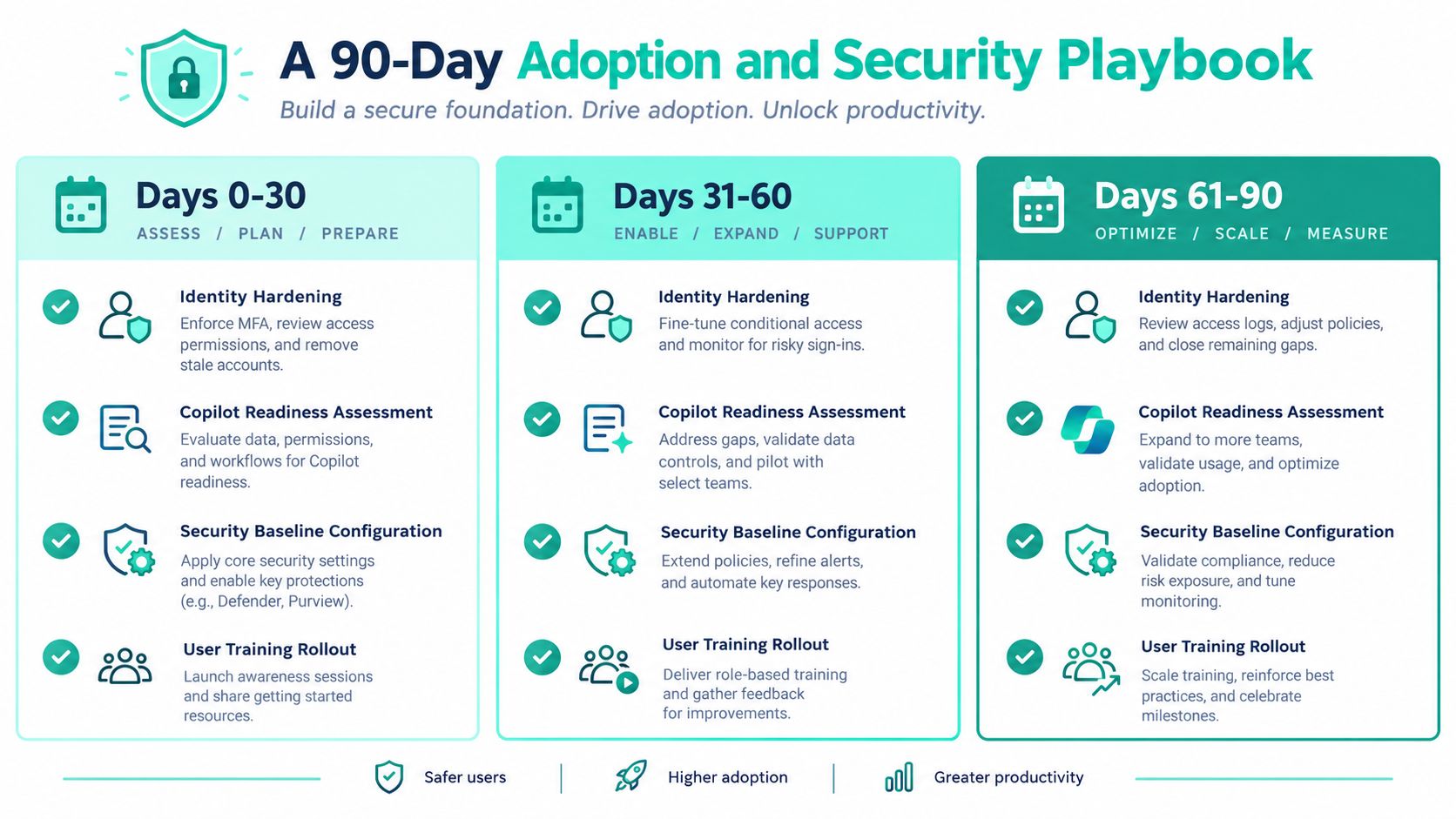
Days 0 to 30 establish control
The identity team should harden Entra ID, define Conditional Access baselines, review privileged roles, and verify service principal ownership. Collaboration administrators should establish SharePoint site lifecycle rules, access review procedures, and Teams provisioning standards. The Power Platform team should enable Managed Environments and route makers into approved environments.
Owners: Identity, collaboration, security, and Power Platform administrators.
Deliverables: Identity baseline, site lifecycle policy, DLP starting policy, environment inventory, and Copilot readiness assessment.
Exit criteria: Privileged access is accountable, high-risk sharing paths have an owner, and new apps or agents can't bypass the approved provisioning route.
Days 31 to 60 instrument the seams
Integration teams should validate Graph API behavior, throttling telemetry, retry handling, and connector permission trimming. The SharePoint engineering team should govern SPFx solutions, app catalog promotion, and deployment rings. DXP teams should test Sitecore XM Cloud and AEM content synchronization with realistic metadata, access, and failure scenarios.
Review Purview activity and labeling reports, Defender alerts, SharePoint sharing signals, and Power Platform admin center usage insights. Microsoft's documentation for Managed Environment usage insights emphasizes tenant-level visibility and aggregated usage trends, which helps administrators identify unused environments, duplicated apps, and unmanaged growth.
Owners: Integration architecture, DXP engineering, security operations, and platform engineering.
Exit criteria: Failures are visible, sensitive content is classified, and every connector has a documented owner and data boundary.
Days 61 to 90 operationalize adoption
Activate a Champions program with representatives from marketing, sales, operations, and regional teams. Measure Adoption Score by workload rather than celebrating a single tenant number. A low Content collaboration score can indicate friction in SharePoint or OneDrive patterns, while a low Teamwork score can point to weak Teams adoption. If Copilot is enabled, treat AI Adoption as a separate benchmark and interpret comparisons in the context of Microsoft's segmentation by region, industry, and licensed-user count.
Owners: Business adoption leads, service owners, security governance, and enterprise architecture.
Deliverables: Champions calendar, support playbooks, quarterly architecture review agenda, and workload-level remediation backlog.
Exit criteria: Business teams know where work belongs, administrators can demonstrate control, and architecture reviews examine connected workloads instead of isolated app metrics.
Kogifi helps enterprises design and maintain Sitecore XM Cloud, Adobe Experience Manager, and SharePoint Online platforms, including SPFx intranets, Power Platform automation, composable integrations, and governance-led modernization. Visit Kogifi to assess your DXP and Microsoft 365 boundaries, define a practical integration roadmap, and turn the first 90 days into an operating model your teams can sustain.