


You can have the right Microsoft account, the right password, and still hit a dead end at the intranet. That's the part only discovered after rollout, when employees start calling the help desk because the portal says they're signed in somewhere else, their device isn't trusted, or the page they need is hidden behind a separate access rule.
That friction isn't a UI problem. It's an identity problem, a network problem, and a governance problem wrapped into one login box. Intranet login has moved far beyond “enter credentials and click submit,” especially in Microsoft 365, SharePoint Online, and hybrid estates where authentication, authorization, and auditability all matter at the same time.
Table of Contents
- Enrollment is the real bottleneck for frontline access
- What frontline access changes in the architecture
Why Intranet Login Is More Complex Than It Appears
A manager opens the intranet from a company laptop, enters a Microsoft password, and still does not reach the page they expected. The login may have succeeded. The portal can still block access because device trust is missing, browser settings are off, the network is not reachable, or a separate entitlement check is still waiting behind the front door. The user sees one failure, while the platform is checking several conditions at once.
The three layers that decide access
The first layer is identity, which proves who the user is. In Microsoft-centric environments, that often sits in Microsoft Entra ID, where sign-in logs show authentication activity centrally across users and applications, and the view can default to the most recent 24 hours with the ability to change the range to periods such as 7 days; the same report can be exported as CSV or JSON for downstream analysis Microsoft Entra sign-in log guidance. The second layer is network and endpoint reachability, which is why many intranets still depend on a company network connection, VPN, or a browser and device that meet technical requirements intranet requirements checklist.
The third layer is authorization. A valid account does not always mean the user can see the content. City of Eureka's employee intranet instructions make that distinction explicit, users sign in with Microsoft credentials, then complete an access request form, and some users still need separate viewing access even after they can sign in to the main site City of Eureka intranet sign-up instructions.
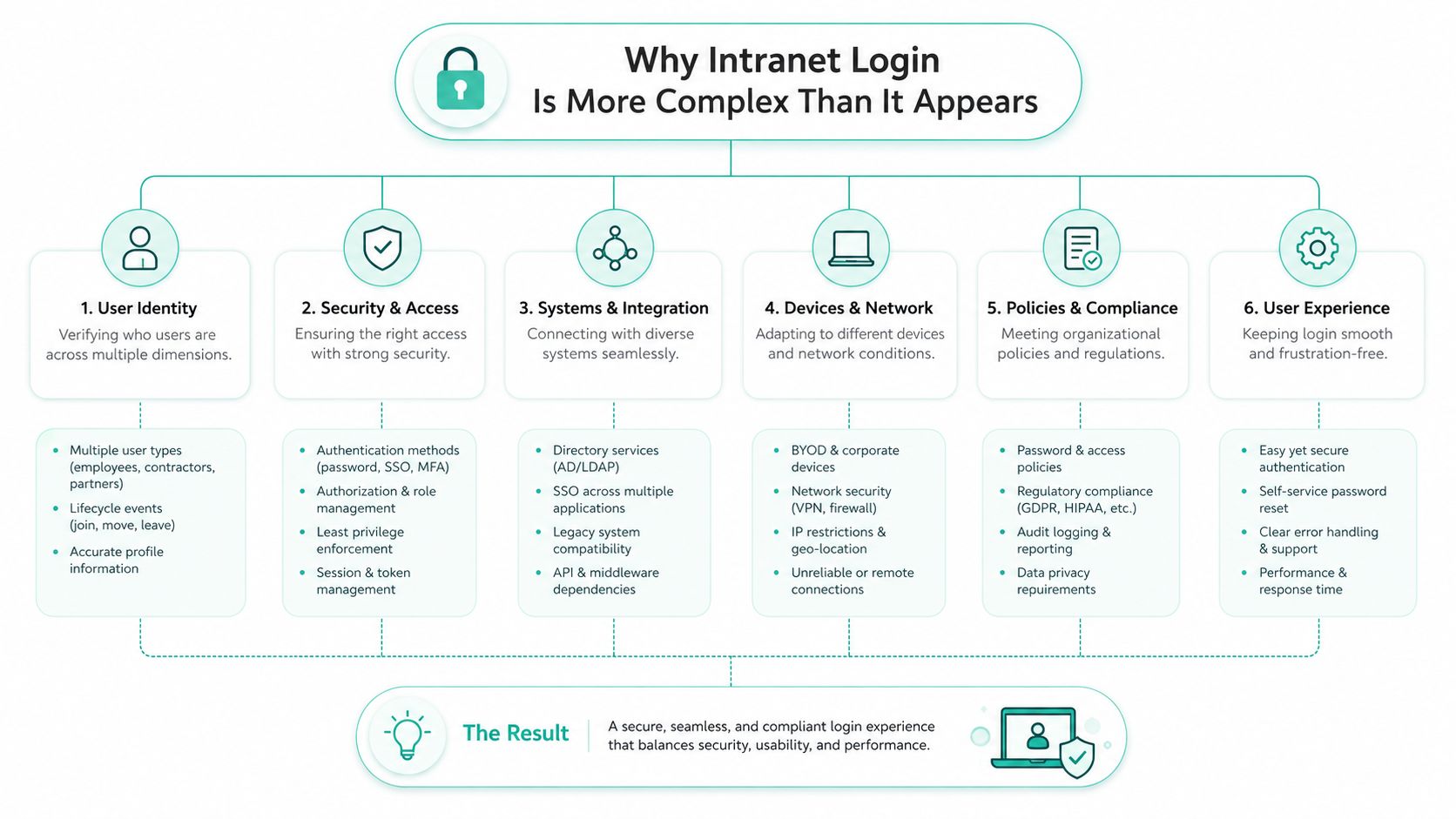
Practical rule: if someone says “I can log in but I can't get in,” start with authorization, device state, and policy checks before blaming the password.
Cloud intranets do not remove these layers. They shift some infrastructure out of the building, but they still require secure authentication, and Microsoft's documentation treats sign-in logs as a distinct monitored resource in Entra ID, which matters for governance, compliance, and incident response Microsoft Entra sign-in log guidance. If you want the portal-side view of how these pieces connect, how intranets work in Kogifi's platform view lays out the moving parts without turning login into a purely front-end problem.
Frontline workers expose the gap that office-centric guides often miss. Many do not have a corporate mailbox, a managed laptop, or a predictable desktop session, yet they still need access that is tied to employment status, role, and site assignment. That means login design is also lifecycle design, because joiners, movers, and leavers all affect whether access should be granted, changed, or removed.
The governance issue shows up fastest at scale. A portal can let a contractor in with one account type, a plant worker in with shared shift credentials, and a manager in with full single sign-on, but each pattern creates different audit and revocation duties. If those duties are not mapped to HR events and directory rules, the intranet becomes easy to reach for the wrong person and hard to maintain for everyone else.
That is why intranet login needs to be treated as an identity control surface, not a form field. The real question is not whether the page loads. It is whether the right person, on the right device, with the right network path, and at the right point in their employment lifecycle, can reach the right content without creating a security gap.
Authentication Methods That Power Enterprise Intranets
Enterprise intranet login rarely depends on a single protocol. In Microsoft environments, the stack commonly combines Kerberos, NTLM, SPNEGO, and, where needed, PKINIT for certificate-based initial authentication Microsoft intranet web environment specification. That mix matters because each method solves a different part of the access problem, and production failures usually come from misalignment between them, not from one bad password.
How silent sign-in actually happens
A domain-joined workstation can pass Windows credentials to the browser through integrated authentication, so the user does not have to keep retyping a password. In an intranet, that is the practical value of SSO, fewer prompts, less password fatigue, and fewer support tickets. As outlined in Microsoft's intranet web environment specification, these protocols sit at the center of user logon and identity propagation across internal web apps, so the browser often receives proof of identity before the user ever sees a form.
Federated identity changes the control plane. Instead of storing local credentials in each app, the enterprise pushes trust to the identity layer and enforces sign-in conditions there. Access decisions then live in policies, authentication strength, and claims, not in isolated app databases. For teams that run Microsoft identity alongside directory services, Active Directory and lightweight directory services overview helps explain why directory design shapes the login path before the browser ever starts.
What scales and what breaks
Local credential storage breaks down as soon as users need one identity across multiple internal apps. It also makes offboarding harder, because each application becomes another place to revoke access. Federated identity with browser-based token flows scales better, especially when the company wants consistent sign-in across SharePoint Online, line-of-business apps, and internal portals.
Silent authentication only works when the browser, device, and identity provider all agree on trust. If one layer is misconfigured, users land in a confusing loop instead of a clean sign-in. That is what breaks most often in production, not the directory itself but the handoff between device state, browser zone settings, and the identity provider.
Microsoft's guidance for Entra SSO includes Kerberos-based ticket forwarding to autologon.microsoftazuread-sso.com and zone assignment so the domain is treated as an intranet site, which is why managed-device rollout needs both identity setup and browser configuration Entra SSO quick start. The same approach only works when the browser trusts the intranet context and the directory can issue the right ticket at the right time, as noted earlier in the Entra SSO quick start guidance.
Multi-Factor Authentication and Self-Service Strategies
A secure intranet login has to hold up as the identity lifecycle changes. New hires, role changes, contractor access, and offboarding all put pressure on multi-factor authentication, role-based access control, and encryption for data at rest and in transit. If the intranet carries policy documents, HR forms, operational playbooks, or contractor material, those controls belong in the baseline, not as a later add-on Fusion Connect intranet glossary.
MFA should fit the user population
The common mistake is forcing one factor pattern on everyone. Office staff on managed laptops can absorb a different sign-in flow than warehouse supervisors, contractors, or executives who move between locations. MFA has to match real usage patterns, otherwise people create workarounds, repeat login requests, or drive up reset tickets.
Role-based access control matters just as much. A sensitive document should not be exposed because someone knows the portal URL. Access should narrow by role, department, or location, which is the pattern reflected in enterprise intranet security frameworks. That keeps the intranet aligned with least-privilege practice instead of turning it into a shared folder with a homepage.
Frontline workers make the trade-off even clearer. They often do not sit at a corporate desk, so they need a login path that works on shared devices, irregular shifts, and limited connectivity without opening broad access to the rest of the organization. A governance-first intranet design treats those access gaps as policy decisions, not just UX issues. The login flow has to support the job without giving every user the same level of trust.
Self-service is a support strategy, not a convenience feature
Password reset and account recovery only reduce friction when they are part of the identity lifecycle. If the recovery flow is vague, users will still call the help desk. If the reset flow is clear, audited, and paired with MFA, support teams get fewer repetitive calls and security teams get better traceability.
A practical operating model usually includes:
- Recovery paths for locked users, so access does not stall the workday.
- Consistent MFA enrollment, so the same rules apply across departments.
- Clear role provisioning, so access follows the job, not just the account.
- Sensitive-content segmentation, so users only reach what their role allows.
The same governance logic shows up in Kogifi's SharePoint intranet development guidance, where identity and content controls need to stay aligned as the environment grows. Happeo's requirements checklist also ties this to governance with SSO, MFA support, role-based access control, exportable audit logs, and scalability from 1,000 to 5,000+ employees without re-architecture Happeo intranet requirements checklist. MFA keeps access trustworthy as the org grows, rather than adding friction for its own sake.
SharePoint and Microsoft 365 Integration Patterns
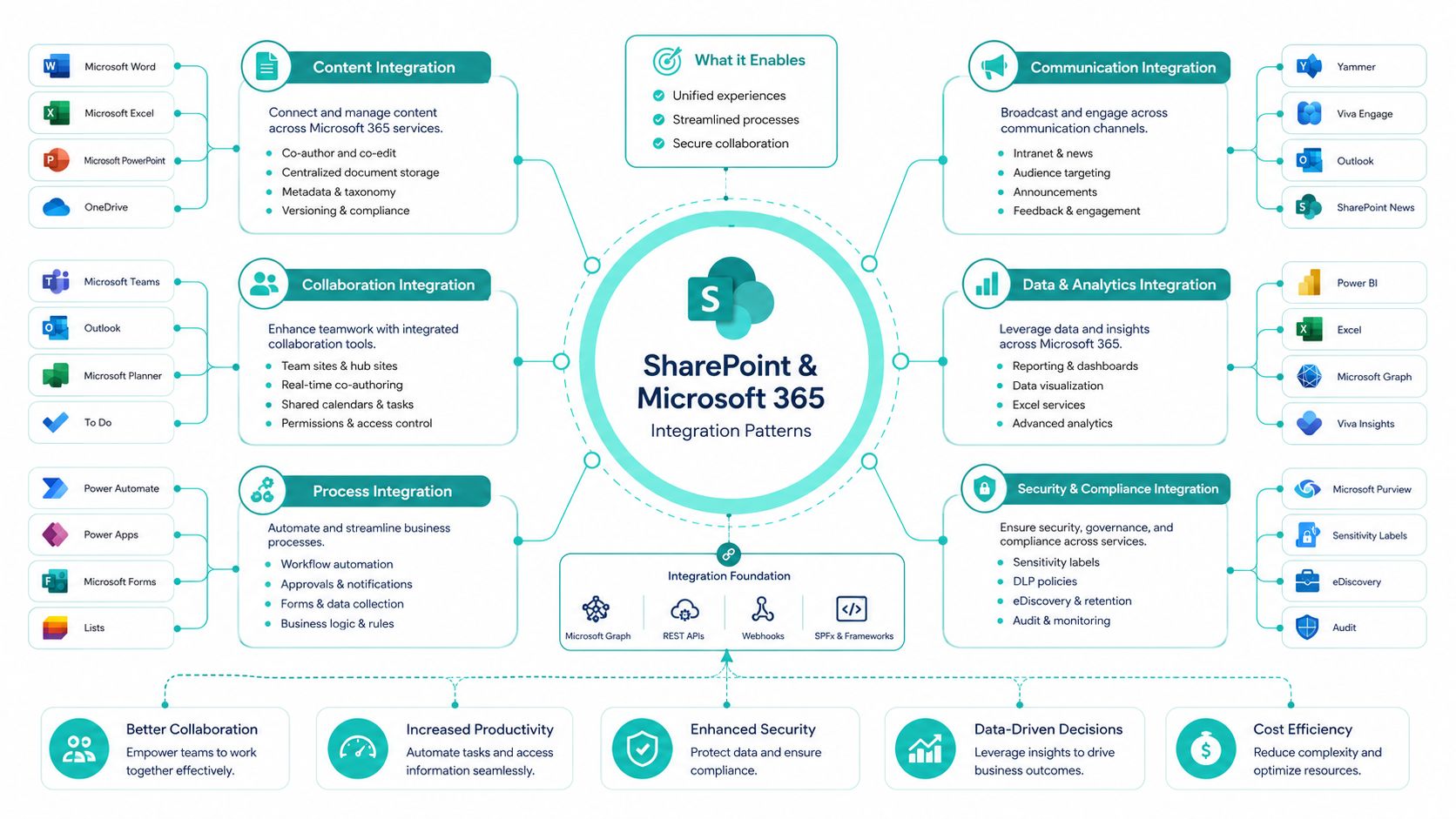
A SharePoint Online intranet breaks down fast when teams collapse authentication and content permissions into one problem. They are related, but they solve different questions. Microsoft credentials can prove identity, while page, library, and audience permissions decide what a user can reach. That split is why SharePoint projects need both identity design and information architecture from the start.
The sign-in path that usually works
Microsoft Entra SSO is the cleanest pattern for managed devices because it uses federated identity and browser-based token flows instead of asking every app to handle passwords on its own. For managed endpoints, the browser can also be set to treat the domain as an intranet site, which is what keeps sign-in from turning into a repeated prompt loop. That is the difference between a SharePoint intranet that behaves like a work tool and one that constantly interrupts employees.
The protocol layer underneath still matters. Microsoft's intranet web environment specification describes Kerberos, NTLM, SPNEGO, and optional PKINIT as the identity propagation mechanisms across internal web apps. If those assumptions do not match the browser and device setup, users see a broken sign-in even when the backend is functioning as designed.
Authentication and authorization in SharePoint
The clean SharePoint pattern separates who you are from what you may see. Microsoft credentials establish identity. Site permissions, audience targeting, and access request workflows establish entitlement. The result is the same pattern you see in Kogifi's SharePoint intranet development view, identity is one layer, content control is another, and both have to stay aligned as the environment grows.
A practical example is a deployment where users sign in with their Microsoft account and still need separate viewing access for the intranet page. That setup is normal, and it catches teams that expect login success to mean content access. It does not. SharePoint pages can load cleanly while the user is still blocked from the document library or the specific audience segment they need.
SPFx components often sit beside Microsoft 365 integrations, but they should never replace identity design. They extend the experience after login. They do not solve login. In production, the strongest pattern is usually boring, one identity provider, clear entitlements, and no surprise prompts for managed users.
Reaching Frontline Workers Without Corporate Email
Standard intranet login guidance typically assumes a desk worker with a laptop, corporate email, and a quiet browser session. That setup does not match shift teams, shared devices, or multilingual frontline environments. Independent coverage of frontline intranets points to email-free authentication through phone number, employee ID, QR code, or SMS invite, along with mobile-first and offline-friendly workflows as the way to reduce access barriers frontline intranet guidance.
Enrollment is the real bottleneck for frontline access
Frontline access usually breaks before the user ever reaches the homepage. Day-one enrollment has to prove identity without a corporate mailbox, and many intranet programs stall at that step. A worker on a shared kiosk, someone without a desk, or an employee rotating between sites can end up blocked even when the portal looks polished and works well for office users.
The better pattern is lightweight identity proofing that fits the job. Phone-based invites, employee IDs, QR flows, and SMS activation fit a workforce that does not live in Outlook all day. Once enrollment is complete, the rest of the experience needs to stay mobile-first and tolerant of intermittent connectivity, because the login flow has to hold up on the floor, in the warehouse, or out in the field.
What frontline access changes in the architecture
Frontline workers need a different access assumption, not a smaller office intranet. The system should prioritize:
- No-email sign-up paths, so workers can enter the system on day one.
- Shared-device support, because the same screen may serve many users.
- Mobile-first sign-in, because the phone is often the only dependable endpoint.
- Offline-tolerant workflows, so critical content remains reachable when connectivity is inconsistent.
Scale changes the design too. The same source cites 2.7 billion deskless workers globally as the size of the challenge frontline intranet guidance. The number matters less as a marketing line and more as a design constraint. If your intranet login assumes office habits, you have already excluded a large part of the organization.
For Microsoft-based intranets, SharePoint Online, SPFx, Power Platform, and identity integration have to be planned together, not attached later. The portal needs to reach real people, not just authenticated devices.
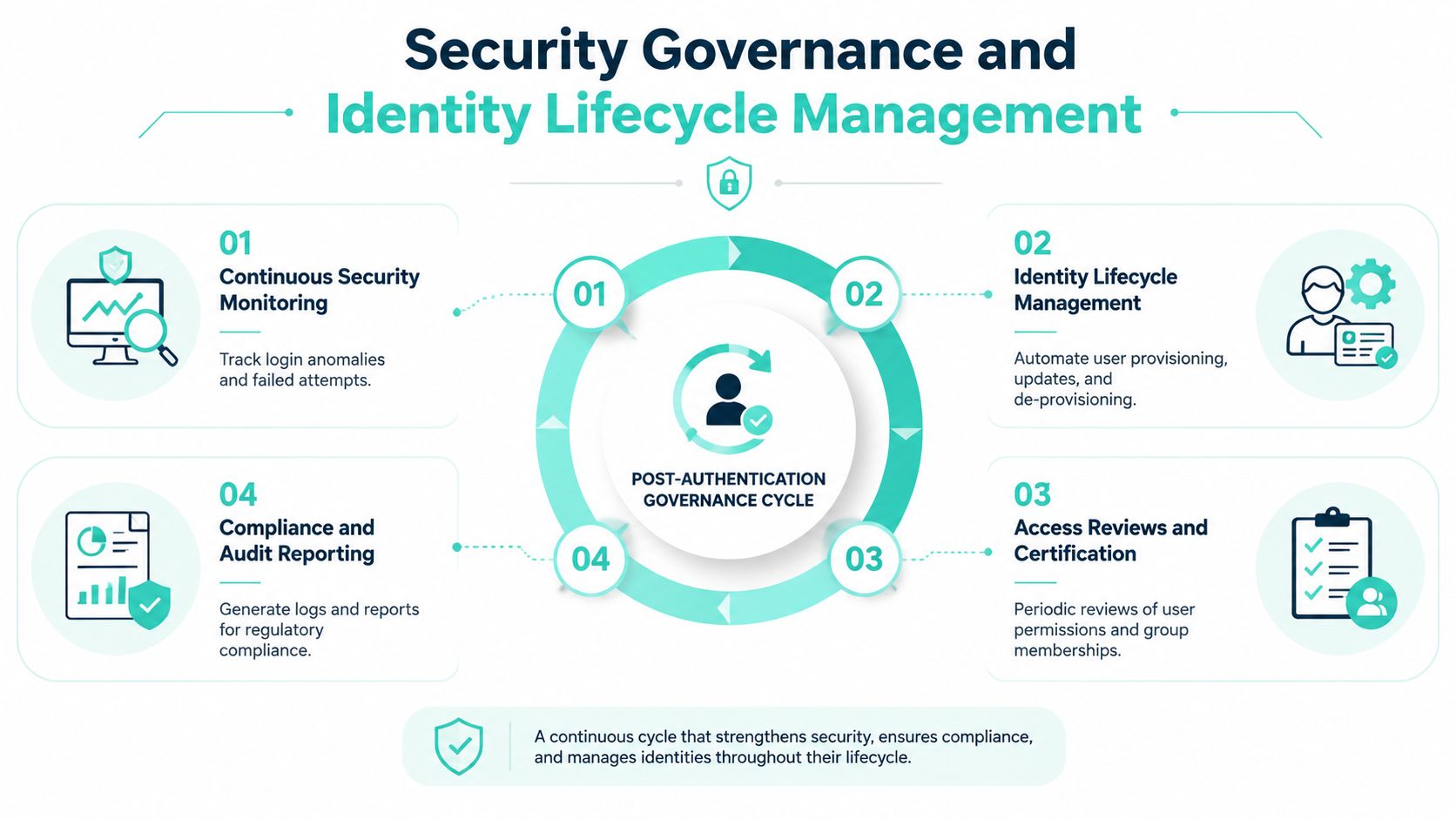
Security Governance and Identity Lifecycle Management
Authentication is the start of intranet login, not the end of it. The hard work begins after the user gets in, because the security model has to keep working when people change roles, leave the company, join as contractors, or share access to a temporary project space. That's where governance either stays disciplined or slowly falls apart.
Offboarding is where many intranets fail
A cybersecurity-focused intranet guidance piece points out a common failure mode, broken offboarding leaves former employees with working credentials because handover delays or missed checklist steps don't shut the account down cleanly digital workplace security guidance. That's not just an HR issue. It's a login governance failure that can leave internal content exposed long after a role change.
The fix is lifecycle control. Every connected system has to be mapped, unused permissions removed, MFA enforced everywhere, and external or contractor access handled explicitly. In practice, this means the intranet team, identity team, and security team need the same view of who has access and why. If they don't, access drifts.
Monitoring has to be part of the lifecycle
Governance also means watching the login pattern itself. A healthy intranet doesn't just authenticate users, it records what happened and makes it reviewable. That's why exportable logs matter. They support audits, investigations, and access reviews, and they give security teams the trail they need when an account behaves oddly.
If you can't explain why a person still has access, you don't have a governance model yet.
The practical takeaway is simple. Build intranet login around provisioning, review, change, and removal, not around account creation alone. That's especially important in enterprises with AD/SSO sync, seasonal staff, external collaborators, and shared operational spaces. The portal should reflect the current organization, not last quarter's org chart.
Monitoring and Troubleshooting Intranet Login Issues
When intranet login fails at scale, logs usually give the fastest path to an answer. Microsoft Entra ID sign-in logs provide centralized visibility across users and applications, and administrators can review recent activity, adjust the time window they inspect, and export the report for analysis Microsoft Entra sign-in log guidance. That turns identity telemetry into something operations teams can use, instead of leaving it buried in isolated server traces.
What to check first
For Windows and Active Directory estates, the core events still matter. Administrators commonly inspect Event ID 4624 for successful logons, 4625 for failed logons, 4648 for explicit credential use, and related logoff events 4634 and 4647 Active Directory login history guidance. Those records show who reached the portal, when they did it, and whether authentication completed.
The practical reality is that the failure can sit in identity, network reachability, or authorization. If the account signed in successfully but the page still will not open, the issue is usually entitlement or app configuration. If the sign-in failed before the identity provider issued a token, the likely causes are credentials, conditional access, or device trust. If there is no visible sign-in at all, the user may be hitting a browser, zone, or endpoint problem before the request ever reaches the identity layer.
Distributed environments need both cloud and domain visibility
Large enterprises rarely keep the full picture in one log source. Microsoft's documentation treats sign-in logs as a distinct monitored resource in Entra ID, while AD guidance shows why administrators still need to query domain controllers and, in some cases, member servers or workstations. That distributed reality is why a single dashboard rarely solves troubleshooting on its own.
For teams building audit trails and incident response workflows, the right pattern is to normalize identity records from both cloud and on-prem sources, then look for repeat failures, unusual logon paths, and stale accounts. Kogifi's real user monitoring article is a useful complement when you need to connect login telemetry to what users experienced on the page.
The best login support teams do not start with “reset your password.” They start with “which layer broke?”
Implementation Patterns for Enterprise Digital Experience Platforms
The cleanest enterprise intranet login implementations aren't built as isolated security projects. They're built as part of a broader digital experience platform, with identity, content, and workflow designed together. That matters for Sitecore and SharePoint alike, because the login system has to support the way people consume content, collaborate, and move across brands or business units.
What works in real deployments
In Sitecore XM Cloud or composable setups, the best pattern is to keep authentication centralized and reusable, then let the front end focus on content delivery and experience logic. That works particularly well when a company needs shared component libraries, multilingual delivery, or hub-and-spoke governance across brands. In SharePoint Online, the same logic applies through Microsoft 365 integration, SPFx extensions, and Power Platform automation, where the portal is less a standalone site and more a secure workplace layer.
Accessibility and localization can't be pushed to the side. A login experience that works in one language but breaks in another, or one that ignores keyboard and screen-reader paths, creates a support burden that shows up later as adoption resistance. Bilingual intranets and WCAG-aware design are not separate concerns from authentication, they're part of the same rollout quality.
Choose the platform for the operating model
The platform should match the governance model. If the organization needs enterprise search, AI-assisted knowledge retrieval, or tightly controlled content reuse, Sitecore can fit that pattern well. If the organization needs Microsoft 365 alignment, employee resource hubs, and internal collaboration tied directly to identity and permissions, SharePoint Online is often the more natural path.
Kogifi works on both Sitecore and Microsoft 365/SharePoint implementations, including intranet delivery, SPFx components, and composable DXP architectures, so the login model can be aligned with the rest of the experience rather than patched on later. The key is not choosing a portal and hoping the identity layer catches up. It's designing the identity lifecycle, front-end experience, and access governance as one system.
If your intranet login is drifting into password resets, access confusion, or frontline exclusion, Kogifi builds and modernizes enterprise portals on Sitecore and Microsoft 365, including SharePoint Online intranets with identity-aware access patterns. Visit Kogifi if you want a team that can align authentication, governance, and user experience into one working platform.