


A familiar enterprise pattern shows up right before launch. The Sitecore build is ready, the content model is stable, personalization rules are mapped, and then identity becomes the blocker. Security teams don't want customer or partner accounts mixed into corporate Active Directory. Delivery teams don't want to wait for domain-level changes, schema reviews, and infrastructure approvals just to support an application-specific user store.
The same tension appears in SharePoint projects. Internal collaboration belongs in Microsoft 365, but partner extranets, supplier portals, and controlled external access often need a separate identity boundary. That's where Active Directory Lightweight Directory Services (AD LDS) earns its place. It gives architects a directory service that behaves like enterprise Active Directory in the ways that matter to applications, without forcing the application into the corporate domain model.
A useful way to think about it is this. AD DS is the central city grid. It governs the whole enterprise. AD LDS is a private, well-planned campus for a specific application or platform. It still has roads, permissions, structures, and administration, but it doesn't require every project to alter the city plan.
For Sitecore and SharePoint teams, that separation can remove a lot of friction. It also creates room for better governance, cleaner data boundaries, and safer rollout paths for modern digital platforms. Identity decisions shape security, release speed, and future integration options, especially in composable architectures. Teams working through those decisions usually benefit from grounding the identity model in broader IAM best practices for DXPs before choosing a directory pattern.
Table of Contents
- Sitecore as the identity consumer
- SharePoint and federated access patterns
- Why governance beats quick setup
Introduction The DXP Identity Challenge
The value of AD LDS isn't typically discovered on a whiteboard. Instead, its value emerges when a portal, membership experience, or partner workspace needs a directory, but the corporate domain is the wrong place to put it. In Sitecore, that often means customer identities, profile attributes, consent states, or role memberships that shouldn't sit alongside employee accounts. In SharePoint, it usually means an extranet where external users need controlled access without becoming part of the internal directory estate.
AD LDS solves that specific problem well. It gives you a standalone LDAP directory that can support application identities, custom attributes, and isolated administration. That matters in digital experience platforms because identity is rarely generic. Sitecore solutions tend to carry application-specific profile shapes, audience markers, and role mappings. SharePoint solutions often need separate governance for suppliers, franchisees, or service partners.
The architectural difference that matters
AD LDS isn't a cut-down copy of Active Directory in the casual sense. It's a directory service designed for applications. That distinction changes the architectural conversation. Instead of asking how to fit an application into enterprise identity infrastructure, you can ask what directory model best supports the application's own data, access rules, and release cycle.
Practical rule: If the application needs custom schema, isolated administration, and a separate lifecycle from corporate identity, AD LDS usually deserves a serious look.
Architects should also treat AD LDS as a strategic component, not just a setup shortcut. It can speed delivery, but only when the team is clear on ownership, schema control, and integration boundaries from the start.
Understanding AD LDS vs AD DS
A pattern shows up early in DXP programmes. The platform team needs LDAP-backed identities for a partner portal, supplier workspace, or customer area. The enterprise directory team hears “directory” and assumes the request belongs in AD DS. That is usually where the design starts to drift.
AD LDS and AD DS share directory technology, but they solve different problems. AD DS is the enterprise identity backbone. It underpins domains, domain controllers, workstation policy, and internal authentication. AD LDS is a separate directory service for application use. It supports LDAP, replication, security principals, and multiple independent instances on one server, which gives architects far more control over isolation, schema design, and release timing.
That distinction matters most when the application team owns attributes that should not enter the corporate forest. In Sitecore, that can mean consent flags, audience markers, profile extensions, delegated partner roles, or regional approval states. In SharePoint, it often means external collaboration structures with their own groups, containers, and lifecycle rules. Pushing those requirements into AD DS creates enterprise change requests for problems that belong to the application.
The deployment model is a practical dividing line. AD DS is tied to domain infrastructure and shared enterprise governance. AD LDS can be stood up as an application dependency with its own service account model, backup plan, patch cadence, monitoring, and operational ownership. Teams should treat it the same way they treat other managed platform components in the stack, including services discussed in these Windows service architecture patterns.
The architectural difference that matters
The technical overlap between AD LDS and AD DS can mislead less experienced teams. Shared code lineage does not mean shared purpose. In delivery terms, AD DS is designed for enterprise-wide consistency. AD LDS is designed for controlled divergence.
That controlled divergence is useful, but it comes with a price. Every AD LDS instance gives a project freedom to define its own schema and naming contexts. Without schema governance, that freedom turns into drift. I have seen two applications in the same organisation model the same business concept with different object classes, different attribute names, and different lifecycle rules. The result is painful migration work, brittle integrations, and long test cycles whenever the DXP stack changes.
Multiple independent instances per server are one of the most useful AD LDS capabilities. They let one Sitecore solution carry its own directory model while a separate SharePoint workload runs beside it with different partitions and schema extensions. That separation is often the right call. It also means version control, promotion between environments, and decommissioning plans need to be defined before the first schema import, not after production has data.
For DXP architects, the comparison is straightforward:
- AD DS fits enterprise identity, domain operations, and shared internal governance.
- AD LDS fits application identity, isolated administration, and schema models that need to change on an application timetable.
- The fundamental design question is not feature parity. It is who owns the schema, who approves change, and how that directory evolves across the platform lifecycle.
AD LDS vs. AD DS Key Differences for DXP Architects
| Characteristic | Active Directory Lightweight Directory Services (AD LDS) | Active Directory Domain Services (AD DS) |
|---|---|---|
| Primary scope | Application-specific directory services | Enterprise identity and domain services |
| Operating model | Runs as a separate directory service for applications | Runs as the enterprise domain directory |
| Instance model | Supports multiple independent instances per server | One instance per Domain Controller |
| Infrastructure dependency | Can run without full domain controller responsibilities | Built around domain and domain controller architecture |
| Schema strategy | Separate, application-owned schema and partitions | Shared enterprise schema with central change control |
| Administration boundary | Can be delegated to platform or application teams | Usually governed by central identity or infrastructure teams |
| Best fit in DXP | Customer portals, partner access, isolated membership and profile stores | Employee identity, workstation policy, enterprise authentication backbone |
| Common failure mode | Schema drift, inconsistent lifecycle management, weak ownership across instances | Overloading the enterprise directory with application-specific requirements |
AD LDS earns its place when the platform needs directory behaviour, but the schema, administration model, and release cadence should stay outside the enterprise domain.
Strategic Use Cases for Sitecore and SharePoint
The strongest AD LDS use cases appear when the platform needs a clean identity boundary and the business still wants rich directory behavior. Sitecore is usually the clearest example because modern customer experiences carry their own profiles, audience states, permissions, and relationship data. When those objects sit in a purpose-built directory rather than the corporate employee directory, design decisions get simpler.

Why Sitecore teams reach for AD LDS
In Sitecore projects, AD LDS works well as a dedicated identity store for customer-facing portals, gated resources, loyalty areas, and partner experiences. The practical advantage isn't just separation from employee identities. It's the ability to shape the directory around the application. You can define the object classes, attributes, and group structures that the experience needs, instead of inheriting structures designed for internal IT operations.
That matters more now because Sitecore's product direction is heavily AI-enabled. Sitecore Stream now embeds Brand-aware AI, AI copilots and agents, and agentic workflows across CMS, DAM, and CDP capabilities (CMSWire coverage of Sitecore Stream). Those capabilities are most effective when the platform works with reliable, application-scoped identity and profile data rather than a blurred mix of internal and external directory objects.
For architects working in Sitecore, AD LDS usually fits one of these patterns:
- Portal identity store: External users authenticate against AD LDS while Sitecore handles content delivery, role-based access, and profile-driven experiences.
- Profile attribute hub: Sitecore writes or reads application-specific identity fields from AD LDS, especially where profile structure differs from corporate directory standards.
- Isolated multi-brand access model: Each brand or portal can maintain its own identity partition, avoiding schema collisions across a shared estate.
Teams exploring those patterns in modern implementations should also consider how they align with broader Sitecore platform architecture choices, especially in headless and composable deployments.
Where SharePoint benefits most
SharePoint uses AD LDS differently. The core value usually sits around extranets and controlled collaboration. A procurement portal, supplier workspace, or regional partner environment often needs external authentication, directory lookups, and manageable access grouping, but internal AD DS remains off limits for good reasons.
AD LDS helps because it can hold the external identity objects that support those collaboration scenarios without turning the internal directory into a catch-all store. It's especially useful when the SharePoint estate needs claims-based access patterns, separate lifecycle ownership, or a staged migration path from older LDAP-integrated extranets.
A strong deployment pattern often includes:
- A dedicated AD LDS instance for the external user population.
- Federation or claims translation between the application and the directory boundary.
- Role and group design mapped to business functions rather than inherited internal org charts.
- Provisioning processes that can be owned by the business application team.
Clean identity boundaries improve personalization, access control, and operational support. They also make incident response less confusing when something breaks.
There's another benefit that doesn't get enough attention. AD LDS supports multi-tenant or semi-isolated designs better than many teams expect, because you can separate naming contexts and schemas for different application populations. In a composable stack, that can be the difference between a directory that grows with the platform and one that turns brittle after a few release cycles.
DXP Integration and Deployment Patterns
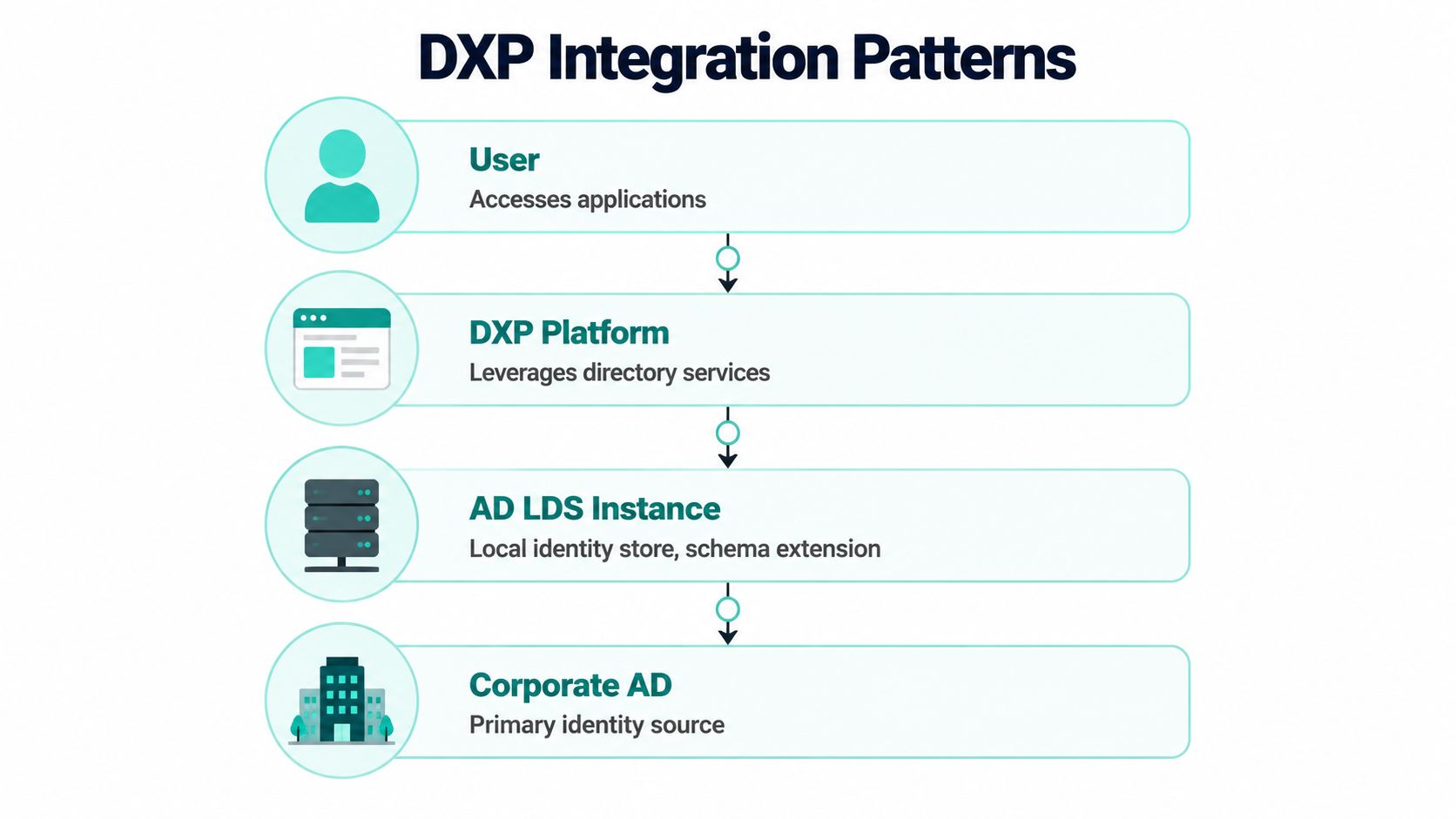
AD LDS only becomes strategic when it's integrated with discipline. Installation alone doesn't get you a stable identity layer. The actual architecture work starts when Sitecore, SharePoint, profile services, and enterprise identity systems all need to exchange trust, attributes, and operational ownership.
Sitecore as the identity consumer
In Sitecore, a common pattern is to let the platform consume AD LDS as an external identity source through a membership, claims, or custom provider layer. The exact implementation varies by version and architecture, but the principle stays the same. Sitecore owns the experience. AD LDS owns the application directory. Synchronization happens only where it needs to.
That approach works best when the team keeps responsibilities narrow:
- Authentication path: The application validates users against AD LDS or a federated layer backed by AD LDS.
- Profile enrichment path: Sitecore consumes selected attributes needed for segmentation or rendering decisions.
- Administrative path: User and role administration stays outside the CMS authoring model unless there's a clear business case to expose it.
This is usually where composable thinking helps. If your DXP already follows an API-first architecture approach, AD LDS fits naturally as a dedicated identity service behind application APIs rather than as a monolithic dependency wired directly into every component.
SharePoint and federated access patterns
SharePoint tends to benefit from a more indirect pattern. AD LDS can support the external directory, while a federation layer handles claims issuance and trust with the SharePoint zone. That keeps SharePoint focused on authorization and user experience, instead of forcing it to become the operational center of identity management.
Microsoft also makes an important boundary clear. AD LDS explicitly excludes Windows operating system directory services and MAPI support, which means it isn't suitable for Microsoft Exchange style scenarios, but it is well suited to directory-enabled applications that need custom schemas and SSL-secured access (Microsoft Learn on AD LDS fundamentals). For architects, that's a useful filter. If the requirement is application directory behavior, AD LDS is relevant. If the requirement is enterprise messaging or full Windows domain services, it isn't.
Why governance beats quick setup
The common failure mode isn't choosing AD LDS. It's choosing it casually. Teams spin up an instance for one application, add schema changes directly in production, clone patterns across environments, and only later discover that the identity layer has diverged across instances.
That's where the long-term trade-off becomes obvious. AD LDS gives freedom, but freedom without control becomes inconsistency. In composable platforms, inconsistency spreads fast because multiple services and user journeys depend on the same identity assumptions. The more agile the delivery model, the more important schema governance becomes.
Fast setup is cheap. Recovering from an unmanaged identity model is not.
Mastering AD LDS Schema Governance and Security
A typical failure pattern looks like this. A Sitecore team adds a custom attribute for profile enrichment, a SharePoint integration later assumes different naming and cardinality, and production starts rejecting lookups after an otherwise routine release. The AD LDS instance is still running, ports are still open, and service accounts still authenticate. The problem sits in the schema lifecycle, not the install.
Schema lifecycle control in real environments
Schema governance is where AD LDS either becomes a durable application directory or a long-term source of delivery friction. In composable DXP stacks, the directory model rarely serves one application for long. It ends up supporting Sitecore identities, SharePoint claims or profile mappings, integration middleware, and sometimes customer or partner onboarding flows as well. Once that happens, every schema change becomes a platform decision.
In our experience on DXP programmes, schema drift is one of the most common causes of avoidable failure in AD LDS estates. The issue usually starts small. An attribute is added directly in test to satisfy one sprint goal. Another team copies the pattern into production with a slight variation. Six months later, environment parity is gone and no one can say with confidence which version the applications were built against.
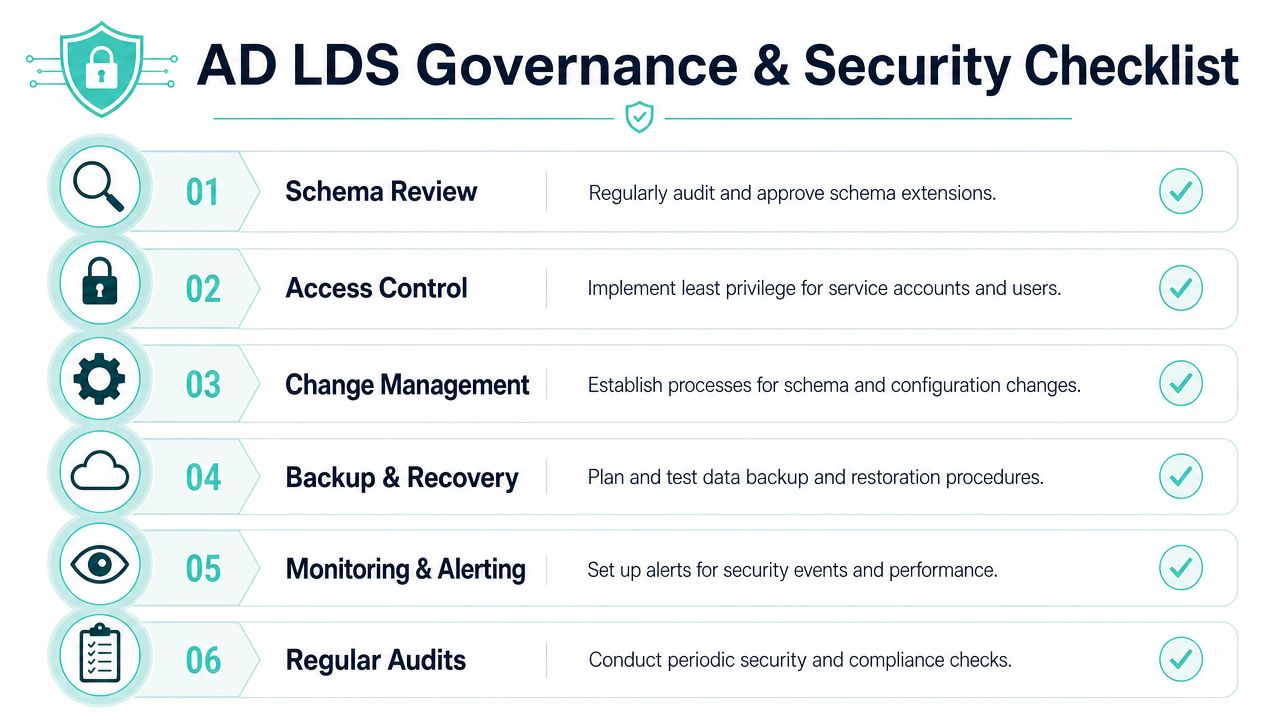
The control model needs to be strict enough to prevent drift without turning every change into a change board exercise that blocks delivery. The practical baseline is clear:
- Version schema artifacts in source control: LDIF files, object classes, attribute definitions, and dependency notes should sit with the application code or platform repository, not on an administrator's workstation.
- Promote changes through environments: Apply the same packaged schema update in development, test, and production. Direct production edits create audit gaps and make rollback planning harder.
- Review naming and reuse before adding attributes: New fields often duplicate something that already exists under a different name. That creates mapping logic that becomes expensive to maintain.
- Separate shared objects from application extensions: If one AD LDS instance serves multiple workloads, keep the common identity model stable and isolate app-specific classes and attributes.
- Document rollback reality: Some changes can be backed out operationally. Others leave data dependencies behind and require a forward fix rather than a true rollback.
The hardest part is ownership. If schema approval sits vaguely between infrastructure, security, and delivery teams, nobody really owns the data model. I recommend assigning one accountable schema authority for the service, with named approvers from the application side. That person should understand downstream effects on Sitecore profile logic, SharePoint claims mapping, API contracts, and data retention requirements. Generic setup guides rarely cover that operating model, but it is what keeps AD LDS usable after year two.
This short walkthrough is useful if you want to revisit the platform fundamentals before tightening governance:
Security controls that hold up in production
Security for AD LDS is less about box-ticking and more about reducing blast radius. The service is often treated as an application dependency, so teams sometimes give it broad rights to keep projects moving. That shortcut usually comes back during audits, incident response, or platform migrations.
A sound production posture starts with predictable boundaries. Use dedicated service accounts with only the rights the application needs. Encrypt LDAP traffic with SSL/TLS. Keep administrative delegation narrow at the partition, container, and object level. Monitor for unexpected schema changes and configuration edits, not just service uptime. Rehearse backup and restore so recovery is documented before an incident, not during one.
There is also a governance overlap with privileged access management. AD LDS administrators, schema admins, and service owners should not hold standing access without review. The same operational discipline discussed in M365 PIM disaster avoidance applies here. Identity platforms fail unnoticed when privileged access grows faster than oversight.
One more trade-off deserves attention. A shared AD LDS instance can reduce infrastructure sprawl, but it also concentrates risk. If schema governance is immature or admin delegation is loose, a multi-tenant instance becomes harder to secure and harder to change safely. In several Sitecore and SharePoint estates, I have seen separate instances by domain boundary or workload produce lower operational risk, even if they add some management overhead.
Teams that run AD LDS well treat schema and security as part of the product lifecycle. They review changes before release, test them against consuming applications, and keep administrative control narrow enough that one rushed request does not reshape the directory for everyone else.
Conclusion When AD LDS Is Your Strategic Advantage
AD LDS works best when the requirement is precise. You need directory services. You need schema control. You need separation from corporate identity. You don't need to force a customer portal, partner extranet, or application-specific user base into the same operational model as internal employee accounts.
For Sitecore, that separation supports a cleaner foundation for advanced experience delivery. It gives personalization and profile-driven logic a dedicated identity layer shaped around the platform's needs rather than inherited enterprise constraints. That becomes more valuable when experience stacks are expected to adapt in real time. Sitecore Personalize supports multivariate testing where AI determines the optimal combination for different user segments, enabling experiences that adapt based on real-time behavior without manual rule configuration (Kogifi's overview of Sitecore Personalize capabilities). That kind of experience design benefits from well-managed, application-specific identity data.
For SharePoint, the advantage is usually governance and isolation. External collaboration can operate with clearer trust boundaries and fewer compromises to internal directory policy.
The differentiator isn't installation. It's management. Teams that control schema lifecycle, secure the service properly, and define ownership early turn AD LDS into a durable identity component. Teams that skip that work usually end up with a hidden support risk embedded inside the platform.
If your Sitecore or SharePoint platform needs a cleaner identity model, stronger governance, or a practical recovery path from a fragile legacy setup, Kogifi can help assess the architecture, stabilize the platform, and design an AD LDS approach that fits a modern composable DXP.