


To boost organic traffic in 2026, you have to play a different game. The old SEO rulebook won't cut it anymore, not in a world dominated by AI-powered search and zero-click results. Real success now means moving beyond basic tactics and using a modern Digital Experience Platform (DXP) to serve up the kind of personalized, high-value content that both users and search engines reward.
Navigating The New Reality Of Organic Search

The ground has definitely shifted, but the foundation isn't completely gone. To grow your traffic, you first need to understand what organic search traffic even means today. The core principles still matter.
But here’s the real challenge: adapting to the new forces at play. While traditional organic results still drive plenty of value, AI-driven answers and "zero-click" searches are fundamentally rewiring user behavior. If you’re still clinging to an outdated SEO playbook, you’re on a fast track to diminishing returns.
The Data Tells A Story Of Change
The numbers paint a pretty stark picture. Organic search is still a beast, driving a massive 53% of all trackable website traffic in 2026. But at the same time, AI search traffic has exploded, surging 527% year-over-year.
Even more telling? A staggering 60% of all searches now end without a single click through to a website. That figure jumps to 77% on mobile devices. The message couldn't be clearer: just ranking at the top isn't the finish line anymore. You have to win the user’s attention right there on the search results page or offer an experience so compelling it demands a click.
The search landscape has been completely reshaped by these trends. Here's a quick look at the data and what it means for your DXP strategy.
The Shifting Landscape of Organic Search
| Statistic | Impact on Organic Traffic | Required DXP Capability |
|---|---|---|
| 53% of all website traffic comes from organic search. | Organic remains the primary channel for discovery and acquisition. | Robust technical SEO foundations and content management. |
| AI search traffic has grown by 527% YoY. | AI overviews are the new "position zero," capturing attention before traditional results. | Structured content that is machine-readable and answers questions directly. |
| 60% of searches are "zero-click." | Users get their answers on the SERP, bypassing websites entirely. | Ability to win Featured Snippets and provide immediate value within search. |
| 77% of mobile searches are "zero-click." | The mobile SERP is an even more competitive, self-contained environment. | Mobile-first design and highly optimized, personalized content delivery. |
These statistics aren't just numbers; they represent a fundamental change in how users find information. Your digital experience platform must be equipped to meet these new demands head-on.
This is exactly where enterprise platforms like Sitecore or even a modernized SharePoint setup become mission-critical. They give you the toolbox to build and deploy the dynamic, personalized content needed to cut through the noise.
Why Your Old SEO Tactics Are Insufficient
Think about your past strategies. They were probably built around keyword density and a relentless push for backlinks to static web pages. In 2026, that approach falls flat because it ignores the new reality of the user journey—one that often starts and ends right on the search engine results page (SERP).
To win now, you need to shift your focus to:
- Winning Featured Snippets and AI Overviews: Structure your content to provide direct, clear answers. This makes it easy for Google's AI to pull your content and feature it.
- Optimizing for Engagement Signals: Things like session duration, low bounce rates, and on-site conversions are powerful signals. They tell search engines your content isn't just relevant, but truly valuable.
- Delivering Personalized Experiences: Generic, one-size-fits-all content is dead. Using a platform with built-in intelligence, like Sitecore AI, lets you tailor content to specific user segments, which drives up relevance and keeps people engaged.
Making this pivot requires both a technical and a philosophical change. For a refresher on the basics, you can check out our guide on how to implement search engine optimization. From here, we'll build on those fundamentals to show you how to use advanced DXP capabilities to not just survive, but thrive.
Auditing Your Technical SEO for Sitecore and SharePoint

Before you even think about content strategy, you have to get your technical house in order. A technical SEO audit is the non-negotiable first step to boost organic traffic, and it’s especially critical for complex enterprise platforms like Sitecore and SharePoint. Generic checklists just don't cut it here; these systems have their own unique quirks and pitfalls.
An audit isn't just about running a quick scan. It's a deep-dive investigation to find what’s stopping search engines from crawling, indexing, and actually understanding your content. With Sitecore, that might mean sorting through a tangled multi-site setup with dozens of regional sites. In SharePoint, it could be untangling legacy permissions or outdated page templates that are completely invisible to crawlers.
The stakes are incredibly high. Getting technical SEO right is crucial for visibility. With the top organic results commanding the vast majority of clicks, failing to secure a top spot means you're fighting for scraps.
Pinpointing Platform-Specific Indexability Issues
Kicking off with a full crawl using a tool like Screaming Frog is standard practice. But the real expertise comes from interpreting that data through the lens of your specific platform.
For example, on a Sitecore XM Cloud site, the page's component-based structure can easily create indexability problems. A developer might set up a key content block to load with client-side JavaScript but forget to enable server-side rendering (SSR), making that content completely invisible to Googlebot. A proper audit hunts for exactly these kinds of rendering gaps.
A public-facing SharePoint site, on the other hand, often suffers from messy URL parameters generated by its lists and libraries. Without proper canonical tags or robots.txt rules, search engines can waste their entire crawl budget on thousands of duplicate, low-value pages, which dilutes the authority of your most important content.
A thorough technical audit isn’t just about finding errors; it’s about creating a prioritized action plan. We classify issues based on impact and effort, focusing on high-impact fixes that deliver immediate gains, like resolving canonical loops or improving Core Web Vitals.
Auditing Core Web Vitals and Page Performance
Page speed is no longer a "nice-to-have"—it's a core part of modern SEO. Both Sitecore and SharePoint can become sluggish, especially when bogged down by old, customized components or heavy, unoptimized media files.
- Largest Contentful Paint (LCP): In Sitecore, this is often a huge, unoptimized hero image that was uploaded straight to the Media Library. The audit needs to flag all images that require compression or resizing.
- Interaction to Next Paint (INP): Custom SharePoint web parts or complex Sitecore renderings can load so much JavaScript that they freeze the page. We pinpoint the exact scripts that are causing these delays.
- Cumulative Layout Shift (CLS): Dynamically loaded content, a common feature in both platforms, can make the page jump around if the layout doesn't reserve space for it ahead of time.
Fixing these problems usually means getting developers involved to refactor old components, switch to modern image formats like WebP, and clean up how scripts are loaded. The detailed plan from your audit makes that collaboration far more efficient. Our comprehensive website audit checklist gives you a solid framework for these kinds of evaluations.
Validating Your Data and Analytics Foundation
Finally, your audit is only as good as the data you're using. A critical but often-missed step is auditing your analytics setup. Are you actually tracking conversions correctly? Are events firing properly on your new component-based pages?
A detailed Google Analytics audit checklist is a great resource for spotting and fixing data issues that are throwing off your organic traffic reports. When you know your data is clean, you can confidently measure the real impact of your technical fixes on user behavior and, ultimately, your bottom line.
Building a Content Hub with Sitecore Content Hub

Throwing random content at your blog and hoping for the best is a losing game in today's search landscape. To really boost organic traffic, your strategy needs to be deliberate and deeply focused on specific topics. It's time to move past the scattered blog and build a true content hub—a powerful ecosystem of pillar pages and cluster content that establishes you as an authority.
For enterprises, Sitecore Content Hub is the perfect command center for this. It combines Digital Asset Management (DAM) and a Content Marketing Platform (CMP) to help you plan, build, and govern a high-performing content strategy. It’s what turns your content from a collection of files into a strategic growth engine.
Evolving from a Blog to a Content Hub
A traditional blog is really just a chronological feed of articles. It's not structured to prove expertise. A content hub, on the other hand, is architected from the ground up to show search engines you own a topic. It’s built around a central "pillar page" and supported by multiple "cluster pages."
- Pillar Page: This is your big, comprehensive guide on a core subject, like "Enterprise DXP Solutions." It covers the topic from a high level, touching on all the essential sub-points.
- Cluster Content: These are more focused articles that dive deep into the sub-points mentioned on the pillar page. Think "Composable DXP Architecture" or "Personalization with Sitecore AI."
- Internal Linking: The magic is in the linking. Each cluster links back to the pillar, and the pillar links out to all its clusters. This structure signals to Google that you have deep, well-organized expertise.
This model is incredibly effective. Your pillar page can compete for high-volume "head" keywords, while your cluster content captures a massive amount of long-tail search traffic. A well-built hub is a proven method for establishing topical authority and driving significant organic traffic growth.
Planning Your Hub with Sitecore Content Hub
Sitecore Content Hub gives you the tools to manage this entire process, from a rough idea all the way to publication. It’s not just a repository for articles; it's a central hub for your entire content operation.
You start with keyword research tied directly to your business goals, identifying the core topics you want to own. From there, you map out your pillar and cluster topics using the platform’s content planning tools.
One of the biggest wins with Sitecore Content Hub is its content modeling capability. You can define specific content types, like "Pillar Page" or "Blog Post," and ensure every piece of content has the required fields for SEO—meta descriptions, schema placeholders, target keywords, and more.
This gets you out of the chaos of managing content in spreadsheets and Google Docs. Your SEO strategist, writers, and even legal and compliance teams can all work within a single, unified system. For a deeper look at its capabilities, you might be interested in our article on streamlining your workflows with Sitecore Content Hub.
Integrating SharePoint Content Sources
Many large organizations have a ton of valuable knowledge locked away in internal SharePoint sites. Instead of letting that expertise gather dust, you can use it to fuel your public-facing content hub. While SharePoint isn't built to be a public-facing CMS, its content is a goldmine.
You can set up a content syndication workflow to pull approved documents, data sheets, and internal guides from SharePoint directly into Sitecore Content Hub. Once inside, that raw information can be refined, optimized for search, and transformed into polished pillar or cluster pages. This approach lets you tap into your internal subject matter experts' knowledge without forcing them to learn a new marketing platform, creating a seamless bridge between internal knowledge and external content marketing.
Supercharging Engagement with the Sitecore AI Portfolio
Generic, one-size-fits-all content doesn't cut it anymore. It just gets ignored. If you’re serious about boosting organic traffic, you have to deliver personalized experiences that connect with what individual users actually want. This is exactly where the Sitecore AI portfolio shines, turning your DXP into a smart engine for growth.
The two key players here are Sitecore Personalize and Sitecore Discover. Together, they help you build a self-improving cycle of content optimization. You’ll move beyond static pages and into a world where your website adapts in real-time to user behavior, directly lifting the engagement metrics that Google loves to see.
Creating a Self-Improving Optimization Loop
The whole point is to create a continuous feedback loop: you test, segment, personalize, and then measure the results. Sitecore AI gives you the tools to run this entire process at scale. It’s not about guessing what users want; it’s about using data to find out and then automatically delivering it.
It all starts with a simple hypothesis. For example, maybe you believe that changing a "Learn More" call-to-action (CTA) to "See Pricing" for users who have visited your product pages multiple times will drive more conversions. With Sitecore Personalize, you can set up that exact test.
A big piece of this puzzle is intelligent site search. The Sitecore Discover dashboard shows how AI-powered search can surface relevant products and content, leading to higher conversions. The insight here is simple: a smart internal search experience keeps users on your site longer, which reduces bounce rates and signals to search engines that your content is high-value.
Setting Up AI-Driven A/B Tests
Traditional A/B testing is fine, but AI-driven testing is in another league. Instead of manually testing one variation against another, you can test multiple headlines, images, and CTAs all at once. Sitecore's AI engine automatically sends more traffic to the winning combinations, which gets you to higher engagement much faster.
Here’s a practical way to get started:
- Find Your Targets: Begin with high-traffic pages that are underperforming, maybe with a high bounce rate or low conversion rate.
- Pick Your Elements: Decide what to test. It could be the main headline, the hero banner image, or the primary CTA button.
- Create Variations: Come up with several alternatives for each element. For a headline, you might test a question against a statement focused on benefits.
- Launch the Experience: Use Sitecore Personalize to run the multivariate test, and let the AI figure out the best combination for different user segments.
When you run these tests continuously, you systematically improve how your pages perform. Better engagement—like longer session durations, more clicks, and higher conversion rates—sends strong positive signals to search engines, which can absolutely lead to better organic rankings.
The real power of Sitecore AI isn’t just running better A/B tests. It’s the ability to move into true 1-to-1 personalization. The system learns from every single interaction to build a rich profile for each visitor, allowing you to serve up uniquely relevant content the next time they visit.
Building Precise User Segments
Great personalization is all about accurate segmentation. Sitecore Personalize lets you create incredibly granular user segments based on a whole range of data points.
- Behavioral Data: Clicks, pages viewed, time on site, videos watched, and items added to a cart.
- Contextual Data: Geographic location, device type, and the referring traffic source (like Google organic search vs. a social media campaign).
- Historical Data: Past purchases, previous interactions, and any preferences a user has shared in their profile.
For instance, you could create a segment for "returning visitors from organic search who have viewed the 'Composable DXP' page but have not downloaded the whitepaper." For this specific group, you can trigger a personalized banner offering them the whitepaper directly, which dramatically increases the chance of conversion. Our guide on AI personalization in DXP implementation dives much deeper into these advanced strategies.
This level of targeting ensures users see content that’s directly relevant to their needs and where they are in their journey. That’s a proven way to increase session duration and build the kind of brand loyalty that fuels long-term organic growth.
Migrating to a Composable DXP Without Losing SEO Equity
Moving your architecture to a composable DXP is a major step toward future-proofing your business. But let's be honest—a poorly handled migration is a surefire way to lose years of hard-earned rankings. If SEO isn't a core part of the plan from day one, you risk watching your organic traffic disappear almost overnight.
The good news is that moving to a composable architecture like Sitecore XM Cloud can be an opportunity to not only keep but actually boost organic traffic. A headless setup offers incredible performance and flexibility, but only if search crawlers can make sense of the new structure. This demands a careful, step-by-step approach to protect your SEO equity.
Get Your URL Mapping and Redirect Strategy Right
This is where most migrations go wrong. Your existing URLs have built up authority and backlinks over years; losing them is like taking a bulldozer to your most valuable digital assets. The only way to prevent this is by creating a comprehensive 301 redirect map that pairs every old URL with its new home.
- Take a Full URL Inventory: Crawl your entire site to capture every single indexable URL. Don't forget language and regional variations.
- Map to the New Architecture: Define a logical, user-friendly URL structure for your new composable site. In platforms like Sitecore, this means avoiding system-generated IDs.
- Build the Redirect Map: Create a master spreadsheet or database that clearly lists the old URL in one column and its new equivalent in the next. This becomes your single source of truth.
Don't cut corners here. Every important page, from high-traffic landing pages down to obscure blog posts and old PDFs, must have a new home. Missing even a small percentage of your URLs can trigger thousands of 404 errors and cause a massive drop in organic visibility.
Audit and Migrate Your Content
A migration is the perfect time to clean house. You don't want to bring outdated, irrelevant, or thin content over to your shiny new DXP. For an enterprise juggling content in both Sitecore and SharePoint, this means evaluating assets from multiple systems.
We often see organizations with valuable knowledge locked away in SharePoint intranets. A smart migration strategy identifies this high-value content, preps it for public viewing, and moves it into the new Sitecore XM Cloud environment as properly structured, SEO-optimized pages.
Take inventory of all your content and decide whether to keep, improve, consolidate, or discard each piece. This process ensures you launch the new site with a clean, high-quality content library that's ready to perform in search.
Validate Your Technical SEO Before Launch
Before you even think about flipping the switch, you need to run a rigorous pre-launch validation. Set up a staging environment that’s a near-perfect mirror of your production setup.
This visual flow shows the optimization loop: first, you test to gather data; second, you segment users based on that data; and third, you deliver personalized experiences.
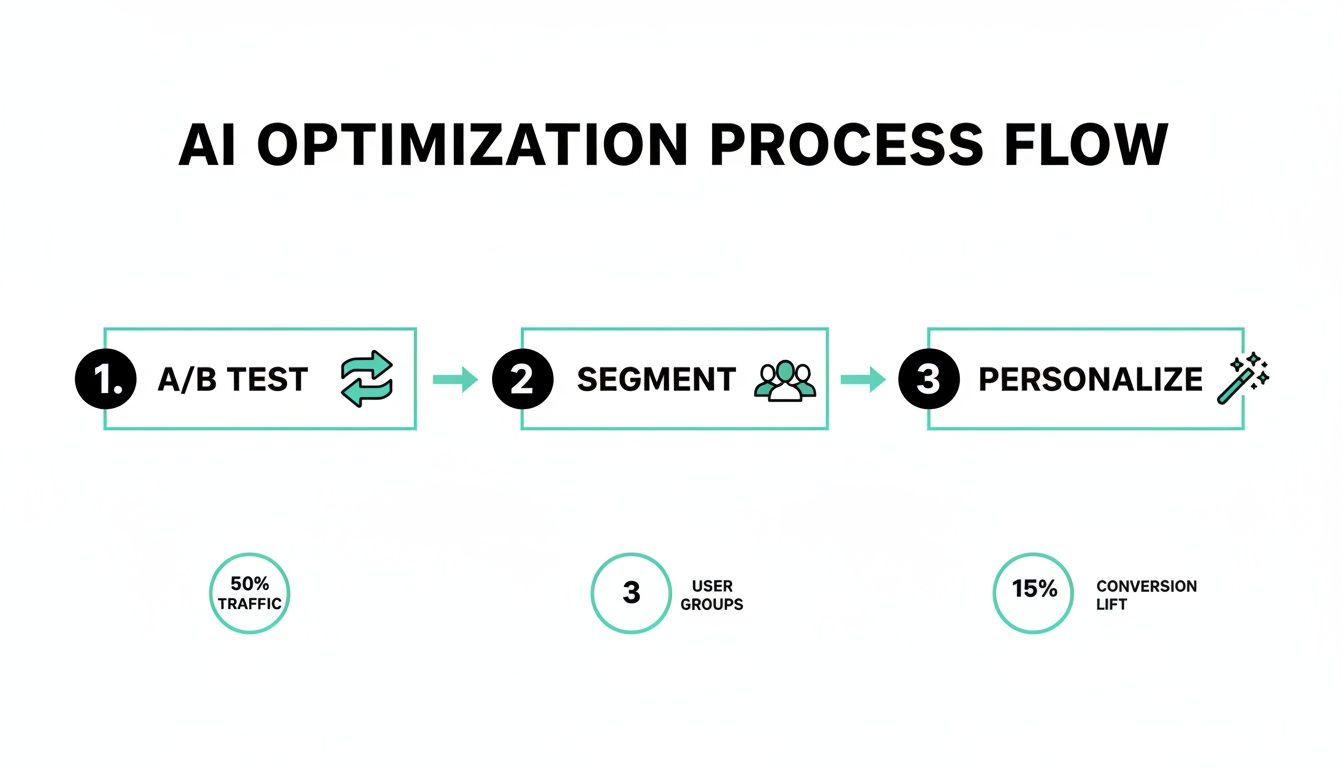
The flowchart highlights how an iterative cycle of testing, segmenting, and personalizing directly improves user engagement, which is a critical factor for boosting organic traffic. In your staging environment, you must validate every technical SEO detail:
- Test Redirects: Use a crawler to test your redirect map. Does every old URL correctly 301 redirect to its new page?
- Verify Rendering: For headless platforms like Sitecore XM Cloud, confirm that server-side rendering (SSR) is working flawlessly. Use Google's Mobile-Friendly Test to ensure crawlers see the full page content, not a blank JavaScript shell.
- Check Canonical and Hreflang Tags: Make sure canonical tags point to the correct page version and that
hreflangtags are correctly implemented for multilingual sites. - Audit Internal Links: Crawl the staging site to find and fix any broken internal links or links still pointing to old URLs.
Once you launch, the work isn't over. Keep a close eye on Google Search Console for any spikes in crawl errors, monitor your analytics for traffic drops on key pages, and run a post-launch crawl to confirm everything is working as planned. This diligent approach will turn your migration into a launchpad for organic growth, not an SEO disaster.
Frequently Asked Questions About Sitecore and SEO
Working with a powerful DXP like Sitecore always brings up a lot of questions, especially when it comes to SEO. Here are some of the most common ones we get from clients, with straightforward answers drawn from our hands-on experience in boosting organic traffic.
How Does Sitecore AI Specifically Help Boost Organic Traffic?
Sitecore’s AI tools don't directly tell Google how to rank you. Instead, they focus on improving the user engagement signals that search engines care about deeply. When users have a good experience, Google notices.
For example, Sitecore Personalize lets you show different headlines, content, and offers to specific user segments. This makes your site more relevant, which naturally increases session duration and lowers the chance a visitor will bounce after seeing just one page.
Then there’s Sitecore Discover, which supercharges your internal site search. It helps users find what they need almost instantly, cutting down on frustration and keeping them on your site. These positive interactions signal to search engines that your site is a high-value resource, which can lead to better rankings and, in turn, more organic traffic.
Can I Integrate Sitecore With My Existing SharePoint Intranet?
Absolutely. Integrating Sitecore with a SharePoint intranet is a common and powerful strategy for large organizations. While it needs some careful technical planning, the efficiency gains are well worth it.
You can use either pre-built connectors or custom APIs to pull content from a SharePoint repository straight into Sitecore Content Hub or your XM Cloud instance. This lets your subject matter experts keep working in the SharePoint environment they already know.
With this setup, SharePoint remains the single source of truth for internal knowledge, while Sitecore handles what it does best: presentation, personalization, and SEO for your public website. You get the best of both worlds.
What Is the Biggest SEO Mistake During a Sitecore Migration?
By far, the most damaging mistake we see is failing to implement a complete and accurate 301 redirect map. It’s a surprisingly common oversight with devastating consequences.
Teams get wrapped up in the new design and exciting composable features, but they neglect the tedious work of mapping every single old URL to its new home. This is an SEO catastrophe. It can wipe out years of link equity and search engine trust overnight.
A botched redirect strategy can lead to a massive, immediate drop in organic traffic from which it can take months or even years to recover. Meticulous URL mapping, testing, and validation before and after launch are absolutely non-negotiable for protecting your SEO performance.
When you don't redirect your old URLs, you're essentially telling search engines that your most valuable pages have vanished. As a result, they get dropped from the index, and your traffic plummets.
Does Moving to Sitecore XM Cloud Hurt SEO?
Quite the opposite. A well-executed migration to a headless platform like Sitecore XM Cloud can give your SEO a significant boost.
Headless architectures are known for delivering much faster page load times—a critical ranking factor for Google. They also give you the flexibility to create lightning-fast, optimized user experiences on any device, from a desktop to a smartwatch.
The key is making sure your implementation uses server-side rendering (SSR) or dynamic rendering. This step is non-negotiable. It ensures that search engine crawlers can see and index your full page content without having to run client-side JavaScript. If you skip this, crawlers might just see a blank page, which would be a disaster for your SEO.
To help put it all together, here’s a quick look at how Sitecore’s main products fit into an enterprise SEO playbook.
Key Sitecore Tools for Boosting Organic Traffic
This table breaks down the specific Sitecore products that form the backbone of a successful SEO strategy, showing how each one contributes to driving more organic traffic.
| Sitecore Product | Primary SEO Function | Key Benefit |
|---|---|---|
| Sitecore XM Cloud | Provides a high-performance, headless foundation for fast page loads (Core Web Vitals). | Improves a direct ranking factor (speed) and enables flexible, SEO-friendly content delivery. |
| Sitecore Content Hub | Centralizes content strategy, planning, and governance around topic clusters. | Establishes topical authority and ensures content is optimized before publication. |
| Sitecore Personalize | Delivers tailored content and runs AI-driven A/B tests to improve engagement. | Increases user engagement signals (e.g., session duration) that correlate with higher rankings. |
| Sitecore Discover | Powers intelligent, AI-driven internal site search and product recommendations. | Reduces bounce rates and helps users find relevant content faster, improving user experience. |
Together, these tools create an ecosystem where you can deliver high-quality, engaging, and technically sound content at scale—the very definition of a modern, successful organic growth strategy.
At Kogifi, we specialize in implementing and optimizing advanced DXP solutions that drive real business results. If you're ready to transform your digital presence and unlock new growth opportunities, explore our expert services at https://www.kogifi.com.