


A campaign is ready to launch. The audience exists in Adobe Target, the copy has been approved, and the AEM authoring team has built the Experience Fragment. Then the fragment doesn't appear in Target, the activity serves the default experience, or a publish environment behaves differently from Author. The immediate suspicion is usually the connector. In practice, the harder problem is often governance, permissions, metadata, and publishing discipline.
A reliable AEM Target integration gives content teams a governed source in Adobe Experience Manager and gives Adobe Target the context needed to choose and deliver a relevant experience. That only works when identity, cloud configuration, fragment structure, tag management, and release processes agree. Treat the integration as an operating model, not a plug-in, and personalization becomes repeatable rather than fragile.
Table of Contents
- Confirm identity and product access
- Decide how the experience will be delivered
- Establish the content model
- Create the IMS and Target configuration
- Permission the service and export the content
- Configure Launch or Web SDK delivery
- Client-side patterns fit established AEM pages
- Server-side and headless patterns increase control
- Conversion tracking must share the same context
- Start with the asset, not the connector
- Separate Author, publish, and Target failures
- Watch for configuration drift
Why AEM Target Integration Matters for Personalization
AEM and Target solve different parts of the same problem. AEM manages content, assets, pages, fragments, workflows, and publishing. Target uses audience context and activity rules to decide which approved experience should appear. Connecting the two lets a team author reusable content in AEM, export it to Target as an offer, and use that offer in a personalization or testing activity.
That distinction matters during planning. Marketing may own the audience and activity in Target, while content authors own the fragment in AEM. If those teams don't share naming, approval, and publishing rules, Target can contain an offer that no longer matches the approved AEM content. The platform connection may be healthy while the customer experience is still wrong.
Experience Fragments change the authoring model
Adobe documents that AEM content can be exported to Adobe Target as HTML offers through Experience Fragments. The fragment becomes a reusable content unit, so authors don't need to rebuild every personalized variation manually inside Target. This supports a cleaner division of responsibility: AEM remains the content system, and Target remains the decisioning environment.
The result isn't just faster authoring. It creates a controlled path from content creation to delivery. A fragment can carry its structure and presentation into Target, while the activity determines which audience receives it. That model is especially useful for organizations managing multilingual, multi-brand estates, where duplicated offers quickly become difficult to audit.
Teams considering broader personalization options may also find a practical overview of no-code personalization tools useful when deciding which experiences belong in a governed CMS workflow and which can be managed through lighter tooling. The architectural choice should follow the content's risk, reuse, and approval requirements.
The integration is an enterprise workflow
Adobe's AEM documentation describes the integration as a multi-step process requiring a valid Target account with approver-level permissions, a client code, and secure cloud configuration inside AEM. For AEM as a Cloud Service, the documented flow includes creating a Target configuration in AEM, adding Adobe Target in Adobe Launch, creating a data element, creating a page rule, and building and publishing the setup. Adobe's AEM and Target requirements make the governance implication clear: identity, permissions, and tag management are part of production readiness.
The architecture has also changed. AEM 6.5 implementations commonly use legacy Cloud Services and opt-in wizard flows, while AEM as a Cloud Service centers on IMS configuration and Launch-style implementation. That shift affects ownership and deployment practices, not just the screen where an administrator enters credentials.
For teams evaluating the wider digital experience environment, a structured view of Adobe customer experience management can help align personalization with content operations, analytics, and channel delivery. The key decision is to define the operating model before campaign volume exposes its weaknesses.
What to Prepare Before You Connect AEM and Target
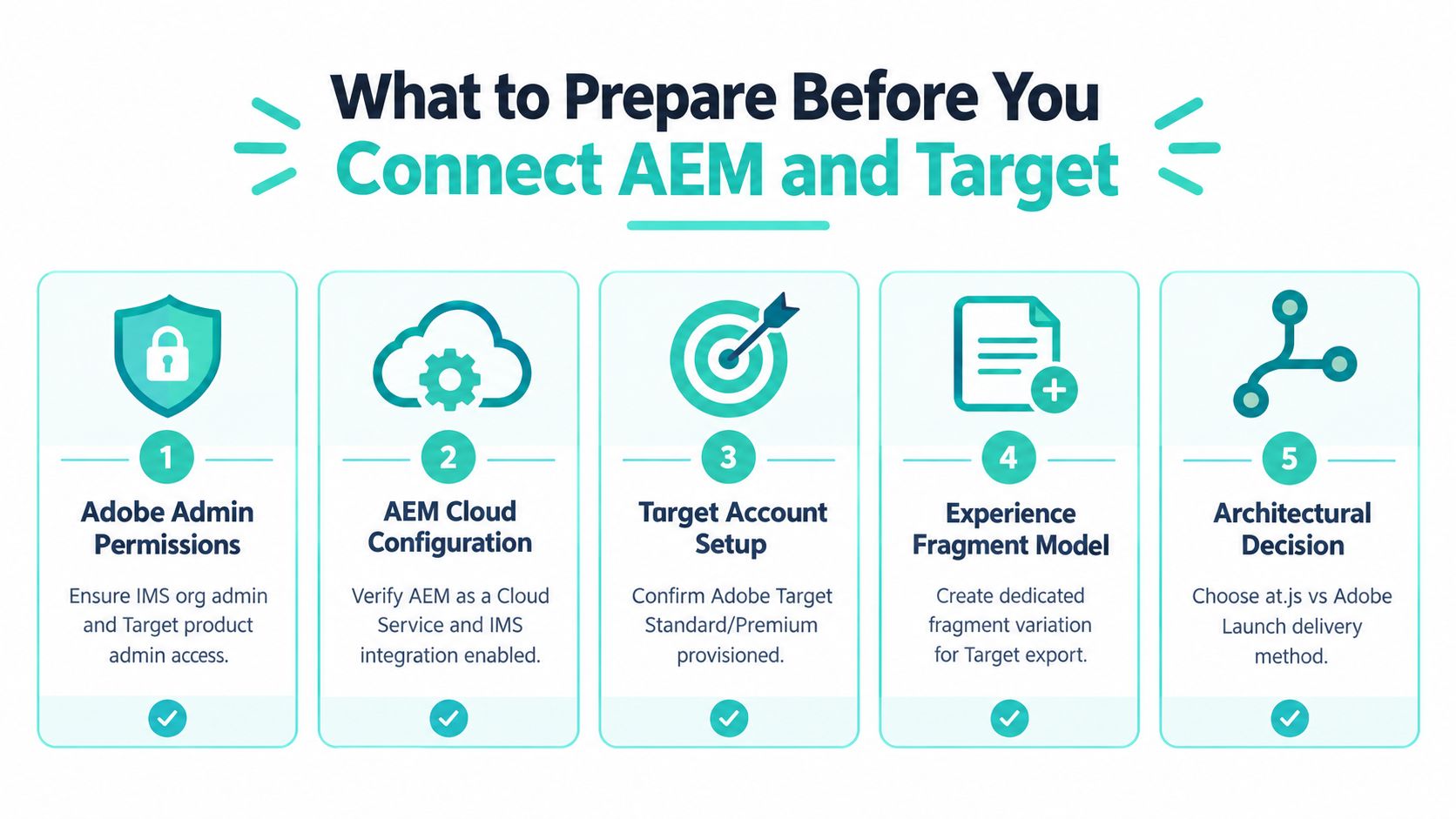
Preparation prevents most avoidable integration delays. Before anyone creates a cloud service, identify the Adobe organization, environments, administrators, Target workspaces, fragment owners, publishing approvers, and delivery architecture. A successful connection still fails operationally if nobody knows who can export an offer, who can approve it, or who owns the page rule that delivers it.
Confirm identity and product access
Start with Adobe Admin Console access. The integration requires the right IMS organization context, a provisioned Adobe Target account, and an account with approver-level permissions for the relevant Target operations. Capture the Target client code and confirm that the team can access the intended property, workspace, and activity workflow.
Don't use a shared administrator identity as a shortcut. Assign permissions to named roles and document who owns configuration changes. When an export fails, an audit trail showing which service, user, and environment initiated it is more useful than a generic statement that “Target is connected.”
AEM 6.5 and AEM as a Cloud Service need different preparation paths. The legacy route depends on registered Target credentials, the client code, and an approver-level Target account. Manual integration also requires a secured publish node and enabling the Test and Target replication agent on Author. Cloud Service implementations instead use IMS configuration and a Launch or Web SDK delivery pattern.
Decide how the experience will be delivered
Choose the delivery model before fragment authors create content. A traditional page integration may use client-side delivery through at.js or Adobe Launch. A headless application may export Content Fragments to Target and use an Experience Platform Datastream with the Adobe Web SDK to deliver the decision in a React-based application.
This decision affects fragment modeling, frontend ownership, consent handling, testing, and observability. It also determines whether authors are exporting rendered HTML offers or supplying structured content for a separate presentation layer.
Consent and data collection deserve an explicit design review. Teams working through privacy requirements can use a practical consent management platform guide while mapping the data elements that are allowed into Target requests. Don't leave that mapping until tag deployment, because consent rules can change the behavior of personalization calls.
Establish the content model
Create a dedicated Experience Fragment variation or folder for Target-bound content. Define naming conventions, locale rules, ownership, expiry expectations, and the referenced assets that must be published with the fragment. Decide whether a fragment is reusable across activities or tied to a single campaign.
Prepare a small validation path before onboarding every brand and language. The first test should prove the complete chain, from AEM Author to export, Target offer visibility, page request, audience decision, and published delivery. That sequence gives the team a controlled baseline for diagnosing later failures.
Practical rule: Treat permissions, fragment state, and publishing ownership as integration prerequisites. They aren't administrative details added after the connector works.
How to Configure AEM for Adobe Target Delivery
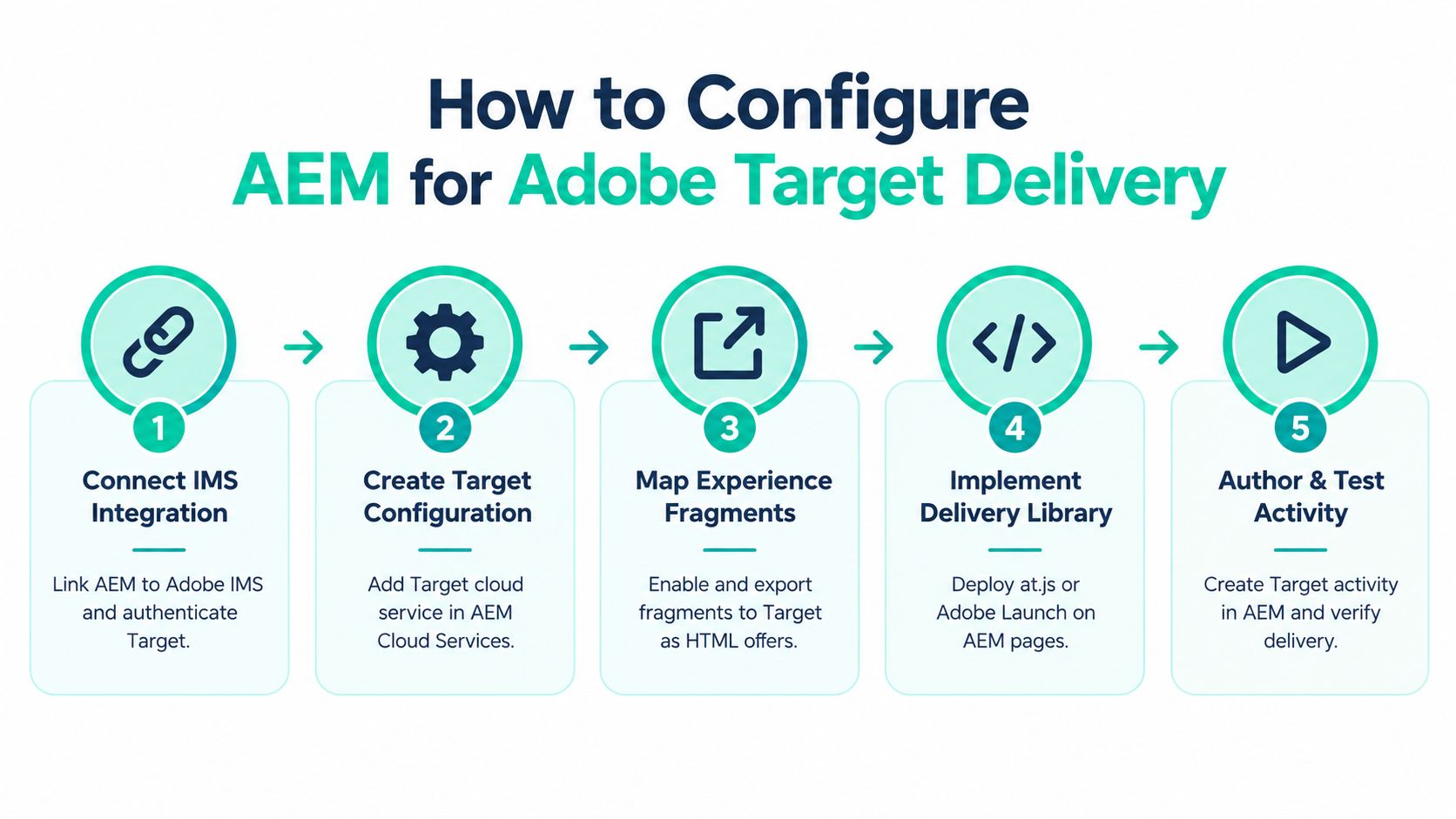
For AEM as a Cloud Service, the implementation should follow a deliberate sequence. Start with the backend connection, then attach the service to the content that will be exported, and only then wire the frontend delivery. Skipping ahead to activity creation makes failures harder to locate because an empty Target offer library can reflect an AEM configuration issue, an asset publication issue, or an authorization issue.
Create the IMS and Target configuration
In AEM Author, create the Adobe IMS configuration for Adobe Target and validate authentication before working with fragments. The configuration establishes the trusted relationship AEM needs for export. If the IMS setup is wrong, authors may see an export action but won't get a reliable offer in Target.
Create the Target cloud service in AEM and associate it with the appropriate Experience Fragment or Content Fragment folders. Folder placement matters because inheritance can apply a configuration more broadly than intended. Keep Target-bound content in a clearly governed branch, and verify the effective configuration on the folder and asset rather than assuming the parent setting is correct.
Adobe's current AEM as a Cloud Service guidance describes the sequence as creating an IMS configuration, creating the Target cloud service, applying it to fragment assets, permissioning the service in Adobe Admin Console, exporting fragments, and then building the Target activity. Adobe's cloud integration guide is the appropriate reference for environment-specific implementation details.
Permission the service and export the content
Cloud service permissioning is a separate concern from user access in AEM. Confirm that the relevant Adobe Admin Console roles permit the service to communicate with Target and that the person performing the export can work with the fragment folder. A user who can edit an Experience Fragment may not automatically have the permissions needed to export or manage the resulting offer.
Before exporting, check the fragment's synchronization metadata, export state, referenced assets, and publication status. Export a controlled fragment, confirm that it appears in Target as an HTML offer, and record the relationship between the AEM asset path and the Target offer. That record becomes valuable when multiple locales or campaign variations use similar names.
For AEM 6.5, the operational path differs. The implementation may use the opt-in wizard, a Target cloud configuration, and a Target Framework associated with sites. Manual integration also involves a secured publish node and the Test and Target replication agent on Author. Don't mix legacy cloud services and IMS assumptions in the same runbook.
Configure Launch or Web SDK delivery
The frontend must carry the decision into the application. In the Launch-style model, add Adobe Target, create a data element, define the page rule, and build and publish the setup. The data element should expose only the context the implementation is designed to use, such as page properties or approved audience signals.
For modern headless delivery, Adobe documents extending the integration through AEM Headless. Content Fragments can be exported to Target, while an Experience Platform Datastream and the Adobe Web SDK deliver personalization into a React-based application. This separates the content source from the consuming frontend, but it also puts more responsibility on application teams to render and test the selected experience correctly.
Don't declare success when the library loads. Test an actual Target request, verify the expected context, confirm the activity decision, and inspect the rendered result in the published application. AEM integration work should include smoke tests before staging approval, not just configuration screenshots.
A practical reference for related Adobe Experience Manager integrations can help teams place Target within the wider integration framework, especially where analytics, identity, and delivery services share the same release process.
A short implementation walkthrough can also help teams visualize the flow before adapting it to their own environments.
Choosing Between Client Side Server Side and Headless Delivery
The right delivery model depends on where the decision must happen and who owns the rendering layer. Client-side delivery can be practical for existing AEM pages because the browser receives the request and applies the selected experience. Server-side or headless patterns give application teams more control, but they require stronger coordination between AEM, Target, the data layer, and the frontend.
| Delivery Method | Best For | Trade Off |
|---|---|---|
| Client-side with at.js | Existing AEM pages and browser-rendered personalization | Easier to add to page experiences, but teams must manage client-side loading behavior, consent, and possible visual changes during rendering |
| Launch-based delivery | Governed tag deployment, data elements, and page rules | Centralizes implementation controls, but a faulty rule or publishing workflow can affect delivery across pages |
| Server-side delivery | Applications that need the decision before rendering | Can support tighter rendering control and reduce dependence on browser execution, but requires application and backend coordination |
| Headless Content Fragment delivery | React and other frontend applications using structured content | Separates content from presentation, but the application must correctly interpret, render, and test the selected variation |
Client-side patterns fit established AEM pages
Client-side delivery is often the least disruptive choice for a conventional AEM site. Adobe Target can receive page context, evaluate an audience, and return the experience associated with the activity. Launch provides a governed place for the Target extension, data elements, page rules, and publication workflow.
The trade-off is visible in the browser. Teams must account for consent timing, request sequencing, caching behavior, and the possibility that the default page appears before the personalized content is applied. These concerns aren't reasons to reject client-side delivery, but they should be tested on representative pages rather than accepted from a single author environment.
A useful technical comparison of server-side and client-side ecommerce tracking can help analytics and engineering teams evaluate the wider implications of browser-based versus server-controlled data collection. The same decision principles apply here, especially around ownership and failure handling.
Server-side and headless patterns increase control
Server-side delivery suits applications that need the decision before constructing the response. It can be a better fit when the frontend controls the full presentation layer or when the team wants to avoid relying on page-level browser manipulation. It isn't automatically simpler. The team must define how Target context reaches the server, how the selected offer is represented, and how fallback behavior works when a decision isn't available.
Headless delivery adds another important distinction. AEM Content Fragments can supply structured content, while an Experience Platform Datastream and the Adobe Web SDK can support delivery into a React application. The approach is powerful for composable estates, but it moves responsibility for rendering and component compatibility into the application code.
For architects working through that boundary, an AEM headless CMS overview provides useful context for separating content modeling from frontend implementation. Choose headless when the application needs that separation, not because the label sounds more modern.
Conversion tracking must share the same context
Adobe's integration guidance identifies content targeting and conversion tracking as core use cases. AEM pages can submit context data to Target, and Target audiences can drive personalized experiences. Analytics alignment through A4T should be designed with the delivery pattern, so the activity, experience, and conversion event use a consistent identity and measurement model.
The practical test is simple. Can the team explain which system owns the content, which system makes the decision, where the request is made, how consent affects it, and where the conversion is recorded? If the answer changes from page to page, the architecture needs more governance before it needs more personalization.
Troubleshooting Fragment Export and Activity Delivery Issues
The most frustrating failures look like connectivity problems. A fragment is published in AEM, an administrator says the integration is active, and yet the offer doesn't appear in Target. Or the offer exists, the activity is active, and the published page still serves the default experience. These incidents need a layered diagnosis rather than another round of credential resets.

Start with the asset, not the connector
Check the fragment itself first. Confirm that synchronization metadata exists, the export state is correct, and the fragment is associated with the intended Target cloud service. Then inspect every referenced image, content asset, and nested dependency. An unpublished reference can leave the exported offer incomplete even when the fragment's own status looks valid.
Bundle compatibility can also matter. If the fragment depends on components or packages that aren't available in the target environment, the exported result may not render as expected. Compare the authored fragment, the exported offer, and the published page. Don't assume that a successful export means a successful customer-facing render.
Separate Author, publish, and Target failures
Use a three-point verification path:
- Author verification: Confirm the effective cloud service, fragment inheritance, synchronization metadata, export state, and user permissions.
- Publish verification: Confirm that the fragment and referenced assets are published, the delivery library is present, and the page rule is active in the published environment.
- Target verification: Confirm that the offer exists, the activity references the intended offer, the audience matches the request, and the conversion or delivery event is being received.
This separation prevents teams from changing three systems at once. If the offer never reaches Target, investigate the backend connection and export prerequisites. If the offer exists but isn't selected, inspect the activity, audience, request context, and delivery library. If it is selected but renders incorrectly, focus on the fragment output and frontend compatibility.
Watch for configuration drift
AEM 6.5 and AEM as a Cloud Service can coexist in an enterprise portfolio, but their integration assumptions differ. Legacy credentials, cloud services, frameworks, replication agents, IMS configurations, Launch rules, and publish permissions can create a misleadingly similar set of screens with different behavior.
Adobe's community discussions also surface recurring symptoms involving missing synchronization metadata, incorrect export state, unpublished referenced assets, and bundle compatibility. The practical lesson is that the connector is only one part of the system. Content governance and release discipline often constrain reliability more than integration code.
Diagnostic rule: If a fragment is absent from Target, prove its state and dependencies in AEM before rebuilding authentication. If an activity fails to deliver, prove the request and audience context before changing the offer.
Keep an incident record that captures the asset path, environment, effective configuration, export result, offer identity, activity, request context, and publication status. That turns recurring failures into a known decision tree instead of an emergency investigation.
Proven Tips to Scale and Govern Your Integration
Scaling personalization across brands and languages requires standardization without removing local ownership. Use a consistent Target configuration and a controlled association between sites, folders, and fragment libraries. In legacy AEM 6.5 environments, Adobe's opt-in wizard can create a Target cloud configuration named Provisioned Target Configuration and associate sites with a Target Framework, which helps reduce manual configuration drift when the setup is applied consistently.
Make content the controlled source
Keep Target-bound Experience Fragments in a governed structure. Define who can edit them, who can publish them, which locales they support, and how changes are communicated to activity owners. Reusable fragments should have clear ownership because an apparently minor update can affect multiple campaigns.
Align analytics through A4T during the design stage, not after the first activity launches. The team should know which experience was selected, which audience was evaluated, and which conversion event measures the result. A personalization program without trustworthy measurement encourages teams to optimize around assumptions.
Turn releases into repeatable checks
Add the following controls to the delivery lifecycle:
- Fragment validation: Check synchronization metadata, export state, referenced assets, and component compatibility.
- Permission review: Verify IMS, Adobe Admin Console, AEM, and publish-side access for the responsible roles.
- Delivery smoke test: Test the actual published page, request context, Target activity, selected offer, and fallback experience.
- Change coordination: Notify activity owners before updating a fragment used by an active campaign.
- Configuration review: Compare environments for cloud service inheritance, Launch rules, Web SDK settings, and legacy-versus-IMS assumptions.
Kogifi works across Sitecore, Adobe Experience Manager, and Microsoft 365 and SharePoint, including AEM integrations, Sitecore XM Cloud and headless delivery, and SharePoint Online solutions using SPFx, Power Platform, and Microsoft 365 integrations. That broader platform view is useful when Target personalization sits within a wider composable DXP or intranet modernization program.
Sitecore's product strategy has moved toward cloud-native SaaS products hosted in the public cloud, and Sitecore's strategy overview positions composable products as a foundation for AI-led orchestration. Sitecore XM Cloud is described as a headless CMS built around content, with Experience Manager, SXA, the Sitecore Next.js SDK, Experience Edge, and Pages included in the product documentation at Sitecore's XM Cloud documentation. Its wider AI positioning includes AI workflows, generative copilots, and brand-aware AI, as described on Sitecore's official platform site. These are useful comparison points when an enterprise is deciding whether its future delivery model should remain Adobe-centered or extend across composable platforms.
The durable lesson remains straightforward. AEM Target integration succeeds when teams govern the path from authored fragment to published decision. Code enables the connection, but disciplined content and release operations keep it trustworthy.
Kogifi can assess your AEM Target architecture, validate IMS and delivery configuration, troubleshoot fragment export and activity issues, and establish smoke tests and governance for production rollout. If your organization is also evaluating Sitecore XM Cloud or SharePoint Online alongside Adobe, visit Kogifi to discuss a platform and delivery plan built around your existing estate.