


“Automate the regression suite and run everything after every change” is popular advice. On an enterprise Sitecore estate, it can also produce a slow pipeline full of duplicate checks that nobody trusts. The better question in regression testing vs functional testing isn't which approach wins. It's which evidence you need before approving a particular change.
A new personalization rule, an AI-assisted content workflow, and a SharePoint web part update create different risks. Test the intended behavior directly, then select regression coverage around the dependencies and business journeys you could unintentionally damage. Automate where repetition makes the evidence cheaper, not where automation merely increases the test count.
Table of Contents
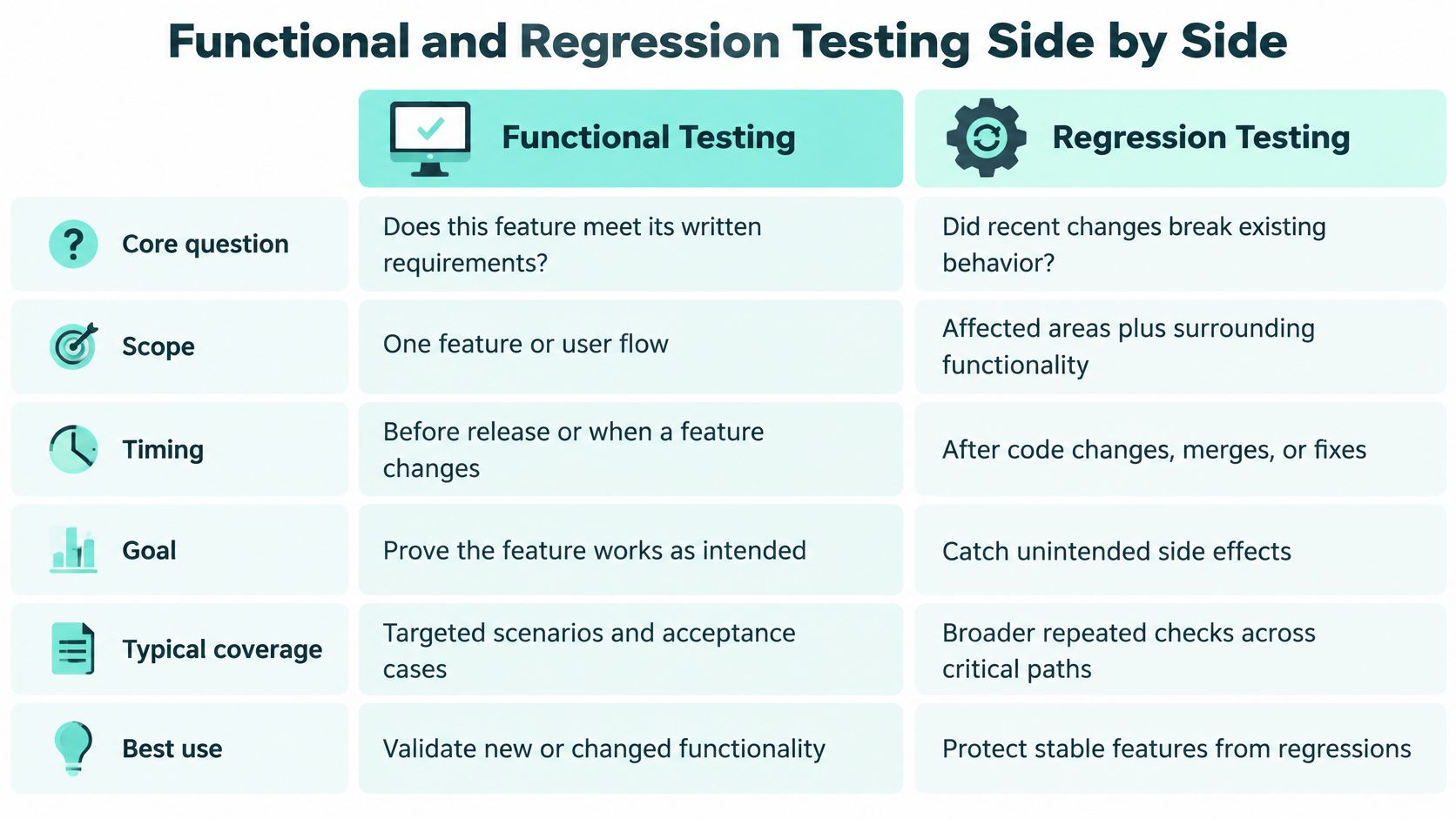
Functional and Regression Testing Side by Side
Functional vs regression testing on core criteria
| Criterion | Functional testing | Regression testing |
|---|---|---|
| Core question | Does the feature meet its requirements? | Did a change break behaviour that already worked? |
| Primary goal | Verify specified behaviour | Protect established behaviour after change |
| Test source | Requirements and user stories | A maintained suite reused across releases |
| Typical scope | New features and end-to-end business flows | Shared components, integrations and critical journeys |
| Evidence produced | Pass or fail against a requirement | Evidence that existing behaviour did not regress within tested coverage |
| Lifespan of the test | Often written once for a feature | Kept and grown over many releases |
The distinction is purpose, not the automation framework or the person executing the test. A Playwright scenario checking a publishing approval can validate a requirement during development and later protect that same workflow during an upgrade. Calling it regression doesn't require rewriting it, but retaining it does require maintenance.
Functional and regression testing are therefore complementary, not competing budget options. Functional tests establish what acceptable behavior looks like. Regression tests preserve selected evidence of that behavior after the application, configuration, dependencies, or environment changes.
A publishing example
Say a Sitecore team introduces a multilingual publishing workflow. Functional testing verifies that authors submit the correct language version, reviewers approve it, and visitors receive the approved content rather than an unpublished draft. The acceptance criteria must also explain what happens when approval is rejected or a translation is missing.
After a platform upgrade, regression testing rechecks the established workflow. The team isn't accepting a new publishing requirement. It's checking whether the upgrade disrupted a business process that editors already depend on.
Practical rule: Classify the test by the decision its result supports, not by whether the script already exists.
Neither category automatically establishes performance under concurrent demand. Keep capacity evidence separate, using load testing services when the release decision includes publishing throughput, search responsiveness, or traffic-related stability.
Apply these questions to any change:
- Does the new or changed behavior meet its specification? Start with functional tests.
- Could this change damage something already relied upon? Add regression coverage around that risk.
Most enterprise releases need both answers. What they don't need is every historical script running at the same depth on every commit.
How Test Design Differs Between the Two
A functional case starts with a requirement and an observable result. NIST's software-testing guidance describes functional test data as derived from functional requirements without regard to internal program structure, covering valid, invalid, boundary, extreme, and special input conditions; it also calls for a maintained regression set throughout the system's life with adequate functional coverage.
That produces a more demanding design exercise than checking the happy path. For a multilingual Sitecore product catalogue, a search-filter specification should define accepted values, rejected combinations, date boundaries, empty results, and language fallback. A tester can then verify visible results and API responses against those expectations rather than against whatever the implementation happens to return.
Design for an explicit verdict
Suppose the requirement says an availability filter includes products available on the selected end date. Test the boundary itself, not just dates comfortably inside the range. Include malformed dates, reversed ranges, missing translations, and values that exceed the permitted range.
For AI-assisted workflows, an expectation such as “produces good copy” isn't testable enough. Define required fields, prohibited claims, approved terminology, language, and whether human approval is mandatory. Separate deterministic validation from editorial judgment so a fluent response doesn't conceal a broken workflow.
Usability testing addresses another question: can editors or visitors understand and complete the task? A technically correct filter can still confuse users, so don't treat a functional pass as usability acceptance.
Retain cases that can survive repetition
Regression cases need an additional design property: repeatability. Copying an acceptance script into a scheduled suite doesn't provide that property automatically.
A publishing test that depends on yesterday's content item, a fixed publication time, or another test's login state will eventually produce misleading failures. Create or reset fixtures, use stable selectors, isolate accounts where necessary, and remove hidden execution-order dependencies. Record the dependency that justifies retaining each case.
Use this ownership checklist before accepting a test:
| Design decision | Functional case | Retained regression case |
|---|---|---|
| Source | Requirement and acceptance criteria | Established behavior and its change risk |
| Owner | Feature QA owner with product-owner clarification | Named suite owner accountable for reliability |
| Data | Inputs covering specified conditions | Reproducible fixtures with cleanup or reset |
| Retirement rule | Replace when the requirement changes | Remove when behavior is retired or equivalent coverage replaces it |
A functional case may be authored once, then revised as requirements evolve. A regression case earns its continued place by protecting a relevant risk, not by having passed before.
Choosing Which Regression Tests Run for Each Change
Selective regression has a real cost-benefit trade-off. An empirical study of regression-test selection, evaluating four Java techniques across five open-source projects, reported an average 40.49% reduction in end-to-end processing time alongside an 8.75% decrease in fault-detection capability compared with the original suite.
Those results aren't a forecast for Sitecore or SharePoint. They demonstrate why faster execution alone isn't a sufficient selection criterion. A selector can correctly identify changed execution paths while overlooking a configuration, data, or integration dependency that matters to the release.
Select by dependency and consequence
Start with the change's reach. A rendering adjustment in a shared Next.js component has a different exposure from an isolated campaign page. A personalization update may leave the page visually unchanged while altering audience eligibility or conversion-event attribution.
Use these inputs together:
- Code coverage: Identify tests that exercise modified behavior, while recognizing gaps in instrumentation.
- Service and data dependencies: Include consumers of changed APIs, schemas, identity claims, indexes, and content structures.
- Business criticality: Preserve coverage for journeys whose failure blocks customers, employees, or publishing teams.
- Defect history: Give extra attention to fragile boundaries and previously recurring failures.
File-change count isn't a useful substitute. A small configuration edit can affect every brand using a shared service.
Regression scope and automation by change type
| Change type | Functional tests to run | Regression scope | Automate? |
|---|---|---|---|
| New component or page template | Targeted tests for new fields and rendering | Shared layout, navigation and search templates | Yes for rendering checks; manual for content UX |
| Personalisation rule update | Rule logic and audience tests | Adjacent rules, rendering and conversion events | Yes, with fixed test audiences |
| Platform or module upgrade | Tests for the changed module's behaviour | Publishing, authentication, rendering and integrations | Yes, full pack on staging |
| SPFx web part change | Web part features and properties | Tenant apps, permissions, API consent and other pages using the part | Partly; host testing stays manual |
| Integration or API fix | Changed endpoint contract | Dependent journeys such as booking, identity and partner portals | Yes, contract and end-to-end checks |
| Accessibility or multilingual content change | Keyboard flows and language variants | Templates across every active locale | Partly; audit tooling plus manual review |
Treat the matrix as a starting policy, not an automatic waiver. If an apparently isolated component uses a global content resolver, its regression scope must include consumers of that resolver. Likewise, automated accessibility checks don't replace keyboard and assistive-technology review.
Keep a non-negotiable baseline
Maintain an always-run critical baseline even when selective execution is enabled. For a Sitecore estate, that might cover sign-in, publishing an approved item, resolving a localized page, searching, and completing the primary conversion journey. Choose the actual paths with business owners rather than copying a generic smoke pack.
Selection should reduce redundant execution, not remove the only check protecting a critical dependency.
Before deploying custom code, integrations, or module updates, execute affected checks on mirrored staging. At Kogifi, we test custom code, OSGi bundles, and integrations on mirrored staging environments before deployment during updates and upgrades. OSGi coverage belongs to the relevant platform estate, not to Sitecore itself.
Check configuration parity as well as deployed binaries. An apparently successful staging run is weak evidence if production uses different identity settings, API permissions, language configuration, or feature flags.
How to Place Each Test in Your Pipeline
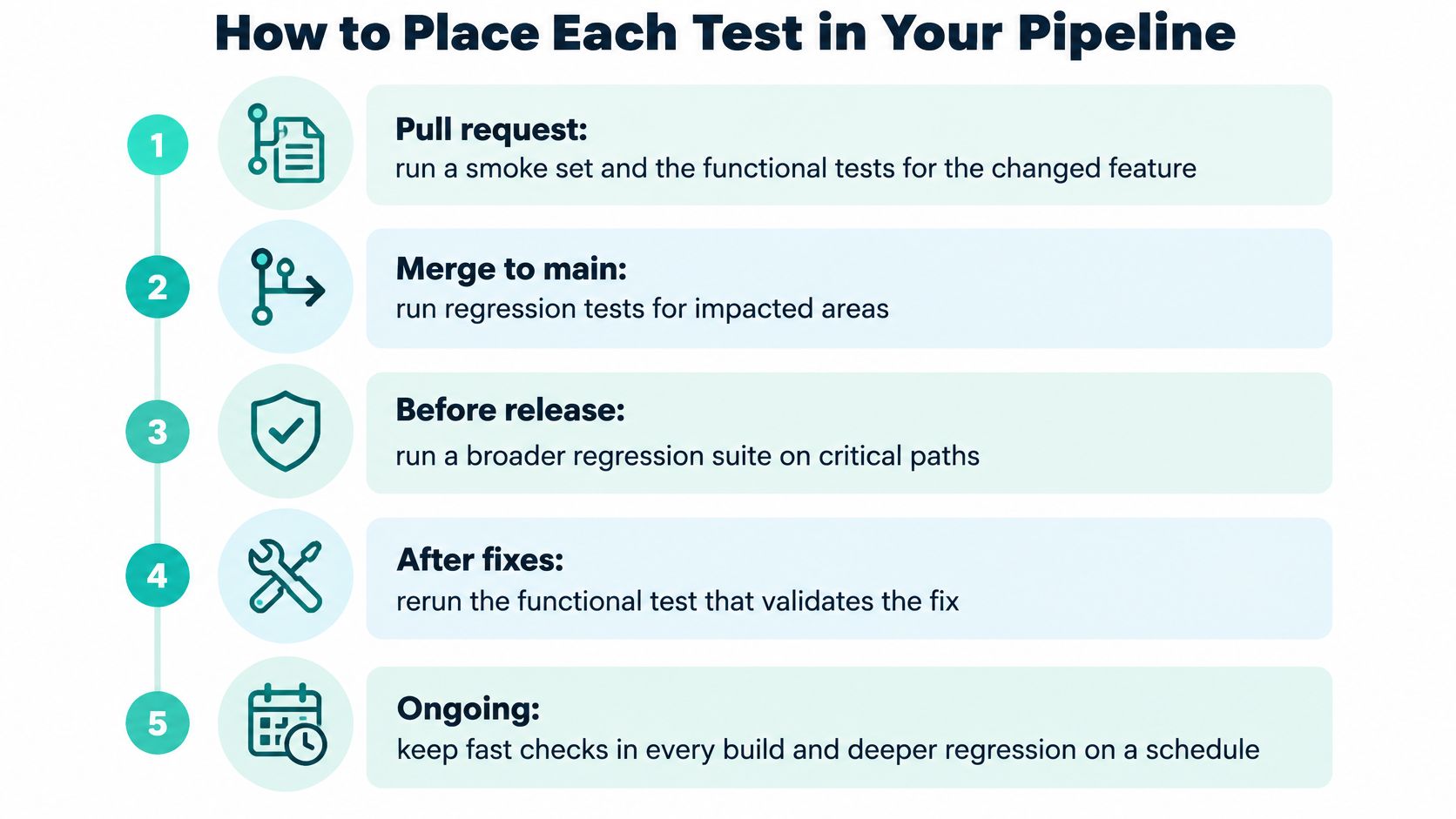
The ISTQB Certified Tester Foundation Level syllabus distinguishes confirmation testing, which verifies a fix, from regression testing, which checks for adverse consequences across affected components, connected systems, and environments. It also notes that regression suites run repeatedly and generally gain cases with each iteration or release, making automation useful but pruning necessary.
Give every pipeline stage a trigger, an accountable owner, and an explicit acceptance condition. A green dashboard without those agreements doesn't establish release readiness.
Execution stages and release evidence
Pull request. The developer owns smoke checks and functional tests for changed components. For a defect fix, reproduce the original failure and confirm the correction, then check immediate consumers. Pass only when changed requirements and connected checks succeed without unexplained failures.
Merge to main. Trigger impact-selected regression across shared libraries, APIs, identity, search, and publishing. The component owner and QA lead review failures together. Require the critical baseline to pass and investigate new failures before accepting the merge as deployable.
Overnight or release candidate. The QA lead owns the broader pack, including multilingual, accessibility, and cross-browser compatibility checks. Pass when required coverage completes and unresolved defects meet the agreed release policy, not merely when the overall pass percentage looks acceptable.
Release gate. The product owner accepts new business flows; the QA lead signs off critical existing journeys. Attach requirement results, known limitations, and approvals to the release record. No unresolved critical baseline failure should pass this gate.
Platform upgrade or hotfix. The platform lead triggers mirrored-staging verification before production deployment. Require compatibility evidence, a passing regression baseline, and a usable rollback point. Our update deployments include rollback points and compatibility testing.
For rendering-heavy changes, DOM Studio's guide to visual testing tools for developers is useful when deciding where screenshot comparisons belong. Keep visual approval distinct from behavioral assertions: matching pixels don't establish correct permissions or successful API writes.
Maintain the stages, not just the scripts
Schedule a pruning review for each stage's inventory. Move slow, low-risk checks out of immediate feedback paths, replace duplicate coverage, and assign an owner to quarantined failures.
Recovery needs additional evidence. After a Bugfixing & Recovery job, we run post-recovery testing, regression checks, and data integrity validation. Restoring a page doesn't establish that the recovery preserved the records and workflow states behind it.
When Regression Automation Stops Paying Off
More automated tests aren't automatically better protection. If engineers spend each release repairing selectors and dismissing false alarms, the suite has become an operational expense without dependable release evidence.
TestRail's software testing and quality report announcement describes teams automating about 40% of tests on average while aiming for 63%, with fewer than one-third integrating AI into core QA workflows; the accompanying survey findings also identify pass/fail tracking at 70% and production-defect tracking at 60%, alongside limited automation-ROI visibility. Adoption and execution counts don't tell a QA lead whether a particular suite is worth maintaining.

Diagnose the expense before adding coverage
Unstable data makes assertions unreliable. Environment drift creates failures unrelated to the release. Brittle selectors turn editorial layout changes into engineering work, while broad retry policies can conceal real timing defects.
A large, slow suite also changes team behavior. Developers wait longer for useful feedback, reviewers merge with incomplete evidence, and release managers become tempted to bypass checks. Adding parallel workers won't repair poor assertions or missing fixture control.
For each candidate, make a deliberate choice:
- Automate it: Use repeatable automation when inputs, expected outcomes, and setup can be controlled.
- Redesign for testability: Add stable component hooks, fixture APIs, observable workflow states, or replaceable dependencies before expanding scripts.
- Remove or replace it: Retire obsolete or redundant coverage, but record what now protects the underlying risk.
Removal isn't appropriate merely because a critical check is difficult. Keep a manual control while repairing the automation or application boundary.
Measure value rather than inventory
Report a compact set of measures with enough context to act:
- Defect detection by suite: Which checks find actionable product failures?
- Escaped-defect severity: What consequential failures passed the release process?
- Maintenance minutes per run: How much human repair does execution require?
- Flake rate: Which failures disappear without a relevant product change?
- Execution time: How long until an engineer receives usable feedback?
- Release-risk reduction: Which named failure scenarios does the suite control?
A test that fails unpredictably isn't conservative protection. It's an unresolved diagnostic problem.
On multilingual, headless, multi-brand Sitecore platforms, review repeated component scenarios first. Preserve meaningful differences such as text expansion, fallback, audience eligibility, and brand configuration. Replace permutations that exercise identical behavior with representative coverage.
The rule is keep useful evidence, fix unreliable evidence, remove unjustified duplication. Neither AI-generated scripts nor self-repairing selectors remove the need to verify that the assertion still means what the business expects.
Applying the Split to Sitecore AI and SharePoint
Consider a marketing team introducing an AI-assisted campaign workflow that creates localized content, routes it for approval, and activates a personalized experience. The QA boundary isn't the editor screen. It includes source assets, audience data, generated output, approval state, search visibility, and downstream events.
Sitecore's SitecoreAI announcement positions the composable SaaS platform on the foundation of XM Cloud, combining content management, customer data, personalization, and search on Microsoft Azure, with 20 AI-powered agents at Agentic Studio's launch covering areas including campaign planning, content migration, production, and testing. Functional acceptance must therefore address the workflow's outputs and controls, not merely whether an agent returns a response.

Follow the campaign across product boundaries
Sitecore's AI capabilities documentation identifies capabilities across Content Hub, Customer Data Platform, Personalize, and Search. Build the test map around those boundaries: an approved asset, a permitted customer-data input, an audience decision, and a discoverable experience.
For the new workflow, functional checks should establish that required metadata survives content creation, permissions restrict access, and approval blocks premature publication. Retained regression scenarios should then protect established content-consumption and activation paths when a prompt, connector, workflow, or product configuration changes.
Sitecore Stream documentation describes its use of Microsoft Azure OpenAI Service for tasks including content ideation, campaign briefs, and message personalization. For these outputs, don't compare every generated sentence against a frozen reference string.
Use fixed evaluation inputs and explicit constraints instead. Check required terminology, forbidden assertions, language, structured-output validity, and approval routing automatically where practical; ask an editorial owner to judge meaning and brand suitability. After a model or prompt change, evaluate against approved examples without assuming legitimate wording variation is a defect.
Apply tenant governance to SharePoint
The same campaign may appear in an employee intranet through a custom SPFx web part. Microsoft's SharePoint Framework guidance identifies SPFx as the supported client-side extensibility model, with tenant-administrator approval and package deployment through the Apps for SharePoint library.
Functionally, verify the web part's properties, rendering, error handling, and authorized data access. For deployment, check the .sppkg package, dependency review, applicable API consent, and supported hosts. Regression should include other pages using the component, relevant tenant applications, and restricted-user scenarios, not just the developer's test page.
Our Bugfixing & Recovery service covers Sitecore, Adobe Experience Manager, and SharePoint environments. Across those platforms, assign evidence to the actual boundary being changed: editorial acceptance for generated content, integration checks for data movement, and tenant-level checks for intranet deployment.
Setting Your Test Mix Before the Next Release
Choose the test mix from the change's uncertainty and potential impact. If a capability has unclear requirements, clarify the acceptance criteria and begin with functional tests against that specification. Automating an ambiguous expectation only makes the ambiguity repeatable.
If the release touches shared components, integrations, or platform behavior, require staging evidence for the affected dependencies before production. For frequent releases, automate dependable regression checks first and prune the inventory deliberately. Large multi-brand estates need risk tiers, not identical execution policies for every site.
Turn the decision into release work
Write your estate's selection matrix. List change types, affected products, required suites, owners, and approval conditions. Include Sitecore AI workflows and SharePoint tenant controls rather than treating them as exceptions.
Choose a compact reporting set. Pick four to six measures that expose detection value, reliability, maintenance effort, and feedback speed. Give each measure an owner who can change the suite when results deteriorate.
Repair or remove an unreliable test this sprint. Identify its protected risk before changing it. Replace missing protection explicitly instead of deleting a troublesome gate.
Put these commitments into your Scrum definition of done, including who accepts residual risk. A release meeting shouldn't be the first time stakeholders discover that a critical check was excluded.
Resolve platform uncertainty before buying more automation
Kogifi's Platform Audit is usually our first engagement. It covers performance, architecture, security, and cost, ending with a prioritized roadmap that helps teams address platform constraints before expanding testing effort.
For a Sitecore direction decision, our Support Readiness Check takes 1-2 weeks, uses read-only access, and compares three paths with cost and risk. Use that assessment when the unresolved question is what should change in the estate, rather than which test runner should execute it.
Kogifi offers platform audits and Sitecore readiness assessments to help teams identify the risks their functional and regression suites need to address. Bring your release process, dependency map, and unreliable test inventory to Kogifi to discuss a prioritized plan for your Sitecore or SharePoint estate.