


Your team is probably close to launch right now. Content is approved, analytics tags are in place, personalization rules are loaded, and stakeholders are focused on campaign timing. Then one browser-specific defect turns a polished release into a support incident. A lead form fails in Safari. A consent modal sits behind a sticky header in Edge. A personalized Sitecore component loads, but the call to action never becomes clickable on a specific mobile device.
That's what cross browser compatibility means in enterprise delivery. It isn't a cosmetic QA task. It's operational risk control for revenue paths, self-service journeys, internal productivity, and brand trust. On platforms like Sitecore AI and SharePoint, small browser differences can break much more than layout. They can interrupt personalization, search, authentication flows, embedded apps, and content publishing workflows. Teams that already invest in speed should also treat compatibility as part of resilience. It sits next to performance, accessibility, and governance, not behind them, which is why work on optimizing website performance often needs to be planned alongside browser support decisions.
Table of Contents
- Build a support matrix around business risk
- Write tests around journeys, not pages
- Split manual and automated effort deliberately
- Migration projects need compatibility triage
- Global rollouts complicate the matrix
- A workable rollout model
The Hidden Risk in Your Digital Experience Platform
An enterprise DXP fails differently from a simple marketing site. If a brochure page shifts by a few pixels, the damage is limited. If a Sitecore AI-powered journey serves the wrong content variant, or if a SharePoint-based employee workflow stops responding in one browser, the business impact reaches lead generation, service delivery, and internal operations.
Cross browser compatibility should be defined in business terms. It means users can complete the journeys you depend on, in the browsers and devices they use, with acceptable behavior, usable layout, and consistent core functionality. That includes rendering, JavaScript execution, form behavior, authentication, search, personalization, and embedded integrations.
Why leaders miss it
Most executive teams assume compatibility is handled by responsive design and modern frameworks. That assumption breaks down in real DXP estates because enterprise platforms rarely run as a clean front end. They include analytics scripts, personalization logic, consent tooling, CRM integrations, search components, design systems, and legacy markup carried forward through multiple releases.
Practical rule: If a browser defect can block a conversion, a support case, or an editor task, it belongs on the risk register before launch.
The hidden cost is delay. Teams stop planned roadmap work to troubleshoot issues that were technically small but strategically expensive. A dropdown within a modal may look minor in a defect tracker. In production, it can block an insurance quote, a banking application step, or an internal knowledge workflow.
What cross browser compatibility actually requires
A mature program doesn't aim for perfect visual sameness everywhere. It sets a support policy and protects critical outcomes.
That usually means:
- Defining essential journeys: Lead capture, checkout, account access, search, document workflows, and publishing flows need explicit browser coverage.
- Separating graceful degradation from failure: A subtle animation difference is acceptable. A broken date picker or inaccessible navigation isn't.
- Testing platform behavior, not just templates: Sitecore rendering hosts, personalization rules, SharePoint web parts, embedded apps, and third-party widgets all need validation in context.
For DXP leaders, the question isn't whether browser issues exist. It's whether the organization finds them before users do.
Why Compatibility Matters for Sitecore and SharePoint
Sitecore and SharePoint make compatibility more consequential because both platforms sit inside high-value operating models. They aren't just publishing systems. They orchestrate content, search, identity, workflows, integrations, and increasingly intelligent experiences. When one browser behaves differently, the problem spreads across business functions.
Sitecore raises the stakes
In Sitecore environments, compatibility defects often hit the exact features leadership expects to drive ROI. Personalized banners, dynamic forms, search-driven content blocks, and analytics-triggered experiences depend on front-end execution. If one browser handles event listeners, DOM updates, or layout layering differently, the user may receive content that appears incomplete, inaccessible, or non-interactive.
That changes the conversation from “a browser bug” to “a failed campaign journey.” For a marketing team, that means spend was allocated to attract users into an experience that doesn't convert reliably. For a commerce team, it means the platform's advanced capabilities don't translate into dependable outcomes. Strong governance around content management best practices helps, but governance alone won't save a journey that breaks at runtime.
SharePoint has a different risk profile
SharePoint problems often surface inside authenticated use cases. Users are already signed in, trying to complete work. That makes defects more visible and less forgivable. A browser-specific issue in document preview, custom forms, embedded Power Apps, or approval workflows doesn't just annoy users. It slows teams down and sends people back to email, spreadsheets, and manual workarounds.
There's also a trust issue. Employees and partners assume internal platforms will work in their standard browser environment. When they don't, support tickets rise and adoption falls. That weakens the return on what was supposed to be a productivity platform.
Browser failures in enterprise platforms rarely stay technical. Marketing feels them as lost engagement, operations feel them as stalled workflows, and leadership feels them as reduced platform confidence.
Why this reaches the C-suite
Executives don't need to know the difference between browser engines to care about compatibility. They care because broken journeys distort the value of expensive DXP investments. A platform can be strategically correct and still underperform if the delivery discipline around it is weak.
The practical takeaway is simple. Browser compatibility belongs in release planning, platform governance, and quality budgeting. If it's treated as a final-stage visual check, it will be discovered at the most expensive moment.
Common Browser Issues in DXP Environments
Most DXP browser problems don't come from dramatic failures. They come from interactions between components that were each “fine” on their own. A carousel behaves until it sits inside a tab panel. A form validates until it appears in a modal. A promotional banner overlays correctly until personalization inserts extra content and changes the stacking order.
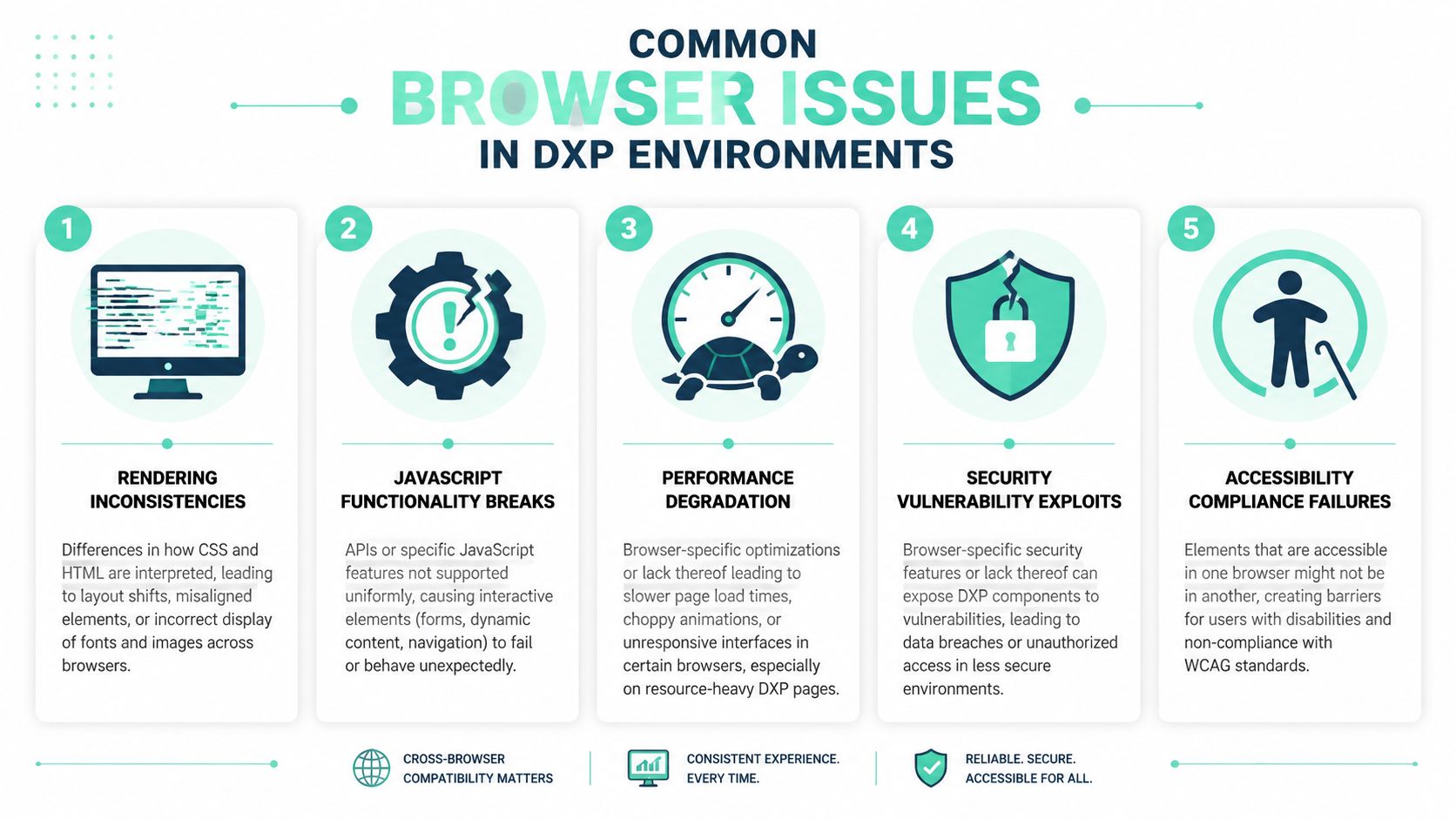
A useful technical pattern is to start with component-level rendering fidelity instead of relying only on full-page review. Practical guidance recommends validating layouts at key breakpoints and then checking stacking context, flex and grid alignment, and computed spacing across the browser matrix before composing those components into full journeys, because issues often appear when components interact rather than when they are tested in isolation, as noted in browser compatibility testing guidance from TestGrid.
The failures that appear most often
In Sitecore builds, one common issue is layout instability inside reusable renderings. Authors add longer headlines, richer promo text, or a localized string, and suddenly a card grid wraps differently in one browser. The front end looked stable in a design review, but the live content model changes the geometry.
In SharePoint solutions, JavaScript behavior is often the first thing to crack. Custom web parts, embedded forms, and client-side extensions can depend on APIs or event timing that behave differently across browsers. The result is rarely a complete crash. More often, a button stops submitting, a panel fails to expand, or a search refinement control doesn't update as expected.
Typography and media handling also create problems that teams underestimate. Font rendering, line height calculation, image sizing, and inline SVG behavior can vary enough to violate brand layouts or break spacing assumptions in tightly designed components.
A practical review checklist
Use this checklist when testing enterprise components, especially in page-builder environments and composable front ends:
- Check layered UI first: Validate sticky headers, consent banners, cookie prompts, modals, dropdowns, and tooltips. Stacking context bugs often hide controls users need.
- Test interactive states, not just default states: Hover, focus, validation, disabled, loading, expanded, and error states often expose the defect.
- Exercise authored variation: Longer headlines, empty fields, fallback images, and personalized content variants can change layout behavior quickly.
- Inspect nested containers: Tabs inside accordions, forms inside side panels, and carousels inside grid layouts are frequent failure points.
- Verify accessibility behavior in-browser: Keyboard navigation, visible focus, form labels, and ARIA-driven interactions need browser-specific checks, not just static audits.
A strong front-end foundation still matters. So do responsive web design best practices. But in DXP delivery, “responsive” and “compatible” aren't the same thing.
Don't approve a component because the screenshot looks right. Approve it when its states, content variants, and interactions hold together in the browsers you support.
What doesn't work
Two habits repeatedly fail enterprise teams.
The first is over-reliance on homepage testing. Homepages are heavily reviewed and often less representative than transactional flows. The second is assuming a framework will smooth over browser differences. React, Next.js, SPFx, and design systems reduce risk, but they don't remove it when real content, embedded scripts, and third-party tools enter the page.
A Strategic Testing Framework for DXP Projects
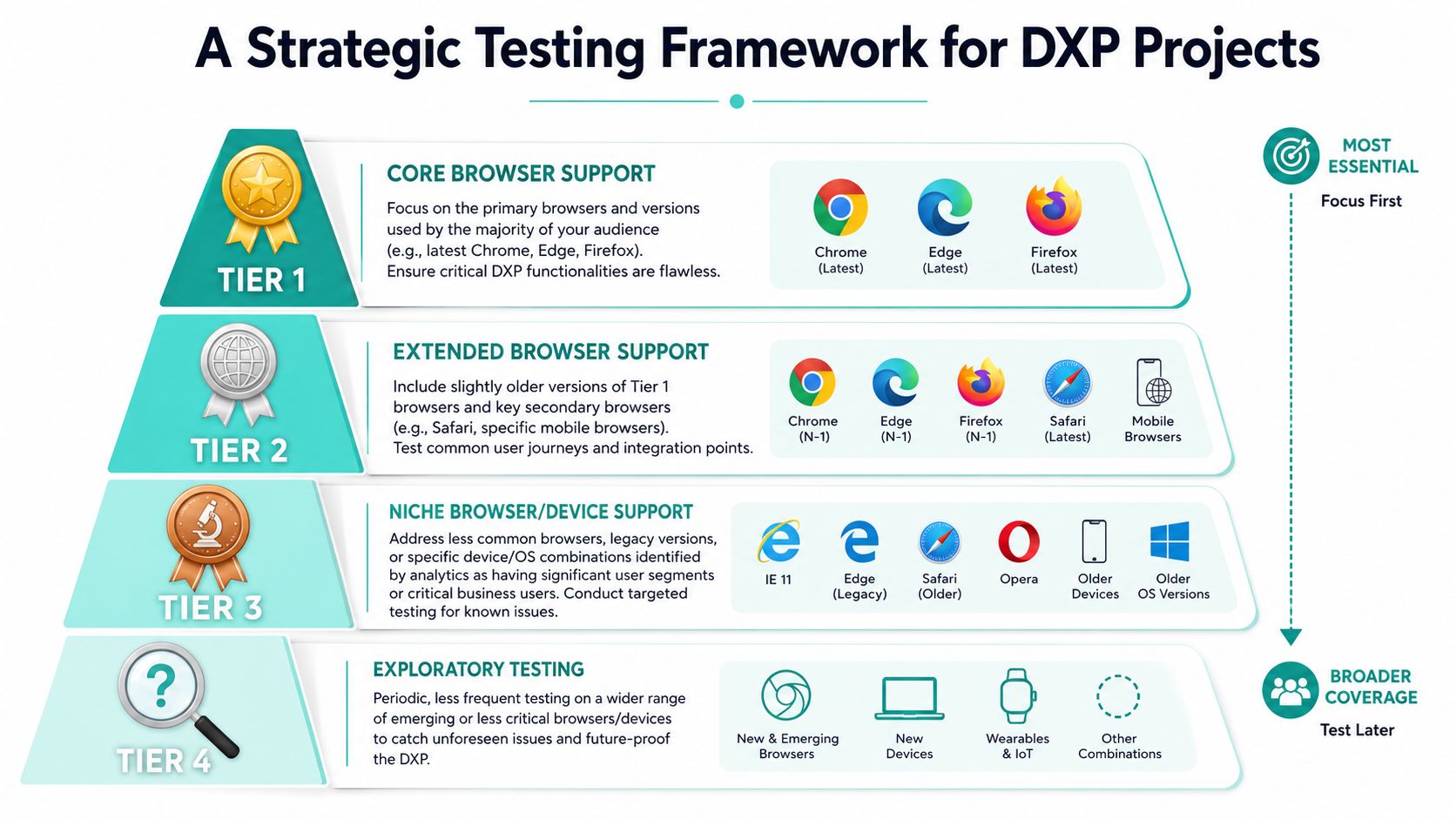
Trying to test everything on every browser is how teams burn budget without reducing risk. Enterprise delivery needs a coverage strategy. Neutral guidance is explicit that it is “unfeasible to test every single browser” and recommends selecting target browsers based on audience usage, then prioritizing the most critical sections of the site, as described in Telerik's guidance on cross-browser compatibility.
Build a support matrix around business risk
The browser support matrix should come from your analytics, your contractual obligations, and the journeys that matter most. For Sitecore, that usually means separating public marketing journeys from editor experiences and authenticated commerce paths. For SharePoint, it often means distinguishing standard employee usage from specialist teams who rely on older environments or managed devices.
A simple way to structure it is to tier support:
| Tier | What belongs here | What to test |
|---|---|---|
| Core | Browsers used by the primary audience for revenue or service journeys | Full regression on critical flows |
| Extended | Important secondary browsers and device combinations | Key workflows, navigation, forms, search |
| Targeted legacy or niche | Specific browsers tied to business units, regions, or managed environments | Focused tests on known risk areas |
| Exploratory | Emerging combinations and edge cases | Periodic manual review |
This gives delivery teams a defensible position. Not every browser gets the same effort. The ones tied to business value do.
Write tests around journeys, not pages
The right test case is usually a workflow. Log in. Search. Filter. Open a result. Submit a form. Confirm analytics fired. That's more valuable than checking whether a landing page “looks right.”
If your QA practice needs sharper structure, a practical external resource on how to create test cases is useful for turning broad scenarios into repeatable validations that teams can run consistently across releases.
Split manual and automated effort deliberately
Manual testing still matters in enterprise DXP work because perception, authoring edge cases, and browser-specific visual defects are hard to judge through automation alone. That's especially true for campaign pages, executive landing pages, and branded interactive experiences.
Automation should carry the repetitive load. Usability review should carry the judgment calls. Mature teams treat those as separate disciplines, which is why planning how to conduct usability testing should sit beside browser coverage planning rather than being treated as the same exercise.
Coverage principle: Spend the most QA effort where browser defects can block money, compliance, or operational continuity.
Integrating Automated Testing into Your CI/CD Pipeline
Cross browser compatibility is most expensive when it's discovered after deployment. The fix isn't more heroics in the release window. The fix is to shift browser validation into CI/CD so defects are caught when code changes are still small and easy to isolate.
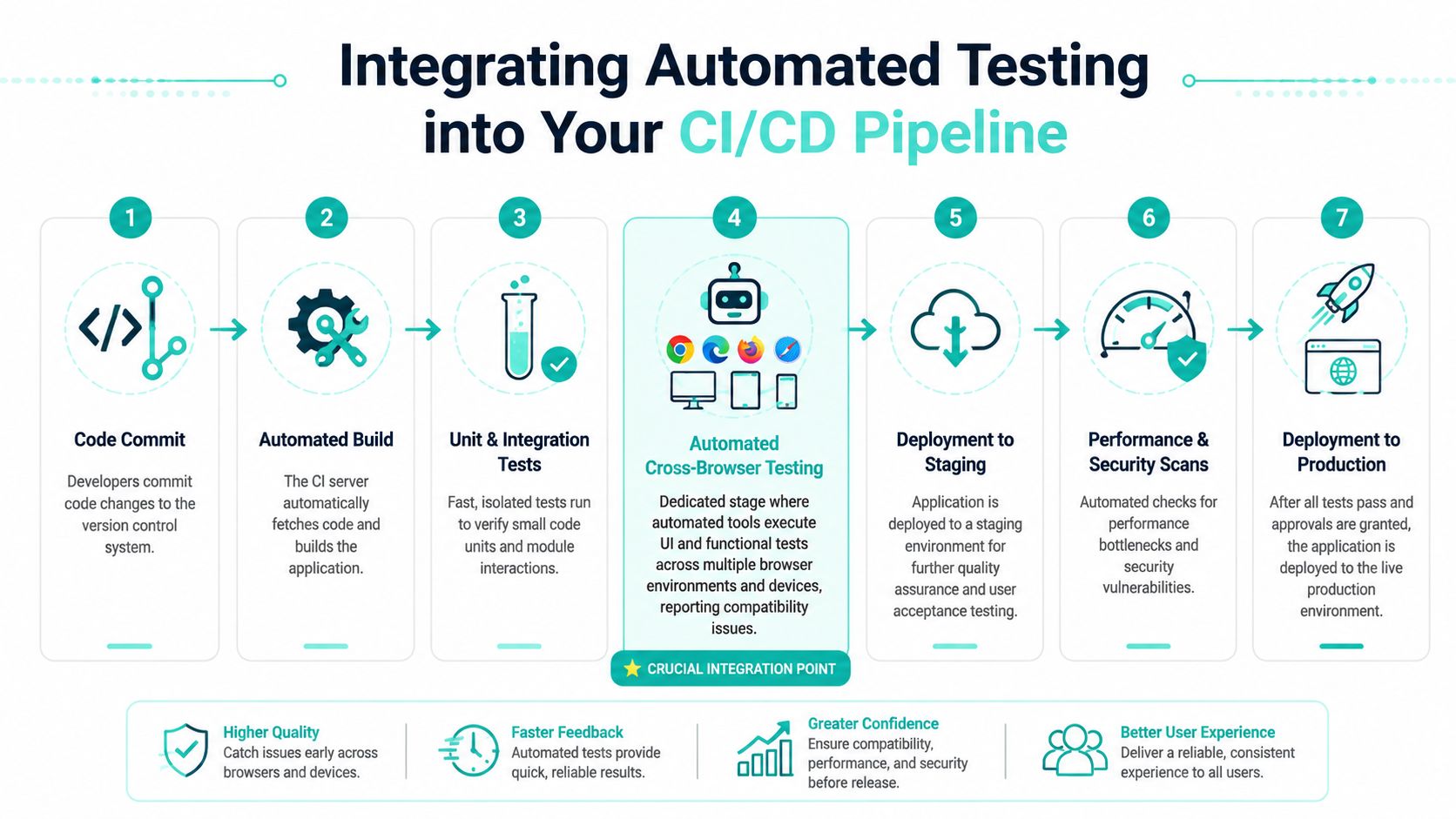
A practical delivery setup usually combines unit tests, integration tests, and browser-based end-to-end tests. In Sitecore implementations, that often means validating rendered components, search results, form submission paths, and personalization-sensitive interactions as part of the build pipeline. In SharePoint solutions, it usually includes testing custom web parts, embedded workflows, and navigation behavior after packaging and deployment steps.
Start with the pipeline view.
Where automation fits
A sensible sequence looks like this:
Commit and build
Developers push changes. The pipeline compiles the application, packages assets, and runs fast checks first.Run unit and integration tests
This catches logic defects before you spend time on browser sessions.Execute cross-browser suites
Use tools such as Playwright, Cypress, or Selenium to run selected journeys against the browser matrix. Keep these focused on high-value paths, not every possible interaction.Deploy to staging for targeted manual review
Automation confirms repeatable behaviors. Human testers verify visual edge cases, authoring variations, and device-specific issues.
A short walkthrough can help teams align on the delivery model:
Handle feature variance before it reaches production
One of the biggest compatibility risks in modern web apps is feature availability variance across browsers, especially in older engines and Safari around Service Workers and Web APIs. The practical response is to use feature detection, transpilation, and conditional polyfills in CI/CD rather than assuming every browser can parse or execute the same code, as discussed in this analysis of browser compatibility pain points.
That has trade-offs. Polyfills add code weight. Transpilation can complicate debugging. Broader compatibility increases maintenance overhead. But in enterprise programs, those costs are usually easier to control than production defects in a live customer or employee journey.
What to automate first
Don't begin with the whole site. Start with stable, repeatable flows:
- Form submission paths: Contact forms, gated content forms, service requests, and quote flows.
- Search and navigation: Header navigation, global search, filters, result interactions, and breadcrumb movement.
- Authentication-adjacent tasks: Login redirects, profile updates, consent handling, and protected content access.
- Commerce or conversion actions: Add to cart, checkout steps, confirmation states, and error handling.
The strongest pipelines fail fast, report clearly, and only block deployment for defects that matter.
Navigating Compatibility in Migrations and Global Rollouts
Migration projects surface compatibility debt that teams didn't know they had. A SharePoint estate that has worked “well enough” for years often contains assumptions built around older markup, legacy scripts, intranet browser policies, and heavily customized components. When that organization moves toward a modern Sitecore AI stack, those assumptions meet a different front-end model.
The breakage usually isn't dramatic on day one. It appears in the seams. Old form behaviors don't map cleanly to new validation patterns. Embedded scripts expect DOM structures that no longer exist. Editors bring forward content patterns that create layout stress in newly componentized pages. The platform migration succeeds technically, but the experience layer reveals years of browser-specific compromises.
Migration projects need compatibility triage
In practice, the first useful exercise is to classify what must be preserved versus what should be redesigned.
Consider three buckets:
Business-critical continuity
Public forms, account paths, service finders, and employee workflows that cannot fail during cutover.Legacy behavior to retire
Custom interactions that only existed to support an outdated browser assumption or old intranet pattern.Modern experience patterns to revalidate
Headless components, richer media blocks, personalization layers, and dynamic search interfaces that require fresh browser testing rather than recycled QA scripts.
Many teams waste effort. They carry old browser workarounds into a new architecture instead of deciding whether those workarounds still belong.
A migration isn't just a platform move. It's a rare chance to reset browser support policy, remove brittle code, and test against current business reality.
Global rollouts complicate the matrix
Global programs add another layer. Browser usage isn't uniform across regions, device fleets, or network conditions. MDN notes that teams should test against the browsers used by their audience and should expect to use real devices, emulators, and virtual machines when full physical testing isn't feasible. It also points to the market reality that Chrome held 64.08% global desktop share in 2021 while Safari held 8.87%, which is enough to show that a majority-browser strategy still leaves a meaningful share of users on other engines and versions, according to MDN's introduction to testing.
For multinational brands, that means one global standard usually isn't enough. Regional support matrices are often more accurate than a single central list. A North American marketing site may prioritize one set of browser-device combinations, while an Asia-Pacific service journey or a managed-device employee portal may require different attention.
A workable rollout model
The cleanest approach is to align browser support with market responsibility:
| Rollout scenario | Best compatibility approach |
|---|---|
| Global public marketing site | Define core global support, then add regional exceptions based on audience analytics |
| Employee portal | Build around managed-device standards, then test exceptions for external partners |
| Migration with legacy debt | Audit old scripts and components before porting them into the new stack |
That keeps compatibility work tied to real usage instead of abstract completeness.
How Sitecore AI Changes the Compatibility Game
Sitecore AI changes the conversation because it pushes teams toward structured content, composable architecture, and component-driven delivery. That doesn't eliminate cross browser compatibility problems, but it makes them easier to isolate and govern.
In a monolithic implementation, one browser defect can hide inside a massive page template with intertwined front-end logic. In a composable Sitecore setup, teams can test smaller units. A hero variant, a recommendation block, a product card, or a search component can be validated as a component first and then retested in the journeys where it matters. That's a better fit for modern QA, design systems, and release pipelines.
The architectural shift matters
Sitecore AI also encourages a cleaner separation between content intelligence and presentation. That allows teams to treat compatibility as a front-end delivery concern with explicit rules, rather than a vague platform-wide problem. When content is structured well and components are bounded clearly, progressive enhancement becomes more realistic. So does graceful degradation.
For enterprise programs, that changes the target state. The goal isn't identical rendering in every environment. The goal is a reliable, accessible, commercially effective experience in the browser combinations your organization has chosen to support.
What strong teams do differently
They make compatibility a managed policy.
They define a browser matrix, build tests around journeys, automate what's repeatable, and use architecture to reduce the blast radius of defects. Sitecore AI supports that approach especially well because component boundaries are clearer, omnichannel delivery is more explicit, and testing can align to the actual units of digital experience instead of oversized templates.
If your Sitecore AI or SharePoint platform needs a clearer browser support strategy, migration review, or CI/CD testing approach, Kogifi can help you turn compatibility from a release risk into an engineered process. Their teams work across enterprise DXP architecture, upgrades, audits, and ongoing support, with the practical depth needed for complex global environments.