


Your team demoed the sprint work on Friday. The component rendered. The workflow triggered. Everyone nodded until someone opened the page on mobile, noticed the layout breaking, asked where the analytics events were, and then flagged that the personalization variant hadn't been validated in staging. In the board, the story was marked complete. In reality, it wasn't releasable.
That gap is where enterprise CMS and DXP projects usually bleed time. Sitecore teams call something done because the rendering works. SharePoint teams call something done because the SPFx web part deploys. Marketing calls it incomplete because content authors can't use it cleanly, compliance hasn't reviewed accessibility, and operations can't support the release without a runbook. The sprint closes, but the work rolls forward as hidden effort.
A practical Scrum Definition of Done fixes that. It turns “done” from a personal opinion into a shared quality contract. On high-stakes Sitecore and SharePoint programs, that contract is often the difference between a smooth release and another delayed launch window.
Table of Contents
The High Cost of 'Almost Done'
On enterprise delivery teams, “almost done” is usually more dangerous than openly unfinished work. At least unfinished work is visible. Almost done hides risk inside a green sprint board.
A common example is a Sitecore feature that passes a local developer test and looks fine in a sprint review. Then the real questions start. Was the rendering tested against actual Experience Editor usage? Did the GraphQL contract still hold after the schema change? Were redirects, analytics tagging, accessibility checks, and content fallback behavior verified? If those answers are missing, the increment isn't ready, even if the UI looks polished.
SharePoint projects fail in a similar way. A team ships an SPFx component that works for one tenant path, but nobody verified permissions behavior, multilingual labels, or what happens when a Power Automate flow fails. Business users don't care that the code compiled. They care whether the intranet page can go live without exposing support teams to another emergency fix cycle.
Practical rule: If a stakeholder can still discover release-blocking work during the sprint review, the team doesn't have a working Definition of Done.
The cost isn't only frustration. It's carryover work, distorted velocity, and a quiet build-up of technical debt. Teams that keep waving items through as “close enough” usually create a backlog full of cleanup, revalidation, and release hardening work that should have been completed earlier. That's exactly the kind of pattern worth addressing through a stronger approach to reducing technical debt.
The Scrum Definition of Done exists to stop this failure mode. Not in theory. In practice. It forces the team to agree on what releasable means before the sprint pressure starts rewriting the standard.
What Is the Scrum Definition of Done
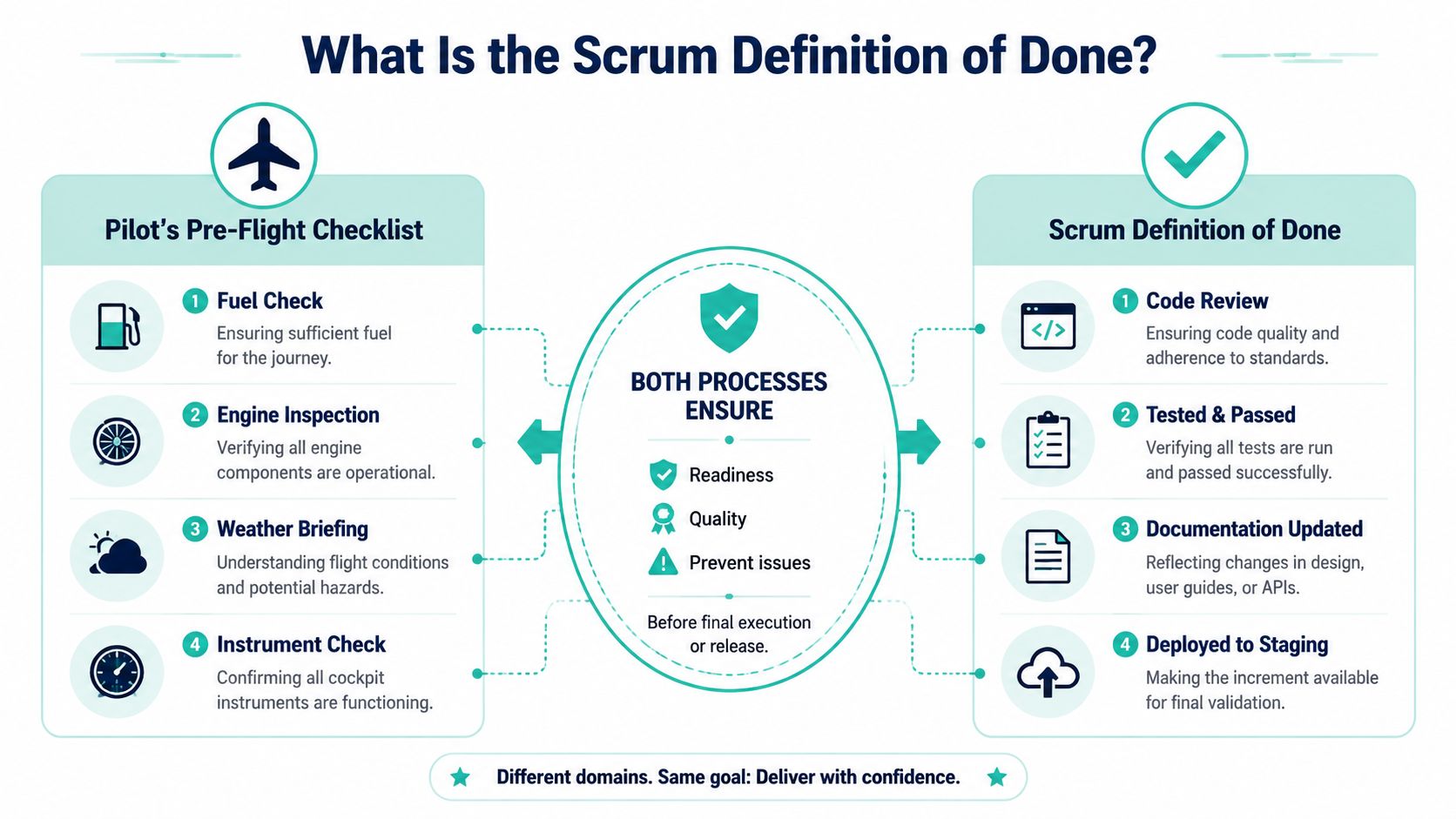
The easiest way to explain the Scrum Definition of Done is to compare it to a pre-flight checklist. A pilot doesn't decide that a flight is ready because the aircraft door closes and the engines start. Readiness means every critical check has been completed to an agreed standard.
The same applies to software. A backlog item isn't done because coding stopped. It's done when the increment meets the team's agreed quality bar for release.
Why teams need a shared finish line
The formal wording matters here. The Definition of Done was cemented as the artifact commitment for the Increment in the Scrum Guide 2020, which describes it as a “formal description of the state of the Increment when it meets the quality measures required for the product” in Scrum.org's Definition of Done guidance.
That wording fixes a common enterprise problem. It moves done away from personal interpretation. Developers, QA, architects, content owners, and release managers all work against the same standard. On a Sitecore XM Cloud project, that may include code review, serialization checks, automated test results, content model validation, and staging deployment verification. On a SharePoint solution, it may include app catalog deployment, permissions review, and rollback readiness.
A useful DoD is also different from a personal task list. “I wrote the code” is a task completion statement. “The increment is deployable, tested, documented, and meets platform standards” is a quality commitment.
What the commitment actually does
A strong DoD gives teams three things:
- Transparency: Stakeholders can see what complete means.
- Consistency: Every story meets the same baseline quality expectations.
- Release confidence: The team stops treating final hardening as a separate hidden phase.
For DXP programs, that's essential because release readiness sits across several layers. The front end may work while the CMS workflow breaks. The content item may render while personalization rules remain unvalidated. The component may be stable while authoring guidance is still missing. The DoD brings those layers into one finish line.
One useful implementation pattern is to make the DoD visible in delivery artifacts, not buried in a wiki. Add it to work item templates, pull request policy, release checklists, and sprint review criteria. If the standard lives only in someone's memory, it won't survive deadline pressure. Teams planning that level of operational discipline usually benefit from the same rigor they apply to a software implementation project plan.
DoD vs Acceptance Criteria vs Definition of Ready
Most delivery confusion doesn't come from disagreement about quality. It comes from mixing up three separate controls.
Acceptance Criteria define what a specific feature must do. The Definition of Ready decides whether a backlog item is clear enough to start. The Definition of Done defines the quality standard required before the work can count as complete.
Three different controls
The cleanest way to separate them is this: Acceptance Criteria are feature-specific. The DoD is universal. The DoR is upstream.
The Definition of Done is structurally orthogonal to user acceptance criteria, acting as a checklist for quality rather than functionality, as described in the Scrum Alliance explanation of DoD. That distinction matters on enterprise platforms because functionality alone never tells you whether work is release-safe.
| Artifact | Purpose | Scope | Owner |
|---|---|---|---|
| Definition of Done | Sets the quality bar for completed work | Applies to every increment or work item the team finishes | Delivery team, with Developers carrying the commitment for increment quality |
| Acceptance Criteria | Define expected functional behavior for a specific story | Applies to one backlog item or feature | Usually shaped by Product Owner with team input |
| Definition of Ready | Confirms the item is clear enough to pull into a sprint | Applies before development begins | Product Owner and team together |
A Sitecore example makes this concrete. A story might have Acceptance Criteria such as “the hero component displays campaign content and supports scheduled publishing.” Those criteria say nothing about code review, serialization, analytics events, or accessibility validation. That's DoD territory.
A SharePoint example is similar. “The employee directory filters by department” is an acceptance criterion. “The SPFx package deploys cleanly, permission behavior is validated, and support documentation is updated” belongs in the DoD.
Where teams get it wrong
The first mistake is using Acceptance Criteria as a substitute for the DoD. That usually produces stories that are functionally complete but operationally unsafe.
The second mistake is overloading the DoD with story-specific business rules. When teams do that, the DoD becomes huge, repetitive, and impossible to apply consistently.
A simple test helps. If the check applies to every story of a similar type, it probably belongs in the DoD. If it applies only to this feature, it belongs in Acceptance Criteria.
The Definition of Ready plays a different role again. It protects the start of work. For DXP projects, Ready often means the story has design references, content assumptions, dependency notes, and enough technical clarity to estimate without guessing. Without that gate, teams drag ambiguity into the sprint and then blame the DoD when they can't finish.
Building a DoD for Enterprise DXP Projects
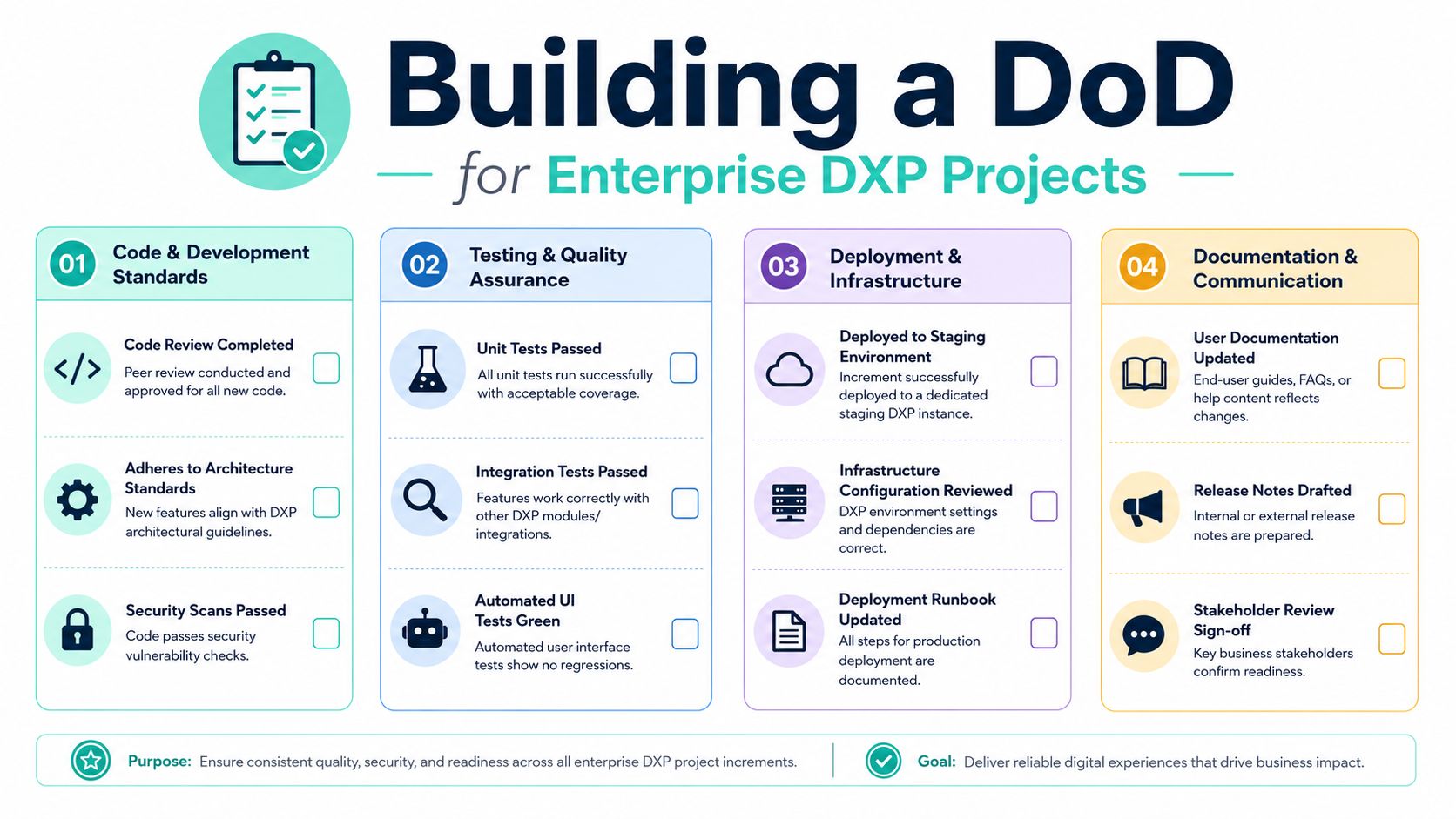
A generic DoD breaks down quickly on enterprise DXP programs. “Code reviewed, tested, documented” isn't wrong. It's just too thin for platforms with authoring workflows, multilingual content, personalization, search, analytics, and cloud deployment dependencies.
For Sitecore and SharePoint, the DoD needs to reflect how the platform fails in real delivery.
Sitecore XM Cloud DoD starting point
Sitecore teams need a DoD that covers development quality, cloud deployment readiness, and editorial usability. That's especially important now that Sitecore's product portfolio keeps expanding around AI-enabled delivery and composable patterns.
A practical starting point for a Sitecore XM Cloud team looks like this:
- Architecture alignment: The solution follows agreed component and layering standards, including Helix-style separation where that's part of the implementation model.
- Serialization complete: Templates, renderings, and related items are serialized through the team's chosen process, including Sitecore Content Serialization where applicable.
- Rendering validated in authoring context: The component works in the intended editing experience, not only in local front-end rendering.
- GraphQL contract checked: Any affected endpoint, query, or schema behavior has been tested for the consuming application.
- Pipeline green: Build, test, and deployment checks pass in the CI/CD path used for the project.
- Analytics and tracking included: Required events, goals, or tagging patterns are implemented and validated where the feature depends on them.
- Accessibility verified: The feature passes the team's accessibility checks for the relevant experience and locale coverage.
- Documentation updated: Author guidance, implementation notes, and release notes are current.
That last area gets skipped more often than teams admit. Recent data from the 2025 State of Agile Report indicates that 54% of enterprise teams skip accessibility validation in their DoD due to unclear prioritization, leading to post-release remediation costs averaging 3.2x initial development spend, as reported in Appfire's discussion of Definition of Done in Agile. For multilingual Sitecore estates, accessibility can't sit outside the DoD. It has to be built in.
SharePoint Online intranet DoD starting point
SharePoint delivery needs a slightly different emphasis. The highest risk often sits in deployment behavior, permissions, workflow resilience, and content governance rather than in complex rendering alone.
A useful starting checklist for a SharePoint Online intranet includes:
- SPFx packaging complete: The SPFx component is bundled, versioned, and deployed through the app catalog process used by the tenant.
- Tenant-safe configuration: Environment variables, API permissions, and tenant-specific assumptions are reviewed.
- Workflow resilience: Any Power Automate flow includes error handling, retry logic where appropriate, and visible failure paths for support.
- Permissions behavior tested: The feature behaves correctly for standard users, owners, and any special audience groups.
- Bilingual or multilingual support verified: Navigation labels, metadata, and page content patterns work across the required languages.
- Authoring instructions ready: Content owners know how to use the component without developer intervention.
- Support handover prepared: Known limitations, dependencies, and support notes are documented.
A SharePoint intranet often fails because teams assume “in Microsoft 365” means “operationally simple.” It rarely is. A web part can render correctly and still fail the practical test if content owners can't govern it, if approvals are brittle, or if a flow stalls with no support visibility.
Operational rule: If business users need a side conversation to use the feature safely, the work isn't done.
For both platforms, the best DoD is rarely one flat list. Use layered criteria. Keep a core organization-wide baseline for security, accessibility, documentation, and deployment. Then add platform-specific controls for Sitecore, SharePoint, search, integrations, or multilingual delivery. Teams building those standards usually also need a strong content governance framework, because governance gaps often show up as fake “done” signals long before release.
Evolving and Enforcing Your Definition of Done
A DoD shouldn't be frozen after the kickoff workshop. If it never changes, it usually means the team is ignoring what defects and release issues are teaching them.
The best DoDs evolve in response to delivery reality. A regression slips through, so the team adds an automated UI check. An authoring issue keeps surfacing in Sitecore Experience Editor, so author validation becomes part of done. A SharePoint flow repeatedly fails under permissions edge cases, so role-based validation gets added.

Treat the DoD as a living control
Retrospectives are the right place to refine the DoD, but only if the discussion stays concrete. Don't ask, “Should we improve quality?” Ask, “What escaped the sprint that should have been prevented by a checklist or an automated gate?”
Use questions like these:
- What came back after sprint review: If work returned for hardening, what criterion was missing?
- What slowed release approval: Was the blocker technical, content-related, accessibility-related, or operational?
- What required tribal knowledge: If one person had to explain how to validate it, can that become an explicit DoD item?
That's how mature teams build credibility. They don't make the DoD bigger for its own sake. They make it sharper.
Automate the quality gate
Manual checklists have a place, but they're not enough for enterprise DXP work. If a criterion can be tested automatically, automate it. That removes debate and stops deadline pressure from weakening standards.
In Azure DevOps or a similar delivery pipeline, enforcement often includes:
- Build validation: The branch can't progress if the build fails.
- Automated tests: Unit, integration, and UI checks run before merge or deployment.
- Code quality policy: Pull requests require review and policy compliance.
- Security scanning: Vulnerability checks become part of the normal path, not a late-stage exception.
- Deployment validation: Staging deployment must succeed before an item can be treated as complete.
Disciplined version control in CI/CD pipelines matters. If your branch strategy, merge rules, and deployment flow are loose, your DoD becomes advisory instead of enforceable.
For commerce-enabled DXP estates, the DoD also needs to follow the architecture. Teams working on storefronts, product discovery, and checkout orchestration can borrow good patterns from this guide to improving checkout with composable commerce, especially where release readiness depends on services working together rather than on one monolithic app.
Where Sitecore AI fits
Sitecore's AI direction changes what teams can reasonably include in the DoD. Sitecore Stream introduced over 250 new features in its latest release, embedding brand-aware AI, AI copilots, and agentic workflows across XM Cloud, Content Hub, and Experience Platform, according to CMSWire's coverage of Sitecore Stream.
That matters because AI-assisted content operations create new readiness questions. If a team uses AI-supported content generation, then “done” may need to include brand review, editorial approval, metadata verification, and personalization readiness checks. AI speeds production, but it doesn't remove the need for governance. It raises the need for explicit controls around how generated content enters a releasable increment.
Common DoD Pitfalls and How to Avoid Them
Most DoD failures aren't caused by bad intentions. They come from teams using the tool in ways it was never meant to be used.
The most expensive mistakes
The first mistake is writing an aspirational DoD that the team can't meet consistently. That creates one of two outcomes. People either ignore it, or they start marking exceptions so often that the standard loses meaning.
The second mistake is turning the DoD into a weapon between roles. Development says QA is blocking. QA says development is gaming completion. Product says everyone is too process-heavy. Once the DoD becomes a blame instrument, teams stop treating it as a shared commitment.
The third mistake is omitting non-functional controls because they feel slower to verify. In enterprise DXP work, that's where serious delays begin. In Sitecore and similar enterprise implementations, omitting DoD criteria such as CI/CD pipeline validation or multilingual accessibility checks directly causes unreleased increments, blocks sprint velocity calculations, and prevents the Product Owner from releasing the increment immediately after the Sprint Review, as described in Scrum.org's guidance on what the Definition of Done is.
How to correct them fast
Use these corrections instead of rewriting the whole process:
- Make it achievable first: Start with criteria the team can satisfy every sprint. Tighten later as capability improves.
- Separate policy from ownership conflict: If an item is repeatedly disputed, define who validates it and at what point. Teams that need clearer responsibility boundaries often benefit from a simple model for building accountability with RACI.
- Bring operations into done: Include staging deployment, support notes, and rollback awareness where the platform requires them.
- Protect non-functional quality: Accessibility, permissions, performance, and security aren't optional extras for “later.”
- Review failure patterns, not opinions: Add or refine DoD items based on escaped defects and blocked releases.
Don't ask whether the DoD feels heavy. Ask whether it prevents the specific failures your team keeps repeating.
A good DoD should create a little productive friction. If it creates constant resentment, it's probably unrealistic. If it creates none at all, it's probably too weak.
From Checklist to Commitment
The Scrum Definition of Done is easy to underestimate because it looks like a checklist. On enterprise Sitecore and SharePoint programs, it's much more than that. It's the team's public agreement about quality, release readiness, and what finished work means.
That agreement becomes valuable when it reflects platform reality. Sitecore teams need controls for authoring, cloud deployment, analytics, accessibility, and AI-assisted content operations. SharePoint teams need controls for SPFx deployment, permissions, workflows, multilingual support, and supportability. Generic agile language won't save a release. Specific standards will.
Teams that treat the DoD seriously deliver with fewer surprises, cleaner sprint reviews, and more trust from stakeholders. That discipline is one of the clearest markers of a healthy digital delivery program.
If your Sitecore, SharePoint, or broader DXP program needs a sharper delivery model, Kogifi helps enterprise teams design, build, and stabilize web platforms with the governance, architecture, and operational rigor that “done” requires.