


Effective faceted search isn't a sidebar feature. It's a coordinated system that connects taxonomy, metadata, ranking, interface behavior, and platform operations. Research on faceted interfaces has favored that view for decades, from early information retrieval work through projects such as Flamenco at UC Berkeley, and the modern design guidance is still consistent: facets work when they're orthogonal, clearly assigned, and built to help people narrow large collections without confusion (historical faceted search overview).
That matters more in enterprise environments than in retail demos. A multilingual Sitecore estate, a SharePoint intranet, a Microsoft 365 knowledge layer, accessibility obligations, mixed content types, and inconsistent metadata will break faceting long before the UI looks “finished.” Teams often start with visible filters and only later discover that poor field modeling, weak governance, or index design has made the experience unreliable.
The strongest faceted search best practices treat the experience as a loop. You model clean dimensions, expose only useful refiners, adapt them to intent, support mobile and assistive technology, localize labels and values, and then tune the whole system with behavioral signals. Sitecore Search is especially useful here because AI-driven experiences explicitly support showing a list of facets for result generation and require ungrouping documents when document grouping is enabled, which is a concrete reminder that discovery behavior is shaped by search configuration, not only by component design (Sitecore AI-driven experiences documentation).
The eight practices below connect UX decisions to enterprise implementation details, with a Sitecore-first lens and direct guidance for SharePoint teams running intranet search at scale.
Table of Contents
- Build the tree around retrieval logic
- Where teams get into trouble
- Implementation choices with enterprise impact
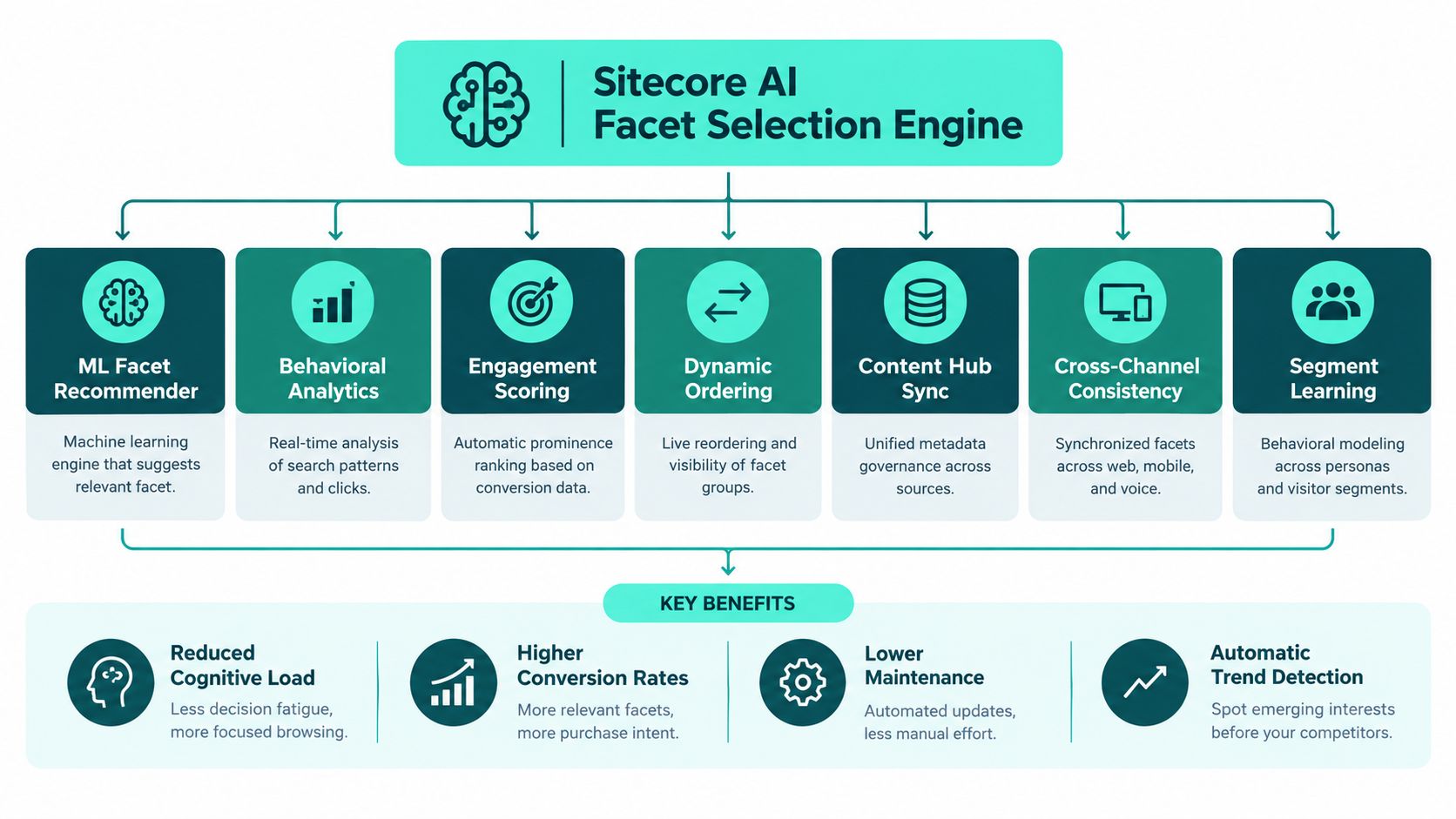
1. Intelligent Facet Selection Using Sitecore AI Search
Static facet menus age quickly. Search behavior changes by season, campaign, audience, and content mix, so the facet model has to adapt without becoming chaotic.
Sitecore teams should treat facet ordering as a relevance problem. Strong guidance on faceted design recommends ranking facets by coverage and utility, then surfacing values that occur most often in the current result set, with historical demand and distribution quality helping decide which filters appear first. That logic fits naturally with Sitecore Search and its personalization controls, which are configurable at the global widget level through Global Resources and Global Widget settings (Sitecore personalization configuration).
What intelligent selection looks like in practice
An apparel brand might put Brand and Price Range higher during school-season product discovery, then shift Color and Material higher when style-led browsing dominates. A manufacturing portal might promote Certification and Lead Time when buyers search in regulated categories. A travel experience can move Star Rating and Distance to Center closer to the top when users are already narrowing near booking intent.
Those aren't cosmetic tweaks. They change which metadata dimensions carry the query forward.
Practical rule: Don't ask editors to predict the perfect permanent facet order. Let business rules and behavior decide the default, then review where AI-driven ordering helps and where it introduces noise.
Implementation choices that matter
- Track event signals early: Capture facet impressions, selections, removals, zero-result outcomes, and downstream clicks so Sitecore Search has reliable behavioral input.
- Define optimization goals clearly: Teams need a declared priority such as lead generation, product discovery, content consumption, or self-service completion. Otherwise facet tuning drifts.
- Segment by intent and audience: New visitors often need simpler refiners than returning users or known customers.
- Audit metadata before tuning UI: If Material is inconsistently tagged, no ranking model will rescue that facet.
Localization also matters here. If your enterprise runs multilingual discovery, AI ranking only helps when labels, synonyms, and attribute values stay coherent across markets. That's why enterprise localization and AI quality belongs in the same conversation as search tuning, not in a separate translation workstream.
2. Hierarchical Facet Architecture for Enterprise Content Discovery
Poor facet hierarchy breaks enterprise search faster than weak visual design.
Enterprise content rarely fits a flat filter model. Sitecore teams often index thousands of items across products, policies, knowledge articles, regions, brands, business units, and document states. SharePoint intranets add another layer because libraries, hubs, and inherited metadata often reflect org structure more than user intent. A hierarchy gives that complexity a usable shape, but only if the tree is designed in the metadata model first and the interface second.
A practical example makes the difference clear. In a regulated content estate, users may start with Region, then narrow to Country, then Regulatory Body, then Document Type. If those relationships exist only in front-end configuration, counts drift, empty branches appear, and caching gets messy because every request has to reconstruct the tree from loosely related fields. If the hierarchy is stored canonically in Sitecore templates, taxonomy services, or Content Hub, the index can return valid parent-child aggregations and the UI can stay honest.
Build the tree around retrieval logic
Hierarchy is an information architecture decision, an indexing decision, and a governance decision at the same time.
For Sitecore Search or a Solr or Elasticsearch-backed implementation, that means deciding whether a facet path is single-valued or multi-valued, whether child values can exist under more than one parent, and how far the UI should expose the tree before it hurts scanability. Enterprises often want “flexible” taxonomy. Search usually pays for that flexibility with ambiguous counts and brittle relevance rules.
Three design choices usually determine whether the hierarchy holds up in production:
- Canonical lineage: Define one approved parent-child path for each governed facet value. If “HR” sits under both Corporate Services and People Operations, users will see inconsistent refinement paths unless the search model explicitly supports polyhierarchy.
- Indexable paths: Store full facet paths in the index, not just leaf values.
Products > Motors > AC Motorsis more usable than a free-floatingAC Motorsvalue when multiple branches share similar labels. - Branch discipline: Keep each level semantically consistent. A second-level branch should not mix audience, geography, and content format in the same sibling set.
Where teams get into trouble
The common failure mode is treating hierarchy as display logic.
I have seen implementations where authors tag content with loosely managed terms, developers flatten those terms into generic fields, and the React layer tries to rebuild a nested experience with custom rules. It works in a demo. It fails under localization, partial content rollout, and permission trimming.
SharePoint teams hit a related issue on intranets. Managed metadata can support good refiners, but local library columns, copied values, and inconsistent term reuse create orphaned nodes. Search still returns results, yet the refinement experience feels unreliable because users open branches that lead nowhere or see duplicate meanings under different labels.
Implementation choices with enterprise impact
- Validate hierarchy at authoring time: Prevent invalid parent-child combinations before content reaches the index.
- Precompute facet paths where possible: This reduces query-time assembly work and simplifies cache keys for popular result sets.
- Expose orphan reports to taxonomy owners: Governance teams need a simple way to find unmapped values, duplicate labels, and dead branches.
- Set a collapse strategy deliberately: Deep trees help precision, but too much expansion hurts accessibility and mobile use. Default open states should follow actual usage, not editorial preference.
- Plan localization with the hierarchy, not after it: Labels can change by market. Parent-child meaning should not.
The user benefit is straightforward. People refine more confidently when each branch answers a narrower version of the same question. For enterprise architecture, the payoff is just as important. Clean hierarchy improves aggregation accuracy, keeps cache behavior predictable, gives AI-driven relevance better metadata to work with, and makes analytics easier to interpret because facet selections reflect governed concepts instead of improvised labels.
3. Dynamic Facet Relevance Tuning Based on Search Query Intent
Intent should change the facet experience on the first results page, not after users struggle through the wrong filters.
A query like "winter coat size 8" signals a narrow selection task. "Best winter coats for commuting" signals comparison, trade-offs, and higher uncertainty. Showing the same facet order, labels, and defaults for both queries usually hurts one of those paths. In enterprise search, that mistake shows up as extra reformulations, low facet use, and weak confidence in the results.
Research supports the distinction. Facets tend to improve accuracy more than speed, and users rely on them more for difficult or open-ended tasks than for simple lookups, as shown in this faceted search task-type analysis. For Sitecore and SharePoint teams, the implementation question is clear: which facet signals belong to the query parser, and which belong to static schema design?
Sitecore AI Search can use query terms, click history, profile context, content type, and session stage to choose what to surface first. A support search for "SSO timeout Azure AD" may need Product, Version, Environment, and Article Type near the top. An intranet search in SharePoint for "parental leave policy Germany" should favor Region, Document Type, Business Function, and Effective Date because the user is trying to confirm applicability, not browse a generic topic.
Two design choices matter more than teams expect.
First, tune facet prominence separately from facet availability. A governed facet can stay in the model without appearing high in every experience. Second, treat suppression as an architectural control, not only a UX preference. Hiding noisy refiners for a given intent reduces visual load, protects accessibility, and lowers the chance that users select metadata that fragments the result set without helping the task.
A practical operating model looks different from a simple "top facets" list:
- Classify intent with lightweight rules before adding ML: Start with patterns such as attribute-heavy queries, question-led queries, location queries, and known entity lookups. Rules are easier to audit and usually expose taxonomy gaps quickly.
- Map intents to content families: Product content, policy content, support knowledge, and people search rarely need the same refiners. Keep those mappings explicit so search owners can tune them without changing core templates.
- Use business stakes to set fallback behavior: If intent is unclear, show stable, high-trust facets such as content type, language, region, or department instead of experimental dimensions.
- Measure reformulation after facet exposure: If users ignore promoted facets and rewrite the query instead, the issue may be poor intent classification, weak labels, or metadata that is too coarse to help.
- Localize intent logic as well as labels: "Holiday" and "leave" can imply different content pathways by region. Regional vocabulary affects which facets feel relevant, especially in multilingual intranets and global commerce catalogs.
There is also a ranking implication. A study comparing a weighted preference-based interface with a standard facet interface found higher satisfaction with the weighted prototype (preference-based interface study). That fits what enterprise teams see in production. Some searches are not asking for a strict filter. They are asking for a better trade-off.
For that reason, dynamic facet tuning should sit beside relevance tuning, not below it. Sitecore AI-driven ranking can boost the right result set while facets expose the dimensions users need to validate or narrow that ranking. SharePoint teams applying custom refiners or Microsoft Search configurations should make the same distinction. Ranking decides what appears plausible. Facets decide whether users can safely commit to a result.
The architecture payoff is broader than UX. Query-intent tuning works only if taxonomy governance is strong enough to support consistent labels, index fields are modeled for intent-specific aggregation, caches can tolerate variant facet payloads, and analytics can attribute success to the facet set that was shown. Without that foundation, "dynamic facets" become a front-end trick. With it, they become a controlled search decision system.
4. Performance-Optimized Facet Indexing and Caching Strategies
Facet performance is an architecture decision, not a front-end polish task. Slow counts, unstable value lists, and delayed redraws usually trace back to index design, cache policy, or permission checks that were left too late in the request path.
Sitecore teams run into this quickly when one search experience spans structured product data, long-form content, localized variants, and personalized components. SharePoint teams see a similar pattern in intranets where security trimming, document metadata, and regional content rules all affect the same refinement panel. In both cases, facet speed depends on whether the platform can aggregate from fields built for filtering instead of trying to derive usable refiners from presentation-oriented content.
A better baseline is simple. Compute facet counts in the search tier, keep facet fields normalized, and reserve the application layer for rendering, state, and accessibility behavior. Teams implementing custom search stacks often follow the same patterns used in Apache Solr search architectures, where field strategy, analyzers, and aggregation queries carry the performance load.

The first implementation choice is not cache duration. It is facet scope.
Treat a small set of refiners as operationally important and engineer them accordingly. Category, language, region, content type, audience, availability, and policy class usually deserve dedicated fields, predictable cardinality, and cache coverage. Long-tail author metadata usually does not. That trade-off keeps index growth under control and avoids spending compute on refiners that add little search value.
Then separate freshness requirements. Availability or inventory-related facets may need near-real-time updates. Department, topic, or document-type facets can usually tolerate short cache windows. Permission-aware counts need special care because cache reuse can expose the wrong numbers unless keys include audience or security context.
Three patterns hold up well in production:
- Model facet fields for aggregation: Use normalized values, stable IDs, and controlled vocabularies. Keep author labels and localized display text in separate fields.
- Cache at more than one layer: Cache common facet payloads in the search layer, then cache rendered responses selectively in the application tier for repeated entry paths.
- Pre-warm for known demand: High-traffic category pages, campaign landing pages, and common intranet queries justify scheduled warming, especially after reindexing or major publishes.
Index shape matters as much as cache strategy. High-cardinality fields increase aggregation cost. Multi-language implementations multiply that cost again if every locale carries separate facet values and labels. Taxonomy governance shows up here as a performance control, not just a content governance exercise. Fewer duplicate terms and cleaner hierarchies mean smaller indexes, more stable counts, and better cache hit rates.
Sitecore AI-driven relevance adds another trade-off. If the result set changes by user behavior, audience, or intent model, the facet payload also varies, which reduces cache reuse. The answer is not to turn personalization off. It is to define where personalization affects ranking only, and where it is allowed to alter the facet set or counts. That boundary keeps relevance gains from creating unnecessary cache fragmentation.
A final check is operational. Measure facet latency separately from result latency, log cache hit rates by facet group, and watch for zero-result combinations after taxonomy changes. Faceted search feels fast when the index, cache design, localization model, and governance process are aligned. Without that alignment, teams end up tuning templates and JavaScript while the bottleneck sits in the query architecture.
5. Faceted Search Analytics and Behavioral Insights Using Sitecore CDP
Bad facet analytics create confident teams with weak evidence. Click counts alone do not explain whether the refinement model helps people complete a task, compare options, or recover from poor relevance.
Sitecore CDP is useful here because it connects facet behavior to a broader session and customer context. That changes the questions teams can answer. Which refinement paths lead to downloads, applications, or contact requests? Which combinations produce abandonment? Which audiences need a narrower filter set because they are trying to finish a task quickly, not explore?
A simple example shows the difference. A manufacturing buyer who selects Certification, then Supplier, then Price is following a purchase-screening pattern. An employee on a SharePoint intranet who filters by Business Unit, then Policy Type, then Last Updated is checking trust and recency. Those are different jobs, and they should not produce the same facet order, the same labels, or the same personalization rules.
The implementation choice is to model facet activity as a journey, not as isolated events.
Capture enough detail to reconstruct the path:
- facet group opened or collapsed
- value selected or removed
- result count before and after the change
- query term, locale, device, and entry page
- zero-result states and the action that caused them
- downstream outcomes such as download, form completion, or document open
That event model gives search teams something they can tune. It also helps architecture teams decide where Sitecore AI Search should adapt ranking only, and where it is allowed to adapt the facet experience itself. If AI-driven relevance changes often but CDP shows that a stable subset of filters drives successful outcomes, keep that subset fixed and personalize around it. That preserves usability while still improving relevance.
For governance, watch for three patterns that usually signal a taxonomy or metadata problem rather than a UX problem.
First, repeated use of one broad facet with little use of its related children often means the hierarchy is too deep, the labels are unclear, or content owners are tagging inconsistently. Second, frequent filter removal after one selection usually points to misleading values or poor count expectations. Third, recurring zero-result combinations after a taxonomy change usually indicate index mapping drift, not user error.
Organizations sorting out where this behavior data belongs often need a cleaner boundary between customer profile analysis and operational record systems. The distinction is clearer in this explanation of CDP vs CRM differences, especially for personalization and journey analysis.
Research on faceted interfaces supports the investment. One digital-library study reported that users rated faceted navigation higher across multiple usability measures, including perceived flexibility and relevance, and another found strong user preference for metadata-based faceted exploration over a baseline search experience (digital library faceted interface findings).
Use that evidence carefully. Better outcomes do not come from adding more filters. They come from measuring which refinement paths help different audiences find the right content, then feeding those findings back into taxonomy governance, AI relevance rules, localization choices, and intranet search design.
6. Accessible Faceted Search Interfaces with WCAG Compliance
Faceted search fails accessibility tests for predictable reasons. The UI changes state quickly, the result set refreshes dynamically, and many teams ship custom controls that never behaved like real form elements in the first place. In enterprise search, those issues usually trace back to architecture decisions, not visual design.
A filter panel has to work as both a search control system and a status system. Users need to understand which options exist, which are selected, what changed, and how to continue. If focus drops after an AJAX update, if counts are only visible but never announced, or if a collapsed section loses its name in the accessibility tree, the interface breaks even when the styling looks polished.
Headless Sitecore builds have a clear advantage if teams treat accessibility as a component contract. A shared React or Next.js facet component can enforce semantic markup, keyboard behavior, ARIA announcements, and focus rules across brands. SharePoint teams building SPFx refiners need the same discipline, especially in intranets where keyboard-only use and assistive technology use are common.

What teams should decide early:
- Use native patterns first: Checkbox facets should be real checkboxes. Expand and collapse triggers should be buttons, not clickable divs.
- Define focus behavior after every update: Send focus to the results heading, keep it on the applied control, or move it to the next logical action. Pick one rule and implement it consistently.
- Announce result changes: Use a polite live region for updated counts and result summaries when filtering happens without a full page load.
- Keep group names persistent: Facet headings, selected states, and control labels need programmatic names that survive responsive layout changes.
- Test hybrid input states: Touch-friendly accordions still need full keyboard support on Surface devices, tablets with keyboards, and desktop browsers.
One implementation detail gets missed often. Count updates and loading states need to be exposed to assistive technology with the same care teams give to visual spinners and badges. If the index is fast but the UI announces stale counts for a second or two, users can apply the wrong filter path and lose trust in the system.
The trade-off is real. Richer facet interactions often improve discovery, but every custom interaction increases accessibility QA, localization complexity, and front-end maintenance. Teams that need a broader pattern library for this work should treat accessible website design practices as part of the search delivery model, not a final compliance pass.
Accessible faceted search reduces cognitive load, lowers failure rates, and makes enterprise content easier to refine under real conditions. That matters just as much for a public Sitecore experience as it does for a SharePoint intranet where employees are trying to find policy, training, or operational documents quickly.
7. Multi-Language Facet Localization and Regional Customization
Global faceted search fails fast when teams localize labels but leave the underlying facet model unchanged. Users judge relevance through familiar categories, local terminology, and market-specific filter logic. If those do not match how a region classifies products, policies, or services, refinement drops even when translation quality is good.
The architecture decision sits below the UI. Teams need one canonical facet model for enterprise governance, then controlled regional overrides for labels, value sets, ordering, and in some cases facet visibility. Sitecore teams often manage that split well with Content Hub or structured content models that hold the global definition while allowing approved local variants. That prevents taxonomy drift across markets without forcing every country site into the same filter experience.
A few cases make the trade-off obvious. Apparel brands may need different size systems by region. A legal knowledge base may need jurisdiction-first filtering in one country and regulation type first in another. An energy or manufacturing catalog may need local certification schemes mapped to a shared master taxonomy so reporting still works across regions.
The indexing layer usually causes the problems. Translating facet labels is the easy part. Search quality breaks when tokenization, stemming, synonyms, and value normalization are configured globally even though the language rules are not global. Sitecore Search and Solr or Azure-backed implementations need locale-aware analyzers, synonym sets, and field mappings, or users get mismatched values and weak recall.
I usually treat localization decisions as four separate controls, not one translation task:
- Canonical definition: Set a master facet name, purpose, owner, and allowed value model.
- Regional override policy: Decide which markets can rename, reorder, hide, or replace values.
- Index behavior by locale: Configure analyzers, synonyms, and equivalence rules per language or region.
- Measurement by market: Review facet usage, abandonment, zero-result paths, and reformulations by locale.
Localization also affects caching and delivery. If counts, labels, and sort order vary by market, cache keys need to include locale and sometimes region plus audience context. Otherwise, a Canadian user can receive cached facets tuned for the US site, or a multilingual SharePoint intranet can expose the right documents with the wrong refinement labels.
Strong teams govern this with a facet register. Keep the base label, approved translations, aliases, regional value mappings, content owner, and retirement rules in one place. Then validate changes with local business stakeholders, not only translators, because operational language often differs from dictionary-accurate language.
One warning from experience. Weak facet usage in a single language version often gets misread as low interest. It is usually a findability problem caused by poor term mapping, a bad regional hierarchy, or values that reflect the enterprise org chart instead of the local user's mental model.
8. SharePoint Search Result Refinement and Faceted Navigation for Enterprise Intranets
SharePoint refiners are often treated as a front-end widget choice. They aren't. They depend on term sets, managed properties, crawl behavior, and query tuning.
Microsoft defines faceted navigation in SharePoint as browsing by filtering on refiners tied to category pages. Relevant term sets must be enabled for faceted navigation, a refinement panel web part is required to show refiners, and the content source must complete a full crawl for refinable managed properties to work (SharePoint refiners and faceted navigation guidance).
What strong SharePoint refinement looks like
A large intranet can expose Document Type, Department, Publish Date, Topic, or Audience as first-class refiners across policies, templates, news, and knowledge assets. A more advanced SPFx layer can add hierarchy, dynamic suggestions, or a cleaner mobile refinement pattern than the default experience offers.
This matters when employees search across multiple sites, file libraries, and collaboration areas. Without metadata-backed refiners, intranet search becomes a long result list sorted by weak relevance and partial recall.
Tuning controls that many teams overlook
SharePoint's query refinement model includes a useful control called deephits, which overrides the default number of hits used as the basis for refinement computation (SharePoint query refinement documentation). That's important because it shows refinement quality can be tuned at the query level, not only through panel configuration.
For organizations extending intranet search, SharePoint intranet development approaches are relevant when native web parts don't provide enough control over hierarchy, event tracking, or federated search behavior.
Use cases are straightforward:
- Policy search: Audience, business area, approval status, and effective date.
- Knowledge search: Department, file type, region, and topic.
- People and service discovery: Office, function, language, and team.
Security trimming has to stay central. A refiner that exposes values from content a user can't access damages trust fast, even if document permissions still block the final click.
9. Govern Facet Taxonomy, Metadata, and Content Lifecycles
Facet quality usually does not break on day one. It degrades later, after duplicate values creep in, stale categories stay visible, and no team is clearly responsible for cleanup.
Governance keeps facets usable after the launch team moves on. In Sitecore environments, that typically means Content Hub or structured templates, validation rules, publishing workflows, and component standards. In SharePoint, it means managed metadata ownership, term lifecycle management, and clear checks on how authors apply classifications.
Build a facet operating model
Every enterprise search program needs a facet register. That register should define the canonical label, source field, allowed values, aliases, localizations, owner, lifecycle state, and whether the facet is static, dynamic, global, or context-specific.
That is administrative work, but it changes search behavior in visible ways. If one platform uses “Region” while another uses “Market” for the same concept, federated search feels fragmented. If deprecated document types remain available as refiners, users keep narrowing into dead content.
Governance habits that prevent drift
- Validate at authoring time: Block bad metadata before it enters the index instead of cleaning it up after publication.
- Assign business ownership: UX, taxonomy, development, and content operations all need separate responsibilities.
- Review zero-result and duplicate-value patterns: These are fast indicators of facet decay and broken classification rules.
- Test taxonomy changes against live query sets: A value can be editorially correct and still hurt search behavior if users no longer recognize it.
Facet governance also needs to account for the underlying information architecture. Sitecore teams usually have more control over how fields, templates, and relevance rules shape facets, while SharePoint teams often work within managed metadata and intranet publishing constraints. The practical decision is the same in both cases. If taxonomy changes do not follow a controlled lifecycle, search quality becomes inconsistent across channels, languages, and content types.
Research on mobile faceted search also points to a broader operational lesson. Facet design affects task performance in context, so governance cannot treat taxonomy as a one-time labeling exercise. The Microsoft Research study on task and trial effects in faceted mobile search showed that outcomes varied by search type and trial (task and trial effects in faceted mobile search). For enterprise teams, that means every taxonomy change should be checked against real queries, not just approved in a content meeting.
Lifecycle control matters just as much as naming. Set review dates for high-traffic facets, retire values that no longer map to active content, and keep localizations aligned so regional teams do not create parallel taxonomies that drift apart. If you also measure how users respond to facet changes, through search analytics, zero-result trends, and refinement usage, governance becomes part of search optimization instead of a back-office cleanup task.
9-Point Faceted Search Best-Practices Comparison
| Approach | Implementation Complexity 🔄 | Resource Requirements 💡 | Expected Outcomes ⭐ | Ideal Use Cases 📊 | Key Advantages ⚡ |
|---|---|---|---|---|---|
| Intelligent Facet Selection Using Sitecore AI Search | 🔄 High, ML pipelines, model training and monitoring | 💡 Significant historical search/behavioral data; Sitecore Discover, CDP, analytics | ⭐ Adaptive facet ordering; improved relevance and conversions | 📊 E‑commerce, travel, B2B portals with strong behavioral signals | ⚡ Self-optimizing facets; faster experimentation and personalization |
| Hierarchical Facet Architecture for Enterprise Content Discovery | 🔄 Medium, taxonomy design, parent-child indexing | 💡 Taxonomy governance, content modelling, index configuration | ⭐ Better discovery and scalable drill-down navigation | 📊 Large catalogs, regulatory libraries, complex product estates | ⚡ Intuitive browsing at scale; reduces UI clutter with lazy-load |
| Dynamic Facet Relevance Tuning Based on Search Query Intent | 🔄 High, real-time intent classification and reranking | 💡 NLP models, labeled query datasets, real-time analytics | ⭐ Higher task completion and intent-aligned conversions | 📊 Comparison vs transactional searches, support portals, marketplaces | ⚡ Surfaces the most relevant filters for user intent; reduces clicks |
| Performance-Optimized Facet Indexing and Caching Strategies | 🔄 High, denormalized indices, cache invalidation, warmups | 💡 Elasticsearch/Solr, Redis/Azure Cache, monitoring and infra | ⭐ Sub-100ms facet responses; consistent performance at scale | 📊 High-traffic e‑commerce, global catalogs, media platforms | ⚡ Fast, cost-efficient query serving; reduces origin load |
| Faceted Search Analytics and Behavioral Insights Using Sitecore CDP | 🔄 Medium, event capture, CDP integration, reporting | 💡 Sitecore CDP, Experience Analytics, data governance and ops | ⭐ Actionable behavioral segments; measurable facet ROI | 📊 Marketing personalization, conversion optimization programs | ⚡ Data-driven facet prioritization; cross-channel activation |
| Accessible Faceted Search Interfaces with WCAG Compliance | 🔄 Medium, semantic markup, ARIA, keyboard & screen-reader support | 💡 Accessibility expertise, assistive-tech testing, frontend dev time | ⭐ Inclusive UX; legal/regulatory compliance and better usability | 📊 Government, education, healthcare, public enterprise sites | ⚡ Expands addressable audience; reduces legal risk; improves UX |
| Multi-Language Facet Localization and Regional Customization | 🔄 High, language analyzers, regional overrides, localization workflows | 💡 Linguists, Sitecore Content Hub, language-specific indexers, QA | ⭐ Improved relevance and conversions per market | 📊 Global e‑commerce, multinational enterprises, regional catalogs | ⚡ Centralized taxonomy with regional tuning; faster market rollout |
| SharePoint Search Result Refinement and Faceted Navigation for Enterprise Intranets | 🔄 Medium, SPFx components, Microsoft Graph integration, permission handling | 💡 SharePoint managed metadata, SPFx developers, governance processes | ⭐ Improved employee findability; permission-aware results | 📊 Intranets, knowledge management, dispersed enterprise content | ⚡ Leverages Microsoft 365 stack; unified faceting across content sources |
| Govern Facet Taxonomy, Metadata, and Content Lifecycles | 🔄 Medium, governance model, workflows, cross-platform mappings | 💡 Sitecore Content Hub, content stewards, audit tooling | ⭐ Consistent facets, fewer zero-results, clear ownership | 📊 Multi‑brand/multi‑site deployments and long-lived content estates | ⚡ Sustains search quality; accelerates multi-site launches and rollbacks |
Turn Facets Into a Search Improvement Loop
The most reliable way to implement faceted search is to treat it as a staged enterprise program, not a single release. Start with taxonomy and metadata. If those dimensions aren't stable, everything that follows becomes expensive tuning around bad structure. In Sitecore, that means defining canonical fields, controlled values, localization rules, and component behavior early. In SharePoint, it means getting managed properties, term sets, and crawl behavior right before teams start debating panel layout.
Then build the interaction layer with accessibility and mobile behavior already designed in. Facets should support keyboard use, dynamic announcements, and clear state changes from the beginning. At the same time, decide which dimensions are global, which are query-driven, and which should only appear in specific content contexts. That's where many faceted search best practices either become useful or become generic advice. The right answer depends on user intent, metadata quality, and platform architecture.
Once the model is sound, optimize the search pipeline. Index facet fields explicitly. Cache common combinations where it makes sense. Keep count computation close to the search engine. Treat multilingual tokenization, permission-sensitive refinement, and personalization as core engineering concerns rather than late enhancements. This is especially important in mixed Sitecore and Microsoft 365 environments, where users expect one discovery experience even when content comes from very different systems.
After launch, switch the team's attention from configuration to evidence. Measure which facets are used, in what order, under which query types, and with what downstream outcomes. Remove noisy filters. Promote dimensions that help people complete tasks. Revisit hierarchy when broad categories hide meaningful detail. Validate regional differences instead of assuming one market's taxonomy will serve every audience.
A focused pilot is usually the best starting point. Pick one high-value search journey such as product discovery in Sitecore Search, a multilingual support library in XM Cloud, or policy retrieval in SharePoint Online. Test real metadata, real permissions, and real mobile conditions. Then expand once the refinement model proves stable.
For organizations that need implementation support, Kogifi is one relevant option for Sitecore, XM Cloud, SharePoint Online, SPFx delivery, search audits, performance tuning, and ongoing enterprise platform support. That kind of partner is most useful when the work spans UX, architecture, governance, and operations at the same time.
Kogifi helps enterprise teams design and improve search experiences on Sitecore and Microsoft 365, including taxonomy work, headless implementation, SPFx intranet delivery, accessibility remediation, and performance tuning. If you're planning a faceted search rollout or need to fix one that already exists, visit Kogifi to see how its teams support enterprise platform delivery and long-term optimization.