


87.8% of surveyed businesses said they were worried about online findability in the AI era in 2025, according to Ann Smarty's survey of more than 300 in-house marketers and business owners, as reported by Search Engine Land. For enterprise teams, that concern isn't just about rankings. It's about whether customers, employees, and AI-powered search experiences can find the right information across sprawling, interconnected platforms.
Search is already a meaningful part of complex B2B buying. Search Engine Land's B2B SEO statistics report that 66% of B2B buyers use internet search results when exploring products they may purchase, and that buyers spend nearly one-third of their purchasing journey on online research. Enterprise search engine optimization therefore needs to work as a governed platform capability, connecting technical delivery, content structure, relevance, performance, and measurement.
Table of Contents
Enterprise Search Optimization Layers at a Glance
Enterprise websites average more than 10 million pages, yet only 3.5% receive organic search traffic, according to a 2025 industry analysis cited by SearchAtlas, based on Botify's examination of 6.3 billion URLs across 1,000 enterprise websites. Publishing more pages doesn't automatically create more visibility. At this scale, a defect in a shared template can affect a portfolio, not just one URL.
| Layer | Core question | Typical owner | Failure signal | First check |
|---|---|---|---|---|
| Crawling and indexing | Can search engines reach and index the pages that matter? | Platform or IT team | Important URLs missing from index reports | Compare sitemap URLs with indexed URLs |
| Rendering | Is critical content in the HTML at first load? | Front-end engineering | Content visible in browser but absent from raw HTML | Compare raw and rendered HTML for key templates |
| Taxonomy and metadata | Can content be grouped and filtered consistently across markets? | Content operations | Duplicate tags and mismatched labels by locale | Count tags per market and flag near-duplicates |
| Relevance and query understanding | Does the right item rank first for common searches? | Search team | High zero-result or reformulated queries | Review the top 50 queries each week |
| Performance | Do real users get fast, stable pages? | Engineering | Poor field Core Web Vitals on key templates | Segment Chrome UX data by template and device |
| Analytics and visibility | Is search value reaching the business? | Digital analytics | Clicks falling with no conversion explanation | Track clicks and citation visibility separately |
The table is a working map, not a list of separate projects. A page can be technically indexable but still fail because its metadata is inconsistent, its content renders late, or search returns irrelevant results. The controls need to work together across brands, markets, and content types.
No single team owns all six layers. Platform, engineering, content operations, search, and analytics need named responsibilities and a shared release process. Score each layer from 1 to 3 against your current estate, then start with the lowest score affecting revenue pages.
Crawl, Indexing and Rendering at Enterprise Scale
A headless Sitecore XM Cloud site can send a crawler different content from what a user eventually sees in a browser. Google parses the delivered HTML first, then queues a page for rendering in a headless Chromium environment. After rendering, Googlebot parses the resulting HTML again and can discover additional links, as explained in Google's JavaScript SEO documentation.
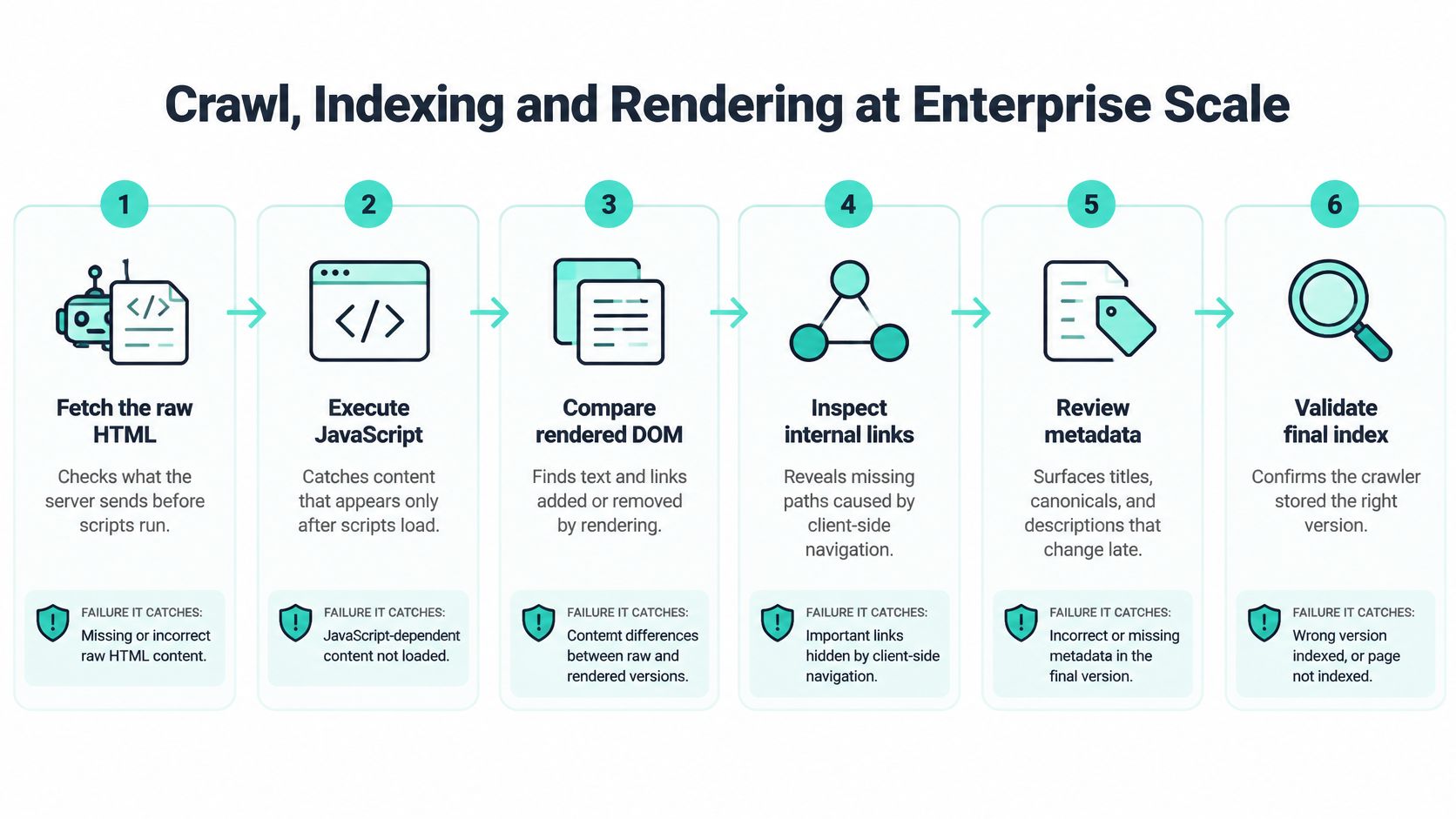
Use this sequence to find where a page's search-visible version diverges from its intended version:
- Fetch the raw HTML. Confirm that product descriptions, canonical tags, internal links, and structured data exist in the first response. This catches important content that depends entirely on client-side execution and may be indexed late.
- Check metadata in the raw response. Inspect canonical URLs, hreflang, and structured data before scripts run. This catches values that change or conflict after rendering.
- Queue the page for rendering. Compare the crawler's rendered output with the initial response. This catches differences between the page Google first parses and the version it receives after rendering.
- Compare the rendered DOM with the raw HTML. Flag missing or altered text, links, and metadata. This catches output that doesn't match the intended page.
- Follow newly discovered links. Check that links work as crawlable anchors, not only as click handlers. This catches navigation paths a crawler can't reliably follow.
- Confirm indexing in Search Console. Check whether important crawled pages are indexed or excluded. This catches URLs that pass a crawl test but don't enter the index.
For a practical primer on understanding search engine crawlers, use crawler behavior to guide testing rather than assuming the browser view tells the whole story. For ranking-critical templates, prefer server-side rendering or static generation so core content and links are available in the initial HTML.
Control crawl paths and shared components
Block or consolidate faceted navigation, session parameters, and infinite-scroll requests that create uncontrolled URL paths. Split XML sitemaps by locale and template, making it easier to spot a market or page type that's missing from submissions or index reports.
Put SEO rules in reusable components and templates. Each component should define how it renders, how it outputs accessible links, which metadata rules apply, and what users and crawlers receive if JavaScript fails. Automated tests should compare HTTP responses with the rendered DOM and validate canonicals and hreflang across markets, brands, and personalization states.
Kogifi's E-ON Polska implementation introduced a Helix-based Sitecore architecture and upgraded the “my E-ON” portal, an example of platform architecture work that can establish reusable implementation patterns. This week, compare raw and rendered HTML for five templates in each market.
Taxonomy and Metadata That Search Can Use
| Content type | Required metadata | Taxonomy level | How search uses it |
|---|---|---|---|
| Product page | SKU, product family, market, language | Product hierarchy, three levels maximum | Facets and filters |
| Support article | Product version, issue type, audience | Topic tree | Query matching and related articles |
| Case study | Industry, service, client region, date | Industry and service taxonomy | Related content blocks |
| News or event | Date, region, owner | Time and region | Freshness boosting |
| Intranet policy on SharePoint | Department, policy owner, review date, audience | Department and lifecycle | Access-aware results and expiry flags |
A taxonomy is the controlled hierarchy that groups topics, products, industries, and services. Metadata is the set of fields stored on an individual item. Search relies on both: taxonomy supplies consistent categories, while metadata tells the platform which market, audience, product version, or date applies to a specific result. For a deeper operational view, see this guide to metadata management.
Use a product hierarchy with three levels maximum. Deeper trees can split related products into narrow facets that users struggle to browse and search teams find difficult to maintain.
Run one controlled vocabulary per market, but map translated labels to a shared concept ID. That lets the interface use a local term while filters still connect equivalent concepts across languages. Without the shared mapping, a translated label can behave like a different category, fragmenting results between regions.
Make required fields block publishing. A product without a market or language can't be reliably filtered; a policy without an owner or review date can't be governed properly. Don't treat mandatory metadata as a cleanup task for later. Enforce it at the publishing step, with clear field definitions and ownership.
Handle vocabulary drift before it spreads
Free-text tags create near-duplicates, such as alternate spellings or different names for the same product family. Replace them with selectable values from the controlled vocabulary. Translated labels can also drift over time, so assign an owner to review them and preserve the shared concept ID when wording changes.
Legacy tags need a deliberate migration. Map each old value to an approved term, merge duplicates, and redirect old tag pages where they have an audience or search value. Don't delete labels in bulk: that can break paths to useful content and leave teams uncertain about which new category to select.
Kogifi's Siemens Healthineers platform applies market-level content filtering to support compliance with regional legal requirements. That kind of filtering depends on reliable market metadata, not just a front-end choice of language.
Before the next release, agree on the required fields in the table for each content type, name the owner of each vocabulary, and switch on the publishing block for every required field.
Tuning Relevance and Query Understanding in Sitecore Search
Treat relevance as three connected layers: query understanding, ranking, and personalization. Sitecore Search is a cloud-based, headless content and product-discovery platform that uses AI and machine-learning algorithms to analyze visitor and document data, according to the Sitecore Search documentation.

Query understanding handles how people express a need. Configure keyword auto-complete, synonyms, common misspellings, and product codes so search can connect different forms of the same request. Ranking determines which indexed items appear first, using rules such as freshness, market, and real-time business logic. Personalization can use visitor location, preferences, interactions, or purchase history, but teams should apply those signals only where consent and data policies allow.
Before changing ranking rules, decide how each searchable item enters the index: crawled, pulled, or pushed. That decision sets which items can be ranked at all. Then define what counts as a useful result. A document a user can't open, or a product result with stale availability, damages trust even if it ranks first.
Kogifi built a search-driven, partner-facing platform for Siemens Healthineers that delivers product and service information to external partners and doctors. The platform applies market-level filtering to meet regional legal requirements, illustrating why relevance needs to account for audience and access, not just text similarity. For travel, Kogifi modernized Grecos' Sitecore portal with a personalized, search-driven experience and booking-engine integration. The connection provides real-time availability, pricing, and limited-time offers, so search results can reflect live commercial information.
Treat answers as a source-quality problem
Sitecore Search can support question-and-answer experiences that generate answers from indexed content. Before enabling them, verify that the index covers the right sources, that content is current, and that access rules prevent restricted material from appearing to the wrong audience. An answer is only as reliable as the content and permissions behind it.
Sitecore's wider AI portfolio connects XM Cloud, Content Hub, XP, CDP, Personalize, and Search. Sitecore's SitecoreAI tiers and FAQ describe Stream's agentic workflow capabilities across products and position XM Cloud as the core platform with entry-level access to CDP and Personalize, Search, and Content Hub. The portfolio matters architecturally because content, customer data, personalization, search, and asset operations can be coordinated rather than treated as isolated AI features. Access and commercial terms can depend on the applicable SitecoreAI arrangement.
Use a steady tuning loop: review the top 50 zero-result queries each week, add synonyms for the most common gaps, and test each ranking change against a fixed set of 30 representative queries before and after release. This overview of enterprise search with Sitecore Search can help teams frame the platform decision around user needs and content coverage.
Governing SharePoint Search and Copilot at Scale
SharePoint is an internal search estate, and the metadata attached to content helps determine which items are useful and who can access them. AI governance needs to cover both service behavior and the sites employees are allowed to query.
Microsoft's Copilot in SharePoint documentation explains that weekly limits used during public preview are removed at general availability, while daily service-protection limits may still apply to Copilot-licensed users. When a daily limit is reached, SharePoint Copilot features are temporarily unavailable until the limit resets. Set adoption and support expectations accordingly, so a temporary service limit isn't mistaken for a broken site.
Governance has two control points. Site owners use the Site AI settings panel to manage how users interact with AI on a site. Administrators use KnowledgeAgentScope to control which SharePoint sites have access to Copilot in SharePoint. Decide scope deliberately rather than enabling access across repositories without checking their content and audience.
- Inventory the sites. Tag each SharePoint site with its department, owner, and audience.
- Set Copilot scope. Decide which sites belong in scope through KnowledgeAgentScope.
- Assign site-level ownership. Name the site owners responsible for Site AI settings.
- Flag overdue policies. Use review dates to identify expired content and remove it from current results.
- Test audience access. Check access-aware results using test accounts from each audience group.
Keep the SharePoint policy fields from the metadata table consistent with this inventory. Record the daily-limit behavior and the in-scope sites in the search scope list so support teams know what users can query and what to expect when service protection applies.
Performance Budgets and Core Web Vitals
| Metric | Good threshold | Usual driver | First fix |
|---|---|---|---|
| Largest Contentful Paint (LCP) | 2.5 seconds or less | Oversized hero image or slow server response | Prioritize and size the largest above-the-fold asset |
| Interaction to Next Paint (INP) | Below 200 milliseconds | Long main-thread tasks from scripts | Defer nonessential scripts and split long tasks |
| Cumulative Layout Shift (CLS) | Below 0.1 | Images, embeds, and banners without reserved space | Set fixed dimensions and layout slots |
Google's Core Web Vitals guidance defines the good thresholds above using real-user performance data. Search Console classifies URL groups using the 75th percentile of page requests over the previous 28 days. That means optimizing only the median experience can leave mobile, regional, and low-bandwidth users outside the good range.
Set a budget for each template, then enforce it in CI/CD. On campaign pages, limit JavaScript and third-party tags. Reserve image and embed dimensions to prevent layout shifts, and prioritize the largest above-the-fold asset for LCP. Reusable components should provide predictable layout slots, optimized image loading, and deferred nonessential scripts.
INP needs its own investigation. A page can look loaded while consent frameworks, personalization scripts, and analytics listeners keep the main thread busy and delay input. Find long tasks in the affected template, then test whether a vendor script or component is responsible before removing functionality that users or compliance teams rely on.
Diagnose in the right order
Segment CrUX or Search Console field data by template, device, country, and release version. Compare regressions against deployments and vendor-script changes so the team can identify what changed, rather than responding with broad code reductions.
Fix INP on the highest-traffic templates first, then address layout shift, then LCP. This order focuses early effort on responsiveness while leaving room to resolve visual instability and loading priorities in the same templates. Kogifi audited Alcatel-Lucent Enterprise's global Sitecore implementation and delivered a prioritized improvement plan with quick wins and longer-term recommendations. For platform-specific tuning ideas, see this guide to AEM performance optimization.
Put each template budget into the CI pipeline. If a build breaks its agreed threshold, fail it before it ships. That turns performance from a periodic audit into a release-quality control.
Measuring Visibility Beyond Rankings
The ranking-only habit misses what happens when search results answer a question before someone visits a site. In a study of more than 3,100 informational queries from 42 organizations, pages appearing alongside AI Overviews recorded a 61% lower organic click-through rate than comparable queries without them, while sites cited in the AI Overview achieved 35% higher organic CTR, according to Seer Interactive's analysis of AI Overview click-through rates. Ranking first may not be enough; citation can increase the value of the clicks that remain.
Replace a ranking-only view with four measures:
| Metric | What it measures | Data source | Review cadence |
|---|---|---|---|
| Impressions | Search exposure on tracked queries | Search Console | Weekly |
| Clicks | Organic clicks on tracked queries | Search Console and analytics | Weekly |
| Citation share | Share of tracked queries where the brand is cited in AI answers | Monthly sample of about 200 queries per market | Monthly |
| Assisted conversions from search | Conversions where a search visit appears earlier in the path | Analytics attribution | Monthly |
Split tracked queries into informational and commercial groups, because an answer that satisfies a basic information need may change clicks differently from one that supports product evaluation. Keep the query sample stable from month to month. Pull the same about 200 queries per market, record whether the brand appears in AI answers, and log AI Overview exposure beside sessions.
Add an analytics annotation when AI Overview exposure changes. That gives analysts a way to interpret a traffic decline against a change in search-result presentation, rather than treating every fall in sessions as an SEO failure. Teams building an answer-engine measurement practice can also use this guide to measuring generative engine optimization performance as a reference point.
Organic sessions can fall because users found an adequate answer before visiting. Judge that situation by whether qualified conversions, assisted conversions, and pipeline hold up, not by sessions alone. Make sure event instrumentation captures meaningful actions along the path; this guide to event tracking in Google Analytics can help teams connect search visits with downstream behavior.
Confirm Your Enterprise Search Scope Before You Commit
Score each layer, start with the lowest score affecting revenue templates, then address rendering, metadata, and relevance before performance and measurement. Bring a clear scope list to any internal or partner review:
- URL inventory: The number of URLs and the page sets with strategic value.
- Rendering method: How each template serves its content to users and crawlers.
- Metadata requirements: The required fields for every content type.
- Search coverage: Sitecore Search domains and content sources, plus the SharePoint sites covered by Copilot settings.
- Performance budgets: The agreed budget for each template.
- Visibility scorecard: Impressions, clicks, citation share, and assisted conversions from search.
Kogifi works across Sitecore XM Cloud, XP, Search, and SharePoint and can support audit, rendering, search, governance, and performance work. The Sitecore Support Readiness Check helps identify which content and personalization move easily and which don't; most enterprise Sitecore implementations require custom quotes based on specific requirements.
Complete the scope list and request a scoped quote against it from Kogifi or another partner.
Kogifi can help assess your Sitecore, SharePoint, or broader enterprise search estate, prioritize platform fixes, and align governance with your content and measurement needs. Bring the scope list to Kogifi to discuss a focused review and a quote tied to your requirements.