


A multinational brand is ready to launch its new customer portal. The front end looks polished, the knowledge base is populated, and the business case assumes customers will finally stop routing routine requests through email. Then the release team discovers that regional identity providers don't share the same claims, the portal spans several subdomains, single sign-out hasn't been tested, and analytics only record anonymous page views.
That scenario is common in customer portal development. The visible interface is usually the easiest part. The difficult work sits underneath, in identity federation, account-level permissions, integration reliability, session behavior, search quality, observability, and the operating model required after launch. A useful primer on building a self service portal for SaaS can help frame the basic service model, but enterprise delivery requires a much deeper architecture conversation.
A portal succeeds when customers can complete important tasks securely, quickly, and repeatedly. The commercial signals are adoption, self-service demand, ticket deflection, engagement, and retention, not simply whether the team delivered a login page and a collection of authenticated screens. The common failure patterns in enterprise projects are especially relevant here because portal programs often expose unresolved problems in governance and integration long before users see them.
Table of Contents
Why Enterprise Portals Fail Before Launch
The first failure usually happens during planning. Product, marketing, IT, and service teams define features independently, then discover that each group has a different idea of what “the portal” means. Marketing expects personalized dashboards and localized content. Support expects ticket history and knowledge search. Finance expects account and invoice data. Security expects strict tenant isolation and auditable access. None of those requirements is difficult in isolation, but their interaction creates the core system.
Enterprise portals have also moved beyond authenticated content delivery. Modern implementations commonly need personalized dashboards, real-time status, secure workflows, embedded analytics, API integrations, audit trails, and reliable multi-device performance. A portal that only displays pages is often just another destination customers must work around. A portal that exposes account state and lets users complete governed actions becomes an operational platform.
The launch checklist nobody owns
Identity is a frequent blind spot. A global customer may use different identity providers by region, while internal administrators use a separate workforce directory. The portal must map those identities to a shared account model, preserve role and entitlement information, and handle invited users, disabled users, changing employment status, and delegated access.
Session management creates a second layer of complexity. A portal may include a content domain, a support application, a billing experience, and embedded analytics from separate services. If those surfaces don't share a deliberate token and session strategy, users encounter repeated logins, inconsistent expiry behavior, or a sign-out action that leaves another application active.
Practical rule: Treat identity, account hierarchy, consent, telemetry, and integration contracts as launch features, not platform plumbing.
Analytics often gets postponed until the team has something to measure. That decision removes visibility into the first and most valuable adoption patterns. You need to know whether users complete login, find the right task, abandon a workflow, search repeatedly, or escalate after viewing an article. Without that evidence, teams debate opinions while the portal accumulates friction.
Reframing the business outcome
A strong portal roadmap starts with service outcomes. Identify the repetitive tasks customers perform, the data they need to make decisions, and the points where support teams currently intervene. Then connect those tasks to the systems of record, access rules, and events that must be captured.
This is why a portal shouldn't be approved solely because it contains the requested features. It should be approved when the organization can explain how users will authenticate, what they can see, which actions they can complete, how those actions affect back-office systems, and how the business will know whether the experience works.
Gathering Requirements That Actually Scale
Requirements gathering should begin with customer behavior, not a feature catalogue. Enterprise users typically arrive with a reason: checking service status, downloading a document, updating account details, submitting a request, reviewing an order, or finding a technical answer. The first release should make the highest-frequency tasks obvious and dependable before adding a broad set of low-use capabilities.
Self-service demand supports that priority. A 2026 industry compilation reports that 77% of consumers have used a self-service support portal, while another finding in the same source says 81% would rather use self-service portals than call support. The source also reports that 69% access self-service help centers on a mobile device, so responsive behavior is an architectural requirement, not a cosmetic enhancement. These customer self-service statistics provide useful context for prioritization, although the implementation still needs to be validated against your own users and service data.
Define a small measurement system
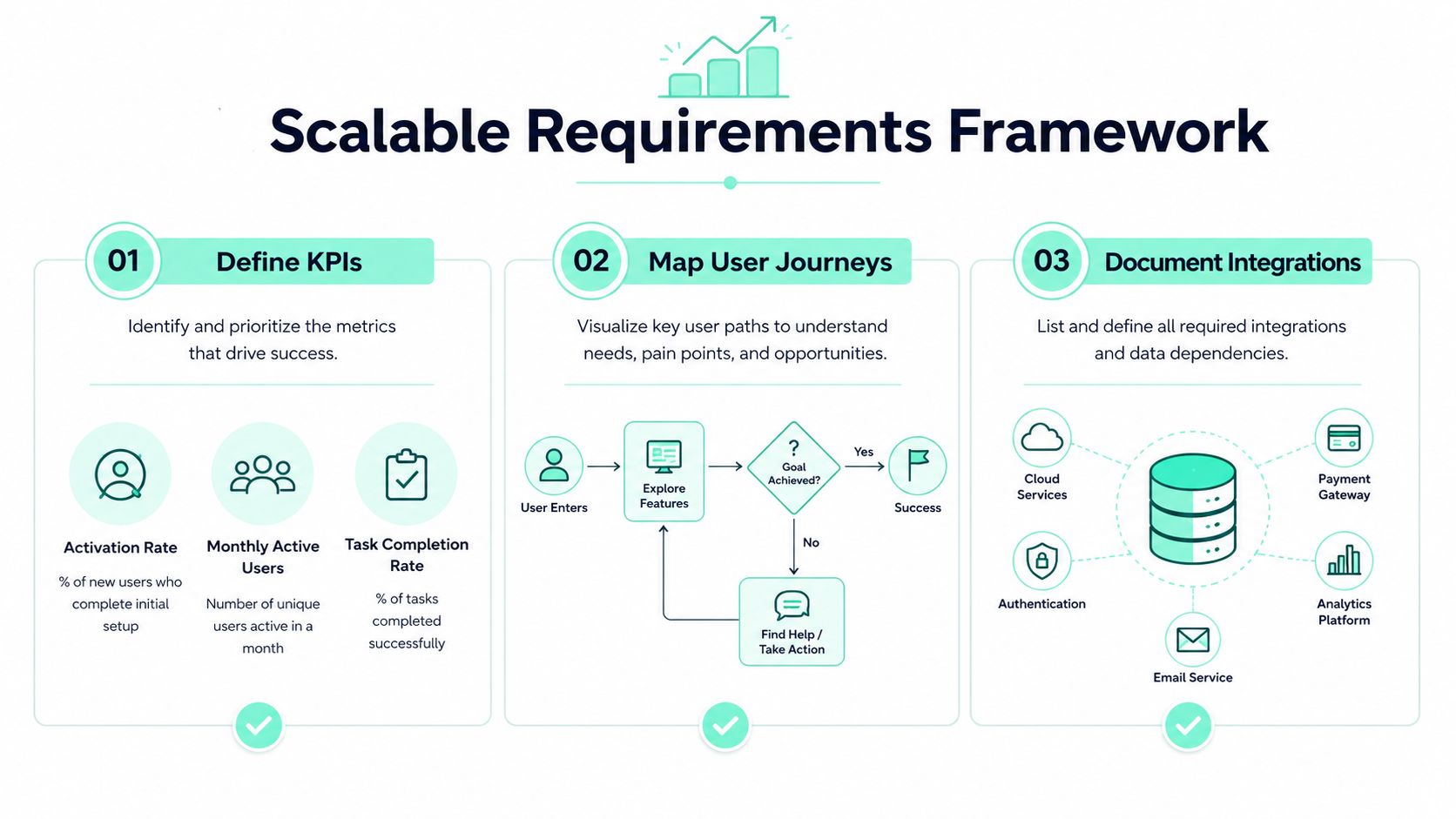
Choose 3 to 5 KPIs before development begins. The practical set usually includes:
- Activation rate: Measure whether invited users complete the actions that establish a usable account.
- Monthly active users: Track authenticated users rather than relying only on anonymous sessions.
- Support-ticket volume: Compare portal interactions with escalations and identify tasks that still require agents.
- Task completion: Record whether users finish important flows, not merely whether they visit a page.
- Engagement depth: Use a relevant interaction such as repeated service checks, document use, or knowledge search.
User-level tracking matters because anonymous sessions can't support meaningful segmentation by customer size, industry, account age, or plan type. The portal analytics methodology also recommends instrumenting analytics from day one and reviewing the selected KPIs monthly. That approach captures early adoption behavior before redesign decisions become guesswork.
Map journeys and dependencies
Write each journey as a sequence of user intent, permission check, data request, action, confirmation, and audit event. “View service status” may require account resolution and a live API. “Download a licensed artifact” may require entitlement validation, filtering, integrity information, and an access log. “Submit a support request” may require routing rules, attachments, notifications, and a connection to the service platform.
Document integrations alongside the journey. For every dependency, identify the system of record, API owner, failure response, retry behavior, and data freshness expectation. This work belongs in discovery, where a disciplined discovery phase can expose constraints before the team commits to interface designs.
Mobile-first design should shape the information hierarchy. Put the most common task within clear reach, keep authentication recovery usable on a phone, avoid tables that require horizontal scrolling, and make status messages understandable without relying on desktop hover states. Knowledge-base integration should use consistent taxonomy, metadata, permissions, and search synonyms so users can find an answer even when their wording differs from the author's terminology.
Choosing Between Sitecore XM Cloud and SharePoint Online
Sitecore XM Cloud and SharePoint Online can both support portal experiences, but they solve different operating problems. The platform decision should follow the audience, experience ambition, data boundaries, governance model, and integration needs.
Sitecore XM Cloud is a strong fit for customer-facing experiences where content orchestration, multilingual delivery, headless presentation, personalization, and brand governance matter. Its composable approach works well when the portal is part of a broader digital experience estate and needs to connect with commerce, CRM, service, identity, search, and analytics capabilities.
SharePoint Online is often the more natural foundation for employee and partner scenarios centered on Microsoft 365. SPFx components, Microsoft Graph, Power Platform workflows, Teams collaboration, and Microsoft identity can reduce integration friction when the organization already operates inside that ecosystem. SharePoint's governance model also suits controlled information publishing, document collaboration, and role-based internal access.
The trade-off is not merely headless versus collaboration. Sitecore demands deliberate composable architecture, content modeling, integration ownership, and personalization governance. SharePoint can accelerate delivery, but teams need discipline around information architecture, SPFx customization, permission inheritance, environment management, and Power Platform lifecycle controls. A platform that feels quick in a proof of concept can become difficult to govern when business units create overlapping sites and workflows.
| Requirement | Sitecore XM Cloud | SharePoint Online |
|---|---|---|
| Primary audience | Customer-facing and public digital experiences | Employees, partners, and Microsoft 365 users |
| Experience model | Composable, headless, personalized delivery | Integrated collaboration and information services |
| Content needs | Multilingual, brand-led, journey-based experiences | Documents, policies, team content, structured publishing |
| Customization | Front-end applications and reusable component libraries | SPFx components, Power Platform, and Microsoft Graph |
| Governance concern | Content, personalization, integrations, and multi-site reuse | Sites, permissions, environments, and citizen development |
| Best fit | Experience orchestration across customer journeys | Secure productivity and collaboration within Microsoft 365 |
Sitecore's newsroom describes XM Cloud as supporting digital experiences intended to grow traffic, improve engagement, and drive conversions, while its 2025 CMSWire IMPACT Award recognition for work with United Airlines highlighted personalization and multilingual support. Sitecore's 2025 Digital Impact Awards also included Business Impact and Digital Experience Leadership categories, with public award mentions for organizations including DP World, Riyadh Airports, and Regal Rexnord. Those examples support the platform's enterprise experience focus, but they don't replace architecture validation for a specific portal.
A useful platform discussion should include deployment ownership, release controls, search, identity, analytics, and total operating cost. For teams evaluating the distinction between legacy and cloud delivery, this Sitecore XP or XM Cloud comparison is a relevant architectural input.
The following overview provides additional product context:
Authentication and Session Architecture Pitfalls
Authentication failures are rarely caused by the login screen. They occur in certificate lifecycle management, token validation, identity-provider availability, session boundaries, and the assumptions teams make about browser behavior.
An expired signing certificate can break every login attempt without any application code changing. Authentication services can also buckle when thousands of users arrive at the same time, producing timeouts that look like random portal defects. A production test must exercise the complete path, including external identity-provider hops, MFA, token issuance, API authorization, session renewal, and logout.
Design for the full identity path
Load tests should use realistic user mixes and randomized identifiers. A test that repeatedly authenticates one account may validate a cache rather than the actual system. Include regional providers, invited users, expired sessions, denied permissions, certificate renewal, and single sign-out. Capture latency at each boundary so the team can distinguish an overloaded identity service from a slow portal API.
MFA adds visible interaction cost. A 2026 analysis citing a National Institute of Standards and Technology finding says an average MFA transaction adds 5 to 15 seconds, depending on the method, and reports that asynchronous token validation can reduce authentication latency by about 30% compared with synchronous validation. The same analysis reports FIDO2/WebAuthn as about 60% faster than traditional OTP approaches. These benchmarks are useful for test planning, not promises of a particular production result. See the detailed hybrid authentication challenges and best practices for the failure modes that commonly appear in mixed identity environments.
Don't depend on cross-domain cookies
Portal sprawl introduces a browser-level problem. Organizations with multiple brands, regions, or applications often expect a session created on one domain to remain available everywhere. Third-party-cookie-based sharing is unreliable because Safari and Firefox block or partition those cookies by default, while Chrome's deprecation path changed in 2025.
Use explicit identity protocols and application-aware session handoffs instead of treating shared cookies as the foundation. Define which application owns the session, how each application validates tokens, how consent travels, and what happens when one service revokes access. Keep account and entitlement resolution centralized where possible, but let each application enforce its own authorization boundary.
Security architecture also needs to cover the data exposed by portal workflows. Teams reviewing how protects sales data can use that type of security framing when assessing access, auditability, and the consequences of an account-level authorization error.
Layering Personalization and AI-Driven Content
AI adds value to a portal when it reduces search friction or presents the next useful action in context. It doesn't add value when it generates generic text beside a broken account model, incomplete content taxonomy, or unreliable entitlement service.
Sitecore Stream adds AI capabilities in XM Cloud, including AI content optimization, A/B/n testing of AI-generated content, and AI-based page personalization. Its brand intelligence feature applies a brand kit to individual sites so generated outputs align with brand context, guidelines, and tone of voice. That combination makes governance part of the content workflow rather than a review step bolted on after generation.
Start with controlled content signals
Personalization should use signals the organization can explain and govern. Account type, product ownership, service status, region, language, lifecycle stage, and recent portal behavior are more useful than an opaque audience label. A customer whose service is degraded should see status and remediation content before promotional material. A newly provisioned administrator should see setup guidance and permission workflows before general education.
Keep the decisioning layer separate from the presentation layer. The front end should request an experience decision or content result, while policy, consent, eligibility, and account state remain controlled by trusted services. This separation makes it easier to test variations without allowing a presentation component to make authorization decisions.
AI governance also needs practical guardrails around source content, approval, traceability, and prohibited outputs. Teams exploring AI guardrails with DevArmor can use those principles when defining review and release controls for AI-assisted development and content operations.
Treat search as a product
Sitecore Search is described as a standalone capability in SitecoreAI. Access isn't automatically provisioned, and organizations must work with a Sitecore account representative to enable it. Configuration, tuning, and analysis happen in a dedicated Search application rather than inside the main Pages authoring interface.
That separation affects delivery planning. Assign ownership for indexing, source selection, field mapping, ranking, synonyms, filters, permissions, and analytics. Test search with real customer language, including abbreviations, product names, regional spelling, and incomplete queries. Then connect search behavior to task completion and support escalation. An empty result is not just a search defect. It may indicate missing documentation, an incorrect permission filter, or a vocabulary gap between customers and internal authors.
A mature AI-powered personalization approach treats AI as a governed service layer. It combines useful context with human oversight and keeps the fallback experience clear when the model, search index, or personalization service cannot respond.
Testing, Deployment, and Continuous Iteration
Launch should be the first controlled production cycle, not the finish line. A portal changes as identity providers change, APIs evolve, content teams publish new material, browsers enforce new privacy behavior, and customers reveal workflows nobody anticipated during discovery.
Testing therefore needs several dimensions. Functional tests confirm that users can complete tasks. Integration tests verify data contracts and failure handling. Security tests validate authorization, tenant isolation, session expiry, and audit events. Performance tests exercise login, search, dashboard APIs, and high-demand workflows together rather than measuring each service in isolation.
Make telemetry part of delivery
Instrument login completion, session depth, search behavior, task completion, error states, and support escalation before the first release. Review the chosen KPIs monthly, then use evidence to simplify navigation and promote high-frequency tasks. If users repeatedly search for a document and then open a ticket, improve the content, ranking, or workflow instead of adding another navigation layer.
Cloud-native delivery on Azure works best when the team treats infrastructure, application code, content models, configuration, and observability as versioned assets. CI/CD pipelines for headless architectures should promote changes through controlled environments, run automated checks, and provide rollback paths for both code and configuration. Release governance must include Sitecore components, Next.js applications where used, API contracts, search configuration, and Power Platform dependencies when SharePoint participates in the solution.
Control portal sprawl
Multi-brand and multi-region estates need a deliberate hub-and-spoke model. Shared components and design rules should be centrally governed, while local teams retain controlled flexibility for language, regulation, and market-specific journeys. Identity, consent, analytics naming, and content metadata need common standards across every portal surface.
A new domain or regional application should require an architectural reason, not merely a local preference. Otherwise users face duplicate profiles, inconsistent consent choices, separate search experiences, and unclear support ownership. The operating model should assign owners for identity, content, integrations, analytics, accessibility, and incident response before the portal expands.
Treating Portals as Long-Term Capabilities
Customer portal development is a capability investment, not a one-time interface project. Enterprise teams need early telemetry, resilient authentication, governed personalization, reliable integrations, and a platform that matches the audience and operating model.
The market context reinforces the scale of the opportunity. A 2021 IT self-service survey reported that portals were offered by 82% of organizations, compared with 84% offering email and 76% offering telephone support. A market forecast projects employee self-service portal growth from USD 6.38 billion in 2025 to USD 10.55 billion by 2031, at a 8.75% CAGR from 2026 to 2031. These figures come from IT self-service coverage and the cited market forecast, and they point to sustained investment rather than a short-lived interface trend.
Choose the platform based on experience and governance needs, design identity for browser and regional realities, and let actual user behavior shape the roadmap.
Kogifi designs, builds, and maintains enterprise portal platforms on Sitecore XM Cloud and SharePoint Online, including headless experiences, SPFx solutions, integrations, analytics, governance, and cloud-native delivery. Visit Kogifi to discuss your portal architecture, identity risks, and roadmap with a team experienced in complex digital experience programs.