


Your AEM program probably isn't failing because the team can't build components. More often, the trouble appears elsewhere: a legacy dispatcher behaves differently in production, content approved in one environment has no dependable promotion path, or a cloud migration preserves old assumptions that the new platform no longer supports. Marketing sees delayed releases. IT sees growing operational risk. The delivery sponsor sees both schedule and cost moving in the wrong direction.
Adobe AEM implementation needs a different mental model. AEM is an enterprise modernization program with a long product lineage, complex content structures, and governance requirements that must be designed before development begins. The same discipline also applies when your broader roadmap includes Sitecore AI capabilities, Sitecore XM Cloud, Sitecore CDP, Sitecore Search, Content Hub, or SharePoint Online. Each platform can support advanced digital experiences, but none removes the need for clear ownership, reusable architecture, secure integrations, and operational controls.
Table of Contents
Why AEM Implementation Is a Modernization Program
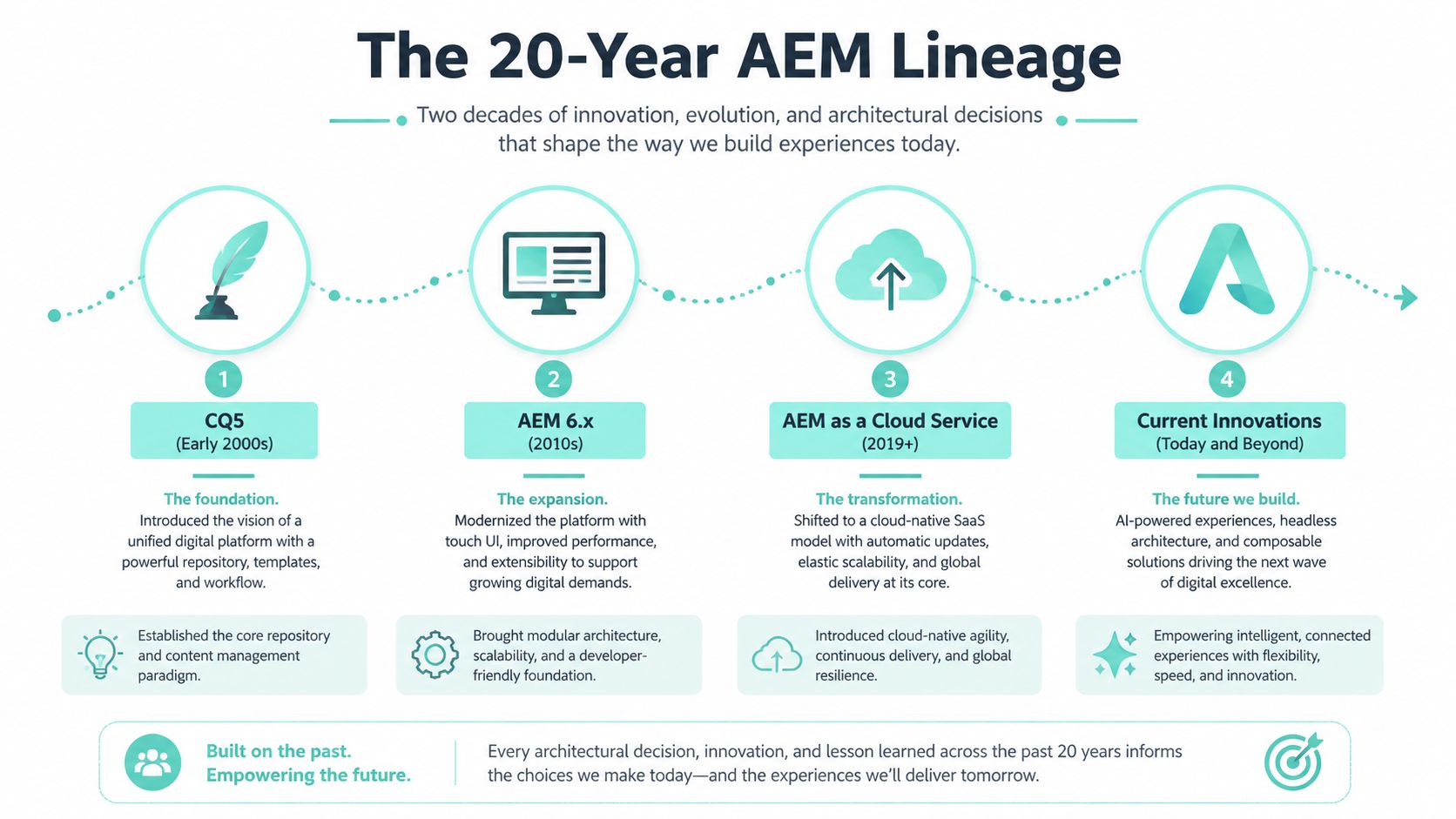
Adobe Experience Manager's modern history begins with Day Software's Communiqué, also known as CQ, which originated in the early 2000s in Basel, Switzerland. Adobe acquired Day Software on October 29, 2010, AEM 5.6 appeared in 2013, and AEM 6.5 followed in 2019, according to the documented AEM product lineage. That history matters because many enterprise estates still carry decisions made during the CQ era alongside Adobe-era releases and newer cloud-aligned patterns.
A mature AEM environment usually contains more than pages. It may include custom components, JSP-era assumptions, Sling Models, OSGi services, dispatcher rules, workflows, content fragments, DAM structures, translation connections, identity integrations, and commerce dependencies. Those layers don't disappear when a program introduces AEM as a Cloud Service. They become inputs to a modernization decision.
Start with inventory, not code
Before creating a component, document the current estate:
- Templates and components: Identify what authors use, what developers maintain, and what can be replaced with Adobe Core Components.
- Content structures: Map page trees, tags, Content Fragments, Experience Fragments, DAM folders, metadata, and language copies.
- Operations: Record dispatcher behavior, cache invalidation, release procedures, monitoring, and environment differences.
- Integrations: Trace identity, analytics, personalization, commerce, search, translation, and downstream publishing dependencies.
- Governance: Name who approves content models, components, releases, security changes, and production promotion.
AEM's current usage profile reinforces this enterprise orientation. W3Techs reports that AEM is used by about 0.1% of websites whose CMS is known, while Datanyze reports a 2.97% share across web content management systems and more than 43,873 companies using the software. Those figures describe a specialized platform, not a mainstream SMB CMS. AEM projects therefore tend to concentrate on multilingual publishing, complex governance, high-value content operations, and integration-heavy experience stacks.
Architectural rule: Treat every inherited AEM decision as a modernization candidate, not as a permanent constraint.
The practical consequence is decisive. Don't approve an AEM implementation plan that starts with “build the new homepage.” Start with an estate assessment, a target operating model, and an explicit decision about what the organization will retire, refactor, preserve, or redesign.
Planning the Engagement Before You Write a Component
The first deliverable shouldn't be a slide deck. It should be a signed readiness package with owners, decisions, evidence, and go/no-go criteria. Teams that skip this work usually create content models and templates in parallel, then discover that taxonomy, navigation, localization, or design-system decisions invalidate both.
A useful implementation planning structure is the Keywordme implementation plan guide, especially for assigning ownership, dependencies, milestones, and acceptance criteria. For AEM specifically, use the discovery phase framework to turn those planning principles into a technical and organizational baseline.
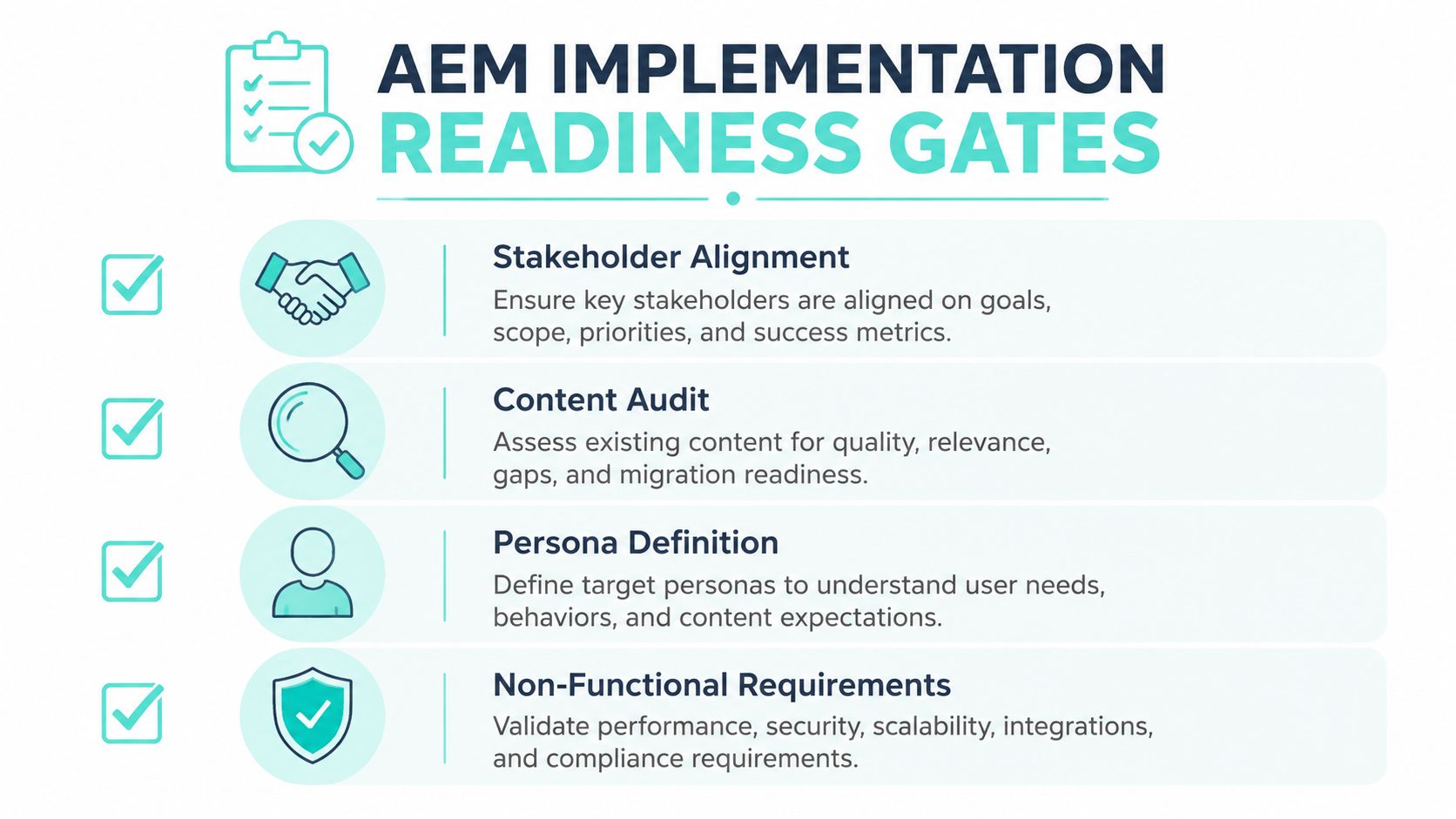
Clear the gates in the right order
Stakeholder alignment comes first. The sponsor, marketing, IT, security, commerce, legal, localization, and regional business owners must agree on what the program will improve. “Modernize the web estate” isn't an acceptance criterion. Define the desired authoring model, release model, site ownership model, and measurable service expectations.
The content audit follows. Inventory pages, assets, fragments, metadata, workflows, translations, redirects, permissions, and content owners. Mark material for migration, rewriting, consolidation, archival, or exclusion. A migration tool can't decide whether an obsolete product page still deserves a place in the target information architecture.
Persona definition must include both audiences and authors. Identify customer journeys, market variations, author roles, reviewer roles, approvers, translators, and administrators. A technically elegant authoring experience fails if regional teams can't complete their daily work without developer support.
Non-functional requirements need written thresholds for performance, availability, security, accessibility, privacy, observability, disaster recovery, and peak traffic behavior. Architecture decisions should reference those requirements, not general preferences.
Make readiness measurable
Don't authorize component development until these conditions are true:
- Information architecture is confirmed, including navigation, page hierarchy, and content ownership.
- Taxonomy and metadata are locked, with rules for tags, assets, fragments, search, and localization.
- The design system is signed off, including responsive behavior, accessibility expectations, tokens, and component states.
- The SLT topology is documented, including author, publish, dispatcher, CDN, integration, and environment responsibilities.
- Named delivery roles are staffed, including AEM architecture, backend development, front-end leadership, dispatcher engineering, DevOps, QA, security, and content governance.
Assign one accountable owner to each gate. A workshop can discover issues, but only a named owner can close them. If any gate remains open, continue discovery or reduce scope. Don't use the first component sprint to resolve unresolved strategy.
Choosing the Right AEM Topology for Enterprise Scale
Topology should follow operating requirements, not product enthusiasm. AEM 6.5 on-premises or through a managed service preserves more control over infrastructure, repository behavior, service packs, and operational timing. AEM as a Cloud Service offers elastic, Adobe-managed infrastructure and removes much of the traditional capacity and patching burden, but it requires immutable deployment patterns, Cloud Manager pipelines, cloud-compatible code, and stricter separation between code and mutable content.
The choice also depends on which products belong in the estate. AEM Sites supports web experience delivery. AEM Assets addresses digital asset management. Forms introduces document and transaction workflows. Dynamic Media adds asset delivery and transformation capabilities. The architecture must account for the combined integration load, not just the Sites authoring experience.
Use three decision drivers:
- Integration load: Evaluate Adobe Experience Platform, identity, analytics, personalization, search, commerce, CRM, and downstream publishing dependencies.
- Content and asset throughput: Examine publishing frequency, asset processing, localization, approval complexity, and campaign volatility.
- Infrastructure ownership appetite: Decide whether the organization can support platform operations, security hardening, upgrades, and capacity planning or prefers a cloud operating model.
AEM remains a specialized enterprise platform, as the usage data cited earlier indicates. That makes topology governance more important than raw adoption comparisons.
AEM Topology Selection Matrix
| Enterprise Profile | Topology Recommendation | Primary Trade-off |
|---|---|---|
| Global estate with frequent releases and a strong DevOps function | AEM as a Cloud Service with Cloud Manager | Teams must adopt immutable deployments, pipeline controls, and cloud-specific operations |
| Regulated organization requiring extensive infrastructure control | AEM 6.5 on-premises or managed service | The organization retains control but carries a larger operational responsibility |
| Sites and Assets program with high integration complexity | AEM as a Cloud Service after architecture readiness | Cloud alignment improves operating elasticity, but integrations and security need redesign |
| Forms-heavy estate with established infrastructure processes | AEM 6.5 or a carefully assessed managed topology | Existing control may outweigh the benefits of immediate cloud re-architecture |
| Headless delivery across web, mobile, and commerce channels | Cloud-aligned AEM with a deliberate content model | Teams must govern APIs, fragments, caching, and channel-specific ownership |
For organizations comparing structured headless approaches, the AEM headless CMS architecture overview provides useful context. The recommendation is simple: choose Cloud Service when the team is ready to operate cloud-native delivery, not merely because infrastructure ownership feels expensive.
Building on a Reusable Foundation
AEM implementation should begin with a reusable foundation, not a collection of page-specific requests. Use the Adobe Project Archetype to establish repository structure, Maven modules, deployment conventions, and local development patterns. Build with Core Components first, add project styling through controlled client libraries, and establish dispatcher rules before the first production template ships.
The build sequence should be explicit:
- Scaffold the project: Set up archetype validation, package boundaries, environment configuration, and local SDK practices.
- Create the component library: Extend or configure Core Components wherever the requirement fits. Custom code requires an Architecture Decision Record when it doesn't reuse a vetted component or project archetype.
- Define templates: Create editable templates only after content structure, author roles, and page governance are understood.
- Connect the front end: Integrate the front-end pipeline and Cloud Manager deployment path before teams accumulate local-only build assumptions.
- Harden dispatcher behavior: Apply the same configuration review and checksum policy to every environment promotion.
- Automate quality gates: Block merges that fail archetype validation, Sling Model unit tests, accessibility linting, code quality checks, or security review.
Treat SPA Editor, ContextHub, and Style System as opt-in capabilities. They can solve real problems, but each adds configuration, training, testing, and governance obligations. A feature belongs in the foundation only when its business value exceeds that operational cost.
Reusable foundation vs. custom build trade-offs
| Layer | Default Choice | Custom Alternative | Trade-off |
|---|---|---|---|
| Components | Adobe Core Components with project styling | Fully bespoke HTL and Sling Models | Bespoke control increases maintenance and upgrade exposure |
| Repository | Archetype-aligned Maven modules | Project-specific package layout | Local conventions can make onboarding and deployment harder |
| Templates | Editable Templates with governed policies | Static templates or page-specific structures | Static control may reduce author flexibility |
| Front end | Layered client libraries and controlled pipeline integration | Separate, loosely governed asset delivery | Independence can create cache and versioning drift |
| Dispatcher | Versioned, reviewed configuration with checksum controls | Manual environment edits | Manual changes weaken repeatability and incident recovery |
| Authoring accelerators | SPA Editor, ContextHub, and Style System only where justified | Enable every available feature by default | Feature breadth creates training and governance overhead |
| Delivery | CI/CD with automated tests and Cloud Manager gates | Manual package promotion | Manual releases make quality inconsistent |
Practical rule: If a component can't reuse Core Components or an approved archetype pattern, require an ADR before development begins.
This foundation also creates a useful comparison point with Sitecore. Sitecore XM Cloud implementations commonly use Helix-based component libraries and headless front ends such as Next.js, while Sitecore Stream adds brand-aware AI, copilots, agents, and agentic workflows across the DXP. Sitecore documents AI-assisted visual search, content generation, translation, image tagging, content optimization in XM Cloud Page Builder, natural-language questions over Sitecore Search content, Gensights insights, brand-aware chat, brief generation, and brainstorming through Sitecore Stream AI capabilities. Those capabilities still depend on a governed foundation, clear content ownership, and reliable deployment controls.
Integrating AEM With the Marketing and Commerce Stack
Every integration needs four things before go-live: an owner, a service expectation, a failure boundary, and a kill switch. AEM can publish a page successfully while an identity token, personalization call, commerce query, or consent signal fails downstream. If the architecture doesn't isolate that failure, a campaign problem becomes an executive confidence problem.
Start with identity. Use IMS or OIDC SSO with explicit audience mapping and role boundaries. Test token expiry, clock differences, permission changes, and regional access. An IMS token drift issue can prevent Adobe Target offers from resolving even though authors can still access AEM.
For personalization, define whether the experience is assembled server-side, client-side, or through a composable decisioning layer. Adobe Target through Launch and at.js can support composable experiences, but the team must design for cache behavior. Personalized fragments can unintentionally bypass dispatcher efficiency or produce stale variants when invalidation rules are incomplete.
Analytics needs the same contract discipline. Define the server-side context, event taxonomy, consent behavior, identity stitching, and failure handling for Adobe Analytics or Customer Journey Analytics. Consent state must remain consistent across AEM, Target, and analytics. A user who withdraws consent shouldn't continue receiving personalized treatment because one system retained an outdated state.
Commerce adds another pressure point. SAP Commerce, Salesforce Commerce, or a headless commerce layer connected through CIF can expose catalog, pricing, inventory, and promotion dependencies. CIF GraphQL throttling under campaign spikes is a design concern, not a testing footnote.
Common integration failure modes in enterprise AEM deployments
| Integration | Typical Failure | Mitigation |
|---|---|---|
| IMS or OIDC identity | Token drift, audience mismatch, or role mapping errors | Test expiry, refresh, audiences, permissions, and regional access |
| Adobe Target | Offers fail when identity or Launch dependencies break | Add a kill switch, fallback experience, and observable decision logs |
| Dispatcher and personalization | Cache busting or stale personalized fragments | Separate cacheable and non-cacheable content, then test invalidation |
| Analytics and Customer Journey Analytics | Consent or event context differs between systems | Define one consent contract and validate end-to-end event behavior |
| CIF and commerce | GraphQL throttling during campaign demand | Add rate controls, fallback content, query governance, and load tests |
| CRM and downstream services | Payload changes break publishing or lead flows | Version contracts, document retries, and assign an integration owner |
Use the AEM integrations planning guide to structure the contract inventory. Then test failure, not just success. Every integration should specify retry semantics, timeout behavior, monitoring, fallback content, and the person authorized to disable it.
The same principle applies to Sitecore portfolios. Sitecore positions XM Cloud, CDP, Search, Content Hub, and related products as a composable DXP with machine-learning decisioning and personalization capabilities, while its Automated Personalization feature is SaaS-based, hosted in Microsoft Azure, and uses prior visitor behavior and characteristics such as country or browser, as described in Sitecore's product documentation. Sitecore Stream's release also spans CMS, DAM, and customer data capabilities, including brand, campaign, content, experience, and optimization copilots, according to Sitecore's newsroom announcement. AI increases the need for integration governance. It doesn't replace it.
Migrating to AEM as a Cloud Service Without Surprises
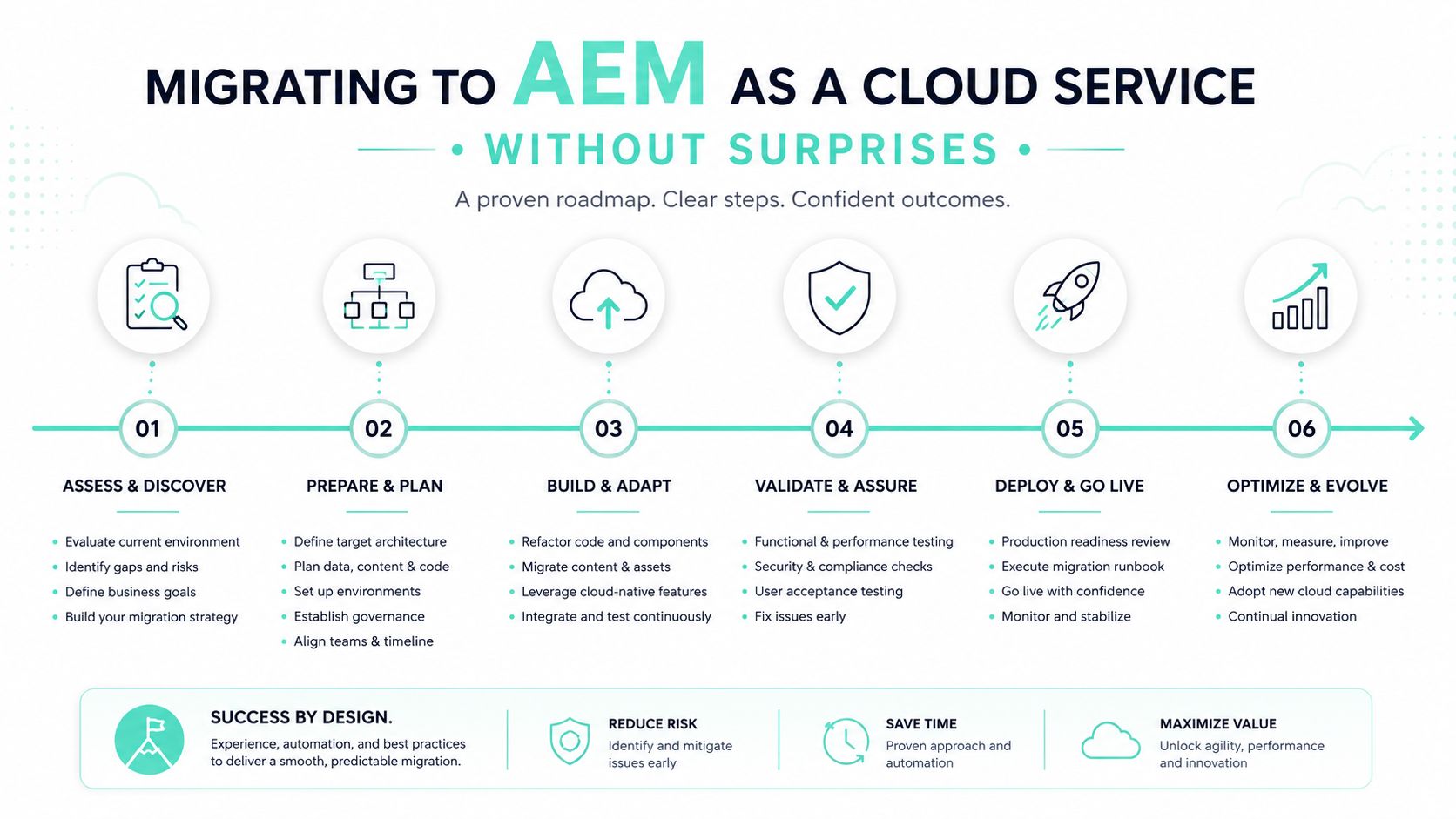
AEM 6.5 to AEM as a Cloud Service isn't a lift-and-shift exercise. The target runtime uses immutable deployment patterns, containerized operations, Git-based workflows, and Cloud Manager pipelines. Treat the program as a redelivery of the platform, with content and business continuity managed as separate workstreams.
The readiness sequence should be strict:
- Refactor configuration: Replace custom run-mode assumptions with environment-specific OSGi configurations.
- Remove unsupported dependencies: Retire deprecated APIs, direct repository access patterns, mutable infrastructure, and other cloud-incompatible behaviors.
- Separate mutable content: Move content that belongs in authoring or controlled content packages out of code deployment packages.
- Externalize secrets: Use Adobe I/O and Cloud Manager environment variables rather than embedding credentials in repositories or packages.
- Rework dispatcher rules: Apply AEM as a Cloud Service rules, then test cacheability, invalidation, filters, headers, and security behavior under realistic traffic.
- Transfer content in waves: Use the Content Transfer Tool against representative production weight, not sanitized samples that hide repository and asset complexity.
Put readiness ahead of execution
The independent AEM Cloud migration analysis reports that poor readiness for immutable deployments, DevOps culture, and cloud security design contributes to 60% to 75% of migration delays and cost overruns. The same source attributes 55% to 70% of migration work to architecture adaptation around Git-based workflows and immutable deployment patterns. Those figures make the sponsor's decision clear: fund architecture redesign before migration execution.
Use the Best Practices Analyzer as the program's risk register. Each finding needs an owner, remediation path, dependency, acceptance test, and deadline. Don't file the report and move directly to content transfer.
A sensible wave structure is:
- Code modernization and cloud compatibility.
- Repository and content model restructuring.
- Dispatcher hardening and security validation.
- Content transfer pilot.
- Staged migration with business-owner validation.
- Cutover rehearsal, rollback decision, and production launch.
Skipping readiness creates exposure through extended dual licensing, blocked release windows, and rollback paths that may not exist in the cloud topology. The AEM cloud migration checklist can help sponsors turn those risks into tracked delivery gates.
The migration should also include a technical walkthrough before execution begins.
Governance, Performance, and Post-Launch Operations
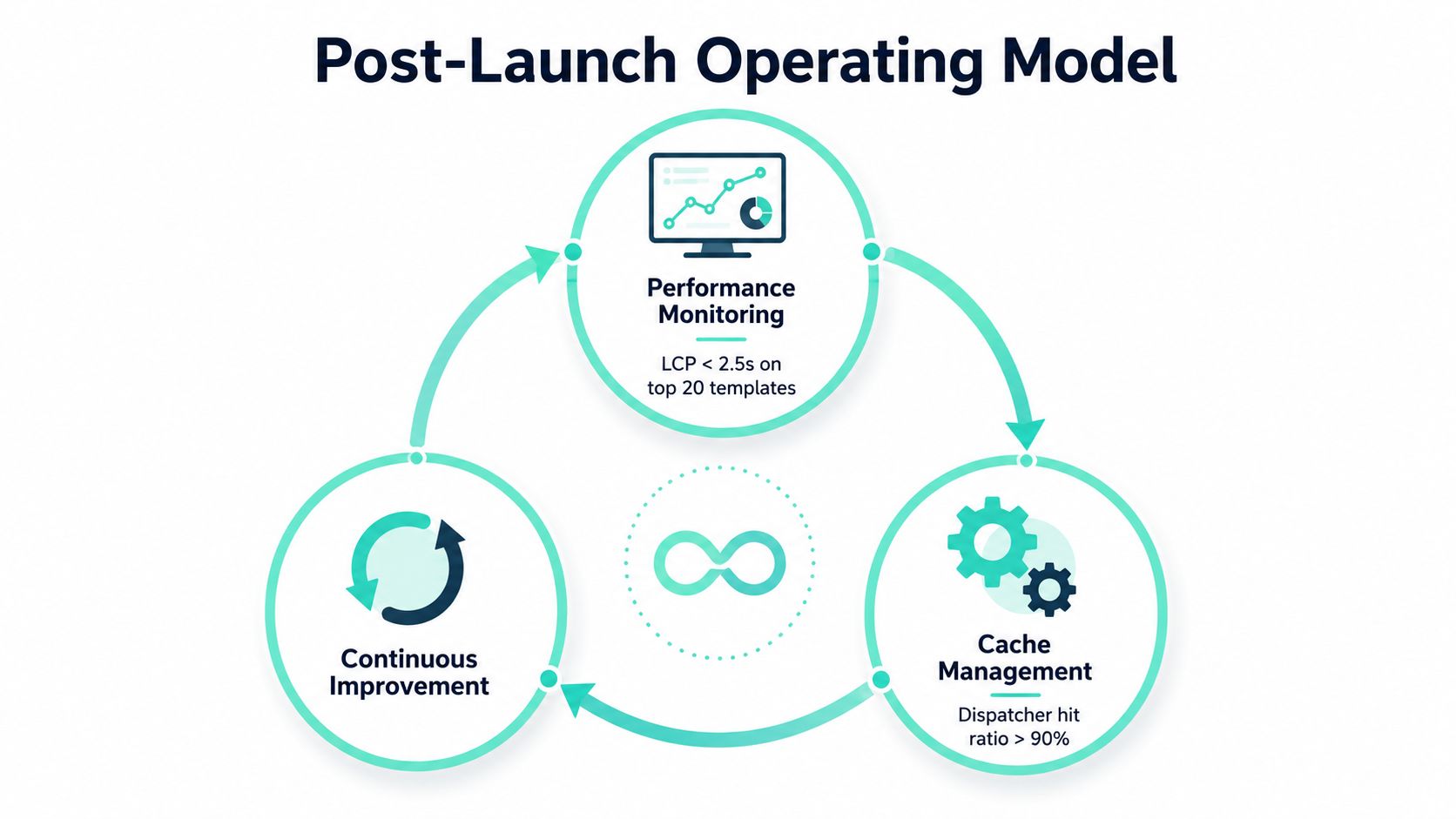
Go-live is a transfer of operational accountability, not the end of delivery. A named platform team must own dispatcher hardening, log monitoring, cache invalidation, release controls, upgrade planning, and incident response. If no team carries those responsibilities, every production issue returns to the implementation backlog, and the sponsor pays for project capability long after the project team has moved on.
Set performance budgets before launch. For the most important templates, require Largest Contentful Paint below 2.5 seconds, a dispatcher cache hit ratio above 90% on authored content, and authoring response time below one second, as defined in the delivery requirements for this program. Adobe's AEM best-practices guidance states that 1% of page requests should respond in under 500 to 1000 milliseconds, with no page responding slower than 1 second. Put these thresholds into build tests, staging validation, and go-live approval. An operations document alone cannot enforce them.
Control the release path
Content promotion is one of the operational bottlenecks that implementation guides often understate. A page or Content Fragment can be approved in one environment while its dependencies remain absent from the next. Manual handoffs become risky as release frequency increases, because authors and developers may promote related content, code, configuration, and assets at different times.
Define one release workflow with explicit ownership:
- Author: The content owner completes the draft, metadata, links, accessibility checks, and approval evidence.
- Staging: QA validates rendering, integrations, cache behavior, localization, consent, and personalization fallbacks.
- Production: A named business approver confirms the release window, dependencies, and rollback or correction plan.
Use content packages or an approved Cloud Manager content synchronization process. Track dependencies among pages, fragments, assets, tags, configurations, and code. Every release record should show what moved, who approved it, what failed, and how the team will correct the issue.
The recent AEM community discussion highlights the continuing gap around visible, dependency-aware promotion of Content Fragments and content variables. Cloud Manager improvements do not remove the need for a deliberate content-release operating model. They provide delivery controls, not business ownership.
Schedule upgrades and governance reviews
For AEM as a Cloud Service, schedule quarterly Adobe release updates in the operating calendar. Assign owners for regression testing, release-note review, compatibility checks, and business sign-off. For AEM 6.5, maintain a service-pack runbook covering backups, dependency review, lower-environment validation, dispatcher verification, smoke tests, and production rollback decisions.
Run a monthly governance review against SLA dashboards. Review performance budgets, cache behavior, incidents, failed deployments, authoring friction, integration errors, security findings, accessibility defects, and content-promotion exceptions. Ad hoc tickets expose symptoms. A governance dashboard shows whether the operating model is improving and where the sponsor must intervene.
Use the first 90 days deliberately
Before kickoff: Confirm the readiness assessment, stakeholder sign-off, information architecture, taxonomy, design system, team roles, and non-functional requirements. Do not start component delivery while these decisions remain ownerless.
First delivery phase: Lock the topology between AEM as a Cloud Service and AEM 6.5. Document integration and governance requirements. Stand up Cloud Manager environments, repository branching, dispatcher configurations, and automated quality checks before the first component sprint.
Before staging approval: Run end-to-end smoke tests for Adobe Target, Analytics, identity, commerce, and other critical services. Resolve mutable infrastructure, direct repository access, unsupported APIs, and cloud-incompatible configuration patterns before business validation.
At launch: Require named approvers for author, staging, and production promotion. Activate governance dashboards, performance budgets, cache monitoring, incident runbooks, and the upgrade process before declaring go-live.
At 30 days: Review release friction, authoring response, cache behavior, integration failures, and unresolved content defects. Assign owners and dates for every open item.
At 60 days: Reassess component reuse, dispatcher rules, content-promotion exceptions, security findings, and backlog priorities. Remove controls that create delay without reducing risk.
At 90 days: Confirm that the platform team, business owners, and delivery sponsor use the same SLA dashboard. The operating model should no longer depend on project-team memory.
Adobe documents a 90-day path for organizations using its Foundation Blueprint methodology and reports that structured implementation can make content production 47% faster while increasing digital-experience team productivity. Use those benchmarks as governance prompts, not promises. Establish a baseline, define the measurement method, and review whether reusable architecture improves authoring and delivery in your own estate.
SharePoint solutions require the same operating discipline when the enterprise needs an employee-facing platform rather than a public experience layer. SharePoint Online with SPFx components, Power Platform automations, and Microsoft 365 integrations can centralize intranet content, workflows, and resources. Permissions, information architecture, search, lifecycle ownership, and accessibility still require deliberate governance.
Sitecore AI can extend a broader composable DXP through brand-aware copilots, agents, personalization, search, CDP insights, and Content Hub workflows. Those capabilities still depend on trustworthy content, identity, consent, and release controls.
The sponsor must protect the operating model after the launch team leaves. If the program cannot name the owner, threshold, approval, and response for each critical platform behavior, implementation is unfinished.
Kogifi provides enterprise AEM implementation, migration, integration, governance, performance tuning, and stabilization services, alongside Sitecore XM Cloud and AI-enabled DXP delivery and SharePoint Online solutions using SPFx and Power Platform. Visit Kogifi to discuss your topology decision, cloud-readiness assessment, dispatcher and content-promotion controls, or post-launch operating model.