


You're probably in one of two situations right now. Either your Sitecore or SharePoint estate has become expensive, brittle, and slow to change, or the business has already decided to move to the cloud and the delivery team is now staring at a migration plan that looks suspiciously like “copy everything and hope for the best.” That approach rarely holds up for a real enterprise DXP.
A modern cloud migration checklist for digital platforms has to deal with content models, editorial workflows, personalization, identity, integration, search, governance, and release engineering. Sitecore XP, XM, XM Cloud, and large SharePoint intranets all bring platform-specific constraints that generic infrastructure checklists miss. That's especially true when you're replatforming from a monolithic CMS into a composable stack with Next.js, API-driven delivery, and AI-enabled experiences.
The wider market pressure is real. In 2023, over 94% of organizations worldwide reported active cloud strategies, yet only 55% achieved their intended cloud maturity goals, a gap that explains why migration discipline matters so much (Cloud Native Computing Foundation, 2024). In practice, I see the same thing. Teams are eager to modernize, but the projects that succeed are the ones that treat migration as architecture and operating model work, not server relocation.
This guide stays focused on the kind of migrations that are hardest to get right: enterprise Sitecore estates, composable DXP replatforming, and SharePoint-connected employee platforms. It goes beyond lift and shift to cover what changes when you want a scalable, intelligent, and cost-aware cloud platform, including where AI workspace cloud services fit into a broader delivery model.
Table of Contents
1. Assess Current Sitecore XP/XM Architecture and Content Inventory

The first mistake I see is teams choosing XM Cloud, headless, or a target Azure topology before they've established what they run today. On older Sitecore estates, that leads to underestimating custom modules, hidden integration points, unsupported pipelines, and content sprawl that no one wants to own but no one wants to delete either.
For medium-to-large enterprises, the discipline starts with a deep inventory. The 2021 AWS Cloud Migration Best Practices framework set a benchmark by requiring a pre-migration inventory of at least 10,000 distinct data points for medium-to-large enterprises to support zero data loss (AWS Cloud Migration Best Practices framework coverage). That standard matters even more for Sitecore because content items, media library assets, templates, renderings, personalization rules, forms, indexing behavior, and integration endpoints all carry migration consequences.
Audit the platform before you discuss target architecture
A solid Sitecore audit should answer questions that architects and product owners both care about. Which modules are custom, which are vendor-supported, which integrations are hard-wired to the current content tree, and which editorial workflows still reflect how teams work today?
In one common enterprise scenario, a regionalized Sitecore setup looks manageable until you inspect it instance by instance. Then you find duplicated templates, branch-level customizations, old marketing automation logic, and content owners keeping legacy pages alive “just in case.” That's where migration scope gets cut intelligently instead of brutally.
- Version reality check: Confirm the exact Sitecore version, hosting topology, xDB dependencies, search implementation, and deployment model.
- Customization review: Separate strategic extensions from code that only exists to work around earlier platform limitations.
- Content triage: Ask content owners to mark retention, archival, and retirement candidates before migration scripts are written.
Practical rule: If a component, integration, or content type doesn't have an owner, treat it as risk until someone claims it.
For Sitecore-focused programs, I also document editorial rules and language governance during discovery. That information often drives the target architecture more than server diagrams do.
2. Define Composable DXP Architecture and Headless Strategy
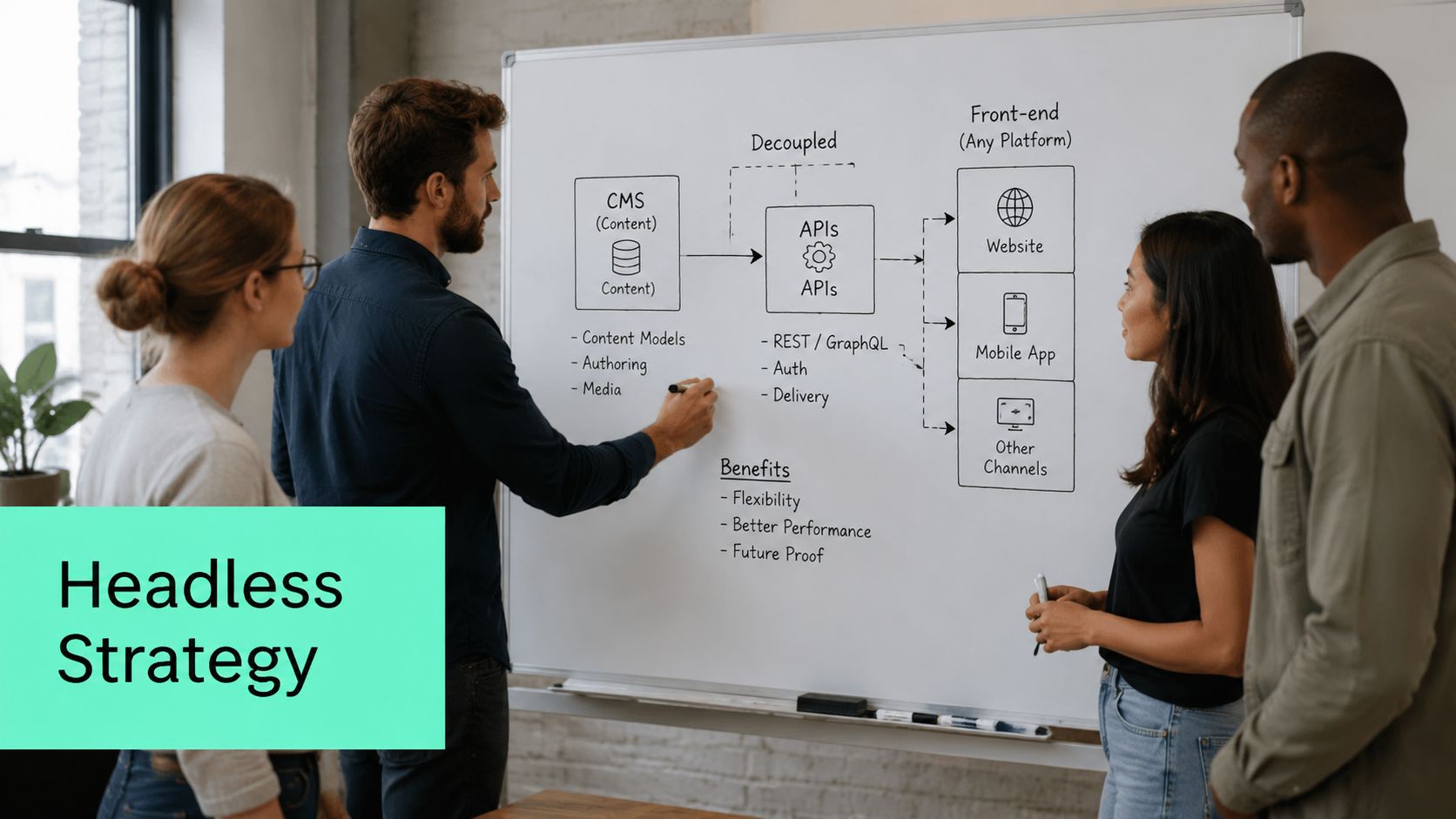
Not every migration should end in the same architecture. Some organizations still need parts of a traditional CMS operating model. Others are overdue for full decoupling with Sitecore XM Cloud, Next.js, and shared component libraries. The important point is to choose the shape of the platform deliberately, based on release cadence, brand governance, integration density, and team structure.
Composable DXP becomes practical rather than fashionable. Organizations implementing headless Sitecore XM Cloud with Helix-based component libraries report a 50% reduction in time-to-market for new brand sites and a 30% decrease in hosting costs, while automated CI/CD lifecycles reduced release cycles from 6 weeks to 10 days and maintained 99.9% uptime under SLA-backed monitoring (Sitecore Digital Impact Awards 2025, Intelligent Tech Stack case study). Those results line up with what strong architecture usually produces: less coupling, better reuse, and fewer release bottlenecks.
Choose the delivery model that matches the operating model
A headless target only works when the content model and front-end contract are designed together. If teams directly replicate legacy page hierarchies and rendering assumptions into APIs, the project keeps the old complexity and adds new integration overhead.
For multi-brand estates, Helix matters because it gives teams a way to separate foundation concerns, feature concerns, and brand-specific implementation. That's how you avoid building twelve versions of the same banner, form wrapper, or search result pattern under different names.
“Headless only pays off when component governance is stricter than it was in the monolith.”
Three patterns usually work well:
- Single-brand modernization: XM Cloud with a Next.js front end and a constrained component library.
- Hub-and-spoke governance: Shared templates and components centrally, local autonomy for regional content teams.
- Hybrid transition: Keep selected legacy delivery surfaces alive while new experiences launch through APIs.
The wrong move is calling everything “headless” while preserving monolithic delivery assumptions in code and process.
3. Plan Data Migration, Content Mapping, and Transformation
Content migration is where strategy turns into hard labor. This is also where many cloud migration checklist articles get too generic. For Sitecore and SharePoint-related DXP work, migration isn't just data movement. It's schema redesign, metadata cleanup, URL preservation, taxonomy normalization, and validation under business rules.
The biggest trap is treating a DXP replatform like a standard application move. A 2025 analysis focused on legacy Sitecore and AEM estates found that replatforming is the dominant modernization strategy for 60% of enterprise clients, yet existing checklists often miss a dedicated data integrity layer for headless migration, contributing to a documented 40% increase in post-migration latency when teams handle DXP migration like a generic app relocation (Device42 cloud migration checklist reference). That's exactly why content mapping deserves its own workstream.
Treat content migration like product engineering
I prefer staged ETL pipelines over one-off scripts because they force teams to define transformation rules explicitly. You need source extraction, field mapping, metadata logic, validation gates, reconciliation checks, and rollback paths. If any one of those is missing, editors will discover the problem in production.
A better approach is to build transformation logic on a controlled subset first. Validate output with content owners, then expand the pipeline. A practical framework for that planning sits inside a broader cloud migration strategy for enterprise platforms.
- Map meaning, not just fields: Legacy “body” or “summary” fields often contain presentation logic that shouldn't move forward.
- Preserve metadata: Publish dates, author attribution, tags, consent flags, and multilingual relationships are usually more valuable than the visible page copy.
- Validate in layers: Check row counts, item counts, taxonomy assignment, media references, and route integrity separately.
For Sitecore XM Cloud migrations, I also account for stateless delivery behavior early. Session assumptions, personalization signals, and deep-linked rendering dependencies often need redesign before content can land cleanly in the target model.
4. Establish Cloud Infrastructure, Security, and Compliance Framework

Good migrations don't bolt security on after the first test deployment. They establish the landing zone first. That means identity, secrets, network boundaries, policy enforcement, logging, backup posture, and compliance controls are built into the environment before application teams start improvising around gaps.
There's a strong reason checklist rigor has become mandatory. In the United States, a 2025 market analysis found that 62% of Fortune 500 companies had formalized migration processes into mandatory checklist protocols after a 2022 industry-wide incident in which 40% of cloud data breaches occurred due to misconfigured security settings during migration (referenced cloud migration governance analysis). Security drift during migration is common because teams move fast, environments multiply, and temporary access tends to become permanent.
Security controls belong in the landing zone, not the backlog
For Sitecore on Azure, I expect to see MFA, RBAC, and Zero-Trust principles implemented from the start. Those skills are now part of migration architect certification expectations because cloud-native delivery increases the number of exposed integration paths and privileged operations.
A practical baseline includes Azure Key Vault for secrets, private networking where required, policy definitions for resource compliance, and reproducible infrastructure through IaC. If you're hardening a Sitecore DXP estate, this cloud security approach for Sitecore DXP on Azure is the right level of detail to align platform and security teams.
Security exceptions made “just for migration” usually survive longer than the migration itself.
What doesn't work is delegating compliance interpretation to developers late in the sprint. Legal, security, architecture, and platform operations all need sign-off on residency, logging, identity boundaries, retention, and access review procedures before cutover planning begins.
5. Evaluate and Integrate AI-Driven Personalization and Analytics
A common failure pattern shows up about four weeks after launch. The new Sitecore environment is stable, pages are fast, and teams declare the migration a success. Then marketing asks for personalization, analytics dashboards disagree with source systems, and no one trusts the event stream enough to turn AI features on in production.
That outcome is avoidable, but only if AI and measurement are treated as migration work, not post-launch enhancement. In complex Sitecore programs, especially XM Cloud and composable builds with Next.js front ends, personalization quality depends on event fidelity, identity design, consent enforcement, and content structure. If those pieces are loosely defined during migration, Sitecore AI becomes a demo feature instead of an operating capability.
For DXP teams, I split this into two workstreams. Analytics readiness covers the event taxonomy, user and session identifiers, consent states, data retention, and reporting baselines. Activation readiness covers content variants, decisioning logic, recommendation placements, experimentation rules, and authoring processes. Both need named owners. In practice, that means architecture, marketing operations, data, legal, and Sitecore implementation leads all have checkpoints before cutover.
Sitecore and SharePoint estates introduce an extra wrinkle. Enterprise clients often want behavioral signals from the public experience layer and document or employee context from Microsoft 365 connected environments, but they should not blend those signals carelessly. Keep customer personalization data, employee collaboration data, and regulated content classifications separated by design. That makes later AI use safer and easier to govern.
A few checks catch most problems early:
- Define the event model before front-end build starts: For Sitecore headless builds, map page view, search, form, CTA, download, and personalization impression events to a documented schema, then validate them in lower environments.
- Choose identity rules deliberately: Anonymous browsing, known contacts, CRM enrichment, and regional consent rules need clear merge logic or reporting becomes unreliable.
- Audit content for AI readiness: Recommendation engines and content intelligence perform better when templates, tags, taxonomy, and reusable components are structured consistently.
- Start with limited, high-yield use cases: Personalized landing pages, search tuning, and repeat-visit recommendations usually produce clearer operational feedback than broad one-to-one orchestration on day one.
- Put AI changes under release control: Personalization rules, model-driven recommendations, and tracking scripts need testing, approvals, and rollback steps like any other production change.
This is also where composable architecture matters. If your Sitecore stack includes separate search, CDP, analytics, and front-end services, define where decisions are made and where events are stored. I have seen teams migrate to cloud, add multiple SaaS components, and then spend months reconciling three definitions of a conversion because no one set a system of record. Composable DXP gives flexibility, but it also increases the number of integration decisions that affect personalization quality.
For a practical agency view on planning those decisions, see this guide to AI-driven personalization strategy for enterprise experiences.
Security still applies here, just in different places. Tracking scripts, profile enrichment jobs, API connectors, and experimentation tools all expand the release surface, so teams should keep Digital ToolPad on SDLC security tied to analytics and personalization delivery, not only core application code.
The goal is simple. Launch with data the business can trust, a limited set of AI use cases the team can operate, and a platform model that fits Sitecore XM Cloud, SharePoint-connected enterprise content, and future composable DXP expansion.
6. Migrate Multi-Brand Governance, Workflows, and Editorial Processes
Cloud migrations fail subtly when the technical launch succeeds but the editorial model doesn't. That's common in multi-brand Sitecore programs. Teams move content and templates, then discover the new platform still depends on informal approvals, manual localization requests, and component usage rules that only exist in people's heads.
A better migration treats governance as part of architecture. Shared components, brand rules, and publishing workflows need explicit ownership. That's especially important in hub-and-spoke Sitecore environments where central teams provide design systems and foundation modules while regional teams adapt content for local markets.
Governance is what keeps composable from turning chaotic
I usually define governance at three layers: component governance, content governance, and workflow governance. Component governance decides what can be reused and who may extend it. Content governance controls templates, taxonomy, language variants, and archive rules. Workflow governance determines who reviews what and under which SLA.
The business case for stronger rollout governance is clear. User satisfaction data shows that 78% of enterprise digital experience teams report high confidence in cloud migration outcomes when they use thorough checklists that include rollback plans, performance baselines, and continuous threat detection protocols (enterprise DXP migration readiness benchmarks). Confidence doesn't come from optimism. It comes from having operating rules that survive launch week.
Editorial note from practice: If local teams need exceptions every week, the shared model isn't mature enough yet.
What works well in Sitecore XM Cloud is a federated model. Central teams own the Helix-based design system, templates, governance standards, and guardrails. Regional or brand teams own local content production inside those constraints. What doesn't work is letting every market rebuild the same component set under deadline pressure.
7. Design SharePoint Online Integration for Enterprise Intranets and Microsoft 365 Connectivity
SharePoint shouldn't be treated as the “other system” in a cloud migration. In many organizations, it's the day-to-day operating layer for employees, while Sitecore serves customer-facing experiences, campaign landing pages, partner portals, or structured product and content journeys. The integration matters because users don't care which repository a document or article lives in. They care whether they can find it and trust it.
When the architecture is done well, Sitecore and SharePoint complement each other. Sitecore handles experience-led delivery, personalization, and composable front ends. SharePoint Online handles collaboration, document workflows, Microsoft 365-native authoring, and team-level publishing patterns.
Use SharePoint for collaboration and Sitecore for experience-led delivery
Modern SharePoint work should lean on SPFx, Power Platform, Teams integration, and Microsoft Search rather than old-school page customization. Microsoft states that SharePoint Online solutions enhanced with SPFx components and Power Platform automations reduce intranet maintenance overhead by 45% and improve employee engagement scores by 28%, while supporting AI-driven discovery and WCAG 2.1 AA compliance across bilingual and multilingual enterprise portals (Microsoft Learn on optimizing SharePoint with SPFx and Power Platform).
That's useful in a migration context because it tells you where to put effort. Don't push every internal communication use case into Sitecore. Don't force SharePoint to behave like a public DXP either.
A practical split usually looks like this:
- Sitecore owns: branded experiences, campaign pages, personalization, structured web content, and high-control content governance.
- SharePoint owns: intranet publishing, document collaboration, policy libraries, workflow-driven team content, and Microsoft 365-connected interactions.
- Integration layer owns: search federation, API syndication, identity consistency, and selected content exchange patterns.
For hybrid intranets, lightweight SPFx components that fetch approved Sitecore content at runtime tend to age better than tightly coupled embed patterns.
8. Implement CI/CD Pipelines, Release Management, and Automated Testing
Cloud doesn't remove release risk. It changes where the risk shows up. In on-premise Sitecore projects, teams often hide instability behind slow release cycles and manual checkpoints. In cloud-native delivery, weak release engineering becomes visible immediately because deployment frequency increases, dependencies multiply, and rollback has to be fast.
That's why pipeline design belongs on the migration checklist, not the post-launch backlog. Teams managing large Sitecore and AEM estates increased adoption of Microsoft's Strategic Migration Assessment and Readiness Tool by 45% in 2025, largely because those platforms support automated lifecycle management and CI/CD pipeline integration (Microsoft SMART adoption trend). The pattern is clear. Mature migration programs automate readiness and delivery together.
Release discipline matters more in the cloud, not less
For Sitecore XM Cloud and composable stacks, I expect source control discipline, environment promotion rules, automated build validation, and repeatable deployment templates. If you use shared Helix component libraries, your pipeline should validate them as products, not just bundles of front-end assets.
A good starting point is simple:
- Automate builds and tests first: Unit tests, linting, package checks, and environment validation catch a lot of preventable failure.
- Add performance gates: Cloud deployments can be functionally correct and still degrade user experience.
- Use feature flags: They let teams deploy safely and control exposure without tying release decisions to deployment windows.
This video gives a helpful visual overview of how teams approach release automation in modern delivery pipelines:
What doesn't work is keeping infrastructure changes in one tool, application code in another, and content serialization as a manual side process. That fragmentation turns every release into a coordination problem.
9. Execute Phased Cutover and Parallel Run with Rollback Planning
The more business-critical the platform, the less sense a big-bang migration makes. DXP migrations touch search, identity, personalization, forms, analytics, media delivery, and third-party services. A single cutover event creates too many unknowns at once.
A phased cutover gives the team room to learn. Low-risk sites, selected traffic segments, or narrow content domains can move first. That approach aligns with benchmark data showing that organizations using a standardized migration checklist saw a 42% reduction in migration-related downtime and a 30% increase in post-migration system stability within the first six months (IDC 2023 analysis of standardized checklists). The process discipline is the point.
Cut over in waves and prove the platform under load
Parallel run is especially useful for Sitecore migrations where personalization logic, search relevance, and analytics tagging need real traffic to validate. You don't need to move every visitor at once to discover broken assumptions.
I advise clients to define rollback conditions before the first DNS or traffic-routing change. Performance thresholds, error tolerances, search quality checks, and content validation criteria need named owners and pre-agreed actions. If the platform misses the threshold, the team should roll back immediately instead of debating whether users are “probably fine.”
Run at least one dry cutover rehearsal with the real people who will own launch night decisions.
The cloud migration checklist should also cover CDN cache invalidation, synchronization windows, redirect behavior, and customer support handoffs. Those details decide whether a migration feels controlled or chaotic.
10. Optimize Cloud Performance, Costs, and Establish Monitoring/Alerting
A migration isn't complete when the platform goes live. It's complete when the operating model can detect problems, tune performance, and control spend without drama. At this point, many teams discover they've moved to the cloud but kept an on-premise mindset.
Post-migration monitoring deserves special attention because 65% of failed migration projects stem from inadequate post-migration monitoring, which is why mature checklists now mandate 24/7 observability pipelines for latency, memory leaks, and cost anomalies (enterprise observability benchmarks for migration programs). That aligns with practical experience. If nobody watches traces, resource behavior, and cost signals in the first weeks after launch, you'll miss the issues users feel first.
Post-migration work is where cloud value is won or lost
For Azure-based Sitecore and SharePoint-connected ecosystems, I want a stack that covers application telemetry, infrastructure metrics, synthetic checks, alert routing, and cost anomaly detection. Baselines should be captured before the final cutover so the team can compare actual platform behavior against known targets.
There's also a direct efficiency upside to doing this well. Structured 10-step migration checklists that include pre-migration assessment, data classification, and governance framework development have been associated with a 35% reduction in post-migration latency and a 40% decrease in unexpected usage spikes (cloud migration services market and technical benchmark analysis). The checklist doesn't create performance by itself, but it forces teams to operationalize the controls that do.
A practical review cadence should include:
- Daily launch-period review: latency, incidents, failed jobs, search health, and cost anomalies.
- Monthly optimization review: autoscaling behavior, waste, cache efficiency, and component-level bottlenecks.
- Quarterly architecture review: whether the platform still matches editorial, business, and integration needs.
For teams formalizing this operating model, a dedicated website uptime monitoring framework for enterprise platforms helps connect availability metrics to application health, not just server status.
Cloud Migration Checklist: 10-Point Comparison
| Item | Implementation Complexity 🔄 | Resource Requirements & Speed ⚡ | Expected Outcomes 📊 | Ideal Use Cases 💡 | Key Advantages ⭐ |
|---|---|---|---|---|---|
| Assess Current Sitecore XP/XM Architecture and Content Inventory | 🔄 High, deep code, infra and content analysis | ⚡ Specialized engineers and discovery tools; time‑intensive | 📊 Clear technical debt, migration scope, reuse candidates | 💡 Legacy Sitecore (≤8.x), large multi‑instance estates | ⭐ Reduces migration surprises; baseline for planning |
| Define Composable DXP Architecture and Headless Strategy | 🔄 High, architecture, API and governance design | ⚡ Front‑end + API teams, governance; moderate lead time | 📊 Decoupled stack, faster releases, flexible integrations | 💡 Organizations adopting headless, multi‑brand, modern front‑ends | ⭐ Scalability, faster delivery, framework flexibility |
| Plan Data Migration, Content Mapping, and Transformation | 🔄 High, ETL design, mapping, validation complexity | ⚡ ETL engineers, migration tooling, QA; can be automated but lengthy | 📊 Integrity‑preserved content, enriched metadata, validated cutover | 💡 Large content volumes, taxonomy changes, archive migrations | ⭐ Reduces manual errors; enables bulk transformation |
| Establish Cloud Infrastructure, Security, and Compliance Framework | 🔄 High, cloud architecture, IAM, compliance setup | ⚡ Cloud architects, security specialists, IaC; upfront investment | 📊 Secure, compliant, scalable environment with auditability | 💡 Regulated industries, production readiness for XM/XP Cloud | ⭐ Built‑in scalability, compliance automation, managed services |
| Evaluate and Integrate AI-Driven Personalization and Analytics | 🔄 Medium–High, data readiness and model integration | ⚡ Data engineers, analysts, consent tooling; needs clean data | 📊 Personalized experiences, higher conversion and engagement metrics | 💡 E‑commerce, high‑traffic consumer sites, experimentation programs | ⭐ Improves CVR and retention; enables data‑driven optimization |
| Migrate Multi-Brand Governance, Workflows, and Editorial Processes | 🔄 Medium, IA redesign and change management | ⚡ Content strategists, editors, governance tooling, training | 📊 Standardized governance, faster multi‑brand rollouts | 💡 Global enterprises, federated editorial teams, multilingual sites | ⭐ Consistency, reuse, reduced approval cycles |
| Design SharePoint Online Integration for Enterprise Intranets and Microsoft 365 Connectivity | 🔄 Medium, cross‑platform sync and SPFx development | ⚡ MS365 specialists, Power Platform, Azure AD; licensing impacts speed | 📊 Unified intranet and web experiences, content syndication | 💡 Organizations on Microsoft 365 seeking intranet + web integration | ⭐ Leverages MS365 investments, SSO and collaboration integration |
| Implement CI/CD Pipelines, Release Management, and Automated Testing | 🔄 Medium, pipeline and test automation setup | ⚡ DevOps engineers, CI tooling, test suites; initial setup cost | 📊 Frequent low‑risk releases, automated quality gates | 💡 Teams seeking faster release cadence and reproducible infra | ⭐ Reduces deployment risk, increases release velocity |
| Execute Phased Cutover and Parallel Run with Rollback Planning | 🔄 Medium, coordination of parallel ops and sync | ⚡ Ops, monitoring, temporary duplicate infra; slower short‑term rollout | 📊 Validated rollouts, safe rollback, minimized customer impact | 💡 High‑availability sites and risk‑averse migrations | ⭐ Lowers cutover risk; enables iterative learning via pilots |
| Optimize Cloud Performance, Costs, and Establish Monitoring/Alerting | 🔄 Medium, ongoing tuning and observability work | ⚡ SREs, APM and cost tools; continuous effort required | 📊 Improved performance, cost savings, SLA compliance | 💡 Post‑migration operations and cost‑conscious organizations | ⭐ Proactive detection, sustained ROI and capacity planning |
Your Partner for a Successful Cloud Transformation
Launch week for a Sitecore or SharePoint migration rarely fails because someone forgot to provision infrastructure. It fails when inherited complexity surfaces late: broken personalization rules, unclear content ownership, brittle integrations, editor workflows that no longer fit, or a rollback plan that exists only in a slide deck. For large DXP programs, a cloud migration checklist works best as an operating tool for architects, developers, marketers, security teams, and content owners who all need to make good decisions under pressure.
The market pressure to modernize is clear. The global cloud migration services market is projected to grow from USD 11.2 billion in 2024 to over USD 100 billion by 2034, with a CAGR exceeding 26% (cloud migration services market projection). More budgets and more tools do not automatically produce better migrations. Strong outcomes usually come from teams that treat migration as platform redesign, not hosting relocation.
That distinction matters with Sitecore. In practice, the upside is rarely just getting XP or XM into a managed cloud environment. The better result is a cleaner architecture, fewer one-off customizations, a sharper boundary between content and presentation, and a delivery model that supports composable DXP patterns instead of resisting them. On recent programs, the highest-value decisions were often subtractive. Retire custom pipelines that no one wants to own. Archive duplicated content. Rebuild only the integrations that still serve a business case.
Sitecore AI and personalization add another layer of responsibility. These capabilities depend on clean events, usable taxonomy, disciplined metadata, and content models that can support experimentation across channels. If those foundations are weak, teams can complete the migration and still miss the business case. If they are planned early, the same migration can improve campaign agility, editorial quality, and analytics confidence.
SharePoint requires the same level of clarity, but for different reasons. In many enterprises, it belongs in the target architecture for intranets, document collaboration, policy publishing, and Microsoft 365 workflows. Sitecore and SharePoint should not compete to store the same assets or own the same journey. They should have explicit roles, aligned identity models, practical syndication rules, and search patterns that make sense to employees and customers.
Kogifi fits these programs because this work sits across architecture, experience, and delivery operations at the same time. As a Sitecore Silver Partner with implementation depth in composable DXP, SharePoint Online, Azure, and enterprise modernization, Kogifi helps teams move from tightly coupled legacy estates to cloud operating models that are easier to govern, test, and change. That experience matters in multilingual environments, accessibility-led builds, high-traffic portals, and multi-brand organizations where shared components only work if governance is designed properly.
Trade-offs show up quickly in any serious migration. Some Sitecore solutions belong on XM Cloud. Others need interim modernization before they are ready. Some SharePoint customizations should move to SPFx. Others are better replaced with native Microsoft 365 capabilities or Power Platform. A partner that has built Helix-based solutions, handled Azure landing zones, delivered SPFx intranets, and supported post-launch cloud operations can make those calls with less rework.
The key question is not whether the target environment can run what you already have. It is whether the target platform will be easier to operate, safer to release, better for editors, and more useful to the business after launch. That standard is what a cloud migration checklist should support. It is also the standard achieving cloud transformation in HVAC R distribution helps illustrate in a broader modernization context.
Kogifi helps enterprise teams turn complex Sitecore and SharePoint migrations into structured modernization programs, from architecture audits and XM Cloud replatforming to SPFx intranets, CI/CD, governance, and post-launch optimization. If you need a delivery partner that understands composable DXP, Sitecore AI, Azure, and Microsoft 365 at implementation depth, talk to Kogifi.