


A marketing director at a global airline opens the weekly performance dashboard and sees the same pattern again: more campaigns, less response. The team has refined segments by region, loyalty tier, and customer tenure, yet the experience still feels generic to passengers moving between mobile, kiosk, call-center, and airport-agent interactions.
That situation is common in enterprise digital experience programs. The issue usually isn't a lack of content or campaign effort. It's that a segment describes a person broadly, while a decision must respond to what that person is trying to do right now.
AI powered personalization addresses that gap by combining behavioral signals, customer data, decisioning, consent, and content delivery. In a Sitecore or Adobe environment, the hard part isn't adding another recommendation widget. It's designing a system that can make useful decisions without exceeding platform limits, violating regional expectations, or creating an operating model marketing can't maintain.
Table of Contents
- Days 1 to 30, discovery and instrumentation
- Days 31 to 60, pilot build
- Days 61 to 90, scale and govern
When Segmentation Stopped Working
Segmentation answers, who is this customer? It does not reliably answer, what does this customer need in this session? That distinction becomes visible when an enterprise journey crosses channels and the customer's intent changes between interactions.
A passenger may begin on a mobile device, compare routes, abandon the session, return through a paid search result, ask an agent about baggage, and complete the booking at a kiosk. Region and loyalty tier still matter, but neither identifies the immediate task. A visitor on a route page could be researching a family trip, checking a disruption, comparing business-class options, or looking for a policy answer. One segment can contain every case.
Rule-based segmentation remains useful for eligibility, legal restrictions, lifecycle programs, and durable customer relationships. It becomes a poor substitute for session-aware decisioning when teams use it to choose every experience.
The problem with stale audience logic
Segments usually refresh on a schedule. Intent can change with each interaction. The gap grows when brands distribute content across search, apps, service channels, authenticated portals, and CMS-managed experiences.
A practical enterprise design keeps two questions separate:
- Who is this customer? Loyalty status, account relationship, market, language, consent preferences, and other governed attributes.
- What does this customer need in this session? The current page path, recent interaction sequence, product context, service issue, or purchase signal.
The first question sets governance and eligibility. The second informs the next approved experience. In Sitecore, Adobe, or SharePoint environments, that separation also clarifies which system owns the profile, event, decision, and delivery responsibility.
Architectural rule: Use segments to establish boundaries, not to make every decision.
AI powered personalization is therefore becoming part of enterprise planning, but adoption does not remove the implementation work. Twilio's 2023 State of Personalized Reporting research reports that businesses are widely using AI-driven personalization for growth, while many still struggle with accurate personalization data and poor data quality. The practical implication is straightforward: teams need usable identity, event, consent, and orchestration foundations before adding more model-driven choices.
The shift is from one-to-many messaging toward a per-session decision. The model does not need to redesign the entire site. It needs to select approved content, an offer, or a component for the current context, then capture the result for the next decision. That scope keeps the work buildable within the limits of the CMS and decisioning stack.
What AI Powered Personalization Actually Means
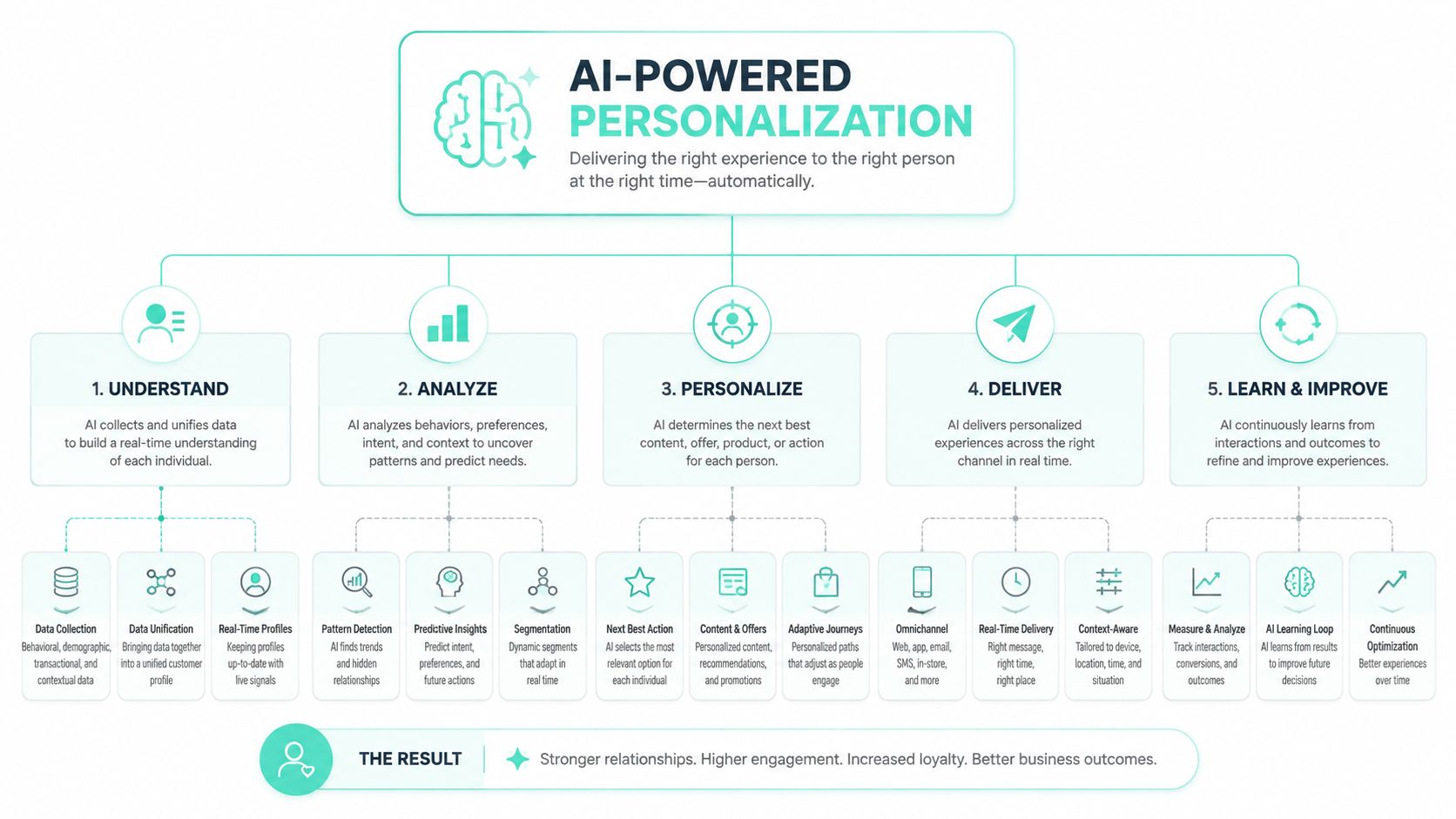
AI powered personalization is a decision system that selects the next suitable content, offer, recommendation, or interaction for a specific visitor in a specific context. It collects signals, evaluates them with a model, applies business and consent constraints, and delivers an approved experience through the CMS or application layer.
That definition matters because personalization isn't the same as placing a customer's first name in a banner. A useful system connects events to identity, identity to features, features to decisioning, and decisioning to delivery.
The enterprise stack
A typical reference architecture has five layers:
- Event capture collects page views, searches, clicks, form progress, product interactions, service events, and authenticated activity. In a Sitecore estate, those events may flow through Sitecore CDP or connected services. In an Adobe estate, Adobe Real-Time CDP can provide the customer data foundation.
- Identity resolution connects anonymous and known activity under permitted rules. It must respect consent status, regional policy, and account boundaries.
- Feature preparation turns raw events into usable signals, such as recent product interest, journey stage, or interaction sequence. A feature store or equivalent profile service keeps those values available to the decision layer.
- Decisioning scores possible experiences. Depending on the use case, teams may use rules, propensity models, contextual bandits, or sequential architectures.
- Delivery and measurement renders the selected variant through a Sitecore or AEM component, then records exposure and outcome.
In a representative airline or banking pattern, Graph API events can feed a decisioning service connected to Sitecore Personalize. The service can return a ranked decision within an agreed latency budget, such as under 80 milliseconds for an in-session experience, before the page renders the selected component variant. That architecture is an implementation pattern, not a guaranteed platform result. The budget must be tested against the estate's network, identity, model, and rendering path.
One-to-one decisioning chooses an experience for an individual session. One-to-many decisioning selects a suitable variant for a cohort. Rule engines still earn a place for regulated disclosures, product eligibility, service recovery, and situations where the organization must explain exactly why a customer saw an outcome.
Teams evaluating the wider category can also use this practical overview of AutoSEO on AI marketing platforms, while enterprise architects may find the AI personalization implementation perspective useful when connecting strategy to delivery.
Sitecore AI, Sitecore Personalize, and AEM Compared
Enterprise teams often describe “Sitecore personalization” as if it were one product. It isn't. The decision surface changes depending on whether the requirement is tightly coupled to CMS components, full-funnel experimentation, or cross-channel Adobe orchestration.
Sitecore AI Automated Personalization is a SaaS capability hosted in Microsoft Azure. Sitecore documents that it uses machine learning to learn from visitors' previous website experiences (Sitecore AI Automated Personalization documentation). That makes it useful for teams that need a fast path from existing content components to automated variant selection.
The operational constraint matters. Sitecore AI Automated Personalization Standard can train up to 20 personalized components. After that limit, additional automated personalization components are selected randomly (Sitecore's component limit documentation). A team that treats that threshold as a footnote can design an experience that looks feasible in a workshop but requires custom orchestration in production.
Sitecore Personalize sits at a broader decisioning layer. Sitecore positions it as a personalization product with a flexible drag-and-drop canvas and a decisioning engine that activates data across customer touchpoints (Sitecore Personalize). It fits teams that need interactive experiences, experimentation, and decisions that extend beyond simple component replacement.
AEM with Adobe Real-Time CDP fits organizations already invested in Adobe analytics, profiles, journey orchestration, and content operations. The advantage is alignment across the Adobe stack. The trade-off is architectural complexity, particularly where teams must coordinate profile governance, activation, experimentation, and AEM component delivery.
| Capability | Sitecore AI (XM Cloud) | Sitecore Personalize | AEM + Adobe RT-CDP |
|---|---|---|---|
| Primary decision surface | CMS component and content variants | Decisioning, experimentation, and interactive experiences | Cross-channel profile, journey, and content orchestration |
| Best fit | Sitecore-native teams seeking close CMS integration | Sitecore estates requiring richer session-aware decisions | Adobe-centered organizations with RT-CDP and AEM |
| Main trade-off | Component scope and the documented 20-component training threshold | Requires deliberate decisioning and data architecture | Broader stack coordination and operating complexity |
| Delivery pattern | Automated CMS personalization | Decision returned through orchestration and experience surfaces | Adobe profile and journey signals activate AEM experiences |
Sitecore-native organizations should usually start with Sitecore Personalize when the business wants full-funnel decisioning, then use Sitecore AI where tightly coupled component automation is appropriate. Adobe shops should keep decisioning close to AEM and Adobe services. Hybrid estates should assign ownership by surface rather than forcing one platform to control every customer interaction. The architectural trade-offs between the two DXP families are also outlined in this AEM and Sitecore comparison.
Extending Personalization Into Microsoft 365 and SharePoint
Employee personalization has a different data shape from customer personalization. The customer side often relies on consented behavioral events, purchase context, and marketing profiles. The employee side relies more heavily on identity, role, group membership, organizational structure, and Microsoft Graph activity.
SharePoint Online is best treated as an extensible experience surface, not as a complete real-time decisioning platform. Microsoft recommends the SharePoint Framework for SharePoint Online customization and extensibility, and states that SharePoint Online has the broadest and most current SPFx support, including published versions and latest betas (Microsoft's SharePoint Framework guidance).
Practical employee patterns
A modern intranet can use SPFx components to surface role-based news, business-unit resources, or region-specific policies. Viva Connections dashboards can present different cards for field employees, office staff, or managers. Teams applications can use Azure AD group membership and Graph signals to tailor navigation and tasks.
The decision process generally looks like this:
- Identity context: Resolve the signed-in employee, role, department, region, and group membership.
- Graph signals: Retrieve permitted organizational or activity data, often using delta queries to avoid repeatedly processing unchanged records.
- Experience rules: Apply audience targeting, business ownership, security trimming, and content metadata.
- SPFx delivery: Render the approved component inside SharePoint or Viva Connections.
SharePoint has clear limits for advanced AI powered personalization. It offers weaker experimentation primitives than dedicated decisioning platforms, and real-time behavior-based decisions often require an external service. Graph query constraints can also force pre-filtering and careful batching. Teams should verify current API behavior and tenant-specific limits rather than embedding undocumented thresholds in the solution design.
| Capability | Customer (Sitecore/AEM) | Employee (M365/SharePoint) |
|---|---|---|
| Primary signals | Consent-based behavior, profile, transaction, session context | Identity, role, group membership, organizational context |
| Decision owner | Marketing, product, and digital teams | IT, workplace experience, and business owners |
| Delivery surface | Web, app, commerce, email, and service journeys | SharePoint, Viva Connections, and Teams |
| Experimentation | Dedicated personalization and testing capabilities | Usually custom or limited |
| Governance focus | Consent, identity, model behavior, regional activation | Security trimming, tenant governance, data access, and retention |
The split between customer and employee personalization is healthy, but duplicate profiles create avoidable risk. Establish a shared identity vocabulary and clear ownership so a person isn't represented differently across a customer portal, partner site, and employee environment. Teams planning an intranet program can review SharePoint intranet development considerations before selecting the SPFx and Graph boundaries.
How the Decisioning Pipeline Works in Practice
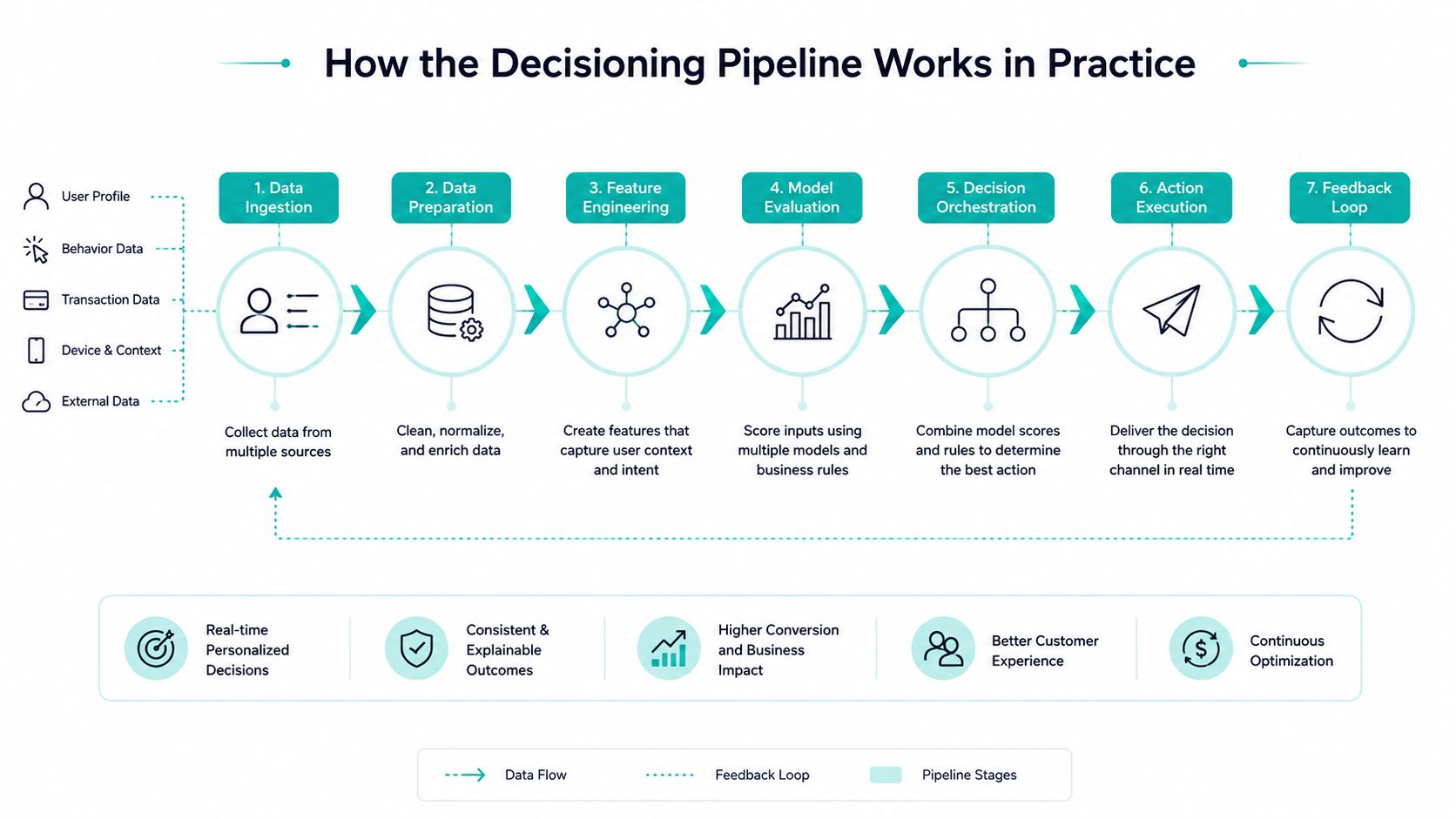
A production pipeline starts with an event, not a model. A visitor searches for a destination, a customer returns to a product page, or an account holder opens a service article. The platform captures that interaction with its timestamp, context, consent state, and permitted identity link.
The engineering sequence is straightforward to describe, but every handoff needs an owner.
From event to experience
- Ingest the event. Sitecore, AEM, applications, service tools, and connected channels publish behavioral events. The schema should identify the action, entity, channel, locale, and consent context.
- Resolve identity. The profile layer determines whether the event belongs to an anonymous session, a known account, or a permitted merged identity. It should also record why the linkage is allowed.
- Hydrate features. Recent actions, frequency, recency, product interest, and journey sequence become model inputs. Static persona attributes can provide context, but they shouldn't replace observed interaction history.
- Call decisioning. Sitecore Personalize can return a decision through its decisioning layer. An Adobe estate can use its profile and activation services to support an AEM experience or connected decision surface.
- Apply constraints. Eligibility, consent, frequency caps, accessibility, legal copy, and inventory rules can override a model recommendation.
- Render the variant. The CMS or application displays the selected component, offer, recommendation, or message.
- Record feedback. Exposure, interaction, conversion, dismissal, and downstream service outcomes return to the learning loop.
The Sitecore AI threshold is an engineering design input, not a minor configuration detail. Automated Personalization Standard can train up to 20 personalized components, so teams must decide whether to reduce the component set, split experiments, or introduce custom orchestration (Sitecore's Automated Personalization usage guidance).
Why sequence matters
Static profiles answer what a customer has been classified as. Sequential models answer what the customer has been doing. Meta reports that its LLaTTE framework, deployed as its largest user model, delivered about a 4.3% conversion uplift on Facebook Feed and Reels with minimal serving overhead, while an upstream user-embedding improvement produced roughly a 0.25% NE reduction on its flagship ads ranker (Meta's LLaTTE research). Those results belong to Meta's environment, but the architectural lesson transfers: user representations that capture evolving interaction sequences can improve ranking beyond static profiles.
The same caution appears in independent LLM personalization benchmarking. PersonaLens found that leading models struggled with complex multi-domain personalization and concluded that interaction history outweighs static user attributes for response adaptation (PersonaLens research).
Set latency and fallback behavior before model deployment. A team might establish an under-80-millisecond in-session target and use a deterministic fallback when confidence falls below 0.6, but those are operating parameters to validate for the specific estate, not universal guarantees. Monitor decision latency, confidence distribution, exposure balance, conversion, consent state, and drift. If the model changes its behavior before business KPIs move, the monitoring system should show that early.
Business Impact and KPIs That Justify the Investment
The business case becomes credible when an enterprise separates adoption, commercial impact, and operational execution. A platform may show widespread use while a specific Sitecore or AEM estate still lacks reliable events, usable content variants, or measurement that attributes outcomes correctly.
As noted earlier, adoption is not the same as readiness. Many organizations use AI-driven personalization, yet teams still report difficulty with accurate personalization data and poor data quality. For a CIO, that combination signals a delivery risk: purchasing decisioning capability without fixing event collection, profile resolution, and content governance can produce an expensive demonstration rather than a dependable growth system.
Industry reporting also cites a McKinsey-based finding that companies using personalization can generate 40% more revenue than companies without it (industry reporting on AI powered personalization). Treat that figure as a directional business case, not a promise for every Sitecore or AEM implementation. Revenue attribution depends on product economics, channel mix, baseline experience quality, offer constraints, and test design.
Measure the system at four levels
A useful KPI model follows the customer from response to business outcome, then checks whether the operating model can sustain the work:
- Engagement: Measure qualified content interaction, search refinement, recommendation engagement, and progression to the next meaningful step.
- Conversion: Track completed bookings, applications, purchases, qualified leads, and other outcomes tied to an exposed decision.
- Retention: Monitor repeat journeys, service recovery, renewal behavior, and reactivation. Do not treat impressions as loyalty.
- Efficiency: Measure variant reuse, editorial effort, approval time, and the time required to launch a governed experiment.
| KPI Tier | Metric Example | Defensible Target | Source System |
|---|---|---|---|
| Engagement | Qualified interaction with a personalized component | Set against the current control baseline | Sitecore or AEM analytics |
| Conversion | Qualified lead or completed transaction | Pre-register a lift threshold before launch | CRM, commerce, or booking platform |
| Retention | Repeat journey or renewal progression | Compare exposed and control cohorts | CDP, CRM, and account systems |
| Operational efficiency | Production effort per approved variant | Establish a baseline before automation | CMS workflow and delivery reporting |
Targets such as a 15% lift in qualified lead conversion, a 20% reduction in content production cost per variant, or a 25% drop in time-to-publish can guide planning, but the platform data here does not verify them. Register each target before launch, document the measurement method, and let the control group determine whether the investment produced a meaningful result.
The practical build constraint matters too. If a team has a 20-component limit in its decisioning or experience design, it should prioritize the components tied to measurable journeys rather than create dozens of lightly used variants. Sitecore and AEM teams should connect each decision to an identifiable event, content variant, consent state, and downstream outcome. SharePoint extensions need the same discipline when personalization reaches employee or partner experiences.
The strongest CFO narrative connects a decision to an outcome and an operating cost. “We displayed more personalized banners” is weak. “We can identify which consented interaction sequence preceded a qualified conversion, compare it with a control, and calculate the cost of producing and governing the experience” is defensible.
Privacy, Consent, and the Regional Trust Gap
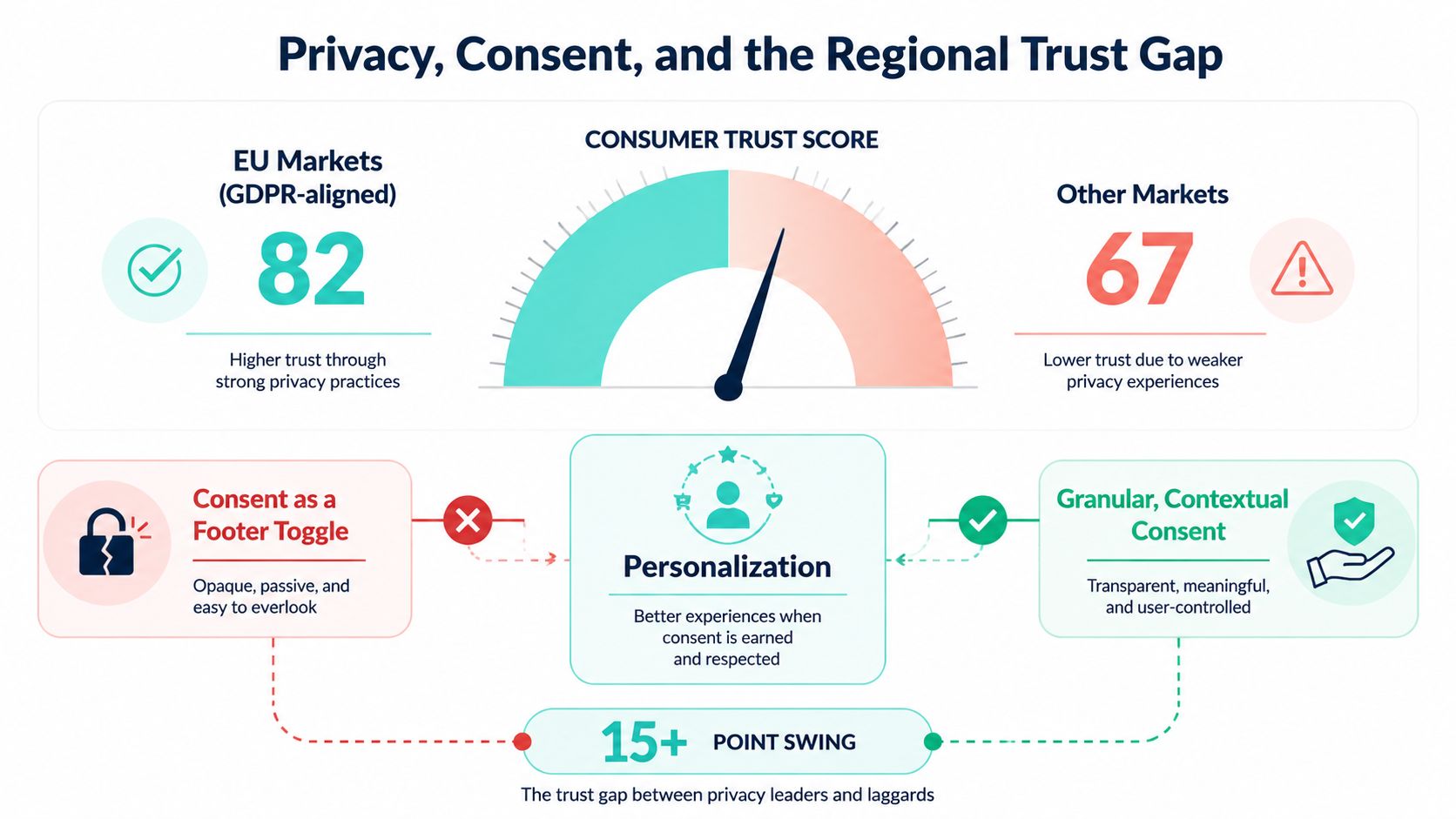
Consent isn't a footer toggle. It determines which signals a decision engine may use, which profile links are legal, how long events remain available, and whether a customer understands why an experience changed.
Qualtrics' 2025 data snapshot reports that 53% of consumers are extremely or very concerned about privacy, while only 33% trust companies to use personal information responsibly. Trust is lowest in EMEA in that source, where 28% report trusting companies with personal data. Consumers are most comfortable with purchase history at 45% and website visits at 42%, while only 17% are comfortable with location data (Qualtrics XM Institute privacy and personalization data).
That evidence changes the design question. Don't ask only, “Can the model improve relevance?” Ask, “Would this customer expect the brand to use this signal in this context?”
Use consent tiers
A practical model gives each tier a clear data boundary:
- Essential: Deliver the requested service, security, accessibility, language, and legally required information. Don't use optional behavioral data for marketing decisions.
- Functional: Use session context and permitted preferences to improve navigation, support, and continuity within the service.
- Predictive: Activate behavioral history for recommendations or propensity decisions after explicit permission and documented retention rules.
- Cross-channel: Connect web, app, email, service, and partner signals only where identity linkage and regional permissions support it.
In Sitecore or AEM, consent enforcement should happen before the component requests a decision, not after a model has already received the data. The same principle applies to SharePoint. Audience targeting must not pull Graph signals into a personalization workflow without the appropriate privacy agreement, access controls, and documented purpose.
A CISO will expect more than a consent banner. Maintain a consent register, model card, data protection impact assessment, retention schedule, regional rollout matrix, and incident procedure. Teams building that foundation can use this user privacy protection guide as supplementary reading, alongside a formal consent management platform assessment.
Governance test: If an analyst can't explain which signal triggered a decision, whether the customer permitted it, and when that signal expires, the experience isn't ready for production.
A 90 Day Enterprise Roadmap to Production Personalization
A production program should start with a narrow journey and a measurable decision, not an enterprise-wide promise of one-to-one experiences. The roadmap below creates evidence early while preserving the governance work that prevents later rework.
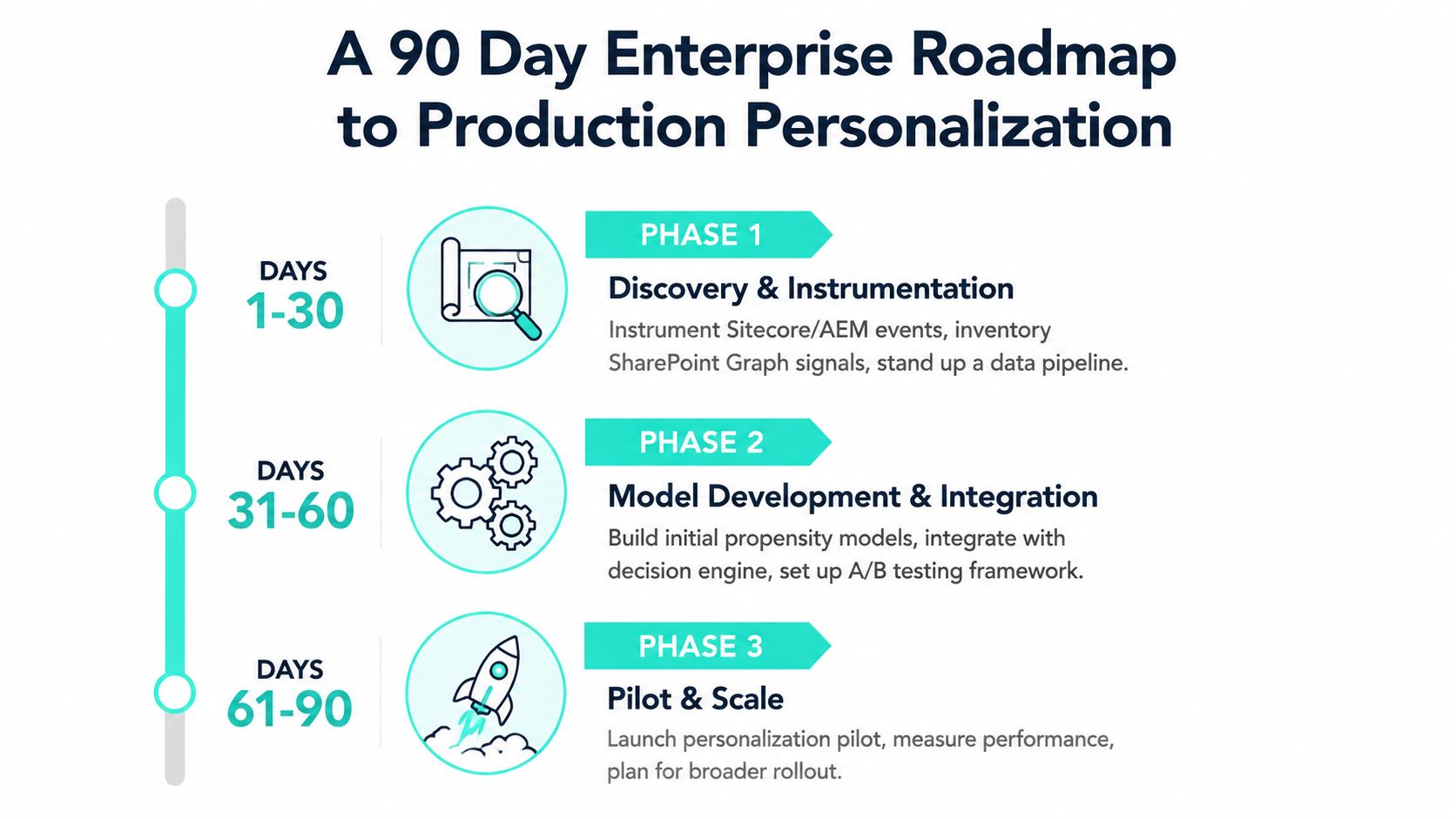
Days 1 to 30, discovery and instrumentation
Start with the current Sitecore or AEM event model. Identify the pages, components, applications, and service interactions that can produce useful signals. Inventory SharePoint and Microsoft Graph data separately, because employee identity and access rules don't map automatically to customer CDP profiles.
Stand up the data pipeline or warehouse connection, then run a 5-day jobs-to-be-done sprint with marketing, product, analytics, privacy, content, and engineering. The output should be a prioritized journey backlog, event dictionary, identity rules, consent baseline, and control-group design.
The first checkpoint is data usability. If the team can't identify the event, identity condition, permitted signal, decision surface, and outcome for a proposed use case, don't move it into model development.
Days 31 to 60, pilot build
Choose a small set of experiences with clear business ownership. The roadmap can include two Sitecore Personalize experiments and one AEM Target activity, all behind feature flags. Use approved content variants, define fallback behavior, and connect exposure logs to the actual conversion system.
A sequential decisioning approach can model the path a visitor took rather than treating the last page view as the entire intent signal. Pre-register the lift threshold and measurement window before launch. Statistical significance can inform interpretation, but it shouldn't substitute for a business threshold that the finance and product teams understand.
Days 61 to 90, scale and govern
Promote variants only after reviewing conversion, latency, consent, accessibility, and operational effort. Extend the winning pattern to SharePoint through SPFx where the employee use case is clear, but keep customer and employee decision policies distinct.
Create a Model Review Board with monthly drift reports and named owners. The incident playbook should define what happens when consent coverage, latency, fairness, or content validity regresses. Production readiness requires more than a positive test result.
Exit criteria should include:
- Documented lift: The team has a measured result against a control.
- Signed DPIA: Privacy and legal owners approve the use case and data flows.
- On-call rotation: Someone owns failures outside office hours.
- Six-month scale plan: The organization knows which journeys, markets, and components come next.
Kogifi works across Sitecore, Adobe Experience Manager, and Microsoft 365, including Sitecore Personalize and CDP implementation, AEM delivery, and SharePoint Online solutions using SPFx and Power Platform. Visit Kogifi to discuss a personalization architecture grounded in your existing DXP, identity model, consent obligations, and measurable enterprise journeys.