


A successful website migration SEO strategy doesn't start on launch day. It begins long before you move a single piece of content, grounded in a meticulous pre-migration blueprint. Think of this initial phase as your insurance policy—it’s what safeguards years of accumulated search authority and sets the stage for future growth, especially when you're moving to a sophisticated DXP like Sitecore.
Building Your Pre-Migration SEO Blueprint
A CMS migration is a defining moment for your digital presence. Moving to a platform like Sitecore isn't just a technical refresh; it's a strategic opportunity to solidify your existing SEO equity and construct a more powerful foundation for what comes next. Skipping this initial audit is like building a skyscraper without surveying the land first. The risks are just too high.
The very first move is to create a complete inventory of every digital asset you own. This goes far beyond a simple list of pages. Firing up a crawler like Screaming Frog is essential here—you need to capture every single URL, title tag, meta description, H1 heading, and image alt text. This comprehensive data-gathering process becomes the bedrock of your entire migration plan.
Cataloging Your Digital Assets
Think of this as a digital census of your entire website. For a complex Sitecore implementation, this inventory allows you to map existing content components to new, more dynamic renderings. In a SharePoint environment, it helps you pinpoint the critical documents and pages driving both internal and external search traffic.
Your catalog should detail:
- All Live URLs: Every single indexable page, including any subdomains and international versions.
- On-Page SEO Elements: The title tags, meta descriptions, header tags (H1, H2, etc.), and canonical tags tied to each URL.
- Content Performance: Pull metrics from your analytics platform, like page views, time on page, and bounce rate.
- Backlink Profiles: Identify which pages have the most valuable external links pointing to them. These are your SEO powerhouses.
This process is more than just data collection; it’s about strategic evaluation. You’re not just moving content. You’re deciding what’s worth keeping, what needs a serious overhaul, and what can finally be retired.
Benchmarking Current SEO Performance
With your inventory complete, the next critical task is to benchmark your current SEO performance. This snapshot is your baseline. It's the only way you'll be able to accurately measure the success of the migration after launch. Without it, you’re flying blind.
Capturing a detailed performance baseline is non-negotiable. It’s the only way to objectively prove ROI and quickly spot post-launch issues before they escalate into significant traffic loss.
You need to document key performance indicators (KPIs) that truly reflect your site's health. This includes organic traffic levels, keyword rankings for your most valuable terms, and conversion rates coming from organic search. At the same time, capture technical metrics like Core Web Vitals (LCP, INP, CLS) and the current crawl error rates from Google Search Console.
The table below breaks down the essential data points you'll want to collect and benchmark before you get started.
Pre-Migration SEO Audit Checklist
Having this data on hand is crucial. It’s your before-and-after picture that demonstrates the value of the project and helps you react quickly if things go wrong.
Migrations to superior platforms like Sitecore often deliver measurable SEO gains. For instance, Core Web Vitals improvements alone can drive significant ranking boosts. In many Sitecore implementations, we've seen LCP reductions of 40-60%, which can correlate to a 15-20% uplift in organic CTRs. This is why thorough SEO audits are integral to successful migrations, helping to avoid the traffic loss common in poorly planned projects.
This blueprint isn't just a checklist. It’s a strategic document that aligns your technical team and marketing stakeholders, ensuring everyone understands what’s at stake and the critical role they play in preserving your brand's visibility.
Building a Bulletproof Redirect and Content Map
This is the make-or-break moment for any CMS migration SEO strategy. Get this part wrong, and you can watch years of hard-won search visibility vanish almost overnight. A flawed redirect and content map isn't just a minor hiccup; it's a catastrophic failure that can tank your rankings. Building a truly bulletproof map is a meticulous, page-by-page process that acts as the literal blueprint for transferring your site's SEO equity into a new system like Sitecore or SharePoint.
The cornerstone of this entire phase is the URL mapping document. Think of it as your single source of truth—a simple spreadsheet listing every single URL from your pre-migration audit in one column, with its new counterpart in the next. This isn't just busy work. For a move to Sitecore, for instance, this is absolutely critical. The platform’s item-based architecture often cleans up old, clunky URLs. A legacy URL like /products/item.aspx?id=123 can finally become a clean, user-friendly /products/enterprise-widget-pro. Every single one of those changes needs a one-to-one 301 redirect to pass authority correctly.
This mapping process is what ensures your entire SEO blueprint—from the initial audit to the final strategic plan—gets executed without a hitch.
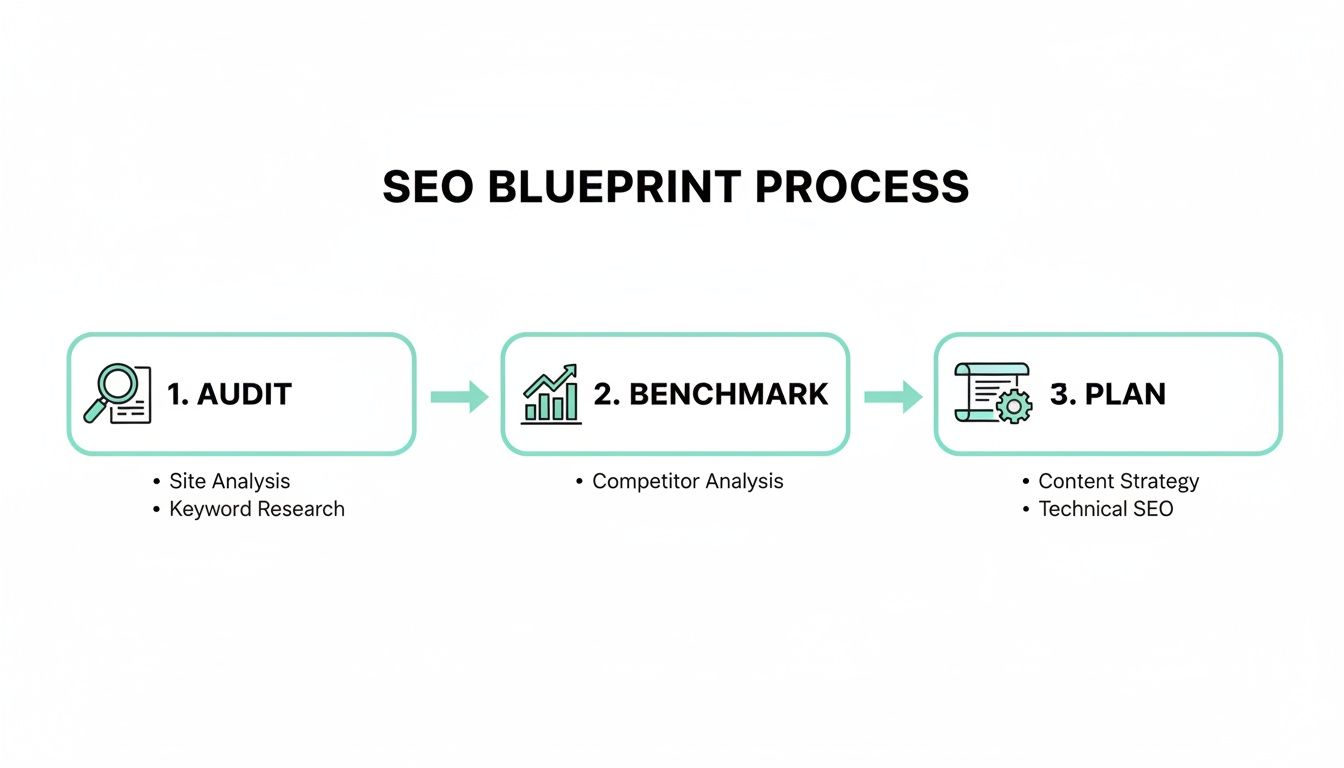
When you visualize the workflow, you can see how each step builds on the last, all leading up to a precise execution strategy.
Mapping On-Page SEO Elements in Sitecore and SharePoint
Mapping goes way beyond just URLs. You have to account for every critical on-page SEO element. In a Sitecore DXP, content is often broken down into specific data templates and components. Your content map must pinpoint exactly where each legacy on-page element will live in the new system.
- Title Tags: The old
<title>tag content needs to be mapped directly to the designated "Page Title" field in the new Sitecore data template. - Meta Descriptions: Make sure the current meta description finds its new home in the corresponding "Meta Description" field.
- H1 Headings: The primary H1 from each old page must be mapped to the main heading component on the new page. No exceptions.
- Image Alt Text: All meaningful alt text must be preserved and mapped to the "alt" field of Sitecore's media library items.
The same logic applies in a SharePoint environment, especially for document libraries and communication sites. You have to ensure that the "Title" field in a SharePoint list—which often generates the on-page title—is correctly populated with your legacy title tag content. It’s these "small details" that, when missed, slowly erode your content's authority after the switch.
A crucial part of executing a bulletproof content map is ensuring the integrity of your transferred data. We've seen projects stumble here, which is why incorporating robust data migration best practices is non-negotiable to prevent common SEO-killing failures.
Navigating Complex Redirect Scenarios
Simple one-to-one redirects are the easy part. But migrations almost always throw a few curveballs that demand a more nuanced approach.
Consolidating content is a classic example. Let's say you have three separate, older pages covering a specific service. In the new Sitecore site, they’ll all be merged into one comprehensive landing page. The solution? All three old URLs must 301 redirect to that single new page.
Another common scenario involves folding in content from subdomains. If blog.example.com is being absorbed into www.example.com/blog, every single blog post URL needs a redirect that accounts for changes to both the subdomain and the directory structure. These are the kinds of details that are easy to miss but devastating if you do. Our detailed website migration checklist offers a structured way to keep track of these moving parts.
Finally, remember that your redirect map is a living document, not a "set it and forget it" file. As the new site is built out on a staging server, you have to constantly validate that the new URLs in your map are correct and that content is being migrated to the right fields. This diligence is what prevents the last-minute chaos and catastrophic errors that plague so many migration projects. This map is the guide that keeps developers, content editors, and SEOs all on the same page, ensuring a smooth and successful transition.
Navigating Technical SEO in a New Environment
Switching your CMS is a lot like moving house. The foundation, the plumbing, the wiring—it's all different, even if the rooms you're putting your furniture in look the same. This is where your CMS migration SEO strategy gets put to the ultimate test. If you don't get a handle on the technical guts of the new platform, you risk letting all your search visibility quietly drain away post-launch.
Technical SEO isn’t just some box you check off. It's the collection of signals that tells search engines your shiny new site is legit, trustworthy, and ready for their crawlers.

This is where a meticulous approach pays off, big time. We’ve seen firsthand how solid planning can preserve over 95% of existing rankings while setting the stage for future growth.
For instance, in a recent enterprise migration from a legacy system to Sitecore, a rigorous SEO-led approach was key. By painstakingly mapping every 301 redirect and leveraging Sitecore's performance optimizations, the client not only preserved their rankings but saw a 17% jump in organic sessions within six months. This is the power of a technically sound migration.
Mastering Crawler Directives and Indexation
Your robots.txt file and canonical tags are essentially the traffic cops for search engine bots. When you move to a new platform, they need a whole new set of instructions. A single misplaced "Disallow" rule could inadvertently make your entire site invisible to Google. It happens more often than you'd think.
First up, your new robots.txt file must block crawlers from hitting any staging or development environments. This is non-negotiable. In a Sitecore setup, for instance, you need to be certain the robots.txt on your CD (Content Delivery) server is correct, while the CM (Content Management) server stays private.
Next, generate a fresh, dynamic XML sitemap. Don't just export and upload a static file. Platforms like Sitecore have modules that can generate this for you automatically, ensuring it’s always a perfect reflection of your live, published content. On platforms like SharePoint, this might require a custom solution or a third-party web part to get a clean, comprehensive sitemap.
Pro Tip: Never, ever just copy and paste your old
robots.txtfile. The directory structure of your new CMS will be different. A rule that blocked a harmless folder on your old site might just block your entire product catalog on the new one.
Preserving International SEO with Hreflang
If you're a global business, migrating your hreflang tags is a high-stakes game. These little tags tell Google which language and regional version of a page to serve to users around the world. Get them wrong, and you can kiss your international traffic goodbye.
In a platform like Sitecore, which has fantastic multi-language support built-in, hreflang tags are usually managed right at the template or component level. The migration process boils down to mapping your old hreflang setup to Sitecore’s native language versioning system.
Here's what your validation checklist should include:
- Verify Language Versions: Make sure every single page has its corresponding language versions created properly in the new CMS's content tree.
- Check Tag Implementation: Confirm the new components are rendering the correct
rel="alternate" hreflang="lang-code"links inside the<head>of every single international page. - Validate Self-Referencing Tags: Each language version needs a self-referencing hreflang tag pointing back to itself. This is a common and costly mistake.
If these concepts are new to you, our guide on how to implement search engine optimization fundamentals is a great place to start.
Migrating Structured Data for SERP Dominance
Structured data, or Schema markup, is the magic behind the rich snippets you see in search results—things like star ratings, FAQs, and product info. If you lose that data during a migration, you lose prime real estate on the SERP and hand a major advantage to your competitors.
The great thing about a modern DXP like Sitecore is its component-based architecture, which makes implementing JSON-LD structured data so much cleaner. Instead of hardcoding Schema into page templates, you can build it directly into reusable components. For example, a "Product Details" component can have fields for price, availability, and rating, which then dynamically generate the perfect JSON-LD markup on the fly.
When you're moving from an older system like SharePoint, where structured data was likely added manually or with clunky plugins, the goal is to map those old data points to these new, structured component fields. This not only saves your existing rich snippets but makes managing and expanding your Schema markup way more scalable for the future.
Managing a Seamless Go-Live and Post-Launch Audit
The real test of your entire migration strategy isn’t in the planning—it's all about the execution. Launch day is just the beginning. It’s the hours and days that follow where you either lock in your success or face the kind of visibility drops that keep marketers up at night. This is especially true when deploying a complex platform like Sitecore, where multiple environments and publishing targets can quickly complicate things.
Before you even think about pushing that big red button, your staging environment needs to become your battleground. This isn't a quick spot-check; it's a full dress rehearsal. You have to validate every single critical SEO element in a firewalled environment that mirrors the live site as closely as humanly possible.
The Staging Environment QA Checklist
If you're on a Sitecore project, this means publishing everything to a dedicated QA or staging Content Delivery (CD) server. Critically, this server must be password-protected or IP-restricted. The last thing you want is Google accidentally indexing your test environment. Once it's up, your job is to crawl it mercilessly with a tool like Screaming Frog.
Here’s what your pre-launch QA has to nail down:
- Redirect Validation: Don't just trust the map. Test a healthy sample of your 301 redirects. Do they land on the correct final URL with a 301 status code? Are there any nasty redirect chains lurking?
- Canonical Tag Accuracy: Check that every page has a correct, self-referencing canonical tag. This is absolutely vital in multi-language Sitecore setups to prevent a duplicate content nightmare.
- Analytics and Tagging: Is Google Tag Manager (or your analytics script of choice) firing correctly on all page templates? Hunt down any hardcoded tags that might have been forgotten.
- Internal Link Integrity: Run a full crawl to find any broken internal links pointing to old URLs or spitting out 404 errors. This is a classic mistake, especially when content components are shifted around.
Think of this pre-launch audit as your last line of defense. Catching a mistake here is a calm fix; finding it on the live site is a high-stress, high-stakes emergency. A thorough approach, much like you'd find in a complete website audit checklist, ensures no stone is left unturned.
Post-Launch Monitoring Protocol
Okay, you’ve done your checks and the site is live. The clock is now ticking. Your actions in the first 24-48 hours are what separates a smooth transition from a painful recovery. The immediate goal is to get Google to see the changes fast and to spot any fires before they turn into infernos.
Your first port of call is Google Search Console. Submit your new XML sitemap right away to give Google a roadmap to your new structure. Next, use the URL Inspection tool on your most important pages—your homepage, key service pages, and top-performing content—and manually request indexing.
A successful launch isn't the end of the project; it's the start of the monitoring phase. Vigilance in the first 72 hours can mean the difference between a minor hiccup and a major SEO disaster.
While you're prompting Google, you also need to be on high alert for negative signals. Keep the "Coverage" report in Google Search Console open on a monitor. A sudden spike in 404s or server errors (5xx) is a massive red flag. It means your redirect map probably has holes or the new server is buckling under the pressure.
Finally, keep your rank tracking and analytics platforms open. Watch for sharp, negative dips in keyword rankings and organic traffic. A little bit of turbulence is normal as Google digests the changes, but a steep, sustained drop is a sign of an urgent problem. This proactive monitoring is your insurance policy, allowing you to react instantly and protect the brand’s hard-won digital presence during this fragile period.
Turn a Defensive Play into an Offensive Win with Sitecore and SharePoint
A CMS migration is often seen as a defensive game—you're just trying to protect your current rankings. But that mindset misses the whole point. This is your chance to flip the script and go on the offensive, using the move to a new platform as a launchpad for serious organic growth. This is where the advanced features baked into platforms like Sitecore and SharePoint come in. They can turn a purely technical project into a powerful engine for building authority.
Instead of just doing a copy-paste of your old content, you now have the tools to build smarter, more dynamic experiences that search engines and users love.

Driving SEO Gains with Sitecore Personalize
For anyone moving to Sitecore, the real magic is in its composable DXP ecosystem, and Sitecore Personalize is a perfect example. Most people think of it as a conversion rate optimization (CRO) tool, but its impact on SEO is massive. By using its AI to serve up tailored content, you can seriously improve the user engagement signals that Google pays close attention to.
Think about it this way:
- Sky-high Dwell Time: When content shifts and adapts based on what a user is doing, they stick around longer. That tells Google your page is a great answer to their query.
- Lower Bounce Rates: Personalized content hits the user's intent right on the head, which means they're far less likely to bounce back to the search results.
- Smarter User Journeys: You can guide visitors to other relevant, high-value content, bumping up your pages-per-session and getting them more invested in your brand.
This isn't just about mapping old content to new pages. It’s about creating a living website where user behavior directly shapes the experience, which in turn strengthens your entire SEO foundation.
Uncovering Hidden Gems with Sitecore Analytics
Beyond personalization, Sitecore's built-in analytics are a goldmine for finding content gaps and fresh opportunities after you've migrated. Dig into the on-site search data and click paths—you'll quickly see what topics your audience is desperate for but can't find. This is direct feedback from your users, and it’s invaluable for building a content strategy that goes after new long-tail keyword traffic.
The real ROI of a migration comes from finally being able to do what was impossible on your old platform. You're shifting from a static digital brochure to an intelligent marketing machine.
We've seen businesses migrate to Sitecore and achieve explosive growth. One client dropped their load times to under a second thanks to the platform’s clean code and optimized delivery. In turn, their organic traffic shot up significantly, leading to a major climb in organic conversion rates. This isn't a fluke; a well-planned migration to a modern DXP often unlocks performance gains that directly translate to better SEO. You can learn more about how modern CMS platforms influence performance rankings.
Optimizing SharePoint for Enterprise Search
For organizations on SharePoint, the game is a bit different. The focus often leans toward internal search and discoverability, but this is a huge, often-overlooked component of enterprise SEO. A great migration shouldn't just make things easier for employees; it should also help search engines find and index critical public-facing documents.
Optimizing SharePoint really comes down to structuring your sites, libraries, and metadata in a way that just makes sense. By creating a logical information architecture and enforcing consistent tagging, you make everything more discoverable. This doesn't just boost internal efficiency—it also helps valuable assets like whitepapers and technical guides get indexed, capturing highly specific, high-intent traffic. The end goal is to transform your SharePoint environment from a messy file server into a well-organized, searchable knowledge hub.
Got Questions About Your CMS Migration & SEO?
Even with the best playbook in hand, a project as big as a CMS migration is going to stir up questions. It's only natural. Leaders and marketing teams need straight answers to move forward with confidence. Let's tackle the most common questions we hear, especially when dealing with enterprise platforms like Sitecore or SharePoint.
How Long Does It Really Take for SEO Traffic to Recover?
It’s the million-dollar question, isn't it? While a small, temporary dip in traffic is normal, a well-executed migration should see your key metrics level out and start bouncing back within 2 to 4 weeks. Honestly, with a truly flawless strategy, you might not see a significant dip at all.
Full recovery, where you’re back to pre-migration levels and starting to see growth from the new platform, usually takes about 3 to 6 months. This is the timeframe where search engines have had a chance to fully recrawl and re-index your new site structure, process all the redirects, and start rewarding you for the performance and UX improvements.
But that timeline isn't set in stone. A few things can speed it up or slow it down:
- Sheer Size and Complexity: A site with tens of thousands of URLs is just going to take longer for Google to process than a smaller one. It's a matter of scale.
- Redirect Map Quality: This is the big one. A clean, one-to-one redirect map is probably the single most critical factor for a speedy recovery.
- Technical Health of the New Site: How fast and crawlable is the new platform? A zippy, clean Sitecore build will get back in Google's good graces much faster than a clunky, poorly configured site.
Staying on top of your analytics and immediately squashing any crawl errors that pop up post-launch is the best way to keep that recovery timeline as short as possible.
What Is the Single Biggest SEO Mistake We Need to Avoid?
If you remember one thing, make it this: the most catastrophic mistake you can make is messing up your URL redirect map.
Failing to implement 301 redirects for every valuable old page to its new equivalent is like telling Google that all your best content, along with all the authority it's built up over the years, has just vanished into thin air.
This one error can wipe out years of link equity and rankings, leading to a flood of 404 errors and a devastating drop in organic traffic. A close second is accidentally leaving a Disallow: / in your live robots.txt file, which is like putting a "do not enter" sign on your entire website for search engines. Both are 100% avoidable with a meticulous pre-launch checklist.
In our experience, over 90% of severe, lasting traffic loss after a migration can be traced directly back to a botched redirect strategy. It's the one place where you absolutely cannot afford to cut corners.
Will Moving to Sitecore Automatically Fix Our SEO?
Moving to a powerful platform like Sitecore creates the opportunity for massive SEO improvements, but it's not a magic bullet. The platform itself doesn't automatically improve anything; the magic happens when you use its advanced features correctly.
Sitecore offers incredible speed, tighter security, and much better tools for things like structured data, personalization, and content governance—all of which can send powerful positive signals to search engines.
But the migration itself has to be handled with SEO at its core. If you don't have the right redirect strategy, content mapping, and technical setup, moving to even the best DXP in the world can do more harm than good. Think of the platform as a high-performance car; you still need a skilled driver with a good map to get you where you want to go.
How Do We Make Sure We Don't Lose Our Backlinks?
Preserving your hard-earned backlink equity is all about that 301 redirect strategy. Backlinks point to specific URLs. When you migrate, those URLs change. A proper 301 redirect acts as a change of address notice for search engines, passing the vast majority (around 90-99%) of the "link juice" or authority from the old URL to the new one.
This is why a thorough backlink audit before you migrate is so crucial. You need to identify your most authoritative pages—the ones with the best backlinks pointing to them—and treat their redirects like gold.
For a Sitecore migration, this means painstakingly mapping every high-value legacy URL to its new, SEO-friendly home in the Sitecore content tree. This simple (but tedious) step ensures all that authority you've built over the years is transferred directly to your new site, protecting your domain's strength from day one.
Navigating a CMS migration requires deep technical expertise and a strategic SEO vision. At Kogifi, we specialize in complex migrations for enterprise platforms like Sitecore and SharePoint, ensuring your digital assets are protected and positioned for growth. Discover how our proven process can make your next migration a resounding success by visiting us at https://www.kogifi.com.